AI Agents: What They Are, How They Work, and Why Web Context Is the Missing Piece
 Bex Tuychiev
TL;DR
- AI agents are software systems that pursue goals by reasoning over context, selecting tools, acting, and self-correcting without a human managing each step.
- Most agent failures trace back to what the agent can't see, not what the model can't reason about. The data layer, especially web data, is the most underinvested part of the stack.
- The web is the most comprehensive real-time data source, but feeding it to agents reliably requires scrapers that handle HTML-to-Markdown conversion, extraction, and rate limiting.
- Firecrawl handles agentic web access as a managed API, MCP, and CLI so you can focus on agent logic instead of data infrastructure.
AI agents have moved from research demos to production infrastructure in roughly 36 months. LangChain's 2025 State of Agent Engineering survey found that 57.3% of developers already have agents running in production. Gartner projects that 40% of enterprise apps will feature task-specific agents by end of 2026, up from under 5% in 2025. That is not a gradual adoption curve. Agents are no longer experimental, and if you are building AI products, understanding how they work is no longer optional.
The questions everyone asks (what agents are, which framework to pick, which LLM to use) get covered on every tech blog.
The question that gets far less attention: where does an agent's context actually come from? An agent is only as good as the information it can read. The web is the biggest, freshest source of that information and also the hardest part of the stack to get right.
By the end of this article, you will understand how agents are defined and built, the four agent types that dominate production, why web context is the architectural bottleneck most teams underinvest in, and what a practical, production-ready agent stack looks like from framework to data layer to reliability guardrails.
What is an AI agent?
An AI agent is a system that uses an LLM to pursue a goal by picking tools, observing results, and adapting its plan until the task is done or a boundary is hit. The industry broadly agrees on this framing (OpenAI, Anthropic), with the distinction being that agents direct their own process rather than following predefined steps.
The distinction from "just an LLM with tools" matters. A single LLM call with a tool attached answers one prompt. An agent pursues a goal across an extended sequence of steps, decides which tools to use and when to stop, and adjusts course based on what it observes along the way.
Three components separate an agent from a smarter chatbot:
- planning (decomposing a goal into steps),
- memory (retaining context across steps), and
- tool use (connecting to external systems like databases, APIs, or the web).
Without all three, you have a more capable chatbot, not an agent.
The concept of self-directed software agents predates LLMs by decades, but what changed between 2022 and 2024 was that chain-of-thought prompting, ReAct, and function calling made goal-directed tool use practical. MCP and Google's A2A protocol then standardized how agents connect to external systems, though CLI tools remain a strong alternative for many use cases.
What do people use AI agents for in 2026?
LangChain's survey puts research tasks and summarizing at 58% for individual use. That is the most common agent task by a wide margin, and it points directly to web access. Practitioners are asking agents to find, read, and synthesize information from live sources.
Improving personal productivity comes in at 53.5% and customer service at 45.8%.
At the organizational level, PwC (PricewaterhouseCoopers) data shows customer service and support (57%), sales and marketing (54%), and IT/cybersecurity (53%) as the three dominant business functions deploying agents.
Healthcare, legal, finance, and DevOps are all seeing early-stage deployments, but each deserves its own treatment. For hands-on examples across these categories, see how to build across these use cases.
But agents are not just for bigger, complex enterprise tasks. This is also the era of the personal agent. People are building agents to manage their calendars, triage email, automate content production, conduct deep research, and handle tasks that would have taken hours of manual work. The viral growth of tools like OpenClaw in 2026 is a direct signal of how fast this space is expanding beyond developer circles and into everyday use.
AI agents vs. chatbots vs. copilots vs. workflows
That picture of real-world use sharpens the definitional question: most practitioners label anything involving LLMs as "agents," yet the category runs from simple chatbots to self-directed pipelines with no human in the loop. The comparison section below draws the line.
The clearest way to separate these categories is autonomy: who controls what happens next?
- A chatbot follows a script. It responds to queries but cannot take actions or call tools.
- A copilot offers suggestions that a human then acts on. The human stays in control.
- A workflow executes predefined code paths with an LLM as one component. The steps are fixed in advance.
- An agent decides what to do next based on what it observes. It picks its own tools, adjusts its plan, and self-corrects.
Anthropic draws the line precisely: workflows are "orchestrated through predefined code paths." Agents "dynamically direct their own processes and tool usage."
| Type | Who controls the flow | Behavior | Web context use | Example |
|---|---|---|---|---|
| Chatbot | Predefined script | Responds to queries, no tool execution | None | Rule-based support bot |
| Copilot | Human | Suggests, human decides and acts | Occasionally (search) | GitHub Copilot inline suggestions |
| Workflow | Predefined code | Executes fixed steps, LLM is one node | When scripted in | Zapier automation with an LLM step |
| Agent | LLM | Pursues a goal, selects tools, self-corrects | On demand, iteratively | OpenAI Deep Research, Claude Code |
Gartner estimates that out of thousands of companies marketing "agentic AI" products, only about 130 qualify as genuine agent platforms. The rest are relabeled chatbots or scripted automations. A practical test: if the system cannot decide mid-task to call a different tool than originally planned, it is not an agent. That distinction matters when you are evaluating vendors.
So, agents are the right tool in three situations:
- Complex decision-making that requires nuanced judgment or context-sensitive exceptions
- Tasks with unwieldy rulesets where static automation would be brittle
- Workflows that depend on unstructured data like documents, web pages, or emails
If a deterministic solution works, use it.
How do AI agents work?
The ReAct loop: reason, act, observe
The standard framework for how agents operate is ReAct (2022). It interleaves three steps in a loop: Thought (an internal reasoning trace, like "I should search for the latest pricing data"), Act (a discrete tool call based on the thought), and Observe (the result returned from that call).
Before ReAct, reasoning-only approaches like chain-of-thought relied entirely on training-time knowledge and hallucinated when that knowledge was stale. Action-only approaches could execute steps but couldn't combine or reason across the results. ReAct grounds reasoning in retrieved data and produces interpretable traces of why the agent did what it did.
According to the original ReAct paper, it achieved a 34% improvement over action-only baselines on ALFWorld (a simulated household task environment) and a 10% improvement on WebShop (a simulated online shopping benchmark).
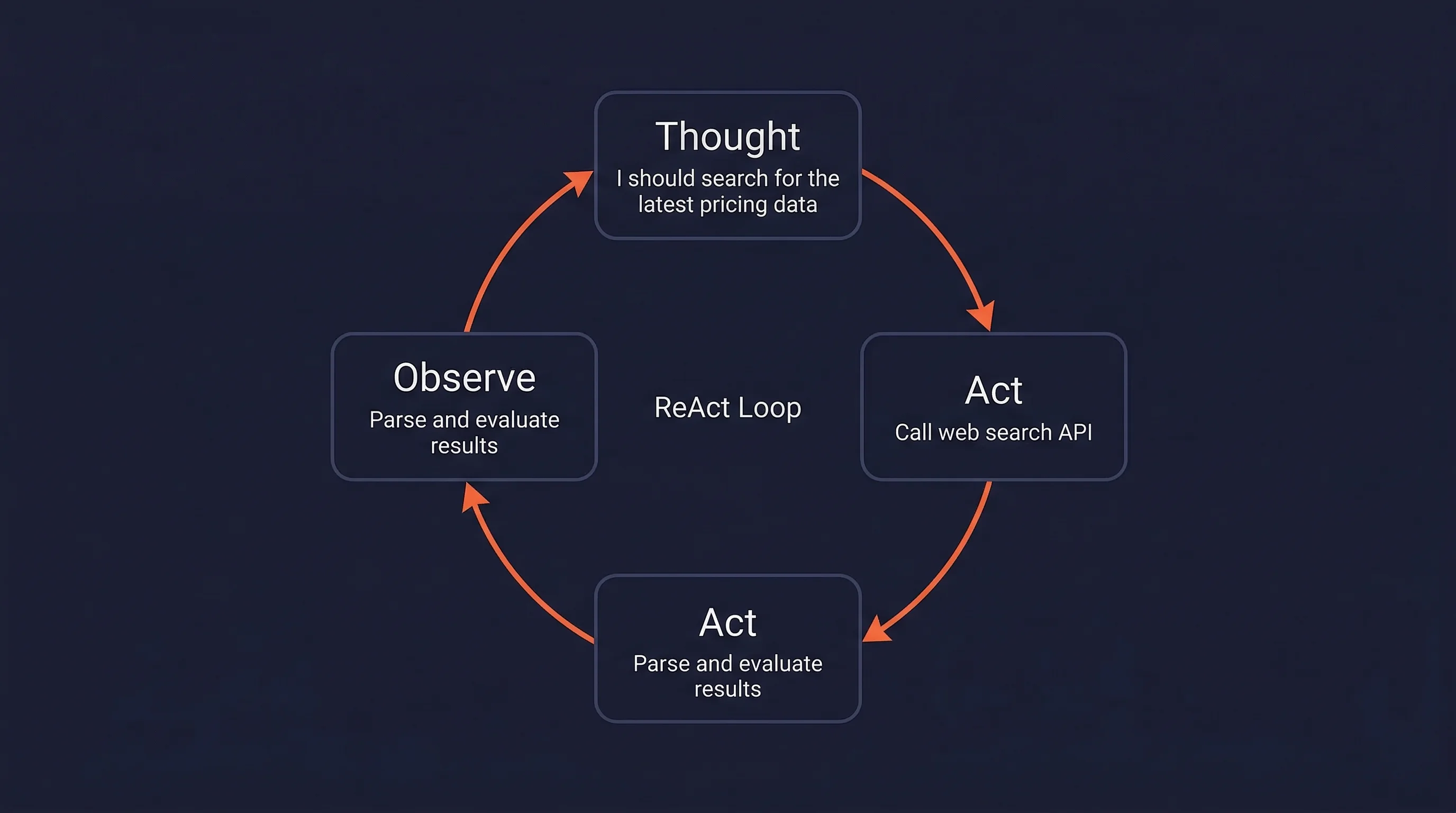
The observe step is where external context enters the agent.
In production, observations come from web pages scraped to clean Markdown, API responses, database records, code execution outputs, or messages from other agents. Web data is qualitatively different from the other channels: it is the only source that is both current and covers virtually every domain.
An agent that cannot reliably read web pages is cut off from the most comprehensive real-time context available.
ReAct is not the only paradigm. ReWOO (reasoning without observation) plans every tool call upfront instead of deciding the next action after each observation. Planning ahead lets a human approve the full plan before anything runs and cuts token usage by avoiding redundant calls, at the cost of adaptability when a tool returns something unexpected. The rule of thumb: ReAct suits open-ended web tasks where the agent cannot know in advance what it will find, while ReWOO suits predictable pipelines where the steps are known before the first call.
Core architecture: LLM, memory, planning, tools, and retrieval
The ReAct loop describes what agents do at runtime. This section describes the components that make that loop work. Five pieces work together to keep it running:
- the LLM,
- memory,
- planning,
- tools, and
- retrieval.
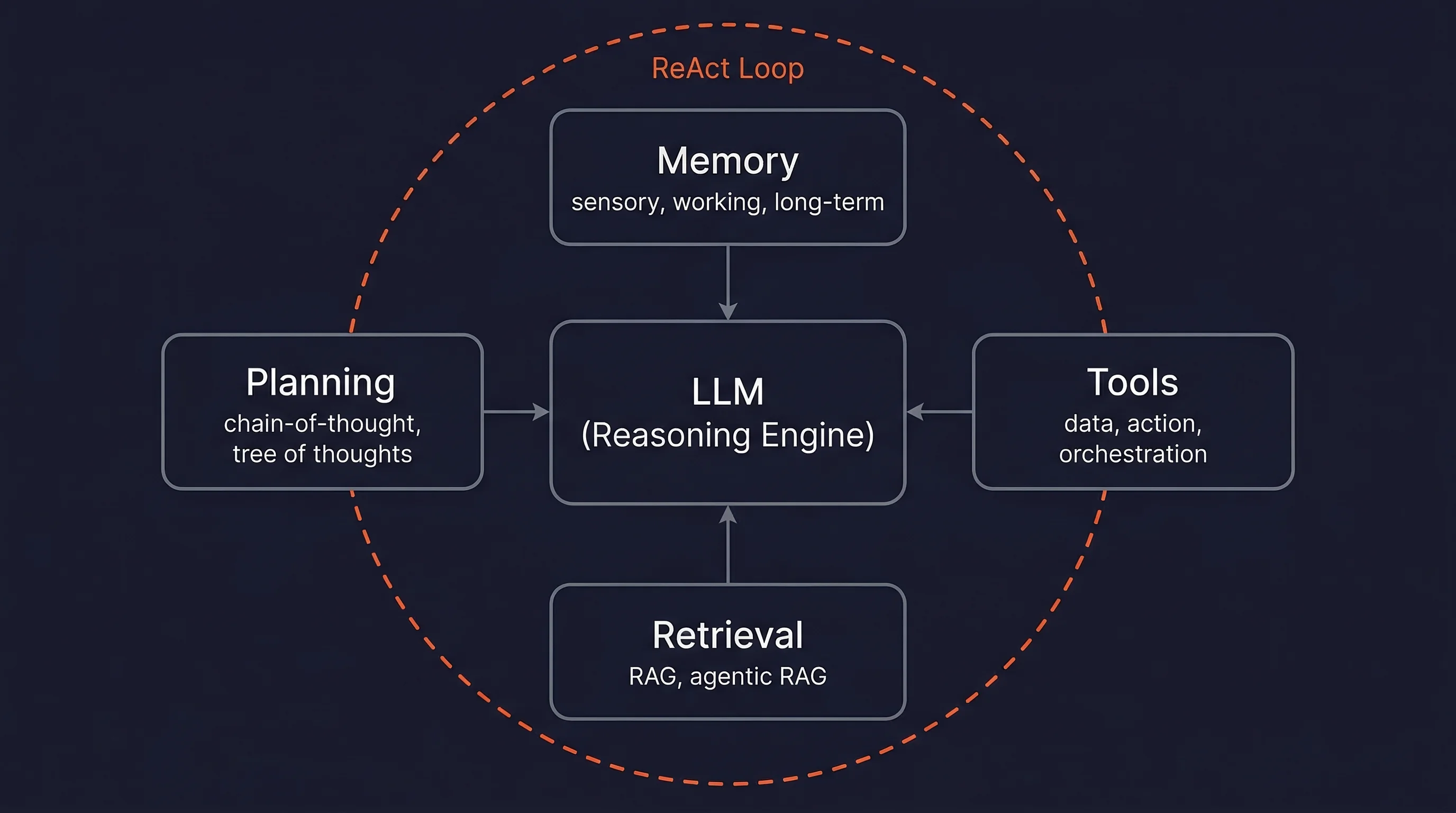
The LLM processes everything in the context window, generates reasoning traces, selects tools, and produces outputs. Model choice involves tradeoffs between capacity, cost, and latency. A common pattern in production routes simple sub-tasks to smaller, cheaper models and sends complex reasoning to larger ones. This keeps cost down without sacrificing quality on hard steps. If you are building an agent, model selection is less about finding the best model and more about knowing when to use which tier.
Agent memory works at three levels: sensory (raw input embeddings), working memory (the context window, which is finite and fills up fast), and long-term (external vector stores the agent can search). Working memory is the bottleneck. Everything the agent needs to reason about has to fit in the context window, so what you put in there matters more than how big the window is.
Planning ranges from simple chain-of-thought decomposition to multi-path Tree of Thoughts. The multi-path approach matters when the problem has branches worth exploring in parallel rather than a single obvious next step.
Tools split into three categories (per OpenAI):
- data tools (search the web, query a database),
- action tools (send an email, update a CRM), and
- orchestration tools (delegate to a sub-agent).
Agentic RAG, where retrieval is a tool the agent calls iteratively and reformulates queries on, outperforms standard RAG by 14% (HuggingFace: 86.9% vs. 73.1%).
The context layer
Most agent development time goes to LLM selection and prompt engineering. The context layer, what data fills the context window at each step, gets a fraction of that attention despite being where many agents actually fail.
Andrej Karpathy defined context engineering (June 2025) as:
The delicate art and science of filling the context window with just the right information for each step.
The constraint is straightforward: the model can only reason over what it can see, so what you put in the window determines what comes out.
Chroma Research documented "context rot" in July 2025: model performance degrades measurably as input length increases. Databricks found correctness begins dropping around 32,000 tokens, well before theoretical limits.
Stanford's "Lost in the Middle" paper adds another constraint: models perform best when relevant information appears at the beginning or end of inputs, not buried in long middle sections. This matters most for web-sourced content, which is the noisiest and most token-heavy input most agents deal with. The next two sections cover exactly how bad the problem gets and what to do about it.
Two types of context require different placement:
- Operational context (current user, active errors, progress metrics) should be injected at the prompt end.
- Decision context (policies, API specs, schemas) should sit at the prompt beginning, where it can be cached.
Anthropic reports up to 90% cost reduction from prompt caching.
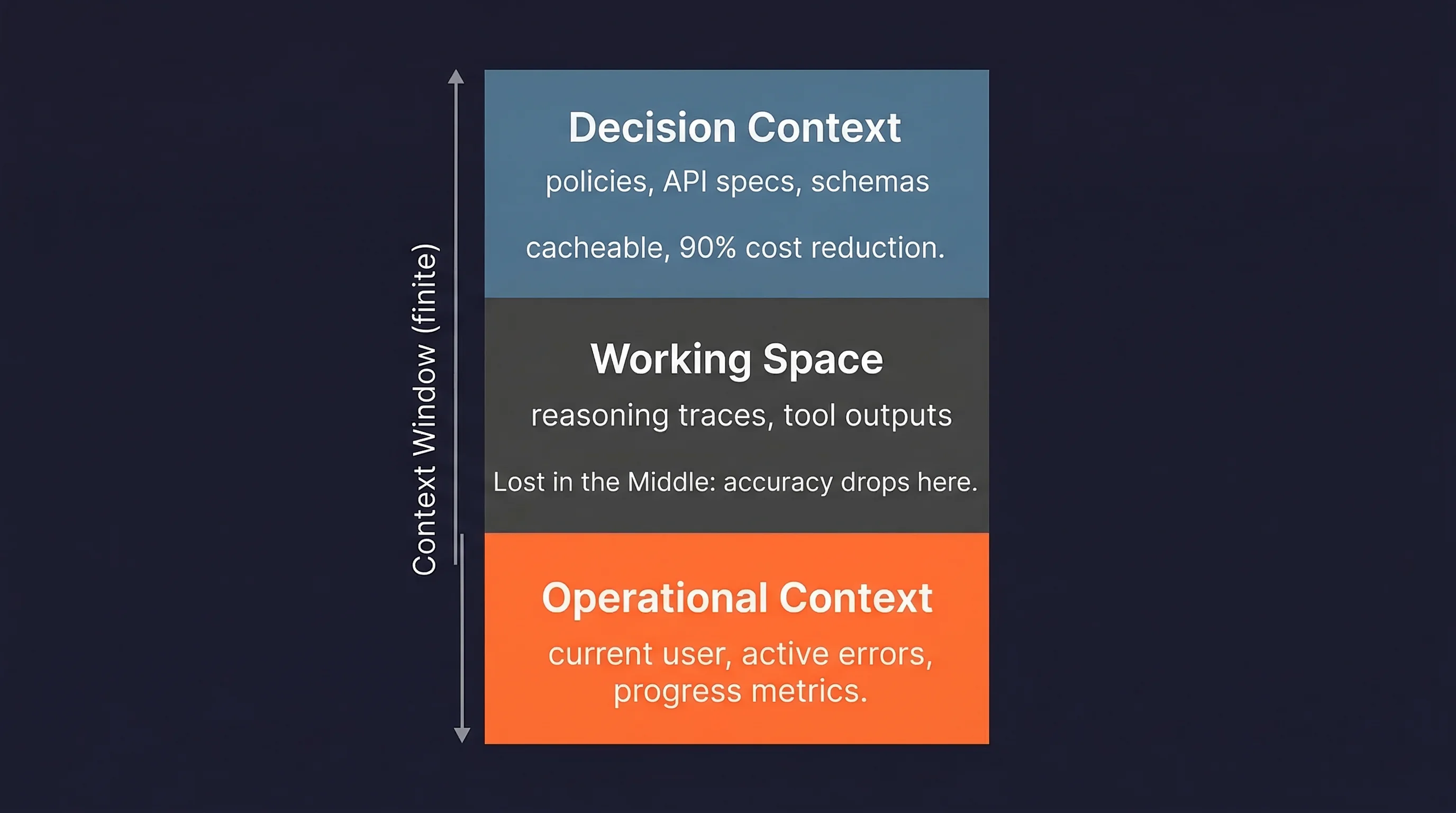
The guiding principle: find the smallest possible set of high-signal tokens that increase the likelihood of a desired outcome. For a deeper breakdown, see Firecrawl's writeup on the context layer for AI agents.
What are the types of AI agents?
AI agents get classified two ways, and the distinction matters. The classic taxonomy (from Russell and Norvig, predating LLMs) sorts agents by decision-making sophistication: simple reflex agents act on fixed condition-action rules (a thermostat that fires at a set time), model-based reflex agents keep an internal model of a partially observable world (a robot vacuum that remembers where it has already cleaned), goal-based agents plan action sequences toward an objective (a navigation system routing to a destination), utility-based agents optimize a scored outcome among several that reach the goal (the route that is fastest and cheapest, not just fastest), and learning agents improve from feedback over time (e-commerce recommendations that sharpen with use).
That taxonomy explains how an agent decides. It says nothing about what the agent does for a living. In production, agents are grouped by job instead. Four types dominate deployments in 2026. Other categories (DevOps/SRE, scheduling, healthcare, legal) exist but each deserves its own treatment. Three of the four types below depend on live web data by definition, which tells you something about how central web access is to the category.
1. Research agents
Research agents plan searches, read sources, reason across them, and produce cited reports. OpenAI Deep Research scored 26.6% on Humanity's Last Exam (a benchmark of expert-level questions designed to be unsolvable by current AI). Google Gemini Deep Research runs around 80 queries and processes roughly 250K input tokens per task. Without web search for AI agents, these agents are limited to training-time knowledge. Choosing the right web search API — whether for RAG grounding, live data retrieval, or agentic search — determines how much of the web a research agent can actually see. For a comparison of the leading search tools for AI agents — from Brave Search and Exa to Tavily and Perplexity Sonar — see the full breakdown.
2. Browser agents
Browser agents control a web browser to fill forms, click buttons, and extract data from live pages. OpenAI Operator (now ChatGPT "agent mode") achieved 87% on WebVoyager (a benchmark of real-world web navigation tasks). Current limits remain: CAPTCHAs, login flows, and payment entry still require human takeover.
3. Coding agents
Coding agents handle multi-step software engineering: writing features, debugging, refactoring, generating tests, and opening PRs. By end of 2025, around 85% of developers were regularly using AI coding tools. Claude Code, Cursor, GitHub Copilot, and Devin lead this category. For the full 2026 lineup and how they compare on harness depth and coding agent benchmarks, see our roundup. They benefit from web access when reading documentation or looking up API references.
4. Sales and GTM agents
Sales and GTM agents automate lead enrichment, prospect research, outbound email, and CRM updates. McKinsey reports revenue increases of 3-15% for organizations using agents in sales and marketing. Clay and Apollo.io dominate this space, with Clay's waterfall enrichment pulling from 100+ data providers to build prospect profiles from live web sources. For a hands-on walkthrough, see how to build an AI SDR that researches companies in real time using live web data.
The pattern across all four: the ones that work well in production have reliable access to current, structured web data. The ones that don't, fail in predictable ways.
Why is web context the bottleneck for AI agents?
Every LLM has a training cutoff. An agent without live external data is frozen: it cannot adapt to current prices, recent events, updated documentation, or anything that postdates its training. This is the root cause of AI agents hallucinating outdated facts — and web search grounding is the only reliable fix. Without external grounding, confident-sounding wrong answers are the default, because training regimes teach models that confident guessing pays off. RAG reduces hallucinations by 70-90% compared to ungrounded LLMs because responses are grounded in retrieved documents rather than pattern-matched guesses from training.
The time dimension compounds the problem. A Gartner projection finds that nearly 40% of agentic AI projects will be abandoned by 2027, with data access failure cited as a primary cause. That is not a small engineering risk. It is the most common way agent projects fail.
These are the broad strokes. In production, the problem breaks down into five specific failure modes that kill agent pipelines:
- HTML overload: modern web pages often contain hundreds of thousands of tokens as raw HTML. Zyte's analysis of 500M+ requests identified this as a primary reason agents fail at web tasks.
- Access challenges: Verification prompts, geo-blocking, and dynamic content requirements interrupt agents mid-task. Cloudflare processed 57 million requests per second as of mid-2025.
- Selector brittleness: CSS selectors and XPath break when sites update layouts, turning working pipelines into silent failures overnight.
- Non-deterministic rendering: A/B tests, client-side rendering, and lazy-loading produce inconsistent HTML for identical URLs.
- Agent loop traps: without a clear path forward, agents repeat identical actions, consuming context window tokens until the agent stalls or runs out of budget.
- Latency: response times above 3 seconds correlate with a 21% higher agent failure rate, compounding across multi-step pipelines.
These failure modes are not static. The web is actively getting harder for agents to read. If you rely on ad-hoc scraping, you will hit these walls at scale. Your web data pipeline needs to be engineered infrastructure, not an afterthought. Agents with excellent LLMs and broken data pipelines fail just as reliably as agents with bad models.
Giving agents eyes on the web
Scraping, crawling, extraction, and search
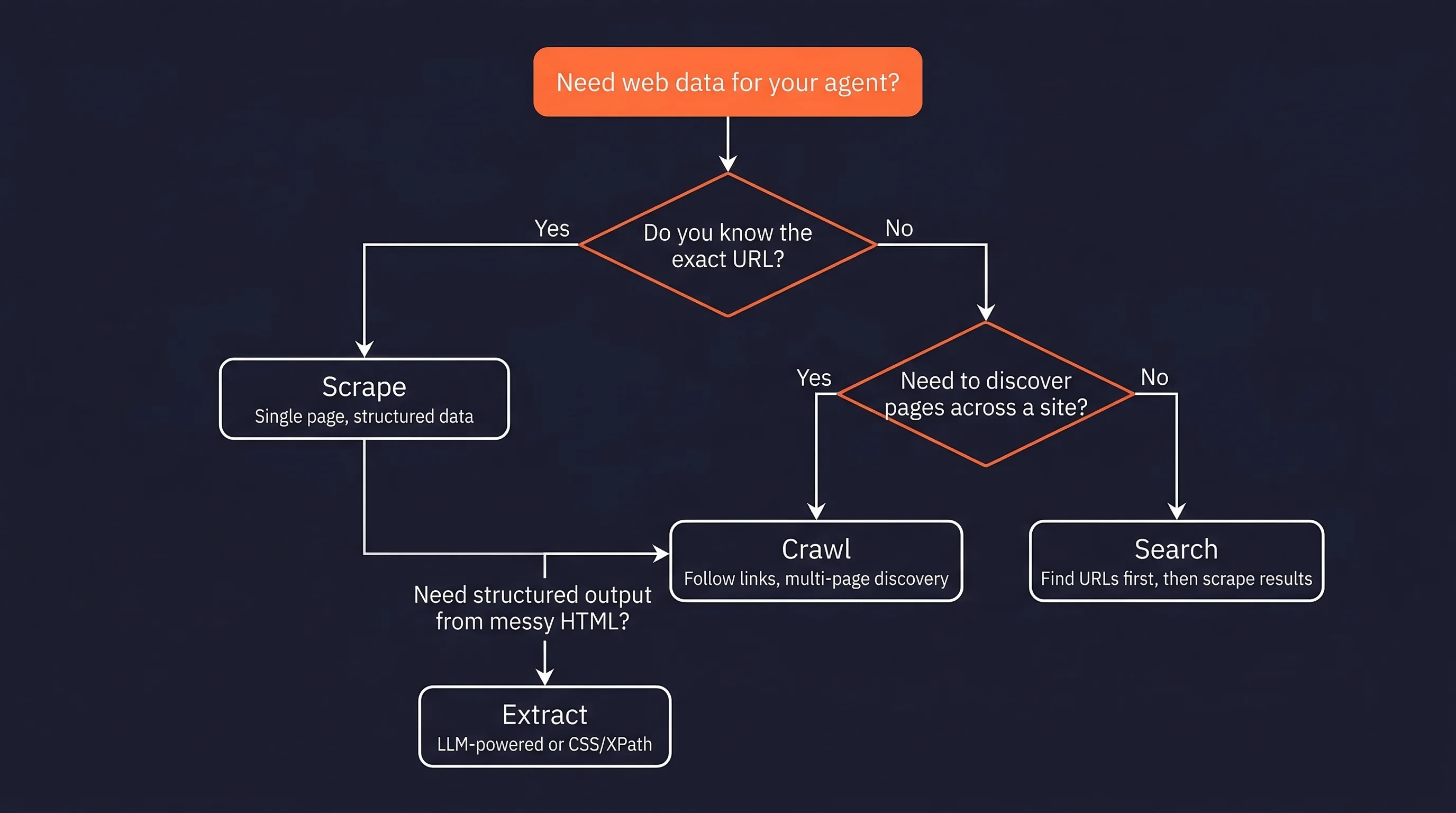
Web access is not one operation. An agent researching competitor pricing needs to search for product pages (web search), visit each result (scraping), follow pagination links (crawling), and pull price data into a structured format (extraction). Each operation solves a different part of the problem, and using the wrong one is one of the more common causes of brittle agent pipelines. For a comparison of AI scraping tools across these categories, see the full breakdown.
- Scraping: use when you know the exact URL and need specific data from that page. If the page uses client-side rendering, basic HTTP scraping will return empty HTML. Firecrawl's agent tools for web access handles rendering automatically.
- Crawling: use when you need to discover pages across a site, not just read one. Starts from a seed URL and follows links. You control how deep it goes and what it follows.
- LLM-powered extraction: use when the page structure is unpredictable or changes often. CSS selectors break when layouts update. LLM extraction adapts to layout changes but costs more per page. For stable, high-volume sites, stick with CSS/XPath selectors.
- Web search APIs: use when you don't know which URLs to hit. Returns URLs and snippets, not full page content. You still need a scraper to get the actual data from the results.
The HTML-to-Markdown conversion step is not cosmetic.
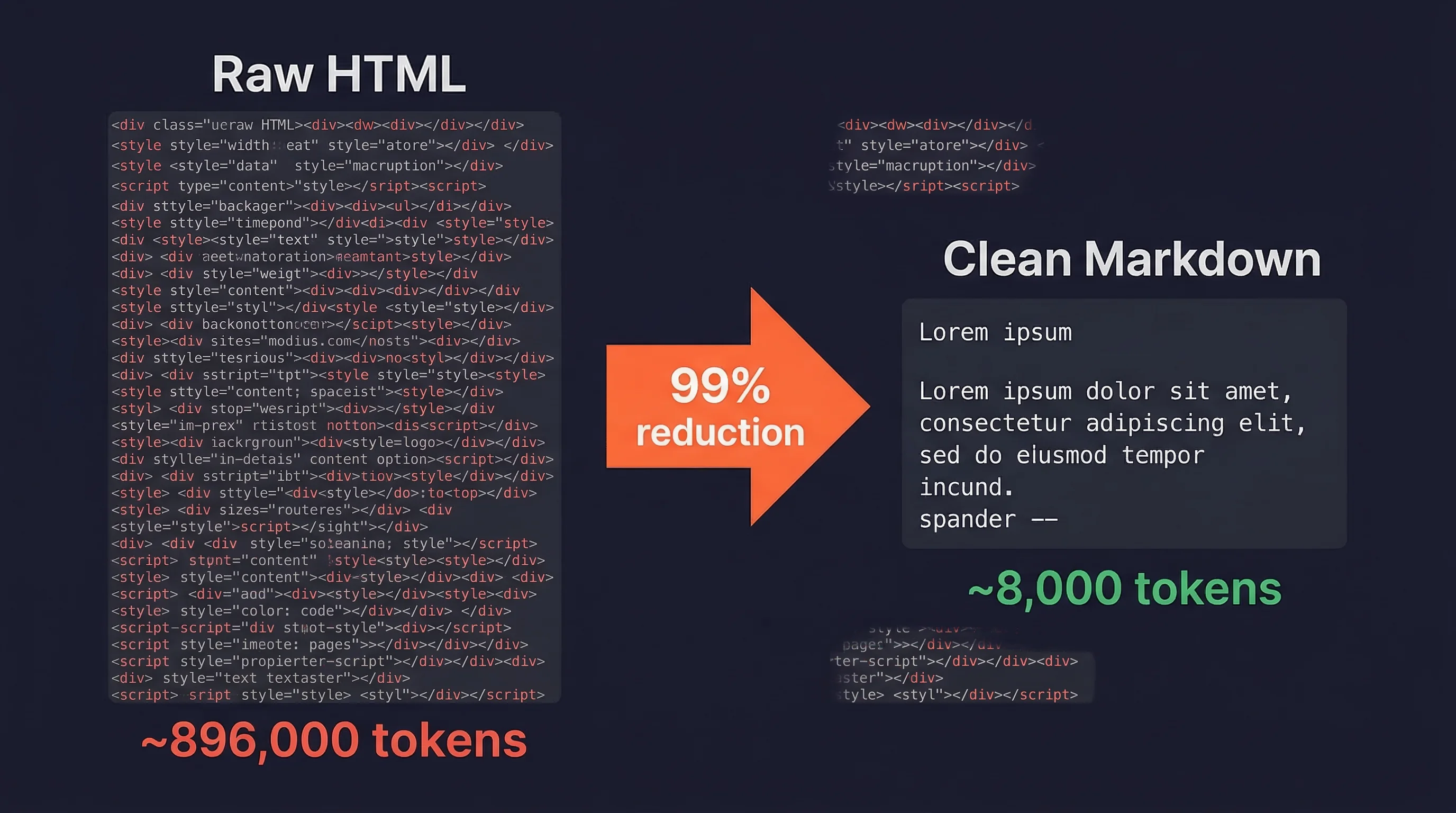
An Amazon product page runs to approximately 896,000 tokens as raw HTML. Cleaned to Markdown, the same page compresses to under 8,000 tokens, a 99% reduction.
Markdown-based RAG shows up to 35% higher retrieval accuracy compared to HTML-based pipelines. This conversion determines whether the agent's working memory has room to reason, or whether the context window is consumed by boilerplate tags, inline styles, and tracking scripts. Firecrawl's clean Markdown output uses roughly 67% fewer tokens than raw HTML.
You can build this pipeline yourself with headless browsers, proxy rotation, and custom parsers, but you will spend more time maintaining infrastructure than building your agent. Firecrawl handles rendering, proxy rotation, and Markdown conversion as a managed API so you can focus on the agent logic instead of the plumbing.
From the terminal, or from inside a shell tool an agent can call, each web operation maps to a single command:
firecrawl scrape https://example.com/pricing --format markdown -o pricing.md
firecrawl search "competitor pricing 2026" --scrape --limit 5 -o results/
firecrawl crawl https://example.com --wait --progress -o crawl.json
The same operations are available as an MCP server and a REST API, so the agent reaches clean Markdown the same way whether it lives in a CLI loop, a framework node, or an MCP client. See the Firecrawl CLI docs for the full command set.
Getting web data into your agent is the tactical layer. Deciding what to fetch, when to fetch it, and how much of it the agent actually needs at each step is the strategic layer. Four principles help you get that right:
- Just-in-time retrieval: fetch web content at the step that needs it, not upfront. If your agent is researching a company, don't scrape every page on their website at initialization. Have it start with the About page and the pricing page, then decide what else it needs based on what it reads.
- Progressive disclosure: structure tools so the agent fetches more when it determines more is needed, rather than receiving everything at once.
- Compaction: as the context window fills, summarize earlier observations while preserving important results. Sub-agent architectures, where specialized agents handle specific subtasks and return short summaries (1-2K tokens) back to the main agent, are one way to do this.
- Minimal tool sets: bloated toolsets cause ambiguous decision points. Define the smallest set of web-access tools the agent actually needs for the task.
Web context also has a time dimension that static document context does not. Prices change hourly. Competitor pages update weekly. News breaks continuously. Treat web context freshness as a design constraint at the same level as latency and cost.
If you want to skip the infrastructure work and start building agents with reliable web access, Firecrawl handles scraping, crawling, and Markdown conversion out of the box.
How to build an AI agent: a practical stack guide
The previous sections covered what agents are, how they work internally, and where their data pipelines break. This section is about putting the pieces together: picking a framework, wiring up the data layer, and choosing what to build vs. buy.
Which AI agent framework should you use?
Framework choice is not about which one is "best." It depends on how much control you need vs. how fast you need to ship. LangGraph, CrewAI, and the OpenAI Agents SDK cover the three most common deployment profiles. For a broader survey, see the best AI agent frameworks. For TypeScript teams specifically, a new wave of lightweight TypeScript agent frameworks built for Vercel and Cloudflare deployments is worth evaluating alongside Mastra.
| LangGraph | CrewAI | OpenAI Agents SDK | |
|---|---|---|---|
| Abstraction level | Low (explicit state graphs) | Medium (role-based agents and crews) | Low (Python-first, minimal abstractions) |
| Mental model | Directed graph of nodes and edges | Organization of specialized roles | Agents with handoffs and guardrails |
| Best for | Production systems needing durable execution and fine-grained control | Multi-agent workflows, faster time-to-production | OpenAI-native deployments, realtime voice |
| Multi-agent support | Yes, via orchestrator-workers pattern | Core feature | Yes, via handoffs |
| Human-in-the-loop | Yes (interrupts, time travel) | Partial | Yes |
| Learning curve | Higher | Lower (full setup under 20 lines) | Medium |
| Notable users | Klarna, Replit, Elastic | 40% of Fortune 500 (claimed) | Block, Apollo |
Model Context Protocol (MCP), introduced by Anthropic in November 2024, is the open standard for connecting AI apps to external data sources and tools. Think of it as a USB-C port for AI applications: instead of writing custom integration code for every data source, agents connect to MCP servers through a standardized interface.
MCP defines three primitives: Tools (executable functions an agent can call), Resources (read-only data), and Prompts (reusable templates). STDIO handles local server transport. The Firecrawl MCP server exposes scraping, crawling, search, and agent operations directly to any MCP-compatible agent, with integrations for the major agent frameworks.
Two additional frameworks are worth knowing. Anthropic's Claude Agents SDK is a Python-first framework for building agents with Claude, with built-in guardrails, MCP support, and multi-agent handoffs. HuggingFace smolagents takes a code-first approach where the agent writes Python actions rather than JSON tool calls. Research suggests code agents outperform JSON tool-calling agents on complex tasks. For a hands-on walkthrough, see this CrewAI multi-agent systems tutorial.
The data layer
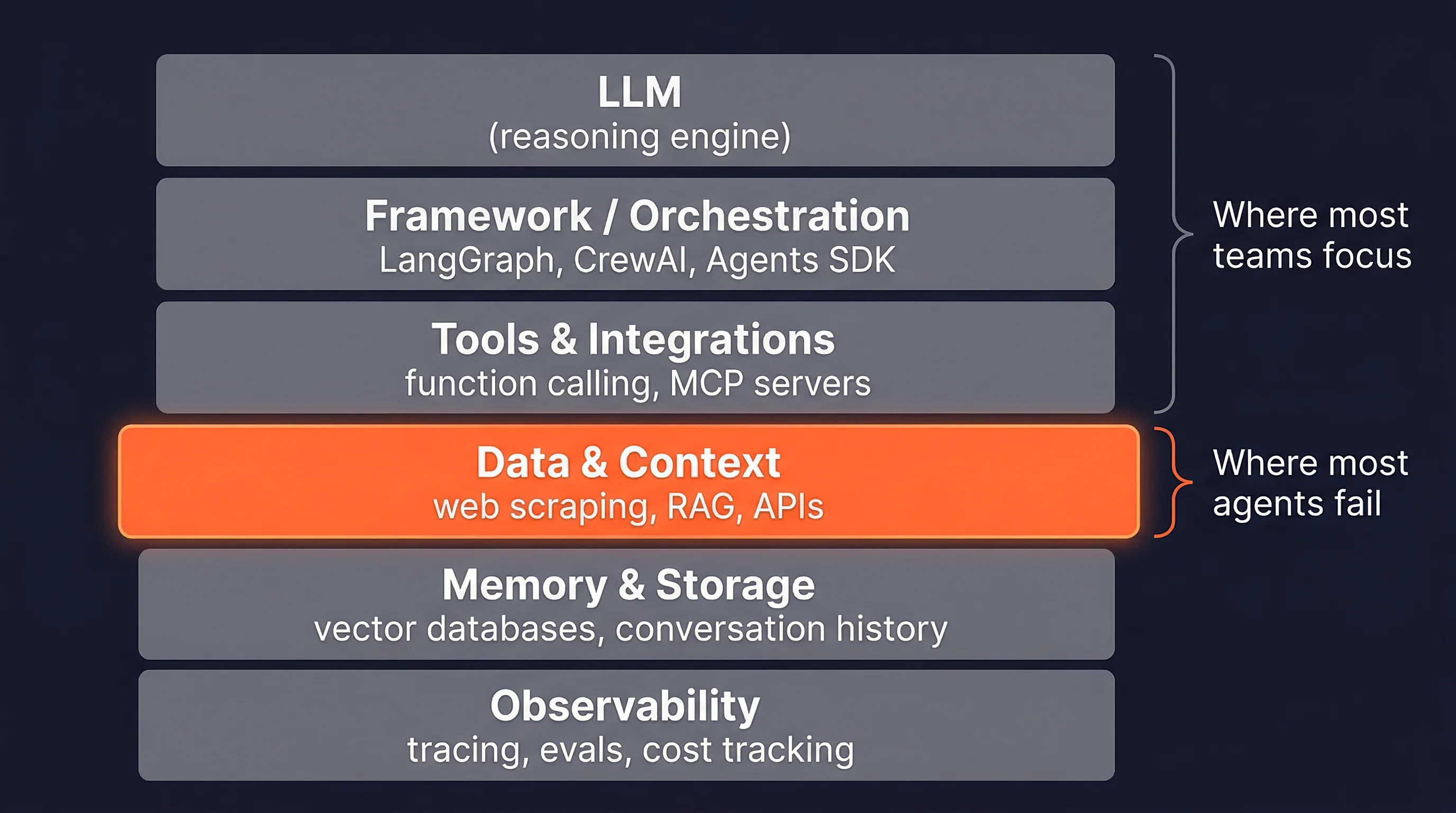
The practical agent stack has six layers:
- LLM (reasoning engine),
- framework/orchestration,
- tools and integrations,
- data and context,
- memory and storage, and
- observability.
The data layer sits at layer four. It is where the agent's context actually comes from. Most framework documentation focuses on layers one through three. The data layer gets one paragraph, usually pointing to a search API. Demo agents skip the data layer entirely and break the moment they need live information. The choice of data source — training weights, a retrieval index, or live web data — is a foundational architectural decision that determines how fresh and accurate the agent's answers can be.
For web context specifically, the decision comes down to whether you build or buy the pipeline. Building means managing headless browsers, proxy rotation, and HTML-to-Markdown conversion yourself. Buying means a managed API handles all four.
Firecrawl covers the full range: single-page scraping, multi-page crawling, integrated search with full-page content, and a natural-language agent endpoint. You can also get started with the open-source agent builder or the Firecrawl CLI for terminal-native workflows.
For teams wanting to fork and deploy a complete web research agent on their own infrastructure with any model provider, the firecrawl-agent stack scaffolds a full project in two commands.
No-code and low-code options
Not every agent needs to be code-first.
n8n integrates LangChain components as visual workflow nodes with JavaScript support for custom logic. This makes it practical for SQL agents, change detection pipelines, and multi-agent workflows that a backend developer could build without touching a Python framework.
Zapier Agents extends Zapier's 8,000+ app integrations with agent "teammates" trained via prompts, with live data source connections and agent-to-agent calling. Zapier's own framing: "choose agents when 80% accuracy is genuinely sufficient and you value speed over perfection."
Other options in this space include LangFlow, Flowise, and Relevance AI. Cursor Automations is another approach worth noting: it runs autonomous AI sessions triggered by schedules or events directly inside the Cursor IDE, making it practical for repetitive coding and research tasks. For a full evaluation of n8n, Zapier, Cursor Automations, Gumloop, and more, see the guide to best AI workflow automation tools.
Building production AI agents
Challenges: hallucination, stale data, and scale
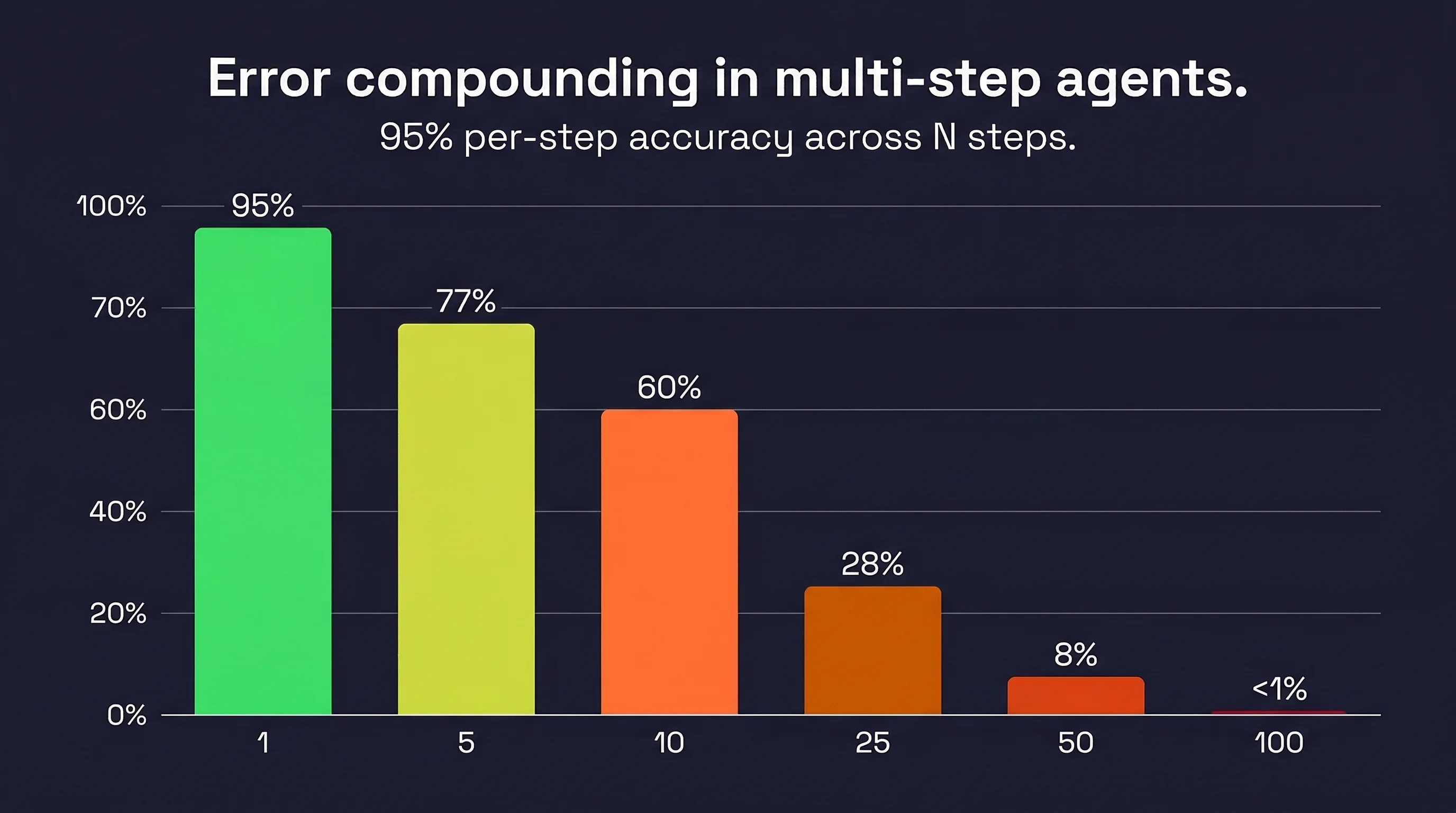
A model with 95% per-step accuracy drops to 60% reliability over 10 sequential steps, and under 1% over 100 steps. This is not a hypothetical. It is a mathematical property of sequential systems with imperfect components. (Chip Huyen documents this in detail in AI Engineering.)
The WebArena benchmark (800+ realistic web tasks) measured the best GPT-4 agent at 14.41% task completion, against a human baseline of 78.24%. That means even the best agents complete fewer than 1 in 5 realistic web tasks that a human handles easily. GAIA (general AI assistant tasks): best agent around 15%, humans 92%. The gap is wide and the benchmark tasks are not toy problems.
LangChain's practitioner survey puts quality and reliability as the top barrier at 41%. Security concerns follow at 24.9% for enterprises, cost at 18.4%, safety at 18.4%, and latency at 15.1%. At scale, the top-performing SWE-bench agent costs $376.95 per benchmark instance. The cheapest high-performer: $36.64. At millions of tasks, model routing (cheaper models for simpler steps) stops being optional.
Testing and evaluating agent behavior
Agent evaluation requires a different approach than standard ML testing, because agents produce long, non-deterministic execution traces rather than single outputs. Three tiers matter:
- unit tests at every code change (fast assertions, regex checks, structured output validation),
- human and model evaluation on a schedule (log all traces, binary good/bad labels, measure precision and recall, meaning how often the agent gives correct answers vs. how many correct answers it catches), and
- A/B testing in mature products with real user traffic. The principle from practitioners: "You are doing it wrong if you aren't looking at lots of data."
LangSmith supports three evaluation types: final response evaluation (LLM-as-judge), trajectory evaluation (the sequence of tool calls, with partial credit), and single-step evaluation (individual components in isolation).
Metrics worth tracking include valid plan percentage, invalid tool call frequency, parameter error rate, steps per task, cost per task, and action latency. The paper "AI Agents That Matter" criticized benchmark culture for optimizing accuracy alone and proposed joint optimization of accuracy and cost.
Security and trust boundaries
Prompt injection is the dominant security threat for agents processing external content. An agent reading a web page, email, or document is exposed to any instructions embedded in that content and cannot reliably distinguish instructions from data.
AgentDojo (ETH Zurich, 97 task scenarios, 629 security test cases) found that current LLMs fail at many tasks even without attacks, leading the researchers to conclude agents need "new design principles" for handling untrusted inputs. Anthropic's Computer Use documentation reports that 24% of unmitigated agents fall for indirect prompt injection.
The OWASP Top 10 for LLM Applications (2025) is the most actionable security checklist for agent builders. The two items most relevant to agents are LLM01 (Prompt Injection) and LLM06 (Excessive Agency). Excessive Agency happens when an agent has more tools than it needs, broader permissions than the task requires, or takes high-impact actions without human confirmation.
The fixes are direct: scope tools tightly, apply least-privilege permissions, and require approval before any consequential action. In practice, larger enterprises tend to start conservative — offline evaluation, read-only access, and human-in-the-loop checkpoints — and expand permissions only once behavior is well understood.
Best practices for reliability
The core reliability insight follows directly from the error-compounding math: every added LLM call is a new opportunity to compound errors. Use deterministic control flow wherever order is predictable. Replace agentic decisions with if-statements when the decision has a clear right answer. Add agents only where judgment is genuinely required. Anthropic's framing is direct: "Many applications benefit from simpler solutions." smolagents echoes it: "Reduce the number of LLM calls as much as you can."
Human-in-the-loop is the most practical reliability mechanism available.
LangGraph supports pausing for approval, editing proposed actions, and time travel (inspect and resume from any prior state). OpenAI's Agents SDK provides explicit handoff functions between specialized agents.
Three guardrail levels layer on top: tool-level (informative error messages and execution logs), output schema (structured JSON for programmatic checking), and evaluator-optimizer (a dedicated evaluator LLM critiques outputs before they are acted on). Andrew Ng's reflection pattern adds another layer: generate output, prompt the model to critique it, rewrite with the critique, repeat. Even simple implementations produce measurable performance gains.
All of these guardrails operate on the LLM's reasoning. None of them help if the data entering the context window is stale or malformed.
The future of AI agents
The reliability gap documented in production benchmarks points to where agent development is actually headed: not bigger models, but better architecture for reading and acting on the real world.
Multi-agent systems are already the norm for production deployments. Gartner recorded a 1,445% surge in multi-agent system inquiries from Q1 2024 to Q2 2025, a single-year transition from "interesting" to "current concern." Single-agent architectures are not disappearing, but they are becoming the simple case rather than the default.
Three infrastructure shifts are compressing the timeline. OpenAI's Operator is now integrated into ChatGPT as agent mode, reaching ChatGPT's entire user base. Google's Gemini integration into Chrome reaches up to 3 billion potential users. WebMCP (previewed February 2026) is a W3C-backed standard that would give browser-native agents a standardized interface to web content, the missing piece that would let agents treat the open web the way they currently treat internal APIs.
Persistent memory is the other axis of progress. LangGraph's persistence layer lets agents interrupt and resume with full state across sessions. The SECOND ME system proposes AI-native memory offload for contextual reasoning across interactions: agents that remember what they did and what they learned, not just the current conversation. At the enterprise end, auditability and controllability are becoming selection criteria alongside capacity. OWASP Top 10 is the de facto security checklist. NIST AI Risk Management Framework provides the regulatory overlay.
The trajectory on SWE-bench from 2023 to 2026 went from under 5% to 76.8% in three years, which means multi-agent is no longer a research topic. It is the default architecture for anything beyond simple tasks.
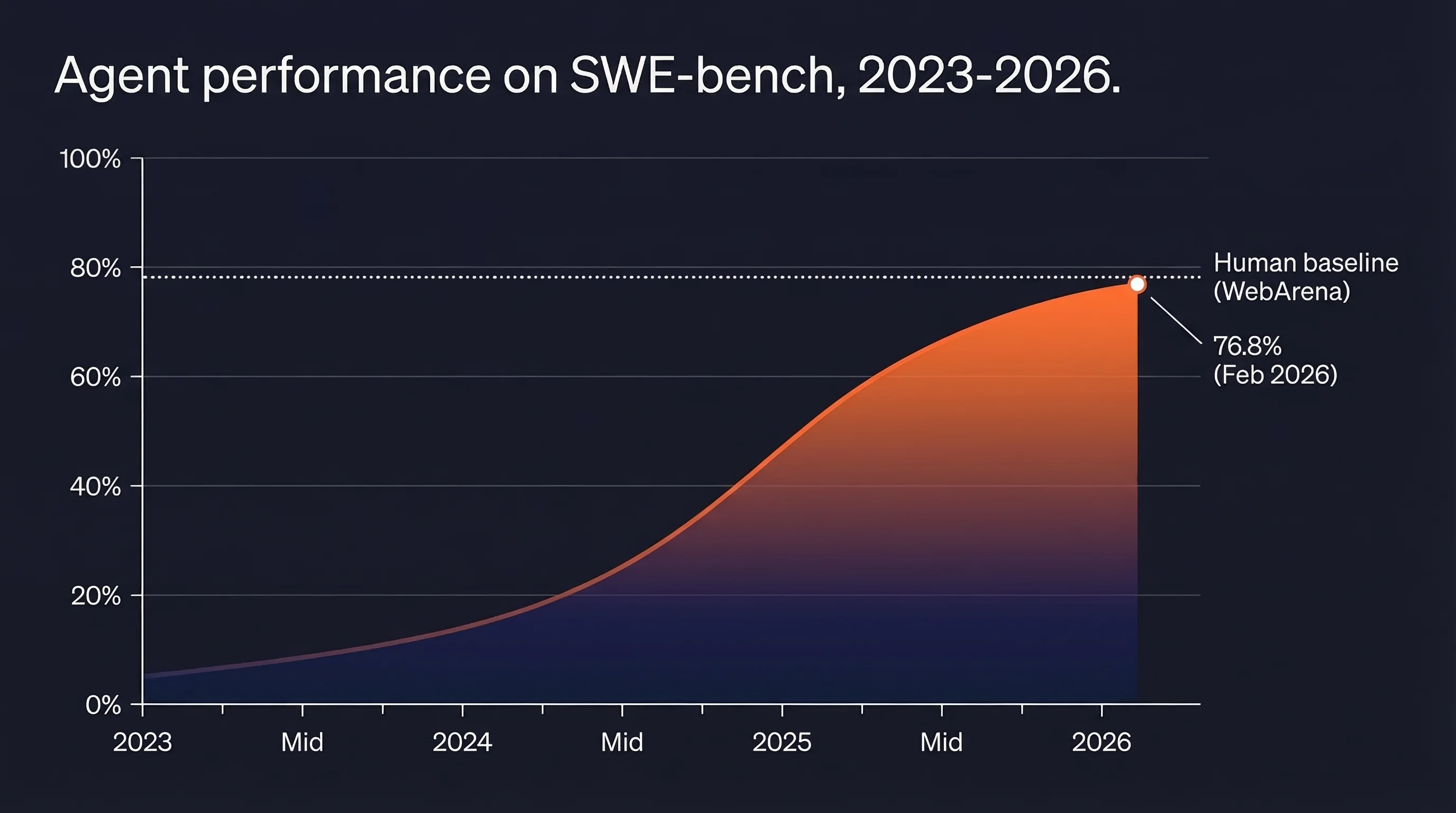
Current task completion rates on realistic web benchmarks (14-77%) still leave substantial room. The agents that close that gap will do it by getting better at reading, parsing, and reasoning over web content. The web context problem does not shrink with better LLMs. It grows with the scope of tasks agents are asked to handle.
That is the problem Firecrawl is built to solve. Firecrawl CEO, Caleb Peffer, and the team understand that AI agents are not a future trend — they are the present, and the infrastructure needs to keep up. Every day, the team works to make clean, structured web data as accessible as possible for agents and the developers building them.
That is what Firecrawl is: the web context layer for AI agents.
Frequently Asked Questions
What is an AI agent?
An AI agent is a software system that uses an LLM to pursue a goal by deciding which tools to call, observing the results, and adapting its plan until the task is done.
Is ChatGPT an AI agent?
Standard ChatGPT is a chatbot. ChatGPT in agent mode (Operator) qualifies because it plans across steps, uses tools, and pursues tasks without step-by-step human instruction.
How do AI agents work?
Agents follow a reason-act-observe loop. The LLM reasons about the goal, selects and calls a tool, observes the result, and repeats until the task is complete or a boundary is reached.
What are the types of AI agents?
The four most common production types are research agents, browser agents, coding agents, and sales/GTM agents. Each depends on different data sources and tool sets.
How do you build an AI agent?
Pick a framework (LangGraph, CrewAI, or OpenAI Agents SDK), connect tools via MCP or function calling, design your data/context layer, and add guardrails before deploying.
What's the best framework for building AI agents?
LangGraph gives the most control for production systems. CrewAI ships faster for role-based multi-agent workflows. The OpenAI Agents SDK is the natural choice inside the OpenAI ecosystem.
Do AI agents need web access?
Most production agents do. Without live external data, agents are frozen at their training cutoff and cannot handle time-sensitive, company-specific, or current information.
What causes AI agents to fail in production?
Quality and reliability is the top barrier at 41% of practitioners. Error compounding is the mechanism: a 95%-accurate model drops to 60% reliability across 10 sequential steps.
What is context engineering for AI agents?
Context engineering is the practice of deciding what information fills an agent's context window at each step, what to fetch, how to compress it, and where to place it.
What is the ReAct framework?
ReAct (2022) interleaves reasoning traces, tool calls, and observations. It outperforms reasoning-only and action-only approaches by grounding decisions in retrieved data.
What is MCP and why does it matter for agents?
Model Context Protocol is an open standard for connecting AI apps to external tools and data sources through a unified interface, replacing custom integration code.
What are the five classic types of AI agents?
The classic taxonomy sorts agents by decision-making sophistication: simple reflex agents act on fixed rules, model-based reflex agents keep an internal model of a partially observable world, goal-based agents plan toward an objective, utility-based agents optimize a scored outcome among several that reach the goal, and learning agents improve from feedback over time. In production, agents are usually grouped by job instead, such as research, browser, coding, and sales agents.
What is the difference between ReAct and ReWOO?
ReAct decides the next action after each observation, adapting as it goes, which suits open-ended tasks where the agent cannot predict what it will find. ReWOO plans every tool call upfront before executing any of them, which reduces token usage and lets a human approve the plan first, but is less adaptable when a tool returns something unexpected.