What Is an Agent Harness? The Infrastructure That Makes AI Agents Actually Work
 Ninad Pathak
TL;DR:
- An agent harness is everything that wraps around an LLM (tool execution, memory, context management, state persistence), excluding the model itself
- Harnesses emerged because LLMs are stateless by default, meaning every new session starts blind
- Harness engineering treats every agent failure as a system problem to permanently fix, not a prompt to retry
- You don't need a harness for simple, single-turn tasks, but any multi-step or long-running work requires one
- Multiple models can share the same harness; the model is a pluggable component
- Firecrawl sits in the tool layer as the harness's web access and real-time data acquisition capability
I came across the term "Agent harness" in February 2026, when Mitchell Hashimoto published a post formalizing what practitioners had been building informally for years.
Days later, OpenAI documented how a three-engineer team used "harness engineering" to produce a million-line codebase at 3.5 pull requests per engineer per day, with zero manually typed code.
The concept spread fast because it named something developers had already been building without a shared vocabulary for it. Harrison Chase, creator of LangChain, framed the evolution clearly: simple RAG chains first, then more complex flows, then agent harnesses as models became capable enough to sustain long-running autonomous work. Each generation didn't shrink the scaffolding — it transformed it.
Here is a breakdown of what agent harnesses are and why they have become essential for production AI systems.
What is an agent harness?
An agent harness is the software infrastructure surrounding an AI model that manages everything except the model's actual reasoning. It acts as the intermediary between the LLM and the outside world, handling tool execution, memory storage, state persistence, and error recovery. By maintaining context across multiple sessions, a harness transforms a simple text generator into a capable, long-running AI agent.
Anthony Alcaraz, Author of Agentic Graph RAG (O’Reilly), defines them as "the complete architectural system surrounding an LLM that manages the lifecycle of context: from intent capture through specification, compilation, execution, verification, and persistence," covering everything except the LLM itself.
In practice, the agent harness connects the AI model to external tools, persists state across sessions, decides what context to feed in at each step, enforces what actions are allowed, and saves a record when a session ends so the next one can pick up where the last left off.
Anthropic's own engineering team describes the Claude Agent SDK as "a powerful, general-purpose agent harness adept at coding, as well as other tasks that require the model to use tools to gather context, plan, and execute."
The SDK handles context compaction, tool dispatch, session management, and progress tracking. Claude supplies the reasoning while the SDK supplies everything else.
Why do long-running agents fail without a harness?
Due to the statelessness of LLMs, each new session with an agent starts with no memory of what happened before. You can compare it to a software project where every engineer has zero knowledge about the previously completed work.
In Anthropic's experiments, Opus 4.5 without a harness failed to build a production web app from a high-level prompt across multiple context windows.
Two failure modes appear consistently without a harness:
- The agent tried to one-shot everything (ran out of context mid-implementation, left the codebase half-built, next session wasted tokens guessing what was done)
- Later sessions declared success after seeing partial progress without verifying anything worked.
Apart from these, there are three additional failure modes that worsen over long-running tasks:
- Context rot. Context windows fill with tool outputs, history, and prior reasoning. As they fill, the model loses sight of original instructions. Even with 200k+ token windows, dense middle-of-context content gets ignored.
- Hallucinated tool calls. Without validation, an agent calls functions with wrong parameter types or references APIs that don't exist. Without a harness intercepting the call first, it burns tokens retrying the same broken call.
- Lost state on failure. Any network timeout or server restart wipes in-memory progress. The next session starts from zero.
Give your agent harness reliable web access. Firecrawl lets your agents scrape, search, and extract clean markdown from any URL. No API key needed to start, add one for higher rate limits. Get your free API key.
How does an agent harness work?
The harness operates between intent and action: at each step it intercepts, validates, routes, and records. A typical long-running agent harness has two phases.
- The first phase runs once at project start. It sets up the environment, creates a structured task list, initializes version control, and writes a progress file that future sessions will read.
- The second phase runs repeatedly. Each session loads that state, picks the next incomplete task, works on it incrementally, then saves progress before exiting. No session needs to know what happened in previous ones because the harness externalizes that knowledge into files and commit history.
When the model outputs a tool call like search ("competitive pricing") or bash ("npm test"), the harness intercepts it, validates parameters, executes in a sandbox, cleans the output, and injects the result back into context.
The model never touches external systems directly. At session end, the harness saves a structured record of what was completed and what comes next. The project accumulates memory across sessions even though each model invocation starts fresh.
What are the core components of an effective agent harness?
A production harness is a set of coordinated subsystems, each handling a specific part of the agent's operation.
1. Tool integration layer
The tool layer defines what the agent can do in the world: file read/write, code execution in sandboxes, database queries, API calls, and web access.
The harness exposes callable functions, validates calls before execution, and returns sanitized results. For web access specifically, the harness needs a tool that handles the modern web problems like JavaScript-rendered pages and dynamic content that breaks simple parsers well.
You could build a custom scraping pipeline, or drop in the Firecrawl CLI as a ready-made tool layer primitive. A single command installs it, authenticates, and teaches every major coding agent harness (Claude Code, Codex, Gemini CLI, OpenCode) how to use it — including fixing Codex CLI's inability to browse the web without additional configuration. For a sourced comparison of all eight best AI coding agents in 2026 — ranked on harness depth, token cost, and SWE-bench accuracy — see Firecrawl's breakdown:
npx -y firecrawl-cli@latest init --all --browserFrom that point the harness can call firecrawl scrape, firecrawl search, and firecrawl browser as native shell commands. Results write to the filesystem rather than into the context window, so the harness retrieves only what it needs per step
2. Memory and state management
A harness manages three memory types:
- working context (the immediate prompt)
- session state (a durable log for the current task)
- long-term memory (knowledge across tasks)
The working context is ephemeral. Session state records tool results, completed subtasks, and progress notes for a task's duration. Long-term memory can be a vector store, a structured file, or a memory layer.
The Anthropic team found JSON worked better than Markdown for feature tracking files. Models are less likely to accidentally overwrite or reformat JSON, making it more reliable for states that multiple sessions need to read correctly.
Sarah Wooders, co-founder of Letta, put it plainly (as quoted by Chase): memory isn't a plugin, it's the harness. The design questions that matter are: where does memory live, who owns it, what gets persisted between sessions, and how does the agent retrieve it? These aren't model questions; they're engineering questions the harness has to answer.
This also has a practical implication for teams choosing managed agent platforms: if memory lives inside a closed harness you don't control, you don't own your agent's accumulated knowledge. Moving to a different system means starting from scratch. Memory portability is worth building for from the start.
3. Context engineering and compression
At each model call, the harness decides what to include and what to compress.
Compaction summarizes older conversation history into condensed notes. Context retrieval (RAG patterns) pulls in only the relevant documents for the current step, rather than loading everything upfront.
The "Lost in the Middle" finding by Liu et al. (Stanford, 2023) showed LLM performance degrades when key content is buried in the middle of a long prompt. Harnesses apply this by positioning the most important context at prompt boundaries.
4. Verification and guardrails
A production agent harness verifies outputs before treating work as complete. For coding agents, this means running the test suite after each feature and only checking it off when tests pass. For instance, an agent might declare a feature complete without running tests. A production harness prevents this by explicitly triggering Puppeteer-based browser testing to catch bugs invisible from the code alone.
For sensitive actions like writing to production databases or sending external communications, the harness implements human-in-the-loop interrupts, pausing until a human approves.
What are the common architecture patterns for an agent harness?
There are three architecture patterns for an agent harness design:
- Single-agent supervisor. One model in a loop with tools, memory, and verification. The harness manages initialization, context injection, tool dispatch, state persistence, and cleanup. Works well for bounded tasks like a customer support agent with a knowledge base and ticket system.
- Initializer-executor split. Anthropic's documented approach for long coding tasks. The initializer runs once and sets up the durable project environment: folder structure, feature list, init.sh, initial git commit. Every executor session reads from this environment, makes incremental progress on one feature, runs tests, commits, updates the progress file, and exits cleanly. The project environment is the shared memory across all sessions.
- Multi-agent coordination. For complex projects, the harness dispatches specialist agents (researcher, writer, reviewer), managing handoffs so each agent gets relevant context from the previous step without irrelevant history. The ICML 2025 paper "General Modular Harness for LLM Agents in Multi-Turn Gaming Environments" tested this with separable perception, memory, and reasoning modules on a GPT-4-class model. The harnessed model consistently outperformed the same model without a harness across all tested games.
What are the benefits of a well-designed agent harness?
A harness improves task completion on complex multi-step problems by giving the model the right context and tools at each step.
The ICML 2025 gaming harness study found consistent win-rate improvements across all tested games when the harness was enabled versus disabled on the same underlying model, with no change to the model weights or prompts.
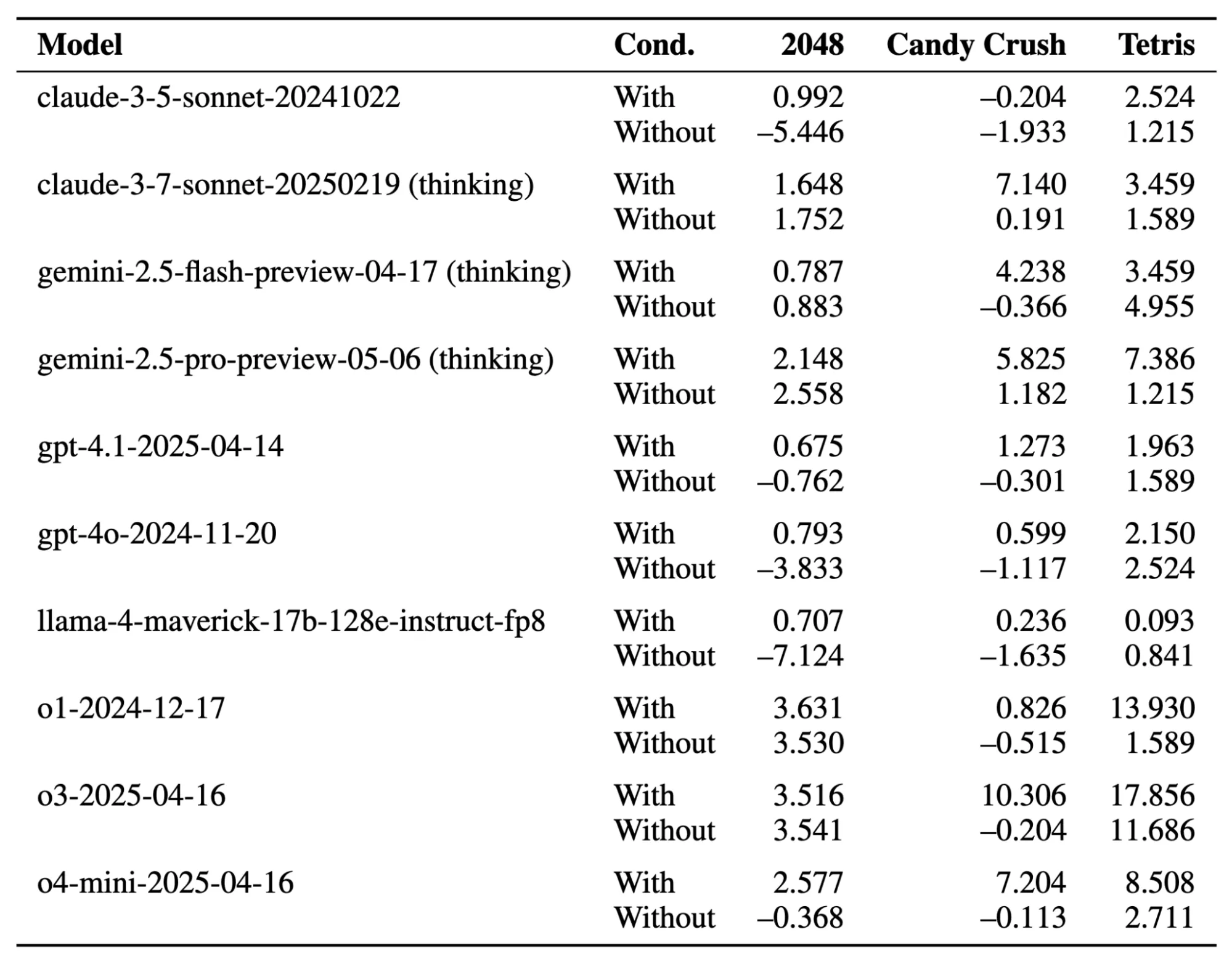
Harnesses make AI systems model-agnostic. All tool integrations, memory architecture, and business logic live in the harness. So, when a better model ships, you simply swap it in while the rest of your code stays intact.
Some harnesses also support model routing where simpler tasks go to smaller models and complex steps go to more capable ones.
Efficient harnesses reduce token costs by storing data outside the model and retrieving only what's needed per step.
Harness vs. orchestration vs. framework: what's the difference?
| Concept | Primary Responsibility |
| Agent frameworks | Libraries and abstractions for building agents (LangChain, LlamaIndex) |
| Agent Harness | Runtime system that executes agents with tools, memory, and state management |
| Orchestrator | Control flow that decides when and how to invoke the model |
A framework provides components. A harness assembles them into a running system with defaults and integrations. An orchestrator decides the sequence of model calls.
The harness provides the capabilities those calls use: tools, memory, context. LangChain's DeepAgents is a harness built on the LangChain framework, adding default prompts, tool handling, and a file system that you'd otherwise assemble yourself.
What is harness engineering?
Harness engineering is the practice of treating every agent failure as an engineering problem to permanently fix, rather than a prompt to retry. That’s in-line with Mitchell Hashimoto’s approach where if an agent makes a mistake, you engineer the environment so it physically cannot make that mistake again.
This means two things.
- First, update the agent's instruction file (AGENTS.md or equivalent) with rules that prevent known failure modes. Each line corresponds to a specific observed failure, and the file grows incrementally.
- Second, build tools that make correct behavior mechanically verifiable. If the agent repeatedly fails to test UI interactions, build a screenshot tool. If it fails to validate API responses, build a response validator.
Harness engineering is distinct from context engineering, which focuses on what information the model sees. Context engineering optimizes the input. Harness engineering controls the environment the agent operates in, what it can access, what gets verified, and what forces a retry when something goes wrong.
The key difference from traditional software engineering is that the system being wrapped is non-deterministic. Traditional components produce the same output for the same input. LLMs can hallucinate function calls or declare a task complete when it isn't. The harness designs for graceful recovery from unexpected behavior. OpenAI documented how their harness engineering wrote linter error messages specifically to teach the fix, so every failure message became context for the next attempt.
One concern that comes up: will harnesses just get absorbed into models as they improve? Chase argues the opposite. Claude Code is now over 512,000 lines of code, a harness that keeps growing as models get more capable, not shrinking. Better models expand what harnesses need to do, not replace the need for them.
Chase also points out something underappreciated: web search built into model APIs is itself a harness. When an LLM with "built-in search" retrieves a page, there's infrastructure doing the tool call, executing the fetch, formatting the result, and injecting it back into context. The harness is invisible, but it's there. Building your own harness just means that infrastructure is yours to control.
Where does Firecrawl fit into an agent harness?
Firecrawl sits in the tool layer. It's the callable primitive that gives an agent web access: discovering URLs, fetching page content as LLM-ready markdown, and performing autonomous multi-step web navigation.
Firecrawl is a tool that plugs into a harness. The Firecrawl Skill and CLI package is built specifically to work with every major coding agent harness, teaching agents how to install, authenticate, and call Firecrawl from within whatever execution environment they're running in.
From the harness's perspective, Firecrawl exposes three callable primitives:
- Search returns ranked URLs with pre-scraped content for the model to reason over. The harness routes a search call when the agent needs to discover sources or find current information, then injects the structured results into the next prompt.
- Scrape/Crawl fetches a URL and returns clean markdown or structured JSON. Firecrawl handles JavaScript rendering and DOM extraction, converting what would be unusable HTML into content the model can actually reason over.
- Browser/Agent extraction handles data that isn't at a static URL. The /agent endpoint takes a natural language description and autonomously navigates the web to retrieve it, useful for "get me X from site Y" style tasks where you know what you want but not exactly where it lives.
Let me show you a simple agent harness implementation:
from firecrawl import Firecrawl
firecrawl = Firecrawl(api_key="fc-YOUR_API_KEY")
def web_search(query: str) -> list[dict]:
     return firecrawl.search(query, limit=5,
         scrape_options={"formats": ["markdown"]}).model_dump().get("web", [])
def fetch_page(url: str) -> str:
     return firecrawl.scrape(url, formats=["markdown"]).markdown
def extract_web_data(prompt: str) -> dict:
     return firecrawl.agent(prompt=prompt).data
if __name__ == "__main__":
     print("--- Testing web_search ---")
     search_results = web_search("Firecrawl sdk")
     print(len(search_results), "results")
     if search_results: print("First result URL:", search_results[0].get("metadata", {}).get("source_url"))

     print("\n--- Testing fetch_page ---")
     page_content = fetch_page("https://firecrawl.dev")
     print(page_content[:150] + "...")

     print("\n--- Testing extract_web_data (agent) ---")
     agent_data = extract_web_data("Extract the main heading text from firecrawl.dev")
     print(agent_data)
Output:
--- Testing web_search ---

5 results

First result URL: https://docs.firecrawl.dev/sdks/overview

--- Testing fetch_page ---

Introducing Browser Sandbox - Give your agents a secure, fully managed browser environment [Read more →](https://docs.firecrawl.dev/features/browser)

...

--- Testing extract_web_data (agent) ---

Turn websites into LLM-ready data
These three functions register as entries in the harness's tool registry. The harness validates each call, executes against Firecrawl's API, and returns clean content the model reasons over in the next step.
Firecrawl's context layer post explains why rolling your own scraping pipeline is a trap: client-side rendering injects content 700ms after page load, Cloudflare blocks simple GET requests, and shadow DOMs break standard parsers. Building it yourself means 80% of engineering time on scrapers, 20% on the agent. Firecrawl abstracts that so the harness focuses on what context to inject and when.
Real-world use cases for agent harnesses
- Software development agents. A coding agent harness connects to a file system, code execution sandbox, test runner, browser automation tool, and git interface. The initializer-executor pattern ensures incremental progress and a clean codebase. Anthropic's published experiment produced a functional claude.ai clone across multiple context windows using this architecture.
- Research and competitive intelligence. The harness manages the search loop: query, retrieve, assess relevance, refine, repeat. The Google ADK multi-agent tutorial builds exactly this architecture: a coordinator agent that delegates web lookups to a specialized search agent backed by Firecrawl, with the harness managing handoffs and tool results.
- Customer support automation. A support harness connects to an internal knowledge base, a ticket API, and the company's public website via Firecrawl for current content. The agent tools post covers how web extraction, RAG retrieval, and security tools combine in this kind of harness, including how permission systems and policy enforcement wrap around Firecrawl calls.
- Data enrichment pipelines. An agent enriching company records (industry, funding, tech stack) uses Firecrawl's search and scrape as primary data sources. The Firecrawl search endpoint guide shows how to build a LangGraph research agent that combines search and scrape in a single tool call, returning full page content rather than just links, which is exactly the pattern a data enrichment harness needs. For an end-to-end example of company research automation for sales outreach that uses this exact enrichment loop, see the AI SDR guide.
Wrapping up agent harnesses
Agent harnesses are the engineering response to a concrete set of problems: LLMs are stateless, context windows are finite, tool calls hallucinate, and complex tasks span multiple sessions. A well-designed harness gives the model continuity, capability, and guardrails the model itself cannot provide.
As you build out the tools for your agent harness, giving your agent continuous and reliable web access is often the hardest challenge. You don't want to spend 80% of your engineering time maintaining custom scrapers to handle client-side rendering and complex page requirements.
This is where Firecrawl steps in. By plugging Firecrawl into your agent harness, your agents get reliable web access, returning clean markdown from any URL and allowing autonomous data extraction—so you can focus on building your agent's core capabilities rather than managing scraping infrastructure.
Ready to give your AI agents reliable web access? Try Firecrawl for free today.
Frequently Asked Questions
What is the difference between an agent harness and prompt engineering?
Prompt engineering improves a single model call. A harness includes prompt management as one function, but also covers tool execution, memory persistence, state management across sessions, and error recovery across many model calls.
What is the difference between an agent harness and context engineering?
Context engineering designs what information enters the context window per step. A harness implements those decisions but also handles everything outside the window: tool execution, state storage, session management, and error recovery.
Do I always need an agent harness to use an LLM effectively?
For single-turn tasks like summarizing a document or answering a factual question, a prompt and model call is sufficient. As soon as the agent needs external tools, memory across turns, or multiple sessions, you need at minimum a minimal harness.
Can multiple models share the same harness?
Yes. Tool integrations, memory architecture, and business logic live in the harness. You can swap the underlying model without rebuilding the system. Some harnesses route different task types to different models based on cost and capability.
Are harnesses relevant only for text-based LLM agents?
No. The pattern applies to any AI system that acts sequentially and needs context across steps: robotics perception pipelines, reinforcement learning environment wrappers, multi-modal agents. The ICML 2025 gaming harness connected an LLM to the Gymnasium game API using the same perception-memory-reasoning module structure as a coding agent harness.
What is harness engineering in AI?
The discipline of treating every agent failure as a system problem to permanently prevent. Each failure mode produces an update to the instruction file or a new tool. The harness makes correctness mechanically enforced rather than verbally requested.