Agent Skills Explained: How SKILL.md Files Work and Why They're Everywhere
 Ninad Pathak
TLDR:
- Agent skills are reusable SKILL.md files that give AI coding agents specialist knowledge on demand, without consuming context when not in use
- Originally created by Anthropic and released as an open standard on December 18, 2025, the spec now lives at agentskills.io
- Skills use progressive disclosure: only ~30-50 tokens per skill load at startup, with full instructions loading only when a task matches
- The same skill file works across Claude Code, OpenAI Codex CLI, Gemini CLI, GitHub Copilot, Cursor, VS Code, and 20+ other platforms without modification
- You can install community skills in seconds or build your own with nothing more than a folder and a markdown file
AI agents are technically brilliant but they’re generic by default. They know how to write code, debug errors, and structure documentation. But they don’t know (or remember) how your team writes commit messages, that your codebase uses a custom linting pipeline, or that every pull request needs a security checklist before merge.
Agent skills fix this. Skills package your domain knowledge, workflows, and preferences into a reusable file that any compatible agent picks up automatically when needed. You define the behavior once, and it works the same way every time, without re-explaining anything.
Here, I’ll explain what agent skills are, how they work, and how to build comprehensive skills that automate workflows. If you'd rather skip straight to a step-by-step walkthrough with a working example, our Claude Code skill tutorial builds a complete web-access skill from scratch.
What are agent skills?
An agent skill is a directory containing a SKILL.md file that carries reusable instructions and knowledge for an AI coding agent. The agent reads the skill's name and description at session start, then loads the full instructions only when a task matches. If no task matches, the skill consumes minimal context (just enough for the title and description).
For instance, an agent with 50 skills installed uses roughly 1,500-2,500 tokens at startup for all 50 name-and-description pairs. It only pulls the full instructions for the skill that actually applies to the current task. A February 2026 study by researchers at Bosch Research and Carnegie Mellon University that analyzed over 40,000 publicly listed skills found the median skill body is 1,414 tokens — confirming that most skills fit comfortably alongside planning context and tool schemas without competing for space.
Before skills, the standard approach was to stuff all your preferences, conventions, and tool documentation into a system prompt. That prompt loaded every session whether you needed it or not, competing with your actual work for space in the context window.
Anthropic product manager Mahesh Murag describes the alternative design principle as "progressive disclosure": each skill takes only a few dozen tokens when summarized, with full details loading only when the task requires them.
What makes up an agent skill
Every skill follows the same structure, defined by the Agent Skills Specification at agentskills.io:
skill-name/
├── SKILL.md         # Required: YAML frontmatter + markdown instructions
├── scripts/         # Optional: executable Python, Bash, or JS
├── references/      # Optional: detailed docs loaded on demand
└── assets/          # Optional: templates, schemas, data files
The SKILL.md file has two parts. The YAML frontmatter at the top defines the skill's metadata:
name: commit-message-formatter
description: >-
  Format commit messages using conventional commits spec.
  Use when the user asks to write, review, or fix a commit message.
Everything below the frontmatter is the instruction body, written in plain markdown. This is what loads when the skill activates.
The body can be as minimal as a few bullet points or as detailed as a multi-step workflow with code examples and references to scripts. For instance, here’s a simple skill.md that writes newsletters in a specific format:
---
name: format-newsletter
description: Formats raw text into a professional weekly newsletter structure. Use this skill when asked to format, structure, or clean up draft newsletters.
---
# Newsletter Formatting Skill

## When to use
Use this skill whenever the user provides raw text for a newsletter, wants a professional structure, or mentions "formatting the newsletter."

## Instructions
1.  **Cleanup:** Remove excessive line breaks and fix spacing issues.
2.  **Structure:** Ensure the following sections exist:
    *   Catchy Title
    *   Introduction
    *   Key Updates (use bullet points)
    *   Quote of the Week
    *   Call to Action
3.  **Tone:** Maintain a conversational yet professional tone.
4.  **Formatting:** Use Markdown for headers (#, ##) and bolding (**).

## Examples
- Input: "write a newsletter about the new project launch next week"
- Action: Apply the 4-step structure above.
When you give the agent a task (newsletter writing), it compares your request against all available descriptions and activates whichever skill matches. The full SKILL.md body loads into context at that point.
You may notice there are folders for scripts, assets, and references. These can be collections of more comprehensive references. If the instructions reference a script in scripts/ or a document in references/, those files load on demand during execution. Files that are never referenced in a session never load at all.
Skills can also bundle executable code. Sorting a list, extracting fields from a PDF, running a linter: a Python script handles these faster and more reliably than an LLM generating the steps on the fly. The Agent Skills Specification explicitly supports Python, Bash, and JavaScript scripts inside the scripts/ directory for exactly this reason. The skill packages the script alongside the instructions, and the agent runs it directly when needed.
Why have agent skills exploded lately?
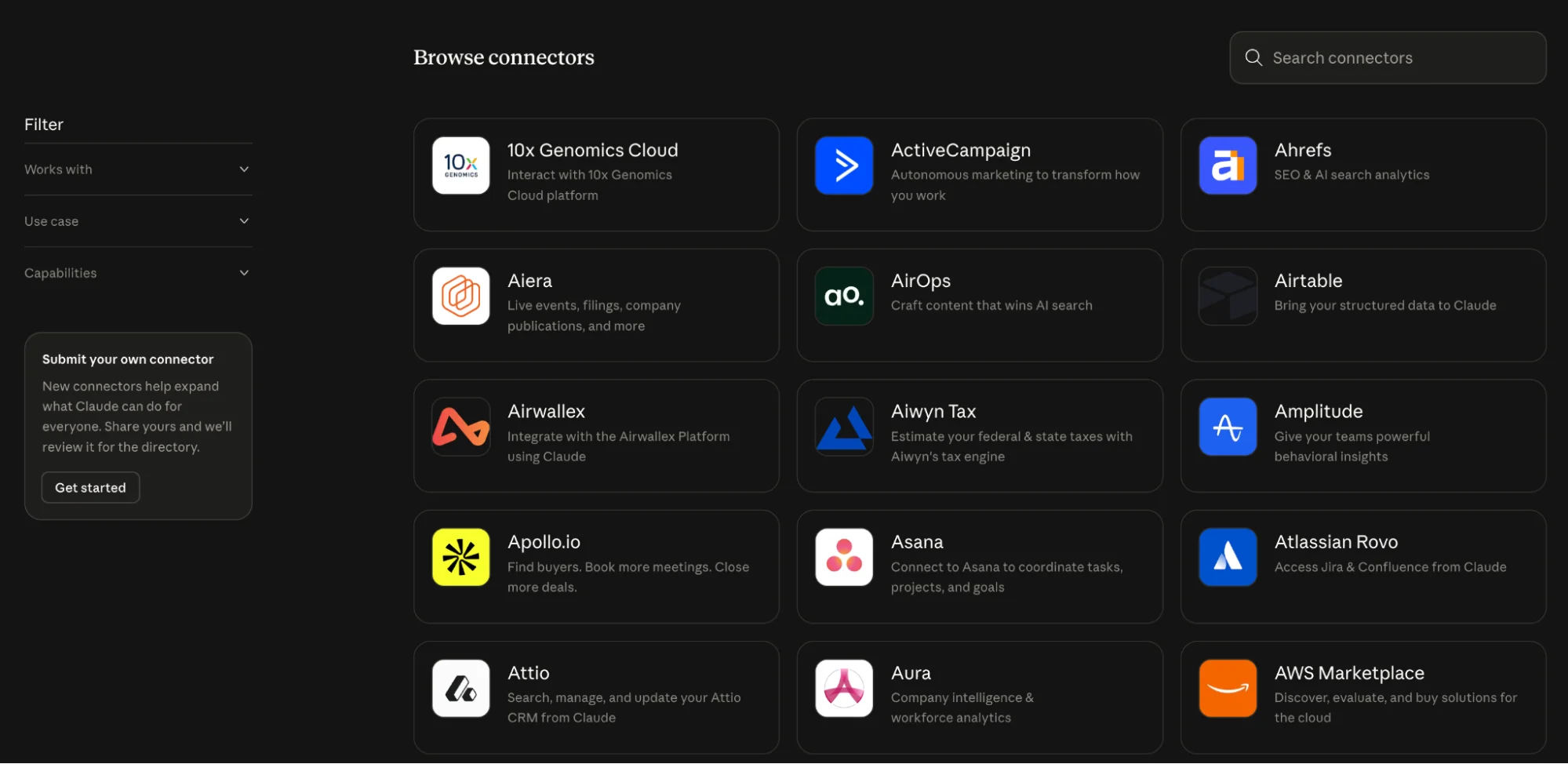
Anthropic first launched Agent Skills as a Claude-specific feature. But two months later, they released the spec as an open standard and simultaneously published a partner directory featuring Atlassian, Canva, Cloudflare, Figma, Notion, Ramp, Sentry, Stripe, and Zapier.
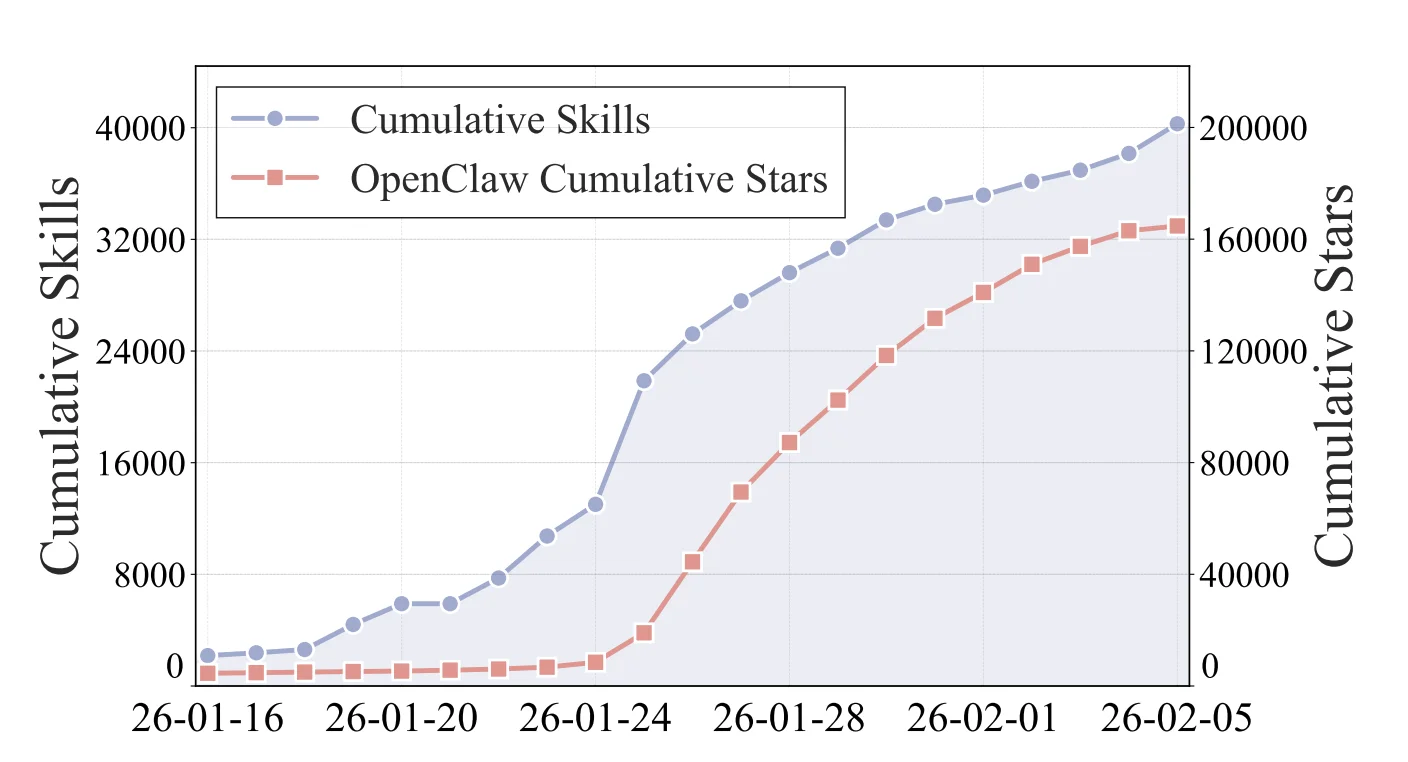
The numbers reflect what followed. A February 2026 study by researchers at Bosch Research and Carnegie Mellon University (arXiv:2602.08004) analyzed 40,285 publicly listed skills and found the ecosystem grew 18.5× in just 20 days — from 2,179 skills on January 16 to over 40,000 by February 5. The sharpest spike hit January 25, when 8,857 skills were published in a single day, accounting for 23% of all new listings in the window. That same week, OpenClaw surged past 170k GitHub stars total.
Source: Ling et al., "Agent Skills: A Data-Driven Analysis," arXiv:2602.08004
Simon Willison noted that OpenAI had already added skills support to both ChatGPT and the Codex CLI before the standard even launched. ChatGPT's code interpreter environment included a /home/oai/skills folder with built-in skills for PDFs, documents, and spreadsheets. GitHub Copilot, Cursor, VS Code, and Gemini CLI followed, each implementing the same SKILL.md format for their own discovery paths.
The underlying architectural bet with skills is to move away from building specialized, single-purpose agents toward equipping one general-purpose agent with a skill library.
Anthropic's own engineers used Claude in 60% of their work and reported a 50% productivity increase, a two-to-threefold gain from the prior year. And skills are part of why that number holds up at scale: specialized knowledge loads on demand, without requiring a different agent for every function.
"Enterprise customers are using skills in production across both coding workflows and business functions like legal, finance, accounting, and data science," Murag said in a VentureBeat interview.
Administrators on Team and Enterprise plans can provision skills centrally, controlling which workflows are available across their organizations while letting individual employees customize their own.
The other driver is that CLIs have become the preferred runtime for AI agents, and skills are designed for exactly this environment. They're version-controlled alongside your code, discoverable through a standard directory structure, and shareable through package-style tooling: npx skills add firebase/agent-skills and install Firebase's full skill set for Gemini CLI in a single command.
How to use AI agent skills
To begin with, start by installing a skill which takes under a minute. The npx skills CLI handles discovery and installation across platforms:
# Install Firebase skills for Gemini CLI
npx skills add firebase/agent-skills

# Install a specific skill from a GitHub repo
npx skills add anthropics/skills/pdf
Where skills are stored depends on your agent.
- Claude Code reads from ~/.claude/skills by default
- Codex CLI uses ~/.codex/skills
- Cursor reads from project-level directories
- Gemini CLI scans ~/.gemini/skills
The npx skills tooling handles placement automatically based on the installed agents. If you're installing manually, make sure to drop the skill folder in the right directory and restart your agent session. Skills are discovered at startup.
You can browse community collections in a few places. skills.sh is the main searchable directory for published skills across the ecosystem — maintained by Vercel, it lets you find skills by category, author, or install count without digging through GitHub repos. For a curated shortlist, see our roundup of trending GitHub repositories for AI developers. The anthropics/skills repository contains official reference skills for Claude Code. The github/awesome-copilot repository has community skills for GitHub Copilot. Anthropic also launched a partner directory at claude.com/connectors with enterprise-ready skills from Atlassian, Figma, Canva, Stripe, Notion, and Zapier.
On the Firecrawl blog, we have a curated list of the best Claude Code skills worth installing, a guide to the best Codex skills for OpenAI Codex CLI users, and the OpenClaw project has built a collection of skills specifically for agentic workflows. If you're deciding which agent to use as your primary runtime, the Claude Code vs Codex comparison covers how the two agents differ in harness depth, sandboxing, and skill ecosystem. For a curated guide to the best skills to install in Antigravity, see Which Antigravity skills are worth installing in 2026?.
Once installed, skills activate automatically. You don't need to invoke them manually (though you can by typing /skill-name in some agents). When your request matches a skill's description, the agent loads it and for the rest of the time, the context stays clean.
How to build your own agent skills
Building a skill requires a folder and a markdown file, that’s it.
Here's the minimum working structure:
my-skill/
└── SKILL.md
And the minimum working SKILL.md:
---
name: my-skill
description: >-
  Describe what this skill does and exactly when the agent should use it.
  Include specific trigger keywords and scenarios.
---
# My Skill
Instructions here. Write in plain markdown and be specific about what you want the agent to do, what format to follow, and what to check before finishing.
The instruction body can mention scripts and reference files using relative paths:
# Code Review Skill
Run the review script before giving feedback:
See [review script](./scripts/review.py) for the full analysis.
Consult [our code standards](./references/standards.md) for team conventions.
From testing agent skills, I’ve noticed the description field carries more weight than it appears to. The description is used by the agent to decide whether to activate the skill at all. A vague description like "helps with code" will miss most triggers.
But a specific description like "Format commit messages using conventional commits spec. Use when the user asks to write, review, or fix a commit message" activates at exactly the right moments. Good context engineering in the description decides if a skill activates reliably or rarely loads.
📝Note: There’s a skill-creator skill by Anthropic and Firecrawl Claude skill generator (via the /agent endpoint) that lets you build compliant, descriptive, and highly specific skills without writing to a markdown file. I’d personally stick to a combination of these
The Agent Skills Specification also caps SKILL.md bodies at 5,000 tokens (recommended) and full skill directories at 500 lines, pushing you to keep instructions focused and move supporting detail into references/ files. This constraint is useful: it forces you to identify what the agent actually needs versus what's nice to have.
Best practices for writing agent skills
Once you know how to build a skill, the harder question is whether you should — and what makes a skill actually good. The framework below is drawn from engineer Ville's post "Does Your Skill Earn Its Keep?", which is one of the clearest pieces I've read on skill design.
Try the task without a skill first
Before writing a single line of YAML, open your agent and describe what you want without any skill. If it handles the task well already, you don't need a skill. If it succeeds but takes a roundabout path, or fails in a specific way, that gap is what your skill should fill — nothing more.
The mistake is skipping this step entirely. You can't know what the agent needs help with if you've never watched it try on its own.
Understand the context tax
Every skill you add carries a cost. Your skill's description loads into the context window on every session, for every engineer, whether the skill fires or not.
100 tokens of description. 1,000 engineers. 10 sessions a day. That's 1 million tokens of daily overhead before the agent touches a single task.
The question isn't "Is this skill useful?" It's: will this skill earn back what it costs to carry? At 10 engineers, you'll never notice. At 10,000, a poorly targeted skill becomes a silent tax on every AI conversation your organization has, compounding daily.
Write an eval before you write the skill
If you've identified a real gap, don't write the skill yet — write an eval. Encode the task and measure how your current model and harness handles it. That gives you a baseline, and after writing the skill you can measure whether it actually helped. Without an eval, you're guessing. You might write a skill that adds noise, confuses the model, or conflicts with other skills.
Ask: is this a skill or a script?
Before writing skill content, ask whether this is mostly a sequence of deterministic steps. If someone could write a bash script or a Makefile target that does 80% of it — do that instead. The worst skills use 500 tokens of natural language to describe something that is really just make test with some flags.
A skill can call a script. The skill handles the judgment calls: when to run it, how to interpret the output, what to do when something unexpected happens. The script handles the predictable parts reliably and cheaply. Bundle the script alongside your skill and reference it with ${CLAUDE_SKILL_DIR}/my-script.sh.
Keep it minimal
When you write a skill, ask: what's the smallest nudge I can give the agent to close the gap I identified?
Not a comprehensive guide. Not a tutorial. A nudge. A pointer to the right framework. A reminder about an internal convention the model can't know. A specific flag that's easy to miss.
Every extra line of skill content is more context the model has to process, more potential for conflicting instructions, and more maintenance burden when things change. The best skills are short enough to read in under a minute.
Be honest about scope and distribution
Who is this skill for? A detailed end-to-end skill for your team's specific workflow is unlikely to be useful to anyone outside your team — and if it's in the default set, everyone pays the context tax for it.
- Broadly applicable (most engineers would benefit): ship it in your default configuration.
- Team or domain-specific: make it opt-in, so teams choose to install it.
A skill that's incredibly valuable to 15 people and meaningless noise to 5,000 others should not be loaded by default. If your tooling supports a marketplace or modular distribution, use it.
Technical best practices for SKILL.md files
A few specifics worth knowing when you sit down to write:
Naming: Skill names become /slash-commands. Use lowercase letters, numbers, and hyphens only — no underscores, no spaces, no capitals. Max 64 characters. deploy-to-staging is valid. Deploy_To_Staging is not.
The description field: This is the most important field in your front matter. Write it for the model, not for humans. Its job is to help the agent decide when to invoke the skill — a vague description like "helps with deployments" wastes tokens in every irrelevant session. A precise one like "Deploy services to staging using the internal deploy CLI, triggered when user asks to deploy or release" fires only when it matters.
Front matter options worth using:
disable-model-invocation: true— prevents automatic loading; users invoke the skill manually with/name. The description drops out of context entirely, reducing the tax to near zero. Use this for skills with side effects: deployments, commits, external writes.paths— glob patterns that limit when the skill auto-activates. If your skill only applies tolibs/go/, it won't be considered when working in unrelated parts of the repo.allowed-tools— scopes what tools the skill can use without prompting for permission. Supports wildcards:Bash(gh *)allows anyghcommand.effort— controls thinking depth (low,medium,high). For a quick formatting skill,lowis fine. For architecture decisions,highmakes a real difference. Don't leave this to chance.context: fork— runs the skill in an isolated subagent with its own context window. Useful for heavy reference-gathering tasks that would otherwise bloat the primary session.argument-hint— shows users what arguments your skill expects during autocomplete.argument-hint: [environment]makes/deployshow as/deploy [environment].
Dynamic variables: Skills support runtime substitutions that most authors overlook: $ARGUMENTS (everything passed after the slash command), $ARGUMENTS[0] for positional access, and ${CLAUDE_SKILL_DIR} to reference bundled scripts regardless of where the user's working directory is.
What are my top 5 agent skills?
- Skill creator. Instead of writing SKILL.md files from scratch, you describe what you need in conversation and the agent writes the skill. I've used this to build custom skills for client review processes, content formatting rules, and internal tooling conventions. Each took under five minutes.
- Firecrawl skill. Web scraping inside an agent session is unreliable without a proper tool. The Firecrawl skill gives your agent access to Firecrawl's scraping, crawling, search, and browser automation endpoints. This is a capability uplift skill: without it, the agent can't reliably extract structured data from live websites. With it, web data becomes a first-class input to any agentic workflow. Scrape a competitor's pricing page, extract API docs from a URL, search the web and get clean markdown back. All from inside your agent session. The same February 2026 study found web search and retrieval skills attract an average of 1,268 installs per skill — the highest of any category, nearly 5× more than code generation — but remain one of the most undersupplied. Most developers publish what they can easily build, not what's actually in demand. The install also ships 16 workflow skills for repeatable jobs — SEO audits, competitive intelligence, market research, design system cloning — demonstrated in Claude Code Just Got 16 New Powers You Should Be Using.
- Frontend design. Claude's default UI output is predictable in a bad way (you know the infamous purple gradients). The Frontend Design skill teaches the agent a specific design vocabulary: typography rules, spacing systems, color palettes, and component patterns. The result is interfaces that don't look like they came from an AI. Worth installing before any frontend work.
- Document skills. PDFs, Word documents, Excel sheets, and PowerPoint files are formats agents can't process natively. Document skills give your agent the scripts it needs to read, write, merge, and extract from all of them. For any workflow that touches business documents, this fills a real gap.
- Trail of Bits Security. Security review is one of those tasks where LLMs are confidently unreliable without structured guidance. The Trail of Bits security skill runs CodeQL and Semgrep analysis and gives the agent a framework for interpreting results. It's not a replacement for a real security audit, but it catches real vulnerabilities that casual code review misses.
- Andrej Karpathy's Guidelines. The most starred behavioral skill on GitHub (144k stars), built by Forrest Chang from Karpathy's viral post about LLM coding pitfalls. One
CLAUDE.mdfile, four rules: think before coding, simplicity first, surgical changes, goal-driven execution. It won't give your agent new capabilities, but it will stop it from confidently overengineering a 50-line problem into 500 lines and rewriting code it was never asked to touch.
The full list of my favorite skills is in the best Claude Code skills guide, which covers nineteen skills across web data, UI quality, code performance, document handling, security, and cross-agent delegation.
Use the Firecrawl skill to give your AI agents web context
AI agents are powerful at reasoning, but they're cut off from the live web by default. Their training data has a cutoff date. They can't check a competitor's current pricing, pull specs from a documentation page, or verify a claim against a live source. Skills can fix many gaps, but web access is one where you need the right tool.
The Firecrawl skill solves this. One install command sets it up across every AI coding agent on your machine:
npx -y firecrawl-cli@latest init --all --browserThe --all flag installs the skill to every detected agent (Claude Code, Codex CLI, Gemini CLI, Cursor). The --browser flag handles API key authentication so you don't have to copy anything manually. After that, your agent has a complete web toolkit it can use on its own. For Codex users this is especially useful since Codex CLI has no live internet access by default — the Firecrawl skill patches that gap immediately.
What the skill gives you:
firecrawl scrape— clean markdown from any page, including JavaScript-heavy sitesfirecrawl search— web search with scraped results in one stepfirecrawl crawl— recursively follow links across an entire sitefirecrawl interact— scrape a page then interact with it via natural language or Playwright
In practice, this means your agent can do things like: pull a competitor's pricing page into a comparison table, extract API docs from a URL on the fly, or research a topic and return clean structured data — all without you leaving the session or doing any manual copying.
The Firecrawl CLI is specifically designed for agentic workflows. It writes results to files rather than dumping raw HTML into the context window, which keeps token usage efficient even when crawling large sites.
Get a free API key at firecrawl.dev/app/api-keys. Full reference at skills.sh/firecrawl/cli.
Specialize your AI model with agent skills
Agent skills are what the AI agent ecosystem was missing: a portable, version-controlled format for encoding the knowledge that makes agents actually useful in real workflows. The open standard means the work you put into a skill today travels with you across every agent platform that adopts the spec, and that list is growing every month.
What are the limitations of using agent skills?
That said, they're still early. A few limitations are worth knowing before you go deep:
Updating skills mid-use is awkward. Skills load at session start. If you push changes to a SKILL.md while an agent session is already running, those changes won't take effect until the session restarts. For teams sharing skills centrally, rolling out updates without disrupting active workflows is a real coordination problem that the tooling hasn't fully solved yet.
Discovery is noisy. The February 2026 study of 40,000+ skills found that 46% of marketplace listings share a name with at least one other skill — near-identical reposts of the same intent. Without reliable quality signals, finding the best version of a skill for a given task requires more manual evaluation than it should.
The skills that get built aren't always the ones most needed. Developers publish what's easy to write: 55% of all skills are software engineering workflows. Meanwhile, information retrieval skills — the category with the highest install counts by far — remain undersupplied because they require stable connectors and ongoing maintenance. The ecosystem is growing, but unevenly.
Action-enabling skills carry real risk. Skills that interact with external systems, execute shell commands, or manage credentials can cause side effects in the real world. The same study found that nearly 40% of published skills access sensitive context or perform writes, and 9% fall into the critical risk category. The spec doesn't yet enforce permission models or sandboxing at the platform level, so the burden of scoping skills safely falls on whoever writes them.
A SKILL.md file with a name, a description, and five lines of instructions is a real skill that works in production today. Just go in with clear eyes about where the rough edges still are.
Frequently Asked Questions
Do agent skills work across different AI agents?
Yes. The Agent Skills specification at agentskills.io is an open standard. A SKILL.md file you build for Claude Code works identically in OpenAI Codex CLI, Gemini CLI, GitHub Copilot, Cursor, VS Code, and any other platform that has adopted the standard, which now includes more than 26 tools.
How many skills can I install before hitting context limits?
Each skill costs roughly 30-50 tokens at startup (just name and description). An agent with 100 skills installed uses approximately 3,000-5,000 tokens at session start for skill metadata. The full instructions only load for the skill that activates on a given task. In practice, 50-100 skills is manageable. The Agent Skills Specification recommends keeping individual SKILL.md bodies under 5,000 tokens and full skill directories under 500 lines to keep activation efficient.
Where do I find community skills?
The anthropics/skills repository has official reference skills for Claude Code. The github/awesome-copilot repository has community skills for GitHub Copilot. Anthropic's partner directory at claude.com/connectors has enterprise-ready skills from Atlassian, Figma, Canva, Stripe, and others. You can also browse agentskills.io for the growing ecosystem of published skills.
Can skills include executable code?
Yes. Skills can bundle Python, Bash, or JavaScript scripts in a scripts/ directory. The agent runs these scripts directly during task execution without loading them into context. This matters for operations where deterministic code execution is faster and more reliable than LLM generation: PDF extraction, data transformation, API calls, and linting runs.
What are the best agent skills to use right now?
Anthropic's official skills repo (github.com/anthropics/skills) has well-maintained reference skills including a frontend design skill that gets Claude past generic AI output. For enterprise integrations, the partner directory at claude.com/connectors has production-ready skills from Figma, Notion, Stripe, and Atlassian. If you want a curated breakdown with install commands and use cases, see our guide to the best Claude Code skills.