TL;DR
- cURL is a command-line HTTP client that sends requests and returns the data the server responds with, raw and unprocessed.
- Scraping a page takes under a second, and the
--parallelflag lets you fetch dozens of URLs concurrently (4 pages in parallel took 1.49s vs 39.43s sequentially in our tests). - It has no JavaScript engine, no HTML parser, and no retry logic, so most modern sites built on React or Next.js return a shell of script tags rather than any usable content.
- Firecrawl fills that gap by running a real browser behind its API, returning clean markdown instead of raw HTML and handling the JavaScript problem entirely on its end.
Daniel Stenberg first built cURL in 1996 to pull currency exchange rates for an IRC bot running on an Amiga. The tool was renamed "curl" in 1998. It was a single-purpose tool designed to make HTTP requests and nothing more. Today libcurl is embedded in billions of devices across every major platform, and that scope still hasn't changed.
You may reach for cURL because it comes pre-installed and gives you a response in seconds. For quick API testing, one-off data pulls, or understanding exactly what a server returns before you build a real scraper, cURL is the right call. But for scraping the modern web, you'll want to use a tool like Firecrawl instead.
What is cURL?
cURL stands for Client URL.
It's a fully open-source command-line tool for transferring data over network protocols, with HTTP being the most common use case. At present, cURL supports over 25 protocols including HTTP, HTTPS, FTP, SMTP, and WebSocket.
For web scraping, only HTTP and HTTPS matter, but that breadth is why libcurl is embedded in everything from game consoles to medical devices. The command-line tool and the library share the same codebase, so when you run curl in your terminal you're using the same transport engine that ships inside Android, macOS, and hundreds of commercial products.
What is cURL web scraping?
Web scraping with cURL means sending precisely crafted HTTP requests to a server and capturing the response body. cURL handles the transport layer (setting headers, managing cookies, following redirects, routing through proxies) and you get exactly what the server sends back.
cURL works well for scraping static pages, REST APIs, and sites that deliver their full content in the initial HTML response. For any page that uses JavaScript to render visible content, cURL returns the pre-render HTML skeleton, which is often just script tags and empty divs rather than the data you actually want.
What are the basic cURL commands for web scraping?
First, verify your installation. Open your terminal and run curl --version.
curl --versionOutput:
curl 8.7.1 (x86_64-apple-darwin25.0) libcurl/8.7.1 (SecureTransport) LibreSSL/3.3.6 zlib/1.2.12 nghttp2/1.68.0
Release-Date: 2024-03-27
Protocols: dict file ftp ftps gopher gophers http https imap imaps ipfs ipns ldap ldaps mqtt pop3 pop3s rtsp smb smbs smtp smtps telnet tftp
Features: alt-svc AsynchDNS GSS-API HSTS HTTP2 HTTPS-proxy IPv6 Kerberos Largefile libz MultiSSL NTLM SPNEGO SSL threadsafe UnixSockets
If the terminal returns a "command not found" error, install cURL from the official cURL website.
Once that works, you're ready to test cURL.
cURL syntax:
curl [options] [URL]The options here are flags that change how an HTTP request is sent or how the response is handled. You can combine as many flags as you need in a single command (as I'll show you in just a bit).
Fetch a page and print it to your terminal:
curl https://www.firecrawl.devSave the response to a file instead of printing it:
curl https://www.firecrawl.dev -o firecrawl.htmlHere, the -o flag is followed by a custom file name to save the HTML response.
Check webpage headers without downloading the page:
curl -I https://www.firecrawl.devHTTP/2 200
content-type: text/html; charset=utf-8
server: Vercel
cache-control: public, max-age=0, must-revalidate
x-robots-tag: index, followHere's the full list of flags I'll cover across this guide.
| Flag | What it does |
|---|---|
-s | Runs in silent mode to suppress progress bars |
-L | Follows HTTP redirects automatically |
-o | Saves the output directly to a local file |
-I | Fetches only headers using a HEAD request |
-A | Overrides the default User-Agent string |
-H | Appends or modifies a specific request header |
-b | Sends stored cookies from a text file |
-c | Saves new cookies to a text file |
-x | Routes the request through an external proxy |
--parallel | Fetches multiple target URLs concurrently |
How to use cURL for web scraping?
Best way to understand these flags is to put them into practice. I’ve created a few examples showing both the CLI commands and its Python equivalent that you can immediately run and test.
1. Making a basic request with cURL
Fetch the Firecrawl homepage while using the -L flag (which follows HTTP redirects)..
curl -s -L https://www.firecrawl.dev -o firecrawl.htmlThis command produces no output on the terminal but you will see a firecrawl.html file in the directory.
If you want to implement this in a Python program, you can call curl using subprocess like this:
import subprocess

result = subprocess.run(
    ["curl", "-s", "-L", "https://www.firecrawl.dev"],
    capture_output=True,
    text=True
)
print(result.stdout[:300])
Output:
<!DOCTYPE html><html lang="en"><head><meta charset="utf-8"/>
<meta name="viewport" content="width=device-width, initial-scale=1"/>
<title>Firecrawl - The Web Data API for AI</title>
2. Setting headers and User-Agent for cURL requests
Servers read every request's User-Agent header. cURL identifies itself as curl/8.7.1 by default, and many servers either block it or serve a degraded response. But you can use the -A flag to override it, and -H to add any additional headers you need.
curl -s -L \
  -A "Mozilla/5.0 (Macintosh; Intel Mac OS X 10_15_7) AppleWebKit/537.36" \
  -H "Accept-Language: en-US,en;q=0.9" \
  https://www.firecrawl.dev -o firecrawl.html
In Python:
import subprocess

result = subprocess.run([
    "curl", "-s", "-L",
    "-A", "Mozilla/5.0 (Macintosh; Intel Mac OS X 10_15_7) AppleWebKit/537.36",
    "-H", "Accept-Language: en-US,en;q=0.9",
    "https://www.firecrawl.dev"
], capture_output=True, text=True)
print(f"Size: {len(result.stdout):,} characters")
Output:
Size: 1,305,972 charactersOver a megabyte of HTML in under a second. That's the raw server response, everything the server sent, with nothing parsed or extracted.
Note: Per the curl documentation, passing a header name with no value removes it from the request entirely, which is useful when you want to strip cURL's defaults.
3. Managing cookies
cURL's cookie engine is off by default. You can use the -c flag to write cookies the server sets to a file and then use the -b flag to send the cookies from a file on the next request.
When used together, you can keep a session alive across multiple requests:
# First request: server sets cookies, cURL saves them
curl -s -L -c cookies.txt -o /dev/null https://www.firecrawl.dev

# Second request: cURL reads and sends those cookies
curl -s -L -b cookies.txt -c cookies.txt https://www.firecrawl.dev/pricing -o pricing.html
The cURL documentation notes that cookies are stored in Netscape cookie file format. That means you can export cookies from a logged-in browser session using an extension like EditThisCookie and pass them directly to cURL to authenticate as yourself.
4. Using proxies with cURL
Route your request through a proxy with -x:
curl -s -L -x http://proxy.example.com:8080 https://www.firecrawl.dev -o firecrawl.htmlFor SOCKS5, swap the scheme:
curl -s -L -x socks5://proxy.example.com:1080 https://www.firecrawl.dev -o firecrawl.htmlPer the curl proxy documentation, HTTPS requests through an HTTP proxy automatically use the CONNECT tunneling method, so the connection stays encrypted end-to-end. Proxy credentials go in the address as user:password@proxy:port.
5. Fetching multiple URLs in parallel
By default cURL runs requests one at a time. The --parallel flag fetches multiple URLs concurrently, up to 50 at once:
curl -s --parallel --parallel-max 4 \
  -o home.html    -L https://www.firecrawl.dev \
  -o pricing.html -L https://www.firecrawl.dev/pricing \
  -o blog.html    -L https://www.firecrawl.dev/blog \
  -o docs.html    -L https://docs.firecrawl.dev
In Python:
import subprocess
import time

urls = [
    ("home.html",    "https://www.firecrawl.dev"),
    ("pricing.html", "https://www.firecrawl.dev/pricing"),
    ("blog.html",    "https://www.firecrawl.dev/blog"),
    ("docs.html",    "https://docs.firecrawl.dev"),
]

cmd = ["curl", "-s", "--parallel", "--parallel-max", "4"]
for filename, url in urls:
    cmd += ["-o", filename, "-L", url]
start = time.time()
subprocess.run(cmd)
elapsed = time.time() - start
print(f"Fetched {len(urls)} pages in {elapsed:.2f}s")
Output:
Fetched 4 pages in 1.49sRunning the same four requests sequentially takes 39.43 seconds. Each URL needs its own -o output file since cURL can't merge concurrent responses into one.
6. Dynamic web scraping with cURL
cURL has no JavaScript engine. Modern sites built on React, Next.js, or Vue render their content client-side. The server sends a loader, the browser executes the scripts, and the visible content appears after that. cURL gets the loader.
Run this against firecrawl.dev:
curl -s -L https://firecrawl.dev -o firecrawl.htmlOpen the file and most of what you'll find is this:
<script src="/_next/static/chunks/webpack-8f4e9a14e8482474.js" defer></script>
<script src="/_next/static/chunks/framework-1c17a9c20f07ddb0.js" defer></script>
<script src="/_next/static/chunks/main-app-a9e61de8f783ef93.js" defer></script>
The actual content (pricing, headlines, feature descriptions) is nowhere in the file.
Two workarounds exist when cURL is your only option. The first is finding the underlying API endpoint the page's JavaScript calls and hitting that directly. Open your browser's DevTools, go to the Network tab, filter by XHR/Fetch, reload the page, and watch which requests fire. Most SPAs load their content from a JSON endpoint that cURL can hit directly, returning clean structured data without any JavaScript dependency.
The second is using "Copy as cURL" in DevTools to capture an authenticated request with all its cookies and headers already populated. Right-click any request in the Network tab and paste the result directly into your terminal. Both approaches work for one-off cases and break quickly at scale. API endpoints change without notice, and copied cURL commands carry session tokens that expire. Dedicated dynamic web scraping tools handle JavaScript execution natively.
What are the limitations of cURL for web scraping?
While cURL is an excellent tool, it was made in the 90s when the web was mostly static. And even with continuous updates, the tool struggles with handling the client-side rendered modern websites.
Here are some of its main limitations:
- No JS rendering. Most modern websites have some bit of Javascript rendering which is deferred until the page structure is fully loaded. cURL only pulls the HTML structure and not the data that the JS is supposed to fetch after load.
- No HTML parsing. cURL returns raw HTML strings. Extracting specific fields means adding a parser like BeautifulSoup on top, writing selector logic for every field you want, and maintaining that logic every time the site changes its HTML structure.
- No rate limiting or retry logic. cURL sends requests as fast as the connection allows. Sites that throttle high-frequency traffic return 429 or 503 responses, and cURL has no built-in exponential backoff to handle that gracefully.
- No structured output. You get text. Converting that text to JSON, a CSV, or a database row is entirely on you.
- Session complexity. Multi-step workflows (search, fill form, submit, then scrape the result) require chaining cURL commands and manually threading cookies and tokens between each step. When a session expires you rebuild the whole chain.
- TLS fingerprinting. Some sites use TLS fingerprinting to tell scripted HTTP clients apart from real browsers. cURL's TLS fingerprint differs from Chrome's, and sites that enforce those checks may block cURL traffic regardless of what User-Agent you set.
What Firecrawl does that basic cURL commands can't
If you go back to that firecrawl.dev example (in point #2), cURL returned 1,305,972 characters of HTML and almost none of it was the content visible on the page.
Firecrawl's /scrape endpoint takes the same URL, runs it through a real browser, and returns 30,079 characters of clean markdown, 98% smaller and containing the actual content rather than a pile of script tags.
You call the /scrape endpoint the same way you'd call any API, with cURL:
curl -s -X POST https://api.firecrawl.dev/v2/scrape \
-H "Content-Type: application/json" \
-H "Authorization: Bearer fc-YOUR-API-KEY" \
-d '{"url": "https://docs.firecrawl.dev/features/scrape", "formats": ["markdown"]}'
This command provides you a JSON with the output type and a data key with the page markdown (or whichever format you requested).
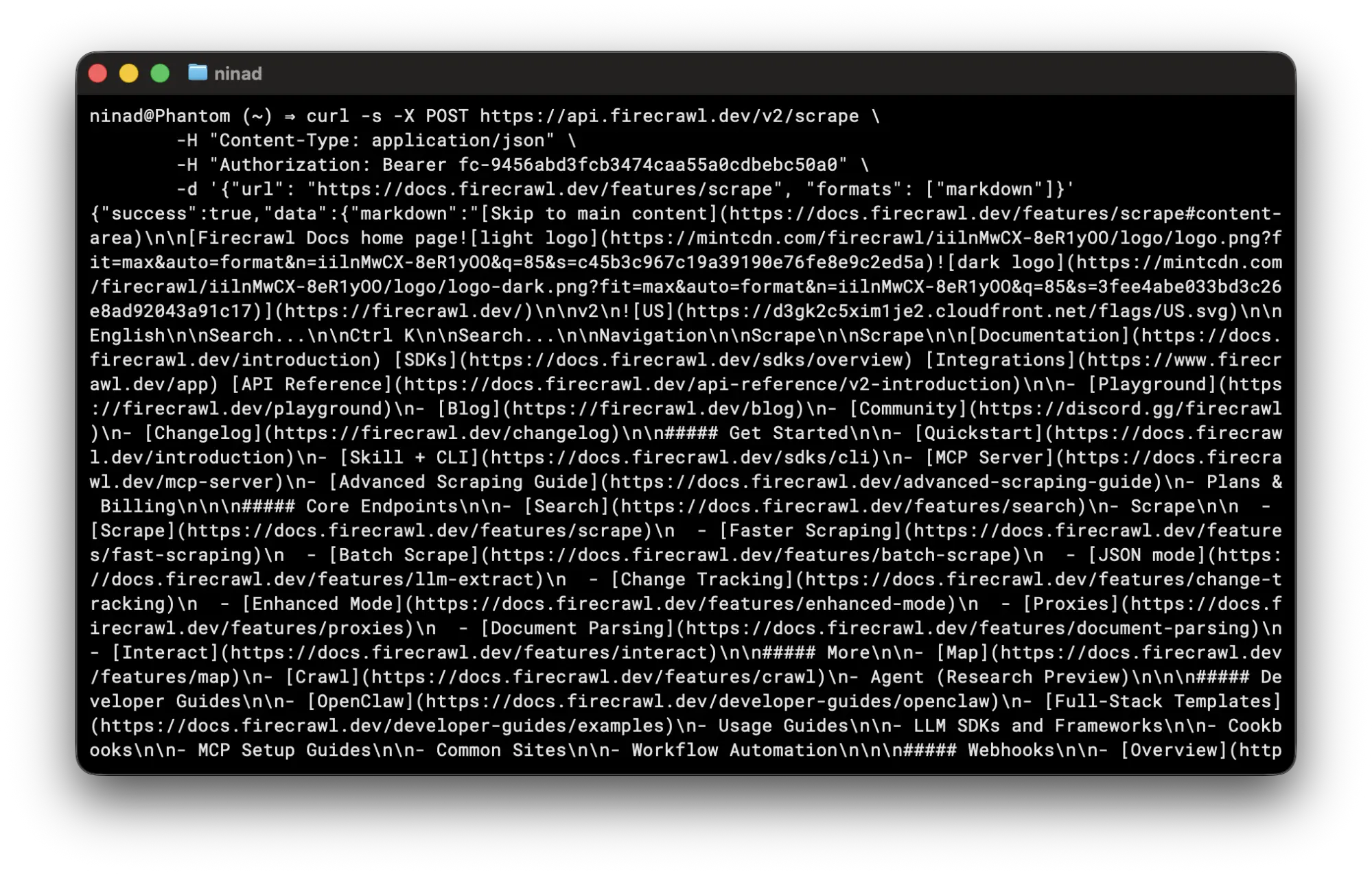
It skips all the HTML tags so you don't waste tokens if the output is directly piped into an LLM's context window.
You can also use the Firecrawl Python SDK in your scripts:
pip install firecrawl-pyfrom firecrawl import Firecrawl
app = Firecrawl(api_key="fc-YOUR-API-KEY")
result = app.scrape("https://www.firecrawl.dev/", formats=["markdown"])
print(result.markdown[:500])
print(result.metadata.title)If you need to scrape multiple URLs, batch_scrape handles concurrency internally:
from firecrawl import Firecrawl

app = Firecrawl(api_key="fc-YOUR-API-KEY")
urls = [
    "https://www.firecrawl.dev/",
    "https://www.firecrawl.dev/pricing",
    "https://www.firecrawl.dev/blog",
]
results = app.batch_scrape(urls, formats=["markdown"])

for page in results.data:
    print(f"{page.metadata.title}: {len(page.markdown):,} chars")
Real output:
Firecrawl - The Web Data API for AI: 30,079 chars
Firecrawl - The Web Data API for AI: 10,630 chars
Firecrawl - The Web Data API for AI: 29,406 chars
Beyond scraping single pages, Firecrawl's /crawl endpoint recursively crawls an entire site and returns all pages as structured data — the mastering the crawl endpoint guide covers depth limits, deduplication, and configuration in full. The /map endpoint returns every URL on a site in seconds. For LLM-driven structured data without hand-written parsers, use Firecrawl's /agent endpoint.
cURL scraping a JavaScript-heavy site means wiring together a browser automation tool, an HTML parser, and custom extraction logic for each field you want.
Firecrawl handles all three in one API call and returns data your application can use immediately. Get started at firecrawl.dev. The free tier includes 1,000 credits per month, enough to build and test a scraping workflow before you commit.
When to use cURL vs Firecrawl
There's a version of this guide in my head that'd end with "just use Firecrawl." And while I'd still recommend Firecrawl for production workloads, I believe cURL is worth knowing deeply.
It's the quickest way to isolate whether a problem is in your code or in what the server actually sends. When an API starts returning 403s, cURL lets you test headers and User-Agents one variable at a time without rebuilding your whole pipeline. It's also the fastest way to surface common web scraping mistakes like misconfigured headers or expired cookies.
So here's what I'd recommend. Use cURL for quick checks, API exploration, and one-off static page pulls.
Reach for Firecrawl when you need structured output from the modern web at scale.
Frequently Asked Questions
Can you web scrape with cURL?
Yes. cURL sends HTTP GET or POST requests and returns the server's response. For static HTML pages and JSON APIs, that's enough to extract data. For JavaScript-rendered pages, cURL returns incomplete HTML because client-side scripts never execute.
What is the difference between cURL and wget for web scraping?
Both are command-line HTTP tools but with different strengths. cURL gives you fine-grained control over headers, cookies, proxies, and output format, making it better for single targeted requests. wget is built for recursive downloads and can mirror an entire site with --recursive. For web scraping, cURL's flexibility with request parameters makes it the more common choice.
How do I handle JavaScript-rendered pages with cURL?
cURL cannot render JavaScript. Your options are to find the underlying API endpoint the JavaScript fetches and hit that directly, use your browser's 'Copy as cURL' feature to capture authenticated requests with all headers included, or use Firecrawl to handle JavaScript rendering server-side.
Can cURL follow redirects automatically?
Yes, with the -L flag. Without it, cURL returns the redirect response (301, 302, 308) and stops. With -L, cURL follows up to 30 redirects by default. Use --max-redirs N to set a custom limit.
How do I send multiple requests in parallel with cURL?
Use the --parallel flag with multiple -o output_file URL pairs. cURL runs up to 50 transfers simultaneously by default. Adjust the ceiling with --parallel-max. Fetching 4 pages in parallel took 1.49s vs 39.43s sequentially in our tests.
How do I save cookies between cURL requests?
Use -c cookies.txt to save cookies after a request and -b cookies.txt to send them on the next one. Both flags together on every request maintain a persistent session.
Is cURL suitable for large-scale web scraping?
cURL works for small-scale scraping of static pages. At scale, the lack of built-in rate limiting, retry logic, JavaScript rendering, and structured output makes it impractical without significant additional tooling. Purpose-built scraping APIs handle these concerns at the infrastructure level.
How do I use a proxy with cURL?
Pass the proxy address with -x followed by the proxy host and port. For SOCKS5, use -x socks5://proxy.example.com:1080. Add credentials directly in the address as -x user:password@proxy:port.
What does the -s flag do in cURL?
-s runs cURL in silent mode, suppressing the progress meter and error messages. It's almost always used in scripts so the output contains only the response body. Combine with -S to suppress the progress meter but still surface error messages.
Can cURL scrape HTTPS sites?
Yes. cURL supports TLS/SSL for HTTPS out of the box and verifies the server's certificate by default. Use -k to skip certificate verification in development environments with self-signed certs, though it's not something you'd want in production.