Back in 1969, Doug Engelbart demonstrated the computer mouse, hypertext, and networked collaboration in what's now called "The Mother of All Demos."
The presentation showed new tools that completely changed how humans interact with computers. Before the mouse, using a computer required memorizing complex commands. Afterward, everyone could point and click.
AI agents are at the same moment. A language model without tools is like a brilliant analyst locked in a room with no phone, no internet, and no way to verify anything. It can reason about what it knows, but it can't check current facts, run calculations, or take any action beyond generating text.
Traditional software, on the other hand, follows deterministic patterns where getWeather("NYC") executes the same way every time with no reasoning involved. Agent tools connect these deterministic functions with non-deterministic reasoning systems that might call that same function with different parameters, at unexpected moments, or combined with other tools in unexpected sequences.
TL;DR
- Agent tools are defined capabilities that allow language models to execute operations and retrieve information from external systems.
- Intelligent querying through tools prevents context window overload and avoids the performance degradation caused by massive prompts.
- These tools can be split into nine categories based on their use case. That includes web extraction, RAG retrieval, code execution, and database access to give agents broad capabilities.
- To create effective agent tools, you need to use unambiguous parameter names and descriptive schemas so models don't have to guess formats.
- You can use orchestration strategies like ReAct loops that allow agents to adapt their actions based on observations, while plan-and-execute fits linear tasks.
- Agent evaluation metrics should focus on tool selection accuracy, latency, and categorized failure modes to identify reasoning gaps.
- Firecrawl replaces fragile browser automation by turning dynamic websites into model-ready structured data.
What do "tools" mean in AI agents?
A tool is a defined capability that allows a language model to execute operations and retrieve information from external systems. I know that's a mouthful so let me simplify.
Consider the question "Should I bring an umbrella today in Tokyo?"
Without tools, an agent would respond: "Based on general climate patterns, Tokyo typically experiences rain during June and September. I'd recommend checking a weather service for current conditions, as I don't have access to real-time data."
With a weather tool, the same agent responds: "Yes, bring an umbrella. Tokyo currently has scattered showers with an 80% chance of rain continuing through the afternoon. The temperature is 18°C with winds at 15 km/h."
The difference is one agent speculates based on outdated training data and the other can retrieve current information and provide actionable answers.
Why do agents need tools instead of bigger prompts?
Language models have limited context windows, and even the most expansive models face performance degradation when overloaded with information. As highlighted in the "Lost in the Middle" research by Liu et al., models struggle to retrieve information buried in the center of long contexts.
Consider asking a model to find a specific phone number from a list of 10,000 contacts. If you include that entire contact list in a prompt, the language model has to read every entry, wasting its context window and driving up API costs. This method is fundamentally inefficient and slow.
Tools solve this through intelligent querying. Instead of loading all customer data into a prompt, you provide a search_customers tool that returns only relevant matches. The agent describes what it needs, the tool performs efficient lookups, and only useful results consume context. This is the core reason why modern RAG tech stacks prioritize targeted retrieval over massive context injection.
What are the core categories of agent tools?
I’ve divided agent tools into nine categories based on the specific capabilities they provide. Understanding these patterns helps identify which tools are most appropriate for a given use case.
1. Web search and web extraction tools
Web tools give agents access to current information beyond their training data. A web search tool discovers relevant sources, while an extraction tool fetches specific pages and returns clean, usable content. For a comparison of the leading options, see the guide to search tools for AI agents.
Every agent needs these capabilities to ground their responses in recent facts but building a scraping infrastructure is quite complex. Websites change, information is rarely structured or easily scrapable. Firecrawl’s specialized web search APIs handle extraction complexity so agents receive model-ready data. For instance, if you’re building a travel planning agent, Firecrawl can fetch flight information directly from airline websites.
This category also includes specialized scraping: product monitoring across e-commerce sites, news aggregation across publications, and research gathering from academic sources.
For agents that should be notified when pages or sites change, Firecrawl's /monitor lets you describe what to watch in plain English and sends a signed webhook when something meaningful changes. Because unchanged pages and noisy diffs do not trigger notifications, agents only need to process meaningful changes, cutting tokens up to 90%. See the full announcement of Firecrawl's web monitoring for AI agents for setup examples and use cases.
Read more here.
2. Knowledge base and RAG retrieval tools
Retrieval tools connect agents to internal knowledge, such as company policies or support tickets that aren't on the public internet. This relies on Retrieval-Augmented Generation, where documents are converted into vector embeddings and stored in a database.
Before documents reach that embedding step, they need to be collected, cleaned, and structured — that's the AI data preparation stage, and it's where most RAG systems quietly fail when skipped or done poorly.
Effective retrieval tools return context intelligently using semantic search to find relevant passages. Instead of dumping a whole document, a well-designed tool returns only the key policy statement and the surrounding context. This provides enough info for an accurate answer without wasting tokens.
3. Code and computation tools
Code execution tools let agents write and run programs for tasks requiring computation. Instead of attempting complex math in text, agents generate Python code, execute it in sandboxed environments, and use the results. This category includes code interpreters for calculations and data analysis, development tools that interact with version control, and data processing tools that handle large datasets.
In my experience, production implementations must use sandboxed environments to isolate agent-generated code from sensitive systems. You define boundaries around file access, network requests, and execution timeouts. Apart from that, returning actionable error messages like "The function expects a list but received a string" gives a clear solution to help agents self-correct without human intervention.
4. Data and database tools
Database tools allow agents to query structured data without loading entire datasets. An agent helping with customer analytics might query for users who signed up last month but haven't made a purchase. Here the agent receives a question, generates a SQL query, executes it, and formats results.
When integrating these agent tools, make sure your production systems explicitly use read-only connections and validate all parameters to prevent data leakage. The goal is to provide useful access while maintaining strict data integrity.
5. Communication and workflow tools
Communication tools connect agents to collaboration platforms like Slack, Teams, or email. Calendar tools check availability, and task tools create tickets or assign work.
These tools often consolidate complex operations into single workflows. For example, the n8n competitor monitoring workflow we created demonstrates this. It scrapes a site, compares versions, and sends a Gmail notification when changes occur. You can further enrich these tools with context enrichment, like attaching relevant documents to a meeting invite, makes them significantly more effective. For a broader evaluation of the platforms, see the guide to AI workflow automation tools.
6. Browsers and "computer use" tools
Browser automation allows agents to interact with websites through clicking and form-filling like a human would. While it is powerful, this automation is also quite fragile and slower than API calls. Interfaces change, which means you need to invest time in creating new scripts or burning tokens to let agents figure it out every time.
Read our guide on the best browser agents for AI automation.
But for government forms, legacy internal tools, and third-party services without APIs, it's often the only viable option.
For all other use cases, Firecrawl reduces the need for browser automation by extracting clean data programmatically. In my experience building these systems, this approach eliminates about 80% of the cases where you'd otherwise need browser automation.
7. Observability and evaluation tools
LLM observability tools provide a window into what agents are actually doing. Logging records every tool call and parameter, while tracing shows the reasoning steps leading to an answer.
Comprehensive logging is the only way to debug emergent agent behavior. When agents fail mysteriously or produce unexpected results, you need to understand their decision process and this category becomes extremely important. As noted in the Anthropic guide on tool evaluation, tracking accuracy, runtime, token consumption, and tool errors is the best way to reveal patterns like redundant tool calls.
8. Memory and personalization tools
Memory tools allow agents to remember information across conversations. Short-term memory stores context from the current conversation. The agent remembers what you discussed five minutes ago. Long-term memory persists across sessions, storing facts like preferred programming languages or ongoing project details.
To keep memory efficient, you need agent memory tools that use retrieval to fetch only the relevant memories based on the current topic of discussion. For example, if a user asks for a code review, the agent should only retrieve past coding preferences.
9. Security, permissions, and policy tools
Security tools enforce boundaries around agent actions. Permission systems verify whether an agent has the right to perform a requested task based on the user's role and context and policy enforcement ensures behavior complies with business rules and regulations.
Autonomous systems can have real-world consequences, so it’s always best to implement multiple layers of protection. This includes authentication, authorization, rate limiting, and audit logging. Policy tools can also enforce spending limits or require human approval for high-risk operations.
This is a rapidly evolving space, so don't be surprised if we see more types of agent tools emerge tomorrow. This list is based on my research as of January 2026.
How do you design tools the model can use reliably?
Anthropic's research on writing effective tools for agents explains, building effective tools means designing for systems that interpret descriptions, reason about when capabilities apply, and handle errors differently than humans would. Building such agent tools requires attention to interfaces, error handling, and performance characteristics.
What are effective tool interfaces and schemas?
Well-designed interfaces make it obvious what the tool does, what inputs it needs, and what results it returns.
Vague descriptions like "processes data" don't provide enough information for a model to use them correctly. Instead, I prefer specific descriptions like "searches customer databases by email and returns name and total purchases."
Parameter definitions must also be explicit. Instead of user, use user_id or user_email_address. Ambiguous names cause agents to guess the format incorrectly about 30% of the time in my experience. Clear JSON schemas provide the formal specifications needed to reduce these errors.
Inputs, outputs, and error contracts
Error messages should guide an agent toward a solution. Instead of returning a raw error code, return a message like "The 'date' parameter must be in ISO 8601 format (YYYY-MM-DD). You provided '01/15/2024'."
Only about 20% of the agent implementations I’ve reviewed include this level of detail, yet it drastically improves reliability. Such clear messages also improve the model’s ability to self-correct when something goes wrong and reduce the amount of human oversight required to complete tasks.
Idempotency, retries, and rate limits
Because models will retry operations or repeat tool calls while problem-solving, your tools must handle these patterns gracefully. Idempotent operations produce the same result when called multiple times with identical parameters. If an agent creates a document and immediately retries with the same parameters, return the existing document or safely indicate it already exists.
Rate limiting is also necessary to protect infrastructure from runaway agents. When an agent hits a limit, the tool should explain the restriction and when it can try again. To avoid overspending on tokens, set token limits on responses, return the first 20 results and explain how to refine the search
Cost, latency, and caching
Performance characteristics determine whether tools are practical for production use.
Caching reduces both latency and cost for frequently requested data. When agents repeatedly query the same information, caching returns results instantly instead of hitting databases or APIs.
Token efficiency in responses is also necessary as returning verbose outputs wastes tokens, increases generation latency, and raises processing costs.
What are common tool orchestration patterns?
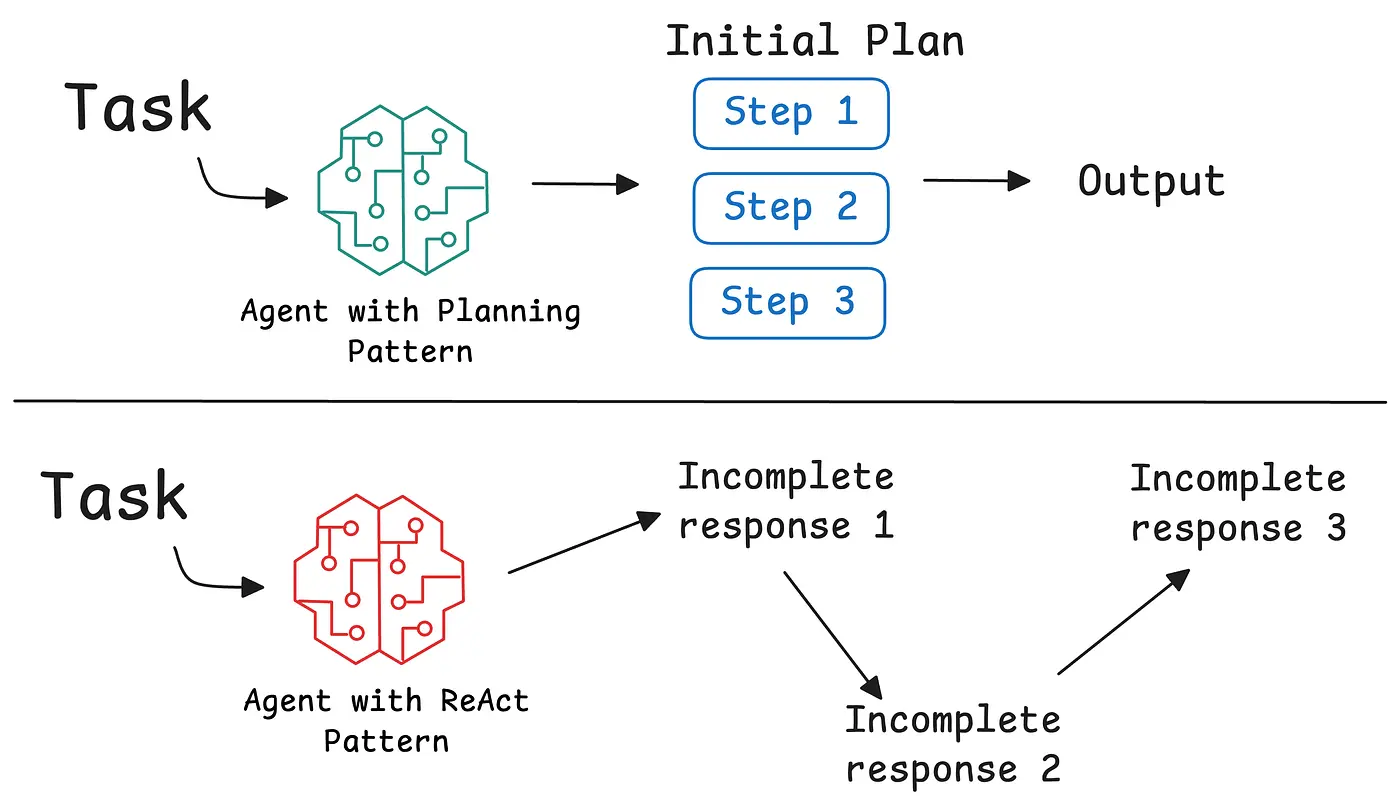
How an agent orchestrates its tools matters as much as the tools themselves. Different tasks require different logic for sequencing actions.
- Single-step tool use: The simplest pattern is single-step execution, where an agent calls one tool to answer a direct question, like "What is the current price of Bitcoin?" This works well for simple lookups but fails when a task requires multiple pieces of information.
- Plan-and-execute: In this architecture, the agent creates a complete plan before taking any action. For a task like "Compare the market position of our top three competitors," the agent identifies the competitors, gathers data, and then synthesizes it. This works best for well-defined problems but can be rigid if the initial plan is flawed.
- ReAct loops: ReAct (Reasoning and Acting) is an iterative pattern that alternates between thinking and acting. The agent takes an action, observes the result, and then reasons about what to do next. You can build a ReAct agent with LangGraph to see this in action. I find the Thought → Action → Observation pattern elegant because it mirrors human problem-solving. It is particularly effective for exploratory tasks like debugging or open-ended research. Each observation informs the next step, allowing the agent to adapt as it learns.
- Multi-agent collaboration: Some tasks are too complex for one agent. Multi-agent systems, such as those built with the Google Agent Development Kit or CrewAI’s agent frameworkI, divide labor among specialized agents. A "flights agent" and an "accommodations agent" can work together under a "host agent" to plan a trip.
- Human-in-the-loop escalations. Production agents need the ability to escalate to a human when they face uncertainty or high-stakes decisions. Rather than respond with a "I don't know,” the agent should explain what information they have, what's missing, and what options they've considered. The Open Researcher agent we built demonstrates how agents can reason through complex research tasks autonomously.
How should you evaluate agent tools?
You can't improve what you don’t measure. Over the last couple of months building agent systems, one of the most valuable lessons for me has been about establishing systematic evaluation before scaling production usage.
| Metric | Description | Key indicators |
|---|---|---|
| Accuracy | Measures whether the agent selects the correct tool and passes valid parameters for a given task. Higher-quality evaluation would also compare the agent's actual "trajectory"—the sequence of tool calls—against a reference path. | Tool selection accuracy (picking the right tool for the job); parameter precision (ensuring the arguments match the required schema). |
| Latency | Speed is critical for user experience. Track both total completion time and individual tool call latency. Monitoring latency distributions helps identify if an agent is stuck in a reasoning loop or if a specific external API is slowing down the entire workflow. | Total completion time; individual tool call latency; latency distributions. |
| Cost | Every tool call and reasoning step consumes tokens. Evaluate the cost per task by tracking total token usage across the interaction. The most efficient agents minimize redundant tool calls and use concise responses to keep operational expenses sustainable as you scale. | Total token usage per task; redundant tool call frequency; cost per task. |
| Failure Modes | Understanding how an agent fails is more important than knowing it succeeded. Categorize failures by type (tool errors, reasoning errors, workflow errors). Track error rates by tool and monitor for cascading failures and agent loops that indicate unclear tool descriptions. | Tool error rate; technical issues (rate limits, timeouts); logical issues (misinterpreting tool output); cascading failures and agent loops. |
The Anthropic research on writing effective tools shows that even small refinements to tool descriptions can yield dramatic improvements.
Where does Firecrawl fit in an agent toolbelt?
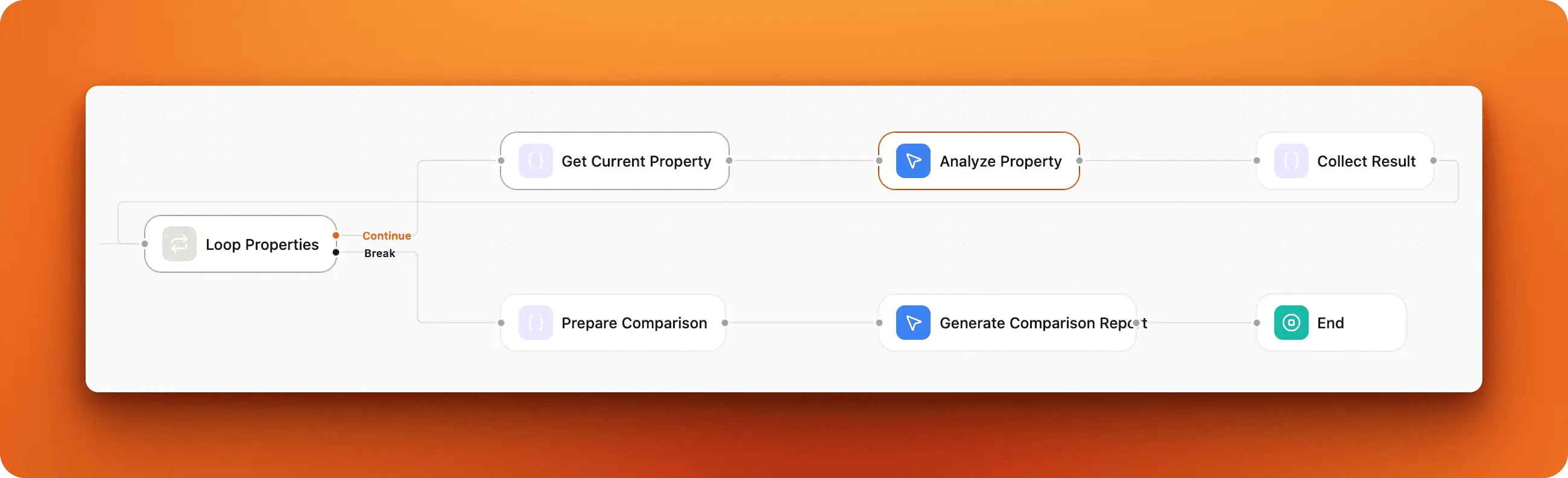
Most real-world agents need to interact with websites. Whether you're researching competitors, monitoring prices, or gathering information for analysis, the web contains vast amounts of useful data trapped in HTML, JavaScript, and dynamic content designed for human viewing.
Firecrawl solves the operational challenges with scraping and fetching data from the web and turning it into parsable outputs. Here’s how it fits into an agent toolbelt.
For a real-world example of an agent using Firecrawl’s full toolbelt, see the OpenClaw + Firecrawl guide and the 16 best OpenClaw skills for extending your agent’s capabilities.
Explore how we built eight powerful n8n web scraping workflows with Firecrawl that solve real business problems here.
1. Turning websites into clean, model-ready data
Websites are built for humans, full of navigation menus and ads that clutter an agent's context window. Firecrawl solves this by converting web pages to markdown for AI. The LLMs.txt endpoint even allows you to extract an entire site into a format optimized for AI consumption.
Firecrawl converts web pages into clean, structured data. Instead of parsing HTML yourself, you provide a URL and receive formatted content with clutter removed. The platform offers multiple endpoints for different use cases: scraping single pages, crawling entire websites, extracting structured data, and handling dynamic JavaScript content. The LLMs.txt endpoint extracts entire websites into organized knowledge ready for agent consumption.
Structured extraction for downstream actions
Raw text extraction isn't always enough. Many use cases require structured data that agents can use directly.
Consider a travel deal finder that compares flight prices across airlines. Firecrawl's structured extraction returns pricing, availability, and booking links as JSON with defined schemas, making it trivial for agents to compare options. This structured extraction capability makes it possible to build robust content generation pipelines and product intelligence systems with Firecrawl.
Scaling web data pipelines for agents
Scraping at scale requires managing rate limiting, proxies, CAPTCHAs, and website changes.
Firecrawl handles these concerns with 96% coverage, so agents can use the best data without additional data cleanup. This allows you to build deep research agents and AI chatbots with web context that operate reliably without needing a dedicated scraping infrastructure team. For a complete look at how web search for agents and deep research retrieval patterns wire into production stacks, see the dedicated guide.
Frequently Asked Questions
How many tools should an AI agent have access to?
Start with a few well-designed tools targeting high-impact workflows, then scale based on real usage patterns. Too many overlapping tools can confuse agents and lead to inefficient strategies.
What makes a tool description effective?
Effective descriptions explain what the tool does as if you're describing it to a new hire. Make implicit context explicit, including specialized query formats and domain terminology. Use unambiguous parameter names like user_id instead of just user.
How do I handle tool failures and errors?
Error messages should guide agents toward fixes. Instead of "Invalid date format", return "The 'date' parameter must be in ISO 8601 format (YYYY-MM-DD). You provided '01/15/2024'. Please reformat as '2024-01-15'."
Should tools return verbose or concise responses?
It depends on context. Some tools implement a response_format parameter letting agents choose. Concise responses save tokens for simple tasks. Detailed responses provide necessary information for complex analysis.
What's the difference between ReAct and plan-and-execute patterns?
ReAct alternates between thinking and acting in an adaptive loop where each observation informs the next action. Plan-and-execute creates a complete plan upfront and executes steps sequentially. ReAct works better for exploratory tasks. Plan-and-execute suits well-defined problems.
How does Firecrawl improve web data extraction for agents?
Firecrawl converts messy web pages into clean, structured data that agents can immediately use. Instead of parsing HTML and handling JavaScript rendering yourself, you provide URLs and receive formatted content. Structured extraction returns consistent data schemas across different websites. The platform handles operational concerns like rate limiting and proxy management.