TL;DR
- Semantic search understands intent - Tools use vector embeddings and neural networks to find results by meaning, not keywords
- Combined search + extraction wins - APIs like Firecrawl that return clean content eliminate scraping infrastructure
- Reranking improves existing systems - Cohere lets you upgrade legacy search without replacing it
- Vector databases handle scale - Pinecone stores billions of vectors but requires you to build everything else
- Choose based on your data source - Web data needs different tools than internal document search
| Tool | GitHub Stars | Best For | Language | Content Extraction | Dynamic Content |
|---|---|---|---|---|---|
| Firecrawl | 122k+ | LLM-ready web search + extraction, Firecrawl Alexandria data providers | Python/JS | Full markdown/HTML | Yes |
| Exa | N/A | Research agents, semantic discovery | Python/JS | Highlights/summaries | Yes |
| OpenAI Embeddings | N/A | RAG systems, custom indexes | Python/JS | None (BYO) | No |
| Cohere | N/A | Reranking existing search | Python/JS | None | No |
| Pinecone | N/A | Vector storage at scale | Python/JS | None | No |
Microsoft pulled the plug on Bing Search APIs in August 2025, and the developer community collective went into a tailspin. I didn’t.
Actually, I panicked for exactly ten minutes. Then I realized we had all been overpaying for a legacy tool that was never built for the age of LLMs anyway. That shutdown forced a migration to the new guard of semantic search tools, and frankly, the timing was perfect.
I spent the last few months breaking my own RAG pipelines and rebuilding them with these modern APIs. The difference between old-school keyword matching and actual semantic search is no longer subtle. It is the difference between a user searching for "cheap laptop" and getting a list of laptop cases versus getting a breakdown of budget-friendly Chromebooks.
If you choose the wrong tool now, you’ll be tearing out your infrastructure by July. I’d rather you avoid that headache.
Related Resources: For web data extraction, explore our web scraping libraries guide. To integrate search into agent workflows, check our best web search APIs guide, agent frameworks comparison, and LangChain integration guide.
What is a semantic search API?
A semantic search API uses natural language processing and high-dimensional vector embeddings to understand the query intent. Traditional search engines fall apart when users don’t use the exact right terminology. Semantic search solves this.
In plain English, this means your search engine actually knows what you are talking about.
For instance, if a lawyer searches for "wrongful termination," the API understands the concept of an unfair firing. It surfaces documents about "at-will employment violations" even if the specific words "wrongful termination" never appear.
The underlying tech is an embedding model that converts text into numerical vectors. In this mathematical space, similar concepts cluster together. When a query hits the system, it is converted into a vector, and the API finds documents with nearby vectors.
That’s a distinction you need to remember: vector search is the infrastructure, while semantic search is intelligence.
Vector databases handle the heavy lifting of storage and retrieval. Semantic search platforms add the reasoning layer, including query understanding, ranking logic, and result formatting. They are related, but they are certainly not interchangeable.
What are the primary use cases of semantic search APIs in 2026?
In 2026, the primary use cases for semantic search APIs have moved from "better search bars" to becoming the backbone of reasoning-heavy AI applications. Here are the four primary areas where these APIs are doing the heavy lifting:
1. Retrieval-augmented generation (RAG)
Your RAG pipeline is only as good as what you feed it. Poor retrieval leads to irrelevant data being fed into expensive language models. The models will hallucinate with total confidence, and your users will notice.
To deploy production-grade RAG, you need a semantic search API that understands query intent, pulls contextually relevant chunks, and formats them specifically for LLM consumption. An API that returns clean markdown instead of raw HTML saves you preprocessing time and cuts your token costs significantly.
2. AI agents and autonomous systems
While RAG focuses on the quality of data being fed into the system, autonomous agents introduce a new layer of complexity by needing to find that data on their own. See our guide to AI agent search APIs for a deeper look at how search fits into agentic workflows.
Agents can use semantic search APIs as their "eyes and ears" on the web. They can navigate through concepts like "CUDA performance" or "NVENC encoding" to gather a holistic answer without being explicitly told what keywords to look for.
3. Enterprise knowledge search
Internal company data is often messy because of the number of people involved in creating these documents. Employees shouldn't have to remember if a document was titled "WFH Policy" or "Remote Work Guidelines."
Semantic search allows natural language queries like, "Can I work from Spain for a month?" These APIs can identify the relationship between "work from Spain" and "international remote work policies” and provide instant answers.
While you still need standardization for documentation hygiene, you get a little more freedom with how things are written and organized in your knowledge base.
4. E-commerce and recommendations
We’ve finally moved past the era where searching for "red dress" on a clothing site showed you red shoes because the keyword “red” was a match.
Semantic search understands style, fit, and occasion. It can easily filter for formal attire and autumn color palettes when a user asks for "wedding guest outfits for October," mimicking a personal shopper experience, further improving your conversion rates.
What are the best semantic search APIs available today
Here are the semantic search APIs that deliver in 2026, with code examples and honest tradeoffs for each.
1. Firecrawl: the best semantic search API for LLM applications
I’m keeping Firecrawl first on the list for two reasons:
First, it’s our tool, and while I’m biased, I’m also sure you’ll love it. But the second reason is that I’ve lived through the nightmare of building separate search and scraping pipelines.
A big majority of search APIs just return a list of links. You have to build scrapers, handle proxy rotation, extract dynamic content, and parse messy HTML to get something an LLM can read.
Firecrawl skips all that. It’s an AI-based engine that combines web search with automatic content extraction in a single call. That is why it has exploded to over 180K GitHub stars and has become the standard for developers who just want their data in clean markdown without the infrastructure headache.
Firecrawl offers several capabilities that make it ideal for semantic search applications:
- Returns full page content in markdown, HTML, or structured JSON formats
- Category-based search targeting GitHub, research papers, PDFs, or general web
- Data tools from Firecrawl Alexandria returned in the same call when
sourcesincludesalexandria: official APIs, licensed publishers, and Firecrawl's own indexes, each with its inputs and price - Time-based filtering with
tbsparameter for recent or historical results - Native integrations with LangChain and LlamaIndex
- Structured data extraction using Pydantic schemas
- Search endpoint that combines discovery with extraction
The Search endpoint handles the core search functionality, returning full page content alongside search results in a single call.
Firecrawl is super simple to get started with. Install via pip with pip install firecrawl and grab an API key from the dashboard.
The free tier includes enough credits to validate your use case before scaling. Here's a complete example showing Firecrawl's search endpoint with content extraction:
from firecrawl import Firecrawl

# Initialize the client
firecrawl = Firecrawl(api_key="fc-YOUR_API_KEY")

# Validates that the search works
results = firecrawl.search(
    query="semantic search implementation best practices",
    limit=3,
    scrape_options={"formats": ["markdown"]}
)

print(f"Firecrawl Search Results ({len(results.web)} found):\n")

for result in results.web:
    # Normalize data access between Document (scraped) and SearchResultWeb (snippet)
    data = result.metadata if hasattr(result, 'metadata') else result
    content = getattr(result, "markdown", None) or getattr(result, "description", "")

    # Clean content for display
    snippet = content[:150].replace('\n', ' ').strip() + "..."

    print(f"Title:   {getattr(data, 'title', 'No Title')}")
    print(f"URL:     {getattr(data, 'url', 'No URL')}")
    print(f"Preview: {snippet}\n")
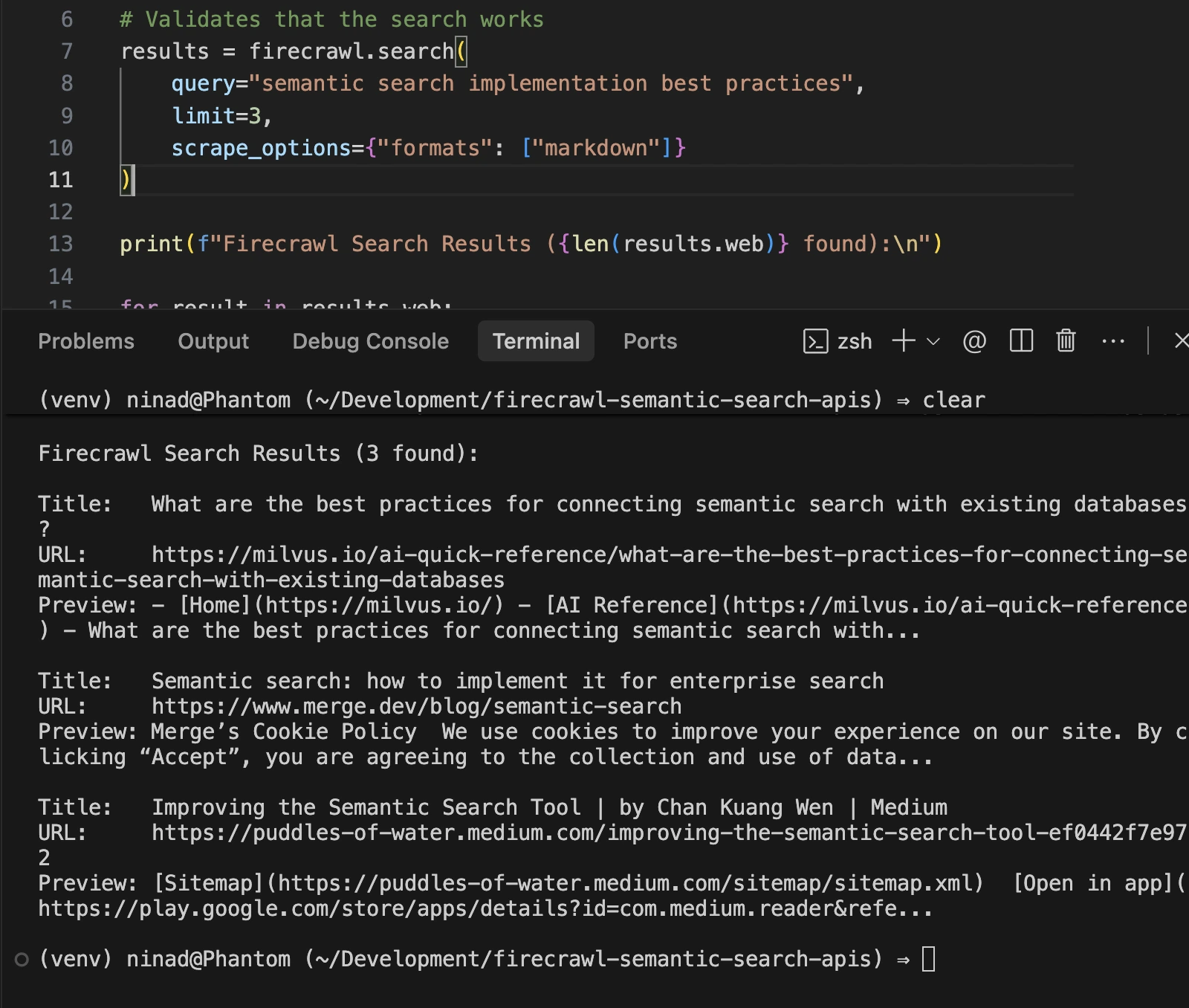
You should see a list of search results like this below:
Firecrawl is for the developer who is tired of maintaining scrapers.
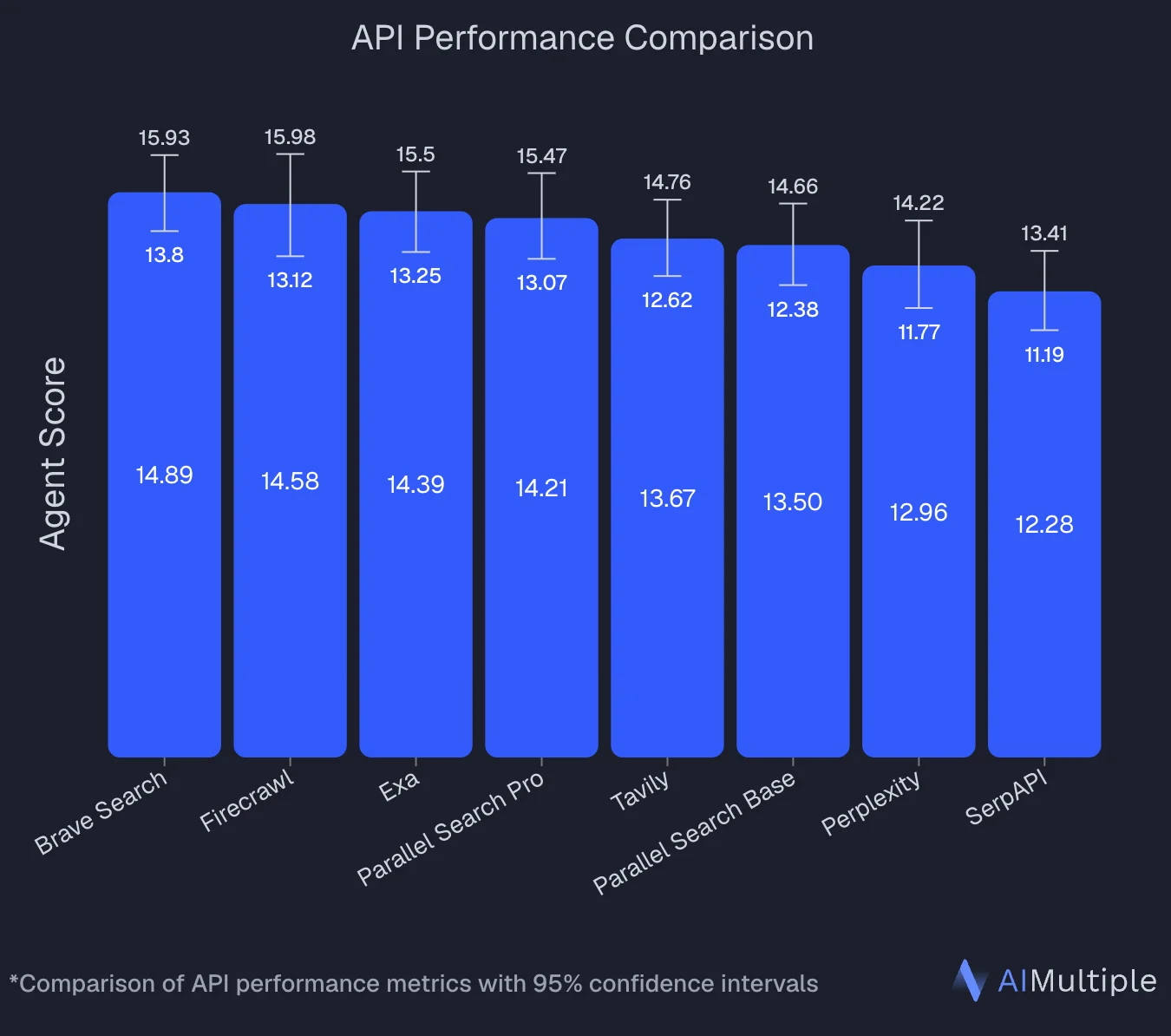
An independent benchmark by AIMultiple evaluated 8 search APIs across 100 real-world AI/LLM queries and ranked Firecrawl second overall with an Agent Score of 14.58, statistically tied with the top performer (Brave Search at 14.89). Firecrawl posted the highest mean relevant score in the benchmark (4.30 out of 5) and performed best on deep content retrieval tasks, the exact workload where full-page extraction beats snippet-only search.
Pricing is credit-based, starting at $16/month for 1,000 credits, with a generous free tier for testing.
Pros:
- Top-tier benchmark performance: ranked second overall in an independent 8-API study (Agent Score 14.58), statistically tied for first, with the highest mean relevant score (4.30/5)
- Markdown output eliminates token waste
- Handles JavaScript-rendered sites automatically
- One API call replaces an entire scraping pipeline
- Generous free tier
- Good community support
Cons:
- Self-hosted version needs effort: Docker Compose plus some ops time, so use the hosted API unless data residency or cost at scale pushes you off it
Use case: Pick Firecrawl when you're building web-augmented RAG systems, competitive intelligence tools, or any application needing fresh web data converted directly into LLM-consumable formats. Explore various Firecrawl use cases here.
2. Exa: neural semantic search engine
Exa built an entire search index from scratch for AI consumption. While Google ranks pages based on SEO and popularity, Exa uses neural models to rank based on how knowledge connects. This makes it exceptionally strong for technical and research queries where the "popular" answer isn't necessarily the "right" one.
Exa’s neural approach understands citations and semantic similarities at a deep level. It excels at finding "pages like this one" or answering complex, multi-layered research questions that would confuse a keyword-based engine.
Here are some of the main features of Exa for semantic search applications:
- Independent index: Not reliant on Bing or Google.
- Three latency modes: Fast (less than 500ms), Auto, and Deep (agentic multi-step search).
- Similarity search: Find content related to a specific URL.
- High accuracy: Boasts 94.9% accuracy on SimpleQA benchmarks.
Their Python SDK is clean and supports async operations, which is great for building high-performance agents. Just install with pip install exa-py, grab your Exa API key, and run this example for a quick trial run:
from exa_py import Exa

# Initialize the client
exa = Exa("EXA_API_KEY")

# Basic semantic search
results = exa.search(
    "latest developments in reinforcement learning",
    num_results=10,
    category="research paper"
)

# Search with full content extraction
results_with_content = exa.search_and_contents(
    "space companies based in the US",
    num_results=10,
    text=True,  # Include full text
    highlights=True  # Include relevant excerpts
)

# Access the results
for result in results_with_content.results:
    print(f"Title: {result.title}")
    print(f"URL: {result.url}")
    print(f"Highlights: {result.highlights}")
    print("---")

# Advanced filtering narrows results precisely. Domain restrictions, date filtering, and semantic categories work together:
# Filter by domain and date
filtered_results = exa.search(
    "climate change mitigation strategies",
    num_results=10,
    include_domains=["nature.com", "science.org", "cell.com"],
    start_published_date="2025-01-01",
    category="research paper"
)

# Find similar pages to a known good result
similar_results = exa.find_similar(
    url="https://arxiv.org/abs/2301.00001",
    num_results=10
)

# Use Deep mode for complex queries requiring multi-step reasoning
deep_results = exa.search(
    "companies using transformer models for drug discovery",
    num_results=5,
    use_autoprompt=True,
    type="neural"
)
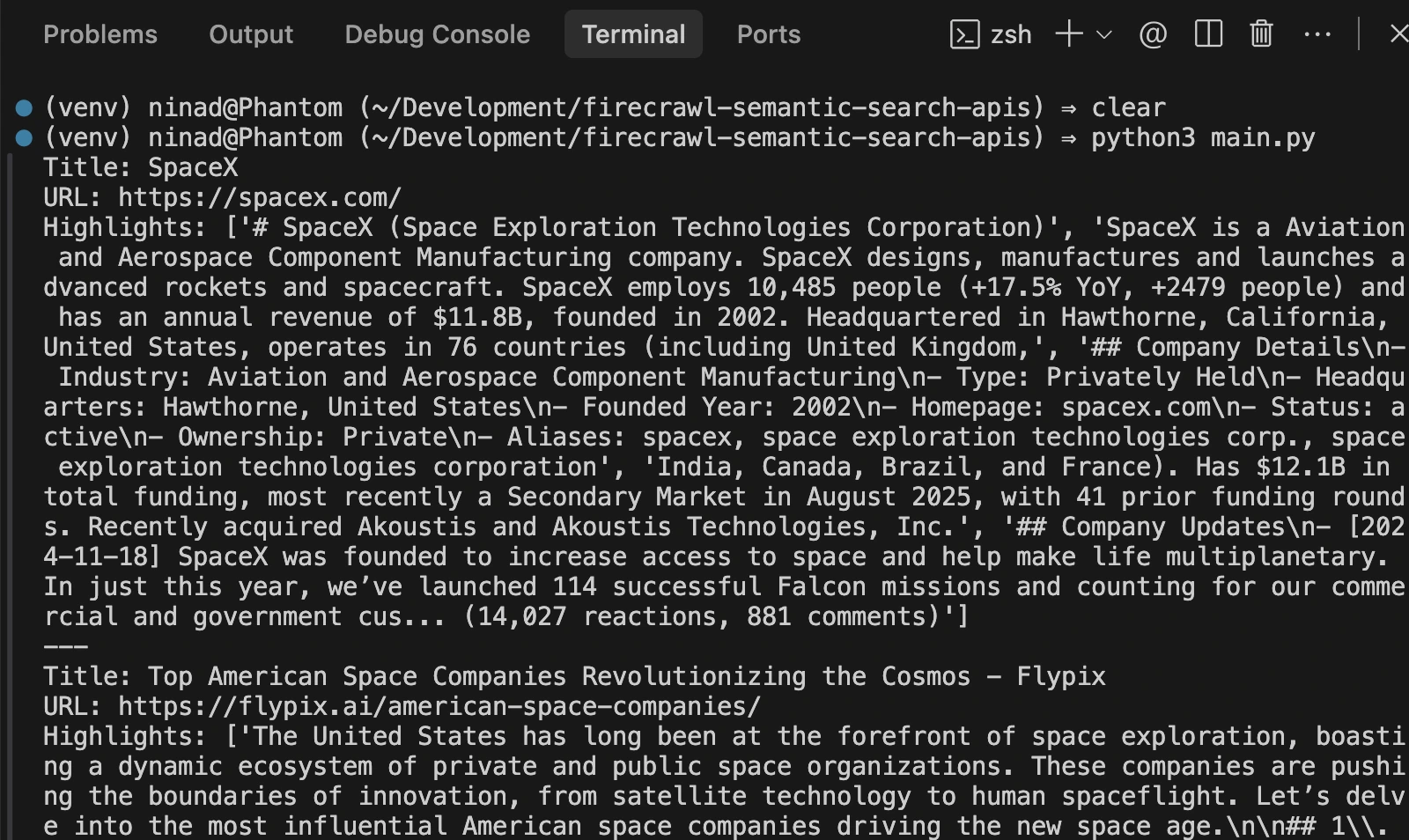
You can expect to see an output like the one I see below:
Pros:
- An independent search index means you're not relying on Google's infrastructure
- Powerful Find Similar for discovery
- Structured research output with citations
- Multilingual capabilities
Cons:
- Expensive at scale
- Steep learning curve for effective prompt engineering
- Slower than simpler alternatives
- Requires understanding Exa's philosophy to get good results
Use case: Exa works best for building research agents that need deep semantic understanding, complex multi-hop queries, or scenarios where you need citation-backed answers. Avoid it if you need simple, fast, cheap lookups or if documentation speed matters more than depth. Compare Firecrawl vs Exa to see which fits your use case.
3. OpenAI Embeddings
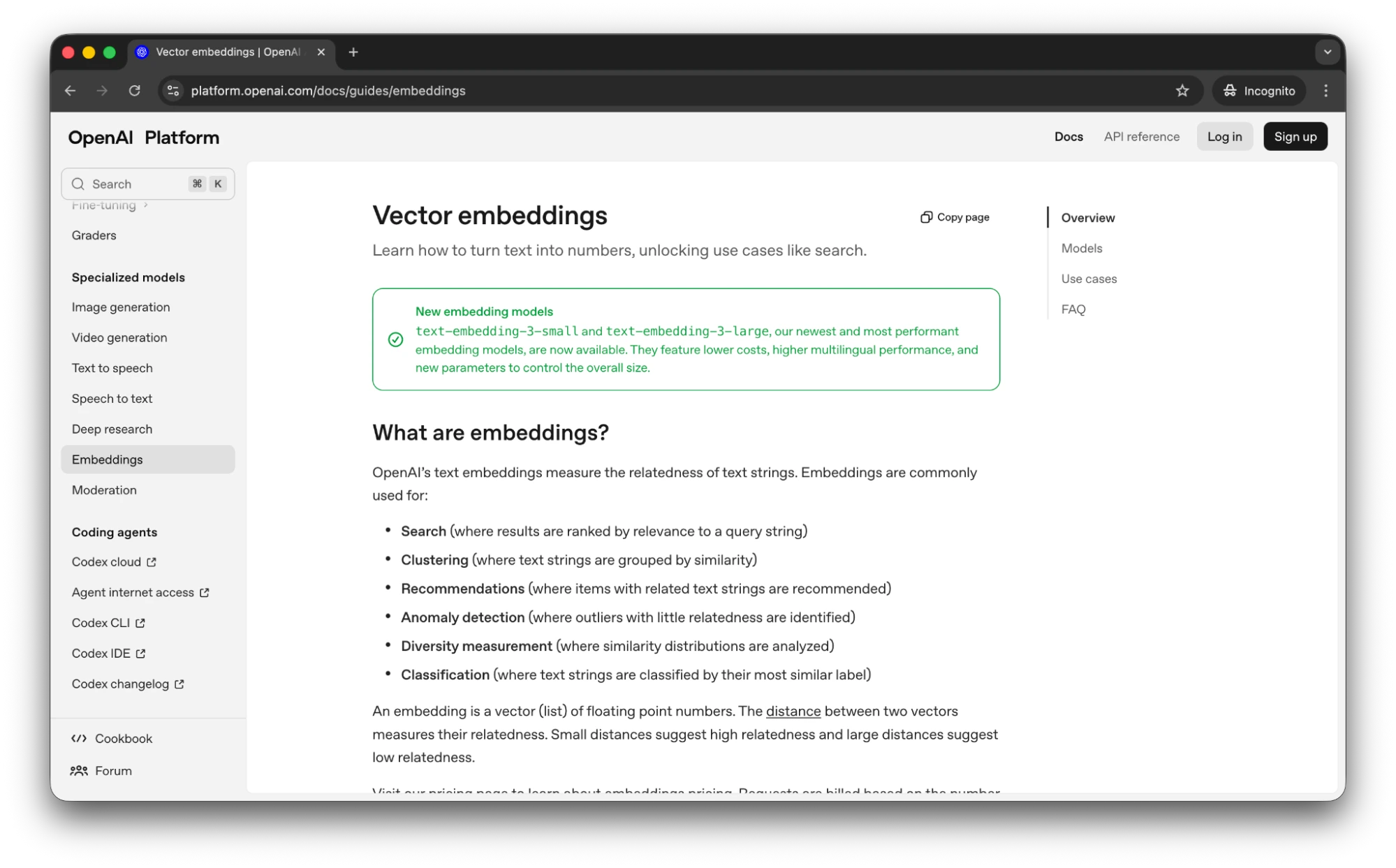
OpenAI's Embeddings API provides the foundation for building custom semantic search systems. It gives you the mathematical vectors that make semantic search possible. You supply documents, generate embeddings, store them in a vector database, and handle retrieval yourself.
This is the standard for building RAG systems on top of proprietary, internal data. If you have 50,000 internal PDFs, you embed them once, store them in a vector database, and you have a perfect semantic search engine for your own data.
OpenAI Embeddings offers these capabilities for semantic search infrastructure:
text-embedding-3-small: The go-to for cost efficiency ($0.02 per 1M tokens).text-embedding-3-large: Higher precision for complex semantic nuances.- Massive ecosystem: Native support in LangChain, LlamaIndex, and every major vector store.
Several frameworks build on OpenAI Embeddings to provide higher-level semantic search. LlamaIndex and LangChain both use OpenAI embeddings as a default option, handling document chunking, embedding generation, and retrieval orchestration. These frameworks reduce the engineering overhead while still leveraging OpenAI's embedding quality.
Implementation example:
Getting started requires an OpenAI API key and a vector database for storage. Install with pip install openai and choose your storage backend. Here's a complete example showing embedding generation and semantic search with Pinecone:
import time, pinecone
from openai import OpenAI

pc = pinecone.Pinecone(api_key="PINECONE_API_KEY")
client = OpenAI(api_key="OPENAI_API_KEY")

idx_name = "semantic-search"
if idx_name not in pc.list_indexes().names():
    pc.create_index(idx_name, dimension=3072, metric="cosine", spec=pinecone.ServerlessSpec(cloud="aws", region="us-east-1"))
    while not pc.describe_index(idx_name).status['ready']: time.sleep(1)

index = pc.Index(idx_name)

docs = [
    {"id": "1", "text": "Neural networks learn by adjusting weights and biases through backpropagation. This process minimizes the error between predicted and actual outputs during training, allowing the model to improve over time."},
    {"id": "2", "text": "Python is a versatile programming language known for its readability and vast ecosystem of libraries like NumPy and Pandas, making it a top choice for data science and web development."},
    {"id": "3", "text": "Vector databases are specialized systems designed to store and query high-dimensional vectors, enabling efficient semantic search and retrieval-augmented generation (RAG) for AI applications."}
]

# Upsert
vectors = [{"id": d["id"], "values": client.embeddings.create(input=d["text"], model="text-embedding-3-large").data[0].embedding, "metadata": {"text": d["text"]}} for d in docs]
index.upsert(vectors)

# Search
query = "How do neural networks learn?"
res = index.query(vector=client.embeddings.create(input=query, model="text-embedding-3-large").data[0].embedding, top_k=2, include_metadata=True)

for m in res.matches:
    print(f"{m.score:.3f}: {m.metadata['text']}")
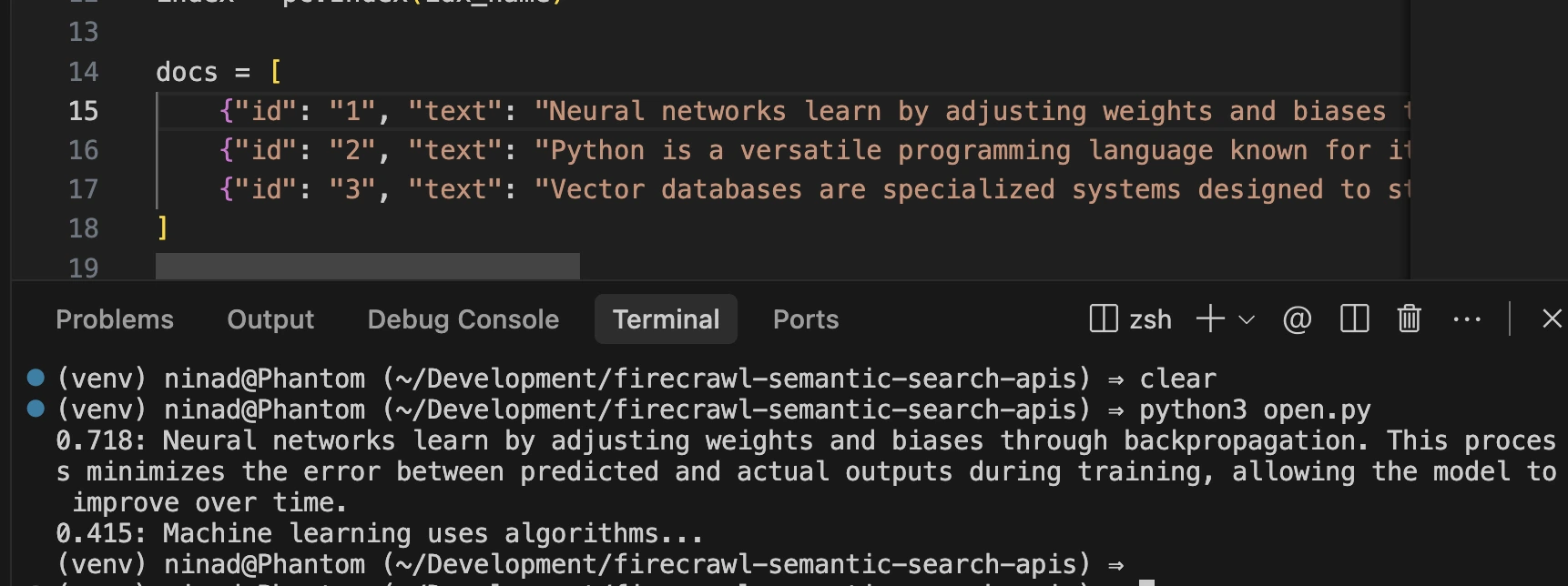
If you run the above snippet, you’ll see the embeddings in your Pinecode database, and the search query will give you a response based on the best-fit entry.
The main benefit is that OpenAI’s embeddings are incredibly cost-effective ($0.00013 / 1,000 tokens).
The actual cost here is developer time. You have to handle document chunking, versioning your embeddings, and managing the retrieval logic, as you can see in the above code snippet. If you have the engineering resources, this approach gives you the most control.
Pros:
- Lowest cost embedding option
- Best multilingual support
- Deterministic and reproducible
- Works with any vector database
- Mature and stable
- Fits into open-source frameworks like LlamaIndex and LangChain
Cons:
- Requires you to build everything else (retrieval, ranking, storage, infrastructure)
- Needs a vector database separately
- Steep learning curve for custom implementations
- Significant engineering time investment
Use case: Choose OpenAI Embeddings when you're building custom RAG systems for proprietary data, need full control over ranking logic, or have engineering resources to maintain the infrastructure. Skip it if you lack ML engineering expertise or need a quick, managed solution.
4. Cohere Rerank
Cohere solves a very specific, painful problem: what if you already have a massive search system (like Elasticsearch, Solr, or a custom solution) but the results are mediocre? Cohere Rerank lets you keep your existing infrastructure while adding a layer of semantic intelligence on top. It acts as a "second pass." Your existing search finds the top 100 results based on keywords, and Cohere Rerank re-orders them based on actual meaning.
Key features:
- Rerank v3.5: Cross-encoder model with deep reasoning over structured enterprise data, including tables, JSON, and code.
- Easy integration: Add it with literally one line of code.
- Multilingual: Supports over 100 languages natively.
- Handles complex formats: Excels at re-ranking JSON, tables, and code.
The reranking approach has inspired several hybrid search architectures. Teams commonly use BM25 or keyword search to retrieve a broad candidate set, then Cohere Rerank to surface the most relevant results. This combines the recall of traditional search with the precision of semantic understanding.
To get started with Cohere, install with pip install cohere and grab an API key. The Rerank endpoint accepts documents as strings or objects with text fields. Here's a complete example showing integration with existing search results:
import cohere

co = cohere.Client("zHXdbCJnIbMkc4LfgUj3hXz3aYTDzYrYWt2OhImE")

docs = [
    "Database indexing improves query performance.",
    "Python is a popular programming language.",
    "Slow queries are often a result of of missing indexes.",
]

# 1. Rerank
print("--- Rerank ---")
results = co.rerank(
    model="rerank-v4.0-fast",
    query="How to fix slow queries?",
    documents=docs,
    top_n=1,
    return_documents=True
)

for hit in results.results:
    print(f"{hit.relevance_score:.2f} - {hit.document.text}")

# 2. Embed
print("\n--- Embed ---")
response = co.embed(
    texts=["Hello world"],
    model="embed-v4.0",
    input_type="search_document"
)

print(f"Embedding vector length: {len(response.embeddings[0])}")
print(f"First 5 dimensions: {response.embeddings[0][:5]}")
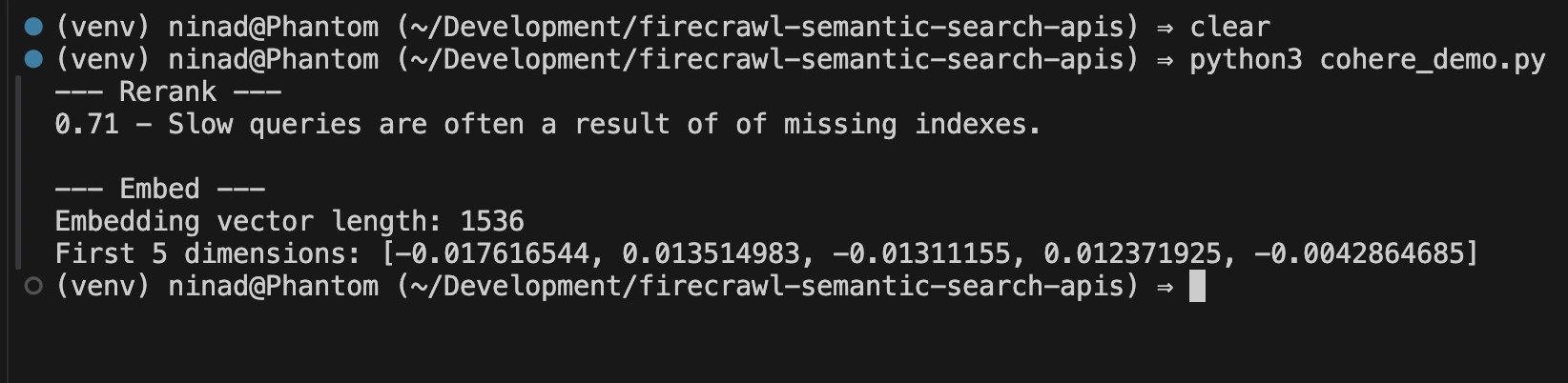
If you run the code snippet as is, you’ll see this output:
Pros:
- Minimal code to integrate (single line for basic usage)
- Works with any existing search system
- Produces immediate quality improvements without infrastructure overhaul
- Low cost for most use cases
- Enterprise options available
- Multilingual support
Cons:
- Data privacy concerns for some organizations
- Not a complete solution if you have no search foundation
- Per-query pricing can add up at massive scale
- Requires that you already have decent retrieval baseline
Use case: Use Cohere Rerank when you have existing search infrastructure that works but produces mediocre results. It's the upgrade that doesn't require ripping out your backend. Skip it if you're building from scratch (use Firecrawl instead) or if you have strict data residency requirements.
5. Pinecone
Pinecone is a managed vector database that excels at storing and querying billions of vectors with consistent low latency. If you are using OpenAI to generate vectors, you are likely using Pinecone to store them.
Recent additions like Dedicated Read Nodes enable predictable performance under heavy query loads. You no longer manage "pods" or "instances" anymore. Their architecture separates storage from compute, allowing independent scaling.
Pinecone offers these capabilities for vector storage and retrieval:
- Billion-scale: Proven to handle massive datasets without slowing down.
- Hybrid search: Combines semantic vectors with traditional keyword search (BM25) for the best of both worlds.
- Metadata filtering: Narrow down searches by date, category, or user ID instantly.
- Managed compliance: SOC 2, HIPAA, and GDPR ready.
To get started, grab a Pinecone API key and install the package with pip install pinecone. Here's a complete example showing vector operations and semantic search:
import time
import random
from pinecone import Pinecone

# 1. Initialize
print("--- 1. Connecting to Pinecone ---")
pc = Pinecone(api_key="PINECONE_API_KEY")
index = pc.Index("semantic-search")
print(f"Connected to index: 'semantic-search'")

# 2. Upsert (Add Data)
# Generating dummy 3072-dim vectors for demo purposes
def get_vector(): return [random.random() for _ in range(3072)]

print("\n--- 2. Upserting Data ---")
vectors_to_upsert = [
    {
        "id": "doc1",
        "values": get_vector(),
        "metadata": {"title": "Postgres Indexing 101", "category": "Database"}
    },
    {
        "id": "doc2",
        "values": get_vector(),
        "metadata": {"title": "CSS Grid Layouts", "category": "Frontend"}
    }
]
index.upsert(vectors=vectors_to_upsert)
print(f"Upserted {len(vectors_to_upsert)} documents: [Database, Frontend]")

# 3. Query (Search)
print("\n--- 3. Querying (Filter: category='Database') ---")
results = index.query(
    vector=get_vector(),
    filter={"category": "Database"},
    top_k=1,
    include_metadata=True
)

for m in results.matches:
    print(f"Result -> ID: {m.id} | Score: {m.score:.3f} | Title: {m.metadata['title']}")
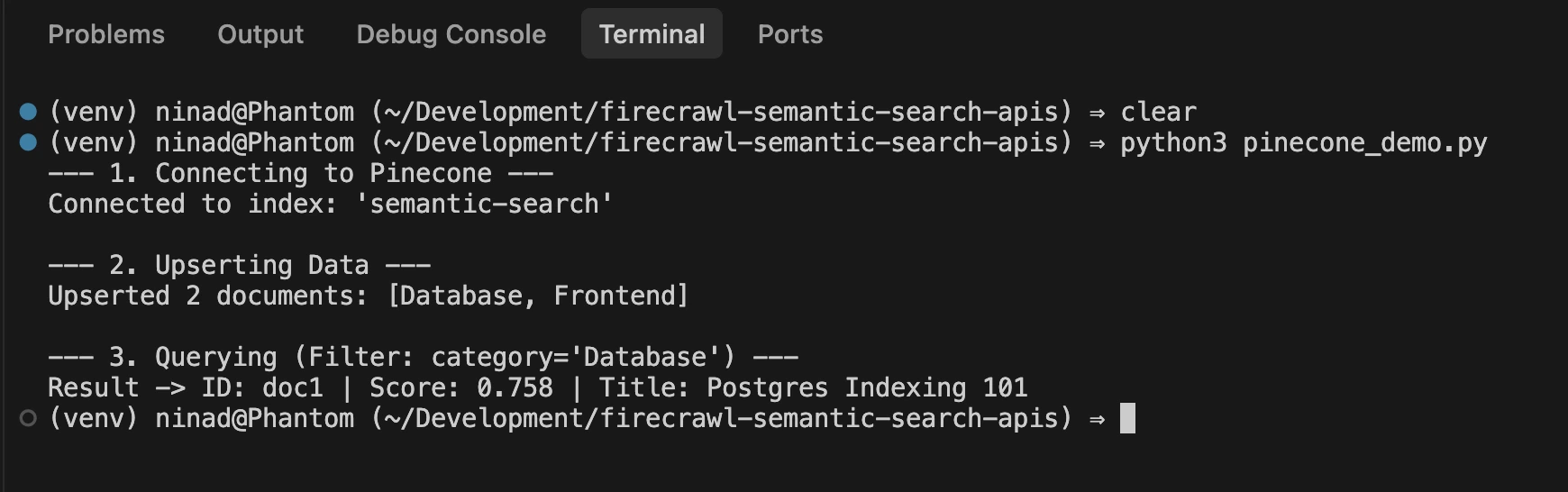
Run the above code snippet, and you’ll see a few entries in your Pinecone database. The code also queries the database for the “Database” category and Pinecone sends back the relevant result.
Pinecone is for the team that never wants to think about database sharding or index maintenance. Pricing is usage-based (Read/Write units), with a $50/month minimum for standard production plans.
Pros:
- Genuinely fast (45ms median latency on billions of vectors)
- No infrastructure management needed, auto-scaling without downtime
- Good integration with frameworks like LangChain and LlamaIndex
- Compliance-ready
Cons:
- Regional restrictions on trial instances create compliance headaches
- Filtering capabilities are limited
- Doesn't include embedding generation, so requires an external solution.
- Operational complexity increases with scale
- Community feedback suggests better alternatives exist for some use cases
Use case: Pick Pinecone when you're storing massive vector collections, need predictable sub-100ms latency, or have the engineering resources to maintain an embedding pipeline. Avoid it if you lack vector database experience or need a turnkey search solution.
Why does LLM-ready web search + extraction matter?
In 2026, the gap between a link and an answer is where most AI projects fail. Traditional search APIs give you a URL. But your LLM can't "visit" a URL. You have to fetch the HTML, clean it, and format it.
What breaks with DIY scraping pipelines?
If you don't use a unified tool like Firecrawl, your backend likely looks similar to this:
- Call Search API
- Manage scraper infrastructure
- Handle proxy management
- HTML to markdown conversion
- Content cleaning (removing ads and headers)
This pipeline is fragile. If the search API changes its schema or if the website updates its structure, your whole system goes down.
Collapsing the stack with unified endpoints
Firecrawl collapses those five steps into one. This is a significant performance win because the search and extraction happen in the same environment. They can be parallelized in ways a DIY pipeline can't match. You get the full content of the page in the same amount of time most APIs take to just return a title and a link.
Optimizing for token density and infrastructure spend
Raw HTML is incredibly noisy. It is filled with <div> tags, tracking scripts, and hidden metadata. An average webpage might be 200kb of HTML but only 10kb of actual text (based on HTTP Archive data on typical page weight distribution). If you feed that raw HTML into an LLM, you are paying for 190kb of garbage.
Firecrawl’s markdown output is 67 percent more token-efficient than raw HTML. For an application doing 10,000 searches a day, this is the difference between a profitable AI product and a money pit that burns through your API credits.
How to choose the right tool for your stack
The right API depends entirely on your data source and your team's size. So, instead of overengineering a solution, here’s a quick list to help you make the decision.
- For web data: Use Firecrawl. It is the only tool that solves the "Search + Scrape" problem in one go. It is built for agentic search and the developer who wants to move fast without managing a scraping team.
- For deep technical research: Exa is a great bet. Their neural index finds the high-signal content that Google ignores. For AI-powered deep research, combine Exa with a reasoning layer.
- For internal document RAG: Use OpenAI Embeddings paired with Pinecone. This combination gives you full control over your private data.
- For fixing a legacy system: Don't replace your existing search. Use Firecrawl to turn your existing documentation into markdown or vector embeddings. Then pair it with a search add-on like Cohere Rerank to layer a semantic brain to your current stack.
The Bing shutdown was the best thing to happen to AI developers
The Bing shutdown in 2025 was the best thing to happen to AI developers, in my opinion. It forced us to move away from bloated legacy APIs and toward lean, AI-native tools.
Today, semantic search tools cater to every need, from raw embedding APIs to complete search + extraction platforms. Some established approaches, like OpenAI embeddings with vector databases, continue to be valuable for a controlled set of documents. But if you need to expand into web data, Firecrawl delivers the optimal balance of simplicity and capability for web-based AI applications.
If you're looking for Bing Search API alternatives in 2026, read our guide on the best Bing Search API alternatives.
Frequently Asked Questions
What is semantic search?
Semantic search finds results by meaning rather than keyword matching. You search "affordable notebooks under $500" and get cheap laptops even when those exact words don't appear together. The technology uses vector embeddings to understand concepts and relationships.
How is semantic search different from vector search?
Vector search is infrastructure. It stores and retrieves embedding vectors efficiently. Semantic search is intelligence. It adds query understanding, ranking logic, and result formatting. Pinecone provides vector storage. Semantic search APIs like Firecrawl provide the complete reasoning layer.
Can semantic search handle personalization?
Some platforms include personalization signals. Most require you to build that logic yourself through reranking or custom scoring. Basic vector databases return identical results for identical queries regardless of who's asking.
Can semantic search scale to billions of documents?
Managed platforms like Pinecone handle billions of vectors with millisecond latency. Cloud-native APIs like Firecrawl scale automatically. Self-hosted solutions require careful infrastructure planning. The key is choosing managed services that hide scaling complexity.
When should I build a custom solution versus using an API?
Build custom when you have proprietary data that can't leave your infrastructure, specific ranking requirements that APIs can't satisfy, or ML engineering resources to maintain the system. Use APIs when you need web data, want fast implementation, or lack dedicated ML engineers.
What makes Firecrawl different from other search APIs?
Firecrawl combines web search with content extraction. One call returns complete markdown articles ready for LLM consumption. Other tools either search without extraction (Exa), provide embeddings without search (OpenAI), or store vectors without web access (Pinecone).
Are there open-source alternatives to these APIs?
Firecrawl has a self-hosted option alongside their cloud API. You can also look into open source vector databases like Milvus, Weaviate, and Qdrant.
What is Firecrawl Alexandria?
Firecrawl Alexandria is a library of data providers that AI agents reach through the Firecrawl API, MCP server, and CLI. It brings official data providers such as SEC EDGAR, FRED, and the World Bank, licensed publishers such as Fiscal.ai, Benzinga, and Particle, site-specific connectors, and Firecrawl's own Research, Developer, and Government indexes together with the live web. Add alexandria to the sources parameter of a search call and the response carries a tools array next to the web results, with each tool naming its provider and capability, describing when to use it, and listing its price in credits.
How does an agent discover a Firecrawl Alexandria tool?
Through the same search call it already makes. Add alexandria to the sources parameter and the response carries a tools array next to the web results, ranked for the query, with each tool describing when to use it and listing its inputs and price in credits. Discovery is free. The agent then runs the tool through the scrape endpoint with an alexandria block in place of a URL, billed at the listed price.