Playwright vs Puppeteer: Which Browser Automation Tool Should You Choose in 2026?
 Ninad Pathak
TLDR:
- Playwright supports Chrome, Firefox, and WebKit natively while Puppeteer focuses primarily on Chrome/Chromium.
- Playwright's built-in auto-wait stabilizes tests by eliminating manual timing code.
- Playwright offers native Python, Java, C#, and Node.js support versus Puppeteer's JavaScript-only approach.
- Puppeteer is often faster for simple Chrome scripts, while Playwright provides better consistency for complex E2E tests.
- Puppeteer maintains deeper Chrome DevTools integration and a stronger stealth plugin ecosystem.
- For pure data extraction, Firecrawl's /interact endpoint, Browser Sandbox, and /agent endpoint handle the entire workflow with natural language prompts and managed browser environments.
| Feature | Playwright | Puppeteer |
|---|---|---|
| Browser Support | Chromium (Chrome, Edge), Firefox, WebKit | Chrome/Chromium (primary), Firefox (Beta) |
| Language Support | JavaScript, TypeScript, Python, Java, .NET | JavaScript, TypeScript |
| Auto-Wait | Built-in actionability checks | Manual waitForSelector calls required |
| Maintainer | Microsoft (2020) | Google Chrome DevTools team (2017) |
| Community Size | 90,000+ GitHub stars | 94,000+ GitHub stars |
| Best For | Cross-browser testing, enterprise automation | Chrome-specific tasks, stealth web scraping |
Playwright and Puppeteer are both powerful browser automation tools. But considering they're functionally similar, choosing the right one can be difficult.
This rivalry began when Google's Chrome DevTools team released Puppeteer back in 2017, to automate Chrome browsers.
Three years later, some of the key Puppeteer engineers moved from Google to Microsoft and created Playwright to fix what Puppeteer couldn't do: run tests across Firefox, WebKit, and Chrome with the same code.
Does that make Playwright the winner? I’ll let you make that decision based on the comparison below.
What is Puppeteer?
Puppeteer is a Node.js library that controls Chrome and Chromium browsers programmatically. Google released it because Selenium was unreliable for modern browser automation, particularly for testing JavaScript-heavy applications.
The tool became the standard for Chrome automation because it downloads a compatible Chrome version automatically during installation. You run npm install puppeteer and get a working browser automation setup without configuration. This zero-setup approach made it immediately popular with developers who needed to generate PDFs, take screenshots, or scrape dynamic websites.
As of February 2026, Puppeteer has over 94,000 GitHub stars and powers automation workflows at companies ranging from startups to enterprises. Developers use it for screenshot testing, performance analysis, automated form submission, and web scraping tasks where Chrome rendering is sufficient.
What is Playwright?
Playwright is a cross-browser automation framework that Microsoft released in 2020.
They built Playwright to fix two problems that plagued browser automation. First, Puppeteer only supported Chrome properly, forcing teams to use multiple tools for cross-browser testing. Second, tests failed randomly because developers had to manually write timing code for every interaction.
Playwright solved both issues. It maintains its own patched versions of Firefox and WebKit to ensure features like network interception and multi-context browsing work the same across all browsers. It also includes automatic waiting, so when you call page.click('#button'), Playwright waits until the button is actually clickable before executing.
The framework grew rapidly to 90,000+ GitHub stars and 20 million NPM downloads. Companies use it for end-to-end testing across browsers, automated UI testing in CI/CD pipelines, and scenarios requiring Python, Java, or C# instead of JavaScript.
Playwright vs Puppeteer: What is the difference?
Puppeteer optimized for Chrome automation with deep DevTools integration. Playwright prioritized consistent behavior across multiple browser engines and eliminated common sources of test flakiness.
Browser and platform support
| Browser | Playwright | Puppeteer |
|---|---|---|
| Chrome/Chromium | ✅ Full support | ✅ Full support |
| Firefox | ✅ Full support | ⚠️ Beta support (WebDriver BiDi) |
| WebKit (Safari) | ✅ Full support | ❌ Not supported |
| Apple Silicon (M1/M2) | ✅ Native | ⚠️ Manual setup required |
| Docker | ✅ Ready-to-use containers | ⚠️ Manual configuration |
Playwright supports Chromium, Firefox, and WebKit with equal first-class status. The same test code runs on Chrome, Firefox, and Safari without modification.
Puppeteer focuses on Chrome/Chromium with beta Firefox support (via WebDriver BiDi) that lacks feature parity with its Chrome implementation.
Playwright also supports Apple Silicon (M1/M2 chips), ready-to-use Docker containers, and smoother integration with CI/CD platforms like GitHub Actions and Azure DevOps.
Puppeteer works on these platforms but requires manual configuration, especially for Docker environments or when working with ARM-based machines.
Programming language support
| Programming Language | Playwright | Puppeteer |
|---|---|---|
| JavaScript / TypeScript | ✅ | ✅ |
| Python | ✅ Official | ⚠️ Unofficial (Pyppeteer) |
| Java | ✅ Official | ❌ |
| C# / .NET | ✅ Official | ❌ |
Playwright offers official APIs in JavaScript, TypeScript, Python, Java, C#, and .NET with full feature parity across languages. The Python bindings include detailed documentation and work smoothly with Python testing frameworks.
This difference eliminates Puppeteer outright for non-JS teams. There’s Pyppeteer, the unofficial Python port, but it usually lags behind Puppeteer releases and receives inconsistent maintenance.
Auto-wait functionality
This difference causes the most practical impact on test reliability.
Playwright's auto-wait performs actionability checks before every interaction.
When you call page.click('#button'), Playwright automatically waits until the element is attached to DOM, visible, stable (not animating), can receive events (not obscured), and is enabled.
Puppeteer requires explicit wait calls.
You must write await page.waitForSelector('#button', {visible: true}) before interactions. Omitting these calls leads to "element exists but is unclickable" failures. A technical comparison on Medium explained: "The community often relies on plugins like puppeteer-autoclicker to compensate for this gap."
The tradeoff is control vs. reliability. Puppeteer's manual approach gives more flexibility for edge cases. Playwright's automatic approach eliminates an entire class of flaky tests.
Network interception and proxy capabilities
| Feature | Playwright | Puppeteer |
|---|---|---|
| Proxy setup | Built-in with auth support | --proxy-server flag + manual auth |
| Request interception | page.route() | page.setRequestInterception() |
| Response modification | Simple | Requires extra setup |
| Mock API responses | Straightforward | More boilerplate |
Playwright's page.route() lets you intercept and modify requests in a few lines. Puppeteer's page.setRequestInterception() works but needs more configuration for complex scenarios like rewriting response bodies or simulating network conditions.
Both tools support network interception, but implementation differs. Playwright provides built-in proxy configuration with integrated authentication support. You can set proxies in the browser context options and Playwright handles the complexity.
Puppeteer requires the --proxy-server launch argument and separate authentication setup. For complex proxy workflows, this means additional boilerplate code. A proxy specialist noted: "Playwright's native support can save time and reduce complexity" in cloud and enterprise environments.
Network interception lets you mock API responses during testing. Playwright simplifies this with page.route() that intercepts requests and lets you return custom responses. Puppeteer supports similar functionality through page.setRequestInterception() but requires more setup for complex scenarios like modifying response bodies or simulating network conditions.
Multi-context browsing and test isolation
Playwright supports multiple isolated browser contexts within a single browser instance. Each context has its own cookies, storage, and session state, so you can simulate multiple users or test different scenarios in parallel without cross-contamination. This is useful for testing authenticated flows where you need separate logged-in sessions side by side.
Puppeteer supports browser contexts too, but the isolation is less robust and requires more manual management. Running parallel tests with independent network rules or session states typically means launching separate browser instances, which increases resource consumption.
Device emulation
Both tools support device emulation, but Playwright ships with a larger library of predefined device profiles (phones, tablets, specific screen sizes) that you can use out of the box. You pass a device name like 'iPhone 17' and Playwright sets the viewport, user agent, and touch support automatically.
Puppeteer supports viewport and user agent configuration, but you define device parameters manually. Neither tool supports native mobile app automation, only mobile browser emulation.
Performance and speed
For simple, single-page automation tasks in Chrome, Puppeteer is often faster due to its lighter overhead and direct DevTools integration. However, as complexity increases—especially with multiple pages, heavy DOM manipulation, or cross-browser requirements—Playwright tends to offer better stability and overall throughput.
Playwright's architecture allows it to run tests in parallel contexts without restarting the browser instance, which significantly speeds up large test suites. Its built-in auto-waiting also reduces the "flakiness" that causes retries, saving time in CI/CD pipelines.
Testing framework integration
Playwright ships with @playwright/test, a test runner built specifically for the Playwright library. It offers parallel execution, automatic retries, video recording, screenshots on failure, and trace viewer for debugging. The test runner handles browser context management automatically.
Puppeteer doesn't include a built-in testing framework. Developers integrate it with Jest, Mocha, or other JavaScript testing frameworks using packages like jest-puppeteer. This requires additional configuration but lets teams use their preferred testing setup.
Web scraping capabilities
| Playwright | Puppeteer | |
|---|---|---|
| Cross-browser scraping | ✅ | ❌ |
| Stealth plugin maturity | ⚠️ Playwright Extra (ported) | ✅ puppeteer-extra-plugin-stealth |
| Auto-wait for dynamic content | ✅ Built-in | ❌ Manual |
| Anti-bot bypass | ⚠️ Limited | ⚠️ Limited |
Both tools handle web scraping effectively, but approach it differently. Playwright's cross-browser support matters for scraping sites that behave differently across browsers. The auto-wait functionality mimics human behavior better by ensuring elements load before interaction, which helps avoid detection.
Puppeteer has a more established scraping community with powerful stealth plugins. The puppeteer-extra-plugin-stealth package masks automation signals that anti-bot systems detect. It modifies browser fingerprints like navigator.webdriver, removes headless Chrome markers, and patches JavaScript properties that expose automation.
Playwright Extra exists with similar stealth capabilities ported from the Puppeteer plugin. However, the Puppeteer stealth ecosystem remains more mature with more community contributions and testing against various anti-bot systems.
For scraping protected sites, both tools face challenges. Modern anti-bot systems like Cloudflare and Akamai detect CDP (Chrome DevTools Protocol) usage itself, regardless of browser or stealth plugins. This detection targets the underlying technology used for automation rather than specific inconsistencies or fingerprints. For a broader look at how Playwright and Puppeteer fit among the best dynamic web scraping tools, including managed APIs that handle anti-bot at the infrastructure level, see our full comparison.
Developer experience and debugging
Playwright offers built-in debugging tools including the Playwright Inspector for stepping through tests, trace viewer for investigating failures, and automatic screenshot/video capture. The codegen feature records browser actions and generates test code automatically.
Puppeteer relies more on Chrome DevTools for debugging. You can launch Puppeteer with {devtools: true} to open DevTools panels. The integration with Chrome's native tools gives deeper access to browser internals, which helps when debugging complex interactions.
A developer on Hacker News compared the experience: "Playwright's API is just promises. Everybody knows how to compose promises" while Cypress's approach "does in theory completely eliminate latency-induced flakiness, but in my experience, Playwright/Puppeteer's usage of bi-directional real-time protocols makes latency low enough."
Community and ecosystem
Puppeteer's longer existence means more Stack Overflow answers, tutorials, and community solutions for edge cases. Developers often find existing code snippets for specific Puppeteer scenarios.
Playwright's rapid growth shows strong adoption, but the ecosystem remains smaller. Some tools like puppeteer-extra-plugin-recaptcha and puppeteer-extra-plugin-adblocker offer plug-and-play solutions that aren't natively available in Playwright. However, the playwright-extra library enables support for these Puppeteer extra plugins.
What are the limitations of Puppeteer?
- Chrome-only in practice. Firefox support exists but lacks feature parity. Network interception and DOM event simulation break or behave inconsistently. Safari isn't supported at all.
- JavaScript/TypeScript only. Python, Java, and .NET teams have no official support. Pyppeteer, the unofficial Python port, lags behind official releases and receives inconsistent maintenance.
- Manual waits cause flaky tests. You must write waitForSelector calls before every interaction. Miss one and you get intermittent failures that pass locally but break in CI. This maintenance burden grows with your test suite.
- No built-in test runner. You wire Puppeteer to Jest or Mocha yourself, configure parallel execution manually, and implement your own retry logic and artifact collection.
- Chromium version coupling. Puppeteer downloads a specific Chromium version during installation and tests can break when that version drifts from production Chrome. Managing multiple Chromium versions across CI/CD environments adds maintenance overhead.
- Detectable by modern anti-bot systems. Cloudflare, Akamai, and similar services identify Chrome DevTools Protocol usage at the protocol level. Stealth plugins reduce detection risk but don't eliminate it against sophisticated systems.
What are the limitations of Playwright?
- Depends on Microsoft maintaining browser forks. Playwright patches its own versions of Firefox and WebKit. As browser vendors release updates, Microsoft must keep those patches current, which is a long-term maintenance dependency outside your control.
- Higher resource usage. Running tests across Chromium, Firefox, and WebKit simultaneously consumes significantly more memory and CPU than Puppeteer's single-browser approach. This adds up in CI/CD pipeline costs.
- PDF generation is Chromium-only. Firefox and WebKit don't support PDF generation through Playwright, which limits this feature for cross-browser workflows.
- Smaller ecosystem. Playwright's documentation is solid, but seven fewer years of community questions means fewer Stack Overflow answers and third-party plugins for edge cases.
- No native mobile app testing. Device emulation covers mobile browsers, but Playwright can't automate actual iOS or Android applications. You need a separate tool for that.
- Same anti-bot ceiling as Puppeteer. Playwright Extra's stealth plugins help against basic detection, but enterprise-grade bot detection identifies CDP usage at the protocol level regardless of fingerprint masking.
But both Playwright and Puppeteer share the same core limitation: they are browser automation frameworks, not web data pipelines. As agentic AI reshapes how we build with the web, that distinction matters more than ever.
When your goal is data extraction rather than browser control, you end up writing a lot of code that has nothing to do with the data you actually need. Proxy rotation, anti-bot bypass, rate limiting, retrying failed requests, and parsing HTML into usable formats are all problems you solve yourself.
Where does Firecrawl fit in your browser automation stack?
If your goal is extracting data from the web, Firecrawl is the best tool for the job. Rather than writing and maintaining browser automation scripts, you describe what you need in natural language or send a URL and get back clean markdown, structured JSON, or HTML. No proxy rotation, no parsing pipelines to build yourself.
Here's what Firecrawl handles out of the box:
- Natural language prompts. Tell Firecrawl what data you need in plain English. The /agent endpoint navigates, interacts with, and extracts data from websites autonomously based on your prompt, no URLs or browser automation code required.
- Scrape + interact in one flow. The new /interact endpoint lets you scrape a page and immediately take actions in it — click buttons, fill forms, navigate deeper — using natural language or Playwright code. No standalone browser session to manage. Sessions support persistent profiles so you can stay logged in across scrapes. Read the announcement →
- LLM-ready output. The API returns clean markdown and structured JSON by default, which means no post-processing before feeding data into AI pipelines or LLMs.
- Crawling at scale. Batch processing handles thousands of URLs asynchronously, and the /crawl endpoint traverses entire websites automatically.
- Broad language support. SDKs available for Python, Node, Go, and Rust, plus integrations with n8n, Zapier, and Make. Teams also use Firecrawl directly in ChatGPT and Claude for instant data access, or build their own AI agents with internet access using the APIs.
And when your AI browser agents need full browser control, Firecrawl has you covered there too. Browser Sandbox gives your agents a secure, fully managed browser environment with Playwright pre-installed. Each session runs in an isolated container, so there’s no local Chromium to install, no driver compatibility to manage, and no infrastructure to maintain.
Here's Firecrawl Browser Sandbox fetching dozens of patents with a single prompt:
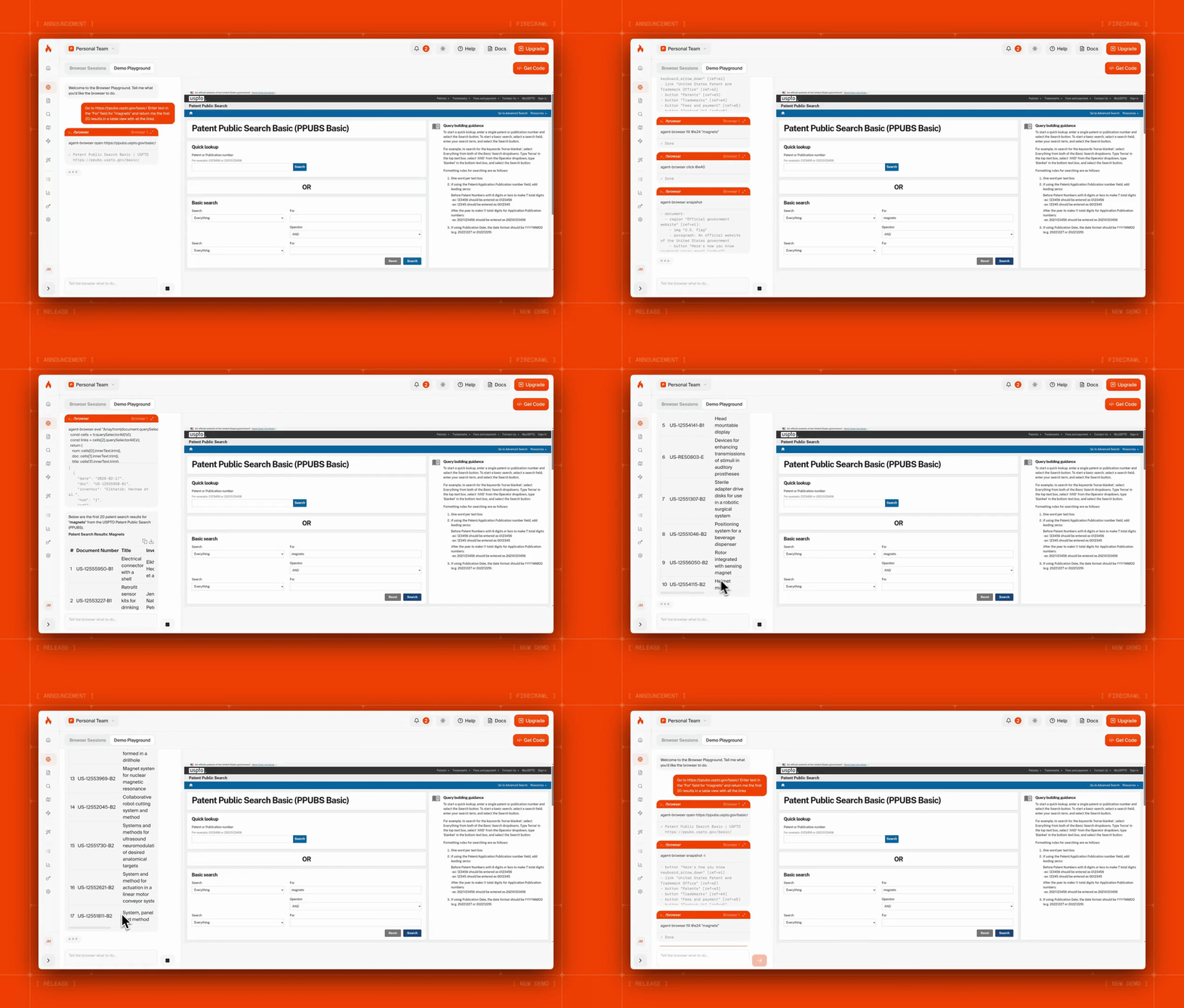
Agents can navigate pagination, fill out forms, handle auth flows, and interact with pages that a static scrape can’t reach. You can launch hundreds of parallel sessions, each in its own sandbox, and scale without managing anything. Read the Browser Sandbox docs for the full API reference.
This video evaluates Firecrawl's new Browser Sandbox feature, demonstrating how it empowers AI agents like Claude Code to interact with the web exactly like humans do.
With Playwright or Puppeteer, you build and maintain the entire extraction pipeline yourself. Firecrawl gives you the data layer and the browser layer through a single platform — and with /interact, you can scrape and automate in one seamless flow.
Making the choice between Playwright and Puppeteer
Playwright offers more features and better reliability out of the box. The cross-browser support, multi-language APIs, and built-in auto-wait make it the stronger choice for most automation scenarios.
Puppeteer works great if you have Chrome-specific use cases that require deep DevTools integration. The stealth plugin ecosystem is more mature for web scraping protected sites. Teams already invested in JavaScript and Chrome-only testing may prefer Puppeteer's simpler architecture. If browser automation is just one piece of a larger pipeline, see our guide on choosing web scraping tools to navigate the full stack: browser layers, parsers, proxies, and APIs.
But if your goal is getting data off the web, neither tool is built for that. Both require you to build and maintain the extraction pipeline yourself. Firecrawl handles the entire workflow, from natural language prompts to clean, structured output, with a managed browser environment when you need one. It's also more affordable than building and maintaining your own pipeline, with a free tier and plans from $16/month.
Try Firecrawl for free today and start extracting web data in minutes.
Frequently Asked Questions
What is the main difference between Playwright and Puppeteer?
Playwright supports Chrome, Firefox, and WebKit through a single unified API, while Puppeteer focuses primarily on Chrome/Chromium. Playwright includes built-in auto-wait functionality that eliminates manual timing code, whereas Puppeteer requires explicit waitForSelector calls.
Which is faster: Playwright or Puppeteer?
Puppeteer is generally faster for short, simple scripts that only need Chrome. Playwright is optimized for scale and stability, making it more efficient for large test suites or complex applications where reducing flakiness is more important than raw single-script speed.
Can Playwright replace Puppeteer?
Playwright supports nearly all of Puppeteer's core features and adds cross-browser support, auto-waiting, and multi-language APIs. The similar API patterns make migration straightforward. However, Puppeteer maintains advantages in Chrome DevTools integration depth and stealth plugin ecosystem maturity.
Does Playwright support Python?
Yes, Playwright offers official Python bindings with full feature parity to its JavaScript version. It includes detailed Python documentation and integrates with Python testing frameworks. Puppeteer only supports JavaScript/TypeScript natively, with unofficial Python ports that lag in features.
Which tool is better for web scraping, Playwright or Puppeteer?
Playwright and Puppeteer handle scraping effectively, but differ in strengths. Puppeteer has a mature stealth plugin ecosystem, while Playwright's auto-wait better mimics user behavior. For large-scale scraping, both face detection by modern anti-bot systems and may require significant infrastructure to manage.
Can I use Playwright for mobile testing?
Playwright supports mobile browser testing through device emulation with predefined profiles for common mobile devices. It can emulate Chrome for Android and Mobile Safari but doesn't support native mobile app automation. Teams need dedicated tools for testing actual iOS or Android applications.
Is Playwright harder to learn than Puppeteer?
Both tools share similar API patterns since the same team originally built Puppeteer before creating Playwright. The learning curve is comparable. Playwright's built-in auto-wait reduces the amount of timing code you need to write, which some developers find easier. Puppeteer's larger ecosystem means more tutorials and Stack Overflow answers available.
How does Firecrawl compare to Playwright and Puppeteer for web scraping?
Firecrawl is the web data API to search, scrape, and interact with the web at scale, handling proxy rotation, browser rendering, and output formatting automatically. You describe what you need in natural language or send a URL and get back clean markdown or structured JSON. Unlike Playwright and Puppeteer, you don't write or maintain browser automation scripts. Firecrawl's /interact endpoint even lets you scrape a page and immediately take actions in it — clicking buttons, filling forms, navigating — using natural language prompts or Playwright code, all without managing browser infrastructure.
What is Firecrawl Browser Sandbox?
Browser Sandbox is a secure, fully managed browser environment where AI agents can interact with the web. Each session runs in an isolated container with Playwright pre-installed. Agents can navigate pagination, fill forms, handle auth flows, and extract data from pages that static scraping can't reach.