

Over the last six months, I moved my primary workflow from Cursor to Claude Code. I wasn’t alone. I saw multiple discussions on Hacker News and similar threads on Reddit where developers described abandoning the "AI-enhanced IDE" for AI coding agents running in the terminal.
We didn’t switch because we prefer typing over clicking. We switched because IDE-based tools are designed for suggestion and CLI agents for delegation. These agents could run for hours without supervision, coordinate changes across dozens of files, execute shell commands to verify their work, and commit results with descriptive messages.
That's exactly what I want to explore in this article. Why are CLI agents better for autonomous coding work?
TL;DR
- CLI agents are designed for delegation while IDE agents are designed for suggestion, making terminals better for autonomous multi-file operations.
- Terminal interfaces naturally support progressive disclosure, loading only the context needed rather than polluting the context window with IDE state.
- Exit codes and text streams provide deterministic feedback loops that allow agents to self-correct without human intervention.
- CLI agents can be invoked from scripts and CI/CD pipelines, turning AI into just another binary in your toolchain.
- IDE agents struggle with "context pollution" from long conversations and open files, degrading response quality over time.
- Skills (markdown instructions) and CLI agents are different. Skills provide knowledge, and CLI agents provide execution.
- Firecrawl recently launched a CLI for web scraping and an MCP server that integrates directly with terminal agents like Claude Code and self-hosted agents like OpenClaw.
What is a CLI agent?
A CLI (Command Line Interface) agent is an autonomous AI program that runs in your terminal, capable of executing shell commands, editing files, and managing git operations directly. Unlike IDE assistants that live in a sidebar and primarily offer code suggestions, CLI agents act as independent workers that you delegate tasks to. They can navigate your filesystem, run tests to verify their own work, and recover from errors without constant human supervision.
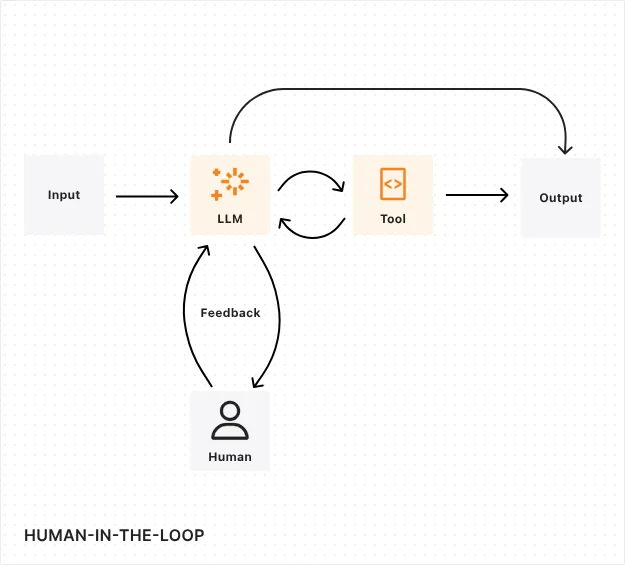
A brief history of AI coding tools
Early AI coding tools were about code completion: GitHub Copilot suggested the next line, CodeWhisperer filled in function bodies.
We are now seeing tools that operate as autonomous loops. You give them a goal. They plan, execute, debug, and commit. This requires an interface that supports composition and clean state management. And the terminal has done that for fifty years.
| Era | Interface | Primary Capability | Constraint |
|---|---|---|---|
| Autocomplete | IDE Plugin | Single-line completion | Context limited to open file |
| Chat Assistant | Sidebar | Multi-turn Q&A | Human must copy/paste code |
| Autonomous Agent | Terminal CLI | Multi-file execution | Steeper learning curve |
What makes building AI agents challenging?
To understand why the terminal works better here, you have to look at the bottlenecks of running LLMs against large codebases.
The context length problem with MCPs
The Model Context Protocol (MCP) standardizes how agents access external tools. It’s a great standard, but results in context pollution.
When you connect an agent to an IDE with dozens of MCP servers, the agent has to load the schema for every available tool before it even looks at your code. In an IDE, this context is persistent. The agent carries that baggage through every interaction. Keeping your stack to a focused set of best MCP servers for developers — rather than installing every available server — is one practical way to limit that overhead.
Terminal interfaces support "progressive disclosure" by default. CLI tools work through discrete commands. When I ask Claude Code to search my repo, it runs grep. It gets the filtered result and doesn’t load the entire file tree into the context window unless I explicitly tell it to. It treats context as a scarce resource to be managed.
This is a pattern playing out more broadly: teams that adopted MCP integrations are pulling back and opting for direct API calls and CLI tools instead. The overhead of MCP setup, schema loading, and context cost often outweighs the convenience, especially for teams running production agent pipelines where token efficiency matters.
Context files and progressive disclosure
To counter the context length problem, developers started creating context files like GEMINI.md or CLAUDE.md in the project root. These markdown files act as "onboarding docs for your agent," describing how your repo is built and tested. For instance, you could have a GEMINI.md as below:
# GEMINI.md (excerpt)

## 1. Project Philosophy

This is a High-Performance SaaS Backend.

* Core Principle: Readability over cleverness

* Architecture: Hexagonal Architecture

## 2. Tech Stack & Standards

* Language: Python 3.11+ (Strict Typing required)

* Testing: Pytest (Coverage must remain >90%)
A similar addition was Anthropic's Claude Code, which introduced Skills with progressive disclosure. The agent initially sees only skill names and descriptions, then dynamically loads the full instruction set when needed. This lets agents be generalists by default but specialists on demand.
P.S: Read our guide on context layer for AI agents
State management and tool coordination
In an IDE, "state" is messy. You have unsaved tabs, scroll positions, and uncommitted changes. An agent trying to navigate that needs complex logic just to know what version of your file it is looking at.
For CLI agents, the filesystem is the only state that matters. Here, a file is either written to disk or it isn't. A test passes or it fails. This binary nature reduces hallucination and grounds the agent in reality. The agent doesn't have to guess if a change is applied as it can verify it with cat or ls.
What makes CLIs powerful for agents?
When you strip away the GUI, you are left with an environment that treats code, logs, and errors as a uniform data stream. This creates three distinct advantages for an autonomous agent.
Text-native composability
Unix philosophy is built on text streams. Simply put, stdout from one program is stdin for another. This is the native language of LLMs.
A CLI agent can pipe commands together. It can find all TypeScript files, filter for a specific import, and run a sed replacement without any special API integration. It just needs to know how to write a shell command.
Deterministic automation
CLI operations are atomic. A command exits with 0 (success) or >0 (error). This feedback loop is essential for autonomous agents.
If an IDE agent suggests a fix, I have to visually inspect it, maybe pass the error back to the chat to find a fix. On the other hand, if a CLI agent runs a fix and the subsequent test command fails with exit code 1, the agent knows without my intervention that it failed. It can read the stderr output, plan a correction, and try again. This "self-healing" loop is much harder to build in a GUI.
Programmatic control
You can invoke terminal AI agents from scripts but you cannot do the same with a VS Code sidebar.
For instance, I can put Gemini CLI or Claude Code into a CI/CD pipeline, write a bash script that spins up an agent to review a PR, run the tests, and fix linting errors automatically. The terminal turns the agent into just another binary in my toolchain. For scripts and pipelines where you want to skip the shell invocation entirely, the Claude Agent SDK embeds the same agent loop as a Python or TypeScript library.
Check out our guide on using Claude Code for Marketing.
Operational efficiency in context management
IDE agents send entire conversation history plus all open files to the model with each interaction. This scales poorly as conversations and codebases grow.
CLI agents are more surgical.
Claude Code, for instance, only loads files explicitly requested. It also spins subagents to perform small, specific tasks and report back with a summary rather than the main agent filling its own context up. Aider builds a codebase map but only reads files when needed. This keeps token usage manageable allowing you to continue the sessions longer.
Permission handling and safety guardrails
When a CLI agent needs to run a potentially destructive command, it prompts for explicit confirmation at the shell level. You review the exact command, understand what it means, and approve or deny.
Gemini CLI offers sandbox mode for containerized execution. Claude Code runs within Dev Containers or uses hooks to enforce path restrictions. This protects your system, limits writes to a mounted working directory, and you remain the final approver at all times.
What are the limitations of terminal AI agents?
The terminal is powerful, but it is also unforgiving. There are distinct areas where the CLI model falls short of a modern IDE experience.
Not beginner-friendly
The learning curve is a wall. You need to know how to navigate directories, set environment variables, and manage API keys. If you aren't comfortable with cd, ls, or chmod, you cannot use these tools effectively.
For instance, setting up Claude Code requires installing Node.js, configuring API keys, and learning agent-specific commands.
Tasks involving visual context
CLI agents are technically blind. When you need to describe a UI bug, reference a design mockup, or understand web page layout, terminal interfaces don’t have the tools to see the change like an IDE integration does. You can paste images into some CLI agents, but the experience feels tacked on. Web development and UI work need visual feedback.
On the other hand, if I’m using an IDE like Cursor or Antigravity, I can see the changes highlighted instantly. When Aider makes the same change, you open the file manually or run git diff. This adds friction.
CLI agents vs. IDE agents
This split usually boils down to one specific friction point: Context Pollution.
A lot of the developers that I work with would say that long-running conversations in IDE sidebars degrade response quality quickly. The agent gets confused by previous turns or irrelevant open files.
With CLI, you tend to start fresh sessions for specific tasks. "Fix the auth bug." Done. "Refactor the database schema." Done. This enforced hygiene keeps performance high.
Of course you can do the same with IDE agents. It just requires extra steps.
| Feature | CLI Agent | IDE Agent |
|---|---|---|
| Workflow | Delegation (fire and forget) | Pair Programming (human in loop) |
| State | Filesystem (Disk) | Editor Memory (RAM/Buffers) |
| Verification | Exit Codes / Test Output | Visual Inspection |
| Context | User-controlled (Specific files) | Often Automatic (Open tabs) |
| Cost | Usage-based / Token-based | Usually Per-Seat Subscription |
Skills or CLIs: Which one is better?
There is confusion about the difference between a "Skill" (like in Claude) and a standalone CLI tool.
A Skill is a markdown file that teaches an LLM how to do something. It is knowledge.
A CLI Agent is a binary that has permission to do something. It is a worker.
When to use each approach
When implementing a team's coding standards, I’d prefer using a skill. You write one SKILL.md file describing your naming conventions, error handling patterns, and testing requirements. Every developer installs it, and Claude applies those standards automatically.
- You can checkout how Leo from Firecrawl built a Claude Skills Generator with Firecrawl's Agent Endpoint here.
- Or build your own from scratch using our Claude Code web scraping skill tutorial.
- For a curated list of the most popular options, check out the best Claude Code skills.
But when you need autonomous multi-step execution with tool access, CLI agents win. If you want an AI to clone a repository, analyze the codebase, identify security vulnerabilities, propose fixes, run tests, and commit the results, that needs the orchestration capabilities of a full CLI agent. Skills can't execute shell commands or make coordinated file changes.
Most valid workflows use both. You use the CLI agent to do the work, and you feed it Skills to ensure the work is done correctly.
The Firecrawl CLI
I spoke about how CLI agents manage context as a scarce resource and load only what's need. Firecrawl extends this philosophy to the web.
Instead of dumping an entire browser page into your agent's context, the Firecrawl CLI converts websites into clean, token-efficient markdown. For Claude Code users, four specific Firecrawl techniques — question format, batchScrape, JSON schema extraction, and search with scrapeOptions — cut what actually lands in context during mid-session web research.
You can also add the Firecrawl Skill to give your agent the ability to fetch this external context on demand. Whether it's checking the latest Next.js docs or looking up a GitHub issue, the agent can autonomously "read" the web without leaving the terminal. This bridges the gap between your local codebase and the world's knowledge.
Making the choice
I still use Cursor for autocomplete. It’s faster than typing boilerplate code in the editor.
But for actual engineering work like refactoring, testing, and migrations, I have moved to the terminal. The ability to pipe commands, verify output with exit codes, and keep context clean makes it the superior environment for autonomous agents.
We’re already moving away from AI agents that “chat about your code” to AI agents that can complete end-to-end code for you. And for now, the terminal is the best interface to achieve complete autonomy.
Frequently Asked Questions
Are CLI coding agents harder to learn?
Yes. You need to understand the underlying Unix toolchain. If you don't know what grep or git diff does, you will struggle to understand what the agent is doing on your behalf.
Can I use both CLI and IDE agents together?
Yes. The most common pattern is using an IDE agent for 'micro' interactions (writing a function) and a CLI agent for 'macro' interactions (refactoring a module).
Do CLI agents require cloud API access?
Not always. Tools like Aider can connect to local models via Ollama. This is critical for air-gapped environments or projects with strict data privacy requirements where you cannot send code to Anthropic or OpenAI.
Are CLI agents more expensive?
It depends on the model. Running local models is free (minus hardware costs). Running state-of-the-art models via API can get expensive if you are in a tight loop of plan, execute, fail, retry. Subscription-based CLI tools perform caching to mitigate this, but API costs for autonomous loops are generally higher than flat-rate IDE subscriptions.
How does Firecrawl integrate with CLI agents?
Firecrawl offers both a CLI binary for direct web scraping and an MCP server that integrates with Claude Code and other terminal agents. This allows agents to autonomously scrape documentation, research topics, and gather web data as part of their workflow.
