The Bing Search API was retired on August 11, 2025. If your application depended on it for web search, real-time data, or feeding results into an AI pipeline, you need a replacement. Microsoft's recommended migration path (Azure AI Foundry) is a platform commitment, not a drop-in swap.
This guide covers five alternatives for developers and AI builders: what each one does well, where it falls short, and when to choose it.
TLDR
| Tool | Best for | Standout feature | Free tier |
|---|---|---|---|
| Firecrawl | Full web data stack for AI agents | Search, Scrape, Interact, Crawl, plus 90+ data providers via Firecrawl Alexandria | 1,000 credits/month |
| Exa | Semantic discovery for research-heavy apps | Embeddings-based search that understands meaning | 1,000 credits |
| Tavily | AI search and research workflows | AI-optimized results, include_raw_content and /extract for full content | 1,000 credits/month |
| Brave Search API | Privacy-centric apps with independent index | Independent 30B+ page index, no Bing or Google | ~1,000 queries/month |
| SerpAPI | SERP data from Google, Bing, and 25+ engines | Multi-engine structured SERP scraping | 100 searches/month |
Quick context: What is Bing Search API
The Bing Search API (Microsoft Bing Web Search API) was a REST API that gave developers programmatic access to Bing's search index. It returned web results, images, news, videos, and related queries as structured JSON, making it a go-to for building search features, aggregating real-time content, and powering AI pipelines that needed live web data.
Developers used it for knowledge bases, news aggregators, competitive monitoring, and feeding search results into LLMs for retrieval-augmented generation.
The Bing Search API was actually a suite of specialized sub-APIs under one umbrella:
| Sub-API | What it did |
|---|---|
| Web Search | General web results, news, images, videos in one call |
| Image Search | Image-specific search with filtering by size, color, and type |
| News Search | Recent articles and headlines from news sources |
| Video Search | Video results with metadata like duration and view count |
| Autosuggest | Query completion suggestions as users typed |
| Spell Check | Spelling correction for search queries |
| Entity Search | Structured facts about people, places, and things |
| Visual Search | Image-based queries (search by image content) |
| Custom Search | Scoped search across a curated set of domains |
| Local Business Search | Business listings with location and contact data |
All of these are gone. Replacements below cover the most common use cases, but no single API replicates the full breadth of the suite.
Why was the Bing Search API discontinued?
Microsoft announced the retirement of all Bing Search APIs on May 15, 2025, with full decommissioning on August 11, 2025.
The move was driven by Microsoft's strategic shift toward AI-mediated search: embedding search inside AI agents rather than exposing it as a raw data endpoint. The recommended migration path is Grounding with Bing Search inside Azure AI Foundry, which requires setting up an entire Azure project with resource groups and model deployment. It's a platform commitment, not a drop-in API replacement.
The discontinuation was controversial. API creation was silently disabled in March 2025, weeks before any official announcement, leaving developers scrambling. Teams that had built on top of Bing's API had roughly three months to migrate after the formal notice.
What developers used the Bing Search API for
Before its discontinuation, the Bing Search API was a common building block across a wide range of developer applications:
- Real-time web search in AI pipelines: Feeding live search results into LLMs for retrieval-augmented generation (RAG) and grounding responses with up-to-date web data
- News and content aggregation: Pulling the latest articles and headlines from across the web into dashboards, newsletters, or media monitoring tools
- Competitive intelligence: Monitoring mentions, pricing changes, and new content from competitors by querying Bing programmatically on a schedule
- Knowledge bases and internal search: Augmenting internal documentation with web results, or building search features into products that surfaced relevant external content
- AI agent web access: Giving autonomous agents the ability to search the web as part of multi-step research and decision-making workflows (see OpenClaw + Firecrawl as a real-world example)
- SEO and SERP monitoring: Tracking keyword rankings and search result changes across Bing's index
Each of these use cases has a clear alternative path today. The right tool depends on which part of that stack matters most to your application. For agent-specific setups like OpenClaw, our OpenClaw web search guide covers the full web_search and web_fetch pipeline, provider options, and when to replace Brave with Firecrawl.
What to look for in a Bing Search API alternative
Not all search APIs are equivalent replacements. Here are the criteria that matter most depending on your use case:
- Data freshness: How current are the results? Some APIs index content with a delay; others return live results. For competitive monitoring or news aggregation, recency matters.
- Pricing model predictability: Bing's tiered pricing was based on transactions and volume tiers. Look for tools with flat, per-request pricing so costs scale predictably as your usage grows.
- Output format: Bing returned raw SERP JSON that required post-processing before it was useful in an AI context. Prioritize alternatives that return AI-ready output (clean markdown, structured JSON) if your pipeline feeds results into an LLM.
- AI-readiness: If you're building RAG pipelines or AI agents, look for tools with native LLM integrations, agent endpoints, or structured extraction. A raw SERP API still leaves you with a post-processing step.
- Enterprise compliance: Teams handling sensitive queries in healthcare, legal, or financial contexts should check for SOC 2 certification, data residency options, and no-tracking policies. Not all alternatives meet these requirements.
- Full-page content vs. snippets: Bing returned snippets. If your use case needs the full content of a page (for summarization, extraction, or RAG), you either need an API that includes extraction or a separate scraping tool alongside.
What are the best Bing Search API alternatives in 2026
Each alternative takes a different approach to web search and data extraction. Here's what they each offer.
1. Firecrawl: Web data APIs for AI agents

Firecrawl searches, scrapes, and cleans the web for AI agents. It's built AI-first from the ground up — every output format, every endpoint, and every default is designed for what agents actually need, not retrofitted from a human-facing product.
With over a million developers using it, Firecrawl has become the default web data stack for AI teams and the go-to choice for production AI agents and workflows — covering the full pipeline from finding fresh sources to delivering clean, usable context. It's fully open source (180K+ GitHub stars), with ZDR and SOC 2 Type 2 for teams with compliance requirements.
| Feature | Firecrawl | Bing Search API |
|---|---|---|
| Primary use case | Web data APIs: Search, Scrape, Interact, Crawl | Web search results (SERP data) |
| Output format | Token-efficient markdown, structured JSON | JSON (links, snippets, metadata) |
| Full-page extraction | Yes, included | No (snippets only) |
| Data providers in search | Yes (Firecrawl Alexandria: official APIs, publishers, indexes) | No |
| JavaScript rendering | Automatic, at no extra cost | Not applicable (index-based) |
| CLI | Yes (built-in Claude skill) | No |
| Post-processing needed | No | Yes, for most AI workflows |
| Open source / self-hosted | Yes (180K+ GitHub stars) | No |
| Free tier | 1,000 credits/month | N/A (retired) |
| Pricing | 1 credit = 1 page (flat) | Was tiered per transaction |
Full content, not snippets
Most search APIs return links and snippets that still need post-processing before they're useful in an agent context. Firecrawl's Search finds the relevant pages and returns their full content — clean, token-efficient markdown or structured JSON ready to use immediately.
Beyond standard web results, Search supports specialized source types: news for fresh coverage, github for repository and code searches, research for academic papers from arXiv and PubMed, and pdf for document searches, all returning full content in a single call.
Since September 2026 the same call can also return data tools: add alexandria to sources and the response carries a tools array from Firecrawl Alexandria, drawn from official APIs such as SEC EDGAR and FRED, licensed publishers such as Fiscal.ai and Particle, and Firecrawl's Research, Developer, and Government indexes. Finding a tool costs nothing, and running one is billed at its listed price.
The catalogue itself is the argument for choosing Firecrawl here. It includes the Wayback Machine for how a page looked on any past date, Greenhouse job boards for every open role at a company, GitHub, Hugging Face, PyPI, and Stack Exchange for developer questions, Companies House and SEC EDGAR for registries and filings, and 80+ other providers, all reachable from the one search call an agent already makes.
One API replaces a multi-vendor stack
With Bing's API, you got snippets and still needed a separate scraper to get actual page content. Most teams end up stitching together a SERP API, a scraper, and a browser tool. Firecrawl covers the full workflow — Find → Extract → Clean → Use — in a single API at one flat credit per page. Fewer vendors, simpler code, predictable costs.
Context-aware queries
Firecrawl supports a context parameter so agents can describe what they're actually trying to do, not just fire off a keyword query. Search bars were built for humans. Agents have more to say, and Firecrawl lets them.
Find, extract, and clean in one call
Bing returned links and snippets. Firecrawl's Search endpoint finds fresh sources and returns their full content in a single call — token-efficient markdown or structured JSON, ready to feed into an agent or RAG pipeline without post-processing.
from firecrawl import Firecrawl

firecrawl = Firecrawl(api_key="fc-YOUR_API_KEY")

results = firecrawl.search(
    query="best open source LLMs 2026",
    limit=5,
    scrape_options={"formats": ["markdown"]}
)

for r in results.data:
    print(r["title"], r["url"])
    print(r["markdown"][:500])
Scrape any source into clean, usable context
Once Search finds the right pages, Scrape turns them into clean markdown or structured JSON — no CSS selectors, no XPath, no parsing logic required. Works on the real web: JS-heavy pages, SPAs, geo-sensitive sources.
from firecrawl import Firecrawl

firecrawl = Firecrawl(api_key="fc-YOUR_API_KEY")

result = firecrawl.scrape(
    "https://example.com/article",
    formats=["markdown", "json"],
    json_options={"prompt": "Extract the article title, summary, and publication date"}
)

print(result.markdown)
print(result.json)
Multiple output formats
Firecrawl's Scrape endpoint returns content in the format your pipeline needs: markdown, html, json, links, screenshot, summary, or image. One call, your choice — no post-processing required.
Five endpoints that work together
- Search: Search the live web and get full content back immediately
- Scrape: Convert any URL into clean markdown or JSON
- Interact: Automate browser actions — click buttons, fill forms, navigate multi-step flows
- Crawl: Navigate entire sites without sitemaps
Pricing
| Plan | Price (billed monthly) | Price (billed annually) | Credits included |
|---|---|---|---|
| Free | $0 | $0 | 1,000 credits |
| Hobby | $19/mo | $16/mo | 5,000 credits |
| Standard | $99/mo | $83/mo | 100,000 credits |
| Growth | $399/mo | $333/mo | 500,000 credits |
| Scale | $749/mo | $599/mo | 1,000,000 credits |
| Enterprise | Custom | Custom | Unlimited |
Performance in independent benchmarks
An independent agentic search benchmark by AIMultiple evaluated 8 search APIs across 100 real-world AI/LLM queries, scoring 4,000 results for relevance, quality, and noise. Firecrawl ranked #2 with an Agent Score of 14.58 — statistically tied with the top tier. SerpAPI, a commonly used Bing alternative, ranked last at 12.28.
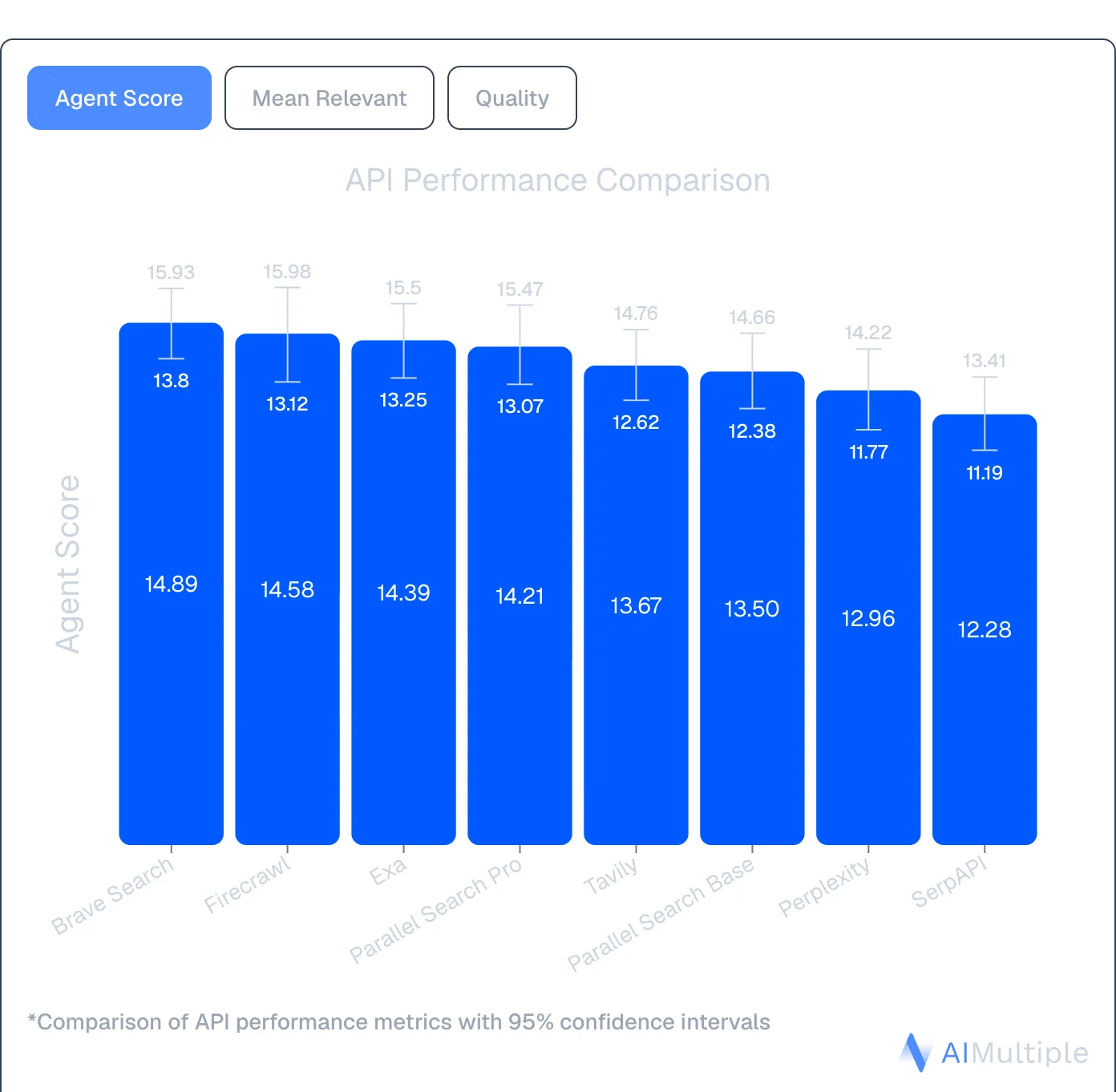
Source: AIMultiple Agentic Search Benchmark 2026
When to choose Firecrawl
Choose Firecrawl if you need:
- The full workflow in one API: Search finds fresh sources, Scrape turns them into token-efficient context, Interact handles dynamic pages, Crawl goes deep across sites
- Clean web context without post-processing — markdown and structured JSON built for agents, not humans
- Real-web handling: JS-heavy pages, SPAs, geo-sensitive sources
- Predictable flat-rate pricing per page
- Compliance-grade by default: ZDR, SOC 2 Type 2, US data residency
- Open source with self-hosting option
You can use Firecrawl as a REST API, an official Claude plugin for direct integration with Claude and other AI tools, or the Firecrawl CLI, with a built-in Claude skill, for terminal-based workflows. It also works with no-code tools like Lovable and n8n.
Try it free with 1,000 credits per month (no card required) or explore the docs.
2. Exa
Exa is an AI-powered search engine built specifically for machines. Unlike Bing's keyword-based index, Exa uses embeddings-based semantic search to understand meaning rather than matching terms, making it a strong fit for AI agents and RAG systems that need conceptually relevant results, not just top-ranked keyword matches.
| Feature | Exa | Bing Search API |
|---|---|---|
| Primary use case | Semantic search & content discovery | Keyword web search (SERP) |
| Search method | Embeddings-based semantic | Keyword/intent matching |
| Output format | Parsed HTML, text snippets | JSON (links, snippets, metadata) |
| Find Similar | Yes (feed one URL, get similar pages) | No |
| Free tier | 1,000 credits | N/A (retired) |
| Pricing | Variable (75–750+ credits/search) | Was tiered |
| Best for | Semantic discovery, research tools | Broad web search |
How Exa compares to Bing Search API
Semantic understanding instead of keyword matching
Bing matched keywords and intent signals. Exa understands the meaning of a query, making it better at surfacing conceptually related content even when the exact words don't appear. This is particularly useful for research tools and AI agents that need thematically relevant pages rather than top-ranked results.
Find Similar endpoint
One of Exa's unique features: feed it a URL and get back semantically similar pages. There's no Bing equivalent. This is useful for competitive research, content discovery, and building recommendation-style features into your application.
Main APIs:
- Search: Semantic queries that understand context and intent
- Contents: Retrieve clean, parsed content from search results
- Find Similar: Feed one URL, get semantically similar pages
- Answer: Summarized responses with citations
- Research: Automated deep research with structured JSON output
Pricing: Free tier with 1,000 credits, then $49 for 8,000 credits. Credit consumption varies by query complexity (75–750+ credits per search), which can make cost prediction harder than flat-rate tools.
When to choose Exa
Choose Exa when semantic relevance matters more than broad coverage. It's well-suited for research tools, content discovery pipelines, and AI applications where you need pages that are conceptually related to a topic, not just pages that rank for a keyword.
Exa is search-first. For deep structured extraction beyond snippets, you'll still need a dedicated tool like Firecrawl alongside it. For a full breakdown, see Firecrawl vs. Exa and our Exa alternatives guide.
3. Tavily
Tavily is a search API built specifically for AI agents and LLMs. It takes a more direct approach than Exa: straightforward pricing, fast response times, and AI-optimized results formatted for LLM consumption. Tavily's platform spans /search, /extract, /crawl, /map, and /research — /search also supports include_raw_content for inline raw HTML alongside results.
| Feature | Tavily | Bing Search API |
|---|---|---|
| Primary use case | AI search and research workflows | Keyword web search (SERP) |
| Search method | Multi-source aggregation | Keyword/intent matching |
| Output format | AI-optimized results with raw content via include_raw_content or /extract | JSON (links, snippets, metadata) |
| LLM optimization | Yes, results ranked for agent context | Requires post-processing |
| Free tier | 1,000 credits/month | N/A (retired) |
| LangChain integration | Native | Not applicable |
| Best for | AI search and research workflows | Broad web search |
How Tavily compares to Bing Search API
Results formatted for LLMs, not humans
Bing returned raw SERP JSON that needed cleaning and formatting before it was useful in an LLM context. Tavily returns AI-optimized results with relevance scores, structured for direct injection into agent context windows. Full page content is available inline via include_raw_content on /search or through the dedicated /extract endpoint.
Transparent, predictable pricing
Tavily charges a flat $0.008 per credit PAYG basic search with clear tiers starting at $30/month. You know exactly what you'll pay before making a request.
Native LangChain integration
Tavily is popular in the LangChain ecosystem with native integrations that make adding real-time web search to an agent straightforward. The setup is minimal compared to building a custom search integration.
Five core endpoints:
- Search: Real-time web queries with AI-optimized, ranked results; optional raw content via
include_raw_content - Extract: Pull full content from specific URLs with JavaScript rendering
- Crawl: Navigate entire websites using natural language instructions
- Map: Discover website structure before extraction
- Research: Multi-step agentic research that synthesizes results across sources
For a detailed comparison, see Firecrawl vs. Tavily and our Tavily alternatives guide.
When to choose Tavily
Choose Tavily when you need AI-optimized search results that feed directly into agent context without additional formatting, especially if you're already using LangChain. It handles the "find relevant content and rank it for my LLM" use case more directly than raw SERP output from Bing required.
4. Brave Search API

Brave Search API stands out with its own independent search index of 30+ billion pages. Unlike search APIs that route queries through Google or Bing under the hood, Brave crawls and indexes the web itself, which is a meaningful distinction now that Bing's API is gone.
| Feature | Brave Search API | Bing Search API |
|---|---|---|
| Index | Independent (30B+ pages, self-crawled) | Microsoft Bing index |
| Privacy | SOC 2 Type II, no user tracking | Microsoft privacy policy |
| Free tier | ~1,000 queries/month in credits | N/A (retired) |
| Rate limits | Up to 50 queries/second (Pro AI plan) | Was tiered |
| Pricing | $5–9 per 1,000 requests | Was tiered |
| Output format | Raw JSON SERPs | JSON (links, snippets, metadata) |
| Best for | Privacy-centric apps, independent index | Broad web search |
How Brave compares to Bing Search API
Independent index, no Bing or Google dependency
Brave runs its own crawler and index. For teams that chose Bing specifically as an alternative to Google, Brave offers genuine independence. You're not re-routing through the same underlying data. The index covers 30B+ pages with millions of new pages updated daily.
Privacy-first architecture
SOC 2 Type II certified with no user tracking. Brave reports not building user profiles or selling data, which is relevant for healthcare, legal, or financial applications handling sensitive queries.
Search Goggles for customization
Customize search behavior by discarding specific domains or re-ranking results. Build custom search experiences tailored to your use case without forking an entire search engine. This level of control wasn't available with Bing's API.
Specialized endpoints:
- Web Search: General queries across Brave's full index
- AI Grounding: Optimized results for LLM context
- Image, Video, News: Vertical-specific search
- Suggest: Autocomplete and query suggestions
- Spellcheck: Query correction
When to choose Brave
Choose Brave for privacy-centric applications or when you need a fully independent index not backed by Bing or Google. The straightforward per-request pricing and no-tracking policy make it a clean starting point.
Brave returns raw JSON SERPs rather than AI-optimized structured output, and like Bing, it doesn't provide full-page content extraction. For AI workflows that need complete page content, you'll need to pair it with a scraping tool. Read our Brave Search API alternatives guide for more.
5. SerpAPI
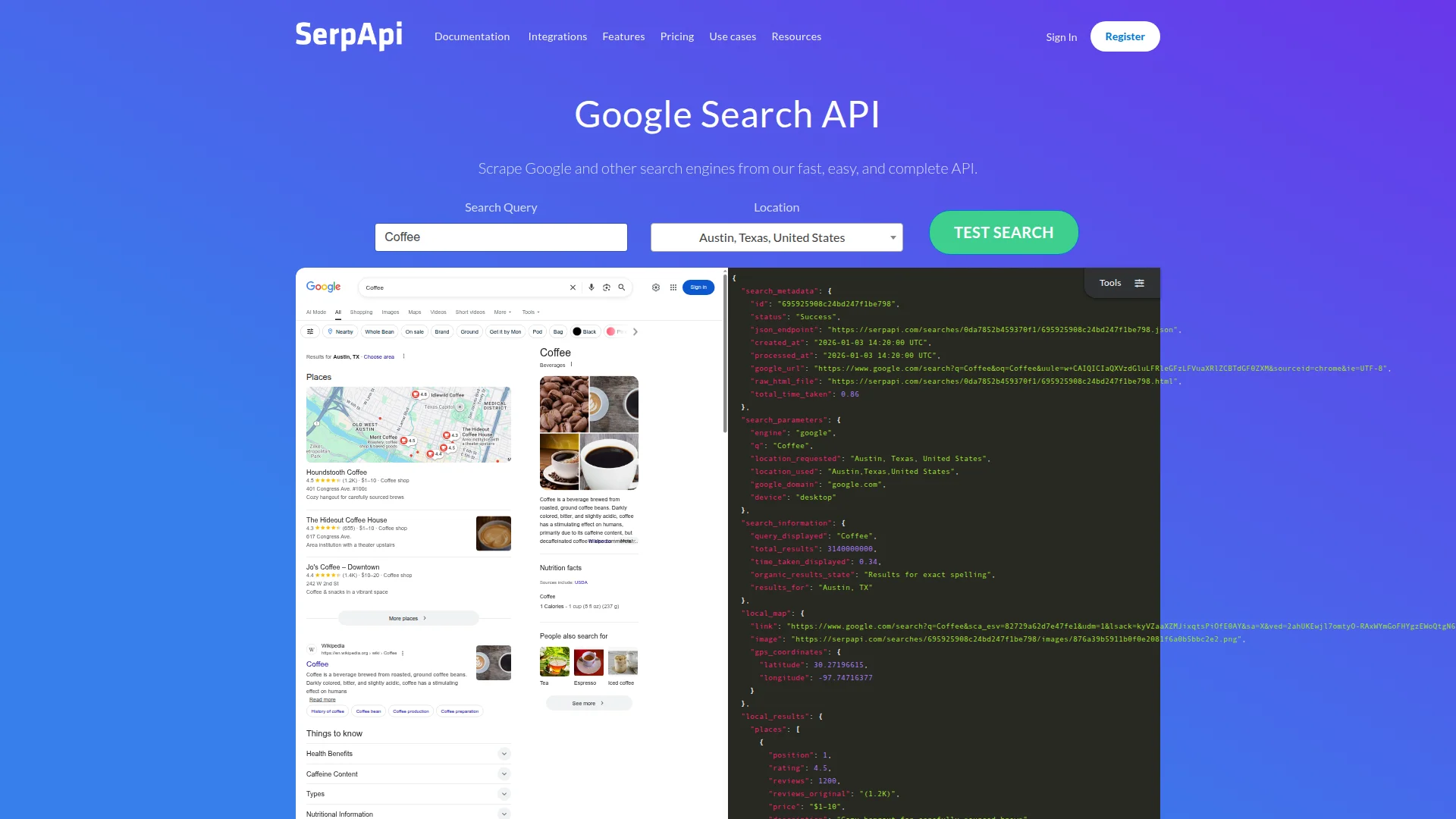
SerpAPI takes a different approach from the other alternatives. Instead of building its own search index, it scrapes and parses search engine results pages from Google, Bing, DuckDuckGo, and 25+ other engines, returning them as clean structured JSON.
| Feature | SerpAPI | Bing Search API |
|---|---|---|
| Primary use case | SERP data from 25+ search engines | Bing web search only |
| Supported engines | Google, Bing, DuckDuckGo, Yahoo, and more | Bing only |
| Output format | Structured JSON (organic, ads, featured snippets, knowledge panels) | JSON (links, snippets, metadata) |
| Free tier | 100 searches/month | N/A (retired) |
| Entry pricing | $50/month (5,000 searches) | Was tiered |
| Real-time results | Yes | Yes |
| Best for | SERP monitoring, multi-engine aggregation | Single-engine search |
How SerpAPI compares to Bing Search API
Access Bing and more via one API
If you were on the Bing Search API specifically for Bing results, SerpAPI can still give you Bing SERP data, plus Google, DuckDuckGo, Yahoo, Baidu, and more from a single integration. Multi-engine coverage in one place, which the native Bing API never offered.
Rich SERP structure
SerpAPI parses the full SERP: organic results, ads, knowledge panels, featured snippets, local packs, "People also ask," images, and more, all as structured JSON. This level of SERP detail wasn't always consistent with the native Bing API's output.
Real-time results
SerpAPI scrapes live results in real time, so you're always getting current data. Useful for rank tracking, competitive analysis, and SEO tools that need to monitor search result changes.
Pricing: Plans start at $50/month for 5,000 searches. Free tier includes 100 searches/month.
When to choose SerpAPI
Choose SerpAPI when you need structured SERP data from multiple search engines, especially if you need Google results alongside Bing, or need rich SERP features like featured snippets, knowledge panels, and ad data.
SerpAPI returns SERP metadata (links, snippets, ads), not full page content. For AI pipelines that need to extract content from the actual pages, you'll need a separate tool like Firecrawl.
Bing Search API vs. Firecrawl
If you used the Bing Search API to feed data into an AI pipeline, Firecrawl replaces it and extends it.
| Capability | Bing Search API | Firecrawl |
|---|---|---|
| Full content (not snippets) | No (links and snippets only) | Yes (full page content in one call) |
| Web search | Yes (keyword/intent) | Yes (via Search endpoint) |
| Data providers in search | No | Yes (Firecrawl Alexandria, 90+ providers via sources) |
| Full page content | No (snippets only) | Yes (full markdown or structured JSON) |
| JavaScript rendering | No | Yes (automatic, included) |
| Structured extraction | No | Yes (natural language schema) |
| Token-efficient output | No (requires post-processing) | Yes (clean markdown or JSON, no cleanup needed) |
| CLI | No | Yes (built-in Claude skill) |
| Open source / self-hosted | No | Yes |
| Free tier | N/A (retired) | 1,000 credits/month (no card required) |
| Pricing | Was tiered | 1 credit = 1 page (flat) |
Bing returned links and snippets. Firecrawl covers the full workflow: Search finds fresh sources, Scrape turns them into clean context, Interact handles dynamic pages, and Crawl goes deep across sites — all in one API.
For teams that used Bing's API as one piece of a SERP API + scraper + browser stack, Firecrawl consolidates that into a single integration. The same API that finds the pages also extracts them, so there's no stitching required.
How to choose the best Bing Search API alternative
The Bing Search API retirement left developers without a direct replacement from Microsoft. The five alternatives above each fill a different part of what Bing offered:
- Firecrawl if you need the full web data stack: Search finds fresh sources, Scrape turns them into clean context, Interact handles dynamic pages — one API covering Find → Extract → Clean → Use
- Exa if you need semantic search that understands meaning, not just keywords
- Tavily if you need AI-optimized search and research workflows with predictable pricing and native LangChain support
- Brave Search API if you need an independent index with privacy guarantees and no Bing or Google dependency
- SerpAPI if you need structured SERP data from multiple search engines including Bing and Google
For AI builders who were using Bing's API to feed content into agents or RAG pipelines, Firecrawl's web data APIs cover the full workflow — Search, Scrape, Interact, and Crawl — with token-efficient output and no platform lock-in. For a full web search API comparison across all major alternatives—including pricing, extraction depth, and use-case fit—see our complete provider guide. For a focused comparison specifically on search tools for AI agents — covering Brave, Exa, Tavily, Perplexity Sonar, and Serper — see the dedicated guide. If you'd rather wire these in as MCP tools with install commands for Claude Code, Cursor, and Codex, the best MCP servers for web search roundup covers the same providers with copy-paste configs. If you're building on Claude, see Anthropic web search alternatives.
Try Firecrawl free with 1,000 credits per month (no card required), try the playground without signing up, or explore the docs to see how it works in practice.
Frequently Asked Questions
Why was the Bing Search API discontinued?
Microsoft retired the Bing Search API on August 11, 2025, as part of a strategic shift toward AI-mediated search experiences embedded within Azure AI Agents. The recommended Microsoft migration path is 'Grounding with Bing Search' inside Azure AI Foundry, which requires a full platform commitment rather than a simple API swap.
What is the best Bing Search API alternative for AI applications?
Firecrawl is the strongest choice for AI applications. It covers the full workflow agents need: Search finds fresh sources, Scrape turns them into clean context, Interact handles dynamic pages, and Crawl goes deep across sites — all in one API with flat predictable pricing. Tavily and Exa are also strong choices for search-first use cases.
Is there a free alternative to the Bing Search API?
Yes. Firecrawl offers 1,000 free credits per month (no card required). Brave Search API offers approximately 1,000 free queries per month in credits. Tavily includes 1,000 credits/month on its free tier. Exa offers 1,000 free credits. SerpAPI provides 100 free searches/month.
Which Bing Search API alternative is best for RAG applications?
Firecrawl is a strong choice for RAG: it pulls full-content results from the live web as the default of `/search`, so context arrives ranked and clean without a follow-up extraction call. It also has native LangChain and LlamaIndex integrations. Tavily is also a strong choice, with AI-optimized results plus raw content on `/search` via `include_raw_content` or the dedicated `/extract` endpoint.
Which alternative handles JavaScript-heavy sites?
Firecrawl includes automatic JavaScript rendering at no extra cost and handles SPAs, infinite scroll, and dynamic content. Tavily and Exa also support JavaScript-rendered pages. SerpAPI returns SERP data without full-page rendering.
Can Firecrawl search the web like the Bing Search API did?
Yes. Firecrawl's Search endpoint lets you run web queries and get full-page content back in a single call, not just links and snippets. You can pass a query, set a result limit, and specify an output format (markdown or structured JSON) so the results are ready to feed directly into an LLM or RAG pipeline without additional processing.
Do any Bing Search API alternatives return data providers alongside web results?
Firecrawl does, through Firecrawl Alexandria. Add alexandria to the sources parameter and the search response carries a tools array next to the web results, drawn from official APIs such as SEC EDGAR and FRED, licensed publishers such as Fiscal.ai and Particle, and Firecrawl's Research, Developer, and Government indexes. Bing returned links and snippets only, and Exa, Tavily, Brave, and SerpAPI return pages or SERP data.
What does Firecrawl Alexandria cost?
Finding tools is free on any search. Running a tool goes through the scrape endpoint with an alexandria block (provider, capability, options) in place of a URL and is billed at the price listed on the tool, which is deducted from your Firecrawl credits. Prices vary by provider, so read the contract before wiring a tool into a loop. Firecrawl Alexandria needs an API key on a team where it is enabled, and some licensed publishers require an organization admin to accept their terms once before the first call.