TL;DR: Best Codex Skills
| Skill | What it does |
|---|---|
| Firecrawl | Gives Codex live web context: search, scrape, crawl, and browser automation |
| grill-me | Stress-tests plans and designs through relentless Socratic questioning |
| handoff | Compresses a session into a markdown doc so you can continue in a fresh session or hand off to a different agent |
| cli-creator | Builds composable CLIs that Codex can run from any repo |
| Andrej Karpathy's Guidelines | Encodes Karpathy's four LLM coding rules: think before coding, simplicity first, surgical changes, goal-driven execution |
| gh-address-comments | Reads GitHub PR review comments and applies selected fixes |
| yeet | Stages, commits, pushes, and opens a GitHub PR in one flow |
| gh-fix-ci | Diagnoses and fixes failing GitHub Actions PR checks |
| migrate-to-codex | Migrates Claude Code skills, agents, and config to Codex |
| finishing-a-development-branch | Wraps up a branch with test verification and merge/PR options |
| mcp-builder | Guides building high-quality MCP servers through a four-phase workflow |
OpenAI officially launched Codex Skills as an experimental feature in December 2025, letting users create reusable, markdown-based workflows for their coding agent. The capability expanded in early 2026, with the SKILL.md format becoming an open standard adopted across Claude Code, Gemini CLI, Cursor, GitHub Copilot, and more than twenty other AI coding tools.
Codex is a capable coding agent. What limits it is not reasoning ability but context. Out of the box, Codex does not know your preferences, cannot browse the live web, and has no awareness of the workflows your team actually follows. Skills fix this. They activate when the task matches, stay dormant when it does not, and load progressively so they never waste context on unrelated work.
The community around the openai/skills repository (19.3k stars) has grown quickly since the Agent Skills spec went cross-platform. One developer on the Codex subreddit captured it directly: "With the right skills, Codex is honestly better than Claude Code for me." That is not a universal claim, but it points at something real. The right skills reshape the experience more than prompt tuning ever will. If you are still deciding between the two agents, the Claude Code vs Codex comparison covers pricing, harness depth, sandboxing, and community verdict side by side.
These are the eleven I would install first.
What are Codex skills?
Codex skills are directories containing a SKILL.md file and optional supporting scripts. The SKILL.md file opens with YAML frontmatter (name, description, trigger conditions) followed by markdown instructions Codex follows when the skill activates.
At startup, Codex reads only the name and description from every installed skill using a capped budget (roughly 2% of context). When you give Codex a task, it checks whether any installed skills match. If one does, the full instructions load. If nothing matches, nothing loads and context stays clean.
The format is an open standard. The same SKILL.md file works across Codex CLI, Claude Code, Gemini CLI, Cursor, and GitHub Copilot without modification. If you want to see the same idea built end-to-end on the Anthropic side, our Claude Code skill tutorial walks through building a complete skill from scratch. For a deep dive into how agent skills became an open standard and why they grew to 40,000 installs so fast, that post covers the full story. Codex can activate a skill two ways: explicit invocation (type $skill-name or /skills in the CLI) and implicit invocation when the task description matches.
Skill locations:
| Scope | Path | Use case |
|---|---|---|
| Personal | $HOME/.agents/skills/ | Private skills available in any project |
| Project | .agents/skills/ in your repo | Shared with everyone who clones the repo |
| Admin | /etc/codex/skills | Machine or container defaults |
System skills
Codex ships with a set of system skills automatically available to every user:
- skill-creator: Builds new skills interactively through a Q&A session
- plugin-creator: Scaffolds plugin packages that bundle skills, agents, and hooks
- skill-installer: Installs curated skills from the openai/skills repository
- imagegen: Image generation inside Codex
- openai-docs: Access to OpenAI documentation as a tool
System skills are maintained by the OpenAI team alongside Codex itself. The full curated skills library lives at github.com/openai/skills. skills.sh (maintained by Vercel) is the searchable directory for the broader ecosystem across all AI coding tools.
Why should you use Codex skills?
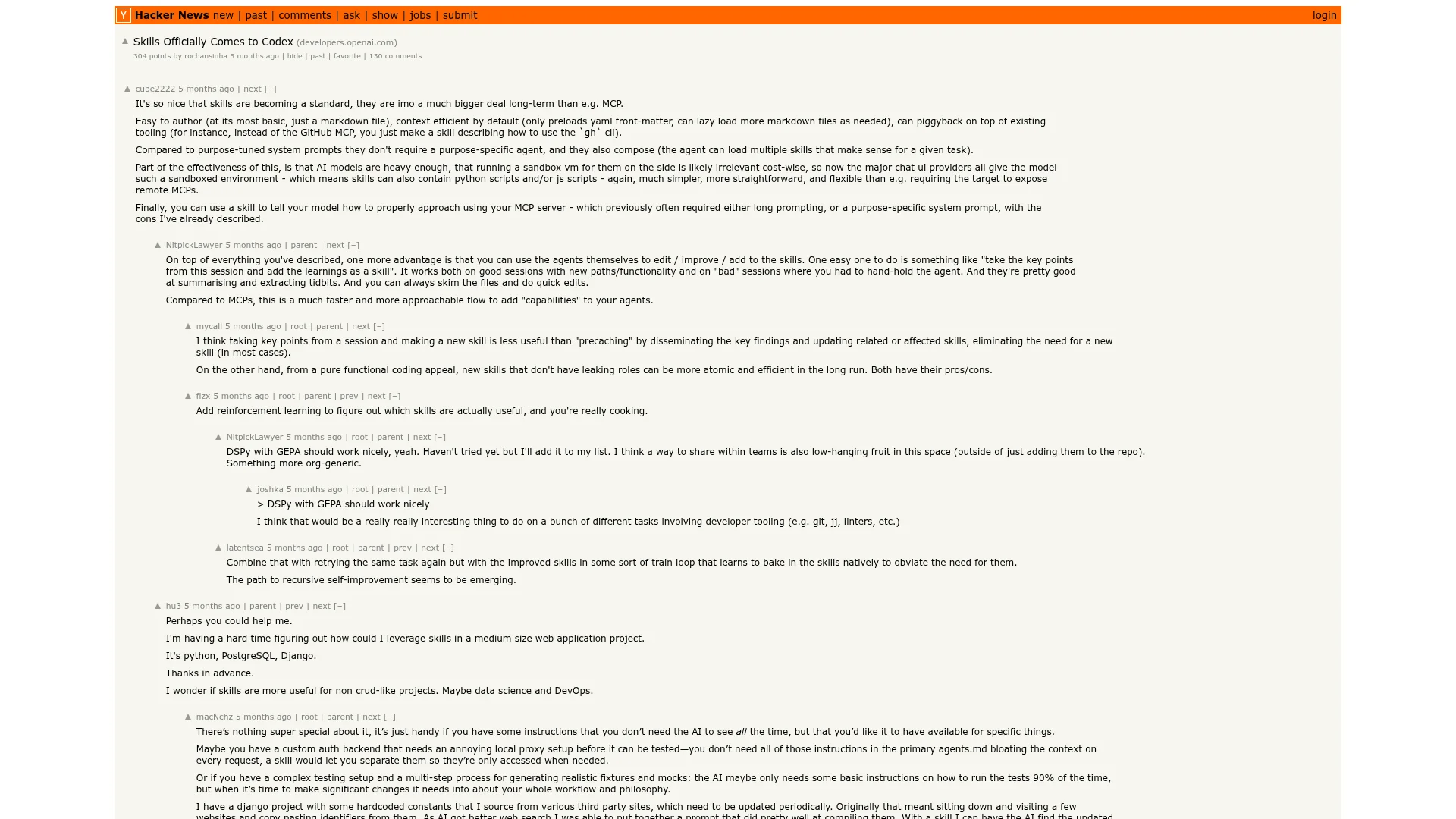
When OpenAI officially rolled out skills for Codex, the Hacker News announcement pulled 304 points and 130 comments. The reaction was not just curiosity — it was recognition that skills change what an agent can consistently deliver.
 Skills Officially Comes to Codex — Hacker News
One developer in the thread put it plainly:
It's so nice that skills are becoming a standard, they are imo a much bigger deal long-term than e.g. MCP.
The reason is architectural: skills are context-efficient where MCP is not. A skill loads only when the task matches; MCP server definitions consume context every session regardless. Another commenter described how this compounds:
Use the agents themselves to edit / improve / add to the skills. One easy one to do is something like "take the key points from this session and add the learnings as a skill". It works both on good sessions with new paths/functionality and on "bad" sessions where you had to hand-hold the agent.
The community verdict on Reddit is direct. One user wrote "With the right skills, Codex is honestly better than Claude Code for me". A second developer in the same thread: "As somebody who has used both extensively over the past 6+ months, Codex has been better than Claude this entire time. No doubts about that."
Firecrawl's Agent Skills Explained covers what happened after the spec became an open standard: 40,285 publicly listed skills within weeks — an 18.5× growth spike driven by the same insight that skills give a general-purpose agent specialist knowledge on demand, without burning context when it is not needed. The right skills do not just tune Codex's behavior. They reshape the experience entirely.
What are the best Codex skills?
Here are the eleven I keep installed and actually reach for.
1. Firecrawl
An agent is only as smart as the context it has. The Firecrawl skill gives Codex live web context.
Codex's built-in web search queries a stale pre-scraped cache by default, silently fabricates results when network access is restricted, and returns snippets with no full-page content. The Firecrawl skill solves all of this by teaching Codex how to install and use the Firecrawl CLI automatically, giving it access to live web data without any manual configuration.
The Firecrawl CLI is built for AI agents. Results write to files rather than flooding the context window. JavaScript rendering is handled automatically. Commands map directly to how agents think about web tasks: search to find sources, scrape to read them, crawl to index an entire site, interact to control a live browser session.
If Codex is doing research, documentation lookups, or any task that requires knowing what is true today, this skill is the difference between confident answers and confident hallucinations.
Install:
npx -y firecrawl-cli@latest init --all --browserThe --all flag installs the Firecrawl skill to every detected AI coding agent on your machine. The --browser flag opens browser authentication to connect your API key. Get a free API key at firecrawl.dev/app/api-keys.
Commands Codex gets access to:
firecrawl search: Live web search with real-time results, not a cached index (see the best web search MCP servers guide for how Firecrawl compares to Tavily and Exa)firecrawl scrape: Clean markdown from any page, including JavaScript-heavy sitesfirecrawl crawl: Recursively follow links across an entire sitefirecrawl map: Discover all URLs on a domainfirecrawl interact: Scrape a page, then interact with it via natural language or Playwright code
Example:
"Check the React 19 migration guide and list any breaking changes from this month"
"Crawl the Prisma docs and find every page that mentions connection pooling"
"Research the top three competitors to our product and extract their pricing structures"
Pros: JavaScript rendering is automatic. File-based output keeps context efficient. Live results replace Codex's stale cache for documentation lookups, research, and competitor analysis.
Cons: You can try the endpoints without an API key, but ongoing use needs one and consumes credits on heavy usage. The free tier is 1,000 credits a month with no card, and GET /v2/team/credit-usage shows what is left before a long run. That covers substantial testing; production research workflows may need a paid plan.
Firecrawl is used by 1.25M+ developers and non-developers across 150,000+ companies, and has served 5B+ requests to date. It has reached that scale because it handles the full workflow — search, scrape, crawl, interact — in a single install, on the real web. Builders who need reliable web context for agentic workflows keep coming back to it — and recommend it to others. Peter Steinberger, founder of OpenClaw, put it plainly:
Users aren't just using Firecrawl's skill as-is. They're creating their own skills for custom workflows and wiring Firecrawl into them — which is where it gets really powerful. Any Codex skill that needs live web context can call Firecrawl directly, turning a one-time automation into a reusable agent workflow. Riley Brown built a skill that pulls any asset from the internet using Firecrawl and creates moodboards by one-shotting assets from any company in a single pass:
Full reference at skills.sh/firecrawl/cli. Also read: Codex web search guide for a deeper look at why the default cache falls short.
2. Grill Me
Matt Pocock's grill-me skill interviews you relentlessly about every aspect of a plan until you reach shared understanding.
The skill went viral on X recently, with developers sharing how it fixes the most common failure mode in agentic coding: Codex charging ahead with wrong assumptions before you had a chance to correct them.
The SKILL.md instruction is direct: "Interview me relentlessly about every aspect of this plan until we reach a shared understanding. Walk down each branch of the design tree, resolving dependencies between decisions one-by-one. For each question, provide your recommended answer." If a question can be answered by reading the codebase, Codex reads it and moves on rather than asking you.
This is a design review tool. Use it before you write code, not after. The questions surface implicit assumptions, dependency chains between decisions, and gaps in your plan that seem obvious until you try to articulate them. Codex's recommended answers move the session forward rather than leaving you stuck at each question with no direction.
Install:
npx skills add https://github.com/mattpocock/skills --skill grill-meExample:
"Grill me on this feature spec before I start building"
"Run grill-me on my plan for the auth refactor"
"Walk me through every decision in this architecture before I commit to it"
Pros: Surfaces the assumptions and dependency chains in your plan before they become bugs. Codex's recommended answers move the session forward rather than just blocking you with questions. 156.2K installs. Matt Pocock's skills collection has 87.3K GitHub stars.
Cons: Requires an actual plan or design to stress-test. "I want to build X" is too vague to grill effectively. Prepare a written spec or description before invoking the skill. The session is open-ended by design, not a checklist with a fixed number of questions.
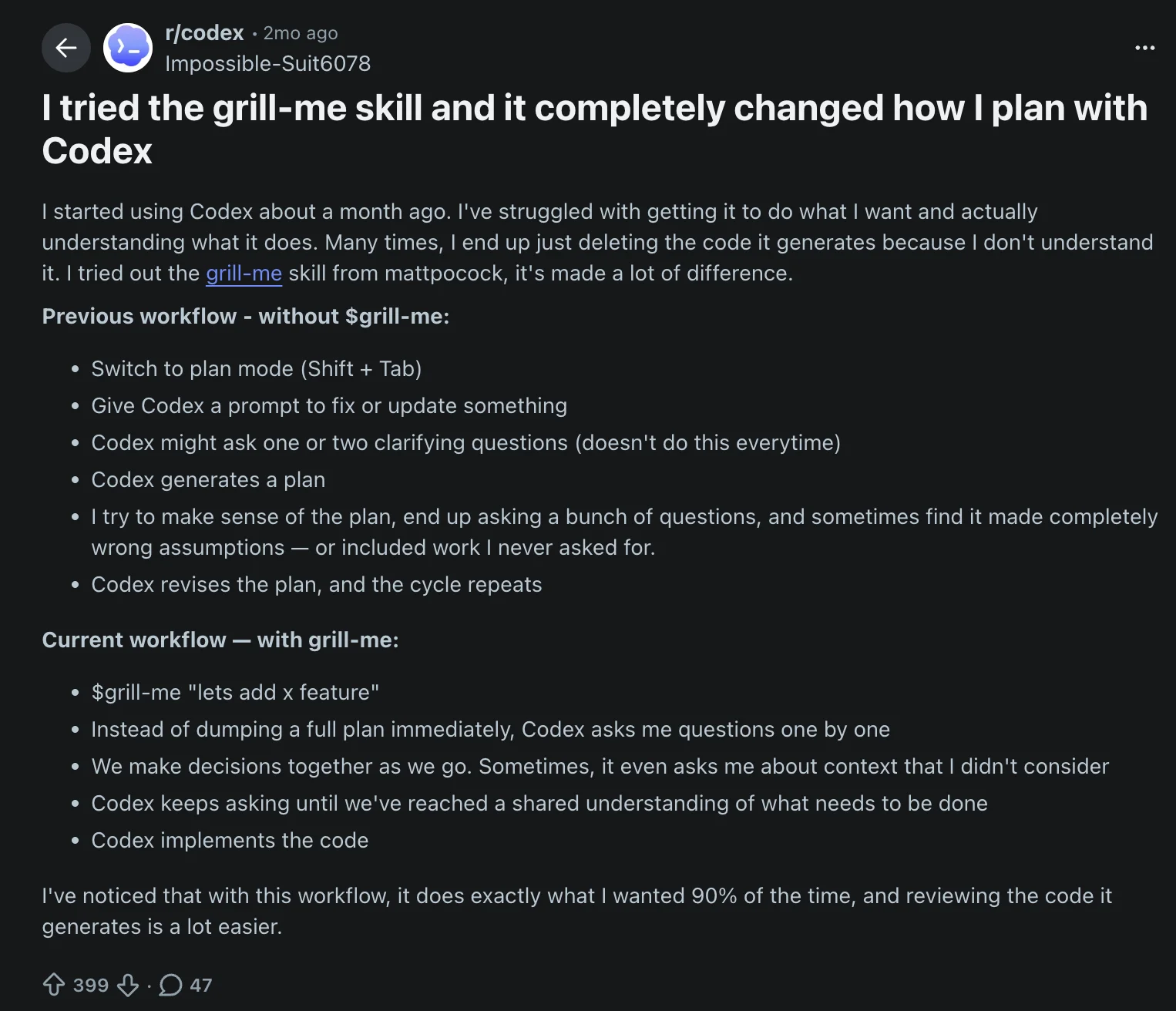
One Reddit user tried grill-me and said it completely changed how they plan with Codex. Their before: switch to plan mode, give Codex a prompt, get a plan that made wrong assumptions or included work they never asked for, then spend time asking clarifying questions and repeating the cycle. Their after: run $grill-me, Codex asks questions one by one, they make decisions together as they go — including context they hadn't considered — until there's a shared understanding, then Codex implements. The result: "it does exactly what I wanted 90% of the time, and reviewing the code it generates is a lot easier."
 r/codex: "I tried the grill-me skill and it completely changed how I plan with Codex"
Full reference at skills.sh/mattpocock/skills/grill-me.
3. Handoff
Matt Pocock's handoff skill compresses your current agent session into a structured markdown document so you can continue the work in a fresh session — or pass it to a different agent entirely.
The problem it solves is context drift. As discussed on HN, sessions nearing compaction limits don't just slow down — they get dumber. After roughly 120k tokens, attention relationships strain and response quality degrades. /handoff gives you a clean exit before you hit that wall: it generates a document containing the purpose of the next session, relevant context from the current one, suggested skills to invoke, and pointers to existing artifacts — without duplicating content.
The difference from /compact is intent. Compact keeps you in the same thread with a compressed summary. Handoff is for moving on — to a new session, a fresh worktree, or a completely different agent. Ben Holmes captured the pattern that makes this genuinely powerful: plan in Claude Code with /grill-me, then pass the handoff doc to multiple Codex worktrees for parallel implementation:
Install:
npx skills add mattpocock/skills skill=handoff -y -gExample:
"Create a handoff for this session before I run out of context"
"Handoff — I want to continue this in a new session"
"Generate a handoff doc so I can delegate the implementation to Codex"
Pros: Keeps sessions focused by giving you a deliberate exit point. The handoff document is more purposeful than a compaction summary — you control what the next session needs to know. Works cross-agent: plan in Claude Code, implement in Codex, or split a large task across parallel worktrees.
Cons: The generated document goes to your OS temp directory by default — commit it if you want a permanent record. Most useful when deliberately splitting work across sessions or agents; less necessary for single-threaded sessions that compact naturally.
Full reference at aihero.dev/skills-handoff.
4. CLI Creator
CLI Creator builds a composable CLI that future Codex threads can run by command name from any working directory.
The output is a durable tool that Codex can call repeatedly: read/write subcommands with stable JSON output, clean auth handling, and a doctor command for health checks.
The typical starting point is an API, an existing SDK, or a set of curl examples. CLI Creator wraps them into a proper CLI with discovery/resolve/read/write subcommands and a companion skill so future Codex sessions immediately know how to invoke it. This is the scaffolding pattern for extending Codex's own toolset beyond what ships by default.
Install (inside Codex):
$skill-installer cli-creator
Example:
"Build a CLI for our internal search API from this OpenAPI spec"
"Turn these curl examples into a composable CLI with a doctor command and JSON output"
"Create a CLI that wraps the Stripe API for reading customer and subscription data"
Pros: Produces CLIs with the contract Codex expects: PATH-installable, stable JSON output, doctor for health checks. The companion skill handoff means every CLI gets a skill that teaches future Codex threads how to use it. This is the right pattern for reusable tooling, not ad-hoc scripts.
Cons: Explicitly scoped to durable, reusable tools. If a short script in the current repo solves the task, the skill will steer you toward a more structured approach than you need. Not a general-purpose script generator.
Full reference: github.com/openai/skills/tree/main/skills/.curated/cli-creator.
5. Andrej Karpathy's Guidelines Skill
The most starred AI coding behavioral skill on GitHub, encoding Karpathy's viral observations about LLM coding pitfalls into four hard rules. It also ranks in our list of trending GitHub repositories worth watching in 2026.
When Andrej Karpathy posted his frustrations with AI coding agents in January 2026, it went viral immediately. Developer Forrest Chang turned the observations into a single CLAUDE.md file — written specifically for Claude Code — with four behavioral principles. The repo hit 144k stars in weeks, all from a single file with zero runtime dependencies.
To use it in Codex, the easiest path is to take the content and turn it into a proper Codex skill using the built-in $skill-creator. It walks you through an interactive session that wraps any instructions into a SKILL.md with the right frontmatter, so the guardrails load contextually rather than sitting in your global AGENTS.md permanently.
The skill targets the three failure patterns Karpathy called out directly: agents making silent wrong assumptions and charging ahead without checking, over-engineering that turns 50 lines into 500, and orthogonal changes that modify code the agent was never supposed to touch.
This is an Encoded Preference skill. Codex already knows how to code. The skill encodes the behavioral guardrails that stop it from confidently charging ahead with wrong assumptions or bloating a 50-line solution into 500.
The four principles:
- Think Before Coding: State assumptions explicitly. If multiple interpretations exist, present them. Don't pick one silently and run with it.
- Simplicity First: Minimum code that solves the problem. No features beyond what was asked. No abstractions for single-use code. If 200 lines could be 50, rewrite it.
- Surgical Changes: Touch only what you must. Don't improve adjacent code or formatting. Match existing style. If you notice unrelated dead code, mention it — don't delete it.
- Goal-Driven Execution: Define success criteria and loop until verified. "Add validation" becomes "Write tests for invalid inputs, then make them pass."
Pros: 144k stars because every developer using AI coding agents has hit these exact failure modes. Works across Codex, Claude Code, Cursor, and Copilot — install once, carry the guardrails everywhere. Designed to be merged with your existing AGENTS.md rather than replacing it.
Cons: Biases toward caution over speed. For trivial tasks, the full rigor adds friction without benefit. Layer your own project-specific sections on top for best results.
Repo: github.com/multica-ai/andrej-karpathy-skills.
6. gh-address-comments
gh-address-comments reads open review comments on a GitHub PR, presents them for selection, then applies the chosen fixes.
The skill is more structured than a fully automatic pass. It fetches all review threads and comments, numbers them with a short summary of what each fix requires, then asks you which ones to address. This matters: some review comments require judgment calls you want to make yourself. The skill handles the mechanical ones you select, and leaves the rest for you.
Install (inside Codex):
$skill-installer gh-address-comments
Example:
"Address the open review comments on this PR"
"Go through the code review and fix the comments I select"
"Help me address PR #247's review feedback"
Pros: Turns review comment resolution from a context-switching chore into a structured agent task. The numbered selection step protects against automatically applying feedback that needs your judgment. Requires gh installed and authenticated, which most developers already have.
Cons: Not fully automatic by design. The confirmation step is a feature, but it does mean you need to be present rather than walking away and letting Codex handle everything.
Full reference: github.com/openai/skills/tree/main/skills/.curated/gh-address-comments.
7. Yeet
Yeet stages, commits, pushes, and opens a GitHub PR in one flow using gh.
Once work is done, the PR creation loop is mechanical: stage, commit with a good message, push, create the PR with a proper title and description. Yeet encodes this entire sequence, including PR template discovery (it checks .github/pull_request_template.md before creating the PR), branch reuse if a PR already exists, and draft/ready-for-review state handling.
The trigger condition is deliberately narrow: it only activates when you explicitly ask to stage, commit, push, and open a PR. It won't fire on every commit, only when you're ready to ship.
Install (inside Codex):
$skill-installer yeet
Example:
"Yeet this work"
"Stage, commit, and open a PR for everything I've built"
"Commit and create a PR for the auth refactor"
Pros: Handles the complete publish workflow in one agent task. Template-aware PR bodies mean your PRs conform to your team's format automatically. Branch reuse prevents duplicate PRs on multiple runs.
Cons: Requires gh installed and authenticated. Scoped to GitHub; does not support GitLab or Bitbucket. The commit message and PR title are generated by Codex, so review them before finalizing if your repo has strict conventions.
Full reference: github.com/openai/skills/tree/main/skills/.curated/yeet.
8. gh-fix-ci
gh-fix-ci diagnoses failing GitHub Actions PR checks, summarizes the failure, and implements a fix after explicit approval.
The workflow is structured: verify gh auth, resolve the PR, fetch GitHub Actions logs for failing checks, extract the relevant failure snippet, draft a fix plan, and wait for your approval before touching any code. Nothing gets changed until you confirm the plan.
External CI providers (Buildkite, CircleCI, etc.) are explicitly out of scope. The skill surfaces the details URL for those and stops there, which is more honest than guessing at a fix across a provider it cannot query.
Install (inside Codex):
$skill-installer gh-fix-ci
Example:
"Fix the failing CI on this PR"
"Debug the GitHub Actions failure on PR #183"
"Why is the test check failing on this branch?"
Pros: Fetches actual GitHub Actions logs rather than asking you to paste them. The approval gate before implementation means you see the proposed fix before anything changes. Bundled Python script handles gh field drift and job-log fallbacks automatically.
Cons: Scoped to GitHub Actions only. External CI providers get a URL and nothing else. Requires gh authenticated with repo and workflow scopes.
Full reference: github.com/openai/skills/tree/main/skills/.curated/gh-fix-ci.
9. migrate-to-codex
migrate-to-codex migrates Claude Code skills, agents, hooks, and MCP config into Codex project and user files.
If you have been using Claude Code and want to move a project or personal setup to Codex, this skill handles the full translation. It reads your Claude Code artifacts (.claude/ commands, CLAUDE.md, .mcp.json, agents, hooks, slash commands) and converts them to the equivalent Codex formats: AGENTS.md, .agents/skills/, .codex/config.toml, .codex/hooks.json, .codex/agents/.
The migration runs in a self-healing loop: scan, dry-run, run for real, fix any MANUAL MIGRATION REQUIRED blocks in the output, validate, and re-run until clean. Items that require judgment get explicit guidance rather than a broken conversion that silently misbehaves later.
Install (inside Codex):
$skill-installer migrate-to-codex
Example:
"Migrate my Claude Code setup to Codex"
"Convert my .claude/ skills and agents to Codex format"
"Migrate the MCP servers from my Claude config to Codex"
Pros: Handles the full migration scope: instructions, skills, agents, hooks, and MCP in one pass. The report table shows exactly what was converted, what needs manual review, and what could not be migrated with a reason. Does not touch source Claude Code files, so you keep a clean rollback.
Cons: Claude-specific plugin marketplaces and some hook types have no direct Codex equivalent and appear as Not Added in the report. Complex custom hooks may need review after migration. Source files are read-only during the run, so the migrated output is a separate artifact.
Full reference: github.com/openai/skills/tree/main/skills/.curated/migrate-to-codex.
10. Finishing a Development Branch
Obra's finishing-a-development-branch skill runs test verification on your current branch and presents exactly four merge options.
Before presenting any options, it verifies that all tests pass. Once they do, it shows four choices: merge locally, create a pull request, keep the branch as-is, or discard with confirmation. After you choose, it handles base branch detection, git operations, and worktree cleanup. The test gate is not optional and cannot be skipped. For teams running agents at fleet scale, this gate is one layer of the broader agent merge policy that governs which changes auto-merge versus which need human sign-off.
This skill is part of Obra's Superpowers collection (196.7K GitHub stars), the most complete multi-agent development framework available as a skill set. Within that collection, this one handles the final step: wrapping a branch cleanly before it merges.
Install:
npx skills add https://github.com/obra/superpowers --skill finishing-a-development-branchExample:
"Finish up this branch and get it ready to merge"
"Run the finishing skill on the feature/auth-refactor branch"
"Clean up and merge this branch"
Pros: The test gate before merge options prevents shipping broken branches. Integrates cleanly with other Superpowers skills: subagent-driven-development and executing-plans both call this skill to finalize completed work. 67.1K installs.
Cons: Requires the Superpowers collection. The discard option is destructive and requires confirmation, but review what that means in your workflow before relying on it.
Full reference at skills.sh/obra/superpowers/finishing-a-development-branch.
11. MCP Builder
Anthropic's mcp-builder skill walks you through building a production-quality MCP server in four structured phases. If you want to see which MCP servers for developers are already widely adopted before building your own, that guide covers the current ecosystem.
The four phases are: deep research and planning (understanding the API and what modern MCP design actually requires), implementation (TypeScript is recommended; Python is also supported), testing, and evaluation. The evaluation phase is the one most generators skip: 10 independent, read-only questions with verifiable answers in XML format that confirm the model can actually use your server before you ship it.
This is not a one-shot generator. It is a structured guide that enforces the design principles that make MCP servers genuinely useful: API coverage over workflow tools, consistent tool naming prefixes, actionable error messages that guide the agent rather than blocking it, correct tool annotations (readOnly, destructive, idempotent), and proper pagination handling.
Install:
npx skills add https://github.com/anthropics/skills --skill mcp-builderExample:
"Build an MCP server that exposes our internal search API"
"Create an MCP server wrapping the Stripe API for reading customer data"
"Build an MCP tool that lets agents query our Postgres database"
Pros: Produces MCP servers built to spec rather than guessed at from the protocol docs. The evaluation framework surfaces whether the model can actually use your server before you deploy it. 56.9K installs. TypeScript path is well-defined and includes code examples.
Cons: The four-phase workflow takes longer than a quick scaffold. The evaluation step requires effort: 10 questions with verifiable XML answers is a real investment. Worth it for production MCP servers; overkill for a quick internal experiment.
Full reference at skills.sh/anthropics/skills/mcp-builder.
Building your own Codex skills
These eleven are a starting point. Every developer has workflows that repeat, preferences that keep getting explained from scratch, and tasks that could be encoded once and reused indefinitely. Skills are the mechanism for that.
The fastest way to build a custom skill is $skill-creator, the built-in system skill available in every Codex session. Type $skill-creator and Codex walks you through an interactive session that generates a complete SKILL.md from your description. Full reference at developers.openai.com/codex/skills.
The best practices guide from OpenAI is worth reading before building anything with multi-step instructions. It covers how to write trigger descriptions that activate reliably, how to structure inputs and outputs clearly, and when to add scripts versus keeping skills instruction-only.
You can also edit any skill on this list for your specific context. The prebuilt versions cover common patterns. Customizing them, updating the trigger conditions, or adding team-specific context is where the real leverage is.
For discovering what else exists, skills.sh is the searchable directory maintained by Vercel. It indexes published skills across Codex, Claude Code, Gemini CLI, and Cursor, searchable by category and author. If you also run OpenCode, the best OpenCode skills roundup covers the top skills that carry across from Codex without modification.
The right combination of pre-built and custom skills is what makes Codex genuinely consistent across sessions rather than starting fresh every time. If you are also evaluating which underlying open source agent frameworks to build on, that comparison covers LangGraph, CrewAI, AutoGen, and others with stars, downloads, and best-fit use cases.
Frequently Asked Questions
What are Codex skills?
Codex skills are directories containing a SKILL.md file with YAML frontmatter and markdown instructions. They activate contextually when Codex detects a task that matches the skill's description and load progressively, so they don't consume context tokens when unused.
How are Codex skills different from Claude Code skills?
Structurally, they're identical. Both follow the Agent Skills open specification. A skill that works in Codex also works in Claude Code, Gemini CLI, Cursor, and GitHub Copilot without modification. Same SKILL.md format, same progressive loading behavior.
What are Codex system skills?
System skills ship with Codex by default. They include skill-creator (to build new skills interactively), plugin-creator (to scaffold plugin packages), skill-installer (to install curated skills), imagegen, and openai-docs. You can browse them at github.com/openai/skills/tree/main/skills/.system.
How do I install a curated Codex skill?
Use the built-in $skill-installer inside Codex. Type '$skill-installer gh-address-comments' and Codex installs the skill automatically. For skills from other repositories (like obra/superpowers or anthropics/skills), use 'npx skills add [repo] --skill [name]' from the terminal.
Where are Codex skills stored?
Personal skills go in $HOME/.agents/skills and are available in any project. Project-scoped skills go in .agents/skills inside your repository root and are shared with anyone who clones it.
How do I build my own Codex skill?
Use the built-in $skill-creator inside Codex. It walks you through an interactive session that generates a complete SKILL.md file. You can also create a skill manually: make a folder with a SKILL.md file containing name and description in YAML frontmatter, followed by markdown instructions.
What does the Firecrawl skill do for Codex?
The Firecrawl skill gives Codex live web context by teaching it how to install and use the Firecrawl CLI automatically. Codex's built-in web search queries a stale pre-scraped cache by default and silently fabricates results when network access is restricted. The Firecrawl skill replaces that with real-time search, full-page scraping, site crawling, URL mapping, and live browser interaction — all writing results to files rather than flooding the context window.
How do I install the Firecrawl skill for Codex?
Run 'npx -y firecrawl-cli@latest init --all --browser' from your terminal. The --all flag installs the skill to every detected AI coding agent on your machine. The --browser flag opens browser authentication to connect your API key. A free API key is available at firecrawl.dev/app/api-keys.
What is Codex goal mode?
Goal mode (/goal) lets you give Codex a specific milestone and it will keep working until it gets there, even across hours or days. It is available in the Codex app, IDE extension, and CLI. You can check in and steer, pause and resume, or edit the goal mid-run. The best goals are measurable: a target metric, a passing test suite, or a clear completion condition.
How do I write a good Codex goal?
The best goals are those where it is unambiguous whether Codex has achieved them. Specify a measurable target or clear test criteria that have to pass. If you struggle writing the goal yourself, use Plan Mode first and then use the resulting plan as your implementation goal, or ask Codex to interview you before crafting and setting the goal itself.
Can I pause a Codex goal?
Yes. Because a goal can run for hours or days, you can pause it at any time, for example before losing internet connection, and resume it later. You can also edit the goal on resume to give Codex more concrete guidance or adjust the target if your requirements have changed.
What is the Andrej Karpathy skill for Codex?
The Andrej Karpathy Guidelines skill encodes four behavioral rules for AI coding agents into a single AGENTS.md file: think before coding, simplicity first, surgical changes, and goal-driven execution. It targets the failure patterns Karpathy called out in January 2026: agents making silent wrong assumptions, over-engineering simple tasks, and touching code they were never supposed to modify. It has 144k GitHub stars and works across Codex, Claude Code, Cursor, and Copilot.
What are the four Karpathy coding rules?
Think Before Coding: state assumptions explicitly before acting. Simplicity First: write the minimum code that solves the problem, no extra features or abstractions. Surgical Changes: touch only what you must, match existing style, and never silently delete adjacent code. Goal-Driven Execution: define a clear success condition and loop until it is verified, for example by writing tests first and making them pass.
What is the difference between AGENTS.md and CLAUDE.md?
AGENTS.md is a community-defined open standard for repo-level agent instructions. It works across Codex, Cursor, Windsurf, OpenCode, and most other coding agents — one file, many agents. CLAUDE.md is proprietary to Anthropic's ecosystem. It is more powerful inside Claude Code, with hierarchical resolution, @path imports, and an auto-memory system that writes back to project files, but it does not work in any other agent. If you run multiple agents, AGENTS.md is the friendlier default. If you live exclusively in Claude Code, CLAUDE.md gives you more control.
What does the grill-me skill do in Codex?
The grill-me skill interviews you about every aspect of a plan before any code is written. Instead of Codex generating a full plan that you then have to interrogate for wrong assumptions, grill-me asks you questions one by one, resolves dependencies between decisions as you go, and provides its own recommended answer for each question so the session keeps moving. You reach a shared understanding first, then Codex implements. It is a design review tool — use it before you write code, not after.
When should I use grill-me instead of just asking Codex to plan?
Use grill-me on anything complex enough that wrong assumptions would be expensive to undo. Regular plan mode gives you a plan to react to. Grill-me gives you a plan you helped build, with implicit assumptions surfaced before they become bugs. If your task is straightforward and unambiguous, plan mode is faster. If it involves architectural decisions, cross-cutting concerns, or work you have not fully thought through yet, grill-me produces better results.
What is the handoff skill for Codex?
The handoff skill compresses your current agent session into a structured markdown document containing the purpose of the next session, relevant context, suggested skills to invoke, and pointers to existing artifacts. You run it when a session is nearing its useful limit or when you want to delegate work to a different agent or worktree. The document becomes the starting context for the next session, giving it everything it needs without duplicating file content.
What is the difference between handoff and compact in Codex?
Compact summarizes a long session so you can keep working in the same thread without losing history. Handoff is for deliberately moving on — to a new session, a fresh worktree, or a different agent entirely. Compact recovers focus within one conversation. Handoff transfers ownership across sessions or agents, which is what you want when delegating implementation to Codex after planning in Claude Code, or when splitting a large task across parallel worktrees.