5 Tavily Alternatives for Better Pricing, Performance, and Extraction Depth
 Hiba Fathima
TL;DR - Best Tavily alternatives
| Tool | Best for | Standout feature | Free tier |
|---|---|---|---|
| Firecrawl | Full web data stack for AI agents | Search, Scrape, Interact, Crawl — find sources, extract clean context, ship | 1,000 credits/month |
| Exa | Semantic research | Embedding-based search and "Find Similar" from one result | No public free tier |
| Perplexity | Cited answers | Synthesized answers with source citations in one call | 100 queries/day |
| Brave | Privacy-first search | Independent 30B+ page index, SOC 2 certified | 2,000 queries/month |
| LLMLayer | Unified web infra | Search, scrape, and answers bundled in one API | $2 free credits |
Tavily has become popular for AI-powered web search API. In our review, this guide explores five alternatives that offer different approaches to web search and data extraction. Tavily also features in our Anthropic web search alternatives comparison for Claude-based agent workflows, and in the comprehensive search tools for AI agents guide covering the full landscape of SERP APIs, semantic search, and RAG-ready extraction tools.
What is Tavily: Quick overview
Tavily is a search API built specifically for AI agents and LLMs. Unlike traditional search engines designed for humans, Tavily returns clean, structured results optimized for feeding directly into language models and RAG systems.
Instead of raw HTML, you get AI-optimized results with structured content, summaries, citations, and optional raw content via include_raw_content or the dedicated /extract endpoint. It's particularly popular in the LangChain community, with native integrations that make adding real-time web search to your agent straightforward.
Main APIs:
- Search: Real-time web queries with AI-optimized results
- Extract: Pull full content from URLs with JavaScript rendering
- Crawl: Navigate entire websites using natural language instructions
- Map: Discover website structure before extraction
- Research: Multi-step agentic research that synthesizes results across sources
For many developers building AI agents, assistants or research tools, Tavily works well. Depending on your needs (cost efficiency, scraping depth, or specific features), you might find different approaches in the alternatives below.
That said, user reviews are mixed. A recent thread on r/mcp captures a common pattern:
I'm using it for a couple weeks in my Claude setup and the results have been underwhelming. The search quality is fine for broad stuff but for technical or niche it returns garbage. I also hit the rate limit very quickly on the free tier.
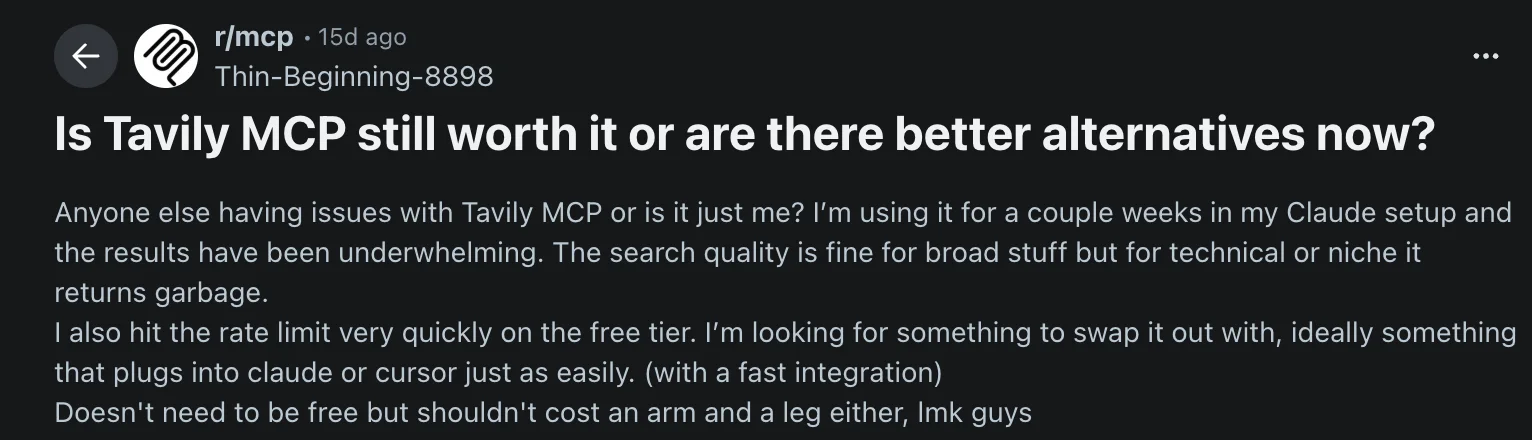
Is Tavily MCP still worth it or are there better options? — r/mcp
One commenter in the thread put it plainly: "No Tavily MCP is no more the best option, you should check Firecrawl (I'm using it for like a year)."
A separate thread on r/Agent_AI asking about Tavily alternatives for search API in 2026 surfaced similar recurring complaints:
- Not always consistent results depending on query type
- Limited control over ranking and sources
- Gets expensive at scale when running multiple agents in parallel
Top 5 Tavily alternatives for agentic search in 2026
Each alternative offers different approaches to web search and data extraction.
1. Firecrawl: Web data APIs for AI agents
Firecrawl searches, scrapes, and cleans the web for AI agents. It's built AI-first from the ground up — every output format, every endpoint, and every default is designed for what agents actually need, not retrofitted from a human-facing product.
With over a million developers using it, Firecrawl has become the default web data stack for AI teams and the go-to choice for production AI agents and workflows. It's fully open source (180K+ GitHub stars), with ZDR and SOC 2 Type 2 for teams with compliance requirements.
| Feature | Firecrawl | Tavily |
|---|---|---|
| Primary use case | Web data APIs: Search, Scrape, Interact, Crawl | Search & discovery |
| Extraction method | Natural language prompts (zero selectors) | Keyword search + optional extraction |
| JavaScript rendering | Automatic (pre-warmed Chromium) | Available with advanced extract |
| Output format | Markdown, HTML, JSON, links, screenshot, summary, image | Structured results with raw content via include_raw_content or /extract |
| Pricing (100K pages) | $99/mo billed monthly, $83/mo billed annually (Standard plan) | ~$800 (PAYG basic search) |
| Free tier | 1,000 credits/month | 1,000 credits/month |
| Credit model | 1 credit = 1 page (flat) | 1-2 credits/search; up to 250 for Research |
| Browser interact | Yes (/interact endpoint) | No |
| CLI | Yes (built-in Claude skill) | No |
How Firecrawl compares to Tavily
Full-page markdown as the default
Firecrawl is optimized to return ranked search results with full markdown content in the same workflow. Firecrawl's Search finds relevant pages and returns clean, token-efficient markdown or structured JSON ready to use immediately — no separate extraction step. Tavily supports raw content on /search via include_raw_content and offers a dedicated /extract endpoint; Firecrawl's distinction is that full-page markdown is the default design center for search-to-read agent workflows.
One API for the full agent web loop
Firecrawl covers the full workflow — Find → Extract → Clean → Use — in a single API at one flat credit per page. Search plus Scrape, Interact, Crawl, and Map live behind the same integration, so agents that need to search, then read, then click, then crawl deeper don't stitch together separate services.
Context-aware queries
Firecrawl also supports a context parameter so agents can describe what they're actually trying to do, not just fire off a keyword query. Search bars were built for humans. Agents have more to say, and Firecrawl lets them.
It also searches across content types Tavily doesn't cover natively: news, GitHub repositories, research papers, and PDFs are all fair game. And results can be returned in whichever format your pipeline needs — markdown, HTML, JSON, links, screenshot, summary, or image — so there's no reformatting step between retrieval and use.
Read more about it here.
Cost-effective at scale
At 100K pages per month, Firecrawl costs $99/month billed monthly, or $83/month billed annually, versus Tavily's pay-as-you-go pricing, making it the more affordable choice for high-volume extraction. Firecrawl's Standard plan gives you 100K credits for $99/month billed monthly ($83/month billed annually), while Tavily charges $0.008 per credit.
Clean, usable context via natural-language extraction
Firecrawl's Scrape turns any URL into token-efficient markdown or structured JSON, pulling exactly the fields you describe in plain English. No CSS selectors, no XPath, no parsing logic — the extraction schema is defined by a prompt, not scraped-page structure.
from firecrawl import Firecrawl
from pydantic import BaseModel, Field
from typing import Optional

app = Firecrawl(api_key="fc-YOUR_API_KEY")

class Company(BaseModel):
    name: str = Field(description="Company name")
    contact_email: Optional[str] = Field(None, description="Contact email")
    employee_count: Optional[str] = Field(None, description="Number of employees")

result = app.scrape(
    "https://ycombinator.com/companies",
    formats=["json"],
    json_options={"prompt": "Extract company name, contact email, and employee count"}
)

print(result.json)
When a site changes its HTML structure, your extraction keeps working because the AI adapts automatically.
Handles dynamic pages with Interact
Many sites hide content behind "Load More" buttons, require form submissions, or spread data across paginated views. Firecrawl's Interact endpoint handles these automatically — clicking buttons, filling fields, navigating pagination — without writing custom automation code for each site.
Firecrawl surfaces that work together
Firecrawl isn't a single-purpose tool. It offers complementary surfaces across the AI-agent web data loop:
- Search: Search the live web and get full content back immediately
- Scrape: Convert any URL into clean markdown or JSON
- Parse: Convert PDFs and documents into usable text
- Crawl: Navigate entire sites without sitemaps
- Map: Discover site structure fast
- Interact: Automate browser actions — click buttons, fill forms, navigate multi-step flows
Firecrawl is also an official Claude plugin, integrating directly into Claude for AI-powered web research. The Firecrawl CLI, with a built-in Claude skill, is ideal for terminal-based workflows. It also integrates with no-code tools like Lovable and n8n — now with a native n8n Cloud integration for one-click connection.
Performance in independent benchmarks
An independent agentic search benchmark by AIMultiple evaluated 8 search APIs across 100 real-world AI/LLM queries, scoring 4,000 results for relevance, quality, and noise. Firecrawl ranked #2 with an Agent Score of 14.58, statistically tied with the top performer (Brave Search at 14.89), and posted the benchmark's highest mean relevant score at 4.30 out of 5. Tavily ranked #5 at 13.67. Read that ordering as a ranking rather than a proven gap: Firecrawl's 95% confidence interval runs 13.12 to 15.98, so the distance to Tavily sits inside the study's own error bars.
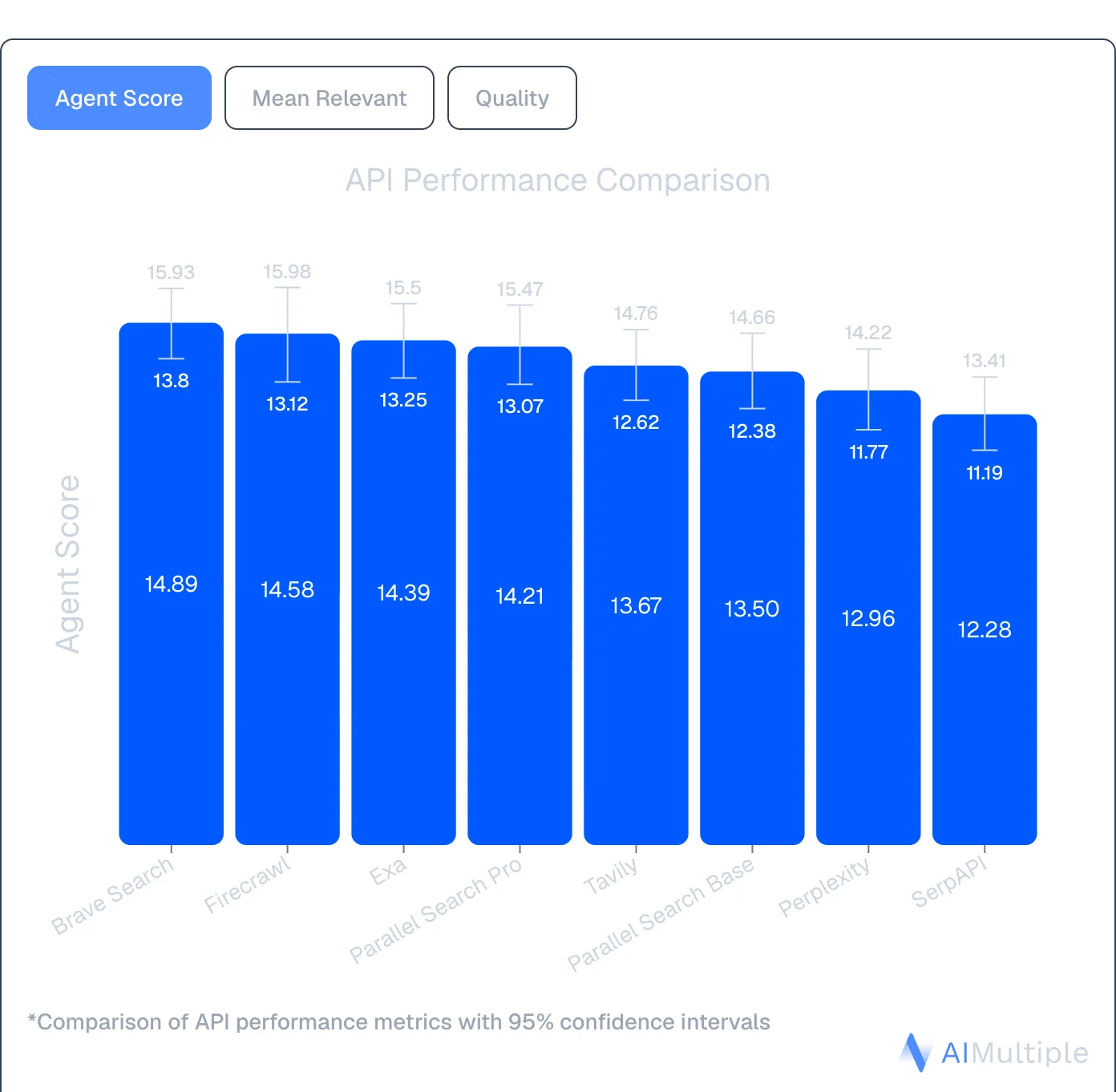
Source: AIMultiple Agentic Search Benchmark 2026
When to choose Firecrawl over Tavily
- Choose Firecrawl when you need the full workflow in one API: Search finds fresh sources, Scrape turns them into token-efficient context, Interact handles dynamic pages, Crawl goes deep across sites — Find → Extract → Clean → Use.
- Choose Firecrawl when extraction quality and depth matter. It's well-suited for product databases, competitor price monitoring, financial data, and structured data collection from specific sites.
- Choose Firecrawl for JavaScript-heavy sites. Modern React, Vue, or Angular apps render content after JavaScript executes. Firecrawl handles this automatically at no extra cost.
- Choose Firecrawl for dynamic pages. Interact clicks "Next" buttons, fills forms, and navigates pagination without custom automation code.
- Choose Firecrawl when predictable costs matter. Flat per-page pricing provides consistent billing: one credit per page.
Checkout our detailed comparison on Firecrawl vs. Tavily.
2. Exa: Semantic search for AI agents
Exa uses embeddings to understand meaning and context instead of matching keywords. This makes it good for research-heavy applications where semantic understanding matters.
| Feature | Exa | Tavily |
|---|---|---|
| Primary use case | Semantic search & research | Keyword search & discovery |
| Search method | Embedding-based (meaning) | Keyword matching + ranking |
| Unique feature | "Find Similar" (feed 1 result, get 20 more) | Multi-source aggregation |
| Output format | Links, full HTML, summarized answers | Structured results with raw content via include_raw_content or /extract |
| Pricing | Contact sales (not public) | $0.008/credit PAYG basic search, plans from $30/month |
| Free tier | No public free tier | 1,000 credits/month |
| Best for | Research, technical discovery, semantic queries | AI search and research workflows |
How Exa compares to Tavily
Understands meaning, not just keywords
Ask Exa "find articles explaining quantum computing like I'm five" and it aims to understand the intent. Traditional keyword search may miss the "explain simply" nuance. This semantic understanding approach may make Exa well-suited for research assistants, competitive intelligence, and complex question answering.
"Find Similar" functionality
Found one good result? Feed it back to Exa and get 20 more pages with similar content. This is invaluable for building comprehensive datasets around a topic.
Five powerful endpoints
- Search: Semantic queries that understand context and meaning
- Crawl: Retrieve full HTML content from discovered pages
- Answer: Get summarized, cited responses instead of just links
- Research: Multi-hop queries across multiple sources
- Websets: Curated collections of high-quality sources
When to choose Exa over Tavily
Consider Exa for research-heavy applications. Technical documentation discovery, academic research assistants, competitive intelligence, and complex queries may benefit from semantic search.
Consideration: Exa requires contacting sales for pricing. No public pricing page or free tier is available for experimentation.
3. Perplexity API: Fast, cited answers
Perplexity Sonar API combines live web crawling with an in-house LLM to deliver cited answers in one API call. Instead of just returning search results, Perplexity searches, processes, and summarizes information with source citations.
| Feature | Perplexity Sonar API | Tavily |
|---|---|---|
| Primary use case | Cited answers with sources | Search & discovery |
| Search method | Live web crawl + LLM processing | Multi-source aggregation |
| Output format | Summarized answers with citations | Structured results with raw content via include_raw_content or /extract |
| Pricing | $1 per 1M tokens + $5-12 per 1K requests | $0.008/credit PAYG basic search ($8 per 1K) |
| Free tier | 100 queries/day | 1,000 credits/month |
| Best for | Fast cited answers, real-time assistants | AI search and research workflows |
How Perplexity compares
Answers, not just links
Perplexity doesn't just find relevant pages. It reads them, synthesizes the information, and returns a coherent answer with citations. This approach may be well-suited for applications where users need answers, not a list of URLs to read themselves.
Built-in citations
Every answer includes source links, which may make it well-suited for applications where verifiable information matters (legal research, financial analysis, healthcare queries, academic work).
However….
Perplexity does come with some pricing complexity
Perplexity's pricing has two components:
- Token costs: $1 per 1M input tokens, $1 per 1M output tokens
- Request fees: $5-12 per 1K requests (based on search context size: Low/Medium/High)
For integrated search and extraction, expect around $134/month at moderate usage. This dual pricing model can make cost prediction harder than other Tavily alternatives’ straightforward per-credit model.
When to choose Perplexity over Tavily
Consider Perplexity when you need fast, summarized answers with citations. Applications in legal, financial, healthcare, or academic domains where source verification matters may benefit significantly.
Consideration: Perplexity's pricing combines token costs plus per-request fees, which requires cost modeling. At high volumes, costs may increase accordingly.
4. Brave Search API: Independent index, privacy-first
Brave Search API stands out with its own independent search index of 30+ billion pages. Unlike some competitors that may rely on Bing or Google, Brave crawls and indexes the web itself. This may be increasingly relevant given changes to third-party search API availability—Microsoft discontinued the Bing Search API in August 2025, pushing teams toward independent indexes like Brave's.
| Feature | Brave Search API | Tavily |
|---|---|---|
| Primary use case | Independent search, privacy-focused RAG | Search & discovery with aggregation |
| Search index | Independent (30B+ pages, 100M daily updates) | Aggregated from multiple sources |
| Pricing | $5-9 per 1K requests | $8 per 1K PAYG basic search |
| Free tier | 2,000 queries/month, 1 query/second | 1,000 credits/month |
| Rate limits | Up to 50 queries/second (Pro AI) | Variable based on plan |
| Privacy | SOC 2 Type II, no tracking | Standard |
| Best for | Privacy-centric apps, high-volume search | AI search and research workflows |
How Brave compares
Privacy-first architecture
SOC 2 Type II certified with no user tracking. May be well-suited for applications where privacy matters or where you're handling sensitive queries. Brave reports not building user profiles or selling data.
Up to 5 snippets per result
Get more context from each search result, useful for training foundation models or building comprehensive RAG systems. More content per result means fewer API calls for the same information depth.
Search Goggles
Customize search behavior by discarding specific domains or re-ranking results. Build custom search experiences tailored to your use case without forking an entire search engine.
Specialized endpoints
- Web Search: General queries across Brave's full index
- AI Grounding: Optimized results for LLM context
- Image, Video, News: Vertical-specific search
- Suggest: Autocomplete and query suggestions
- Spellcheck: Query correction
When to choose Brave over Tavily
Consider Brave for privacy-centric applications. If you're building tools for sensitive industries, handling confidential research, or serving privacy-conscious users, Brave's architecture and certifications may be relevant.
Consideration: Brave returns raw JSON SERPs, not AI-optimized content. You may need to pair it with a scraper like Firecrawl for full-page extraction.
If you're evaluating Brave as your primary search layer, see our full Brave Search API alternatives guide.
5. LLMLayer: All-in-one web infrastructure for AI
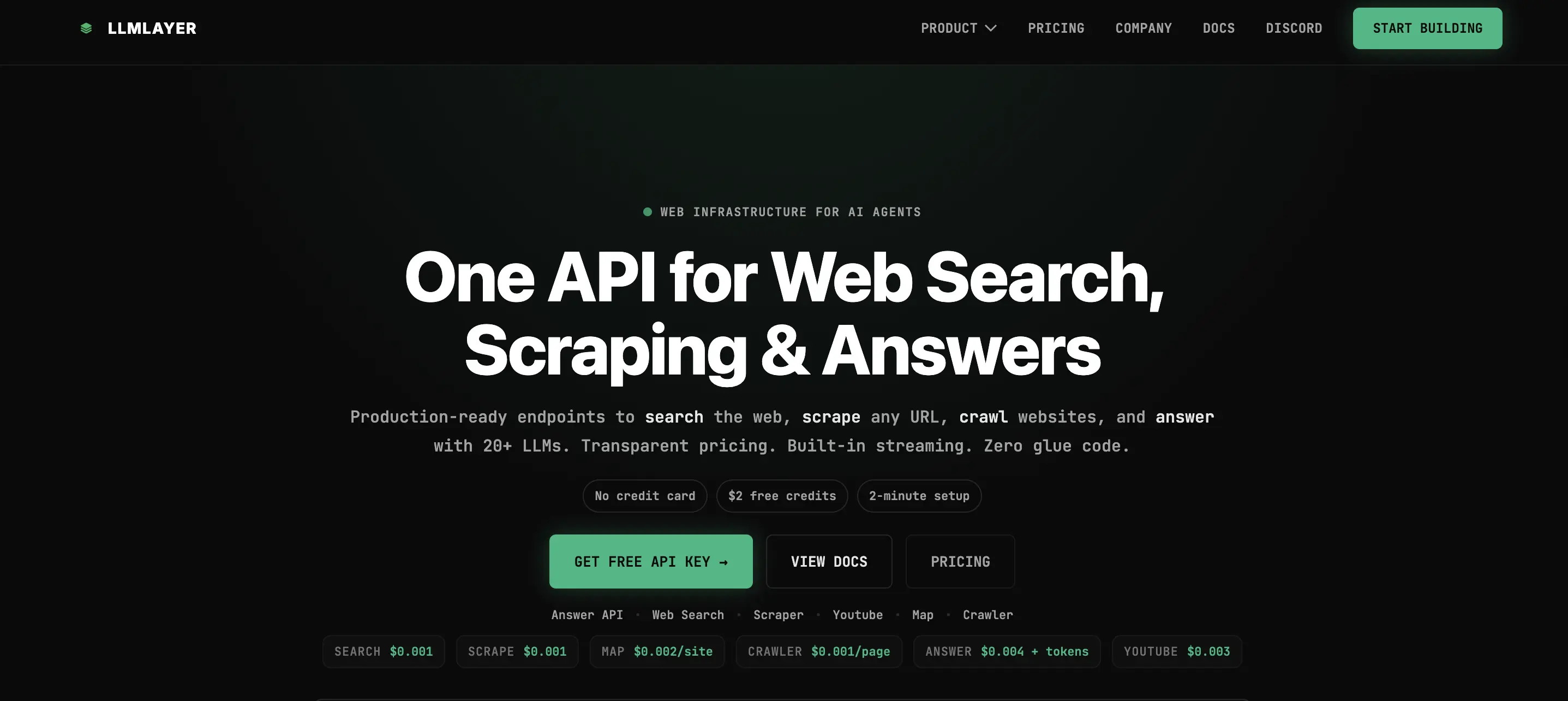
LLMLayer offers a unified API that combines search, scraping, crawling, and LLM-powered answers in one platform.
| Feature | LLMLayer | Tavily |
|---|---|---|
| Primary use case | Unified web infrastructure (search + scrape + answers) | Search & discovery with extraction |
| Free tier | $2 free credits, no card required | 1,000 credits/month |
| Best for | Teams needing search, scraping, and answers | AI search and research workflows |
How LLMLayer compares
Competitive pricing for search
At $1 per 1,000 requests versus Tavily's $8 per 1,000 PAYG basic search credits, LLMLayer offers different pricing for search. For high-volume applications, this may provide cost advantages.
Complete toolkit in one API
LLMLayer combines six capabilities that normally require multiple services: web search, content scraping, website mapping, crawling, document processing, and LLM-powered answers. No integration juggling between providers.
Six APIs, one platform
- Web Search: Query general web, news, images, videos, scholar, and shopping. Filter by recency, localize by country, include or exclude domains.
- Scraper: Convert any URL to markdown, HTML, screenshots, or PDFs. JavaScript rendering included.
- Map: Discover complete website structure in seconds.
- Crawler: Navigate entire websites with sitemap generation and deep crawling.
- Answer API: Search, reason, and answer in one call. Citations included. Stream tokens or return blocking responses.
- YouTube Transcript: Multi-language transcript extraction.
When to choose LLMLayer over Tavily
Consider LLMLayer when you need both search and scraping. Instead of paying for Tavily's search and a separate scraping service, LLMLayer bundles both which may offer cost advantages.
Consideration: LLMLayer is newer with less market presence than established alternatives. Community adoption and integrations are still growing.
Conclusion: Choosing your Tavily alternative
Tavily works well for real-time search and discovery. Each alternative we've covered takes a different angle: semantic understanding, cited answers, privacy-first indexing, or unified web infrastructure.
The shift worth paying attention to is quality. As the web fills with AI-generated content, passing raw crawl results straight to an agent creates noise problems. The alternatives that win long-term will be the ones that compete on what's in the index — not just how much.
Firecrawl is built around that bet: full-page markdown from the live web as the default output of /search, and a context parameter so agents can say what they actually need. Built AI-first, with over a million developers and 180K+ GitHub stars, it covers Search, Scrape, Interact, and Crawl — the full web data stack — in one API at $99/month billed monthly ($83/month billed annually) for 100K pages.
Try Firecrawl free with 1,000 credits per month (no card required) or explore the docs to see how it works.
Frequently Asked Questions
What's the main difference between Tavily and its alternatives?
Tavily offers AI-optimized search plus extraction, crawl, map, and research endpoints. Alternatives specialize in different areas: Firecrawl for the full web data stack (Search, Scrape, Interact, Crawl) built AI-first with full-page markdown as the default, Exa for semantic search, Perplexity for cited answers, Brave for independent indexing, and LLMLayer for unified web infrastructure with transparent pricing.
Why explore Tavily alternatives?
The main reasons are search quality, extraction depth, and pricing. As the web fills with AI-generated content, passing raw crawl results to an agent creates noise. Some teams need full-content results from the live web with no post-processing, others need semantic search, cited answers, or predictable per-page pricing at scale.
Which Tavily alternative is most cost-effective?
LLMLayer offers search at $1 per 1,000 requests. Brave costs $5-9 per 1,000 requests. For extraction workflows, Firecrawl's Standard plan is $99/month billed monthly, or $83/month billed annually, for 100K pages. Pricing varies based on use case and volume.
Can Tavily alternatives handle JavaScript rendering?
Yes. Firecrawl includes automatic JavaScript rendering at no extra cost. Brave Search API handles dynamic content in its index. LLMLayer's scraper includes JavaScript rendering. Tavily offers JavaScript rendering with additional credit costs.
Which alternative is best for RAG applications?
Firecrawl is a strong choice for RAG: it pulls full-page markdown from the live web as the default of `/search`, so context going into your pipeline arrives ranked and clean without a follow-up extraction call. It also has native LangChain and LlamaIndex integrations.
Are these alternatives compatible with LangChain?
Yes. Firecrawl, Brave, Perplexity, and Exa all offer LangChain integrations. Firecrawl provides native adapters for both LangChain and LlamaIndex. This makes switching from Tavily straightforward, often requiring just a few lines of code change in existing implementations.