Building AI agents that can autonomously research topics is one of the most requested enterprise use cases I hear about. Teams want to power AI-driven search experiences, build internal deep research tools, source investment data from the internet, and create training datasets using live web data.
The problem? Traditional search APIs return links, not answers. And most "deep research" tools are built for human consumption, not programmatic workflows.
As one developer put it on Hacker News: "If you know LLMs and how a basic RAG pipeline works, deep research is wonderful. If not, screwed." This highlights the core challenge: you need deep research APIs that understand how developers actually build AI applications, not just tools designed for end-user chat interfaces.
This guide compares five APIs built specifically for developers building agentic workflows, RAG systems, and data pipelines where schema control, autonomous research, and predictable costs matter.
TL;DR
| API | Best for | Autonomous research | Structured output | Pricing model |
|---|---|---|---|---|
| Firecrawl | AI agents, RAG, data pipelines | Yes (Agent endpoint) | Native Pydantic/Zod schemas | Flat-rate (credits) |
| Tavily | AI search and research workflows | Yes (/research endpoint) | JSON with search results, include_raw_content and /extract for raw HTML | Per-credit |
| Exa | Semantic discovery | Find Similar only | Basic JSON | Variable credits |
| Brave Search | Privacy-first, high-volume | No | Structured snippets | Per-request |
| Perplexity | Conversational research | Yes (Sonar API) | Markdown summaries | Per-request + tokens |
What makes a deep research API "agentic"?
The shift from static search to agentic search and dynamic research agents represents a fundamental change in how AI systems gather information. Recent research from Singh et al. (2025) on Agentic RAG defines this distinction clearly:
- Traditional RAG: Static workflows with single retrieval steps
- Agentic RAG: Autonomous planning, iterative retrieval, tool use, and multi-agent collaboration
When evaluating APIs for agentic workflows, look for these core capabilities:
Autonomous navigation: Can the API search, follow links, and gather data without explicit URLs? This is the hallmark of an agentic web crawler and is critical for research tasks where you do not know the exact sources upfront.
Schema-based extraction: Can you define the exact structure of output data? For production systems, you need predictable JSON that matches your data models, not free-form text.
Iterative refinement: Does it support multi-step research with feedback loops? Complex research questions often require following threads across multiple sources.
Citation preservation: Are sources tracked for verification? Enterprise applications need audit trails showing where each piece of data originated.
The 5 best deep research APIs
Everyone has deep research use cases today. Engineering teams need to track competitor features, marketing needs market intelligence, sales teams research prospects, and operations teams monitor industry trends. I have researched and tried dozens of tools, and these five stood out as the most impressive for programmatic deep research workflows. For sales teams specifically, see how to build an AI SDR that researches companies in real time using these research APIs as the data layer.
1. Firecrawl
Firecrawl takes a fundamentally different approach than conversational research tools. While others optimize for human-readable summaries, Firecrawl is built specifically for developers who need clean, structured, LLM-ready data extracted from the web at scale.
I have been using Firecrawl extensively for most of my marketing use cases, including the research for this blog post, and the key differentiator is the schema-first design. Instead of parsing free-form responses, you define your data structure upfront and get predictable JSON every time.
What Firecrawl does differently
Agent endpoint for autonomous research
The Agent endpoint is where Firecrawl really shines for agentic workflows. Just describe what you need in natural language, and the Agent autonomously searches, navigates, and extracts structured data. No URLs required.
from firecrawl import Firecrawl
from pydantic import BaseModel, Field
from typing import List, Optional

app = Firecrawl(api_key="fc-YOUR_API_KEY")

class CompetitorAnalysis(BaseModel):
    company_name: str = Field(description="Company name")
    pricing_tiers: List[str] = Field(description="Available pricing tiers")
    key_features: List[str] = Field(description="Main product features")
    limitations: Optional[str] = Field(None, description="Known limitations")

result = app.agent(
    prompt="Research the top 3 web scraping APIs and compare their pricing",
    schema=CompetitorAnalysis
)

print(result.data)
# Returns structured JSON matching your schema
The Agent autonomously handles the entire research workflow: searching for relevant sources, navigating through pages, extracting data matching your schema, and handling JavaScript-heavy sites automatically.
Parallel Agents for batch deep research
Need to run deep research at scale? Parallel Agents let you batch process hundreds or thousands of Agent queries simultaneously. Upload a spreadsheet of research tasks and get structured results streamed back in real-time. The intelligent waterfall system tries instant retrieval first with Spark-1 Fast, then automatically upgrades to full Agent research only when needed, so you only pay for deeper work when required. This is ideal for lead enrichment, competitive intelligence, and any deep research workflow that needs to process data in bulk.
Search endpoint for controlled web research
When you need more control over the research process, the Search endpoint combines web search and content extraction in a single API call. Unlike traditional web search APIs that return just links or snippets, Firecrawl Search returns full page content in LLM-ready markdown.
from firecrawl import Firecrawl

app = Firecrawl(api_key="fc-YOUR_API_KEY")

# Search and extract in one call
results = app.search(
    query="best practices for RAG system architecture",
    limit=5
)

for result in results["data"]:
    print(f"Title: {result['title']}")
    print(f"Content: {result['markdown'][:500]}...")
This makes Search ideal for building custom research pipelines where you want to control the query logic, filter results programmatically, or chain searches together.
Native schema support with Pydantic and Zod
Unlike APIs that require manual JSON Schema construction, Firecrawl works natively with Pydantic (Python) and Zod (Node). This means type safety, validation, and IDE autocomplete out of the box.
Four complementary endpoints
Firecrawl is not just Agent. It offers multiple tools for different workflow patterns:
- Search: Find pages and extract content in one call (2 credits per 10 results)
- Agent: Autonomous research from natural language prompts (dynamic pricing, 5 free daily runs)
- Scrape: Convert single URLs to markdown/JSON (1 credit per page)
- Crawl: Navigate entire sites systematically (1 credit per page)
For deep research specifically, Firecrawl used to have a dedicated deep research API which has been deprecated in favor of the more flexible Search API combined with the Agent endpoint. For an example of how to build deep research, check out the open source Firesearch project. For research agents that need to search academic literature and GitHub repositories, the Firecrawl Research Index provides dedicated arXiv search, GitHub search, and literature search in a single API call.
Pricing
Firecrawl uses affordable flat-rate, credit-based pricing that makes budgeting predictable:
- Scrape: 1 credit per page
- Search: 2 credits per 10 results
- Agent: Dynamic pricing based on complexity, with 5 free daily runs
The Agent endpoint is powered by Spark 1 Pro and Spark 1 Mini, Firecrawl's purpose-built reasoning models optimized for web research and extraction tasks.
This contrasts sharply with dual pricing models (tokens plus per-request fees) that can make costs unpredictable at scale.
When to choose Firecrawl
Choose Firecrawl when you are building systems that need structured data rather than conversational summaries. It is particularly suited for:
- RAG systems that need clean markdown or JSON for vector databases
- AI agents that autonomously gather research data
- Data pipelines that extract specific fields at scale
- Training datasets that require structured, high-quality web data
- Enterprise applications where budget predictability matters
The combination of schema-based extraction, autonomous Agent research, and flat-rate pricing makes it purpose-built for production agentic workflows.
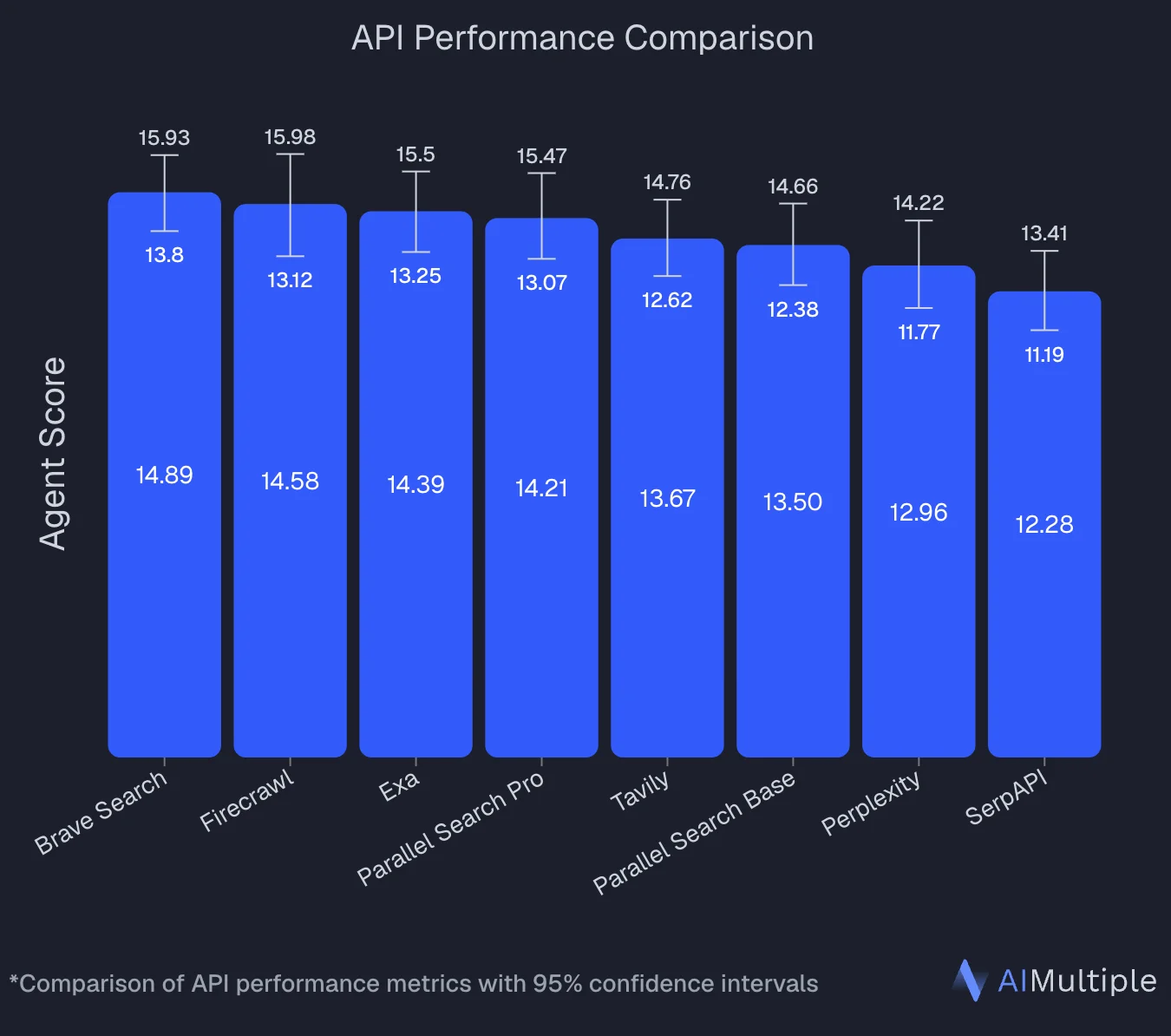
An independent benchmark by AIMultiple that evaluated 8 search APIs across 100 real-world AI/LLM queries puts numbers behind this: Firecrawl ranked second overall with an Agent Score of 14.58, statistically tied with the top performer. It posted the highest mean relevant score in the benchmark (4.30 out of 5) and performed best specifically on deep content retrieval tasks — the exact workload deep research agents run.
Today, everyone is a builder. Firecrawl has native integrations with tools like Lovable, so even non-technical folks can leverage deep research capabilities to build AI-powered applications without writing code.
What developers are saying
The developer community has been vocal about Firecrawl's impact on their workflows:
"If you're coding with AI, and haven't discovered @firecrawl yet, prepare to have your mind blown."
"Started using @firecrawl for a project, I wish I used this sooner. I was wasting too much time setting up scraping with Selenium/bs4."
The performance benchmarks have caught attention too. Alex Reibman from AgentOps noted: "Moved our internal agent's web scraping tool from Apify to Firecrawl because it benchmarked 50x faster with AgentOps."
Teams making a similar switch can explore the best Apify alternatives for a breakdown of which tools fit different research workflows.
For deep research specifically, developers have highlighted the new capabilities. As one user put it: "Firecrawl's new deep research is a game changer!"
The rapid iteration and developer experience also stands out. Brandon Charleson summed it up: "Firecrawl just SHIPS all the right things!"
2. Tavily
Tavily positions itself as "the search engine for AI agents" and delivers pre-processed search results optimized for LLM context windows. Its platform spans /search (with optional include_raw_content), /extract, /crawl, /map, and /research — the /research endpoint breaks a question into sub-queries and returns a cited answer. If you are evaluating Tavily, check out our Tavily alternatives guide and Firecrawl vs Tavily comparison.
What Tavily does differently
Search grounding for LLM applications
Tavily returns search results with pre-processed content summaries that can be directly injected into LLM prompts. When you also need raw HTML, include_raw_content on /search returns it inline; /extract handles targeted extraction from known URLs.
Multi-step research via /research
The /research endpoint decomposes a research question into sub-queries, searches across sources, and returns a cited answer — a managed alternative to writing your own retrieval-and-synthesis loop.
Simple integration with agent frameworks
Tavily provides official integrations with LangChain, LlamaIndex, and other popular frameworks. If you are already using these tools, adding Tavily search is straightforward.
Pricing
- Free: 1,000 credits per month
- PAYG basic search: $0.008 per credit, more for advanced features
When to choose Tavily
Choose Tavily when you need AI-optimized search plus optional raw content or a managed research workflow. It works well for:
- Adding web search to chatbots
- Quick fact-checking in conversational AI
- LangChain- or LlamaIndex-native RAG pipelines
- Managed multi-step research via
/research
3. Exa
Exa pioneered embeddings-based semantic search for AI applications. Instead of keyword matching, Exa understands meaning and context, making it strong for the discovery phase of deep research workflows. For a deeper look at semantic search options, see our Exa alternatives guide and best semantic search APIs comparison.
What Exa does differently
Semantic search with neural embeddings
Exa uses neural embeddings to understand query meaning rather than matching keywords. This approach excels for the discovery phase of deep research when you need to find conceptually similar content, even when sources use different terminology.
Find Similar for content discovery
The Find Similar API is Exa's standout feature. Provide one URL and discover semantically related pages across the web. This is particularly useful for building knowledge graphs or exploring research topics by following conceptual connections.
Pricing
- Free tier: $10 in credits
- Research tier: $5 per 1,000 operations
- Pro tier: $10 per 1,000 page reads
Limitations
Exa excels at semantic discovery but has gaps in other areas:
- No autonomous research - you provide queries or seed URLs
- Limited extraction capabilities - returns metadata and snippets
- Variable credit consumption makes cost forecasting challenging
When to choose Exa
Choose Exa when your workflow centers on content discovery and semantic exploration. It works well for:
- Research discovery where you need to find related papers or articles
- Semantic search applications that benefit from meaning-based ranking
- Building knowledge graphs from conceptually connected content
Exa pairs well with extraction tools. Use Exa to discover relevant URLs, then feed them to Firecrawl for structured data extraction. For a detailed comparison of the two tools, see Firecrawl vs Exa.
4. Brave Search
Brave Search is a privacy-first search engine built on an independent index of 30+ billion pages. For deep research workflows that handle sensitive data, Brave offers an alternative to Google-dependent APIs. Unlike search engines that rely on Google or Bing, Brave crawls and ranks the web itself. For a broader comparison of Brave Search API alternatives on pricing, index quality, and AI agent support, see our dedicated guide.
What Brave Search does differently
Independent index with privacy guarantees
Brave Search does not build user profiles, track queries, or sell data. SOC 2 Type II certification provides verifiable privacy guarantees, important for applications handling sensitive queries in healthcare, legal, or financial domains.
High-volume capacity at lower costs
Brave Search supports up to 50 requests per second with pricing at $3-5 per 1,000 requests. This makes it cost-effective for high-volume search workloads compared to alternatives charging $15-22 per 1,000 requests.
Search Goggles for custom ranking
The Goggles feature lets developers create custom ranking filters to modify search results. Build tailored search experiences for specific domains without forking an entire search engine.
Pricing
- Free: 2,000 queries per month
- Base: $3 per 1,000 queries
- Pro: $5 per 1,000 queries with AI features
Limitations
- No autonomous research capability
- Limited structured extraction beyond snippets
- No schema-based output control
When to choose Brave Search
Choose Brave Search when privacy, transparency, and high-volume capacity matter. It is suited for:
- Privacy-centric applications requiring verifiable data handling
- High-volume search workloads needing predictable costs
- Custom search experiences using Goggles for domain-specific ranking
5. Perplexity
Perplexity has become synonymous with AI-powered deep research for consumers, offering conversational search that synthesizes information from multiple sources. Their Sonar API brings these capabilities to developers building research applications. For alternatives, see our Perplexity alternatives guide.
What Perplexity does differently
Conversational deep research
Perplexity's Sonar API provides the same research capabilities as their consumer product through an API. It searches the web, synthesizes findings, and returns conversational responses with inline citations.
Pro Search for complex queries
The Pro Search tier handles multi-step research questions that require following threads across sources. This makes it suitable for deep research tasks that need comprehensive coverage rather than quick answers.
Pricing
- Sonar: $5 per 1,000 searches + $0.30 per 1M input tokens
- Sonar Pro: $5 per 1,000 searches + $3 per 1M input/output tokens
For cost-sensitive deep research use cases, Firecrawl offers flat-rate credit-based pricing as an alternative.
Limitations for deep research workflows
- Returns markdown summaries optimized for human reading, not structured data
- No schema-based extraction for programmatic data pipelines
- Less control over the research process compared to agent-based approaches
When to choose Perplexity
Choose Perplexity for deep research when you need conversational summaries rather than structured data extraction. It works well for:
- Consumer-facing research assistants that present findings in natural language
- Use cases where human-readable summaries are the end goal
- Teams already using Perplexity's consumer product who want API access
How to choose the right API
The right choice depends on your specific workflow requirements:
| API | Best use cases | Key strengths | Consider when |
|---|---|---|---|
| Firecrawl | AI agents, RAG systems, data pipelines, enterprise research | Autonomous Agent, schema-based extraction, flat-rate pricing | You need structured output, budget predictability, or autonomous research |
| Tavily | AI search and research workflows, LLM chatbots | LangChain/LlamaIndex plugins, /research endpoint, include_raw_content on /search | AI search with optional raw content or managed multi-step research |
| Exa | Semantic discovery, research exploration, knowledge graphs | Neural embeddings, Find Similar API | Discovery is primary need; pair with Firecrawl for extraction |
| Brave Search | Privacy-centric apps, high-volume search, custom ranking | Independent index, SOC 2 certified, Goggles | Privacy guarantees or high-volume at lower cost required |
| Perplexity | Conversational research, consumer-facing assistants | Pro Search, inline citations | You need human-readable summaries rather than structured data |
Implementation patterns for agentic workflows
Based on the enterprise use cases I see most often, here are practical architecture patterns:
Pattern 1: Search, extract, synthesize
This pattern breaks research into three explicit steps: find relevant sources, extract content from them, and combine the findings. It gives you full control over each stage and works well when you want to inspect or filter sources before extraction.
The most common pattern for deep research applications:
from firecrawl import Firecrawl

app = Firecrawl(api_key="fc-YOUR_API_KEY")

# Step 1: Search for relevant sources
search_results = app.search(
    query="AI agent frameworks comparison 2026",
    limit=10
)

# Step 2: Extract structured data from top results
for result in search_results["data"][:5]:
    extracted = app.scrape(
        url=result["url"],
        formats=["markdown"]
    )
    # Process extracted content

# Step 3: Synthesize with your LLM
Further reading: Search endpoint docs | Scrape endpoint docs
Pattern 2: Autonomous Agent loop
This pattern delegates the entire research workflow to the Agent. You describe what you need and define the output schema, then the Agent autonomously searches, navigates, and extracts. Best for open-ended research questions where you cannot predict which sources will be relevant.
For complex research where you do not know the sources upfront:
from firecrawl import Firecrawl
from pydantic import BaseModel, Field
from typing import List

app = Firecrawl(api_key="fc-YOUR_API_KEY")

class MarketResearch(BaseModel):
    companies: List[str] = Field(description="Companies in the space")
    market_size: str = Field(description="Estimated market size")
    key_trends: List[str] = Field(description="Major industry trends")
    sources: List[str] = Field(description="Source URLs")

# Agent handles the full workflow autonomously
result = app.agent(
    prompt="Research the AI code assistant market. Find major players, market size estimates, and emerging trends.",
    schema=MarketResearch
)

print(result.data)
Further reading: Agent endpoint docs | Agent models
Pattern 3: Deep research with iterative refinement
This pattern handles complex deep research questions that require multiple rounds of investigation. Start with a broad search, analyze initial findings, then run targeted follow-up queries based on what you learn.
from firecrawl import Firecrawl
from pydantic import BaseModel, Field
from typing import List

app = Firecrawl(api_key="fc-YOUR_API_KEY")

class InitialFindings(BaseModel):
    key_topics: List[str] = Field(description="Main topics discovered")
    follow_up_queries: List[str] = Field(description="Questions for deeper research")
    sources: List[str] = Field(description="Source URLs")

class DetailedResearch(BaseModel):
    topic: str = Field(description="Research topic")
    findings: str = Field(description="Detailed findings")
    citations: List[str] = Field(description="Source URLs")

# Round 1: Broad discovery
initial = app.agent(
    prompt="Research emerging trends in AI agent architectures. Identify key topics worth exploring deeper.",
    schema=InitialFindings
)

# Round 2: Deep dive on each topic
for topic in initial.data.key_topics[:3]:
    detailed = app.agent(
        prompt=f"Deep research on: {topic}. Find technical details, implementations, and expert opinions.",
        schema=DetailedResearch
    )
    # Aggregate findings
Further reading: Deep Research use case guide | Advanced scraping guide
Ready to build your research agent?
Deep research for AI agents requires more than search APIs that return links. Production agentic workflows need autonomous research, schema-based extraction, and predictable costs at scale.
Firecrawl's Agent endpoint and schema-first design make it purpose-built for these use cases. The combination of autonomous research capabilities, native Pydantic/Zod support, and flat-rate pricing addresses the core challenges developers face when building research agents.
For teams building internal deep research tools, AI-driven search experiences, investment research agents, or training data pipelines, the right API choice can mean the difference between a prototype that works and a production system that scales.
Try it yourself in the Firecrawl Playground with no signup or credit card required. When you are ready to integrate, start with Firecrawl's free tier (1,000 credits/month) or use the Agent endpoint (5 free daily runs) to see how it handles your specific research workflows.
Related resources
- Building an AI Research Assistant with Firecrawl and AI SDK
- Deep Research Use Case Guide
- Firesearch: Open Source Deep Research
- Building a Deep Research App with Streamlit
- Open Deep Research Explainer
- Web Search and Deep Research for AI Agents
- Anthropic Web Search Alternatives for Claude-based Agents
Frequently Asked Questions
What is an agentic workflow?
An agentic workflow is an AI system that autonomously plans, executes, and iterates on tasks without constant human supervision. Unlike traditional RAG systems that follow static retrieval patterns, agentic workflows can dynamically decide when to search, what to extract, and how to synthesize information based on the task at hand.
How is deep research different from regular search APIs?
Regular search APIs return lists of URLs or snippets. Deep research APIs go further by autonomously navigating through sources, extracting structured data, following citation chains, and synthesizing findings into comprehensive reports. They handle the entire research workflow rather than just the initial search.
Which API is best for RAG systems?
Firecrawl excels for RAG systems because it outputs clean markdown or structured JSON that can be directly embedded into vector databases. The Agent endpoint can autonomously gather research data while maintaining citations, and the flat-rate pricing makes high-volume ingestion predictable. An independent 8-API benchmark by AIMultiple found Firecrawl ranked second overall with the highest mean relevant score (4.30 out of 5) and best performance specifically on deep content retrieval tasks, which is the core workload for RAG pipelines.
Can these APIs handle JavaScript-rendered pages?
Yes. Firecrawl, Tavily, and Exa all handle JavaScript rendering automatically. This is essential for modern web applications where content loads dynamically. Firecrawl's browser-based scraping handles even complex SPAs and authenticated content.
How do I ensure citation accuracy in research outputs?
Look for APIs that preserve source URLs and timestamps with every extracted piece of data. Firecrawl maintains full metadata including source URLs, extraction timestamps, and page titles. This allows you to build audit trails and show citations in your research applications.
What is the most cost-effective option for high-volume research?
Firecrawl offers the most predictable costs at scale with flat-rate pricing (1 credit per page for scraping, 2 credits per 10 results for search). APIs with dual pricing models (tokens plus per-request fees) can become expensive and unpredictable for high-volume workloads.