Building AI-Powered Apps with Firecrawl and Lovable: Access Live Web Data
 Leonardo Grigorio
TL;DR
I built two apps using Firecrawl + Lovable to show you what's possible:
- Brand analyzer - Drop in a URL, get branding, content, and SEO insights (1 prompt)
- Trend tracker - Type any topic, get 14-day trend analysis with sources (handled agent timeouts with user-controlled polling)
Key lessons: Don't overthink prompts. Start simple and iterate. Use scrape for speed, agents for smart research. The combo of Firecrawl's data + Lovable's design is where the magic happens.
What are Firecrawl and Lovable?
Firecrawl is the context API built for AI agents and apps. It grabs data from any website and turns it into clean, structured formats that AI can actually work with.
Lovable is an AI app builder that lets you create full-stack apps just by describing what you want in plain English. You tell it what to build, and it handles the design and code.
What does Firecrawl + Lovable integration offer vibe coders?
Here's where things get interesting. Firecrawl and Lovable teamed up to make building data-powered apps stupidly easy!
You don't need to hunt down API keys. You don't need to write scraping code. Just connect Firecrawl inside Lovable and you're good to go.
The workflow is simple: describe your app idea to Lovable, and it builds everything while Firecrawl feeds it live web data. It's the vibe coding dream — ship something real without touching scraping logic or backend setup.
Users are loving the Firecrawl + Lovable integrations and have been building insane apps in a matter of minutes!
Check out another one:
Let's walk through how each one came together.
The power of iteration over perfect prompts
Quick tip before we dive in: don't overthink your first prompt.
The brand analyzer started dead simple. Paste a URL, let Firecrawl grab the branding data. That's it.
As I tested it, I realized I wanted tabs for typography, links, and markdown — and a cleaner layout for the color palette. These details just... emerged from using the generated app and I went from there.
That's the real power here.
You're not trying to architect everything perfectly upfront. You build, test, see what's missing, and refine. It's way more fun than traditional development - especially if you’re not super technical.
For best results, I structure my prompts like this:
- Start with context - What is this thing?
- User's point of view - What will they actually see and do?
- Technical nudges - Which endpoint to use, what kind of data
- Design vibes - Colors, style, feel
Project 1: Brand identity analyzer
The concept
Pretty straightforward. You paste a URL, Firecrawl grabs:
- Branding stuff (colors, fonts, typography)
- A content summary
- The full markdown
- SEO data
My first prompt
Create a brand analysis website. It should have an input field for the URL
and use Firecrawl's scrape endpoint to gather the branding format, summary,
markdown, etc. Everything returned from the fetch should be structured and
displayed with a clean neo-brutal UI using orange as the primary color.
Notice I said "everything returned from the fetch should be structured." That's intentional. I'm hinting that one API call should do everything, not a bunch of separate requests.
Setting things up
Lovable builds your frontend and backend, but it runs the backend on Supabase Edge Functions.
Since we're calling Firecrawl:
- Turn on Cloud in Lovable
- Connect Firecrawl (you get 10,000 free credits when you do this)
- That's it. No messing with API keys.
10,000 credits goes a long way. That's enough to build and test a lot of apps like the ones in this post — brand analyzers, trend trackers, competitive research tools, data enrichment pipelines. Pick an idea and start shipping.
What the brand analyzer produced
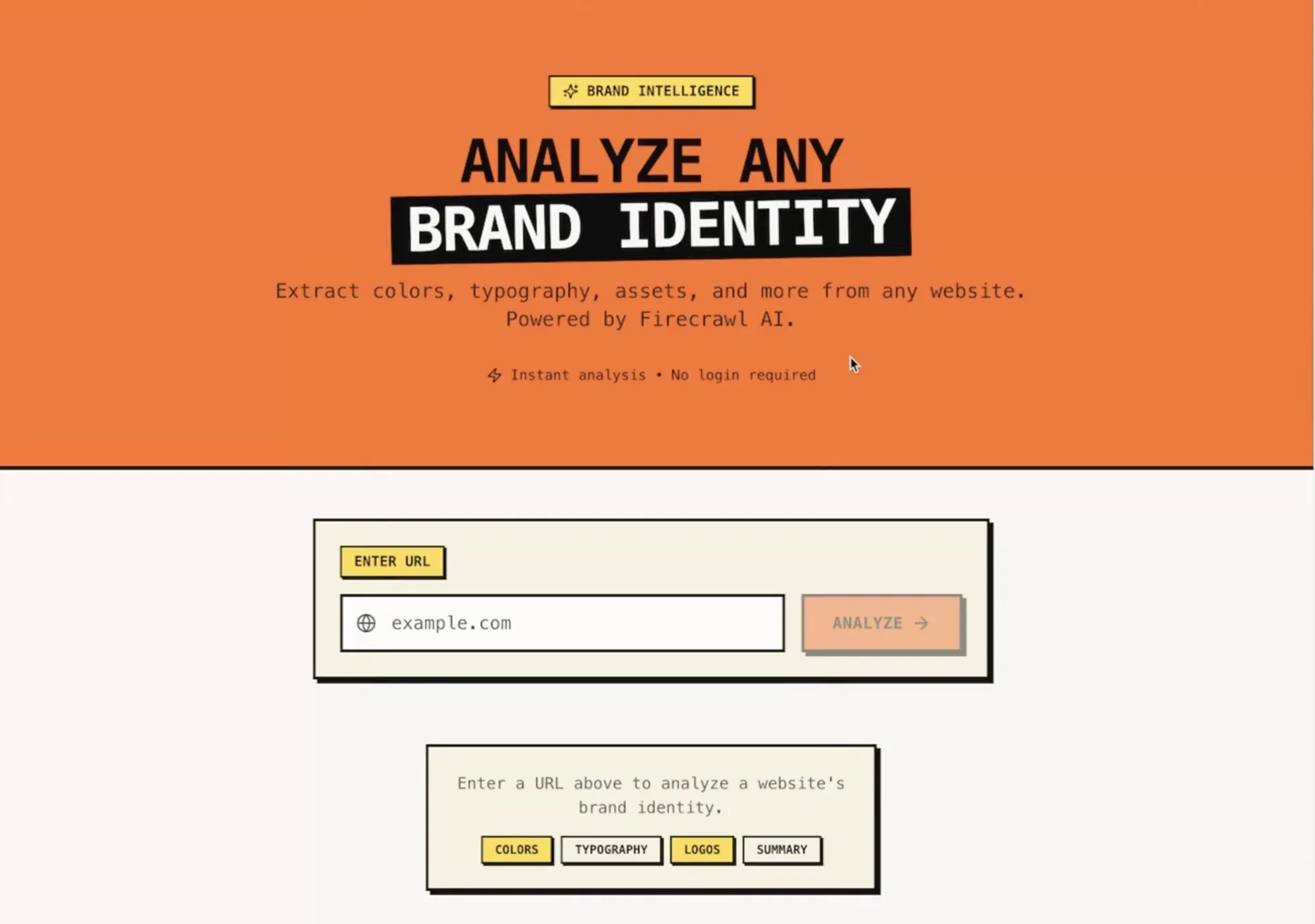
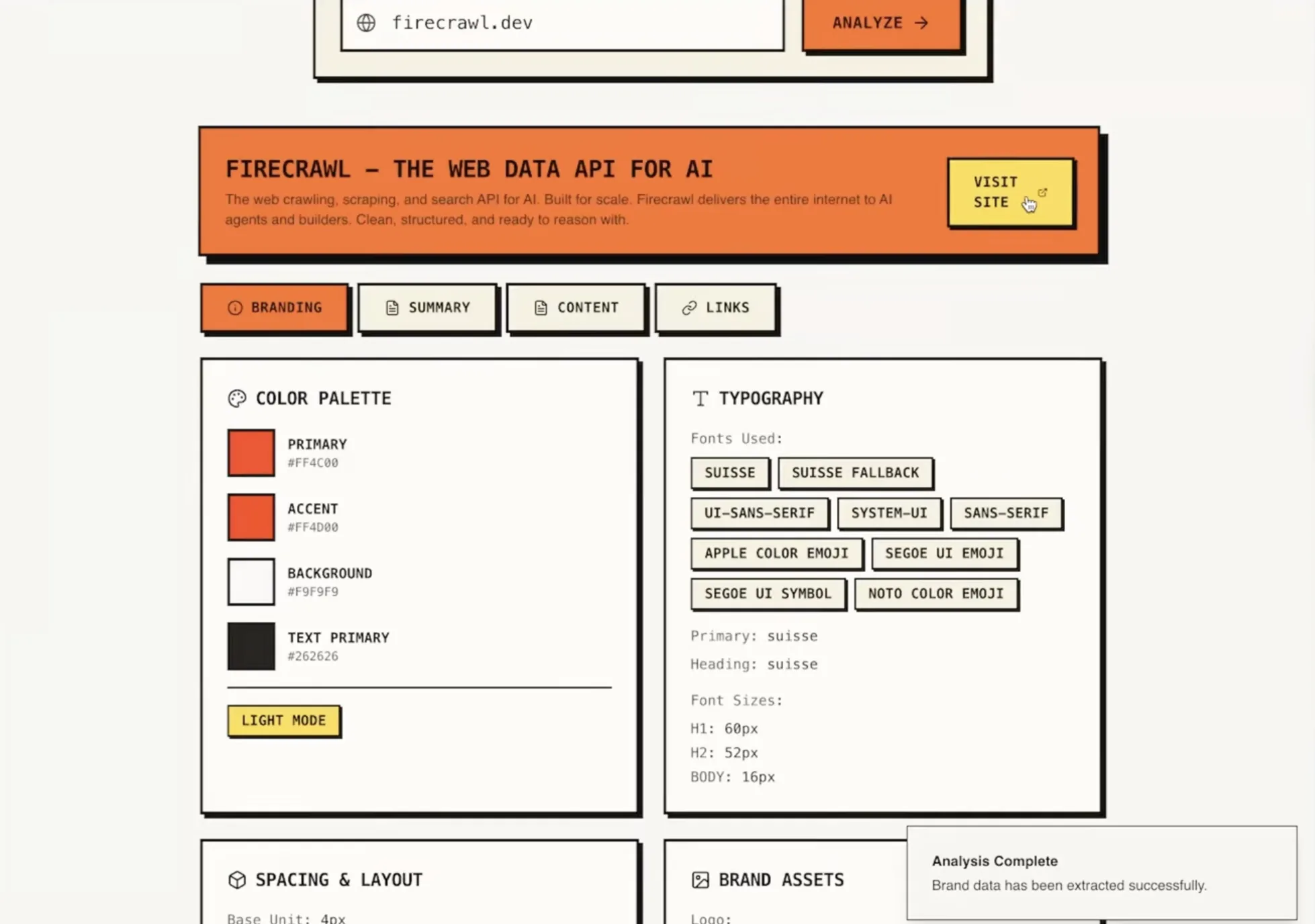
The analyzer organized everything into tabs:
- Typography - Fonts it found
- Summary - What the page is about
- Markdown - Full content, structured
- Links - Every URL on the page
The cool part? It just looks good. Firecrawl gives you clean data, Lovable makes it look polished. No manual styling needed.
Here’s the data it gave me when I ran it on www.firecrawl.dev:
Where you could take this
This one-prompt start could become:
- Send the data to another AI model for deeper SEO analysis
- Use Firecrawl's agent mode for competitive research
- Generate content suggestions based on what's missing
Project 2: Topic trend tracker
The challenge
This one shows off what Firecrawl's /agent endpoint can do.
Firecrawl /agent searches, navigates, and gathers even the most complex websites, finding data in hard-to-reach places and discovering information anywhere on the internet.
The goal: You type "Claude Code" and get back a 14-day trend analysis with insights, related topics, and sources.
My prompt approach
For something more complex, I got more detailed:
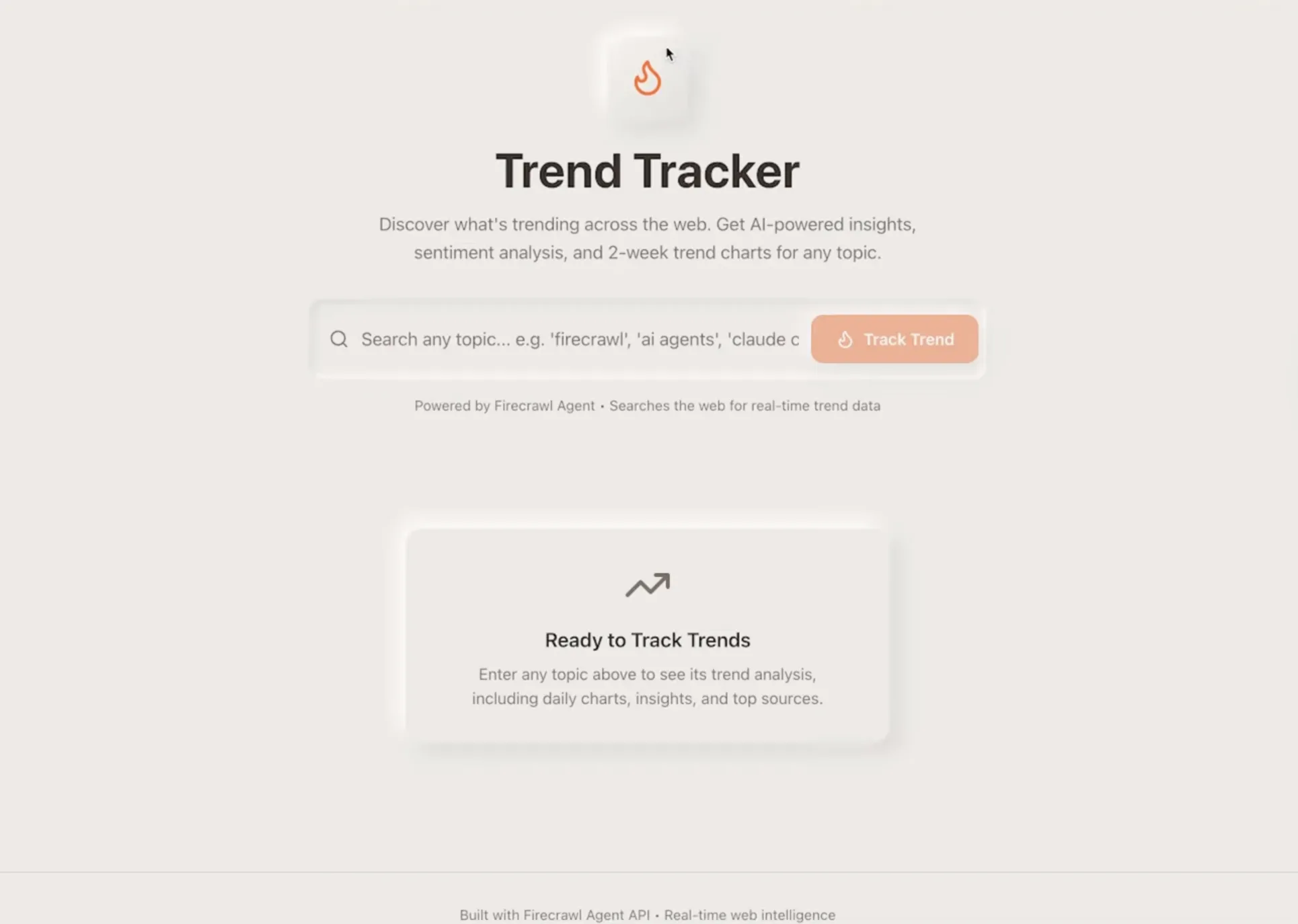
Create a topic trend tracker that searches for recent news, posts, and articles whenever a user types in something like "firecrawl", "ai agents", "claude code" then provides an overall trend prediction with a daily chart from the past 2 weeks.

This should only do 1 fetch to Firecrawl's /agent endpoint with the schema needed to produce the chart along with all other insights for measuring the trend. Instruct the agent to gather all necessary data and generate the trend analysis. Structure the website to display the agent's output in a clean, information-rich layout that includes insights about the trend, along with any images, links, and other media returned. Use a Neumorphism design style with orange as the primary color.
The big difference from the brand analyzer: I'm asking for one agent call that goes off and researches the whole web.
Same Cloud + Firecrawl setup as the brand analyzer above.
What the trend tracker produced
The timeout problem
First try, I got an edge function error. Lovable has a "try to fix" button that handled it automatically. But then I hit the real wall: AI agents take time to research stuff. Like, actual minutes.
Here's what was happening:
- Lovable asks Firecrawl to start researching
- Firecrawl says "okay, I'm on it"
- Lovable keeps checking: "done yet?" "nope" "done yet?" "nope"
- Eventually: timeout
Two ways to fix this
Option 1: Webhooks (the proper way)
Lovable: "Hey Firecrawl, research this and ping me at [endpoint] when you're done"
[Firecrawl goes off and researches]
Firecrawl: "Done! Here's everything"
Option 2: Let the user check (what I did)
Lovable: "Start researching"
Firecrawl: "Cool, here's your job ID: abc123"
[User clicks "Fetch Results" whenever they want]
Lovable: "Hey, is abc123 done yet?"
The fix
Instead of using polling, hold the agent ID in a button that the user
can click to fetch for the agent's response and populate the interface.

Also, do not use extract. The correct endpoint is agent.
This fixed two things:
- Switched from auto-checking to user-triggered
- Made sure we're using the right endpoint
What it produced after fixes
One agent call gave me everything.
For "Claude Code":
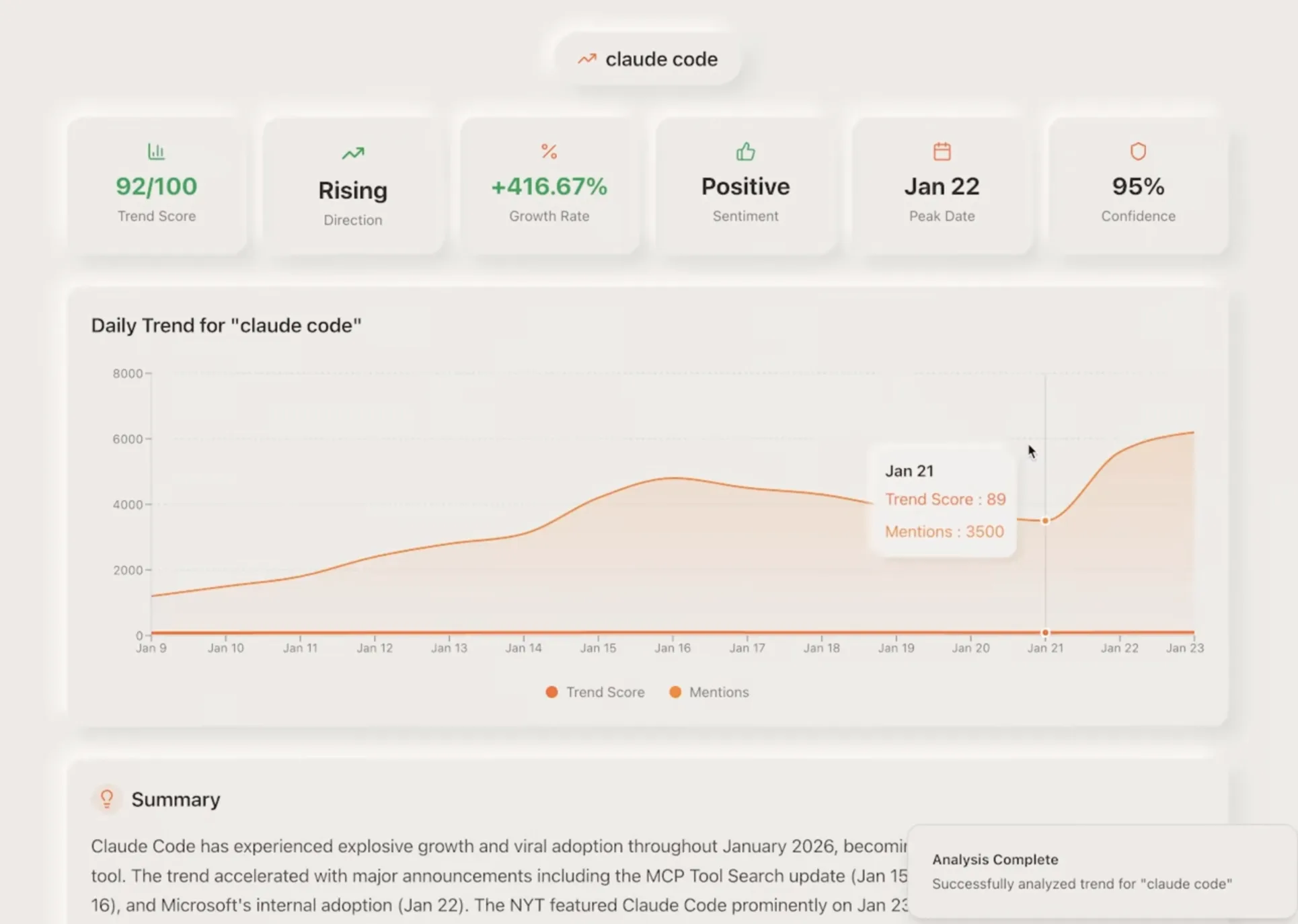
- A trend graph with peaks and valleys (matched Google Trends perfectly)
- Activity summary
- Key stuff happening (Opus 4.5 launch, MCP protocol, vibe coding trend)
- Related topics with context
- Top sources
No manual scraping. No juggling multiple APIs. Just one fetch.
What I learned
1. Prompt structure actually matters
Good prompts have:
- Context about what you're building
- How users will interact with it
- Technical hints (endpoints, data structure)
- Design preferences
2. Start simple, build up
Don't try to nail it in one shot. Build something basic, test it, see what's missing, add it. Way better than trying to think of everything upfront.
3. Scrape vs. agent
- Scrape endpoint: Fast. Grabs page content in whatever format you want.
- Agent: Slower but way smarter. Does research, makes judgments, cross-references sources.
4. Think about async stuff
When you're using agents that take time:
- Show the user what's happening
- Handle timeouts properly
- Use webhooks in production, polling for quick projects
5. Data plus design is where the magic happens
Getting data is easy. Making it useful and good-looking? That's the hard part.
Firecrawl gets the data. Lovable makes it look good. Together they make something that feels professional.
Firecrawl endpoints I used
These builds used:
- Scrape endpoint - Quick page grabs
- Agent endpoint - Smart research
- Branding format - Pulls out colors, fonts, all that
- Summary format - Content overview
- Markdown format - Full structured content
You can mix and match these in one request.
Note: On 6th February 2026, The Firecrawl team launched the new Branding Format v2. It now reliably handles edge cases like logos hidden in background images, buried in unusual HTML structures, or generated by modern site builders like Wix and Framer.
Build your own
Want to try this? Here's how to start:
- Get Lovable set up - Turn on Cloud, connect Firecrawl
- Start with scrape - Build something simple first
- Add agents - Level up to autonomous research
- Handle timeouts - Pick webhooks or polling
- Keep iterating - Add features as you go
Honestly, the speed here is wild. You go from idea to working app in minutes. No backend setup, no scraping logic, no UI design. Just describe what you want and refine it until it's right.
Whether you're using Lovable or building with code, Firecrawl makes web data accessible. Get your free API key at firecrawl.dev.
Frequently Asked Questions
What is Firecrawl and how does it work with Lovable?
Firecrawl is the context API to search, scrape, and interact with the web at scale, turning websites into clean, structured data. In Lovable, you connect Firecrawl once and then prompt Lovable to fetch live web data through Firecrawl endpoints without writing scraping code.
Which Firecrawl endpoints are used in these examples?
The brand analyzer uses the Scrape endpoint to pull branding, summary, and markdown in one call. The trend tracker uses the Agent endpoint to research across the web and return structured insights.
How should I structure prompts for Lovable + Firecrawl apps?
Start with clear context, describe the user flow, specify the endpoint and data format you need, and add design guidance. This keeps Lovable focused on a single, structured Firecrawl request.
How do you handle long-running agent requests?
Use webhooks in production so Firecrawl can call you when it finishes. For quick prototypes, store the agent job ID and let users click a button to fetch results when ready.
Can I build these apps without managing API keys?
Yes. Lovable runs backend calls on Supabase Edge Functions and can connect Firecrawl directly, so you can build and ship without manually handling API keys.