Anthropic just released Claude Opus 4.6, a major upgrade to their smartest model. In this post, we'll break down what Opus 4.6 is, what's new, and then walk through how to pair it with Firecrawl's agent endpoint to build apps that leverage live web data.
What is Claude Opus 4.6
Claude Opus 4.6 (claude-opus-4-6) is Anthropic's most intelligent model, purpose-built for building agents and coding. It improves on its predecessor across the board: it plans more carefully, sustains agentic tasks for longer, operates more reliably in large codebases, and has stronger code review and debugging skills to catch its own mistakes.
It supports a 200K context window by default (with a 1M token context window available in beta), up to 128K output tokens, extended thinking, and all existing Claude API features. The model is available on claude.ai, the API (claude-opus-4-6), and all major cloud platforms at the same pricing as its predecessor ($5/$25 per million tokens).
One of the headline features is agent teams, a research preview that lets you spin up parallel agent execution — multiple Claude Code agents working simultaneously from a single orchestrator. Each sub-agent runs in its own tmux pane, handling a different part of the build while the orchestrator coordinates the overall task.
On benchmarks, Opus 4.6 leads the industry on Terminal-Bench 2.0 (real-world agentic coding), Humanity's Last Exam (multidisciplinary reasoning), and BrowseComp (locating hard-to-find information online).
What's new in Claude Opus 4.6
Here's what Anthropic shipped with this release:
- 1M token context window (beta): A first for Opus-class models. Substantially less context rot over long sessions — Opus 4.6 scores 76% on the 8-needle 1M variant of MRCR v2, compared to just 18.5% for Sonnet 4.5.
- 128K output tokens: Double the previous 64K limit, enabling longer thinking budgets and more comprehensive responses.
- Adaptive thinking mode: The new recommended thinking mode (
thinking: {type: "adaptive"}). Claude dynamically decides when and how much to think based on the problem. The previousbudget_tokensapproach is deprecated. - Effort parameter (GA): Four levels — low, medium, high (default), and max. The new
maxlevel provides the absolute highest capability. No beta header required. - Context compaction (beta): Server-side context summarization for effectively infinite conversations. When context approaches the window limit, the API automatically summarizes earlier parts.
- Agent teams (research preview): Spin up multiple Claude Code agents that work in parallel, coordinated by an orchestrator. Each sub-agent runs in its own tmux pane and handles a different part of the build.
- Fine-grained tool streaming (GA): Now generally available on all models and platforms.
- Data residency controls: Specify where model inference runs (
globalorus) per request.
The benchmarks are strong, but how are developers actually reacting to all this?
Early developer reactions
The release sparked active discussion across Hacker News, Reddit, and X. Two Hacker News threads alone pulled in over 400 comments within hours of the announcement.
The C compiler demo got attention. Anthropic published a companion post showing agent teams building a 100,000-line C compiler that can compile and boot Linux 6.9 on x86, ARM, and RISC-V. On Hacker News, this sparked a 300+ comment thread. Several developers noted the rate of progress as the real story, with one commenter pointing out that projecting even one year forward from results like these has staggering implications.
The cybersecurity claims drew scrutiny. Anthropic's announcement that Opus 4.6 uncovered 500 zero-day vulnerabilities in open-source code generated healthy skepticism. Some developers pushed for more detailed evidence, while others with security backgrounds vouched for the credibility of the findings.
Reddit was largely positive. These r/ClaudeAI thread and r/Anthropic thread combined for 170+ comments, with developers highlighting the agentic coding improvements and agent teams as the standout features.
Here's what a Reddit user had to say:
The 1M context is exciting but I'm actually more curious about the Agent Teams feature in research preview. The idea of multiple agents working in parallel on subtasks could be huge for complex projects.
The consensus so far: the model is a real step forward for agentic coding, and agent teams are the feature developers are most eager to experiment with. Now let's put that to the test.
Claude Opus 4.6 + Firecrawl: Building with live web data
Opus 4.6's agentic capabilities become significantly more useful when the model has access to live web data. Out of the box, Claude Code's built-in browsing uses curl, which can struggle with JavaScript-rendered pages and tends to fill up the context window.
Firecrawl's Claude Code plugin solves this by giving the model access to a production-grade scraper, the /agent endpoint for autonomous web research, and structured data extraction, all without bloating the context. The combination of Opus 4.6's improved planning and Firecrawl's web capabilities opens the door to building apps that interact with the live web in non-trivial ways.
Honestly, I was waiting for Sonnet 5, not Opus 4.6. But I wanted to give it a spin and see what's actually different first-hand. So I built a Chrome extension that automatically finds and applies discount coupons on any website.
P.S: Check out how we built a Claude Skills generator with Firecrawl's Agent endpoint.
What we're building today
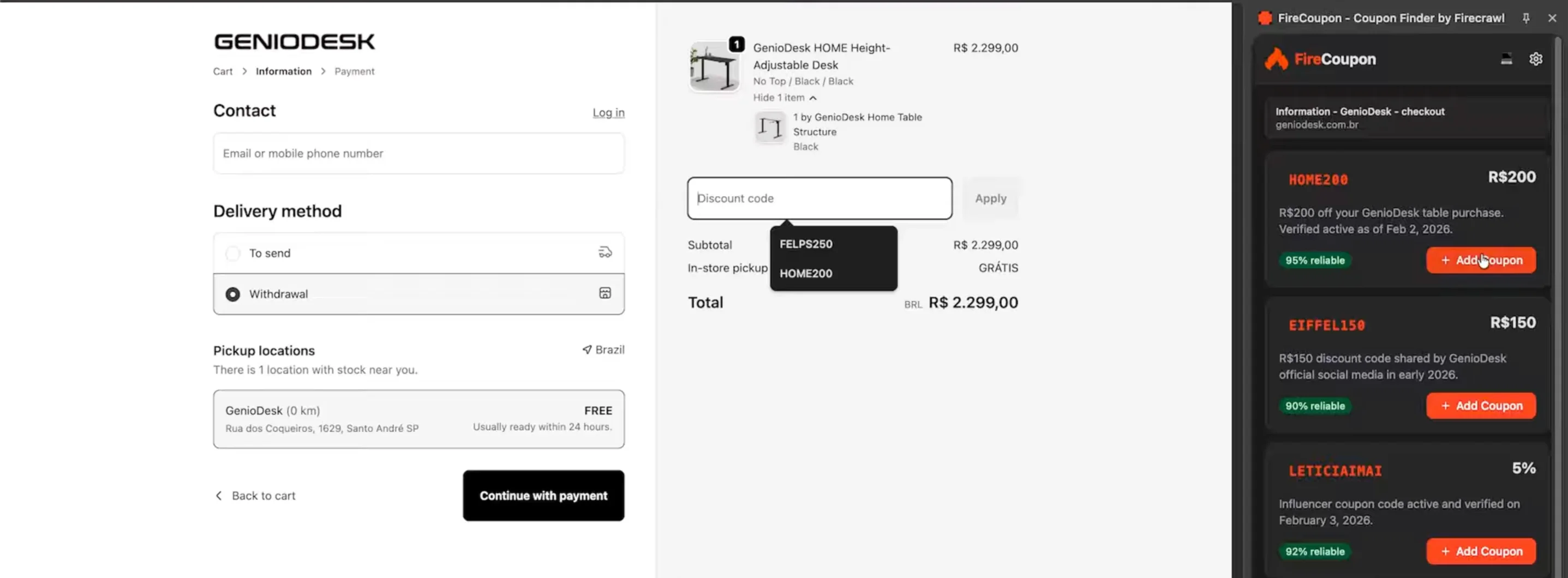
The end result is a Chrome extension powered by Firecrawl's agent endpoint. You right-click on a coupon input field, select "Search for coupons with Firecrawl," and the extension finds valid coupon codes, ranks them by reliability, and lets you apply them with a single click.
During testing, it successfully found and applied working coupons on hosting platforms, domain registrars, and other e-commerce sites, saving real money on real purchases.
Setting up the environment
Install tmux
Agent teams require tmux to manage multiple terminal panes. On Mac:
brew install tmuxOn Windows:
choco install tmuxConfigure Claude Code for agent teams
Create a .claude/settings.json file in your project directory with the instruction to use agent teams:
{
  "env": {
    "CLAUDE_CODE_EXPERIMENTAL_AGENT_TEAMS": "1"
  },
  "teammateMode": "tmux"
}
This explicitly tells Claude to use tmux hooks for spawning sub-agents. Without this, Claude may not recognize that it should use the team workflow.
You can now run tmux and then Claude.
Note: The official Claude documentation recommends using an external terminal and not inside of let's say, VS Code, because of the limitations with tmux.
Add the Firecrawl plugin
The reason you want to add Firecrawl as a plugin is to empower Claude Code with proper web scraping capabilities. Instead of relying on Claude's default browsing features that sometimes use curl and can't access JavaScript-rendered websites, you get access to a much more powerful scraper that can perform many different actions to fetch the data you need. It's faster, more precise, and won't fill up your context window the way default search does.
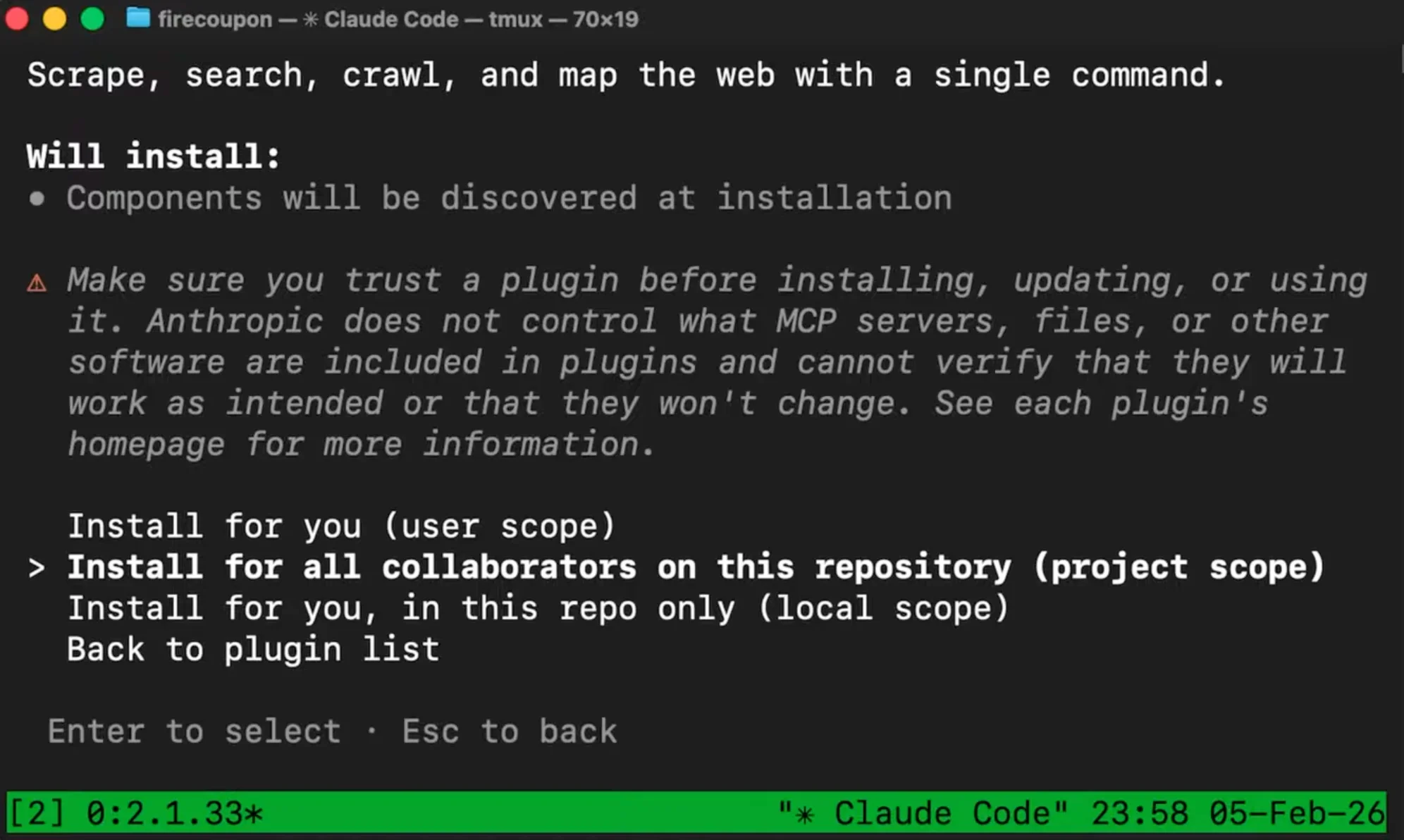
Install it with two commands inside Claude Code:
plugin marketplace add firecrawl/cliplugin install firecrawl@firecrawl-cliSelect your preferred installation scope (I prefer project scope). It will eventually ask for authentication, but that's as easy as having your browser open and clicking one button. This gives all your agents, including sub-agents on the team, access to Firecrawl's scraping, mapping, and agent capabilities.
Send prompt
Create a chrome extension that uses Firecrawl /agent to search for coupons.

(Needs to use firecrawl to scrape/search if not authenticated help the user authenticate)

This should use plasma as the framework and shadcn for UI components. The plugin should be a side panel.

The usage should follow:

- whenever a user is inside of a checkout page they should be able to right click the input field for the coupon and click "Search for coupons with Firecrawl".
- the extension should open up as a side panel and proceed to use Firecrawl's /agent endpoint.
- make sure to add as context in the prompt enough information for the agent to successfully fetch for the correct coupon. So the website name, url, product being purchased, current date, localization etc.
- the agent should also have a schema defined: an array of objects that contains: coupon code, reliability score, description, discount. The discount can either be in cash or percentage off… so keep this field as a string since the currency symbols might vary as well. Finally there should also be an order parameter decided by the agent based on the reliability score and discount.
- as soon as the data is retrieved the user should see it all listed on the side panel. Clicking on "add coupon" button next to the coupon should make it add to the input field previously clicked (from right click)… if the input field isn't identified the button should just be a "copy". Cache these results in the extension's memory so that in a next request in the same website they immediately show up. Also make sure the user can delete the codes and trigger a new fetch as well. But limit to max of 5 coupon codes per website.
- allow light and dark mode (default to system)
- make sure to design everything using firecrawl's branding:
  - Primary: #FF4C00
  - Accent: #FF4C00
  - Background: #F9F9F9
  - Text Primary: #262626
  - Link: #FF4D00
  - Personality Tone: Modern
  - Energy: High
  - Audience: developers and AI enthusiasts
  - [Firecrawl logo](https://www.firecrawl.dev/brand): https://www.firecrawl.dev/brand/firecrawl-logo.png

Use firecrawl's skill (cli) to search for firecrawl's documentation on implementing with /agent. Prefer Firecrawl CLI when search/scrape.

P.S: We recently explored [Why CLIs Are Better for AI Coding Agents Than IDEs](https://www.firecrawl.dev/blog/why-clis-are-better-for-agents). Read about it to improve your understanding.

There should be a nice button at the top right to configure firecrawl api key. In this same api settings part there should be the remaining amount of firecrawl credits the user still has (check firecrawl documentation for that).

Do not let the extension active on every website. It should only be triggered when the user clicks the fetch button.

Create an agent team to build each part. Understand how everything can be handled by the team and create the different angles.
Using the branding format for design context
Before sending the main prompt, it helps to gather branding information so the extension matches your desired look and feel. Firecrawl's branding format extracts colors, fonts, typography, logo URLs, and brand personality from any website.
Note: The Firecrawl team just launched the new Branding Format v2. It now reliably handles edge cases like logos hidden in background images, buried in unusual HTML structures, or generated by modern site builders like Wix and Framer.
You can do this through the Firecrawl playground or directly through the API. The extracted branding data then goes into your prompt so Claude builds an extension that visually aligns with your brand.
How Firecrawl /agent teams handle the build
The prompt includes everything: the branding data, the extension's functional requirements, the tech stack (Plasmo framework for the Chrome extension), and an instruction at the bottom to create an agent team for the build.
Once you hit enter in tmux, here's what happens:
- Firecrawl plugin fetches documentation - Claude uses Firecrawl to search for relevant docs and context it needs
- Project scaffolding - Claude sets up the Plasmo-based extension project
- Agent team spawns - The orchestrator creates sub-agents for different responsibilities, each in its own color-coded tmux pane
- Parallel development - Each agent works on its assigned part: one handles the UI popup, another builds the content script for detecting coupon fields, another handles the background service worker and Firecrawl API integration
- Build and verify - The orchestrator checks the final build output
This is where Opus 4.6's improved planning shows. The orchestrator figures out which parts of the extension can be built independently, delegates accordingly, and coordinates the pieces back together. For a Chrome extension with UI components, background scripts, content scripts, and API integrations, the parallel approach is a natural fit.
Check out our guide on using Claude Code for Marketing.
The Firecrawl agent endpoint in action
The core of the extension is its coupon-finding ability, which relies on Firecrawl's /agent endpoint. When a user triggers a coupon search, the extension sends a request to the agent endpoint with context about:
- The website they're on
- The specific product or service they're purchasing
- What type of coupon would be relevant
This context matters. A hosting provider like Hostinger has different coupons for VPS purchases versus domain registrations. By giving the Firecrawl agent enough context, it returns coupons that are actually relevant rather than generic codes that won't work.
The agent autonomously searches the web, evaluates sources, and returns structured results with coupon codes and reliability rankings. Each search takes roughly 50 seconds, and you get five free agent executions per day with Firecrawl.
Iterating on the build
The extension nearly one-shotted, which speaks to Opus 4.6's improved first-pass accuracy. But no build is perfect on the first try. There are always things to iterate on: a squished logo, a layout tweak, or an edge case where the right-click menu doesn't trigger correctly.
The workflow for fixing issues is straightforward:
- Load the unpacked extension in Chrome (enable Developer Mode in
chrome://extensions) - Test on a real website
- Check the browser console for errors
- Copy any errors back into Claude Code
- Claude fixes the issue, you reload the extension, and test again
After a few rounds of iteration, the extension was fully functional: finding real coupons, applying them to input fields, and saving actual money on real purchases.
Key takeaways
Opus 4.6 is a meaningful upgrade for agentic coding. The model's improved planning, longer task sustain, and better debugging make it noticeably more capable at building multi-file projects end to end.
Agent teams change the development flow. Watching multiple Claude agents work on different parts of a project simultaneously is a different experience from the standard back-and-forth. For projects with multiple independent components, it speeds things up considerably.
Live web data unlocks new categories of apps. Pairing Opus 4.6 with Firecrawl's agent endpoint lets you build apps that don't just generate code but interact with the live web: finding coupons, extracting product data, price tracking, or any task that requires real-time information.
Context in prompts matters for the agent endpoint. The more specific you are about what product or service the user is looking at, the better the results. Generic prompts return generic results.
Try it yourself
The full branding configuration, and source code are available in the GitHub repository. You can install the extension for free and start finding coupons right away.
If you want to build your own apps that combine Opus 4.6's agentic coding with live web data, get started with the Firecrawl agent endpoint.
Frequently Asked Questions
What is Claude Opus 4.6?
Claude Opus 4.6 is Anthropic's latest upgrade to their smartest model. It improves on its predecessor with better coding skills, more careful planning, longer agentic task execution, better performance in large codebases, and stronger debugging abilities. It also introduces a 1M token context window in beta, a first for Opus-class models.
What are Claude Code agent teams?
Agent teams are a research preview feature in Claude Code that lets a single orchestrator agent spawn multiple sub-agents, each handling a different part of the build. The orchestrator delegates tasks like design, component building, and testing to specialized agents that run concurrently in separate tmux panes.
How does the Firecrawl agent endpoint help find coupons?
Firecrawl's /agent endpoint receives a prompt with context about the website and product, then autonomously searches the web for valid coupon codes. It returns structured results with coupon codes and reliability rankings, all from a single API call.
Do I need a paid Firecrawl plan to use the agent endpoint?
You get five free executions of the agent endpoint every day with Firecrawl. That's enough to test coupon searches regularly without a paid plan.
Why use tmux with Claude Code agent teams?
Agent teams require tmux to split the terminal into multiple panes. Each sub-agent runs in its own pane with a distinct color, while the main orchestrator agent manages everything from the primary pane. Anthropic recommends running tmux from an external terminal rather than inside VS Code.
How do I add Firecrawl as a plugin to Claude Code?
Run two commands: first 'plugin marketplace add firecrawl/cli' to add the marketplace, then 'plugin install firecrawl@firecrawl-cli' and select your preferred installation scope. Authentication happens automatically through your browser.