Top 5 Exa Alternatives for AI Web Search and Data Extraction in 2026
 Hiba Fathima
TL;DR - Best Exa alternatives
| Tool | Best for | Standout feature | Free tier |
|---|---|---|---|
| Firecrawl | Full web data stack for AI agents | Search, Scrape, Interact, Crawl, plus 90+ data providers via Firecrawl Alexandria | 1,000 credits/month |
| Tavily | AI search and research workflows | Transparent flat pricing, native LangChain integration | 1,000 credits/month |
| Perplexity | Cited answers | Synthesized answers with source citations in one call | 100 queries/day |
| Linkup | Verified facts + business intelligence | Trusted source integration, ranked #1 on SimpleQA | €5 free/month |
| Brave | Privacy-first search | Independent 30B+ page index, SOC 2 certified | 2,000 queries/month |
As AI agents and LLMs move into production, developers need reliable, cost-effective web search APIs that go beyond keyword matching. The demand for semantic understanding, structured extraction, and real-time data feeding directly into AI systems has never been higher. This shift toward agentic search — where agents autonomously retrieve, reason, and act on live web data — is reshaping what developers need from search APIs.
Exa pioneered embeddings-based semantic search for machines, understanding meaning rather than just keywords. This guide explores five alternatives that offer different approaches to AI-powered web search and data extraction. Exa also appears in our Anthropic web search alternatives comparison for Claude-based agent workflows, and in the broader search tools for AI agents guide that benchmarks the full field. If you are evaluating Parallel AI specifically, see the dedicated Parallel AI alternatives comparison, which covers Firecrawl, Exa, Tavily, and Linkup side-by-side on latency, output consistency, and pricing.
Why users look for Exa alternatives
Teams may explore alternatives when they need a fully open-source, self-hosted option, an all-in-one web data stack (search + scrape + extraction), predictable flat pricing, or parallel processing at scale.
What is Exa: Quick overview
Exa is an AI-powered search engine built specifically for machines. Unlike traditional search engines, Exa uses embeddings-based semantic searc to understand meaning rather than just matching keywords, making it ideal for feeding results directly into LLMs, AI agents, and RAG systems.
Main APIs:
- Search: Semantic queries that understand context and intent
- Contents: Retrieve clean, parsed HTML from search results
- Find Similar: Feed one URL, get 20 similar pages
- Answer: Summarized responses with citations
- Research: Automated deep research API with structured JSON
- Websets: Complex queries returning thousands of results (can take up to 1 hour)
Pricing: Free tier with 1,000 requests/month. Paid tiers: $7/1k search requests, $12–15/1k deep search, $1/1k pages (Contents), $5/1k answers. Enterprise pricing via sales contact.
Top 5 Exa alternatives
Each alternative offers different approaches to AI-powered web search and data extraction.
1. Firecrawl: Web data APIs for AI agents
.webp)
Firecrawl searches, scrapes, and cleans the web for AI agents. It's built AI-first from the ground up — every output format, every endpoint, and every default is designed for what agents actually need, not retrofitted from a human-facing product.
With over a million developers using it, Firecrawl has become the default web data stack for AI teams and the go-to choice for production AI agents and workflows. It's fully open source (180K+ GitHub stars) and can be self-hosted for teams with data residency, compliance, or infrastructure requirements.
| Feature | Firecrawl | Exa |
|---|---|---|
| Primary use case | Web data APIs: Search, Scrape, Interact, Crawl | Semantic search & discovery |
| Extraction method | Natural language prompts (zero selectors) | Search results + basic content |
| JavaScript rendering | Automatic (included) | Automatic (Contents API) |
| Output format | Token-efficient markdown, structured JSON | Parsed HTML, text snippets |
| Free tier | 1,000 credits/month | 1,000 credits |
| Credit model | 1 credit = 1 page (flat) | Per-request ($7/1k search, $1/1k contents) |
| Open source / self-hosted | Yes (180K+ GitHub stars) | No (closed source, cloud-only) |
| Benchmark performance | 77.2% coverage, 0.638 F1 | 69.2% coverage, 0.508 F1 |
| Browser interact | Yes (/interact endpoint) | No |
| Data providers in search | Yes (Firecrawl Alexandria, 90+ providers via sources) | No |
| CLI | Yes (built-in Claude skill) | No |
How Firecrawl compares to Exa
Full content, not snippets
Most search APIs return links and snippets that still need post-processing before they're useful in an agent context. Firecrawl's Search finds the relevant pages and returns their full content — clean, token-efficient markdown or structured JSON ready to use immediately.
Beyond standard web results, Search supports specialized source types: news for fresh coverage, github for repository and code searches, research for academic papers from arXiv and PubMed, and pdf for document searches, all returning full content in a single call.
Since September 2026 the same call can also return data tools: add alexandria to sources and the response carries a tools array from Firecrawl Alexandria, drawn from official APIs such as SEC EDGAR and FRED, licensed publishers such as Fiscal.ai and Particle, and Firecrawl's Research, Developer, and Government indexes. Finding a tool costs nothing, and running one is billed at its listed price.
The catalogue itself is the argument for choosing Firecrawl here. It includes the Wayback Machine for how a page looked on any past date, Greenhouse job boards for every open role at a company, GitHub, Hugging Face, PyPI, and Stack Exchange for developer questions, Companies House and SEC EDGAR for registries and filings, and 80+ other providers, all reachable from the one search call an agent already makes.
One API replaces a multi-vendor stack
With Exa, you search for pages, then make separate extraction calls via the Contents API. Most teams end up stitching together a search API, a scraper, and a browser tool. Firecrawl covers the full workflow — Find → Extract → Clean → Use — in a single API at one flat credit per page. Fewer vendors, simpler code, predictable costs.
Context-aware queries
Firecrawl supports a context parameter so agents can describe what they're actually trying to do, not just fire off a keyword query. Search bars were built for humans. Agents have more to say, and Firecrawl lets them.
Read more about it here or see the full breakdown in Firecrawl vs. Exa.
Performance in independent benchmarks
In open-source scrape-evals testing 13 web scraping engines on 1,000 real URLs, our testing showed the following results:
- Coverage: Firecrawl 77.2% vs Exa 69.2% in our evaluation
- Quality (F1 score): Firecrawl 0.638 vs Exa 0.508 in our evaluation
The F1 score measures how much useful content you capture versus noise. Higher F1 generally means cleaner, more complete extraction, which can be valuable when feeding data into LLMs where context windows matter.
A separate agentic search benchmark by AIMultiple — evaluating 8 search APIs across 100 real-world AI/LLM queries — found Firecrawl and Exa statistically tied at the top of the field: Firecrawl ranked #2 (Agent Score: 14.58) and Exa ranked #3 (14.39), with overlapping confidence intervals. Both outperformed the remaining field by a meaningful margin.
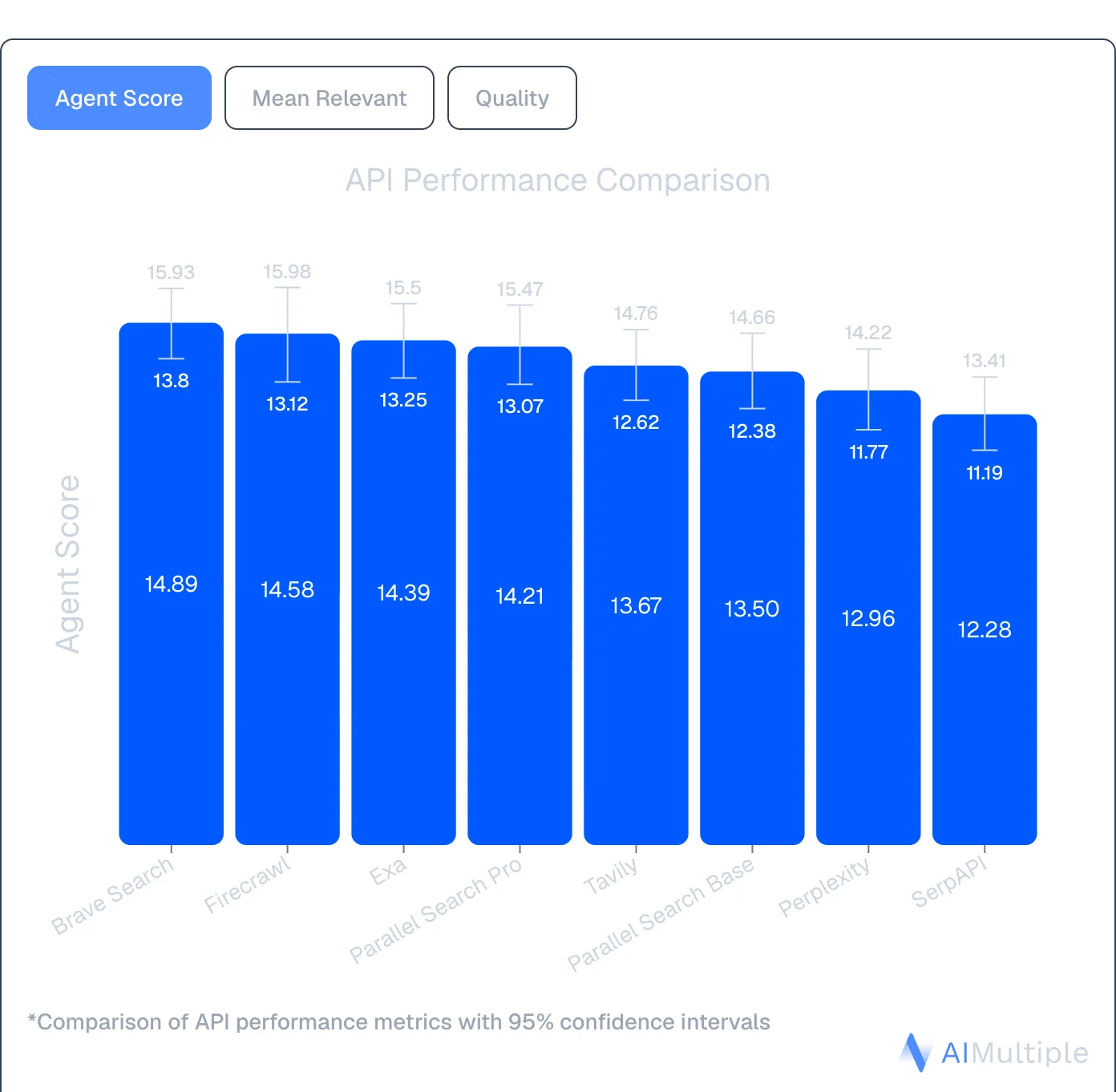
Source: AIMultiple Agentic Search Benchmark 2026
Multiple output formats
Firecrawl's Scrape endpoint returns content in the format your pipeline needs: markdown, html, json, links, screenshot, summary, or image. One call, your choice — no post-processing required.
Clean, usable context — not snippets
Exa returns search snippets optimized for discovery. Firecrawl goes further: Scrape turns any URL into token-efficient markdown or structured JSON, pulling exactly the fields you describe in plain English. No CSS selectors, no XPath, no parsing logic required.
from firecrawl import Firecrawl
from pydantic import BaseModel, Field
from typing import Optional

app = Firecrawl(api_key="fc-YOUR_API_KEY")

class Company(BaseModel):
    name: str = Field(description="Company name")
    contact_email: Optional[str] = Field(None, description="Contact email")
    employee_count: Optional[str] = Field(None, description="Number of employees")

result = app.scrape(
    "https://ycombinator.com/companies",
    formats=["json"],
    json_options={"prompt": "Extract company name, contact email, and employee count"}
)

print(result.json)
When a site changes its HTML structure, your extraction keeps working because the AI adapts automatically.
Open source and self-hosted
Firecrawl is fully open source and can be self-hosted, which is useful for teams with data residency requirements, security constraints, or cost optimization needs at scale.
Handles dynamic pages with Interact
Many sites hide content behind "Load More" buttons, require form submissions, or spread data across paginated views. Firecrawl's Interact endpoint handles these automatically — clicking buttons, filling fields, navigating pagination — without writing custom automation code for each site.
Firecrawl surfaces that work together
Firecrawl isn't a single-purpose tool. It offers complementary surfaces across the AI-agent web data loop:
- Search: Search the live web and get full content back immediately
- Scrape: Convert any URL into clean markdown or JSON
- Parse: Convert PDFs and documents into usable text
- Crawl: Navigate entire sites without sitemaps
- Map: Discover site structure fast
- Interact: Automate browser actions — click buttons, fill forms, navigate multi-step flows
Firecrawl is also an official Claude plugin, integrating directly into Claude for AI-powered web research. The Firecrawl CLI, with a built-in Claude skill, is ideal for terminal-based workflows.
It also integrates with no-code tools like Lovable and n8n — now with a native n8n Cloud integration for one-click connection. If you want to see what's possible, the firecrawl lovable tutorial covers building two data-powered apps from scratch.
When to choose Firecrawl over Exa
Exa is a search engine. Firecrawl is the web data API to search, scrape, and interact with the web at scale, covering discovery, extraction, crawling, and live page interaction in one workflow.
- Choose Firecrawl when you need the full workflow in one API: Search finds fresh sources, Scrape turns them into token-efficient context, Interact handles dynamic pages, Crawl goes deep across sites — Find → Extract → Clean → Use.
- Choose Firecrawl when extraction quality and depth matter. In our benchmarks, Firecrawl achieved 77.2% coverage and 0.638 F1 quality versus Exa's 69.2% coverage and 0.508 F1.
- Firecrawl handles JavaScript rendering automatically at no extra cost, with predictable flat-rate pricing per page.
- It's fully open source (180K+ GitHub stars) and can be self-hosted for data residency, compliance, or infrastructure control.
2. Tavily
Tavily is a search API built for AI agents and LLMs. It spans /search, /extract, /crawl, /map, and /research endpoints, and takes a more straightforward approach than Exa with transparent pricing and faster response times.
| Feature | Tavily | Exa |
|---|---|---|
| Primary use case | AI search and research workflows | Semantic search & discovery |
| Search method | Multi-source aggregation | Embeddings-based semantic |
| Unique feature | AI-optimized results with include_raw_content on /search | Find Similar (semantic matching) |
| Output format | Structured results with raw content via include_raw_content or /extract | Parsed HTML, text content |
| Free tier | 1,000 credits/month | 1,000 credits |
| Best for | AI search and research workflows | Semantic discovery, research |
How Tavily compares to Exa
Transparent, predictable pricing
Tavily charges a flat $0.008 per credit PAYG basic search with clear pricing tiers starting at $30/month. Tavily's costs are predictable, allowing you to know exactly what you'll pay before making a request.
For a full feature-by-feature breakdown, see Firecrawl vs. Tavily.
Native LangChain integration
Tavily is particularly popular in the LangChain community with native integrations that make adding real-time web search to your agent straightforward. The setup is simpler than Exa's semantic search configuration.
Five core endpoints
- Search: Real-time web queries with AI-optimized results; optional raw content via
include_raw_content - Extract: Pull full content from URLs with JavaScript rendering
- Crawl: Navigate entire websites using natural language instructions
- Map: Discover website structure before extraction
- Research: Multi-step agentic research that synthesizes results across sources
When to choose Tavily over Exa
Choose Tavily when you need predictable costs for AI search workflows and faster response times than Exa offers. It's ideal for prototyping AI agents, building chatbots with web search capabilities, and applications where you need consistent performance without hour-long wait times.
For a full comparison of search plus extraction capabilities, see Firecrawl vs. Tavily.
Read our detailed Tavily alternatives comparison for more.
3. Perplexity API
Perplexity Sonar API combines live web crawling with an in-house LLM to deliver cited answers in one API call. Instead of just returning search results like Exa, Perplexity searches, processes, and summarizes information with source citations.
| Feature | Perplexity Sonar API | Exa |
|---|---|---|
| Primary use case | Cited answers with sources | Semantic search & discovery |
| Search method | Live web crawl + LLM processing | Embeddings-based semantic |
| Output format | Summarized answers with citations | Parsed HTML, text content |
| Free tier | 100 queries/day | 1,000 credits |
| Context length | 128K tokens | N/A (snippet-based) |
| Best for | Fast cited answers, chatbots | Semantic discovery, research |
How Perplexity compares to Exa
Answers, not just links
Perplexity doesn't just find relevant pages. It reads them, synthesizes the information, and returns a coherent answer with citations. Perfect for applications where users need answers, not a list of URLs to read themselves.
Built-in citations
Every answer includes source links, making it ideal for applications where verifiable information matters like legal research, financial analysis, healthcare queries, or academic work.
Simpler than semantic search
While Exa requires understanding embeddings-based semantic search, Perplexity works like a traditional chatbot. Ask a question, get an answer. No need to learn about vector databases or semantic matching.
When to choose Perplexity over Exa
Choose Perplexity when you need fast, summarized answers with citations rather than raw search results. It's ideal for building conversational AI applications, research assistants, or knowledge bases where users expect direct answers backed by sources.
The tradeoff is dual pricing complexity (token costs plus per-request fees) compared to Exa's credit system, and you lose Exa's semantic search capabilities for discovering conceptually similar content.
4. Linkup
Linkup is an AI search engine optimized for LLMs and AI agents, with a focus on sourcing data from trusted, authoritative sources. It ranks #1 on OpenAI's SimpleQA factuality benchmark, positioning itself as the world's most accurate search for AI applications.
| Feature | Linkup | Exa |
|---|---|---|
| Primary use case | Fact retrieval & company enrichment | Semantic search & discovery |
| Search method | Two-tier (Standard & Deep) | Embeddings-based semantic |
| Unique feature | Trusted source integration | Find Similar (semantic matching) |
| Output format | Sourced answers with citations | Parsed HTML, text content |
| Free tier | €5 worth of queries/month | 1,000 credits |
| Best for | Business intelligence, enrichment | Semantic discovery, research |
How Linkup compares to Exa
Two-tier search approach
Linkup offers both fast fact retrieval (Standard) and comprehensive deep intelligence searches (Deep). Standard search handles quick queries like "What is Microsoft's Q3 2024 revenue?" while Deep search uses chain-of-thought reasoning for complex questions like "What are Apple and Samsung's strategy differences for 2026?"
Company enrichment capabilities
Unlike Exa's general search focus, Linkup specializes in enriching company profiles with market and competitive intelligence. It can automatically pull product information, target markets, ICP ratings, and customer testimonials, making it powerful for sales and GTM teams.
Transparent pricing with free tier
Linkup charges a straightforward €5 per 1,000 standard searches or €50 per 1,000 deep searches. The free tier includes €5 worth of queries every month, providing predictable pricing.
Native integrations
Linkup integrates natively with CrewAI, LangChain, Make, n8n, and Zapier, making it easy to add to existing AI workflows without custom code.
When to choose Linkup over Exa
Choose Linkup when you need verifiable facts from trusted sources rather than broad semantic discovery. It's ideal for business intelligence applications, company research, competitive analysis, and GTM automation where data accuracy is critical.
The tradeoff is that Linkup doesn't offer web crawling capabilities, so you'll still need a separate tool like Firecrawl for extracting structured data beyond search results.
5. Brave Search API

Brave Search API stands out with its own independent search index of 30+ billion pages. Unlike some competitors that may rely on Bing or Google, Brave crawls and indexes the web itself. This may be a consideration given Bing's API changes affecting some search services.
| Feature | Brave Search API | Exa |
|---|---|---|
| Primary use case | Independent search, privacy-focused | Semantic search & discovery |
| Search index | Independent (30B+ pages) | Custom (30B+ pages claimed) |
| Pricing | $5-9 per 1,000 requests | $7/1k search; $12-15/1k deep search |
| Free tier | 2,000 queries/month | 1,000 credits |
| Rate limits | Up to 50 queries/second | 5 requests/second |
| Privacy | SOC 2 Type II, no tracking | SOC 2 Type II |
| Best for | Privacy-centric apps, high volume | Semantic discovery, research |
How Brave compares to Exa
Privacy-first architecture
SOC 2 Type II certified with no user tracking. May be well-suited for applications where privacy matters or where you're handling sensitive queries. Brave reports not building user profiles or selling data, which may be relevant for healthcare, legal, or financial applications.
Up to 5 snippets per result
Get more context from each search result, useful for training foundation models or building comprehensive RAG systems. More content per result means fewer API calls for the same information depth.
Search Goggles for customization
Customize search behavior by discarding specific domains or re-ranking results. Build custom search experiences tailored to your use case without forking an entire search engine. This level of control isn't available with Exa's fixed semantic ranking.
Specialized endpoints
- Web Search: General queries across Brave's full index
- AI Grounding: Optimized results for LLM context
- Image, Video, News: Vertical-specific search
- Suggest: Autocomplete and query suggestions
- Spellcheck: Query correction
When to choose Brave over Exa
Choose Brave for privacy-centric applications where data handling and compliance matter. If you're building tools for sensitive industries, handling confidential research, or serving privacy-conscious users, Brave's architecture and certifications provide guarantees Exa doesn't emphasize.
The tradeoff is that Brave returns raw JSON SERPs rather than AI-optimized semantic results.
For a deeper look at how Brave compares to other search APIs, see our Brave Search API alternatives guide.
Conclusion: Choosing your Exa alternative
Exa pioneered semantic search for AI with embeddings-based discovery. When your application needs deep extraction, transparent pricing, or different performance characteristics, these alternatives offer specialized approaches for those use cases.
If you need the full web data stack, Firecrawl covers Search, Scrape, Interact, and Crawl in one API — built AI-first, with over a million developers and 180K+ GitHub stars. At $99/month billed monthly ($83/month billed annually) for 100K pages, it delivers token-efficient output with no post-processing required. For a deeper feature-by-feature comparison, see Firecrawl vs. Exa.
Try Firecrawl free with 1,000 credits per month (no card required) or explore the docs.
Frequently Asked Questions
What's the main difference between Exa and its alternatives?
Exa focuses on semantic search with embeddings-based discovery. Alternatives specialize in different areas: Firecrawl for the full web data stack (Search, Scrape, Interact, Crawl) built AI-first, Tavily for AI search and research workflows with transparent pricing, Perplexity for cited answers, Linkup for trusted sources, and Brave for independent indexing with privacy guarantees.
Why explore Exa alternatives?
The main reasons are search quality, extraction depth, and pricing. As the web fills with AI-generated content, passing raw crawl results to an agent creates noise. Some teams need full-content results from the live web with no post-processing, others need semantic search alternatives, cited answers, or predictable per-page pricing at scale.
Which Exa alternative is most cost-effective?
Firecrawl offers competitive pricing at scale: the Standard plan is $99/month billed monthly, or $83/month billed annually, for 100K pages. Brave costs $5-9 per 1,000 requests, while Linkup charges €5 per 1,000 standard searches. Tavily offers pricing at ~$800 for 100K pages. Pricing varies based on use case and volume.
Can Exa alternatives handle JavaScript rendering?
Yes. Firecrawl includes automatic JavaScript rendering at no extra cost. Brave Search API handles dynamic content in its index. Tavily and Perplexity support JavaScript-heavy sites. Exa supports JavaScript rendering via the Contents API.
Which alternative is best for RAG applications?
Firecrawl is a strong choice for RAG: it pulls full-content results from the live web as the default of `/search`, so context arrives ranked and clean without a follow-up extraction call. It also has native LangChain and LlamaIndex integrations. Tavily offers AI-optimized results plus raw content on `/search` via `include_raw_content` or the dedicated `/extract` endpoint. Perplexity provides pre-synthesized answers with citations, eliminating extraction steps entirely.
Do Exa alternatives offer free tiers?
Yes. Firecrawl offers 1,000 free credits per month (1,000 pages). Brave provides 2,000 queries monthly. Linkup gives €5 in free queries each month. Perplexity offers 100 queries daily. Tavily includes 1,000 credits/month. Exa offers 1,000 credits in its free tier.
Are these alternatives compatible with LangChain?
Yes. Firecrawl, Brave, Perplexity, Tavily, and Linkup all offer LangChain integrations. Firecrawl provides native adapters for both LangChain and LlamaIndex. This makes switching from Exa straightforward, often requiring just a few lines of code change in existing implementations.
Which alternative handles complex websites best?
Firecrawl's Interact endpoint handles complex scenarios automatically, including pagination, form submissions, and JavaScript-heavy sites. It clicks buttons, fills fields, and navigates multi-page workflows without custom code. Exa focuses on semantic search and may require additional tools for complex extraction scenarios.
Do Exa or its alternatives give agents access to third-party data providers?
Firecrawl does, through Firecrawl Alexandria. Add alexandria to the sources parameter and the search response carries a tools array next to the web results, drawn from official APIs such as SEC EDGAR and FRED, licensed publishers such as Fiscal.ai and Particle, and Firecrawl's Research, Developer, and Government indexes. Exa's search API returns results from Exa's own web index.
What does Firecrawl Alexandria cost?
Finding tools is free on any search. Running a tool goes through the scrape endpoint with an alexandria block (provider, capability, options) in place of a URL and is billed at the price listed on the tool, which is deducted from your Firecrawl credits. Prices vary by provider, so read the contract before wiring a tool into a loop. Firecrawl Alexandria needs an API key on a team where it is enabled, and some licensed publishers require an organization admin to accept their terms once before the first call.