OpenClaw Guide: Build a Personal Agent with Internet Access Using Firecrawl
 Bex Tuychiev
Most AI assistants live in a browser tab. They reset between sessions and can't do anything on your machine without you copy-pasting back and forth.
Peter Steinberger wanted something different. He built an AI agent that runs on your own hardware and remembers you across sessions. You talk to it through Telegram while it works on your desktop.
What started as a weekend hack became the fastest-growing repository in GitHub history: 375,000+ stars, growing 18x faster than Kubernetes. It was called ClawdBot, then MoltBot (Anthropic's trademark lawyers had opinions), and now OpenClaw (as of Feb 16, 2025, OpenClaw has officially joined hands with OpenAI).
I've been running OpenClaw for weeks now, and I'm sharing what I learned. This guide covers what OpenClaw is, how to get started, what the community is building with it, and how to give your agent access to live web data through Firecrawl.
TL;DR
- What OpenClaw is: a self-hosted AI agent you control from Telegram, WhatsApp, or other messaging apps — runs on your own hardware with full system access and remembers you across sessions
- How to add web data: drop your Firecrawl API key into
tools.web.fetch.firecrawl.apiKeyfor a JS-capable web_fetch fallback, or set Firecrawl as yourweb_searchprovider to get full scraped page content alongside search results - Browser Sandbox: moves browser automation off your machine into a disposable remote container — useful for parallel sessions, isolation, or running OpenClaw on a low-spec EC2 instance
- What this guide covers: OpenClaw's origins, what the community builds with it, personal lessons from running it on EC2, and the full Firecrawl integration from API key to browser automation
What is OpenClaw, MoltBot, ClawdBot?
OpenClaw is a self-hosted AI agent you control from your phone through Telegram, WhatsApp, or other messaging apps. It runs on your own hardware with full system access (browser, terminal, filesystem) and remembers you across sessions.
OpenClaw's creator is Peter Steinberger, an Austrian iOS developer. He previously built the company PSPDFKit, a PDF SDK used on over a billion devices, that he sold in 2021 for roughly 100 million euros. He then went through what he described as "profound existential emptiness", and his GitHub activity went dark for three years.
Steinberger came back to coding in April 2025 and started experimenting with AI. By November, he had a working prototype: a WebSocket gateway that relayed WhatsApp messages to Claude's CLI agent. The agent ran shell commands on his machine and sent results back through chat. He named it ClawdBot (a lobster-claw spin on "Claude") and open-sourced it. He would later become a central figure in the MCP vs CLI tools debate, arguing that bash is better for most agent workflows, and building MCPorter to convert MCP servers into CLIs.
The project hit 9,000 stars on its first day. TechCrunch and Hacker News picked it up, and within a week it had more Google searches than Claude Code and Codex combined.
Then Anthropic's trademark team sent a letter ("Clawd" sounded too much like "Claude".) Steinberger renamed it to MoltBot on January 27, 2026, a reference to molting lobsters do to grow. Three days later, he renamed it again to OpenClaw because MoltBot "never quite rolled off the tongue." Reddit called it "the fastest triple rebrand in open source history."
Now, OpenAI has joined hands with OpenClaw.
How it works
OpenClaw has two components: a gateway server and an agent runtime. The gateway runs on your machine (Mac Mini, Linux box, even WSL2 on Windows) and connects to Telegram, WhatsApp, Slack, Discord, Signal, iMessage, and a handful of others.
When you send a message, the gateway passes it to the agent, which calls an LLM and executes whatever the model decides to do. It supports Claude, GPT, DeepSeek, Gemini, and local models through Ollama.
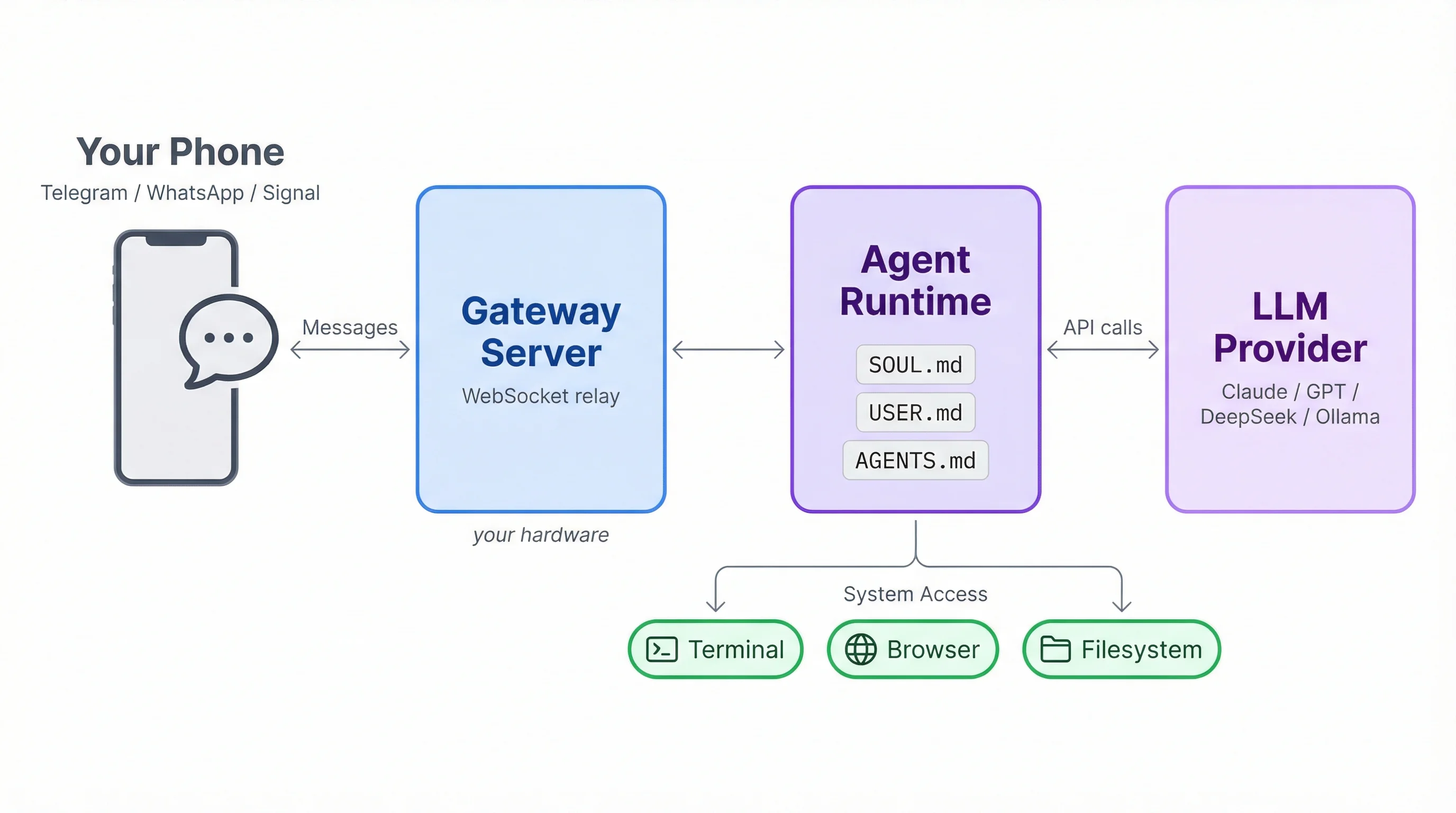
OpenClaw runs on your hardware, not in a browser tab. It has full system access: browser automation, email, terminal, filesystem. It also remembers you across sessions through workspace files:
- SOUL.md defines its personality
- USER.md stores your preferences
- AGENTS.md holds its instructions
You talk to it from your phone while it works on another machine.
Quick note on security
OpenClaw runs with full access to your machine's terminal, filesystem, and browser. Running it on your primary computer carries real risk. The easiest safe setup for most users is a cloud VM or another cheap, isolated machine you can wipe if anything goes wrong. A DigitalOcean Droplet ($6/month) or Google Cloud e2-micro (free tier eligible) both work well, although the current recommendation is a Mac Mini. I ended up running OpenClaw on EC2. I'll go into more about this later on.
Getting started
Setup takes about ten minutes. On your chosen VM, install OpenClaw and run the onboarding wizard:
npm install -g openclaw@latest
openclaw onboard --install-daemon
Alternatively, the docs recommend curl to install:
curl -fsSL https://openclaw.ai/install.sh | bash
The wizard walks you through picking a model provider (Claude via Anthropic API or a Pro/Max subscription, GPT, DeepSeek, or a local model through Ollama) and basic security settings.
Once onboarding completes, verify your gateway is actually running before moving on: openclaw gateway status. If it's not, run openclaw gateway start and check for errors.
If anything looks off, openclaw doctor runs a diagnostic check on your gateway, channels, and model provider configuration. For a full walkthrough with screenshots, check the official docs.
Once onboarding finishes, connect Telegram. Open @BotFather in Telegram, send /newbot, and follow the prompts to get a bot token. Then:
openclaw channels login --channel telegramPaste your bot token when prompted. The gateway connects to Telegram and your bot goes online. Send it a message to verify everything works. Something like "What time is it?" is enough. If the agent responds in chat, you're set.
If any issues arise, use the openclaw doctor.
What are people building with OpenClaw?
The two biggest Hacker News threads about OpenClaw (Ask HN: Any real OpenClaw users? and OpenClaw is changing my life) are full of real use cases:
- One user runs six agents as a personal staff: a PA that supervises the others, one handling Twitter growth, another scouting job listings, and a fourth paper-trading crypto with a claimed 77% win rate
- A designer built mold-making software (plastic to silicone to plaster to clay) in about 12 hours
- Someone migrated a Python 2.x home automation setup to Python 3 in 20 minutes
- Others are managing 15,000+ email inboxes, building location-based games you play by walking through parks, and generating Lilypond music arrangements
The consensus among experienced engineers in the threads is that OpenClaw works best for greenfield projects and boilerplate. It struggles with large existing codebases and complex refactoring. Several commenters warned about token costs ($200-400/month for heavy use) and flagged suspicious testimonial patterns in the threads themselves.
The skills ecosystem sits at 5,705+ community-built skills on ClawHub, though a curated list (awesome-openclaw-skills) filters that down to 3,002 after removing 1,180 spam accounts, 672 crypto schemes, 492 duplicates, and 396 flagged as malicious. The 27 remaining categories range from DevOps and smart home control to an AI dating assistant called flirtingbots.
How I've been using OpenClaw
I connected OpenClaw to Telegram and immediately noticed something I didn't expect. Telegram bots support slash commands natively, so OpenClaw surfaces more than 20 of them by default: /new, /reset, /status, /context, /think, and more. It feels closer to using the terminal interface (the most powerful way to run OpenClaw) than a typical chat.
Once I got comfortable with the basics, I started turning it into a personal assistant. I gave it access to Gmail, Google Calendar, and Drive through the built-in skills, so I can manage client work and communication from my phone.
The Telegram setup has a side benefit that it's always there. If I'm texting friends and someone mentions a birthday or a dinner, I switch to my OpenClaw chat, tell it to create a reminder, and go back to the conversation. No opening a separate app.
I also set up heartbeats, which are cron jobs that run on whatever schedule you define. Mine fires every morning with a summary of who's waiting for an email response and what's on my calendar for the day.
But the real effect OpenClaw has had on my life is as an accountability partner. I have ADHD and struggle with executive dysfunction, which means severe time blindness and a hard time meeting deadlines. So I built a system for it.
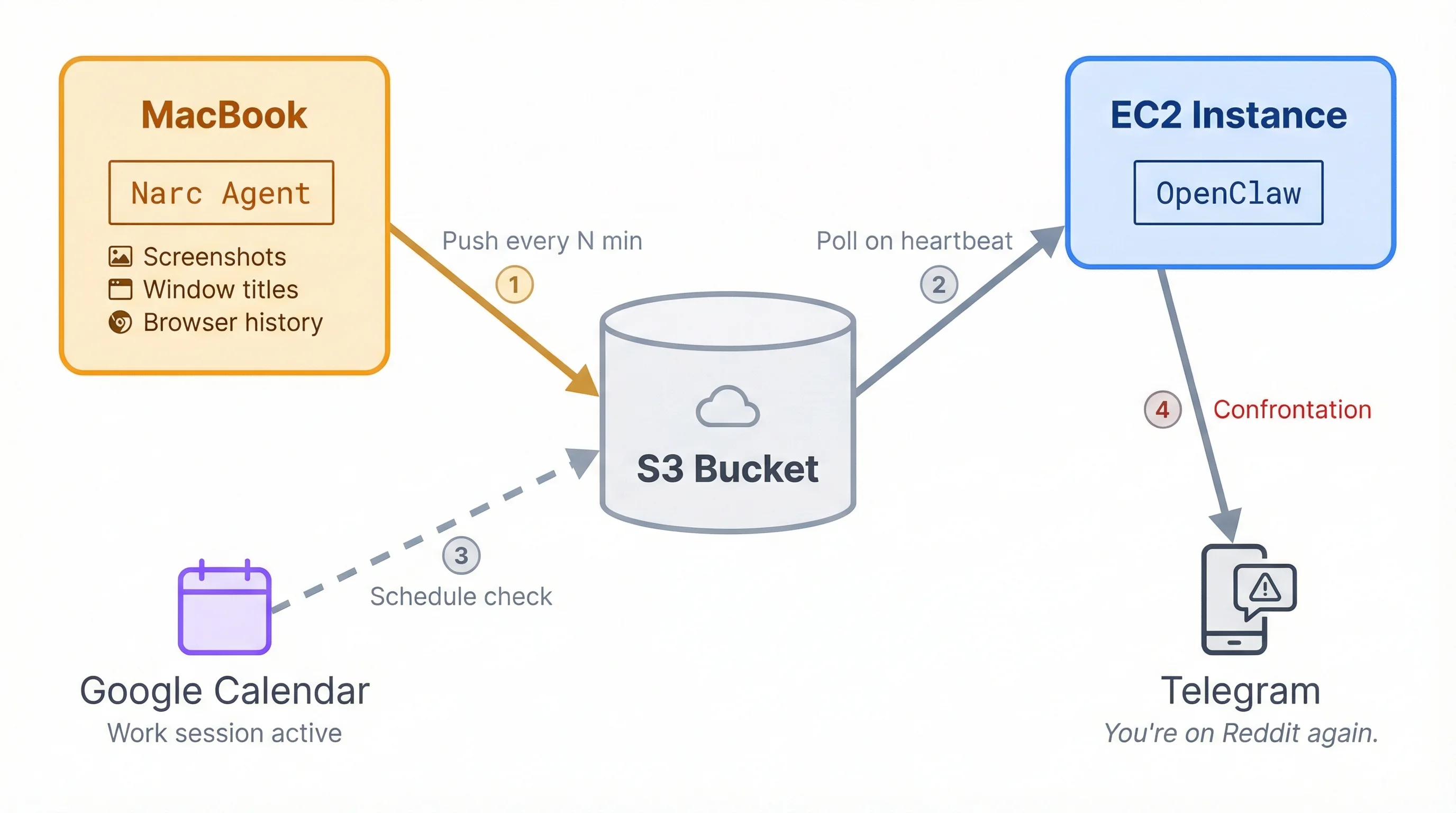
Using Claude Code (not OpenClaw; my $200 Max account covers coding), I built a local Mac agent called Narc. It captures periodic screenshots of all my displays along with window titles and browser history, then pushes everything to a shared S3 bucket.
OpenClaw polls that bucket on a heartbeat schedule. When it finds me doing something I shouldn't be during an enforced work session (which it can see on my calendar), it confronts me on Telegram. I'm currently working on hooking it up to my actual Telegram account so it can message friends and family when I'm caught slacking. Consequences with witnesses.
There's also a library of community-built skills you can install. See the best OpenClaw skills on ClawHub for a curated breakdown by category, download counts, and setup notes. Here are a few highlights:
- pndr - all-in-one productivity: idea capture, task management, journaling, habit tracking
- cognitive-memory - multi-store memory that mimics human short-term and long-term patterns
- moltbot-ha - controls Home Assistant devices through natural language
- voice-reply - local text-to-speech using Piper voices, no cloud API needed
- quests - guides you through complex multi-step processes like buying a house or filing taxes
But one thing that needs more than a skill install is web search. OpenClaw's web_search doesn't work at all without a provider. For a full comparison of all 11 supported OpenClaw search providers, including setup steps and when to use each, see our dedicated guide. Of the options, I went with Firecrawl because Brave gives you links, and when the agent tries to actually read those pages, it runs into 403 errors and access restrictions on most modern sites. Firecrawl returns the actual page content with search results, so the agent skips that problem entirely.
Giving your OpenClaw agent live web data with Firecrawl
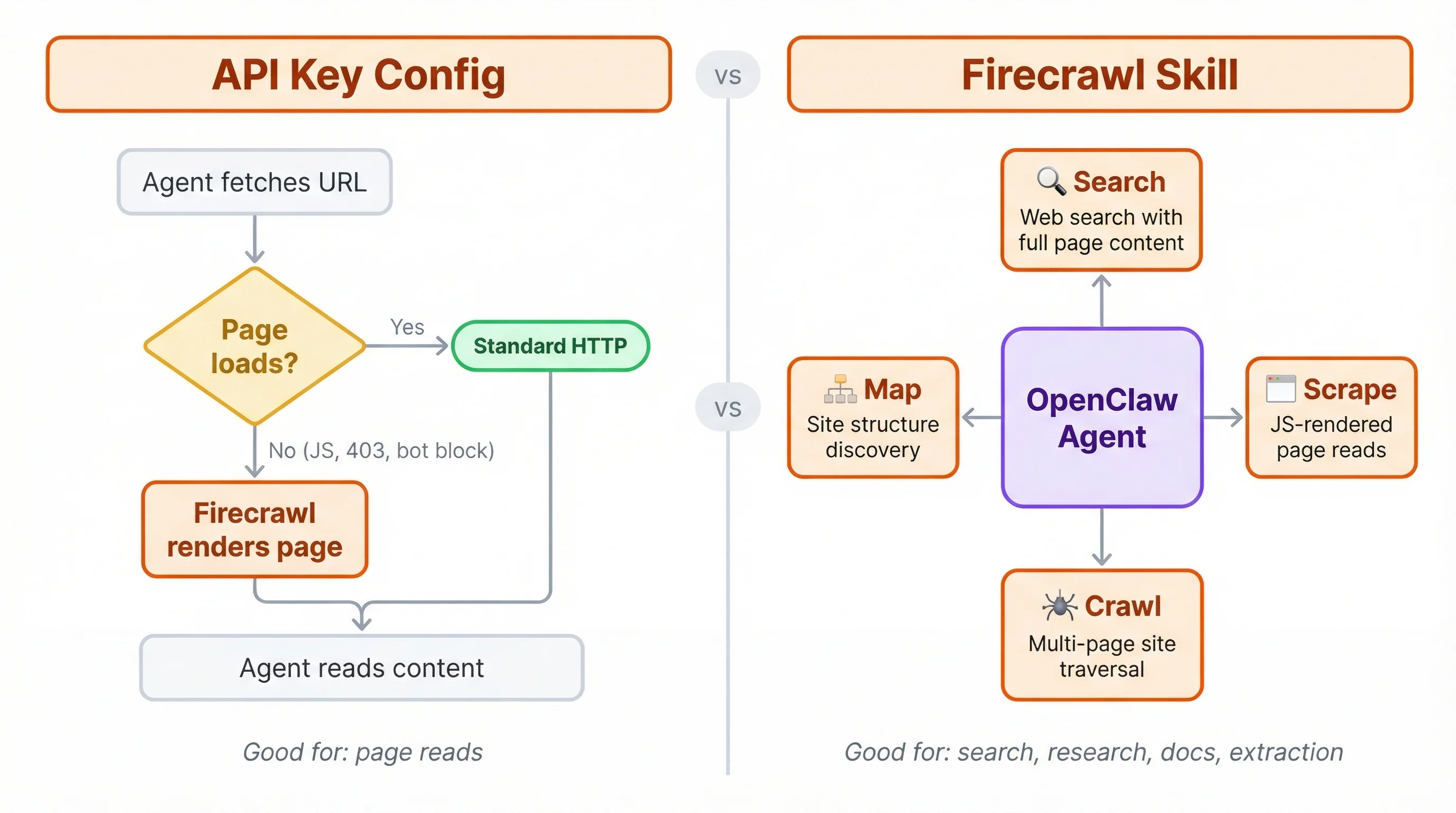
The simplest way to add Firecrawl is dropping your API key into the config file. This gives your agent a fallback for JS-heavy and dynamic pages. For web search, crawling, and structured extraction, you install the full Firecrawl skill through Telegram in about 30 seconds.
Adding the API key
There are two ways to wire Firecrawl into OpenClaw. The first makes Firecrawl the web_search provider — your agent's search calls go through Firecrawl and come back with full scraped page content alongside results. The second makes Firecrawl a fallback for web_fetch only, so it kicks in when Readability can't handle a page.
Option A: Firecrawl as the web_search provider
Set FIRECRAWL_API_KEY as an environment variable, or add it explicitly:
{
  "plugins": {
    "entries": {
      "firecrawl": { "enabled": true }
    }
  },
  "tools": {
    "web": {
      "search": {
        "provider": "firecrawl"
      }
    }
  }
}
With this config, web_search calls route through Firecrawl and return full page content alongside results in a single call. No separate web_fetch round-trip needed.
Option B: Firecrawl as web_fetch fallback only
Open ~/.openclaw/openclaw.json and add your Firecrawl API key under tools.web.fetch:
{
  "tools": {
    "web": {
      "fetch": {
        "firecrawl": {
          "apiKey": "fc-YOUR-API-KEY",
          "onlyMainContent": true,
          "maxAgeMs": 172800000
        }
      }
    }
  }
}
With this config, web_search uses whichever other provider is configured (Brave, Gemini, etc.), but web_fetch falls back to Firecrawl whenever a page can't be read with a standard HTTP request. JavaScript-rendered sites, paywalls, and pages that return 403s all go through Firecrawl instead. maxAgeMs controls cache freshness (default is 2 days; lower it for time-sensitive pages like pricing or release notes). You can also combine both: use Brave or another provider for web_search and Firecrawl for web_fetch fallback.
This covers individual page reads. For web search, site crawling, and structured extraction, you want the full skill.
For a complete breakdown of how OpenClaw's web_search and web_fetch tools work together, how to configure each search provider, and when to use Firecrawl's search instead, see our OpenClaw web search guide.
Installing the Firecrawl skill
You don't need to touch the terminal. Just text your agent:
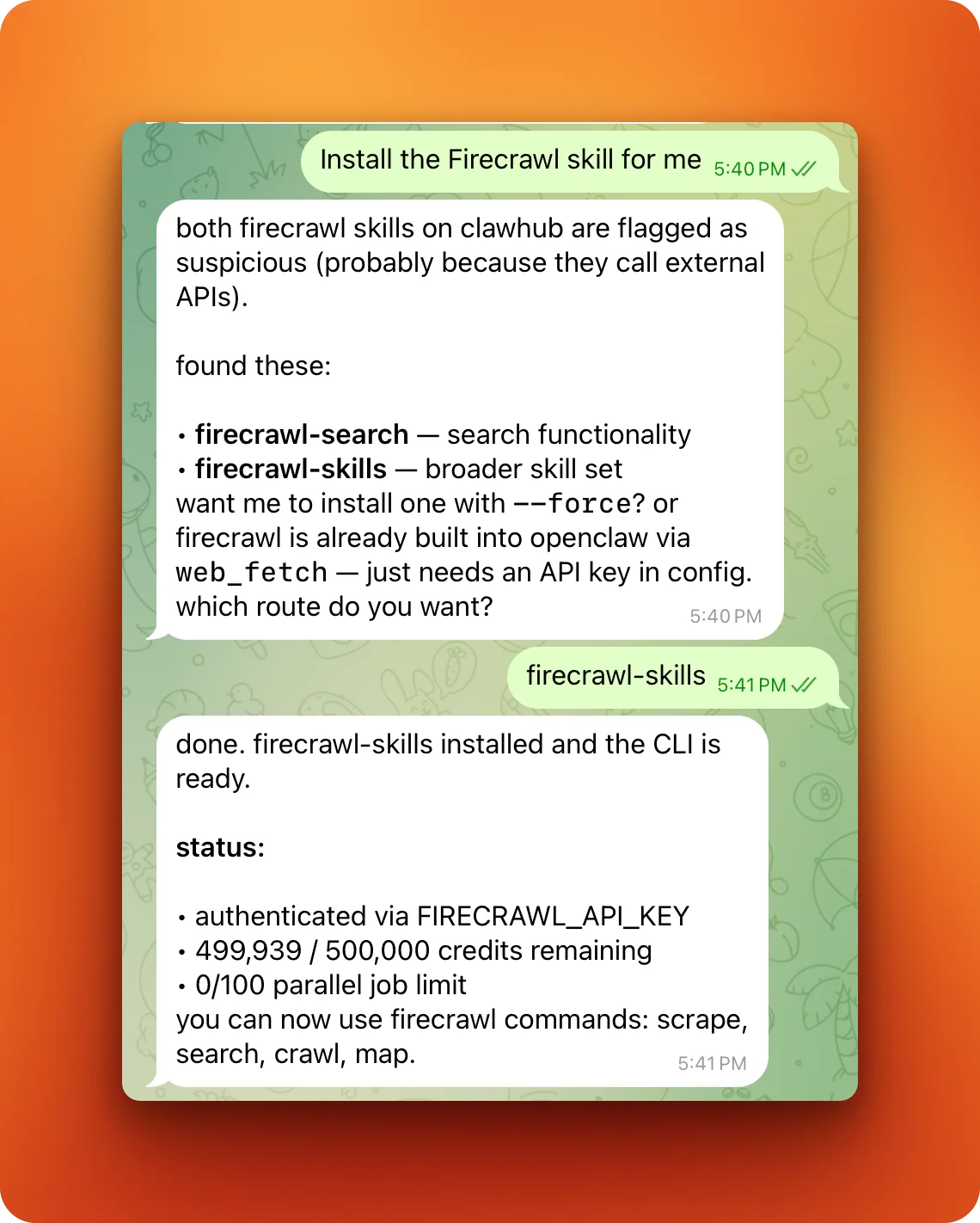
Claw finds the available Firecrawl skills on ClawHub, asks which one you want, and installs it. The firecrawl-skills option gives your agent scrape, search, crawl, and map under the hood. It authenticates automatically if you have FIRECRAWL_API_KEY set in your environment.
From here, you just talk to your agent like normal. When it needs to read a webpage, it scrapes through a real browser instead of failing on JavaScript. When it needs to research something, it searches the web and pulls back full page content instead of just links. When you point it at a documentation site, it can crawl every page and map the structure.
Here's what that looks like in practice. I asked my agent to compare pricing across three SaaS products:
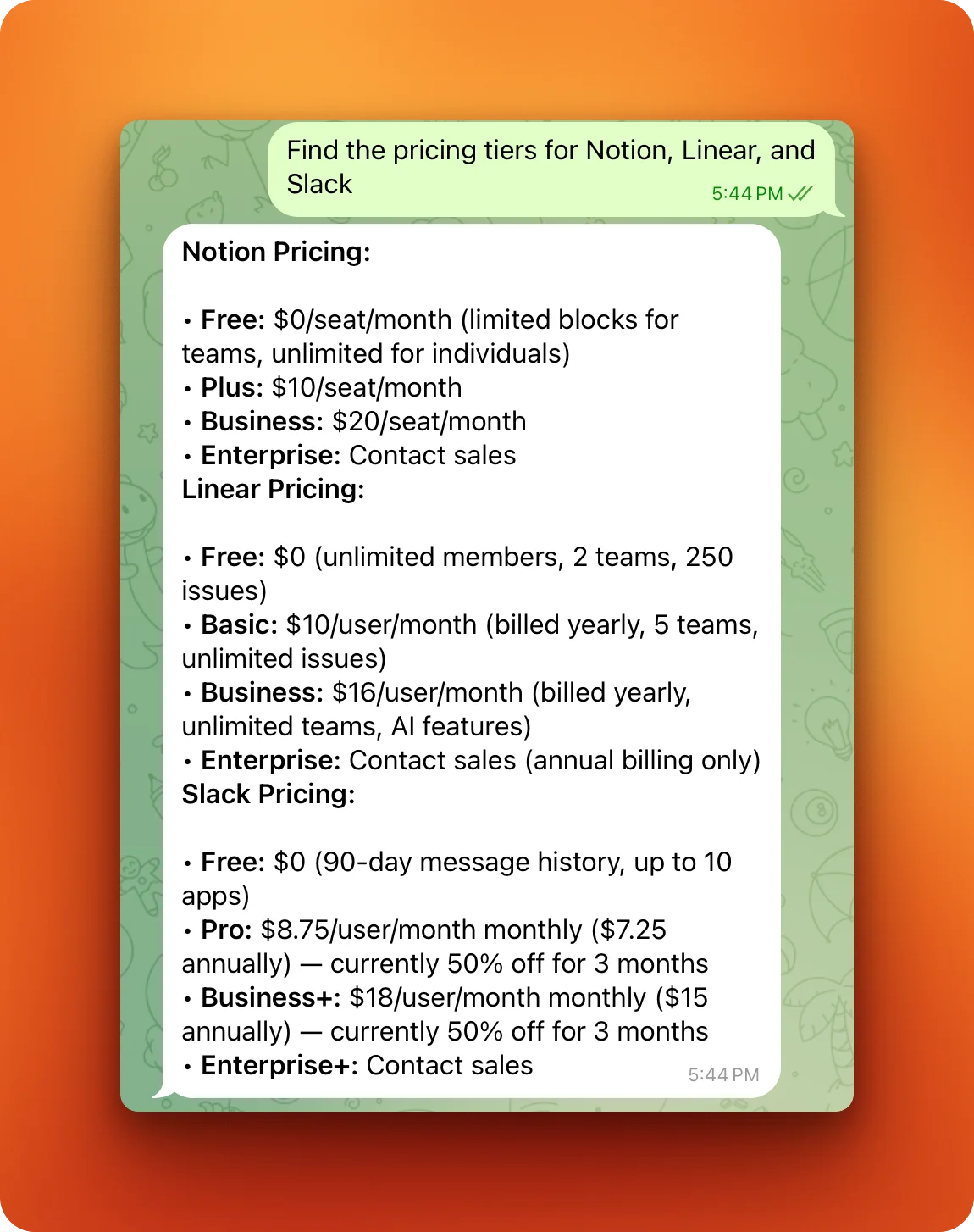
It searched the web, scraped each pricing page, and put the results together in one message. No URLs needed, no 403 errors, no browser tabs.
You can learn more at our Guide to the Firecrawl Skill and CLI, or see the full Firecrawl + OpenClaw developer guide for the complete CLI reference, authentication options, and scrape/search command examples.
Browser Sandbox: moving browser automation off your machine
There's another bottleneck that shows up once you start running more ambitious workflows: the browser itself.
OpenClaw's default setup drives your local browser. That works for simple tasks, but two problems surface quickly. First, your agent is sharing an environment with your real browsing state (a real security concern). Second, the moment you try to run a few sessions in parallel, your machine becomes the bottleneck. RAM spikes, the agent slows down, and runs get flaky.
Firecrawl's Browser Sandbox solves this by moving browser work into a secure, remote, disposable environment. No local Chromium installs. No driver setup. Your agent can spin up a browser on demand, one session or dozens, without tying the workload to the machine it's running on. Your OpenClaw agent can run on a free-tier EC2 instance or a Raspberry Pi while the browsing happens elsewhere.
Setting it up is a single command:
npx -y firecrawl-cli init --browser --all--browser opens authentication automatically; --all installs the Firecrawl skill to every detected AI coding agent on the machine. Verify the setup afterwards with firecrawl --status. Once that's done, you can tell your agent:
Use Firecrawl Browser Sandbox to open Hacker News and get me the top 5 news of the day and the first 10 comments on each
Under the hood, the firecrawl browser commands use agent-browser — a pre-installed automation interface with 40+ commands — to execute intent-level actions (open, click, fill, snapshot, scrape) inside the sandbox instead of generating and debugging Playwright code. What your agent actually runs looks like this:
firecrawl browser "open https://news.ycombinator.com"
firecrawl browser "snapshot"
firecrawl browser "scrape"
firecrawl browser close
When you need to interact with specific page elements, snapshot returns @ref IDs for each interactive element. Your agent uses those refs directly in follow-up commands:
firecrawl browser "open https://example.com"
firecrawl browser "snapshot"
firecrawl browser "click @e5"
firecrawl browser "fill @e3 'search query'"
firecrawl browser "scrape"
firecrawl browser close
A few things worth knowing about how this works:
- Auto-session: the shorthand form (
firecrawl browser "...") auto-launches a sandbox session if one isn't active, so the agent doesn't need to manage session lifecycle - Token efficiency: the agent gets back clean artifacts (snapshot/extracted content) instead of raw DOM logs, and uses the filesystem to save fetched pages rather than loading them all into context at once
- Full toolkit: scrape, search, and browser automation all through a single CLI
This is especially useful for the EC2 setup described above. Your EC2 instance handles the agent logic while Browser Sandbox handles the actual browsing: each doing what it's optimized for.
/interact: scraping and browser automation in one endpoint
Firecrawl's newest endpoint, /interact, takes this even further. Instead of managing browser sessions separately, you scrape a page and then take actions directly in that same session: clicking buttons, filling forms, navigating deeper, using natural language prompts or code.
The workflow is straightforward: scrape a URL to get a scrapeId, then call /interact with a prompt like "Click on the first result and tell me the price." The agent handles the mechanics. You can also pass Playwright code for precise control. Each session stays alive for up to 10 minutes, and you can chain as many interactions as you need.
For an OpenClaw agent, this means you can tell it to scrape a page and immediately interact with dynamic content (search forms, paginated results, dropdown filters) without setting up a full browser sandbox session. The /interact endpoint also supports persistent profiles, so your agent stays logged in across scrapes.
Watch this video where we evaluate how to use Firecrawl inside of Openclaw to easily extract data from complex, dynamically rendered websites. We walk through a quick, secure Docker setup for Openclaw and connect OpenRouter to access different LLMs.
After demonstrating how the default web fetch struggles with JavaScript elements like pagination and "see more" buttons, we evaluate the Firecrawl browser feature as the solution. By installing the Firecrawl CLI, we show exactly how your AI agents can navigate pages, click buttons, and scrape the full data you need without hitting rendering roadblocks.
What I learned about OpenClaw the hard way
I started running OpenClaw on my MacBook because I don't have a desktop. That lasted about a week. Reports about OpenClaw security vulnerabilities started piling up (exposed control panels, one-click RCE, credentials stored in plaintext), and running an agent with full system access on my primary machine didn't sit right.
On top of that, keeping a laptop open 24/7 isn't practical. Battery health, sleep settings, lid behavior. I uninstalled completely.
The fix was deploying to AWS. I spun up an EC2 instance (t4g.small, about $15/month) and moved everything there. The agent was now up around the clock, and my accountability system with Narc could poll S3 without me worrying about my MacBook sleeping mid-session.
If you're considering a Mac Mini for this (the common recommendation), I'd argue EC2 is a better deal unless you need the macOS-specific features. A t4g.small with an existing Anthropic subscription runs under $30/month total.
Setting up the EC2 was the hardest part because you install everything from scratch: Node.js, OpenClaw, systemd services, security groups. Here's a single script that handles the full deployment. It assumes your AWS credentials are configured locally with the right permissions:
#!/bin/bash
# deploy-openclaw.sh
set -euo pipefail

REGION="us-east-1"
INSTANCE_TYPE="t4g.small"  # 2 vCPU, 2GB RAM, ~$15/month
KEY_NAME="openclaw-key"

# SSH key pair
aws ec2 create-key-pair \
  --key-name "$KEY_NAME" \
  --key-type ed25519 \
  --region "$REGION" \
  --query 'KeyMaterial' --output text > "${KEY_NAME}.pem"
chmod 400 "${KEY_NAME}.pem"

# Security group: SSH only, gateway port stays closed
SG_ID=$(aws ec2 create-security-group \
  --group-name openclaw-sg \
  --description "OpenClaw server" \
  --region "$REGION" \
  --query 'GroupId' --output text)

MY_IP=$(curl -s https://checkip.amazonaws.com)
aws ec2 authorize-security-group-ingress \
  --group-id "$SG_ID" \
  --protocol tcp --port 22 \
  --cidr "${MY_IP}/32" \
  --region "$REGION"

# Ubuntu 24.04 ARM64
AMI_ID=$(aws ssm get-parameter \
  --name /aws/service/canonical/ubuntu/server/noble/stable/current/arm64/hvm/ebs-gp3/ami-id \
  --query 'Parameter.Value' --output text \
  --region "$REGION")

# Launch
INSTANCE_ID=$(aws ec2 run-instances \
  --image-id "$AMI_ID" \
  --instance-type "$INSTANCE_TYPE" \
  --key-name "$KEY_NAME" \
  --security-group-ids "$SG_ID" \
  --block-device-mappings 'DeviceName=/dev/sda1,Ebs={VolumeSize=30,VolumeType=gp3}' \
  --tag-specifications 'ResourceType=instance,Tags=[{Key=Name,Value=openclaw-server}]' \
  --region "$REGION" \
  --query 'Instances[0].InstanceId' --output text)

aws ec2 wait instance-running --instance-ids "$INSTANCE_ID" --region "$REGION"

EC2_IP=$(aws ec2 describe-instances \
  --instance-ids "$INSTANCE_ID" \
  --region "$REGION" \
  --query 'Reservations[0].Instances[0].PublicIpAddress' --output text)

echo "Instance up at ${EC2_IP}. Waiting for SSH..."
sleep 30

# Install Node.js, OpenClaw, and start the gateway
ssh -o StrictHostKeyChecking=no -i "${KEY_NAME}.pem" ubuntu@"${EC2_IP}" << 'REMOTE'
set -euo pipefail

sudo apt-get update && sudo apt-get upgrade -y

# Node.js 22 via NVM
curl -o- https://raw.githubusercontent.com/nvm-sh/nvm/v0.40.1/install.sh | bash
export NVM_DIR="$HOME/.nvm"
[ -s "$NVM_DIR/nvm.sh" ] && . "$NVM_DIR/nvm.sh"
nvm install 22

npm install -g openclaw@latest

# Headless systemd support (required on EC2)
sudo loginctl enable-linger ubuntu
export XDG_RUNTIME_DIR=/run/user/$(id -u)
echo 'export XDG_RUNTIME_DIR=/run/user/$(id -u)' >> ~/.bashrc

# Onboard and start
openclaw onboard --non-interactive --gateway-bind loopback --skip-daemon --skip-skills
openclaw gateway install --force
openclaw gateway start

echo "OpenClaw running. Set your API keys and connect Telegram."
REMOTE

echo "SSH: ssh -i ${KEY_NAME}.pem ubuntu@${EC2_IP}"
echo "Tunnel: ssh -L 18789:127.0.0.1:18789 -i ${KEY_NAME}.pem ubuntu@${EC2_IP}"
Once the instance is up, SSH in, set your ANTHROPIC_API_KEY (or integration token) and FIRECRAWL_API_KEY in ~/.bashrc, then connect Telegram with openclaw channels login --channel telegram. The gateway port (18789) stays closed to the public. You access it through an SSH tunnel if you ever need the web interface.
After a few weeks of running, I hit a problem. Claw's responses started getting slower and slower. The typing indicator would hang for minutes, even on short messages. Starting a fresh conversation with /new didn't help. I ran openclaw doctor --deep and did a full audit of the system.
The cause: without regular cleanup, heartbeat cron jobs and conversation history accumulate stale data. OpenClaw was injecting all of it into every new thread, burning through my Sonnet 4.5 account limits on context that didn't matter anymore.
I was very glad to have used a Claude integration token instead of a raw API key. With per-token billing, that kind of silent context bloat would have been an expensive surprise.
Conclusion
OpenClaw went from a one-hour WhatsApp relay to 375,000+ GitHub stars. Peter Steinberger joined OpenAI on February 15, 2026, and the project is moving to an open-source foundation with OpenAI's continued support.
For me, it started as a curiosity and turned into something I use every day. The accountability system, morning email digests, calendar reminders mid-conversation, Firecrawl-powered web research... all running on a $15/month EC2 instance that I set up in an afternoon. The rough edges are real (stale data buildup, security concerns, the triple rebrand), but nothing that made me want to stop using it. If you're weighing whether to stick with OpenClaw or migrate to Hermes Agent — Nous Research's newer self-hosted alternative — Firecrawl's side-by-side covers architecture, memory, file handling, security, and the one-command migration path.
Frequently Asked Questions
How much does it cost to run OpenClaw on EC2?
A t4g.small instance (2 vCPU, 2GB RAM) costs about $15/month on AWS. Add 30GB of storage for another $2-3. With a Claude Pro or Max subscription (which you can use instead of per-token API billing), total monthly cost is under $30. A Mac Mini runs $500-600 upfront but has no recurring compute cost.
Can I use OpenClaw with local models instead of Claude?
Yes. OpenClaw supports local models through Ollama. Install Ollama on your machine (or EC2 instance), pull a model like Llama or DeepSeek, and point OpenClaw at it in the config. The tradeoff is that smaller local models are not as sharp, and Steinberger himself warns they can be "very gullible" from a security standpoint.
Is my data sent to Firecrawl's servers?
When you use the Firecrawl skill or API key integration, the URLs your agent scrapes are sent to Firecrawl's API for processing. The page content is returned to your agent and stored locally. Firecrawl doesn't store the scraped content long-term, but check their privacy policy for current terms. If this is a concern, Firecrawl also offers a self-hosted option you can run on your own infrastructure.
How do I clean up stale conversation data?
Use the /compact command in chat to summarize and compress the current conversation context. For a full reset, /new starts a fresh thread. To clean up old heartbeat logs and cron job data, check ~/.openclaw/workspace/ for accumulated files and prune anything outdated. Running openclaw doctor --deep periodically flags storage and performance issues before they slow your agent down.
What messaging apps does OpenClaw support?
Telegram, WhatsApp, Slack, Discord, Signal, and iMessage all connect through the gateway. Telegram is the most popular choice because it supports bot slash commands, tokens are free through @BotFather, and sessions don't expire. WhatsApp works but needs re-authentication every few days. Signal support is still experimental.
How secure is running an agent with full system access?
It's a legitimate concern. OpenClaw has had reported vulnerabilities including exposed control panels and credentials stored in plaintext. Run it on a dedicated machine rather than your daily driver, bind the gateway to localhost, and audit your setup with openclaw doctor --deep regularly. Avoid installing unverified skills from ClawHub without reviewing the source.
What does Firecrawl add beyond OpenClaw's built-in web access?
OpenClaw's built-in web_fetch uses a basic HTTP client that fails on JavaScript-heavy sites and dynamic content. Firecrawl routes requests through a real browser, returning actual page content instead of empty HTML or 403 errors. The full skill also adds web search, site-wide crawling, and structured data extraction that the built-in tools can't do. For workflows that span multiple pages, the agent endpoint can gather data across an entire site in a single call.