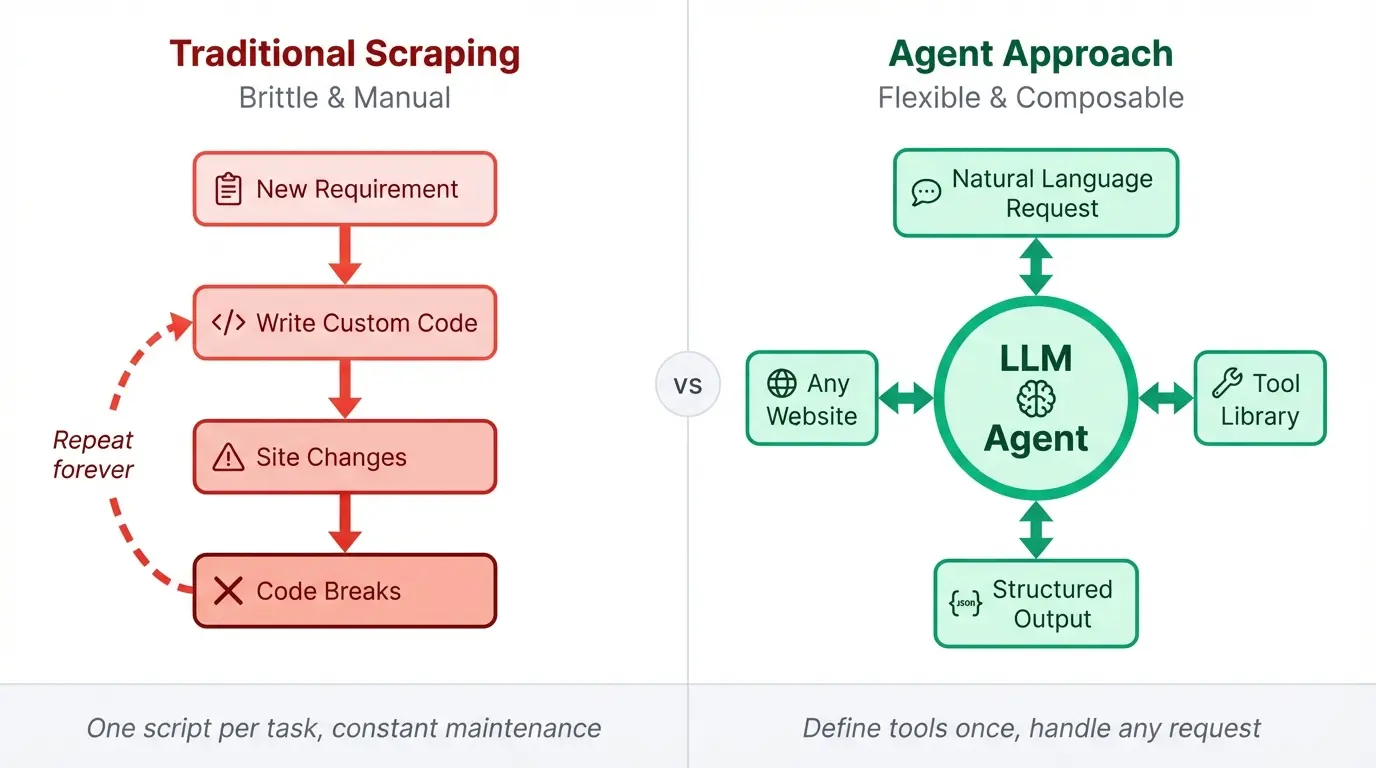
Web scraping code tends to rot. You spend hours finding right CSS selectors, then the site redesigns and everything breaks. The fix is usually more brittle code on top of brittle code.
Agents offer a different model. Give an LLM the right tools and it can figure out how to extract what you need from a page, even when the structure changes. The reasoning happens at runtime instead of being baked into your selectors.
LangGraph is one of the top choices in the Best AI Agent Frameworks of 2026 comparison. We're going to build one of these agents using LangGraph for the agent loop and Firecrawl for the actual scraping. Firecrawl handles the annoying parts like JavaScript rendering, returning clean markdown. LangGraph gives us a simple way to wire up tools and let the model decide when to call them. The finished agent runs in the terminal and responds to plain English commands for scraping, screenshots, structured extraction, web search, and documentation crawling.
TL;DR
- Build a ReAct-style agent in ~300 lines using LangGraph tasks and a simple loop
- Use Firecrawl for the heavy lifting: scrape, screenshot, extract, search, and crawl without managing browsers
- Expose six tools to the LLM so it can decide what to call based on plain English requests
- Add an iteration limit to avoid infinite tool-call loops in production
- Use Firecrawl
/agentas the fast alternative when you want structured data without custom tool wiring
What is a web scraping agent and why build one?
A traditional scraping script does exactly what you tell it. When you need data from a new page, you write new code. When you want to combine scraping with a web search, you add more code. The script grows with every requirement, and so does the maintenance burden.
An agent works differently. You define a set of tools once, then the LLM figures out how to combine them based on what you ask. Searching for competitor pricing pages, scraping each result, and pulling prices into JSON becomes a single request instead of a custom pipeline you have to build and debug.
The stack for the tool we'll build has three parts:
- LangGraph's functional API provides the agent loop through
@taskand@entrypointdecorators - The ReAct pattern (reason, act, observe, repeat) fits in about 20 lines without complex state graph definitions
- Firecrawl's Python SDK wraps scraping, screenshots, structured extraction, search, and crawling into single function calls with no browser drivers to manage.
Rich gives us formatted terminal output, markdown rendering, and status spinners so the agent feels polished without much effort. The entire agent comes out to under 300 lines of Python.
Prerequisites and setup
Before writing any code, you need a few things in place: Python 3.10+, API keys for Firecrawl and OpenAI, and the right packages installed. We'll use uv for dependency management since it's faster than pip and handles virtual environments automatically.
Installing dependencies
Create a new project directory and initialize it with uv:
mkdir scraping-agent && cd scraping-agent
uv init
Install the required packages:
uv add firecrawl langgraph langchain-openai python-dotenv richThis gives you:
firecrawl: The Python SDK for Firecrawl's scraping, crawling, and extraction APIslanggraph: LangChain's framework for building stateful agentslangchain-openai: OpenAI integration for LangChainpython-dotenv: Load environment variables from a.envfilerich: Terminal formatting for a nicer chat interface
Getting your API keys
You need two API keys:
- Firecrawl API key: Sign up at firecrawl.dev and grab your key from the dashboard. The free tier includes 1,000 credits per month, more than enough for this tutorial.
- OpenAI API key: Get one from platform.openai.com and add some balance to your account. We'll use GPT-5 as the reasoning model, but expect costs under $1 for following along with this tutorial.
Create a .env file in your project root:
FIRECRAWL_API_KEY=fc-your-key-here
OPENAI_API_KEY=sk-your-key-here
Project structure
Your directory should look like this:
scraping-agent/
├── .env
├── .python-version
├── pyproject.toml
└── main.py          # We'll build this next
You may also have a README.md and lockfile depending on your version of uv. With the environment ready, we can start defining the tools our agent will use.
Defining the Firecrawl tools
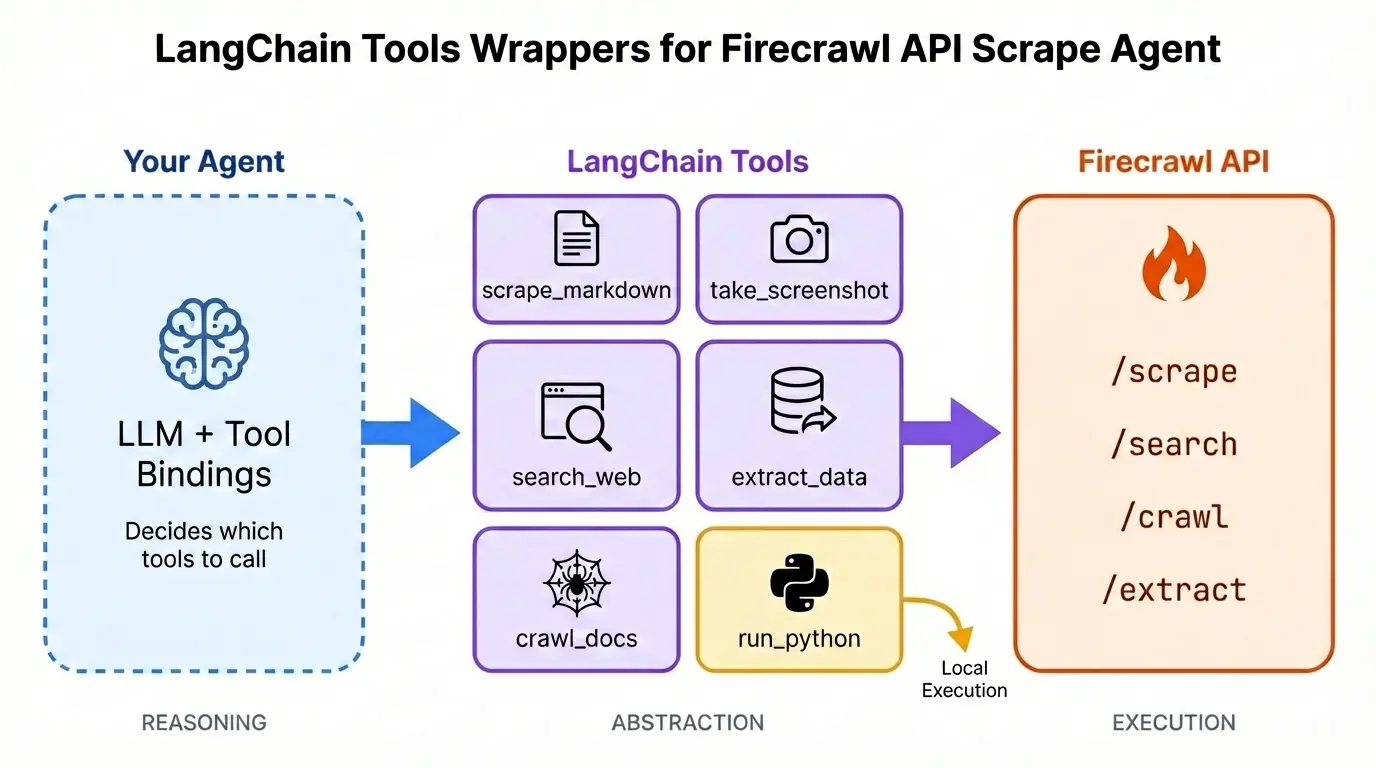
LangChain's @tool decorator turns regular Python functions into tools that an LLM can call. The decorator reads the function's docstring to understand what the tool does and when to use it. Our agent needs six tools: five that wrap Firecrawl endpoints and one for Python code execution.
Add the following code to the main.py file:
# Add these imports with the other imports at the top of the file
import os
import urllib.request

from dotenv import load_dotenv
from firecrawl import Firecrawl
from langchain_core.tools import tool
from langchain_openai import ChatOpenAIload_dotenv()
fc = Firecrawl(api_key=os.environ.get("FIRECRAWL_API_KEY"))
model = ChatOpenAI(
model="gpt-5",
api_key=os.environ.get("OPENAI_API_KEY"),
temperature=0,
)scrape_markdown
@tool
def scrape_markdown(url: str, main_only: bool = False) -> str:
    """Scrape a URL and return clean markdown content.

    Args:
        url: The URL to scrape
        main_only: If True, exclude navigation, footers, and sidebars
    """
    result = fc.scrape(
        url, formats=["markdown"], only_main_content=main_only if main_only else None
    )
    return result.markdown
Firecrawl's scrape endpoint handles JavaScript rendering, returning clean markdown. The only_main_content flag strips nav bars, footers, and sidebars when you just want the article body.
For a complete guide to the scrape endpoint, see Mastering Firecrawl's Scrape Endpoint.
take_screenshot
@tool
def take_screenshot(url: str, output_path: str) -> str:
    """Capture a full-page screenshot of a URL and save it locally.

    Args:
        url: The URL to screenshot
        output_path: Local file path to save the screenshot (PNG)
    """
    result = fc.scrape(url, formats=["screenshot"])
    urllib.request.urlretrieve(result.screenshot, output_path)
    return f"Screenshot saved to {output_path}"
Same scrape endpoint, different format. Firecrawl returns a cloud URL for the image, and urllib downloads it to the path the agent specifies.
extract_data
@tool
def extract_data(url: str, json_schema: dict, prompt: str = None) -> dict:
    """Extract structured data from a URL

    Args:
        url: The URL to extract data from
        json_schema: JSON schema defining the structure of data to extract
        prompt: Prompt to guide the extraction
    """
    format_spec = {"type": "json", "schema": json_schema}
    if prompt:
        format_spec["prompt"] = prompt

    result = fc.scrape(url, formats=[format_spec])
    return result.json
The agent endpoint is LLM-powered. You describe your requirement in a simple prompt and it gathers the structured data for you. URLs are optional. You can also pass a JSON schema like {"type": "object", "properties": {"product_name": {"type": "string"}, "price": {"type": "number"}}} and Firecrawl pulls matching data from the page.
For more details on capabilities and parameters, see the agent documentation.
search_web
@tool
def search_web(query: str, limit: int = 5) -> str:
    """Search the web and return results with content.

    Args:
        query: The search query
        limit: Maximum number of results (default: 5)
    """
    results = fc.search(query, limit=limit)
    web_results = getattr(results, "web", []) or []
    output = [
        f"## {getattr(r, 'title', 'Untitled')}\nURL: {getattr(r, 'url', '')}\n{getattr(r, 'description', '')}"
        for r in web_results
    ]
    return "\n---\n".join(output) if output else "No results found."
The search endpoint returns titles, URLs, and descriptions. The agent uses this to find pages before deciding which ones to scrape. For a deeper walkthrough, see Mastering Firecrawl Search Endpoint.
crawl_docs
@tool
def crawl_docs(url: str, limit: int = 30) -> str:
    """Crawl a documentation site and return page summaries.

    Args:
        url: The starting URL to crawl
        limit: Maximum number of pages to crawl (default: 30)
    """
    result = fc.crawl(
        url,
        limit=limit,
        scrape_options={"formats": ["markdown"], "onlyMainContent": True},
    )
    pages = result.data
    summaries = [
        f"- {page.metadata.title if hasattr(page, 'metadata') and page.metadata else 'Untitled'}: {getattr(page, 'url', '')}"
        for page in pages[:10]
    ]
    return f"Crawled {len(pages)} pages:\n" + "\n".join(summaries)
The crawl endpoint follows links from a starting URL and scrapes multiple pages. Built for documentation sites, and you can take this further by turning crawled docs into a RAG-powered agent. This version returns summaries, but the agent could use run_python to save full page contents to disk.
For more advanced crawling techniques, see Mastering the Crawl Endpoint.
run_python
import io
from contextlib import redirect_stdout, redirect_stderr

@tool
def run_python(code: str) -> str:
    """Execute Python code for file operations, data processing, and analysis.

    Use this tool to:
    - Save scraped data to files (JSON, CSV, text)
    - Process and transform data
    - Read files from disk
    - Perform calculations or data analysis

    Args:
        code: Python code to execute. Use print() to output results.
    """
    stdout_capture = io.StringIO()
    stderr_capture = io.StringIO()

    try:
        with redirect_stdout(stdout_capture), redirect_stderr(stderr_capture):
            exec(code, {"__builtins__": __builtins__})

        stdout_output = stdout_capture.getvalue()
        stderr_output = stderr_capture.getvalue()

        result = ""
        if stdout_output:
            result += stdout_output
        if stderr_output:
            result += f"\nStderr:\n{stderr_output}"

        return (
            result.strip()
            if result.strip()
            else "Code executed successfully (no output)."
        )

    except Exception as e:
        return f"Error: {type(e).__name__}: {str(e)}"
Not a Firecrawl tool, but it rounds out the agent. Executes arbitrary Python and returns whatever gets printed. Uses exec() with full builtins access, which is fine running locally but not something to expose over a network.
Six tools total: scrape, screenshot, agent, search, crawl, and code execution. Next we wire them into the agent loop.
Building the LangGraph agent
With the tools defined, we need to wire them into an agent loop. LangGraph's functional API makes this straightforward with two decorators: @task for individual operations and @entrypoint for the main agent function.
from langchain_core.messages import ToolMessage
from langgraph.func import entrypoint, task
from langgraph.graph.message import add_messages
First, collect the tools into a list and bind them to the model. Binding tells the LLM what tools exist and how to call them.
tools = [
    scrape_markdown,
    take_screenshot,
    extract_data,
    search_web,
    crawl_docs,
    run_python,
]
tools_by_name = {t.name: t for t in tools}

model_with_tools = model.bind_tools(tools)
The call_model task
The @task decorator marks a function as a unit of work that LangGraph can track and execute. Our first task calls the LLM with a system prompt and the conversation history.
@task
def call_model(messages: list):
    """Call the LLM with the current message history."""
    system_message = {
        "role": "system",
        "content": """You are a web scraping assistant with access to Firecrawl and Python tools.

Available tools:
- scrape_markdown: Get clean markdown content from any URL
- take_screenshot: Capture screenshots of web pages
- extract_data: Extract structured data using JSON schemas
- search_web: Search the web for information
- crawl_docs: Crawl documentation sites
- run_python: Execute Python code for file operations, data processing, saving results

When users ask to scrape, search, or extract data from the web, use the appropriate tool.
Use run_python to save data to files, process results, or perform calculations.
Be concise in your responses. When showing scraped content, summarize the main points.""",
    }
    return model_with_tools.invoke([system_message] + messages)
The system prompt tells the model what it can do and how to behave. Listing the tools here reinforces what the model learned from the tool bindings.
The call_tool task
When the model decides to use a tool, we need to execute it and return the result. The second task handles this.
@task
def call_tool(tool_call: dict):
    """Execute a single tool call."""
    tool = tools_by_name[tool_call["name"]]
    try:
        result = tool.invoke(tool_call["args"])
        if isinstance(result, str) and len(result) > 5000:
            result = result[:5000] + "\n\n[... truncated ...]"
        return ToolMessage(content=str(result), tool_call_id=tool_call["id"])
    except Exception as e:
        return ToolMessage(content=f"Error: {str(e)}", tool_call_id=tool_call["id"])
The function looks up the tool by name, invokes it with the arguments the model provided, and wraps the result in a ToolMessage. We truncate long outputs to keep context windows manageable. Errors get caught and returned as messages so the model can try a different approach instead of crashing.
The agent loop
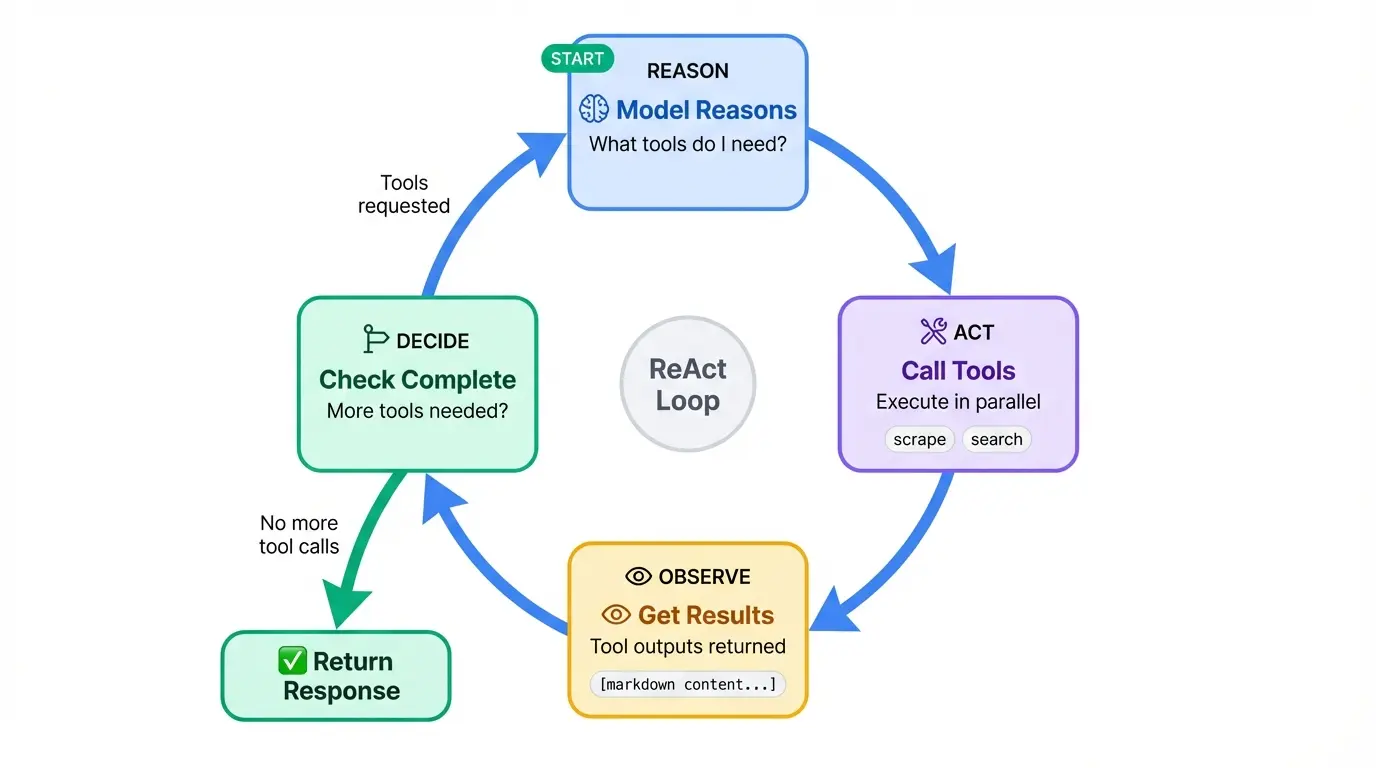
The @entrypoint decorator marks the main function that orchestrates everything. This is where the ReAct pattern lives: the model reasons about what to do, acts by calling tools, observes the results, and repeats until it has an answer.
@entrypoint()
def agent(messages: list):
    """ReAct agent loop: model -> tools -> model -> ... -> response"""
    llm_response = call_model(messages).result()

    while True:
        if not llm_response.tool_calls:
            break

        # Show which tools are being called
        for tc in llm_response.tool_calls:
            console.print(f"  [dim]Calling {tc['name']}...[/dim]")

        # Execute tools in parallel
        tool_futures = [call_tool(tc) for tc in llm_response.tool_calls]
        tool_results = [f.result() for f in tool_futures]

        # Update message history
        messages = add_messages(messages, [llm_response, *tool_results])

        # Call model again with tool results
        llm_response = call_model(messages).result()

    return llm_response
The loop starts by calling the model. If the response includes tool calls, we execute them all (in parallel via task futures), add the results to the message history, and call the model again. When the model responds without requesting any tools, the loop breaks and we return the final response.
The add_messages helper from LangGraph handles message deduplication and proper ordering. The .result() calls block until each task completes.
You'll notice a console.print call that we haven't defined yet. That's the Rich console object, which we'll set up in the terminal interface along with the rest of the chat loop.
Creating the terminal interface
The agent logic is done, but we need a way to interact with it. Rich gives us a polished terminal experience with minimal code: formatted prompts, status spinners, and markdown rendering.
# Add these to the top of the file
from rich.console import Console
from rich.markdown import Markdown
from rich.panel import Panel
from rich.prompt import Prompt

console = Console()
The Console object is Rich's main interface. All output goes through it, and it handles things like color support detection and terminal width automatically.
The main function
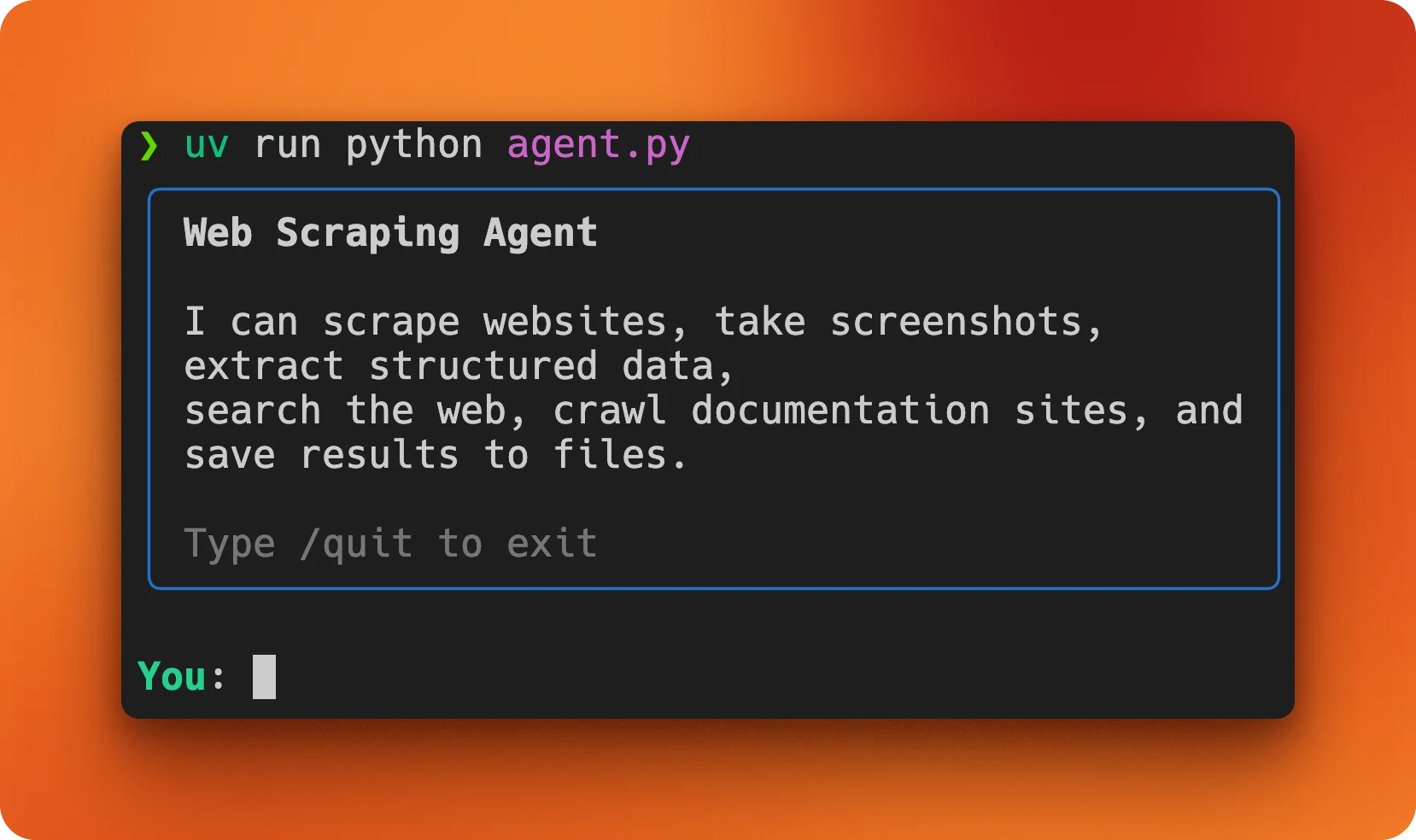
The terminal interface lives in a main() function that displays a welcome message and runs the chat loop.
def main():
    """Run the interactive terminal interface."""
    console.print(
        Panel(
            "[bold]Web Scraping Agent[/bold]\n\n"
            "I can scrape websites, take screenshots, extract structured data,\n"
            "search the web, crawl documentation sites, and save results to files.\n\n"
            "[dim]Type /quit to exit[/dim]",
            border_style="blue",
        )
    )

    messages = []
Rich uses a markup syntax similar to BBCode. Tags like [bold] and [dim] wrap text to apply styles, and you close them with [/bold] or [/dim]. The Panel class draws a box around content, and border_style sets its color.
The messages list holds the conversation history. It starts empty and grows as the user and agent exchange messages.
The chat loop
The rest of main() is a standard input loop with some Rich polish.
    # Continue in main function
    while True:
        try:
            user_input = Prompt.ask("\n[bold green]You[/bold green]")
        except (KeyboardInterrupt, EOFError):
            console.print("\n[dim]Goodbye![/dim]")
            break

        if user_input.lower() in ["/quit", "/exit", "/q"]:
            console.print("[dim]Goodbye![/dim]")
            break

        if not user_input.strip():
            continue

        messages.append({"role": "user", "content": user_input})

        with console.status("[bold blue]Thinking...[/bold blue]"):
            response = agent.invoke(messages)

        messages.append({"role": "assistant", "content": response.content})

        console.print("\n[bold blue]Agent[/bold blue]")
        if response.content:
            try:
                console.print(Markdown(response.content))
            except Exception:
                console.print(response.content)


if __name__ == "__main__":
    main()
Prompt.ask() displays a styled prompt and waits for input. We catch KeyboardInterrupt and EOFError so Ctrl+C and Ctrl+D exit gracefully instead of dumping a traceback.
The console.status() context manager shows an animated spinner with the message "Thinking..." while the agent runs. It disappears automatically when the block exits.
For the agent's response, we try to render it as Markdown for nicer formatting of headers, lists, and code blocks. If that fails for any reason, we fall back to plain text.
Run the agent with:
uv run python main.pyYou'll see the welcome panel, and then you can start asking it to scrape pages, take screenshots, or search the web.
Testing the agent
With the code complete, I ran a few tasks to see how the agent handles real-world requests.
Research task: comparing web scraping APIs
My first prompt asked the agent to do competitive research:
I'm evaluating web scraping APIs. Search for comparisons between Firecrawl,
ScrapingBee, and Browserless, then summarize the pros and cons of each
For a pre-built comparison, see our guide to ScrapingBee alternatives which covers how ScrapingBee stacks up against Firecrawl and others in detail.
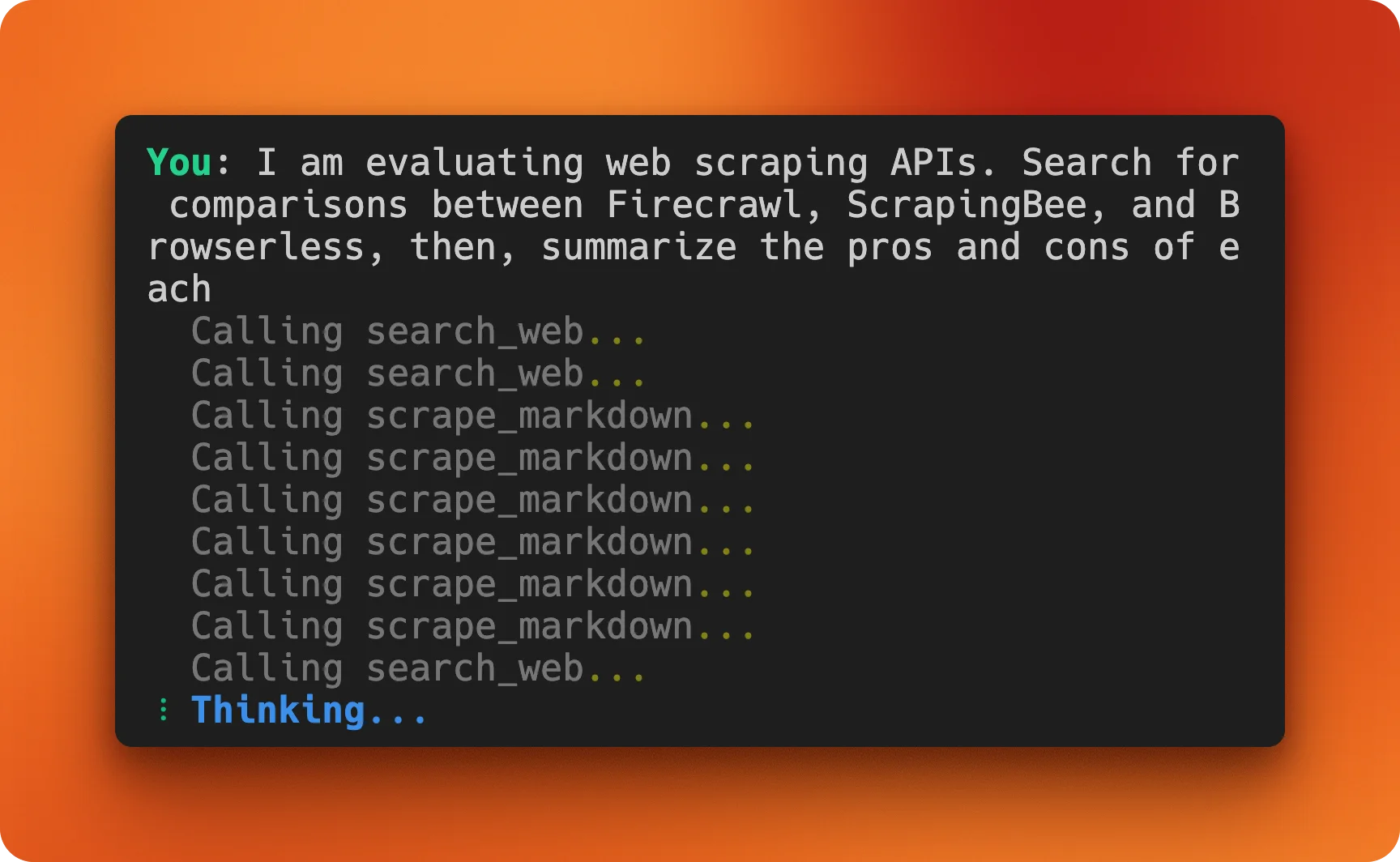
The agent orchestrated multiple tool calls on its own. It started with search_web to find comparison articles and documentation pages, then used scrape_markdown to pull content from the most relevant results. The final output was a structured comparison with pros, cons, and source links for each service.
Agents shine over traditional scripts here. I didn't specify which sites to check or how to structure the output. The model figured out it needed current information from multiple sources, gathered it, and synthesized a useful summary.
Documentation lookup: LangGraph quick reference
Next, I wanted to test the crawl functionality:
Crawl the LangGraph documentation and create a quick reference of the main
decorators and when to use them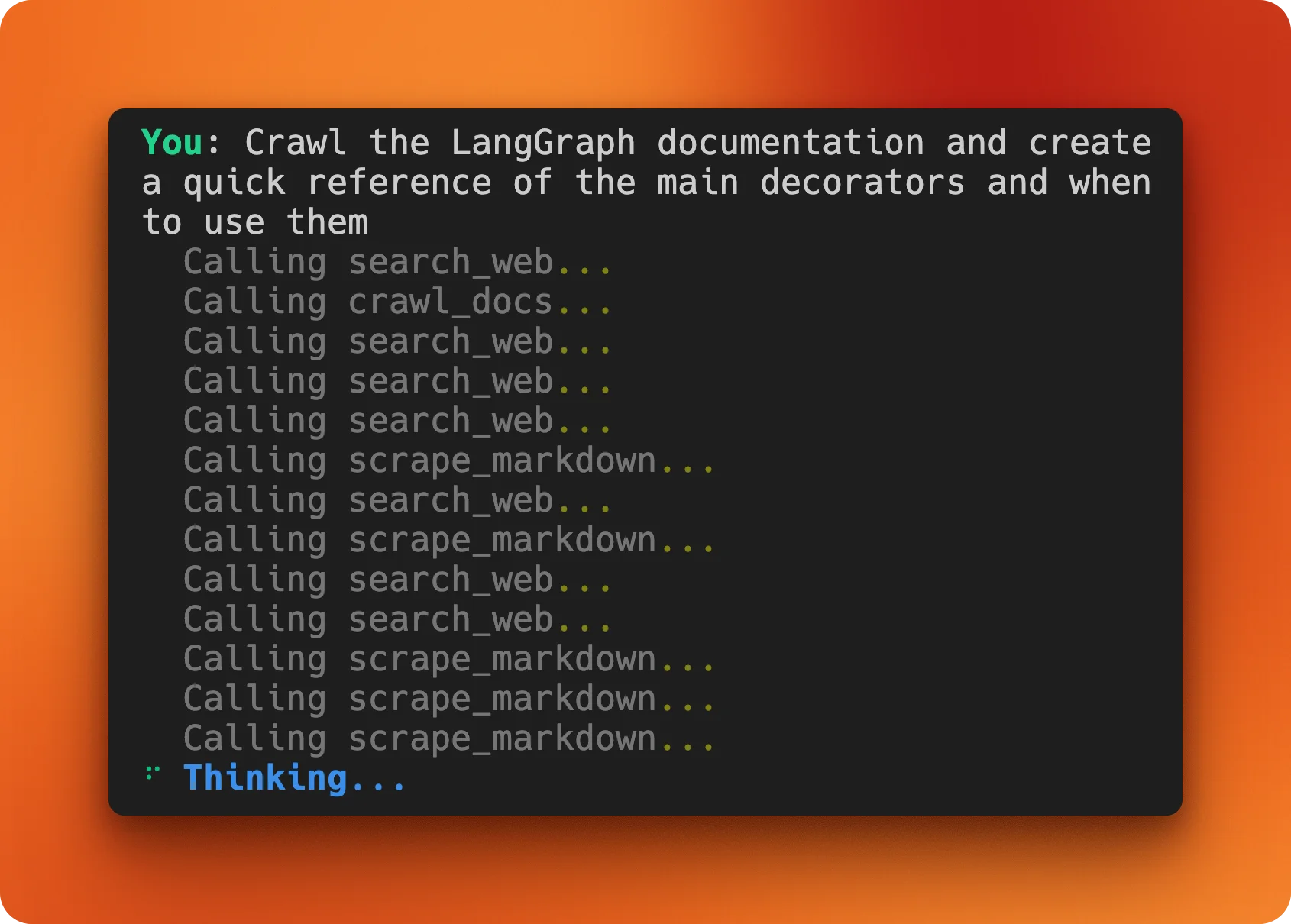
The agent used crawl_docs once, then supplemented with search_web and scrape_markdown to fill in details. The result was a detailed reference covering @entrypoint and @task decorators with usage examples, parameter lists, and links to the official docs.
I then asked it to save this as a reference file:
Save that information as reference.md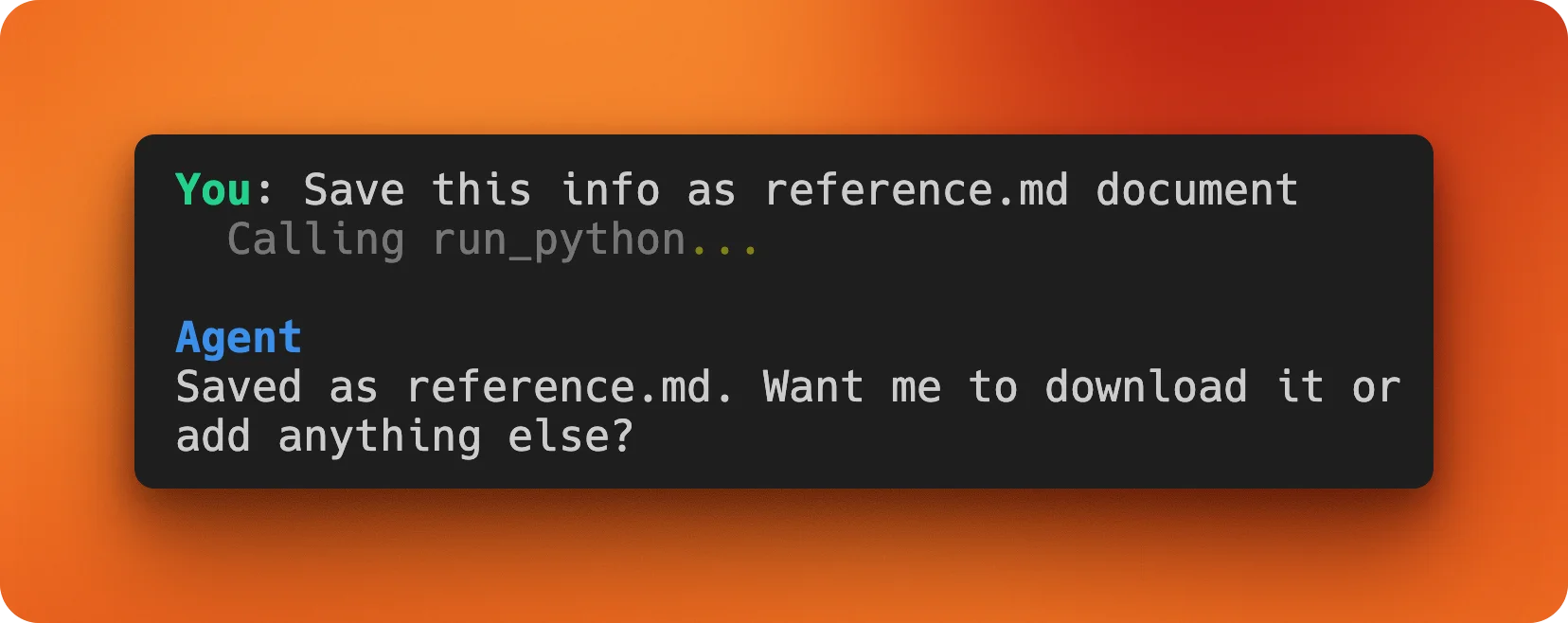
The agent called run_python to write the file, confirming that message history was working correctly since it remembered the previous response.
A lesson in iteration limits
My third test revealed a flaw in the agent design. I asked it to extract event data from python.org:
Extract all event names, locations, dates and URLs of the upcoming events
in 2026 from https://www.python.org/events/ and save it as a CSV file
Instead of using extract_data directly, the agent started looping through search_web and scrape_markdown calls, seemingly trying to gather context before extraction. It kept going and going.
The problem: the original agent loop had no iteration limit. If the model keeps requesting tool calls, it runs forever. The fix is adding a max_iterations parameter to the entrypoint function:
@entrypoint()
def agent(messages: list, max_iterations: int = 10):
    """ReAct agent loop with iteration limit."""
    llm_response = call_model(messages).result()
    iterations = 0

    while iterations < max_iterations:
        if not llm_response.tool_calls:
            break

        for tc in llm_response.tool_calls:
            console.print(f"  [dim]Calling {tc['name']}...[/dim]")

        tool_futures = [call_tool(tc) for tc in llm_response.tool_calls]
        tool_results = [f.result() for f in tool_futures]

        messages = add_messages(messages, [llm_response, *tool_results])
        llm_response = call_model(messages).result()
        iterations += 1

    return llm_response
Ten iterations is plenty for most tasks. If the agent hits the limit, it returns whatever response it has rather than spinning indefinitely. This is a good default for any ReAct-style agent. So, please update your main.py file as well before using it for your own tasks.
Firecrawl's /agent endpoint: the pre-built alternative
We just built a web scraping agent from scratch using LangGraph and Firecrawl's individual endpoints. But Firecrawl also offers a higher-level option: the /agent endpoint. It wraps search, navigation, and extraction into a single API call that takes a natural language prompt instead of code.
The difference comes down to control versus convenience. Our custom agent lets us define exactly which tools exist, how they behave, and what the model can do with them. The /agent endpoint handles all of that internally. You describe what data you want, optionally provide a schema, and Firecrawl figures out the rest.
How /agent works
The endpoint accepts a prompt describing your data needs. URLs are optional. If you don't provide any, the agent searches the web to find relevant pages on its own. It then navigates through those pages, handles JavaScript rendering and dynamic content, and extracts structured data matching your schema.
Here's the same competitive research task from our testing section, done with /agent:
from firecrawl import Firecrawl
from pydantic import BaseModel

fc = Firecrawl(api_key="fc-your-key")

class APIComparison(BaseModel):
    name: str
    pros: list[str]
    cons: list[str]
    pricing: str

class ComparisonResult(BaseModel):
    apis: list[APIComparison]

result = fc.agent(
    prompt="Compare Firecrawl, ScrapingBee, and Browserless. Get pros, cons, and pricing for each.",
    schema=ComparisonResult,
)

print(result.data)
No tool definitions. No agent loop. No message history management. The /agent endpoint handles web search, page scraping, and data extraction in one call. The Pydantic schema ensures you get typed output instead of unstructured text.
When to use which
Build your own agent when you need:
- Custom tools beyond web scraping (database queries, file operations, API calls)
- Fine-grained control over the reasoning process
- Integration with existing LangChain/LangGraph workflows
- Multi-turn conversations with persistent state
Use the /agent endpoint when you need:
- Quick data extraction without writing agent code
- One-off research tasks where setup time matters more than flexibility
- Structured output from websites you haven't seen before
- A starting point before deciding if a custom agent is worth building
The /agent endpoint runs on Firecrawl's infrastructure, so you're paying for compute time rather than managing your own LLM calls. Check the agent documentation for current pricing. For high-volume or latency-sensitive applications, a custom agent with your own model deployment might make more sense.
Both approaches solve the same core problem: getting structured data from websites without brittle selectors. The custom agent gives you a framework to build on. The /agent endpoint gives you results without the framework.
P.S: Anthropic has been killing it with their shipping velocity lately. On February 5, 2026, Anthropic released Claude Opus 4.6, a major upgrade to their smartest model. The major update was Agent teams (research preview) using which one can spin up multiple Claude Code agents that work in parallel. We wrote a detailed guide on Building Apps with Claude Opus 4.6 Agent Teams & Firecrawl Agent.
Conclusion
The finished agent comes in under 300 lines of Python. LangGraph's @task and @entrypoint decorators handle the reasoning loop, while Firecrawl's SDK wraps scraping, screenshots, extraction, search, and crawling into simple function calls. Rich handles the terminal formatting.
What makes this useful is tool composition. You define capabilities once, and the model figures out how to combine them for each request.
A few directions to take this further:
- Add memory persistence so conversations survive restarts
- Integrate with databases to store extracted data
- Build a web UI instead of a terminal interface
- Connect more tools: email, Slack notifications, calendar integration
- Try a different framework: see the best open source agent frameworks for how LangGraph compares to CrewAI, AutoGen, Mastra, and others; for TypeScript-native alternatives built for edge deployments, see the Flue vs. Eve agent framework comparison
- If you use Claude Code, turn Firecrawl into a custom skill for on-demand scraping in your terminal — or use the claude code skills generator to build it automatically from documentation
The code is on GitHub. Fork it, swap in your own tools, and build something.
Frequently Asked Questions
How does a web scraping agent differ from a traditional scraping script?
A traditional script follows hardcoded instructions: specific URLs, CSS selectors, and data transformations. When a website changes its structure, the script breaks. An agent uses an LLM to reason about pages at runtime, deciding which tools to call and how to extract data based on natural language instructions rather than brittle selectors.
Can I use a different LLM instead of GPT-5?
Yes. The agent uses LangChain's ChatOpenAI class, but you can swap it for any LangChain-compatible model. Anthropic's Claude, Google's Gemini, or local models via Ollama all work with minimal changes. Just replace the model initialization and ensure the model supports tool calling.
How much does it cost to run the web scraping agent?
Costs depend on your LLM provider and usage. Following this tutorial with GPT-5 costs under $1. Firecrawl's free tier includes 1,000 credits per month. For production use, expect LLM costs of a few cents per complex query and Firecrawl costs based on pages scraped.
Is the run_python tool safe to use?
For local development, yes. The tool uses Python's exec() with full builtins access, which means it can read and write files on your system. Never expose this tool over a network or let untrusted users interact with the agent. For production deployments, consider sandboxing code execution or removing the tool entirely.
Why use LangGraph instead of plain LangChain?
LangGraph provides better control over agent loops through its functional API. The @task and @entrypoint decorators make it easy to define discrete operations and orchestrate them in a ReAct pattern. Plain LangChain agents work but offer less visibility into the reasoning process and fewer options for customization.
How do I add new tools to the agent?
Create a function with the @tool decorator from langchain_core.tools. Write a clear docstring explaining what the tool does and when to use it. Add the function to the tools list and update the system prompt to mention the new capability. The LLM learns tool behavior from docstrings, so be specific.
What websites can the agent scrape?
Firecrawl handles JavaScript rendering, so the agent works on most public websites. Some sites may block requests. The agent cannot access pages behind logins unless you implement authentication in your tools.
How do I handle rate limits and errors?
The call_tool task already catches exceptions and returns error messages to the LLM, which can then try a different approach instead of crashing. For rate limits, add delays between tool calls or implement exponential backoff in your Firecrawl wrapper functions. You can also reduce the limit parameter on search and crawl operations.