TLDR:
- An API for AI agents is any programmatic interface that lets an agent read data, write data, or trigger actions in an external system at inference time.
- Agents need API access for four core reasons: persistent memory, real-time data, action execution, and task specialization.
- There are five ways agents interact with APIs: direct REST calls, tool/function calling, MCP gateways, unified API platforms, and the Agent-to-Agent (A2A) protocol.
- Web data APIs like Firecrawl are foundational: raw HTML is unusable inside an LLM prompt, and the open web is the largest real-time knowledge source any agent can access.
- Investment in model APIs grew from an estimated $3.5 billion in late 2024 to $8.4 billion by mid-2025.
- Gartner projects 33% of enterprise software will incorporate agentic AI by 2028, up from less than 1% in 2024.
- Forrester's 2025 AI predictions found three-quarters of organizations attempting to build AI agents in-house will fail. The primary reason: inability to interact with different software environments and databases.
- Postman's 2024 State of the API Report found nearly 74% of organizations follow an API-first approach, with the average app using between 26 and 50 APIs. Agents need access to those same systems to function inside those organizations.
An AI agent without API access can reason and respond, but it cannot check your database, update a ticket, fetch a live price, or remember what you told it last week.
Giving AI agents API access helps you turn that reasoning into action.
When an agent can call a CRM, pull a support ticket, query a vector database, or scrape a live webpage, it starts being useful infrastructure. I'll walk you through the different types of APIs. Agents can use the integration patterns that work in production and the tools for AI agents that are worth knowing in 2026.
What are APIs for AI agents?
An API for an AI agent is any endpoint that lets an agent read, write, or trigger actions in an external system at inference time.
On the surface, this looks identical to traditional APIs: it has endpoints, authentication, request parameters, and a structured response.
What makes it distinct is the client consuming it.
Instead of application code calling a predefined function with hardcoded parameters, a language model decides at runtime what API to call, what arguments to pass, and whether the call makes sense given the current context. The API is still the same (maybe a bit better documented), but only the user changes.
What is the Agent-to-Agent (A2A) protocol?
A2A is an open protocol for agent-to-agent communication announced by Google in April 2025. When the target of an API call is another agent instead of a data service, A2A handles discovery, authentication, and task handoff using this protocol.
The project is under the Apache 2.0 license backed by over 150 organizations including Atlassian, Salesforce, SAP, and LangChain.
Here is what A2A protocol looks like in practice:
- A retail inventory agent detects that stock is running low.
- Instead of a developer manually wiring a connection, the agent uses A2A to find and authenticate with an external supplier agent.
- It delegates the reorder task. The supplier agent processes it and returns a confirmation.
- No human involvement, no hardcoded integration between the two systems.
When used correctly, you can automate much of the repetitive decision-making that happens behind the scenes in organizational workflows.
Why do AI agents need API access?
Agents are stateless by default and have training cutoffs. Without API access, every session starts from scratch, every answer draws on stale data, and put simply, the agents can only read, never write.
Here are the specific gaps that API access can fill for AI agents:
- Memory and persistence. Persistent memory, user profiles, conversation history, and accumulated context all require external storage APIs. An agent without memory cannot remember that a customer called last week, cannot build on earlier context, and cannot improve from prior interactions. The software infrastructure that manages this state persistence is what practitioners now call an agent harness.
- Real-time data. Any agent working with current information, whether a stock price, an open GitHub issue, a support ticket, or a regulatory update, needs an API to fetch it. An agent reasoning over stale training data produces confident answers that are factually wrong. As IBM noted in its analysis of the agent API landscape: "If your API isn't AI-ready, it might as well not exist."
- Action execution. Agents that can only read and return text cannot close a Jira ticket, send a Slack message, create a calendar event, or push code. Users route requests through AI models expecting actual tasks to be completed, not just summarized.
- Specialization. A research agent that calls a vector database for semantic retrieval, then pulls live web content via Firecrawl, then hits a summarization endpoint produces more reliable output than one trying to approximate all three from a single pass. Composing specialized APIs raises the ceiling on what an agent can accomplish.
What are the 5 API integration patterns for AI agents?
While working with APIs, I’ve safely concluded that there is rarely a one-size-fits-all API integration. And most production systems use two or three in combination.
The right starting point depends on how many APIs you need to support, how much credential management you want to own, and whether you're building for one agent or many. Here’s a quick summary:
| Pattern | Best for | Auth ownership | Scales to 10+ APIs? | Maturity |
| Direct REST calls | Prototypes, 1-2 internal APIs | You | No | Stable |
| Tool/function calling | In-product copilots, fixed action sets | You | Poorly | Stable |
| MCP gateway | Shared tooling across agents, centralized governance | MCP server | Yes | Growing fast |
| Unified API platform | Multi-tenant SaaS products, 10+ integrations | Platform | Yes | Stable |
| A2A protocol | Multi-agent architectures, cross-org delegation | Per-agent | Yes | Early-stage |
Pattern 1: Direct REST API calls
Direct REST calls mean the agent's code handles:
- Acquiring tokens
- Forming request bodies
- Parsing responses
- And managing errors
It's the right choice for one or two stable, internal APIs.
But REST API calls are difficult to manage at scale because every integration requires hand-coded auth logic, retry handling, and pagination. Any change in the target API breaks the code. Also, security risk is the highest here because application code directly handles sensitive credentials.
👉 My recommendation is to use direct REST calls only for quick prototypes and internal tools with a fixed, known set of endpoints.
Pattern 2: Tool and function calling
Tool and function calling lets the LLM output structured JSON specifying which tool to call and which arguments to pass. Your code controls whether it actually executes. This decouples model reasoning from execution, but you still own all the backend complexity.
LLM providers including OpenAI, Anthropic, and Google support this natively. You define tools with structured schemas based on the OpenAPI specification.
The model analyzes the user's request and outputs the tool call JSON. Your application receives it, runs the function, and returns the result to the model.
The major limitation with tool and function calling is scalability.
Managing 50 tool schemas in a system prompt consumes context budget and makes tool selection unreliable. Top that with auth management, error handling, rate limiting, and schema versioning, all of which have to live in your codebase, and you can see how quickly the LLM will start failing.
👉 I’d recommend using function calling only for in-product copilots and agents that operate over a small, defined set of actions.
Pattern 3: MCP gateway
MCP is an open standard introduced by Anthropic in late 2024 that creates a universal interface between AI agents and external tools.
An MCP server acts as a centralized intermediary: the agent discovers available tools and makes requests through it, and the server handles auth, execution, and response.
As Ericsson Research describes it,“tools are exposed in a way that agents can understand their purpose dynamically, without custom prompt engineering or hardcoded schemas.”
Many companies released their official MCP servers to handle payments, scrape the web, store memory, connect with third-party applications, and more.
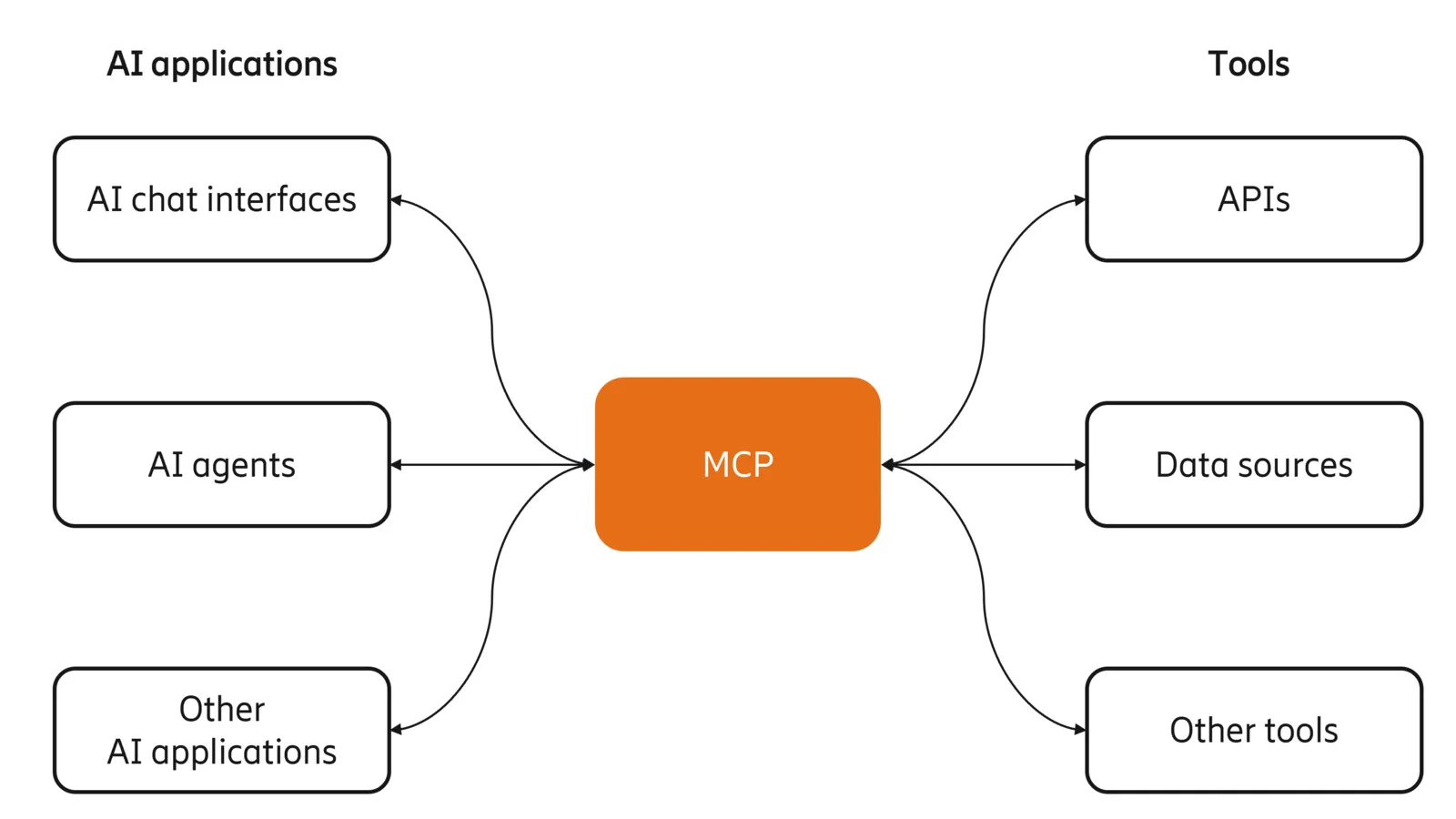
The MCP server pattern separates what the agent knows about tools, what the application serves its existing API, and what the MCP server bridges the two. When an underlying API changes, you update the MCP server once rather than every agent using it.
Now the MCP server pattern is scalable. But there is infrastructure overhead: you need to run, monitor, and maintain a separate server to keep the MCP server active and connected.
👉 MCP is perfect if you need centralized governance, dynamic tool discovery, or want to share tooling across multiple agents and teams.
Pattern 4: Unified API platforms
A unified API platform gives you a single standardized API for an entire category of software.
One integration covers Salesforce, HubSpot, and Pipedrive. The platform translates your call into the correct native API call for whichever system the user has connected.
The tradeoff with using a unified API platform is that you are limited to the categories and applications that platform supports.
👉 My recommendation is to use unified API platforms only when your agent needs to operate across 10 or more SaaS integrations, especially in multi-tenant products where each customer brings their own credentials.
Pattern 5: Agent-to-Agent (A2A) protocol
A2A handles the case where the target of an API call is another agent. A primary agent reads a remote agent's published Agent Card, authenticates, and delegates a task. No manual wiring required from a developer.
A hiring agent can delegate background checks to a specialized verification agent. A travel planning agent can delegate flight and hotel booking to separate specialized agents.
Considering that 29% of enterprises are already running agentic AI in production, with another 44% planning to within a year, A2A is better suited to that production wave than isolated research prototypes.
The complexity with A2A is debugging cross-agent task failures, managing authorization across agent boundaries, and handling partial failures in multi-agent chains.
👉 Use A2A for multi-agent architectures where specialization across organizational or vendor boundaries is the actual requirement. For a 2026 comparison of agent frameworks including LangChain, CrewAI, and the OpenAI Agent SDK, see Best AI Agent Frameworks of 2026.
What are the common APIs used with AI agents?
Now that you have clear context around what APIs for AI agents are, your final step is to pick the APIs that you’d need.
I’ve split this section into six categories that cover the majority of what production agents actually need: web context, CRM, productivity tools, LLM inference, code execution, and memory.
1. Web context and scraping APIs
Context is everything. And on the internet, web context is everything.
The web holds nearly everything humans know — the most complete, real-time record of our knowledge, and the one data source no training dataset can fully capture because it updates continuously. That makes web access the most foundational API category for any agent working with current information.
The problem is that getting usable data out of a webpage is harder than it looks. Search gets your agent to the right page, but a URL is not data. The information your agent needs is buried inside: in a table, a pricing block, a product spec, a changelog entry. Extracting it means converting the page to clean markdown, stripping navigation and ads, handling JavaScript rendering, and dealing with rate limits. And that's assuming the data is visible on first load — which it often isn't. A lot of it sits behind an interaction: a click to expand a section, a scroll to trigger lazy loading, a form submission, a pagination button. Static scraping misses all of it.
A specialized scraping API handles all of this and returns clean, LLM-ready content instead of raw HTML full of noise. Firecrawl covers the full stack:
- Search: Web search and full-page content extraction in a single API call. Filter by category, location, or time range. Results come back as clean markdown, ready for your LLM — the right tool for Summary Agents and Link-Based Research Agents.
- Extraction: Turn any URL into structured data. Supports markdown, HTML, JSON schemas, and natural language prompts. Handles JavaScript rendering, proxies, and PDFs automatically — the right tool for Data Extraction Agents.
- Document parsing: For documents that live on disk rather than the web — contracts, invoices, uploaded PDFs, DOCX, XLSX — the /parse endpoint accepts file uploads directly and returns the same clean, LLM-ready Markdown output.
- Interact: Programmatic browser control for pages that require interaction before the data appears. Click buttons, fill forms, scroll, paginate, and navigate using plain English prompts or code.
- Question/Highlights: Get a grounded answer or verbatim excerpt from any page in a single
/scrapecall — up to 100x fewer tokens than a full scrape, with prompt-injection hardening built in. The right tool for RAG pipelines where you need answers, not full pages.
Firecrawl is the web data API to search, scrape, and interact with the web at scale — and the numbers say it all: 180K+ GitHub stars, 1.25M+ developers, 150K+ companies, 5B+ requests served, and one of the top GitHub repos globally. For any agent that does research, monitors competitors, pulls documentation, or needs current information from the web, this is the first integration to add.
You can also use the Firecrawl CLI directly with your agents for better programmatic control and operational efficiency.
2. CRM and sales APIs
CRM APIs give agents access to customer records, deal pipelines, interaction histories, and contact data. If you have a connected sales agent, you can ask it to enrich a lead, create an opportunity, draft a follow-up email, and notify a rep in Slack, all from a single user request.
Here are three CRM APIs you can try with your AI agent.
- Salesforce Agentforce uses MuleSoft API connectors to link agents to external systems using existing flows, Apex code, and prompts grounded in CRM data.
- HubSpot's CRM API has stricter governance rules, making it well-suited for enterprise teams handling sensitive customer data.
- Pipedrive works cleanly with direct webhook subscriptions and n8n or Make for orchestration.
The main integration challenge is schema mapping. CRM data models differ significantly across vendors, and agents need consistent internal representations to work reliably across customer environments.
At such points, a unified API platform works best to handle this translation layer for teams building multi-tenant products.
3. Productivity and communication APIs
Production AI agents spend most of their time writing back to productivity and communication tools like Slack, Gmail, Google Calendar, Notion, Linear, and Jira so the human team members can stay in the loop.
A support agent resolving a ticket needs to update the ticket status, send a customer reply, and log the resolution: three separate API calls across potentially three different systems.
An engineering agent triaging a bug needs to read a GitHub issue, search internal documentation, create a Linear ticket, and post a Slack update.
For all of this to work, you need APIs (or MCP servers). Fortunately, Slack, GitHub, Atlassian, and Google have all published official MCP server implementations.
With productivity and communication APIs, the main blocker is authentication. Providing full access to Gmail or the company Slack isn’t always feasible due to security restrictions.
4. LLM and embedding APIs
Agents use LLM inference endpoints both as their own reasoning engine and as tools within their workflows. The most common production pattern is retrieval-augmented generation (RAG): embedding, retrieval, and synthesis as three separate API calls composing a single operation.
An agent calls an embedding endpoint to convert a user query into a vector, searches a Pinecone or Qdrant database for semantically similar results, then passes those results to a generation model for synthesis.
The accuracy impact of this API access is measurable. Mistral's Agents API data shows Mistral Large with web search achieving 75% on the SimpleQA benchmark. Without web search, that drops to 23%. Same model, 3x accuracy difference, from a single API integration.
5. Code execution and infrastructure APIs
Coding agents need to run code, test it, and push it. The core requirement beyond GitHub is isolated execution: the agent's code must not affect the host environment.
- GitHub's API covers repository operations, pull request creation, and issue management.
- Docker and Kubernetes APIs handle deployment.
- GitHub Actions APIs handle pipeline triggers.
- E2B and Modal provide sandboxed code execution accessible via API.
- Firecrawl's Browser Sandbox covers browser-based execution scenarios.
6. Database and memory APIs
Agents need two types of storage:
- Operational databases for the data they work with.
- Memory databases for what they've learned across sessions.
Initially developers replicated the SaaS database model for AI agents through vector databases. A few companies like Pinecone, Qdrant, and Weaviate are still the primary vector databases for semantic memory.
A customer service agent using Pinecone, for instance, can retrieve the most relevant past interactions for a customer in roughly 50ms, and provide conversation context without having to pass thousands of tokens through the LLM on every turn.
If vector databases don’t satisfy your use case, you may need an open source memory layer like MemOS to handle the embedding, storage, retrieval, and update cycle automatically.
Wrapping up
You could build the most capable reasoning model in the world and it would still tell you the wrong npm package version, or cite a deprecated endpoint. The model is simply boxed into its training data with no external knowledge or ability to grab that knowledge.
APIs fill in that knowledge gap. Start with Firecrawl for web context — it’s the fastest way to give your agent access to real-time information from the web. Layer in MCP servers or a unified API platform for SaaS integrations, and direct function calling for the internal APIs you control.
One thing worth noting as you build: through 2025, MCP servers were considered the gold standard for giving agents access to external tools. In 2026, that thinking has shifted. CLIs are now considered better for agents — they’re faster to integrate, easier to debug, and give agents more direct, predictable access to the tools they need. If you’re starting a new agent project today, CLIs are worth defaulting to before reaching for an MCP server.
This pattern is playing out more broadly. Teams that adopted MCP integrations are pulling back and opting for direct API calls and CLI tools instead. The overhead of MCP setup, schema loading, and MCP token cost often outweighs the convenience — especially for teams running production agent pipelines where token efficiency matters.
The teams building this integration layer correctly now will have agents that are qualitatively more capable than those running on poorly wired tool sets. Get started with the Firecrawl CLI today.
Frequently Asked Questions
What is the difference between an API for AI agents and a regular API?
The API is usually identical. What changes is the client. A regular API is consumed by application code with hardcoded parameters set at build time. An API for an AI agent is consumed by a model that generates calls dynamically during inference, based on context accumulated mid-conversation. The agent needs machine-readable tool descriptions it can interpret at runtime, not documentation written for human developers.
Which API integration pattern should I start with?
Start with direct REST calls or function calling if you control one or two internal APIs. Move to a unified API platform or MCP server if you need multiple SaaS tools or multi-tenant customer credentials. A2A is worth understanding but is not a starting point for most production deployments in 2026.
How do AI agents handle API rate limits?
Rate limit handling lives at the execution layer, not the model layer. Production implementations need exponential backoff with jitter for retries, rate-limit header parsing to avoid hard blocks, and idempotency keys for operations that could produce duplicates if retried. Unified API platforms and MCP servers handle this transparently in most cases.
What happens when an API changes while agents are using it?
The agent fails at the integration layer and surfaces an error. With direct REST calls or function calling, a developer updates the code manually. With MCP servers, you update the server once and every agent using it picks up the change. This single-point-of-update is the main operational reason to use centralized integration patterns over direct calls at scale.
Can AI agents access on-premise or legacy systems?
Yes, through a bridge layer. You can wrap a legacy SQL database or SOAP endpoint in a modern MCP server, or use a tunneling service to expose it programmatically without opening firewalls. The agent only needs a clean tool description and a reliable response.
How do I prevent an agent from taking destructive actions through an API?
Scope permissions at the credential level, not the prompt level. An agent whose credentials only allow read access cannot write data regardless of what the prompt says. For write operations, add human-in-the-loop confirmation for anything irreversible: record deletion, file overwrites, financial transactions. Audit logs at the API gateway level give you a full trace of every action the agent took, independent of the agent's own logs.
Do I need MCP if I already use function calling?
Not immediately. Function calling defines how the model requests actions. MCP standardizes how agents discover and invoke tools across servers. The two are complementary. MCP becomes worth adding when you want shared tooling across multiple agents, centralized observability, or access to the growing ecosystem of MCP-native tools that providers are now shipping by default.