TL;DR
- LLM grounding injects verified, real-time web content into the prompt at query time so the model reasons over current facts rather than training-time snapshots
- The pipeline has three steps: search for ranked URLs, scrape full-page content, inject cleaned text as context
- Snippets leave the model filling reasoning gaps from memory; full-page scraping is what enables grounded reasoning to actually work
- Firecrawl's Search and Scrape endpoints handle both steps with average latencies of 1.5s and 2.6s respectively
- Stanford AI Playground uses Firecrawl for LLM grounding, processing ~800 web sources daily across 10,000+ unique domains with zero self-managed infrastructure
Google Bard's public release was the first time the world saw what the lack of LLM grounding can do to companies at scale.
Bard hallucinated a fact about the James Webb Space Telescope in its own promotional video, Google's stock dropped 7–9%, and the company shed roughly $100 billion in market value in a single afternoon.
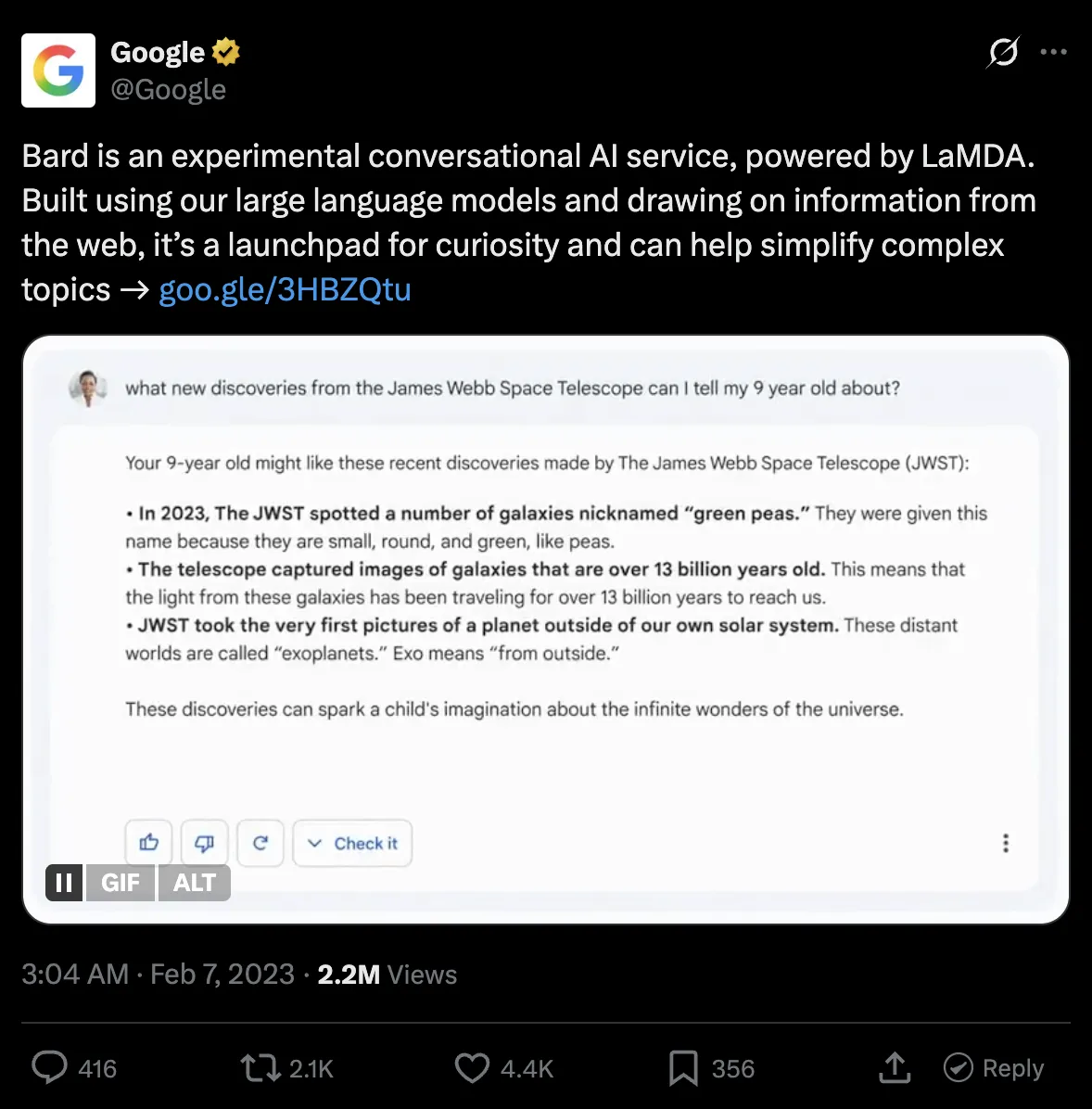
LLMs rely on static training snapshots, and those snapshots go stale. That is what a knowledge cutoff means. For a full breakdown of LLM agent hallucinations and how to reduce them in production, including the stale-data and confabulation types, see our dedicated guide.
LLM grounding solves this by injecting factual, up-to-date context at query time so the model reasons over real data. I’ll walk you through what grounding is and isn’t, how it works, and how you can integrate it in your AI agents.
What is LLM grounding (and what it isn't)
LLM grounding is the practice of injecting verified, real-time web content into the model's prompt at query time so it reasons over current facts rather than training-time snapshots. When you ground an LLM, the model reads fresh context and answers using that to give you the most accurate response possible.
Grounding is often confused with fine-tuning or RAG, especially when marketing. But those are completely different concepts.
| Fine-tuning | RAG (Static) | Live web grounding | |
| What it updates | Model behavior and style | Queryable document corpus | The facts the model reasons over |
| Knowledge freshness | Frozen at training cutoff | Frozen at last ingestion | Current at every query |
| Latency | Fastest (no retrieval step) | 50–300ms retrieval overhead | ~4s (search + parallel scrape) |
| Maintenance burden | Retraining cycles when domain shifts | Re-ingestion pipeline when docs change | None; fetches live on every request |
| Fails when | The answer postdates training data | The corpus hasn't been refreshed | The target page blocks scraping |
| Right use case | Domain tone, structured outputs, high-volume stable tasks | Internal document Q&A | Anything where accuracy depends on recency |
- Fine-tuning optimizes a model for style and domain expertise. If you want your AI agent to answer high-stakes queries around law, you'd fine-tune it on legal terminology, case law structure, and jurisdictional reasoning patterns. Ask that same model what a judge ruled last Thursday and it will hallucinate an answer, because that ruling wasn't in the training data. Fine-tuning only shapes how a model speaks around a specific niche.
- RAG over internal documents makes proprietary content queryable. A team that loads its internal HR policies into a vector database can let employees ask questions about it without exposing raw files. But the problem is staleness. That knowledge base only reflects reality as of the last time someone ran the ingestion pipeline. A regulatory change from last week will be outside of that corpus until someone manually updates it.
Grounding an LLM with live web data solves freshness at the source for most research, pricing/availability, and academic use cases. You give the LLM access to web search tools that trigger a real-time fetch when a query requires recent data, and the content from the web gets fed into the context window so you get accurate, grounded responses.
Why is live web data necessary for LLM grounding?
Live web data provides an LLM the information it needs to write an accurate and up-to-date response. Without it, the language model falls back to stale training data and produces confident-sounding but invalid answers, and the distance between training data and inference keeps growing if you don't upgrade to newer models.
To put this in perspective, suppose you pick a model that works well for a coding use case, say GPT-5.5 with its December 2025 knowledge cutoff.
Right now, you could let it rely on its training data and get usable outputs since the cutoff isn't too far off. But if you keep using the same model for the next three years without grounding, it will produce outdated code against deprecated APIs, recommend libraries that no longer exist in their documented form, and suggest syntax patterns that newer language versions have moved past.
For coding-specific grounding, the Firecrawl Developer Index is a purpose-built retrieval surface over READMEs, GitHub issues, pull requests, and curated docs, refreshed daily. It's the fastest way to keep an agent's code output pinned to the current API rather than whatever version dominated its training set. See the launch post for the DevDex benchmark, the Developer Index docs for the query API, and our end-to-end guide on up-to-date documentation for AI coding agents for the full crawl, refresh, and MCP wiring.
The grounding architecture: search, scrape, inject
At a high level, every live web grounding pipeline follows the same three-step structure: turn the user's query into a web search, scrape the full content of the top results, and inject that content into the prompt before the model generates a response.
This is what the flow looks like:
User query → search → scrape → inject → LLM → grounded response
Step 1: Search
The user's query becomes a web search that returns ranked URLs.
You need to be especially careful with search result quality at this step because bad URLs cascade into bad scraped content, which means the model has nothing useful to reason over even if the rest of the pipeline works perfectly.
So, spend time filtering by domain authority and blocklisting low-signal sources like forums or autogenerated content pages before you ever get to scraping.
Step 2: Scrape
At this stage, each URL gets scraped and converted to clean, LLM-ready text.
That includes the full article body, any tables, code blocks, methodology sections, whatever the page contains that a human would actually read.
I’d recommend sticking to markdown for LLM context since raw HTML typically contains 40–60% boilerplate (navigation, ads, footers, javascript, etc) which is irrelevant to the model. It consumes more tokens, eats up the context window, and degrades your model’s responses.
The scraping step is where many self-built pipelines fail. Modern sites use Javascript to render parts of content (or even the full page) which basic scrapers can’t handle efficiently. Some services are also behind services like Cloudflare or Akamai that block headless browsers, so you need proxy and user-agent rotation to make sure your scraping doesn’t look automated.
And even if you get the raw content, parsing the actual article body from arbitrary HTML across thousands of different site structures is its own ongoing engineering problem.
Once you’ve scraped and cleaned up the content, you’re ready for the next step.
Step 3: Inject
The cleaned content goes into the prompt as context.
A system message along the lines of "Answer the user's question using only the following web content" works well as a starting baseline, and you can refine from there based on what your evals tell you.
The model reasons over what you inject and returns a response that is bounded by real, retrieved information rather than training memory.
The main thing to manage at this step is the token budget. Full pages can easily exceed 10,000 tokens each, and if you are pulling content from three to five URLs per query, you will hit context window limits fast.
A good approach is building a secondary extraction pass that scores paragraph chunks by relevance to the query and injects only the top-scoring sections, rather than the full page. For a systematic breakdown of how to split and rank document content for injection, see the guide to RAG chunking strategies.
Why web index quality sets the ceiling for grounding accuracy
The search step in your pipeline queries a web index — a structured, pre-built snapshot of crawled pages. The quality of that index determines the quality ceiling for everything your agent can answer. Even a perfect scrape and inject step cannot recover from search results that point to stale, noisy, or irrelevant pages.
Two factors matter most. The first is freshness. For traditional search, a slightly outdated result is tolerable — users see the publication date and can judge. For LLM grounding, staleness is invisible. The model produces a confident-sounding answer from six-month-old data with no indication that the information is outdated. For use cases involving pricing, compliance, availability, or recent events, a stale index produces wrong answers that look right.
The second is extraction quality. A large share of pages on the web contain 40–60% boilerplate: navigation, ads, footers, cookie banners. If the index was built from noisy extraction, the content your model reasons over is polluted before your pipeline even starts. Noisy chunks produce poor retrieval; poor retrieval means the model fills gaps from training memory, which is exactly what grounding is supposed to prevent.
For a full breakdown of how web indexes are built, what makes them fail, and how AI indexing differs from search indexing, see What Is Website Indexing? How Web Indexes Power Search and AI Agents.
Challenges in building live web data pipelines in 2026
The three-step architecture is straightforward, but the infrastructure underneath it is not. Here are the failure modes I have seen teams underestimate most consistently.
- JavaScript rendering is a baseline requirement that often gets underestimated early on. A large share of the pages you will want to scrape, especially documentation sites, SaaS product pages, and news publishers, render their actual content via JavaScript. A plain HTTP GET on these pages gives you a skeleton with no meaningful text. Getting around this requires spinning up a full browser environment per scrape, which adds memory overhead and latency to every request.
- Domain breadth needs to be considered before you start scraping. Larger domains with thousands of pages can make a reliable scraper fail unpredictably if the scraper is expected to follow links. A better way is to either limit how many pages a scraper can pull or if you have a static set of domains you scrape, write domain-specific logic.
- Latency across steps needs to be considered as search adds roughly 1.5 seconds. If you scrape URLs sequentially, each one adds another 2-5 seconds. An unconfigured pipeline can easily hit 10-15 second end-to-end response times, which makes it unusable in any interactive setting. Parallelizing scrape calls is not an optional performance optimization; it is what makes the pipeline viable at all.
- Proxy rotation requires its own provider management layer. High-volume scraping needs rotating IPs across multiple providers. Building that yourself means handling provider reliability, per-provider rate limits, and routing logic to funnel high-detection-risk domains through clean IPs. Most teams only discover the full cost of this after their first major blocking event in production.
How to use Firecrawl to ground your LLM with live web data
Firecrawl's Search and Scrape endpoints handle the first two steps of the pipeline as a managed API, which means you get reliable JavaScript rendering, proxy rotation, and clean Markdown output without building or maintaining any of that infrastructure yourself.
Here is a working implementation of the full LLM grounding pipeline:
from google import genai
from google.genai import types
from firecrawl import Firecrawl

firecrawl = Firecrawl(api_key="YOUR_FIRECRAWL_KEY")
client = genai.Client(api_key="YOUR_GEMINI_KEY")

def ground_and_query(query: str, num_sources: int = 3) -> None:
    results = firecrawl.search(query, limit=num_sources, scrape_options={"formats": ["markdown"]})
    context = "\n\n".join(
        (getattr(r, "markdown", None) or "")[:4000] for r in results.web
    )
    prompt = f"Answer using only the web content below. If it lacks enough information, say so.\n\nQuestion: {query}\n\nWeb content:\n{context}"

    contents = [
        types.Content(
            role="user",
            parts=[types.Part.from_text(text=prompt)],
        ),
    ]
    generate_content_config = types.GenerateContentConfig(
        thinking_config=types.ThinkingConfig(thinking_level="HIGH"),
    )

    for chunk in client.models.generate_content_stream(
        model="gemini-3-flash-preview",
        contents=contents,
        config=generate_content_config,
    ):
        if text := chunk.text:
            print(text, end="", flush=True)
    print()

ground_and_query("What are the current Python 3.13 performance benchmarks?")
# Output (truncated)
Based on the provided web content, the current Python 3.13 performance benchmarks are as follows:
**General Improvements**
- Average Speed: ~15% faster on average on standard benchmarks.
- Parsing & I/O: 25–40% improvement in near-term workloads.
- Memory: Reduced memory costs for long-running applications.
**Web Frameworks**
- FastAPI: Response times under load were 12–18% lower.
- Django: Request processing was 10–15% faster.
**CPU-Intensive Benchmarks (Fibonacci Sequence)**
- CPython 3.13 average: 9.72s — 2.1x faster than CPython 3.8, slightly slower than CPython 3.12 (9.41s).
- PyPy-3.10: 6.1x faster than CPython 3.13.
- Node.js 22: 5.5x faster than CPython 3.13.
- Rust-1.81: 38.9x faster than CPython 3.13.
...
If you had to build the same pipeline from scratch, you’d need separate search and scrape APIs, an HTML cleaning script, and multiple trips to each URL to grab the content.
Firecrawl collapses all the steps into one with the scrape_options={"formats": ["markdown"]} tag inside the search request.
Your results.web attribute comes back with usable context for each search result — clean Markdown ready to inject into any model's prompt. Firecrawl also handles the parallelization of those page fetches on its end, which is what keeps the latency under 5 seconds even across multiple sources.
Now, if your pipeline needs to scrape URLs beyond what the search endpoint returns, say from a curated domain allowlist or a secondary source, use batch_scrape instead of individually going over the links. Here’s how to do that.
from firecrawl import Firecrawl

firecrawl = Firecrawl(api_key="fc-YOUR_FIRECRAWL_KEY")

def scrape_additional_urls(urls: list[str]) -> list[str]:
    # batch_scrape runs all URLs concurrently server-side up to your plan's browser limit
    # sending them one by one would cost the same credits but take 3x longer
    job = firecrawl.batch_scrape(urls, formats=["markdown"])
    # skip results where markdown is empty — failed scrapes return the key but null the value
    return [
        (getattr(page, "markdown", None) or "")[:4000]
        for page in job.data
        if getattr(page, "markdown", None)
    ]
# Output (truncated)
Got 2 pages scraped
Page 1 (first 200 chars):
### Navigation
- [index](https://docs.python.org/3.13/genindex.html "General Index")
- [modules](https://docs.python.org/3.13/py-modindex.html) |
...
Page 2 (first 200 chars):
PEP 703 – Making the Global Interpreter Lock Optional in CPython
Author: Sam Gross
...
batch_scrape passes the full URL list to Firecrawl's infrastructure and processes them concurrently server-side, up to your plan's concurrent browser limit.
Calling individual scrape_url requests in a loop provides the same outcome but requires more time and client-side coordination in how the output is saved and processed.
Production considerations
- Latency budget. A grounded query using Firecrawl's search endpoint with scrape_options runs in about 4-5 seconds end-to-end, which is fast enough for interactive use. Stanford AI Playground processes roughly 800 web sources daily spanning 10,000+ unique domains at this speed, including scholarship databases, news outlets, and government resources, without running any scraping infrastructure of their own.
- Token budget. Just a few untruncated pages can easily push a single query past 20,000 tokens. Instead, run a fast embedding similarity comparison between the query and paragraph-level chunks from each result, then inject only the top-scoring sections. You get the reasoning quality of full-page content without burning a token budget on navigation text and boilerplate.
- Quality control. Comment threads, paywalled article previews, and SEO-optimized autogenerated content pages inject noise that actively degrades response quality. An allowlist of trusted domains for your specific use case, combined with a blocklist of known low-quality sources, tends to improve response accuracy more than any prompt engineering change I have tested.
- Caching. Not every query needs a fresh scrape on every request. For reference content that changes weekly rather than hourly, caching the scraped Markdown keyed to the URL with a 24-hour TTL can eliminate redundant scrape calls. A query about Python 3.13 release notes does not need a live scrape every five minutes.
- Eval. LLM grounding improves factual accuracy, but the magnitude of that improvement depends entirely on query type. The fastest way to measure it is an A/B eval: run a batch of factual queries through both the grounded pipeline and the ungrounded baseline, then score correctness on queries where the answer post-dates your model's training cutoff. The gains are consistently large on time-sensitive queries and close to zero on historical ones, which also gives you a clear way to decide where the added latency cost is justified.
If you need to run queries that require navigating multiple pages, following links, or gathering data from hard-to-reach parts of a site, Firecrawl's agent endpoint handles that autonomously. Pass a prompt describing what you need and it searches, navigates, and extracts without requiring explicit URLs. It is currently in Research Preview, but worth knowing as the upgrade path when a single search-and-scrape pass isn't enough to answer complex research queries. For a broader look at how AI agents are architected around web context retrieval, the linked guide covers the full architecture and production patterns.
If you're building agent workflows outside of Python, Firecrawl is also available via MCP and the CLI — so you can wire the same grounding pipeline into tool-calling agents, Claude, or any MCP-compatible runtime without touching the API directly.
Why use Firecrawl for LLM grounding?
Most search tools help agents find sources. Firecrawl helps agents find sources and turn them into usable data. That distinction matters: discovery is the easy part; reliably extracting clean, structured content from arbitrary pages at scale is where self-built pipelines break down.
Here are a few major advantages of using Firecrawl as your LLM grounding layer:
- No infrastructure overhead. Proxy management, browser fleet maintenance, and content extraction logic across heterogeneous site structures is significant engineering work that most teams underestimate until they are already deep in it. Teams that build this layer in-house typically spend more time keeping the scraper operational than building the product on top of it. With Firecrawl, you add an API key and get reliable extraction across 10,000+ domains without managing a single proxy. For a comparison of managed scraping options, see the best web scraping APIs guide.
- Reliable JavaScript rendering. Because Firecrawl uses a full browser environment under the hood, it handles static HTML, single-page apps, and dynamically loaded content correctly without any page-specific configuration on your end. A naive HTTP client silently returns empty content from a large share of the pages you will want to scrape; Firecrawl handles that by default.
- Clean, LLM-ready output. Raw HTML is a poor input format for language models. Navigation bars, footers, cookie consent banners, and ad slots inflate your token count without contributing any meaning. Firecrawl extracts the main content body and returns token-efficient Markdown, dropping token usage per scraped page by around 67% and making your prompts easier to debug when something goes wrong.
- Domain breadth at scale. Getting reliable extraction from five domains is a manageable engineering task. Getting reliable extraction from 10,000+ domains, as Stanford AI Playground does, requires per-domain extraction logic that someone has to write and maintain. Firecrawl handles that as a managed service so you inherit the breadth without the maintenance cost.
- Integrated search-to-scrape workflow. Search and scrape share the same API, the same authentication, and the same credit system, which means one SDK, one API key, and no credential management across two separate services. For a pipeline you will be running at high volume, that operational simplicity matters.
Start grounding your LLM in under 30 lines of Python
Google lost $100 billion because one LLM answered without grounding. All they had to do was give it access to search the live web for ranked URLs, scrape the full content of those pages, and inject that content into the model's context before it generates anything. For Google, that’d have been simple as they own search and fortunately they fixed it in the newer iterations.
But for you, the same infrastructure is hard to build and maintain. Firecrawl solves that by handling the end-to-end search and scrape steps as a managed API, so the full pipeline comes together in under 30 lines of Python and adds just 4-5 seconds of latency for interactive use. Get your free Firecrawl API key and try the code above.
Frequently Asked Questions
What is LLM grounding in simple terms?
LLM grounding is the practice of adding current, verified information to a model's prompt before it generates a response. Instead of relying on whatever was in the training data, the model reads fresh context that you inject at query time and answers from that.
How is LLM grounding different from RAG?
Retrieval augmented generation is the broader technique of retrieving relevant documents and injecting them as context. Live web grounding is a specific implementation where the retrieval source is the live web rather than a static internal corpus. The key difference is freshness: a static vector database reflects the world as of the last ingestion run, and live web grounding fetches current content on every single request.
Why not just use search snippets instead of full-page scraping?
Search snippets are one to two sentence extracts designed to help humans decide which result to click, not to give a language model enough context to reason accurately. If you inject only snippets, the model fills the gaps from its training memory, which is exactly the problem grounding is supposed to solve. Full-page content is the minimum viable input.
How do I keep grounded responses fast enough for interactive use?
Parallelize your scrape calls using asyncio.gather or an equivalent pattern in your language of choice. Firecrawl's search averages 1.5s and scrape averages 2.6s, so three parallel scrapes take roughly the same wall time as a single sequential one. For stable reference content, cache the scraped Markdown with a 24-hour TTL to avoid redundant fetches on repeated queries.
Can I use Firecrawl with models other than Claude?
Yes, Firecrawl is completely LLM-agnostic. It returns clean Markdown that you inject into any model's context window. The same grounding pipeline works with Claude, GPT-4o, Gemini, Llama, or any other model you can reach via API.