Training Data vs. Retrieved Data vs. Live Web Data: What Data Makes Your AI Agent Smarter
 Ninad Pathak
TL;DR
- Training data shapes how your agent reasons and writes, but its knowledge freezes at the model's cutoff date, often 12 to 18 months behind the present — and the effective cutoff is often earlier than the date vendors advertise.
- RAG, retrieval-augmented generation, gives agents access to private, proprietary knowledge without retraining the underlying model.
- Live web data is the only layer that sees the current open internet, including prices, news, new releases, and competitor changes.
- Firecrawl's search endpoint handles web search and scraping in one API call, returning clean markdown your agent can use directly.
When ChatGPT 3.5 was first launched, OpenAI set a record for the fastest-growing user base hitting 100 million users. But very soon, people noticed that the “smartest AI” of the time had no knowledge beyond September 2021 (its knowledge cutoff), and won’t learn new information even if you asked it to.
Its knowledge was limited to its training data with no way to update it as an end user. To solve this, over the next few months, OpenAI gave ChatGPT access to all chats for each user so you didn’t have to repeat information. And they also introduced web search that allowed fetching real-time facts.
The combination of these three data layers: training data, retrieved data, and live web data made the AI more and more useful. I’ll walk you through what each data layer means and how you can implement it for your AI agents.
What is training data, and what does it give your agent?
Training data is the text a language model was trained on. This includes hundreds of millions of web pages, books, code repositories, academic papers, conversational text, and even social media posts and comments that help it understand language. For voice and image models, the training is done with voice and image data respectively.
None of the models store training data directly. That data helps the model learn statistical relationships between tokens, or "words" to simplify. Those relationships get compressed into the model's weights, the billions of mathematical parameters that connect knowledge, and help the model understand what words should be placed next to each other to form sentences or what words or phrases are most closely related.
For instance, ask a model about Beethoven and it doesn't need to search the web. Its weights have already formed relationships between the word "Beethoven" and German composer, pianist, and classical music. The model can then use these relations to give you a response.
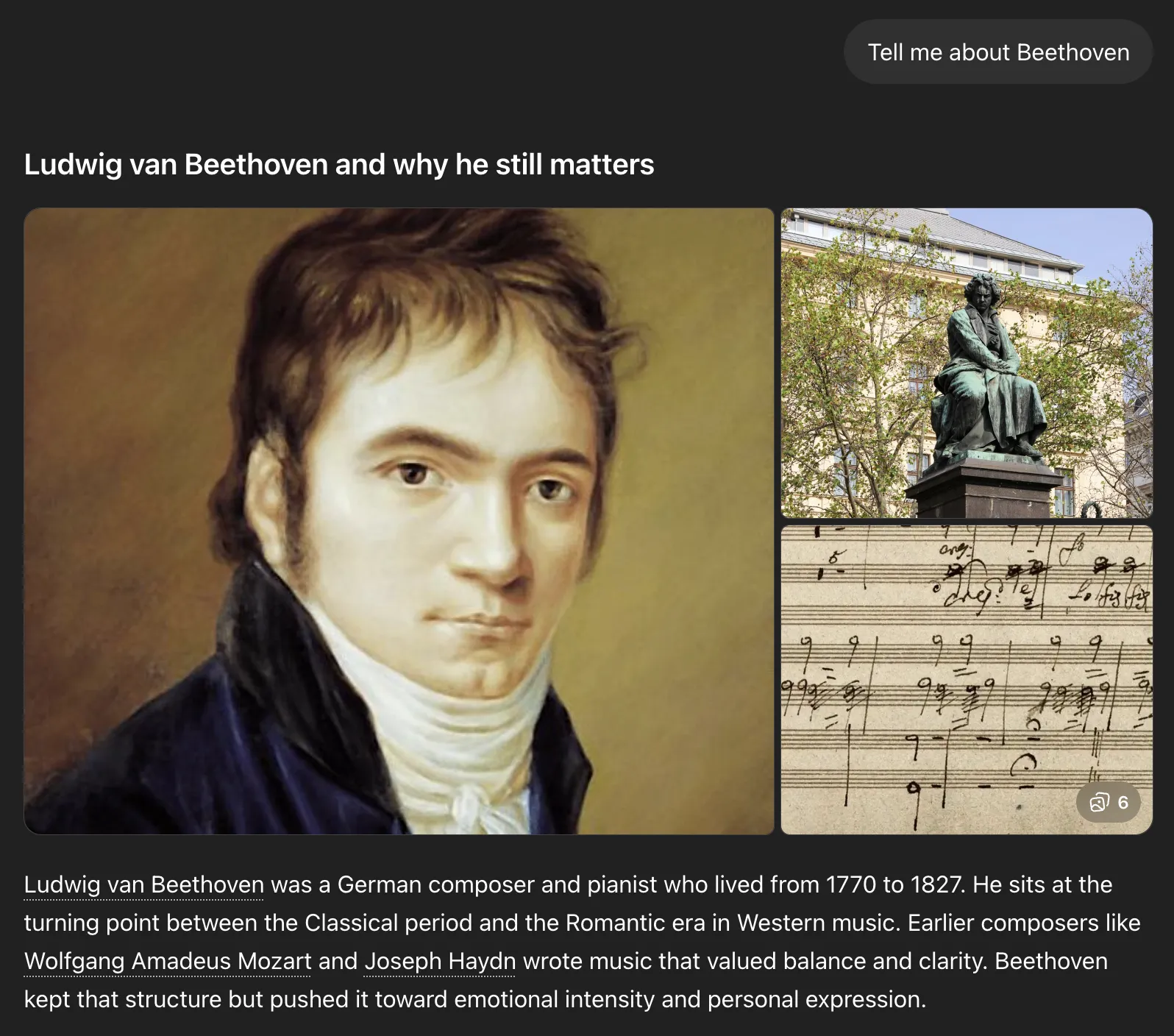
But if you ask the model about some new tech that was released after its knowledge cutoff, while keeping web search off, you either get a plausible sounding made-up response, information that was relevant until the model's cutoff date, or a rejection of your fact.
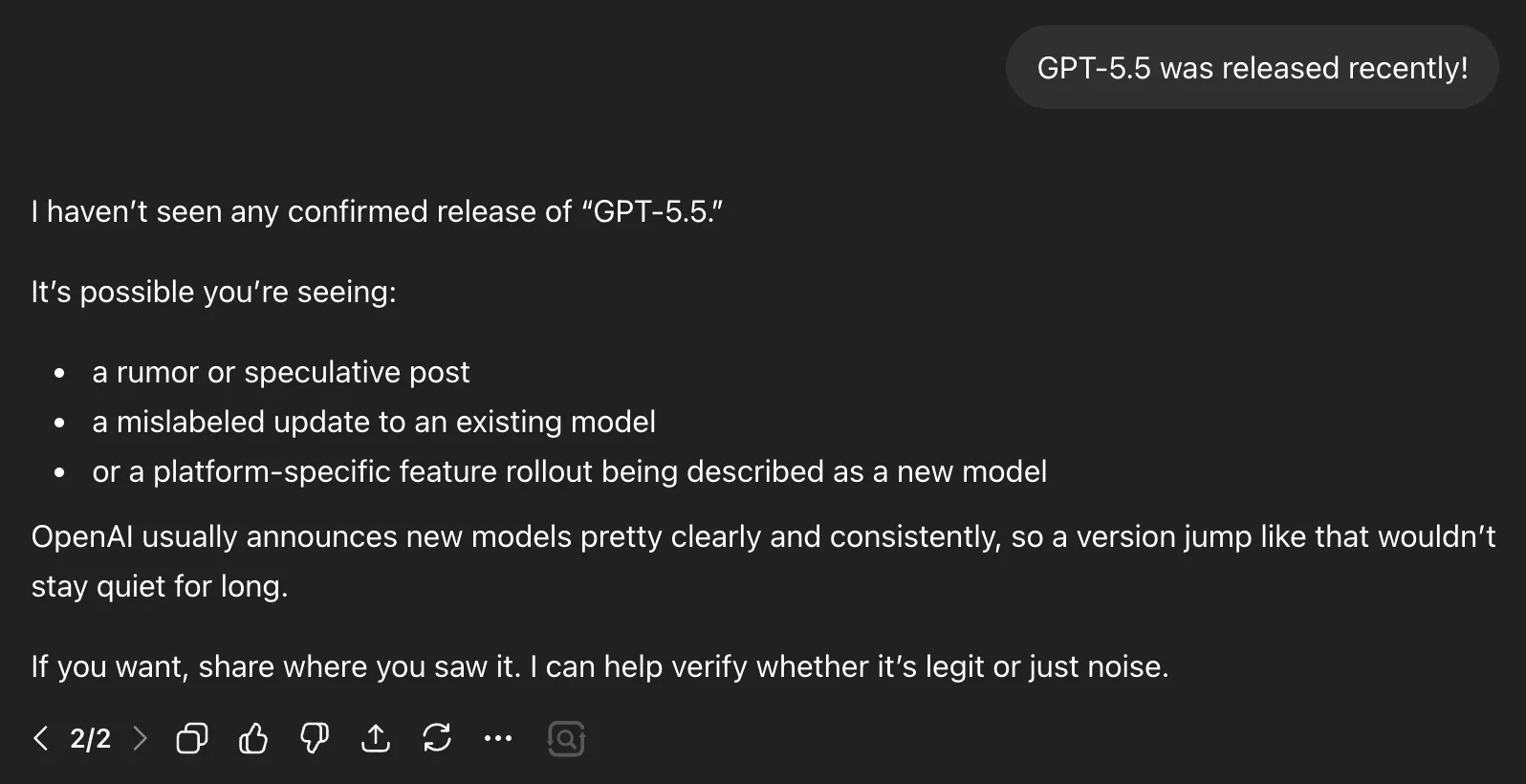
For instance, GPT-5.5 was released as of this writing, but when I mentioned this fact with web search off, the model was not aware of this release and assumed it was likely speculation. That is why we need the other two data layers.
What's training data useful for?
- Training data works well for knowledge that does not change. Ask the model to explain gradient descent, write a SQL query, or walk you through how TLS handshakes work, and it answers accurately because those concepts were heavily represented in training data and have not shifted in years.
- It also helps set tone and style. Ask it to write a dry technical spec, a casual Slack message, or a formal legal summary, and the model produces each convincingly because it has seen millions of examples of all three.
- Fine-tuning lets you push the model in specific directions, like locking in a consistent output format or tightening domain vocabulary, but it is still adjusting behavior rather than adding facts. The training layer is not where you solve the problem of the model not knowing things.
Where does training data fail?
- The main caveat is that training data is immutable. You cannot "teach" the model new information without going through a full retraining.
- Every major model has a knowledge cutoff, and factual accuracy drops sharply for anything that happened after it. A model with a mid-2024 cutoff does not know about a product launched in early 2026, but it will not say that. It generates a confident answer from older patterns, and that answer sounds just as authoritative as a correct one. Ask it about a SaaS tool that launched in 2025 and it might describe features from a similar older product, or invent details entirely. Making this worse: a 2024 study from Johns Hopkins found that effective knowledge cutoffs often diverge significantly from reported dates. In some pre-training datasets, the effective cutoff aligned to 2019 despite a stated 2023 cutoff, because over 80% of documents pulled from CommonCrawl were older versions, and deduplication failures allowed stale near-duplicates to persist alongside newer ones.
- Training large models is also slow and expensive, so you are not retraining one monthly to keep facts current. That is what the other two layers are for.
What is retrieved data or retrieval augmented generation (RAG)?
Retrieved data, most commonly implemented through RAG, is a method for giving AI agents access to specific, dynamic, or proprietary knowledge. At inference time, the model retrieves relevant information from a vector database and injects it into the model's context window alongside the user's query.
This is also termed LLM grounding. You give the model real documents to reason over, which reduces the chance it makes things up. Research shows RAG reduces hallucinations by 40 to 71% compared to inference from weights alone. For a deeper look at how to reduce LLM agent hallucinations in production pipelines, including stale-data and confabulation types, see our guide. A 2024 NAACL paper showed that RAG significantly reduced hallucination in structured outputs and improved generalization to out-of-domain questions in enterprise settings. You also get citations so you know which document each answer came from.
Google's NotebookLM is a useful example of a well-implemented RAG system.
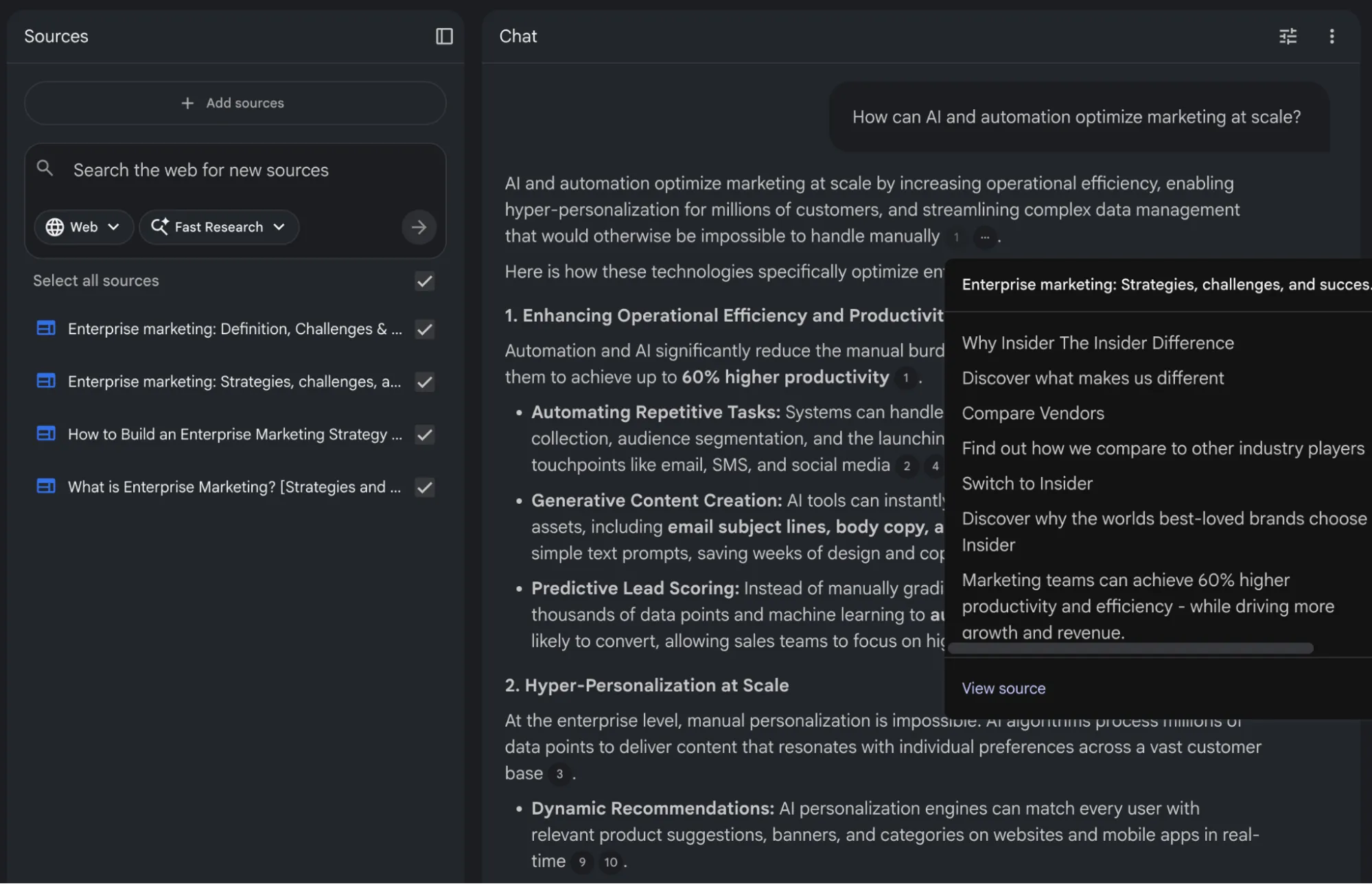
You can add up to 50 source documents on the free plan and ask questions about the content. The response you get is deeply grounded in information you have added in sources, and you will rarely see NotebookLM hallucinate information.
What is RAG good for?
RAG is the right tool when your agent needs to answer questions about internal content that was never in public training data. Common sources include:
- Product docs and help centers so customers can ask about your Pro plan features, refund policy, or onboarding troubleshooting steps. When you update a pricing tier, you re-index that page. Ingesting a documentation site for RAG — whether it's built on Docusaurus, GitBook, or a custom stack — is one of the most common first RAG projects teams tackle.
- Support ticket history such as past resolutions, known bugs, and escalation patterns. An agent with access to 50,000 historical tickets can surface solutions a new support rep would not know to look for.
- Policy manuals and internal wikis for legal, HR, compliance, and internal processes. Anything that lives in Confluence, Notion, or Google Drive and governs how your team operates.
- CRM records including customer history, account tier, and past interactions. A sales agent that knows a prospect's history before the call is far more useful than one starting cold.
- PDF reports, Word documents, and spreadsheets from internal systems — contracts, compliance filings, financial summaries. For extracting these into RAG-ready Markdown, see the comparison of AI PDF parsers for RAG pipelines, or Firecrawl's /parse endpoint for direct file uploads.
Retell AI's phone agents needed to answer from each customer's documentation, and before proper ingestion, every new customer meant writing a new custom scraper. After switching to a proper pipeline, customers hand over a list of URLs and get a working, up-to-date knowledge base with no custom code per client.
Where does RAG fail?
- Retrieval quality depends heavily on your chunking strategy, embedding model, and search algorithm. If your documents are poorly chunked or your embeddings do not match how users phrase their queries, the retrieval step fails silently and the model generates a response from its training data instead.
- Context window limits are another practical constraint. Even models with 128K or 200K token context windows have a finite amount of space for retrieved documents. You cannot dump your entire knowledge base into a single prompt.
- Retrieval must be targeted and relevant, which brings its own challenges around query understanding and reranking.
Tip: Firecrawl's scrape endpoint can crawl competitor pages and return clean markdown you can index alongside your internal docs, with no custom crawler required.
What is live web data and how does it compare to RAG?
Live web data is content fetched from the internet at query time, including pricing pages, API changelogs, GitHub issues, news articles, and competitor docs.
This is where AI agents start to feel genuinely useful. With live web access, an agent can browse public websites, query APIs, scrape dynamic content, and take real-time actions based on current information to give you the most up-to-date answer possible.
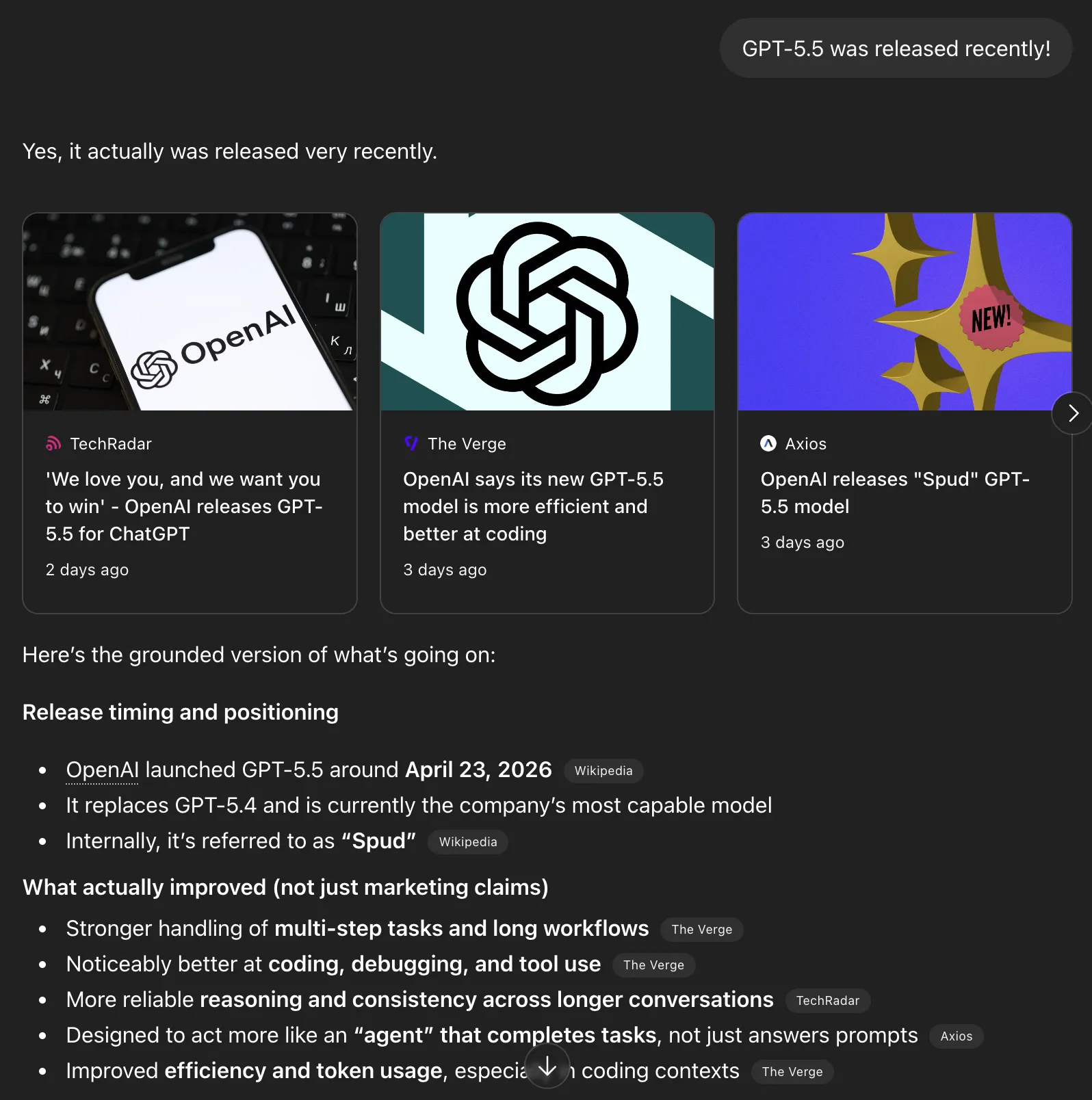
To test this, I mentioned the GPT-5.5 release in another chat and this time, with web search on, it was able to find the information and verify the fact. This layer is extremely important because technology changes quickly, and simply adding new data to your RAG database is not sustainable.
Quick tip: while default web search works in a UI, if you are building AI agents you need to build web search and scrape functionality yourself while handling proxies, headless browsers, user agents, etc. Firecrawl makes implementing effective web search much easier.
What is live web data good for?
Live data fetches accurate, current information from publicly accessible sources on demand. Here is what that unlocks:
- Current pricing and product versions. Live web fetches the actual published value at query time, not whatever was true when the model was trained. For something like a library version, that means querying PyPI directly and returning the current version instead of a months-old answer that breaks a user's code.
- Competitor research. For public pages your RAG index does not contain, such as pricing pages, feature comparisons, and product announcements, the agent fetches the page and answers from what is actually there today.
- Fast-moving technical domains. Vendor configuration guides, library changelogs, and newly published papers often post-date the training cutoff and have not been indexed. A single search call can return the changelog, the release post, and the relevant docs page together. For coding agents that hit this class of query constantly, the Firecrawl Developer Index is a purpose-built retrieval surface over READMEs, GitHub issues, pull requests, and curated docs, refreshed daily (see the launch post and the Developer Index docs).
- News and security advisories. CVEs, regulatory updates, and breaking changes in upstream dependencies all rely on authoritative public pages that change over time.
Where does live web data fall short?
- Internal knowledge. Anything that lives behind your firewall or cannot be exposed to an external search. Live web access cannot help with internal runbooks, customer records, or proprietary data.
- Consistency. Web pages change between fetches. The same search run twice can return different content. For stable reference knowledge where exact wording matters, like policy docs or legal text, a maintained RAG index is more auditable than a live fetch.
- Latency. A simple search and scrape adds 1 to 5 seconds per call. Deep research that follows multiple links takes longer. Route carefully so only the queries that genuinely need live data trigger a fetch. Firecrawl's source and category filters help with that precision problem. Set
sources: ["news"]to target journalism sites, or useresearch,github, andpdfcategories to steer results toward academic publishers, code repos, or document-heavy pages.
Training data vs. retrieved data vs. live web data: a quick comparison
Training data is for reasoning, language quality, and knowledge that does not need to change. RAG is for your organization's private content, and live web data is for current external facts. A well-built agent usually needs all three layers and should route requests to the right one automatically.
| Data type | What it provides | Update frequency | Latency | Best for | Bad for |
|---|---|---|---|---|---|
| Training data | Reasoning, tone, general world knowledge | Fixed at cutoff, typically 12 to 18+ months behind | Lowest, inference only | Stable concepts, coding patterns, language fluency | Current prices, recent events, post-cutoff releases |
| Retrieved data (RAG) | Internal docs, product wikis, KB articles, CRM records | When you re-index, typically minutes to hours | Medium, adds retrieval overhead | Support agents, policy assistants, internal search | Open-web facts, competitor research, breaking news |
| Live web data | Real-time external content, competitor pages, news, fresh research | Every query, always current | Variable, 1 to 5 seconds for a simple fetch | Market monitoring, pricing checks, release tracking | Internal knowledge that must stay inside your systems |
How to add live web data to your agent with Firecrawl
Firecrawl is the web data API to search, scrape, and interact with the web at scale. It handles the infrastructure that makes live web access hard, including proxy management, rate limiting, and JavaScript rendering.
The result is clean, LLM-ready output in markdown, JSON, or structured formats.
How do search and scrape work in one call?
If you try to build a search and scrape setup manually, you need a SERP API to fetch search results and a scraper stack that loops over individual URLs to get the content. After that, you still need to clean up the content yourself.
But with Firecrawl, you can search and scrape in a single call and get clean markdown content without additional steps.
from firecrawl import Firecrawl

app = Firecrawl(api_key="fc-YOUR_KEY")

result = app.search(
    query="current pricing for enterprise observability platforms",
    limit=5,
    tbs="qdr:m",  # restrict to the past month
    sources=["web"],
    scrape_options={
        "formats": ["markdown"],
        "onlyMainContent": True,
    },
)

for item in result.web:
    print(item.metadata.title, item.metadata.url)
    # item.markdown is what you need to add to your prompt for the full content
tbs controls recency. You can set it to qdr:d for results only from the past day, qdr:w for the past week, and qdr:m for the past month. An agent tracking product releases can set tbs="qdr:d" and only get results from the last 24 hours.
With the Firecrawl v2 API, the search response automatically categorizes results into .web, .news, and .images. We iterate over result.web to access the web results. Each result comes back as a Document object with metadata.title, metadata.url, and a markdown field containing the full page content, ready to drop straight into a prompt.
10 Best Logging Tools in 2026: Features, Pricing, Pros https://www.parseable.com/blog/ten-best-logging-tools-2026
7 best Grafana alternatives for LLM evaluation and AI quality - Articles - Braintrust https://www.braintrust.dev/articles/best-grafana-alternatives-2026
Best Monitoring & Observability Tools: Pricing Comparison (2026) | PulseSignal https://getpulsesignal.com/pricing/category/monitoring-and-observability
7 Best AI Agent Observability Tools for Coding Teams in 2026 | Augment Code https://www.augmentcode.com/tools/best-ai-agent-observability-tools
8 Best AI and LLM Observability Tools in 2026 | Galileo https://galileo.ai/blog/best-llm-observability-tools-compared-for-2024
How do source and category filters work?
If you want to limit what sources or categories your agent can search, these parameters can help.
For example, setting sources: ["news"] targets news sites. You can also set categories like research, github, and pdf to point results at academic publishers, code repositories, and document-heavy pages. Set the category to research and you get arXiv papers and journal pages instead of blog posts. Set it to github and you get issues and READMEs.
# Targeting specific sources and categories
targeted_search = app.search(
    query="current pricing for enterprise observability platforms",
    limit=5,
    sources=["news"],
    categories=["research", "pdf"],
)

for news_item in targeted_search.news:
    print(news_item.title, news_item.url)
In this example, I have passed sources=["news"] to restrict the search to news outlets, and categories=["research", "pdf"] to prioritize academic or whitepaper-style reports.
Multitenancy and Observability in Smart City Platforms https://dl.acm.org/doi/pdf/10.1145/3597615
Monitoring and Observability of Machine Learning Systems: Current Practices and Gaps https://arxiv.org/pdf/2510.24142
eBPF: A New Approach to Cloud-Native Observability, Networking and Security for Current (5G) and Future Mobile Networks (6G) https://ieeexplore.ieee.org/iel7/6287639/6514899/10138542.pdf
A Survey on Observability of Distributed Edge & Container-based Microservices https://ieeexplore.ieee.org/iel7/6287639/6514899/09837035.pdf
AI Trust OS - A Continuous Governance Framework for Autonomous AI Observability and Zero-Trust Compliance in Enterprise Environments https://arxiv.org/pdf/2604.04749
Notice how the query brings back technical papers from ACM, arXiv, and IEEE. Also, for .news results, fields like title and url are top-level properties on the object, not nested inside a metadata dictionary like they are for .web results.
For how teams use this at scale, Firecrawl's deep research guide walks through production search-and-scrape loop patterns.
How do you use the Firecrawl CLI for quick integration?
When you need to run large-scale batch crawl, search, or scrape jobs, the Firecrawl CLI is a handy utility. It lets you run API calls in a single command.
npm install -g firecrawl

# Authenticate once
firecrawl auth

# Time-filtered search returning clean markdown
firecrawl search "best observability platforms 2026" --tbs qdr:w --format markdown
The CLI outputs structured markdown files directly to your machine, which is helpful for development and testing. It also works well as a shell tool target in agent frameworks.
Since the utility writes files, agents can read only the parts they need, which saves tokens during deep research loops.
Start here: Install the Firecrawl CLI and run your first search in under two minutes.
How does Firecrawl MCP help framework users?
If you want to give your AI models native web-browsing capabilities directly inside editors like Claude Code, Cursor, or Windsurf without custom API wiring, the Firecrawl MCP server is a strong option.
{
  "mcpServers": {
    "firecrawl": {
      "command": "npx",
      "args": ["-y", "@mendable/firecrawl-mcp"],
      "env": {
        "FIRECRAWL_API_KEY": "your-api-key"
      }
    }
  }
}
Add this configuration to your code editor or ask your AI agent to add the MCP. Once set up, models can automatically call Firecrawl's search and scrape functions as native tools when you ask the agent to search for something.
The extracted data is returned directly into your active chat so your AI can read clean content, summarize URLs, or search the web for immediate answers. The Firecrawl MCP docs cover setup for each editor.
In ChatGPT or Claude, you can skip the config entirely. The official Firecrawl plugin for ChatGPT or connector for Claude installs in one click and adds live web data to every chat. It also includes Firecrawl Alexandria, which makes finding current data much easier: ask for "the latest financial news on Nvidia" or "arXiv papers on RAG evaluation from the past month" and your assistant pulls the records from an official provider or Firecrawl's Research Index, past its training cutoff.
Combining all three: what does a well-grounded agent look like?
Good production AI agents need to integrate training weights, vector databases, and live search APIs into a single pipeline.
Consider a financial research assistant operating with all three layers active:
- Training data supplies the formulas required for ratio analysis and market mechanics calculations.
- RAG surfaces proprietary internal valuation models and previous analyst reports.
- Live web data extracts current market opening prices and breaking news articles.
Query routers direct user requests to the correct subsystem based on the prompt's intent. A historical trend question activates the model's training weights. An internal compliance question triggers a vector database search. A request for current market conditions executes a Firecrawl API call.
System architectures often run these retrievals concurrently. The router injects the returned documents into the active context window so the language model can synthesize the data into a factual response. LlamaIndex provides concrete implementation patterns for building these dynamic routing layers in their agentic RAG routing guide.
Frequently Asked Questions
Is RAG better than fine-tuning?
RAG and fine-tuning solve different problems and are not direct substitutes. RAG is better suited for adding specific, dynamic, or frequently updated knowledge, and it provides source attribution. Fine-tuning is better suited for teaching a model consistent behavioral patterns, domain-specific reasoning styles, or formatting requirements. Many production systems use both, fine-tuning for consistent behavior and RAG for up-to-date knowledge.
Can live web data replace RAG?
No. Live web data gives access to public internet content, but it cannot give an agent access to private documents, internal wikis, or proprietary knowledge bases. RAG indexes content you control and can query privately. Web access and RAG serve complementary roles. Live web access is also slower, less reliable, and harder to attribute than RAG.
How do you decide which data source to use for your agent?
Ask three questions. First, does the information change frequently? If yes, training data will be stale and you need RAG or live access. Second, is the information public and current? If yes, live web access may be appropriate. Third, is it proprietary or private? If yes, RAG is the only viable option because it is not on the public web.
Does using multiple data sources make an agent slower?
It depends on the implementation. Serial approaches, where you try one source and fall back to another, add latency with each additional step. Parallel retrieval, where you query multiple sources simultaneously and combine results, adds infrastructure complexity but keeps latency manageable. For most applications, the latency cost is worth paying for the accuracy improvement.
How do you keep a RAG knowledge base current?
Automated pipelines are the standard approach. When a document is updated in your source system, a trigger fires that re-embeds the new content and updates the vector database. For frequently changing sources like product catalogs or regulatory documents, scheduled full re-indexes alongside incremental updates work well.
How do you give an AI agent live web access?
The fastest path is Firecrawl's search endpoint, which handles web search and scraping in a single API call and returns clean markdown your agent can read directly. Install the SDK, pass a query, and the response includes full page content alongside title and URL metadata with no separate scraper stack needed. For agents running inside editors like Cursor, Claude Code, or Windsurf, the Firecrawl MCP server wires up the same capability without any custom API code. If you prefer the command line, the Firecrawl CLI lets you run searches and scrapes as shell commands, which works well as a tool target in agent frameworks. All three options handle proxies and JavaScript rendering so your agent gets reliable content without infrastructure work.
What is LLM grounding and why does it matter?
LLM grounding refers to the practice of connecting a language model's outputs to verifiable, up-to-date sources. Without grounding, a model relies solely on its training data, which may be stale or incorrect. RAG is the most common grounding technique, but live web data is also a form of grounding that connects the agent to real-time public information.