Web Search and Deep Research for AI Agents: What It Is and How to Integrate It into Your Agentic Stack
 Bex Tuychiev
TL;DR
- Web search lets agents answer quick questions from a handful of sources.
- Deep research handles complex queries that need hundreds of pages.
- Both went from experimental to production-grade in the past year, driven by new APIs, standardized protocols, and proven products from OpenAI and Google.
- Companies like Retell AI, Botpress, and Credal already process millions of URLs monthly on this pattern.
- This article covers what both terms mean, what teams are building with them, and how to wire them into your stack.
Web search and deep research - the two terms often get used as if they mean the same thing, so it helps to be clear about what each one does.
Your agent can hold a conversation long enough to pass a Turing test.
Ask it what changed in the React docs last Tuesday, and it draws a blank. Training data has a cutoff, and APIs only cover what someone decided to wrap in an endpoint. Everything else on the web stays out of reach.
The reasoning got good fast. The web data layer didn't keep up.
When your agent can plan a research sprint but can't read a live webpage, you don't have a model problem. You have a data pipeline problem. This piece covers:
- What web search and deep research mean for agents
- Why 2026 moved both into production infrastructure
- What teams are building on top of them
- How to wire them into your stack
What is AI web search and what is deep research?
An AI agent is a system that takes a goal, breaks it into steps, picks tools, and acts on the results without waiting for a human at each step. A web search tool for AI agents and deep research are two of the capabilities agents rely on most, and both follow the same loop at different scales.
What is agentic web search?
Traditional search is a one-shot manual act: type a query, scan a list of links, pick what to read.
Agentic web search works differently. An agent:
- Breaks its goal into sub-tasks
- Runs multiple queries
- Checks what came back
- Re-searches based on what it learned
The process is tied to a specific task. The agent isn't browsing for fun. It's gathering what it needs to make a decision or take a next step.
A typical query: "What is the current pricing for GPT-5.4 through the OpenAI API?" The agent checks a handful of sources, confirms the answer, and moves on.
What is deep research?
Deep research follows the same loop but at a much larger scale.
Where agentic web search handles questions that need a few dozen sources at most, deep research is for queries that need hundreds of pages across the web. Think: "Compare every major AI code editor released in 2025 and 2026, with pricing, supported languages, user reviews, and benchmark results." No single page has that answer.
A deep research agent searches, reads, cross-checks, and combines results across sources without waiting for human input between steps.
An arXiv paper (From Web Search towards Agentic Deep Research) frames this as a four-stage evolution. Firecrawl's Research Index extends this further by giving research agents direct access to arXiv search, GitHub search, and academic literature without a separate scraping step.
- Keyword matching with static ranked results
- LLMs answering from training data with no retrieval
- RAG adding a retrieval step before generation
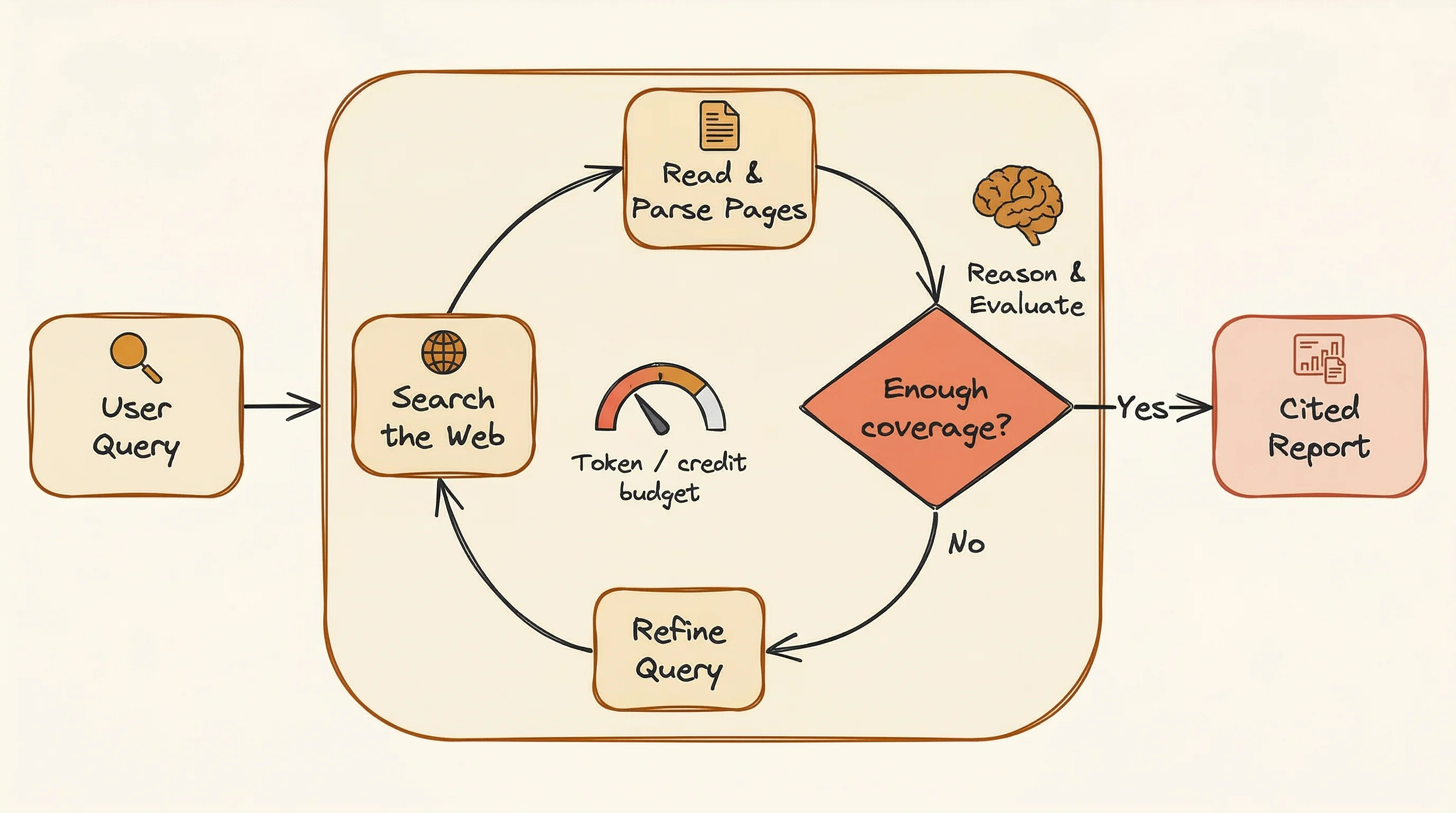
- Agentic deep research with search-reason loops that adapt in real time
That last stage is the break point.
The agent doesn't search once and reason once. It searches, reads, updates what it knows, and searches again with better questions. The loop keeps going until it has enough coverage or hits a budget limit.
How does deep research differ from RAG?
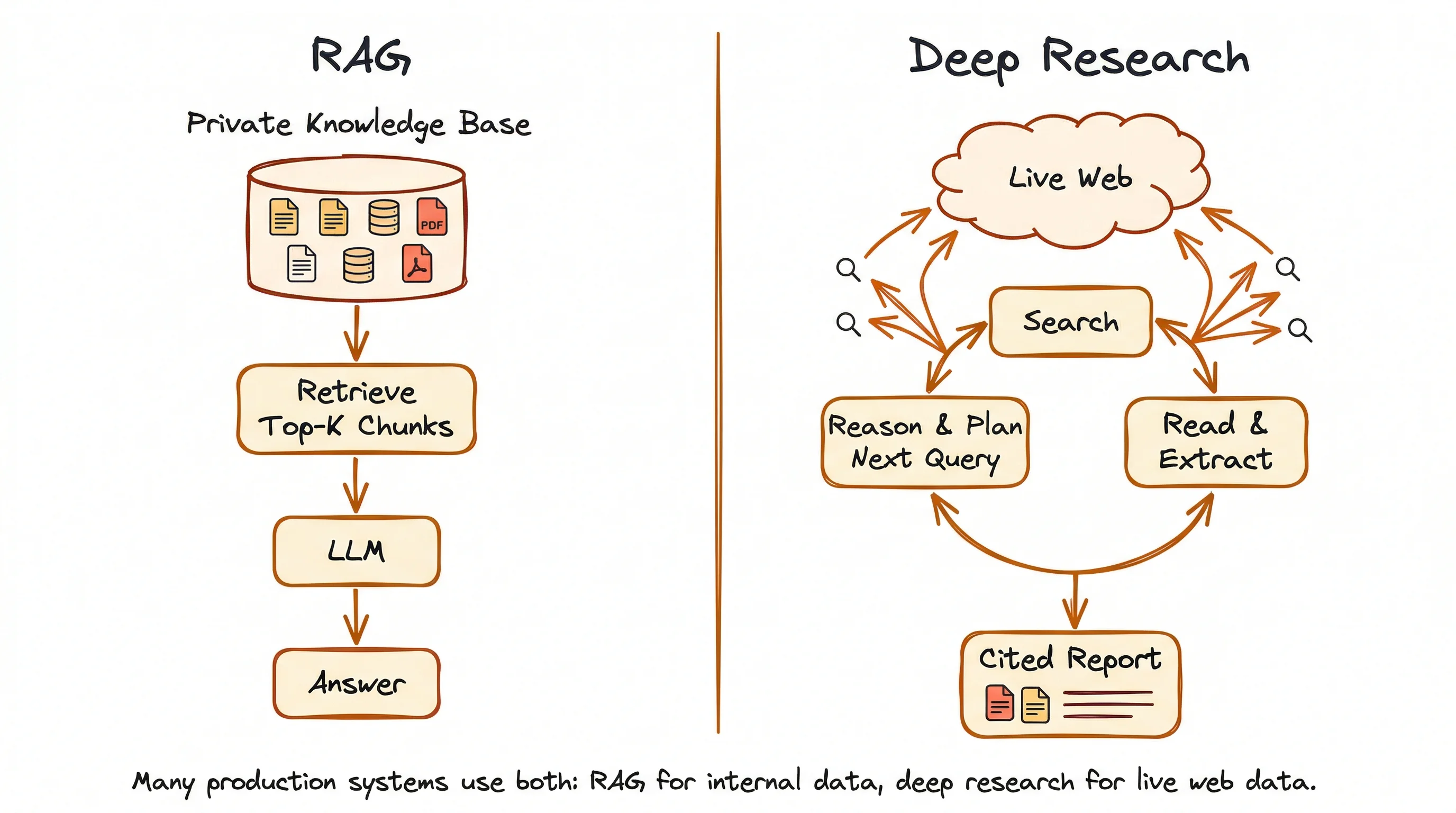
RAG (Retrieval-Augmented Generation) pulls answers from static, local sources:
- Internal documents
- Knowledge bases
- Databases
- Any pre-loaded collection of files
The system finds the most relevant pieces, then passes them to an LLM for a response. The two stages (find, then reason) run one after the other, and the source material doesn't change between queries.
Deep research pulls answers from the live web.
It weaves reasoning and retrieval into a loop where each search result changes what the agent looks for next. The reasoning isn't just something that happens after the search. It's what drives the search itself: deciding when to look, what to look for, and how to adjust the approach based on what's already been found.
The two aren't replacements for each other. RAG answers questions from private or internal knowledge. Deep research gets current answers from the open web when the information is spread across many sources. Many production systems use both: RAG for internal context, either web search or deep research for fresh external data.
For a structured breakdown of when each data layer applies, whether training weights, a retrieval index, or live web data for AI agents, see the dedicated guide.
For a step-by-step implementation of the search-scrape-inject pipeline that grounds LLM responses in live web data, the LLM grounding guide covers the full pipeline with working Python code.
| Dimension | Single-query search | RAG | Deep research |
|---|---|---|---|
| Query strategy | One query | One or few queries | Dozens of dynamically adapted queries |
| Knowledge source | Web index | Static knowledge base (local docs, databases) | Live web, adapts in real time |
| Reasoning | None (ranking only) | Post-retrieval only | Interleaved with retrieval |
| Multi-source synthesis | No | Partial | Yes, with conflict resolution |
| Self-direction | No | No | Yes, adjusts strategy based on results |
| Output | Links and snippets | Generated answer from internal data | Cited report from web sources |
| Latency | Milliseconds | Seconds | Minutes |
Why do agents need web search and deep research in 2026?
The web holds nearly everything humans know: the most complete, real-time record of our knowledge. Your agents should have access to this knowledge to be useful.
In his book Principles of Building AI Agents, Mastra CEO Sam Bhagwat puts it plainly
Agents are only as powerful as the tools you give them.
AI search engines for agents and deep research are the tools that determine how much of the world an agent can actually see. For a current comparison of the leading options (Firecrawl, Brave, Exa, Tavily, Perplexity Sonar, and Serper), see the guide to search tools for AI agents.
Two years ago, giving an agent web access was a side project. You'd wire up a custom scraper, hope the page layout didn't change, and call it done.
Today, both run in production with dedicated APIs, standard protocols, and entire companies built around them.
The speed of that shift is what makes 2026 different. The global AI agent market hit $7.84 billion in 2025 and is on track to reach $52.62 billion by 2030, growing at 46.3% per year. Gartner estimates that 40% of enterprise apps will include task-specific AI agents by end of 2026, up from less than 5% in 2025. Cloudflare's CEO projects that agent-generated web traffic will pass human traffic by 2027.
The infrastructure moved just as fast.
Microsoft shut down the Bing Search APIs in August 2025, pushing thousands of developers onto independent search providers. In the same window, the Model Context Protocol (MCP) went from draft spec to wide adoption, giving agents a standard way to connect to external tools. Adding search to an agent went from a custom integration project to a config line.
Then the products proved the pattern works.
Perplexity Comet, Browser Company Dia, and OpenAI's GPT Atlas all shipped within months of each other, putting agentic browsers in front of real users. ChatGPT Agent Mode launched in July 2025, and deep research products from OpenAI, Google, and Perplexity showed the approach works at consumer scale. On the open-source side, multiple deep research projects crossed thousands of GitHub stars within weeks of release.
Each of those steps removed a different reason not to add web access to agents. The question for builders stopped being "should we add web search?" and became "how fast can we ship it?"
What can you build with web search and deep research?
Definitions and market data only go so far. What matters is what production teams are building with this pattern.
The companies below all use Firecrawl as their web search and scraping layer. Their use cases fall into two mature categories, plus a third that's still forming.
AI knowledge bases and assistants
The most common pattern: give your agent a knowledge base that stays current with the web.
Retell AI builds voice agents that answer questions about each customer's docs, support pages, and product specs. That knowledge has to stay current as pages change, which meant their team ran Puppeteer scrapers for each customer and copied content by hand when scrapers broke. Every new customer meant another scraper to build and watch over.
After switching to Firecrawl, customers hand over a list of URLs and get an auto-syncing, LLM-ready knowledge base. No scraping team. No manual upkeep.
Botpress ran into the same problem from a different angle. Their engineering team managed HTML-to-Markdown conversion in-house, so every page layout change meant more work. CTO Michael Masson summed it up:
Unlike other solutions we evaluated, Firecrawl intelligently extracted relevant data right out of the box.
Now any Botpress user crawls a URL into their bot's knowledge base in seconds, no engineer needed.
Credal runs this at a different scale. Their enterprise AI agents process over 6 million URLs monthly through Firecrawl, feeding both real-time context pipelines and long-lived knowledge bases.
Dust (at $7.3M ARR with 70%+ weekly AI adoption) runs a self-hosted Firecrawl fork for web browsing in their enterprise agents. Guru, an enterprise knowledge management platform, has posted six straight months of growth by keeping internal knowledge searchable and current.
Every new customer onboarded means more web data coming in. These aren't one-time crawls. They're ongoing sync loops that grow with the business.
Research and discovery tools
Knowledge bases aren't the only pattern.
A second category uses web search and deep research to build products around original research, and all three companies below run Firecrawl as part of their retrieval stack.
SciSpace has 280 million indexed research papers and over a million regular users. Their Deep Review feature runs multi-step literature reviews that would take a human researcher days. The agent:
- Searches for relevant papers
- Reads and extracts key points
- Cross-checks claims across sources
- Combines results into a single review
you.com takes a different approach, running continuous search-and-scrape loops with no end point. The system pulls fresh data as long as the product runs, because the moment it stops, the answers go stale.
None of these have a "done" state. Each needs a steady stream of fresh web data, not a one-time import.
Scheduled and recurring use cases
A third set of patterns is earlier but growing:
- Competitive intelligence: scheduled scrapes that track competitor pricing, product launches, and feature changes on a cycle
- Lead enrichment: scraping company sites to fill CRM records with data sales teams use for outreach. See how to build an AI SDR that researches companies in real time for a full implementation or our AI sales automation tools for GTM roundup for the full modern stack
- Compliance monitoring: tracking regulatory updates, policy changes, and legal filings across government and industry sites
These don't run because someone asked a question. They run on a schedule. For agent-triggered patterns, where the agent only wakes up when a page actually changes, Firecrawl's web monitoring endpoint sends a signed webhook when meaningful changes occur, so the agent skips unchanged pages entirely.
How do you integrate web search and deep research into your agentic stack?
The use cases above share the same underlying architecture, and the pieces are already built.
The three-layer architecture
Most agentic search systems follow the same three-layer structure, whether they handle knowledge base loading or full deep research.
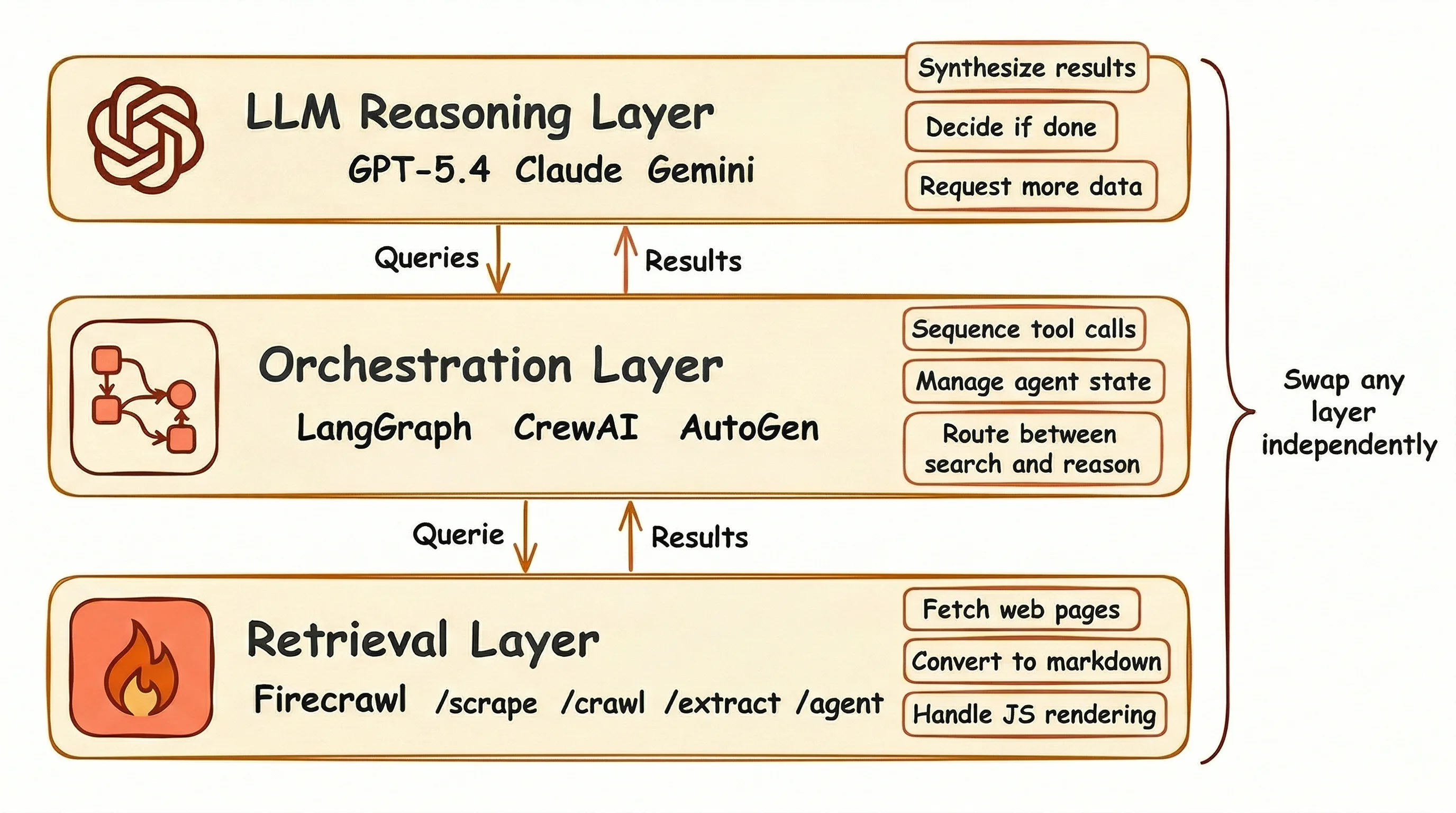
At the bottom sits the retrieval layer: search APIs, scrapers, crawlers, and content extractors that pull raw web data into a format your agent can read. Firecrawl lives here. If you're new to Firecrawl's API surface, Firecrawl 101 covers the core endpoints (scrape, search, crawl, and interact) with working examples for each.
The orchestration layer runs above it.
This covers agent frameworks like LangGraph, CrewAI, or AutoGen that decide when to search, what queries to run, and how to order tool calls across a research task. (See also Best AI Agent Frameworks of 2026 for the current comparison of LangChain, Microsoft Agent Framework, CrewAI, Agno, and more.)
At the top, the reasoning layer (your LLM) reads what the retrieval layer fetched, draws conclusions, and tells the orchestration layer whether the task is done or needs another search pass.
Each layer has a clean boundary.
You can swap your search provider without touching your agent framework, or switch LLMs without rebuilding your retrieval pipeline. Start with basic search this week, and move the retrieval layer to deep research next month without changing anything above it.
How does Firecrawl map to each pattern?
Firecrawl covers the retrieval layer with five endpoints, each matching a different use case from the previous section:
| Endpoint | What it does | Use case match |
|---|---|---|
/scrape | Single URL to LLM-ready markdown. JS rendering built in. 1 credit/page | Knowledge base loading |
/search | Web search + content extraction in one call. 2 credits/10 results | Grounding responses in fresh data |
/crawl | Recursive site discovery and scraping. Up to 10,000 pages | Full-site knowledge bases |
| Firecrawl Alexandria | Data tools from official APIs, licensed publishers, and Firecrawl's indexes, returned by /search with sources: ["web", "alexandria"]. Discovery free, execution priced per tool | Sources the open web does not hold |
Most teams start with /scrape for building a knowledge base and /search when the agent needs fresh data for its responses, and add alexandria to the search call when the answer sits with a data provider rather than on a page. Each step adds more to the retrieval layer without touching anything else in your stack.
In an independent benchmark by AIMultiple that evaluated 8 search APIs across 100 real-world AI/LLM queries, Firecrawl ranked second overall with an Agent Score of 14.58, statistically tied with the top performer. It posted the highest mean relevant score (4.30 out of 5) and performed best specifically on deep content retrieval tasks, the workload that matters most for research agents.
Firecrawl's free tier gives you 1,000 credits per month to start. The standard plan at $47/month covers 100,000 credits with 50 concurrent requests. The platform serves over 150,000 companies and 1.25M+ developers, including the companies listed above and more (Shopify, Zapier, and Canva), and has handled 5B+ requests to date, covering 96%+ of the web. 95% of requests return in 3.4 seconds or less.
What framework integrations are available?
Once you decide on the retrieval layer provider like Firecrawl, connecting it to an agent framework is mostly a setup step:
LangChain:FireCrawlLoaderfor Python and JavaScriptCrewAI: throughLangChain's tool compatibility layerLlamaIndex:FireCrawlReaderfor document loading- MCP server: works with Claude, Cursor, Windsurf, and VS Code
Camel AI, Dify, Flowise, Langflow, and OpenClaw also have integrations. Most agent frameworks with tool calling support connect with minimal setup.
Here's an end-to-end example: a LangGraph agent that uses Firecrawl's /search endpoint to answer questions from live web data.
First, set up the Firecrawl client and wrap its search as a LangChain tool:
from firecrawl import Firecrawl
from langchain_core.tools import tool

firecrawl = Firecrawl(api_key="your-firecrawl-api-key")

@tool
def web_search(query: str) -> str:
    """Search the web and return scraped content for the given query."""
    results = firecrawl.search(query, limit=4, scrape_options={"formats": ["markdown"]})
    output = []
    for doc in results.web:
        url = doc.url or ""
        title = doc.title or ""
        content = (doc.markdown or "").strip()[:1000]
        output.append(f"Source: {title} ({url})\n\n{content}")
    return "\n\n---\n\n".join(output)
Then create the agent and run it:
from langchain_openai import ChatOpenAI
from langgraph.prebuilt import create_react_agent

llm = ChatOpenAI(model="gpt-4o-mini")
agent = create_react_agent(llm, tools=[web_search])

response = agent.invoke({
    "messages": [{"role": "user", "content": "What are the main new features in Python 3.13?"}]
})
print(response["messages"][-1].content)
The agent calls web_search, gets back full page content from four sources, and answers the question:
Python 3.13 introduces several notable features:

1. Improved Interactive Interpreter (REPL) with block-level editing
2. Better Error Messages with clearer, more informative feedback
3. Free-Threaded Python: multiple threads without the GIL
4. Experimental JIT Compiler for compiling Python to machine code at runtime
5. Additional Typing Improvements and enhancements to type hints
6. Performance Improvements across the interpreter
The whole script is under 30 lines. Firecrawl handles the search, scraping, and markdown conversion. LangGraph handles the reasoning loop. The agent decides when to search and what to do with the results.
Using the Firecrawl CLI
If your agent runs in a terminal environment like Claude Code, Antigravity, or OpenCode, the Firecrawl CLI gives it direct web access without any SDK setup. Terminal-first agents have significant advantages over IDE-based workflows. For a breakdown of why CLIs are better for agents, see the full analysis.
Install it globally:
npm install -g firecrawl-cli
firecrawl login --api-key fc-YOUR_API_KEY
The same five retrieval patterns are available as subcommands. For web search with content extraction in one call:
firecrawl search "AI agent benchmarks 2026" --scrape --limit 5 -o results/For scraping a single page to markdown:
firecrawl scrape https://example.com/pricing --format markdown -o pricing.mdOutput writes to files rather than stdout, which keeps results out of the agent's context window. It covers the same retrieval layer as the API endpoints (scrape, search, crawl, and map) without a wrapper or SDK in between. For teams that need full infrastructure control and custom model providers, the open-source firecrawl-agent stack scaffolds a complete web research agent project in two commands, with skill playbooks that define how the agent searches, scrapes, and synthesizes across sources.
Firecrawl is the web data API to search, scrape, and interact with the web at scale
Search gets your agent to the right page. But a URL is not data.
The information your agent needs is buried inside that page: in a table, a pricing block, a product spec, a changelog entry. Getting it into a format your LLM can reason over requires extraction. That means converting the page to clean markdown, stripping navigation and ads, handling JavaScript-rendered content, and dealing with rate limits.
And more often than not, the data is not even visible on first load. It sits behind an interaction: a click to expand a section, a scroll to trigger lazy loading, a form submission, a pagination button. Static scraping misses all of it.
Different agents have different retrieval needs. Summary Agents need fast search with clean, readable content per result. Link-Based Research Agents need to follow chains of URLs, reading each page in full to build up context.
Firecrawl covers both:
-
Search: Web search and full page content extraction in a single API call. Filter by category, location, or time range. Results come back as clean markdown, ready for your LLM. The right tool for Summary Agents and Link-Based Research Agents.
-
Interact: Programmatic browser control for pages that require interaction before the data appears. Click buttons, fill forms, scroll, paginate, and navigate using plain English prompts or code. See the scraping for agents guide for a full walkthrough.
With alexandria in sources, the same search call also returns data tools from Firecrawl Alexandria, so a research agent can reach filings, economic series, or paper indexes it would otherwise need a separate integration for.
The catalogue includes Fiscal.ai, Benzinga, SEC EDGAR, FRED, the World Bank, and IMF Data for financial research, the Wayback Machine for how a page looked on a past date, Shopify Catalog for storefront data, Greenhouse job boards, GitHub, Hugging Face, PyPI, and Stack Exchange, with 80+ other providers behind them.
Each layer solves a different part of the same problem: getting the data your agent actually needs, not just what happens to be visible on the first page load.
Conclusion
Web search and deep research aren't two separate tools you bolt onto an agent. They're two ends of the same spectrum, both sitting on the same infrastructure: reliable search and clean content extraction.
The companies in this article aren't running experiments.
They're production teams who moved to this pattern because the old approach stopped working at scale. Firecrawl is what powers their retrieval layer: search, scraping, crawling, and browser interaction in one platform. The free tier is real, the integrations cover every major framework, and the starting point is a single API call.
If your agents still run on stale training data and pre-loaded documents, the gap between where they are and where they could be is one API layer.
Frequently Asked Questions
What is the difference between web search and deep research for AI agents?
Web search pulls results for a single query or a small set of queries. Deep research runs dozens of adaptive queries in a loop, where each result shapes the next search. The outputs differ too: search returns links or snippets, while deep research produces a full report with source citations.
How do AI agents use web search differently than humans?
A human types one query and scans the first page of results. An agent breaks a goal into sub-tasks, runs multiple queries, checks what came back, and re-searches based on what it finds. The process is repeated and tied to a specific task, not passive browsing.
How does deep research differ from RAG?
RAG pulls answers from static, local sources like internal documents and knowledge bases. Deep research pulls answers from the live web through adaptive search loops. They serve different purposes: RAG for private or internal knowledge, deep research for current information spread across the open web. Many systems use both.
What is an agentic search API?
An agentic search API returns full page content in structured formats (markdown, JSON), not just titles and snippets. It handles JavaScript rendering and content extraction so agents can read and reason over web pages without a separate scraping step.
What tools do AI agents use for web research?
AI-native search APIs like Firecrawl, Brave Search, Exa AI, and Tavily return structured content ready for LLM use. Traditional SERP APIs (SerpAPI, Serper) only return titles and 150-300 character snippets, which means you need a separate scraping layer to get full page content.
How many searches does a deep research agent run per task?
OpenAI Deep Research fetches 120-150 pages across roughly 28 minutes per session. Google Gemini Deep Research runs 80-160 searches per task at a cost of $2-5. Standard LLMs without deep research score below 10% on multi-step web retrieval benchmarks; deep research scores 51.5% on the same tests.
What is the three-layer architecture for agentic search?
The retrieval layer (search APIs, scrapers, content extractors) gets raw web data. The orchestration layer (agent frameworks like LangGraph or CrewAI) decides when and what to search. The reasoning layer (LLMs) turns results into answers or reports. Each layer has a clean boundary: swap your search provider without touching your agent logic, or change models without rebuilding your retrieval setup.
How does Firecrawl help with web search for AI agents?
Firecrawl's /search endpoint combines web search and full-page content extraction in a single API call. Instead of getting back titles and 150-character snippets, agents receive the full markdown content of each result page. This means no separate scraping step: one call returns structured, readable content the agent can reason over immediately.
What tools are available for deep research for AI agents?
The main options are OpenAI Deep Research (built into ChatGPT), Google Gemini Deep Research, and Perplexity's Deep Research product. For teams building their own stack, Firecrawl pairs with agent frameworks like LangGraph, CrewAI, and the OpenAI Agents SDK to give full control over the research loop, query strategy, and output format.
Can Firecrawl handle data that requires interaction to access?
Yes. Many pages only reveal their data after a user interaction: clicking to expand a section, scrolling to load more results, submitting a form, or navigating pagination. Firecrawl's Interact feature gives agents programmatic browser control to perform these actions before extracting content. Interactions can be described in plain English or written as Playwright code.
What kinds of search do different AI agents need?
Different agent types have different retrieval needs. Summary Agents need fast search with clean, readable content returned per result, with no raw HTML or noise. Link-Based Research Agents need to follow a chain of URLs, reading each page in full to build up context across sources. Firecrawl covers both: the /search endpoint handles summary and link-based retrieval, and the /scrape endpoint returns full page content for deep reading.
What is Firecrawl Alexandria, and where does it sit in the three-layer architecture?
Firecrawl Alexandria is Firecrawl's library of data providers, and it lives in the retrieval layer next to search and scrape. Add alexandria to the sources parameter of a search call and the response carries a tools array from official APIs such as SEC EDGAR and FRED, licensed publishers such as Fiscal.ai and Particle, and Firecrawl's Research, Developer, and Government indexes. The orchestration layer decides whether to read a page or run a tool, and the reasoning layer works with whichever came back.
When should a research agent use Firecrawl Alexandria instead of web search?
When the fact lives with the provider rather than on a page that quotes it, such as a filing, a standardized financial statement, an economic series, a paper abstract with its citation graph, or a podcast transcript. Discovery is free, so the agent can include alexandria in every search and read the tool descriptions before deciding. Execution is billed at the tool's listed price.