TL;DR
- Set up the Claude Agent SDK with a Firecrawl MCP server for web research
- Define Pydantic models for structured audit output
- Write an orchestrator agent that dispatches researcher subagents in parallel
- Each subagent scrapes PyPI and GitHub for package health data
- Produce a color-coded terminal report sorted by risk level using Rich
Claude Code is great until you need an agent that runs without you. It's a CLI tool, built for interactive sessions. If you want the same agent loop inside a Python script that runs on a schedule or plugs into a pipeline, you need the Claude Agent SDK.
This tutorial covers the SDK by building a dependency auditor. It reads a requirements.txt, sends parallel subagents to research each package on PyPI and GitHub through a Firecrawl MCP server, and produces a structured risk report. Every SDK feature we touch transfers to whatever you build after.
What is the Claude Agent SDK?
Anthropic released Claude Code as a CLI tool in February 2025. The Claude Agent SDK, which launched that June under the name "Claude Code SDK," extracts that agent loop into a library for Python and TypeScript. It was renamed in September 2025 after developers started building everything from legal assistants to SRE bots with it, not just coding agents.
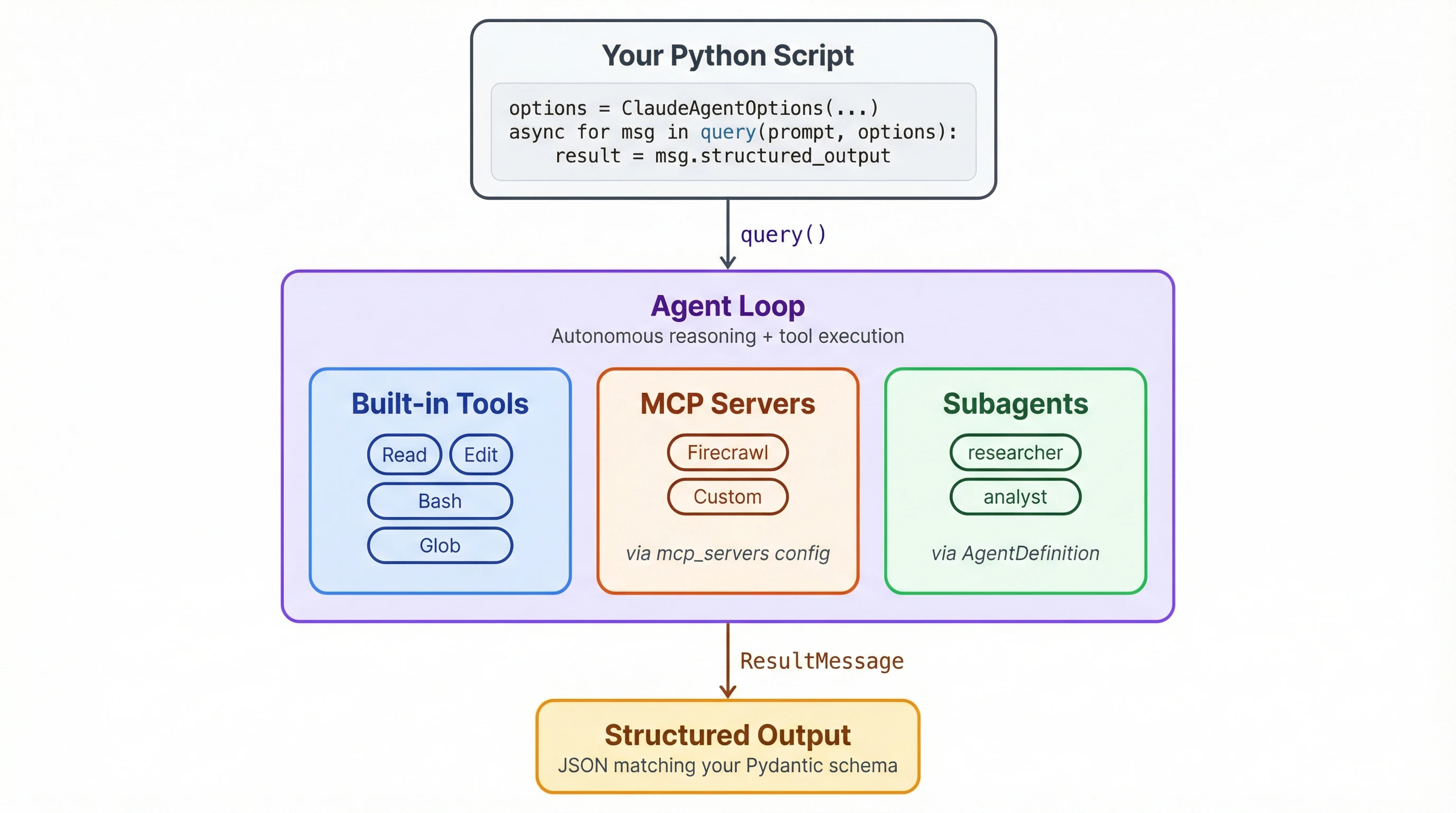
At a high level, the SDK lets your scripts do what Claude Code does. The agent handles file operations and shell commands on its own, can search the web for information, and coordinates subtasks by dispatching subagents. You configure what it's allowed to do, point it at external tools through MCP servers or CLI skills, and let it run. If you'd rather extend Claude Code interactively instead of building a standalone script, Claude Code automation through the skills system is built for that workflow.
Building a web scraping agent with the Claude Agent SDK
The fastest way to learn the SDK is to wire something up with it. Our project is a dependency auditor that reads a requirements.txt and produces a risk report for each package. I know tools like pip-audit already handle this, but the audit isn't the point. The SDK patterns are: subagents, structured output, MCP integration.
The full script is on GitHub. Open it in a separate tab for reference as we break it down section by section.
This tutorial uses the Firecrawl MCP server for web access. If you prefer the CLI approach, there's a CLI version of the script that uses the Firecrawl CLI as a skill instead. The case for CLIs over IDEs applies here too.
Prerequisites
You need Python 3.10+ and Node.js (the Firecrawl MCP server runs via npx). Install the dependencies:
pip install claude-agent-sdk pydantic rich python-dotenvIf you're going with the CLI version, you'll also need to install and register the Firecrawl CLI as a skill:
npm install -g firecrawl-cli
npx -y firecrawl-cli@latest init --all --browser
Create a .env file with your API keys:
FIRECRAWL_API_KEY=your-key-here
ANTHROPIC_API_KEY=your-key-here
The SDK reads ANTHROPIC_API_KEY from the environment automatically. We'll load FIRECRAWL_API_KEY with python-dotenv and pass it to the MCP server config.
The sections below cover the SDK-specific parts of the script. Utility functions for parsing requirements.txt, rendering the Rich table, and saving the markdown report are in the full script. You'll need all of them to run the auditor.
How do you get structured output from the agent?
Before the agent researches anything, we need to define what a report looks like. Two Pydantic models handle this:
from pydantic import BaseModel

class PackageReport(BaseModel):
    name: str
    pinned_version: str = ""
    latest_version: str = ""
    last_release: str = ""
    last_commit: str = ""
    status: str = ""        # active | slowing down | stale | abandoned
    risk: str = ""          # low | medium | high
    summary: str = ""
    replacement: str = ""

class AuditResult(BaseModel):
    packages: list[PackageReport]
Agents return text by default. Ask one to "audit flask" and you'll get a paragraph you have to parse yourself. output_format changes that. We'll pass AuditResult.model_json_schema() to the SDK, and the agent returns JSON matching this schema instead of prose. AuditResult wraps the full package list so everything arrives in one response, and we validate it into Python objects on our end.
The replacement field defaults to an empty string since it only applies to abandoned packages. Defaults matter because the agent will skip fields it considers irrelevant unless you give it a fallback value.
One thing to know is that the agent doesn't always return the exact enum values from your field comments. We got "outdated" instead of "stale" in early testing. If strict validation matters, add a Pydantic validator or post-process the results. This is a common issue with LLM-based data extraction in general, not just the SDK.
How do system prompts shape agent behavior?
The agent is general-purpose out of the box. The system prompt turns it into a specialist. Ours needs classification logic for rating packages and a coordination strategy for its subagents:
AUDITOR_PROMPT = """You are a Python dependency auditor coordinating a team of
researchers. You will receive a list of Python packages to audit.

For EACH package, dispatch a researcher subagent using the Task tool. Dispatch
ALL packages at once so they run in parallel.

After all researchers report back, classify each package:

- active: released within the last 6 months
- slowing down: last release 6-18 months ago
- stale: last release 18 months to 2 years ago
- abandoned: no release in 2+ years, or repo archived

Risk levels:
- low: active, no known issues
- medium: slowing down or minor concerns
- high: stale/abandoned, security risks, or no maintained alternative

If stale or abandoned, suggest a replacement. Keep summaries to one sentence.
Return the structured audit result with all packages."""
The "dispatch ALL packages at once" line matters. Without it, the agent researches packages sequentially, which takes much longer with eight dependencies.
Each subagent gets a shorter prompt focused purely on data gathering:
RESEARCHER_PROMPT = """You are a Python package researcher. For the package you're
given, use the Firecrawl tools to check its PyPI page for latest version and
release dates, and its GitHub repo for recent commits and activity. Return a
detailed text summary of your findings."""
The researcher prompt is deliberately narrow. It scrapes data and reports back without knowing the classification criteria or risk levels. That separation matters: the orchestrator sees results from all eight packages when it makes its assessment, while each researcher just focuses on getting accurate data for one.
How do you connect an MCP server?
MCP servers are how you give the agent tools beyond what's built in. The SDK has built-in web tools, but they return raw page content the agent has to sift through. Firecrawl strips pages down to clean markdown and handles JS rendering, so the researchers get usable data from PyPI and GitHub instead of HTML noise. It plugs in through the mcp_servers parameter:
import os

mcp_servers = {
    "firecrawl": {
        "command": "npx",
        "args": ["-y", "firecrawl-mcp"],
        "env": {"FIRECRAWL_API_KEY": os.environ["FIRECRAWL_API_KEY"]},
    }
}
The SDK starts the Firecrawl server process, discovers its available tools (search, scrape, crawl, and a few others), and registers them alongside the agent's built-in tools. This first run downloads firecrawl-mcp via npx. After that it uses the cached version.
You can add multiple MCP servers to the same dictionary. Each one registers its own tools, and the agent picks from the combined set.
How do subagents work?

AgentDefinition creates a named subagent the orchestrator can dispatch:
from claude_agent_sdk import AgentDefinition

agents = {
    "researcher": AgentDefinition(
        description="Researches a Python package's health using Firecrawl web tools",
        prompt=RESEARCHER_PROMPT,
    ),
}
Each subagent runs as a separate process with its own context window. That matters for two reasons:
- The orchestrator's context doesn't get filled with raw scraped HTML from eight different PyPI pages.
- Each researcher works independently so a slow scrape on one package doesn't block the others.
The description field is how the orchestrator decides when to use this subagent. With the "dispatch ALL at once" instruction from the system prompt, it fires off eight researchers simultaneously. Each one hits PyPI and GitHub for its assigned package, then reports back. The orchestrator collects all results before producing the final classification.
If you want a subagent to use a different model, AgentDefinition accepts a model parameter with short names: "sonnet", "opus", or "haiku". Full model IDs like "claude-sonnet-4-6" don't work here (they do work on ClaudeAgentOptions.model).
How does the query() loop run the agent?
All the pieces come together in ClaudeAgentOptions:
from claude_agent_sdk import ClaudeAgentOptions

devnull = open(os.devnull, "w")
options = ClaudeAgentOptions(
    model="claude-sonnet-4-6",
    system_prompt=AUDITOR_PROMPT,
    permission_mode="bypassPermissions",
    max_turns=25,
    debug_stderr=devnull,
    output_format={
        "type": "json_schema",
        "schema": AuditResult.model_json_schema(),
    },
    mcp_servers={...},  # Firecrawl config from above
    agents={...},       # researcher definition from above
)
permission_mode="bypassPermissions" is the one to pay attention to. By default, the SDK prompts for confirmation before every tool call. That makes sense when a human is watching, but a non-interactive script needs to run unattended. This flag lets the agent use any tool without asking.
max_turns=25 caps the number of agent loop iterations. Each tool call, subagent dispatch, or reasoning step counts as a turn. With eight subagents making multiple scrape calls each, 25 gives enough headroom without letting a confused agent spin forever.
output_format connects to the Pydantic schema from earlier. The agent's final response comes back as JSON matching AuditResult instead of free-form text. debug_stderr=devnull suppresses the SDK's internal subprocess logging, which would otherwise dump pages of MCP server startup messages into your terminal.
The query() call itself is an async generator:
import json
from claude_agent_sdk import ResultMessage, query

async def run(path: Path) -> list[PackageReport]:
    packages = parse_requirements(path)
    # ... options config from above ...

    pkg_list = "\n".join(
        f"- {name}=={version}" if version else f"- {name}"
        for name, version in packages
    )
    prompt = f"Audit these Python packages:\n\n{pkg_list}"
    result = None

    console = Console(stderr=True, force_terminal=True)

    with console.status("[bold blue]Auditing packages..."):
        async for message in query(prompt=prompt, options=options):
            if isinstance(message, ResultMessage) and message.structured_output:
                data = message.structured_output
                if isinstance(data, str):
                    data = json.loads(data)
                result = AuditResult.model_validate(data)

    return result.packages if result else []
query() yields messages as the agent works: tool calls, subagent dispatches, intermediate reasoning. Most of these you can ignore. The one that matters is ResultMessage at the end, which carries the structured output. We validate it into an AuditResult with model_validate and pull the package list out.
One gotcha that cost some debugging time: don't return inside the async for loop. It triggers a RuntimeError from the SDK's cancel scope handling. Collect the result in a variable and let the generator exhaust on its own.
Console(stderr=True, force_terminal=True) keeps the Rich spinner visible while the agent runs. The SDK captures stdout for its own communication, so any UI output you want the user to see needs to go through stderr.
Output
Here's the requirements.txt we're feeding the auditor, with a deliberate mix of healthy and suspect packages:
flask==3.1.1
pydantic==2.11.4
httpx==0.28.1
ruff==0.11.12
chardet==5.2.0
pylint==3.3.6
nose2==0.15.1
envoy==0.0.3
Run it:
python audit.py requirements.txtThe orchestrator dispatches eight researchers in parallel. After roughly a minute, you get a color-coded table sorted by risk. The script also saves a markdown report next to the input file.
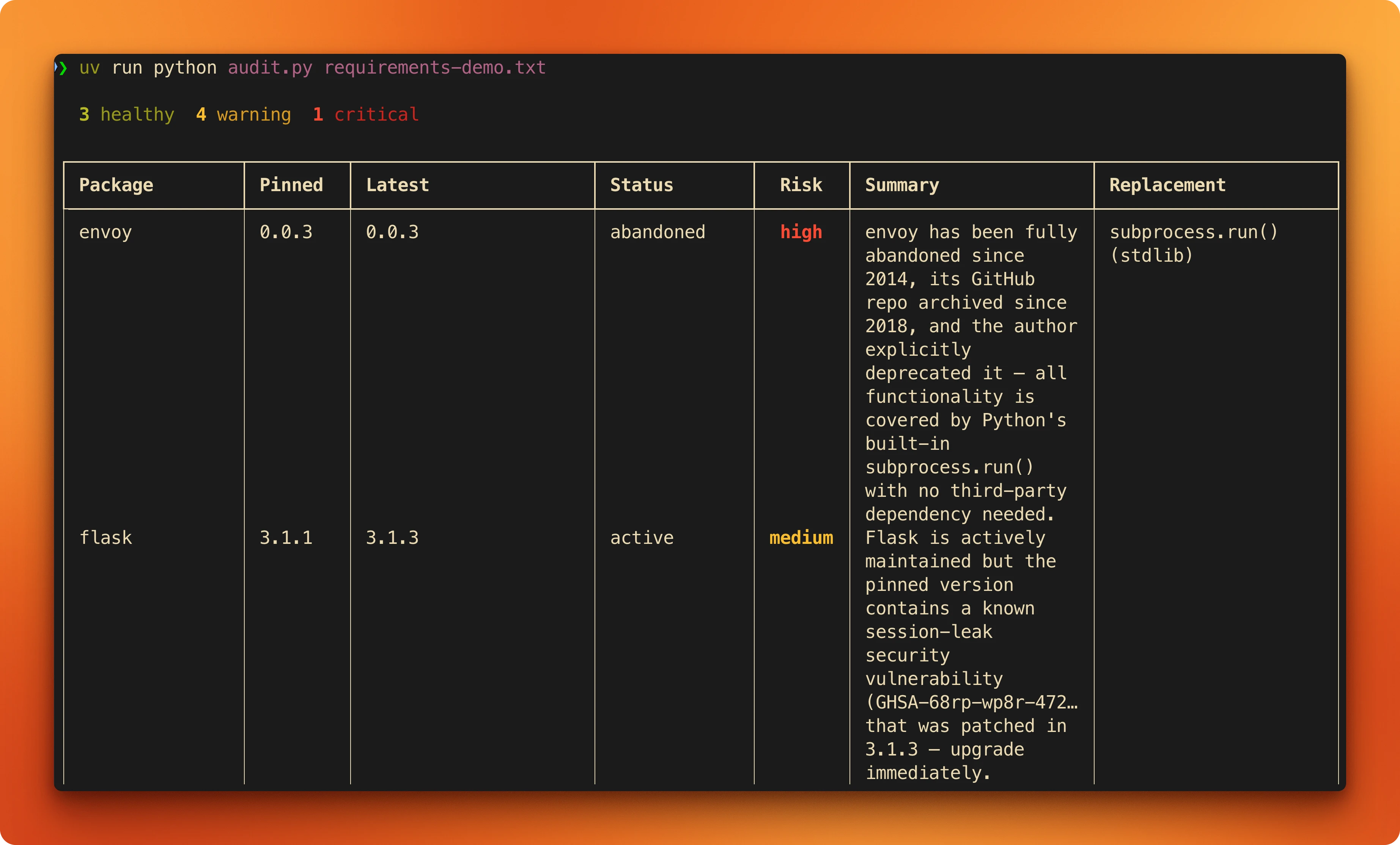
Here's what the output looks like for a high-risk package versus a healthy one:
envoy (archived since 2018):
| Field | Value |
|---|---|
| Pinned | 0.0.3 |
| Latest | 0.0.3 |
| Status | abandoned |
| Risk | high |
| Summary | Repository archived in 2018, last commit in 2014. |
| Replacement | subprocess (stdlib) or sh |
pydantic (active):
| Field | Value |
|---|---|
| Pinned | 2.11.4 |
| Latest | 2.12.5 |
| Status | active |
| Risk | low |
| Summary | Near-daily commits, 2.13.0 beta in progress. |
Conclusion
The SDK is still in alpha with weekly releases, so pin your version and check the changelog before upgrading. If something breaks, removing debug_stderr=devnull from the options config gives you full visibility into what the agent is doing. The full auditor script is 220 lines. Swap out the classification logic for whatever problem you're working on and the scaffolding stays the same.
To start building your own agent with web access, sign up for a free Firecrawl account and grab an API key.
Frequently Asked Questions
How much does running the auditor cost?
Each run dispatches eight subagents, each making 2-4 Firecrawl scrape calls and several Claude API calls. With Sonnet as the model, a full audit of eight packages costs roughly $0.50-1.50 depending on how much page content the agent processes. Firecrawl's free tier covers 1,000 credits per month. Using Haiku for the researcher subagents brings the Claude API cost down further.
Is the Claude Agent SDK production-ready?
Not yet. It's in alpha with weekly releases, and breaking changes happen. The core patterns (query, subagents, MCP, structured output) haven't changed much, but parameter names and error handling behavior can shift between versions. Pin your dependency version and test after upgrades. For production use, add retry logic around the `query()` call and validate structured output more strictly than this demo does.
Can I use the Firecrawl CLI instead of the MCP server?
Yes. Install the Firecrawl CLI with `npm install -g firecrawl-cli`, then swap `mcp_servers` for `setting_sources=["user"]` in `ClaudeAgentOptions`. The agent discovers the CLI as a skill and calls it through shell commands instead of the MCP protocol. The tradeoff: the CLI is simpler to set up but less self-contained since it lives outside your script. MCP keeps everything in one Python file with no global installs.
How do I debug what the agent is doing?
Remove the `debug_stderr=devnull` line from `ClaudeAgentOptions`. The SDK prints detailed logs to stderr showing every tool call, subagent dispatch, and model response. It's verbose but useful when the agent misbehaves. You can also iterate over all messages from `query()` (not just `ResultMessage`) to see intermediate steps programmatically.
What happens if a subagent fails?
The orchestrator handles it. If a researcher can't scrape a PyPI page (rate limiting, network error, page doesn't exist), it reports back what it found or didn't find, and the orchestrator classifies with whatever data is available. The fallback in our script creates a `PackageReport` with status "unknown" and risk "medium" if the entire `query()` call returns nothing.
Can I use different models for the orchestrator and subagents?
Yes. Set the orchestrator model on `ClaudeAgentOptions.model` (accepts full IDs like `"claude-sonnet-4-6"`). Set subagent models on `AgentDefinition.model` (only short names: `"sonnet"`, `"opus"`, `"haiku"`). A common setup is Opus for the orchestrator (better at reasoning across multiple results) and Haiku for researchers (cheaper, and data gathering doesn't need the strongest model).
Does the SDK work with TypeScript?
Yes. The Claude Agent SDK ships Python and TypeScript versions with nearly identical APIs. `query()`, `ClaudeAgentOptions`, `AgentDefinition`, and `ResultMessage` all have TypeScript equivalents. The Firecrawl CLI integration works the same way since skills are language-agnostic. Porting this tutorial to TypeScript would mostly be syntax changes.