TLDR
- Playwright gives you a full browser you control with code. You write the selectors (patterns that target HTML elements), manage the servers, and handle failures yourself. The library is free, but infrastructure and selector maintenance add up.
- Firecrawl is the web data API to search, scrape, and interact with the web at scale. You send a URL and a data model, and get back organized JSON. One credit per page, free tier starts at 1,000 per month.
- We ran both on the same websites. Half the Playwright code was defensive checks for missing elements. The Firecrawl version defined a schema and wrote a one-line prompt.
- Use Playwright when you need login flows or network-level control. Use Firecrawl when you want the data without running your own browser fleet.
The Playwright vs. Firecrawl for web scraping question comes down to how much plumbing you write yourself: Playwright is a browser automation library, while Firecrawl is a web data API that handles search, scraping, and interaction for AI agents.
Playwright hands you a real browser and expects you to do the rest. You have to find the right CSS selectors, write wait logic for dynamic content, catch timeout errors, and keep the whole thing running on your servers. Firecrawl takes a URL and gives back structured data. Rendering and retries all happen on their end.
Below, we run both tools on the same pages with code you can copy. Then we compare what each one costs you in code, infrastructure, and ongoing maintenance.
What is Playwright?
Playwright is a browser automation library built in 2020 by a team at Microsoft, several of whom had previously worked on Puppeteer (Google's earlier browser automation library) at Google's Chrome DevTools team. For a direct comparison of how these two tools stack up for web scraping, see our Puppeteer vs Selenium guide.
You control a real Chromium, Firefox, or WebKit browser through Python code. Playwright talks to the browser over the Chrome DevTools Protocol, so every page loads exactly as it would for a real user, JavaScript and all. That's what separates it from HTTP-only tools like requests or BeautifulSoup, which only see the raw HTML before any JavaScript runs. SPAs, lazy-loaded content, login-gated pages: they all render correctly because you're running an actual browser.
For scraping, three of its features matter most:
page.route()intercepts any network request the browser makes. It blocks images and fonts to cut down on bandwidth.page.evaluate()runs arbitrary JavaScript inside the page, which is how you grab data that lives in JS variables rather than in the DOM.- Auto-waiting pauses until an element is visible, stable, and ready before acting on it. No more
time.sleep(3)and hoping for the best.
The full API is at Playwright's Python docs. Apache 2.0, free to use.
What is Firecrawl?
Firecrawl is the web data API to search, scrape, and interact with the web at scale, handling the rendering and retries so you don't have to. The code is open source on GitHub, and you can self-host it if you prefer.
A few surfaces cover most scraping patterns:
/scrapefor single pages, with optional pre-extraction actions like clicking a button or filling a search box/crawlfor following links across a site, up to 10,000 pages, with built-in URL discovery and retries/agentfor pulling structured data using a plain-English prompt and optional schema. It searches the web, navigates to the right pages, and returns organized results — no URL required
Firecrawl also includes Search for discovery, Map for site structure, Parse for documents, and Interact when a page needs clicks, scrolling, or login steps before extraction.
Pricing is credit-based: one credit per page, free tier of 1,000 credits per month. SDKs exist for Python, JavaScript/TypeScript, Java, and Elixir.
For the Python examples below, install the Firecrawl SDK with:
pip install firecrawlHow does the code compare for a single page?
We'll scrape GitHub Trending (https://github.com/trending) and pull repo names, descriptions, languages, and star counts. We use GitHub Trending as a stable public page for both code samples. During testing, Playwright in headless mode sometimes failed on other targets (for example an IMDb request returned 403 before the page loaded), so we standardized on GitHub for the walkthrough below.
The Playwright snippets assume you have installed the library and a browser binary:
pip install playwright
playwright install chromium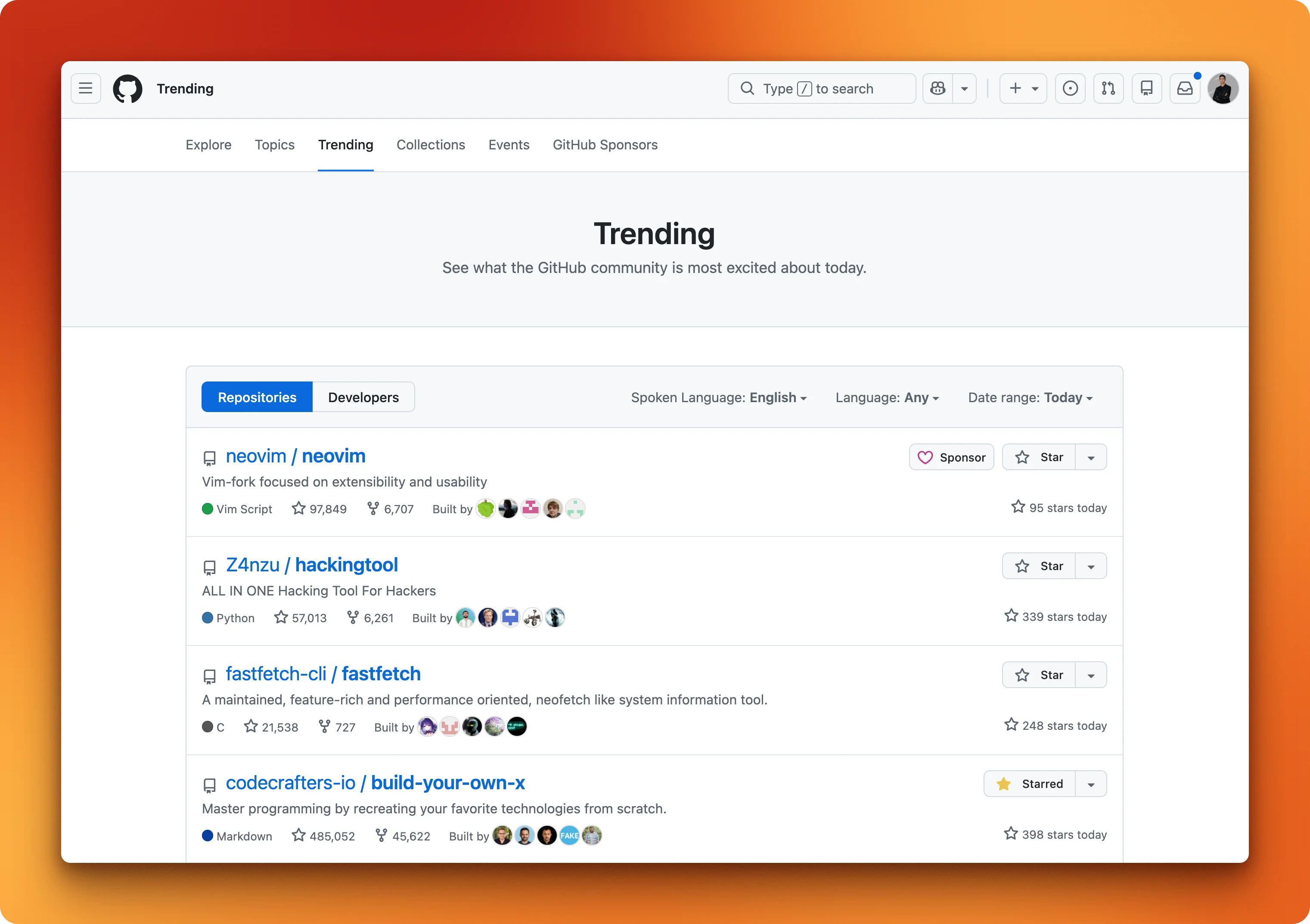
Playwright: Scraping GitHub Trending
Before writing any Playwright code, you need to open the page in a browser and inspect the HTML to figure out which CSS selectors target the data you want.
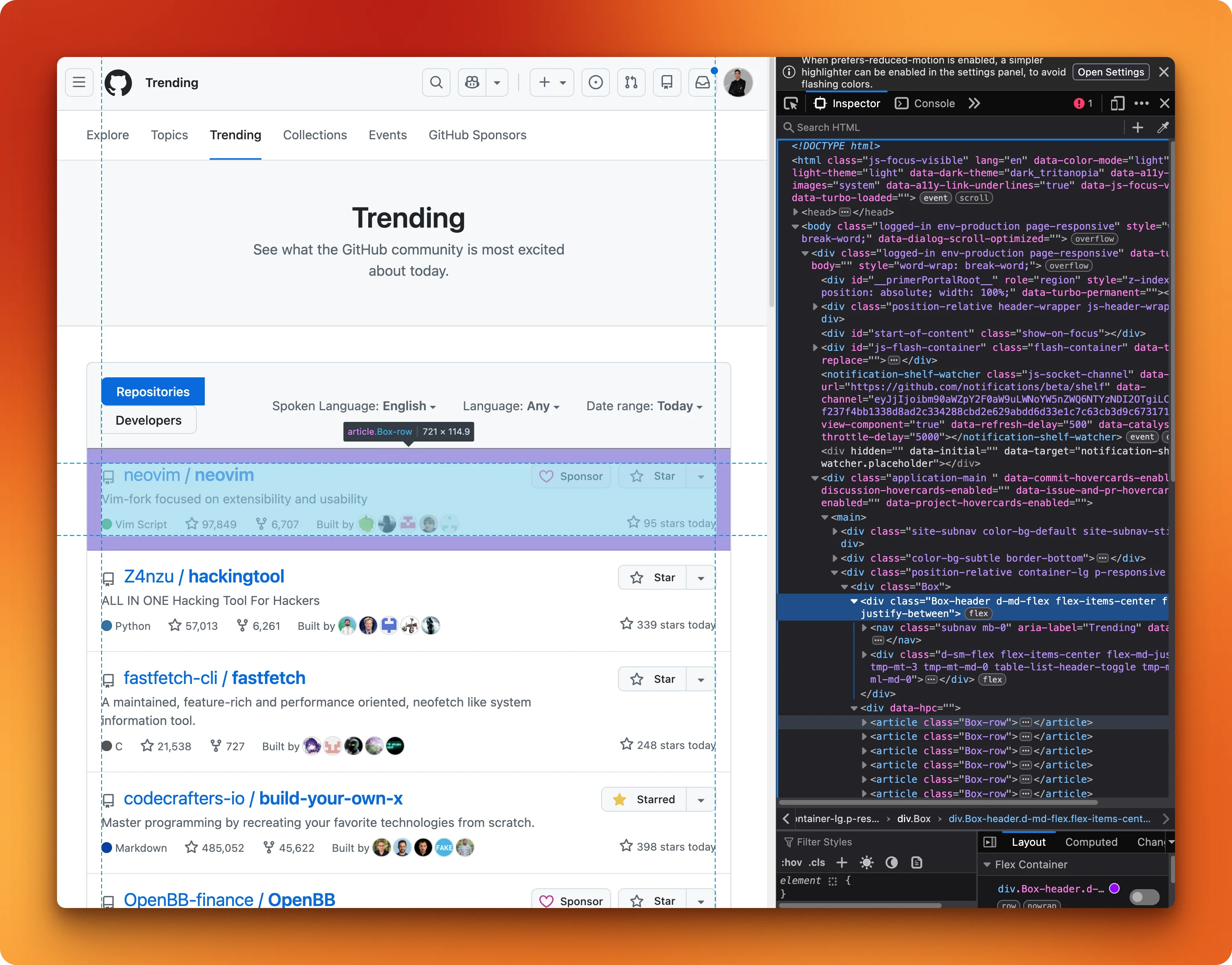
For GitHub Trending, the selectors map out like this:
article.Box-rowtargets each repo cardh2 ainside each card gives the repo name[itemprop="programmingLanguage"]gives the language
With those selectors, you launch a headless browser (runs without a visible window) and load the page:
from playwright.sync_api import sync_playwright
import json

with sync_playwright() as p:
    browser = p.chromium.launch(headless=True)
    page = browser.new_page()
    page.goto("https://github.com/trending", timeout=20000)
    page.wait_for_load_state("networkidle", timeout=15000)
networkidle waits until the browser has fewer than 2 pending requests for 500ms. Then you loop through the repo cards and pull out each field:
    repos = page.locator("article.Box-row").all()
    results = []
    for repo in repos[:5]:
        name = repo.locator("h2 a").first.text_content(timeout=3000)
        name = name.strip().replace("\n", "").replace("  ", "")
        desc_el = repo.locator("p")
        desc = desc_el.first.text_content(timeout=3000).strip() if desc_el.count() > 0 else ""
        lang_el = repo.locator('[itemprop="programmingLanguage"]')
        lang = lang_el.first.text_content(timeout=3000).strip() if lang_el.count() > 0 else ""
        results.append({"name": name, "description": desc, "language": lang})
Notice the if desc_el.count() > 0 guards. Some repos don't have a description or a language tag, and without those checks the script crashes with a timeout error instead of returning empty strings. Half the logic here is handling things that might not exist.
Print the results and close the browser:
    print(json.dumps(results, indent=2))
    browser.close()
{'repos': [
{'name': 'microsoft/VibeVoice', 'description': 'Open-Source Frontier Voice AI', 'language': 'Python', 'stars_today': '3862'},
{'name': 'luongnv89/claude-howto', 'description': 'A visual, example-driven guide to Claude Code...', 'language': 'Python', 'stars_today': '2390'},
...
]}The output is clean JSON. But the fragile part is that every selector in this script is hardcoded to GitHub's current HTML structure. If they redesign the trending page, the script won't throw an error. It'll just quietly return empty results.
Firecrawl: Extracting GitHub Trending
The /agent endpoint skips the HTML inspection entirely. You define a Pydantic model describing the data you want, and Firecrawl's AI reads the rendered page and maps it to your schema:
from firecrawl import Firecrawl
from pydantic import BaseModel, Field
from typing import List, Optional

class TrendingRepo(BaseModel):
    name: str = Field(description="Repository name in owner/repo format")
    description: str = Field(description="Short description")
    language: Optional[str] = Field(None, description="Primary programming language")
    stars_today: Optional[str] = Field(None, description="Stars gained today")

class TrendingRepos(BaseModel):
    repos: List[TrendingRepo]
Then pass the schema to /agent with a plain-English prompt:
app = Firecrawl(api_key="YOUR_API_KEY")
result = app.agent(
    prompt="Extract the top 5 trending repositories from https://github.com/trending",
    schema=TrendingRepos.model_json_schema()
)

print(result.data)
{'repos': [
{'name': 'microsoft/VibeVoice', 'description': 'Open-Source Frontier Voice AI', 'language': 'Python', 'stars_today': '3862'},
{'name': 'luongnv89/claude-howto', 'description': 'A visual, example-driven guide to Claude Code...', 'language': 'Python', 'stars_today': '2390'},
...
]}Same data, no selectors. If GitHub redesigns the page tomorrow, the Playwright script breaks. This code keeps working because it reads rendered text, not HTML structure.
The tradeoff: your data goes through Firecrawl's servers instead of staying local. For more on /scrape and its output formats, see the Firecrawl scrape endpoint tutorial.
Try it yourself. No API key needed to start. You can call /agent, /crawl, and /scrape on your own targets right away. Add a key for higher rate limits, and the free tier gives you 1,000 credits per month. Get your API key here.
How does crawling multiple pages compare?
Scraping one page is straightforward. Crawling a site means you're also handling URL discovery, deduplication, error recovery, and parallelism. Even a 5-page crawl of the Firecrawl blog (https://www.firecrawl.dev/blog) shows how much more work Playwright takes.
Playwright: Two-phase crawling
Playwright crawling is always two phases: find URLs first, then visit each one.
The selector a[href*="/blog/"] grabs every link containing "/blog/" in its URL. We store them in a set() for deduplication:
from playwright.sync_api import sync_playwright

with sync_playwright() as p:
    browser = p.chromium.launch(headless=True)
    page = browser.new_page()

    page.goto(
        "https://www.firecrawl.dev/blog",
        timeout=30000,
        wait_until="domcontentloaded"
    )
    links = page.locator('a[href*="/blog/"]').all()

    blog_urls = set()
    for link in links:
        href = link.get_attribute("href")
        if href and "/blog/" in href and href not in ("/blog/", "/blog"):
            full_url = f"https://www.firecrawl.dev{href}" if href.startswith("/") else href
            blog_urls.add(full_url)
Then visit each URL and pull the content:
    results = []
    for url in list(blog_urls)[:5]:
        page.goto(url, timeout=30000, wait_until="domcontentloaded")
        title = page.title()
        article = page.locator("article")
        content = article.first.text_content(timeout=5000) if article.count() > 0 else ""
        results.append({"url": url, "title": title, "content_length": len(content)})

    for r in results:
        print(f"{r['title'][:60]} | {r['content_length']} chars")

    browser.close()
This works, but each page waits for the previous one to finish. No parallelism, no retries, no backoff. Adding those would double the code.
Firecrawl: one API call
The /crawl endpoint handles URL discovery (from sitemaps and page links), parallel requests, and retries internally:
from firecrawl import Firecrawl
from firecrawl.types import ScrapeOptions

app = Firecrawl(api_key="YOUR_API_KEY")
result = app.crawl(
    "https://www.firecrawl.dev/blog",
    limit=5,
    scrape_options=ScrapeOptions(formats=["markdown"]),
    poll_interval=5
)
Each result comes back as a Document with the page content as markdown plus metadata (title, source URL, status code):
for doc in result.data:
    title = doc.metadata.title
    length = len(doc.markdown) if doc.markdown else 0
    print(f"{title[:60]} | {length} chars")
AI Agent Sandbox: How to Safely Run Autonomous Agents in 202 | 32750 chars
Best Chunking Strategies for RAG (and LLMs) in 2026 | 69174 chars
How to Build a Client Relationship Tree Visualization Tool i | 27268 chars
...Going from 5 pages to 100 means changing limit=5 to limit=100. The code stays the same.
Feature comparison: Playwright vs Firecrawl
Code aside, here's how they compare on everything else. For a broader look at how Playwright stacks up against other browser automation tools, Firecrawl's comparison of the top 9 tools covers the full picture.
| Feature | Playwright | Firecrawl |
|---|---|---|
| Setup | Install library + browser binary (~300 MB) | API key, no local dependencies |
| JS rendering | Full browser engine, you write wait logic | Automatic, handled on Firecrawl's servers |
| Output format | Raw HTML, you parse and structure it | Clean markdown, HTML, or organized JSON |
| Scaling | You manage browser instances (512 MB+ RAM recommended per instance in production | Managed infrastructure, set concurrency via plan |
| Cost model | Free library + your server costs | Credit-based API pricing (free tier: 1,000 credits/month) |
| Maintenance | Selectors break on site changes, browser updates | API is versioned, no selector maintenance |
| Multi-page crawling | Manual: find links, loop, handle errors | One API call with automatic URL discovery |
| Language support | Python, JS/TS, Java, .NET | Python, JS/TS, Java, Elixir, Go, Rust SDKs |
| Open source | Yes (Apache 2.0) | Yes (GitHub), hosted and self-hosted options |
When you need more than extraction
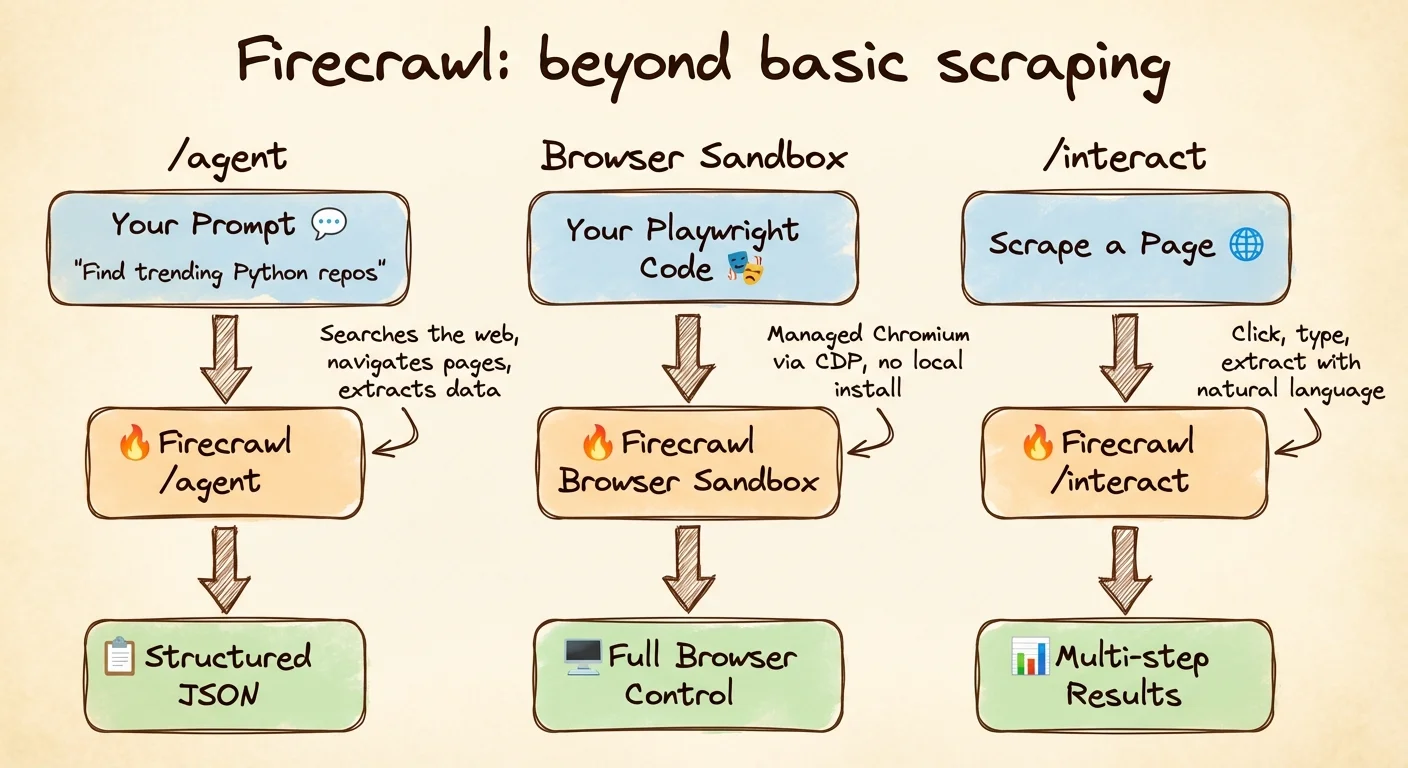
Playwright stands out in that table for full browser interaction. Firecrawl splits that work across two kinds of surface. Scrape and crawl take interaction as configuration: you pass action parameters and Firecrawl runs them for you. Interact and Browser are session-based APIs: you open a live session, either on a page you already scraped or on a fresh URL, then drive clicks, form fills, navigation and pagination with a prompt or with your own code. If you're evaluating dynamic scraping tools more broadly, that split is the thing to check for.
Three Firecrawl features cover that work.
Prompt-driven extraction without a URL
/agent doesn't need a URL at all. Describe what you want and let it search the web, find the right pages, and return results. It runs on the spark-2 model by default. Use max_credits to cap spending. You get 5 free runs per day on any paid plan.
from firecrawl import Firecrawl

app = Firecrawl(api_key="YOUR_API_KEY")
result = app.agent(
    prompt="Find the top 3 trending Python repositories on GitHub today",
    max_credits=100
)
print(result.data)
{'top_trending_python_repositories': [
{'name': 'microsoft/VibeVoice', 'description': 'Open-Source Frontier Voice AI'},
{'name': 'luongnv89/claude-howto', 'description': 'A visual, example-driven guide to Claude Code...'},
{'name': 'hacksider/Deep-Live-Cam', 'description': 'real time face swap and one-click video deepfake...'}
]}The Playwright equivalent is the script from earlier, plus filtering logic, and it only works on GitHub. The /agent call works across sites without site-specific code, though results depend on how well the page content matches your prompt.
Managed browsers for CI and serverless
Installing Chromium in CI pipelines, serverless functions, or lightweight containers ranges from painful to impossible. Browser Sandbox gives you a managed Chromium instance on Firecrawl's servers. You connect via a CDP WebSocket URL using the same Playwright API you'd use locally, at 2 credits per minute:
from firecrawl import Firecrawl
from playwright.sync_api import sync_playwright

app = Firecrawl(api_key="YOUR_API_KEY")
session = app.browser(ttl=120)

with sync_playwright() as p:
    browser = p.chromium.connect_over_cdp(session.cdp_url)
    page = browser.contexts[0].pages[0]
    page.goto("https://example.com")
    print(page.title())
    browser.close()

app.delete_browser(session.id)
Same Playwright code, just running on someone else's machine.
Scrape then interact with the page
The /interact endpoint handles situations where you need to click through pagination, expand collapsed sections, or fill search filters before the data you want is visible. The browser automation API guide covers prompt mode, code mode, and named profiles in depth. Instead of writing selectors for each interaction, you describe what you want in plain English:
from firecrawl import Firecrawl

app = Firecrawl(api_key="YOUR_API_KEY")

# Step 1: Scrape the page (this starts a browser session and returns a session ID)
result = app.scrape("https://www.amazon.com", formats=["markdown"])
scrape_id = result.metadata.scrape_id

# Step 2: Interact with the live page using natural language
response = app.interact(scrape_id, prompt="Search for iPhone 16 Pro Max")
search_results = response.output

# Step 3: Interact again to drill into a result
response = app.interact(scrape_id, prompt="Click on the second search result and extract the product title, price, and rating")
product_data = response.output

print(product_data)
Multiple interact calls on the same scrape_id share one browser session, so page state persists from step to step.
When you are finished, stop_interaction tears that session down (see the interact docs for details); after that, start a new scrape if you need another flow.
app.stop_interaction(scrape_id)/interact also supports saved browser sessions that remember your cookies and login state. That means workflows that need to stay logged in between requests don't have to re-authenticate each time.
Which tool should you pick?
For most scraping work, start with Firecrawl. If you're pulling data from pages and feeding it into a RAG pipeline or dataset, /agent and /crawl handle the rendering, retries, and output formatting. You get markdown or typed JSON without managing any infrastructure. See Firecrawl pricing for credit costs when planning a project.
Playwright earns its place when you need things no API can provide: multi-step login flows, network interception via page.route(), or extraction logic that depends on live page state. It also makes sense if you already run Playwright for test automation and want to reuse that setup, or if your deployment can't depend on external services at all.
Conclusion
Start with Firecrawl. When you hit a wall that /interact or Browser Sandbox can't solve, bring in Playwright for that specific part. Most projects never need to.
If you're building AI agents, Firecrawl is the easiest way to give them web access. A single API covers search, interaction, and extraction — no browser management required. Install the CLI to connect your agent in minutes:
npx -y firecrawl-cli@latest init --all --browserReady to try Firecrawl? No API key needed to start. Add one for higher rate limits, and the free tier includes 1,000 credits per month. Sign up and get your API key to start scraping in minutes.
Frequently Asked Questions
Is Playwright free to use?
Yes. Playwright is open source under the Apache 2.0 license. The library costs nothing, but you pay for infrastructure to run browser instances at scale.
How much does Firecrawl cost?
Firecrawl has a free tier with 1,000 credits per month. Paid plans start at $16/month for 5,000 credits. One credit equals one page scrape.
Can Firecrawl handle JavaScript-rendered pages?
Yes. Firecrawl renders JavaScript server-side by default on every scrape and crawl request with no configuration needed.
Can I use Firecrawl with Python?
Yes. Install with pip install firecrawl and initialize with your API key. SDKs also exist for JavaScript/TypeScript, Java, Elixir, Go, and Rust.
What output formats does Firecrawl support?
Markdown, HTML, raw HTML, structured JSON via schema or prompt, screenshots, links, and page metadata.