TL;DR
- Get structured web data into your app through API calls instead of building scraping pipelines
- Four patterns: search + scrape in one call, structured extraction from known URLs, multi-page crawling, and agent-driven gathering
- Code examples use Firecrawl's Python SDK and run as-is
- Best practices for picking the right pattern and managing costs
Your product manager wants a feature that pulls live data from the web. Could be a research assistant, competitor monitoring, or an "import from URL" button. You start building and quickly realize the difference between "search the web" and "get structured data my LLM can use" is bigger than you thought. By the time you've wired up a search API, a scraper, and some parsing logic, you've built a fragile pipeline before writing any product code.
There are APIs now that cover most of that stack, and this tutorial walks through four patterns using Firecrawl's Python SDK.
What is AI-powered search / data retrieval?
AI-powered data retrieval uses language models behind API calls to search the web, read pages, and return structured data. You describe what you need or point to a URL, and the API sends back markdown or typed JSON instead of raw HTML. Getting clean structured fields from web extraction for AI search and RAG is the core value here — turning messy web pages into typed records your pipeline can consume directly.
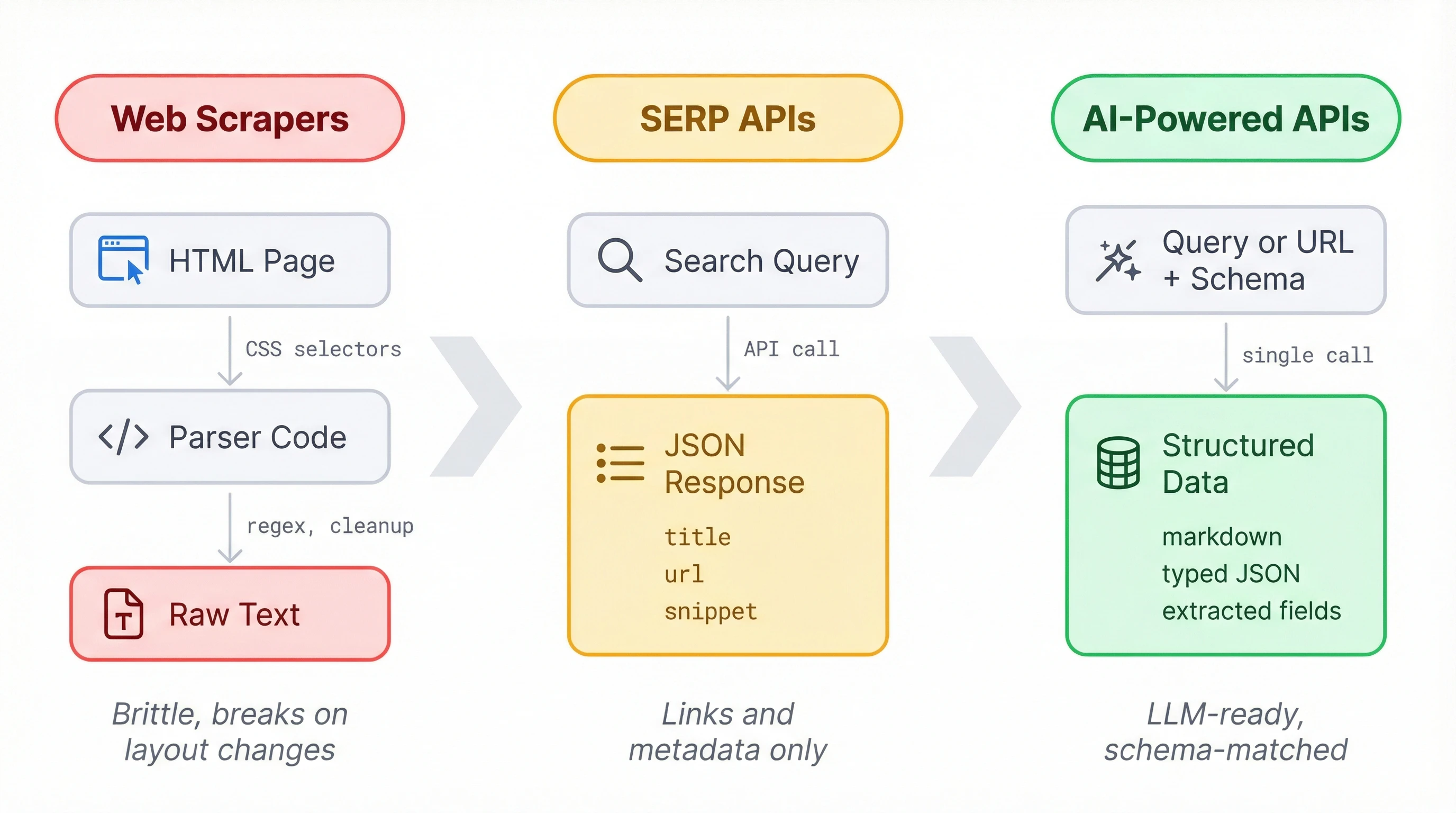
For years, getting web data meant writing scrapers. You'd dig through a page's HTML to find and grab the elements you need, then figure out how to clean the output into something usable. It worked when sites held still, but one layout change could break a pipeline overnight. At scale, scraper maintenance became its own project.
SERP APIs made the search part easier. Services like SerpAPI or Serper return structured JSON for any query: titles, URLs, short snippets. But that's still metadata about pages, not the actual content your LLM needs.
A newer set of APIs delivers the content too. You send a query or point to a URL, and you get back markdown, JSON, or structured data matching a schema you define. All the fetching and formatting happens on the API side, which is what makes these APIs a good fit for products that need web data without the overhead of maintaining a scraping pipeline.
AI-powered search trends in 2026
Microsoft retired the Bing Search APIs in August 2025. If you were building on Bing, you got pushed toward Azure AI Agents and 'Grounding with Bing Search,' which is both pricier and more locked-in. A lot of developers moved to independent providers instead, and that accelerated the shift toward AI-native search APIs.
Around the same time, RAG stopped being experimental. By early 2026, most AI products that need current information run some form of retrieval-augmented generation, which means more developers need APIs that return content they can feed to a model, not just links. SerpAPI, Serper, and Brave stop at search metadata. If you're using Firecrawl, Exa, or Tavily, you get the page content in the same call and skip the scraping step.
The newer development is agent-driven gathering. Instead of spelling out exactly where to look, you describe what you need in a prompt and the API figures out the sourcing. That makes things like competitive analysis, lead enrichment, and market monitoring a lot more practical to automate.
The shift toward RAG means that we need a strong content layer. Links and snippets aren't enough when your model needs to read the page. Firecrawl's four endpoints — search, scrape, crawl, and agent — are all built around returning content your LLM can use, not just pointers to it
How to add AI-powered search to your product
Firecrawl's Python SDK covers these retrieval patterns through four endpoints:
/searchfinds pages and optionally scrapes their full content in one call/scrapeconverts a known URL to markdown or structured JSON using a schema/crawldoes the same across multiple linked pages on a site/agenttakes a prompt, finds its own sources, and returns structured data
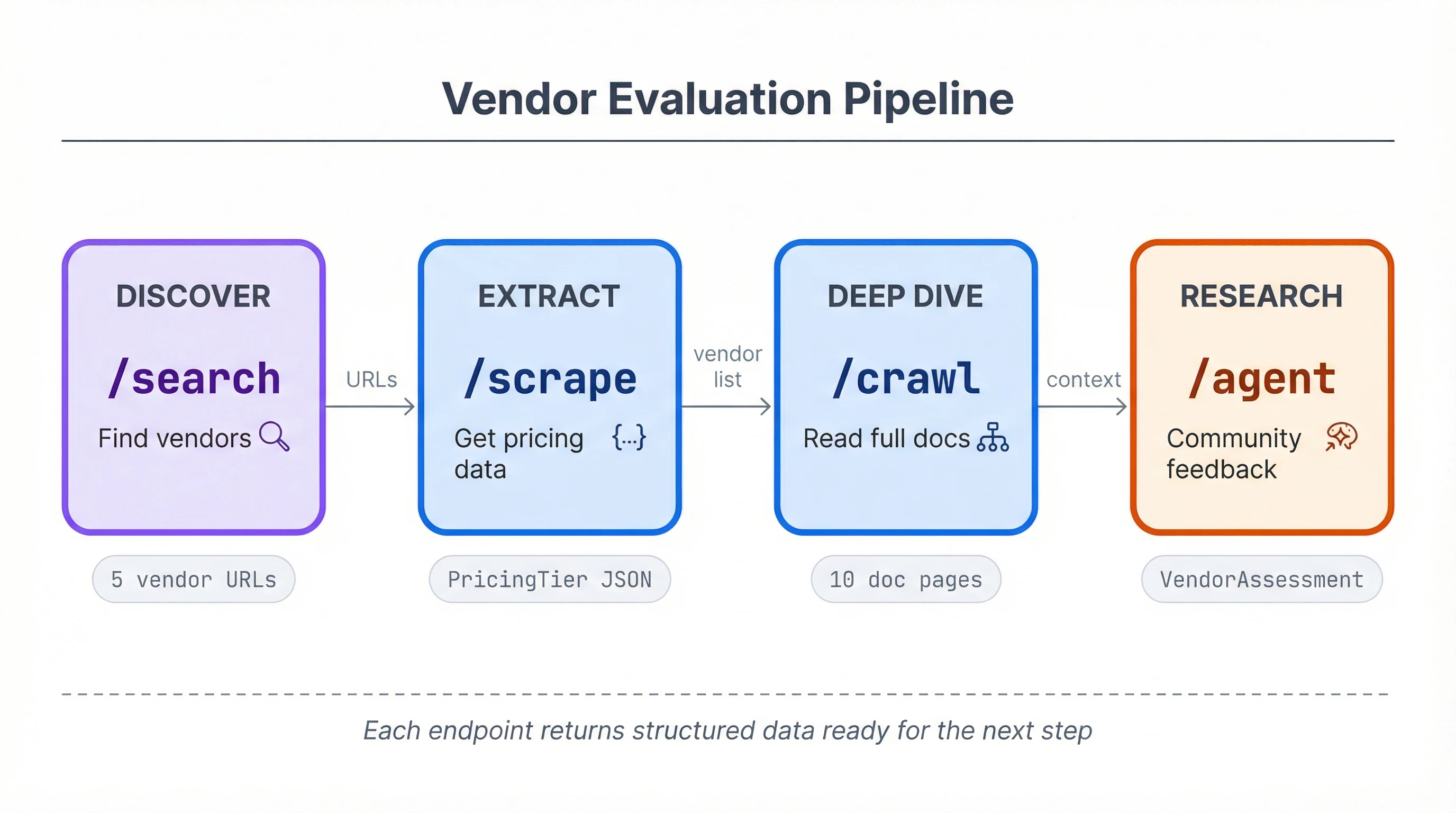
The examples below use a vendor evaluation project (comparing email API providers like Resend, SendGrid, Postmark) to show all four working together, but each pattern applies independently to any feature that needs web data.
Setup
pip install firecrawl-py pydanticfrom firecrawl import Firecrawl
from firecrawl.v2.types import ScrapeOptions
from pydantic import BaseModel, Field
from typing import List
app = Firecrawl(api_key="fc-YOUR_API_KEY")You can try Firecrawl's endpoints without an API key to start. When you're ready to go further, grab a key from firecrawl.dev for higher rate limits and more credits. The free tier covers everything in this tutorial.
Search and scrape with /search
When you need to find relevant pages and get their content in one step, /search does both. It runs a web search and scrapes each result, returning full page markdown instead of a list of links.
results = app.search(
    "best transactional email API providers 2026",
    limit=5,
    scrape_options=ScrapeOptions(formats=["markdown"]),
)

for doc in results.web:
    if hasattr(doc, 'metadata'):
        print(doc.metadata.title)
        print(f"  {doc.metadata.url}")
        print(f"  {len(doc.markdown)} chars of content")
    else:
        print(doc.title)
        print(f"  {doc.url}")
        print(f"  (no content scraped)")
    print()
13 Best Transactional Email Services (2026)
https://www.emailtooltester.com/en/blog/best-transactional-email-service/
42,318 chars of content
The 8 Best Email APIs Compared
https://www.courier.com/blog/best-email-apis/
28,104 chars of content
Each result is a Document with the page's full markdown and metadata (title, URL, status code). Without scrape_options, you'd get back SearchResultWeb objects with just titles, URLs, and short descriptions, which is what traditional SERP APIs return. Even with scrape_options, some results may come back as SearchResultWeb if a page fails to scrape. Check for metadata before accessing it to avoid an AttributeError.
The scrape_options parameter takes a ScrapeOptions instance imported from firecrawl.v2.types, not a plain dict (this trips people up on first use).
Cost: 2 credits per 10 search results, plus 1 credit per page scraped.
Structured extraction with /scrape
Markdown is useful for feeding content to an LLM, but some features need typed fields you can store and compare. The /scrape endpoint's JSON extraction mode does that: you point it at a URL with a Pydantic schema, and it returns structured data matching your schema.
For RAG pipelines where token efficiency matters, the scrape endpoint also supports question and highlights formats — pass a question and get a grounded answer with up to 100x fewer tokens than a full markdown scrape.
class PricingTier(BaseModel):
    name: str = Field(description="Tier name, e.g. Free, Pro, Enterprise")
    price: str = Field(description="Monthly price")
    email_limit: str = Field(description="Emails included per month")

class VendorPricing(BaseModel):
    vendor: str = Field(description="Company name")
    tiers: List[PricingTier] = Field(description="Available pricing tiers")
doc = app.scrape(
"https://resend.com/pricing",
formats=[
"markdown",
{"type": "json", "schema": VendorPricing.model_json_schema()},
],
)
pricing = VendorPricing(**doc.json)
print(f"{pricing.vendor} Pricing:")
for tier in pricing.tiers:
print(f" {tier.name}: {tier.price} ({tier.email_limit})")Resend Pricing:
Free: $0/mo (3,000 emails/mo)
Pro: $20/mo (50,000 emails/mo)
Scale: $90/mo (100,000 emails/mo)
Enterprise: Custom (Custom volume)
The formats list takes strings and dicts together. "markdown" gets the raw page text, and the JSON format dict tells the API to run LLM extraction against your schema. Both come back in the same response.
"json" as a bare string in the formats list won't work. The JSON format requires the dict form with type and either schema or prompt.
Field(description=...) is worth getting right. Those descriptions ship to the API as part of the JSON schema, and the extraction model reads them to decide what qualifies as a match. Something vague like "the value" won't give the model much to work with.
doc.json comes back as a plain dict, not a Pydantic instance. The VendorPricing(**doc.json) call validates the structure. In production, wrap it in a try/except to catch cases where extraction doesn't match your schema.
Cost: 1 credit base plus 4 for JSON extraction, so 5 credits per page.
Multi-page crawling with /crawl
Some features need content from an entire section of a site, not just one page. The /crawl endpoint starts at a URL, follows links within that path, and scrapes each page it finds.
result = app.crawl(
    "https://resend.com/docs",
    limit=10,
    include_paths=["/docs/*"],
    scrape_options=ScrapeOptions(formats=["markdown"]),
)

print(f"Crawled {result.completed} pages ({result.credits_used} credits)")
print()
for doc in result.data:
    print(f"  {doc.metadata.title}: {len(doc.markdown)} chars")
Crawled 10 pages (10 credits)
Introduction - Resend: 3,842 chars
Send with SMTP - Resend: 2,156 chars
Send with Next.js - Resend: 4,521 chars
Webhooks - Resend: 1,893 chars
...
include_paths takes glob patterns to restrict which URLs get crawled. Without it, the crawler follows every link on the domain and you'll end up scraping unrelated sections of the site.
Set limit deliberately. The API default is 10,000 pages, and at 1 credit per page that adds up fast. For most use cases, 10 to 20 pages gives you enough content to work with.
Small crawls of 3 to 5 pages finish in under 10 seconds. Larger ones can take minutes. The blocking .crawl() method polls the server automatically and returns once the job completes.
Each page comes back as a Document, the same type scrape returns. You could concatenate the markdown and pass it to an LLM for analysis, or index each page in a vector store for retrieval later.
Cost: 1 credit per page crawled.
Prompt-driven research with /agent
The previous three endpoints require you to know what to search for or which URLs to hit. The /agent endpoint works differently: you write a prompt describing what you need, and it finds relevant pages, reads them, and returns structured data. You don't need URLs.
The /agent endpoint is the right pattern for questions where the answer is spread across multiple sources and you can't predict which pages will have it.
class VendorAssessment(BaseModel):
    vendor: str = Field(description="Company name")
    strengths: List[str] = Field(description="Top 3 strengths based on developer feedback")
    weaknesses: List[str] = Field(description="Top 3 weaknesses or common complaints")
    best_for: str = Field(description="What type of project or team this vendor fits best")
result = app.agent(
prompt="""Research Resend as a transactional email API provider.
Look at developer community feedback, GitHub issues,
and reviews. What are the main strengths, weaknesses,
and ideal use case?""",
schema=VendorAssessment,
)
assessment = VendorAssessment(**result.data)
print(f"{assessment.vendor}:")
print(f" Best for: {assessment.best_for}")
print(f" Strengths:")
for s in assessment.strengths:
print(f" - {s}")
print(f" Weaknesses:")
for w in assessment.weaknesses:
print(f" - {w}")Wait a moment for the agent to run.
Resend:
  Best for: Developers and startups wanting a modern, developer-first email API
  Strengths:
    - Clean, well-documented API with intuitive SDK design
    - Native React Email integration for building templates in JSX
    - Simple pricing with generous free tier
  Weaknesses:
    - Younger platform with less enterprise track record than SendGrid
    - Fewer integrations and add-ons compared to established providers
    - Limited analytics and reporting features
Unlike scrape's JSON format, the agent endpoint accepts a Pydantic class directly as the schema argument. No .model_json_schema() call needed.
The agent runs on the spark-2 model by default. Credit usage varies with how many pages the agent visits and how much reasoning it does, so there's no fixed per-call cost like with scrape.
Agent calls take 30 to 60 seconds. The agent browses the web, loads pages, and reasons about the content before responding. Build appropriate loading states into your UX.
The prompt matters more here than with the other endpoints. Be specific about what sources you want checked and what kind of information you're after. "Research Resend" is vaguer than pointing it toward community feedback and real-world usage patterns.
| Endpoint | Pattern | Input | Cost |
|---|---|---|---|
/search | Find pages + get content | Search query | 2 credits/10 results + 1/page scraped |
/scrape | Structured extraction from a URL | URL + Pydantic schema | 1 credit (5 with JSON extraction) |
/crawl | Multi-page content from a site section | Start URL + path filters | 1 credit/page |
/agent | Prompt-driven research, no URLs needed | Natural language prompt + schema | Variable per call |
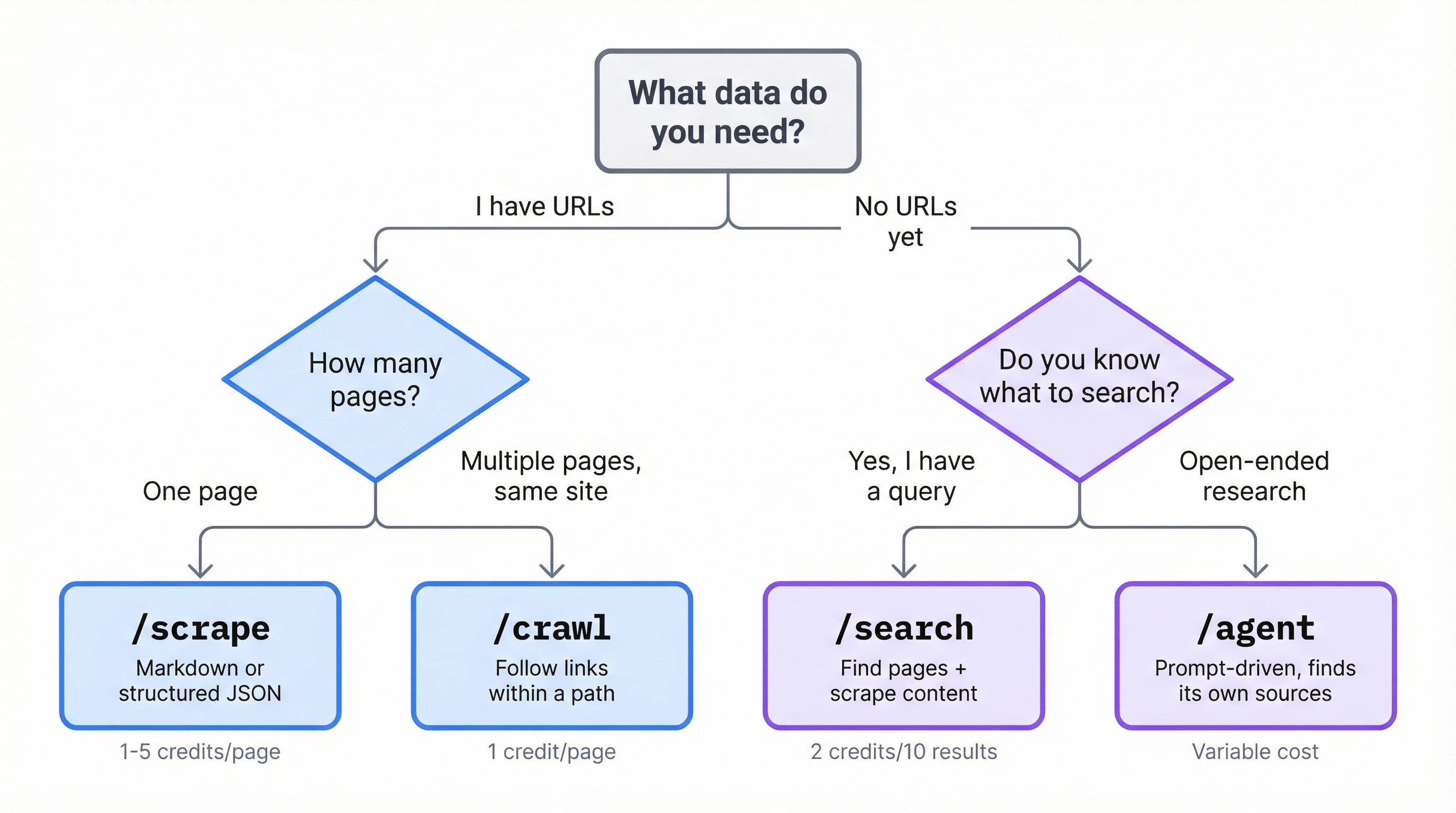
In practice, most features won't need all four endpoints. A search widget might only use /search, while a data import tool could chain it with /scrape. The vendor evaluation example ties them together to show how they compose, but each one stands on its own.
For AI agent developers
The code in this tutorial runs as a standalone script, but the same endpoints work as tools inside agent frameworks. Your agent decides when to search, scrape, or crawl, and calls Firecrawl through whichever integration fits your stack.
LangChain's FireCrawlLoader in langchain-community wraps scraping and crawling as a document loader. LlamaIndex has FireCrawlWebReader for the same purpose. CrewAI ships three separate tool classes covering scrape, crawl, and search. If you're using a custom agent loop, the Python SDK (firecrawl-py) and Node SDK (firecrawl) work as direct function calls without any framework glue.
The fastest integration path for MCP-compatible platforms is Firecrawl's MCP server. Run npx firecrawl-mcp with your API key, and you get 12 tools exposed through the Model Context Protocol: the four endpoints from this tutorial, plus map, batch scrape, browser automation, and async job management. There's also a hosted MCP endpoint if you'd rather skip running the server locally.
The /agent endpoint is already an agent itself. Calling it from your agent creates two layers, where yours runs orchestration and business logic while Firecrawl's runs the web research. While this split can make sense for deep research tasks, managing browser sessions and page parsing inside your own agent loop adds a bunch of complexity. Firecrawl's agent abstracts that away.
For agents that need to interact with pages beyond just reading them (filling forms, clicking through pagination, handling login flows), Firecrawl's browser sandbox provides managed cloud sessions with Playwright and CDP access. And when your agent needs to run the same research across hundreds of entities at once, Parallel Agents lets you submit batch /agent jobs that run concurrently instead of looping through them one by one.
Best practices for production
If you don't have URLs yet, start with /search. For known URLs, /scrape takes a single page and /crawl takes multiple pages on the same domain. Reach for /agent when the question is open-ended enough that you can't specify sources upfront. Agent calls cost more and run slower, so defaulting to the simpler endpoints keeps your feature fast and your bill predictable.
The scrape endpoint accepts a max_age parameter (in milliseconds) that returns cached content when it's fresh enough. For pages that don't change every hour, you can avoid redundant scrapes and save credits.
doc = app.scrape("https://resend.com/pricing", max_age=14400000) # 4 hoursRate limits depend on your plan. The API returns HTTP 429 when you hit them. The SDK manages retries through max_retries and backoff_factor on initialization:
app = Firecrawl(api_key="...", max_retries=3, backoff_factor=0.5)Keep schemas flat when you can. Nested Pydantic models work, but flatter schemas produce more accurate extractions because the LLM has less structural ambiguity to resolve. Use Optional fields for data that might not exist on every page.
Conclusion
Which endpoints you need depends on your feature. A URL import button might only use /scrape. A research assistant could chain search, crawl, and agent calls. The retrieval pattern stays the same regardless: you define a schema for the data you want, and the API does the fetching and formatting. Whether it searches the web or scrapes a URL you provide, the output comes back typed and ready to store.
The documentation covers options beyond what this tutorial included, and both the Python and Node SDKs support every endpoint shown here.
Frequently Asked Questions
How is Firecrawl different from a SERP API like SerpAPI?
SERP APIs return search metadata: titles, URLs, snippets. Firecrawl returns the actual page content as markdown or structured JSON. You can also search and scrape in a single call, extract data with schemas, or let the agent endpoint research a topic without specifying URLs.
Does Firecrawl have a Node SDK?
Yes. The package is firecrawl on npm. It covers the same endpoints as the Python SDK with equivalent methods and response types, so the patterns in this tutorial translate directly to TypeScript/JavaScript.
Can I use Firecrawl for RAG?
Yes. The /search and /crawl endpoints return markdown that's ready to chunk and index. The /scrape endpoint's JSON extraction mode can pull structured metadata alongside the content, which is useful for filtering and retrieval ranking.
How do I handle pages that require authentication?
The /scrape endpoint accepts custom headers (including cookies and auth tokens) for pages behind login walls. This doesn't apply to /search or /agent, which work through Firecrawl's own crawling infrastructure. For pages that need interactive login (clicking buttons, filling forms), use the browser sandbox instead.
Does Firecrawl render JavaScript?
Yes. All endpoints render JavaScript by default. Single-page apps, client-side rendered content, and dynamically loaded elements work without extra configuration.
What's the difference between /agent and /extract?
/extract is in maintenance mode and will be deprecated. /agent is its replacement and does everything /extract did (structured extraction from URLs) plus open-ended research without URLs. For new code, use /agent or /scrape with JSON extraction mode.
Can I self-host Firecrawl?
Yes. Firecrawl is open source and available on GitHub. You can run it locally or deploy it to your own infrastructure. The self-hosted version uses the same API, so your code works with both hosted and self-hosted instances.
How do I use Firecrawl with MCP?
Run npx firecrawl-mcp with your API key set as an environment variable. This starts a local MCP server that exposes 12 Firecrawl tools (scrape, crawl, search, agent, map, browser, and job management) to any MCP-compatible agent platform. Firecrawl also offers a hosted MCP endpoint if you don't want to run the server locally.