TL;DR
- Firecrawl is the web data API to search, scrape, and interact with the web at scale. Its
/scrapeendpoint fetches a URL once and returns the page as markdown or structured data. /interactopens a live browser on top of that scrape and keeps it running, so a click on call one is still applied when call two runs.- You can drive the session in two ways. Send a plain-English prompt and let an agent figure out the page, or send a code string in Node, Python, or Bash. Both work on the same session.
- Named profiles save cookies and login state under a name you pick. Log in once, reuse the auth in later runs.
- Every response carries the agent's answer, the raw return value of the last call, the standard output and error streams, and two URLs that stream the live browser (one read-only, one embeddable so a human can take over).
- Use
/interactwhen a page needs real interaction, like a login, a multi-step flow, or data that only shows up after a click. For one or two deterministic steps before a single scrape, stay on/scrapewith itsactionsparameter. - Available via REST API and the Python and Node SDKs.
- Cost: 2 credits per session-minute for code-only sessions, 7 once any call uses a prompt, prorated by the second. The underlying scrape bills separately at 1 credit.
A lot of useful data on the web sits one or two clicks away from the URL you land on. Think login forms, tabs, filters, infinite scroll, and lazy-loaded sections. None of that data is in the first HTML response, so a single-request fetch comes back empty or incomplete.
What you need is a browser session you can keep open between calls. Firecrawl's /interact endpoint is that session. The same browser stays open between calls, so a click on one call is still in effect on the next. You drive it in plain English or in code, and you can mix the two on the same page.
We'll walk through how it works and when to use it.
What is the Firecrawl interact endpoint?
/interact keeps a live browser running between API calls. State from each call, the DOM, cookies, and scroll position, stays in place while you send the next one. To see what that means, it helps to start with /scrape, Firecrawl's single-request endpoint. Give it a URL to get the page back as markdown, HTML, or structured JSON:
from firecrawl import Firecrawl

app = Firecrawl(api_key="fc-...")
result = app.scrape("https://example.com", formats=["markdown"])
print(result.markdown)
/scrape is a single request and response. The browser that loaded the page closes before the call returns. If the data you want is on the first response, that is all you need.
/interact is the next step up. It takes the page /scrape just loaded and keeps that browser running, so the DOM, the cookies, and the scroll position all stay put while you send more calls against the same session. The browser stays alive between calls until you stop it.
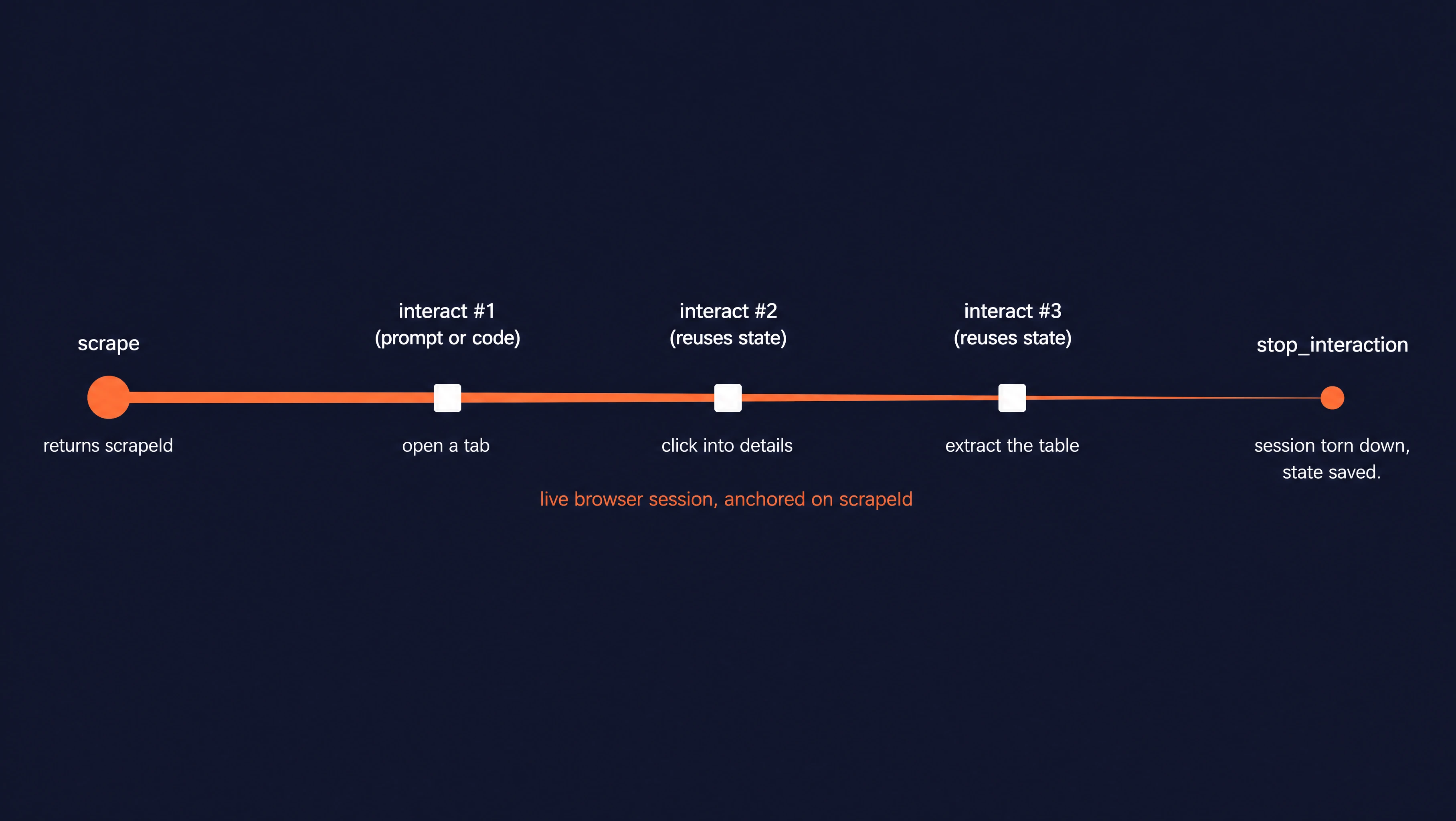
Every /interact flow has the same three steps:
- A scrape opens the page and returns a
scrape_idthat points at the live browser. - One or more interact calls drive the page through that
scrape_id. - A final
stop_interactioncall closes the session.
Sessions also expire on their own, but stopping explicitly is cheaper.
Each interact call accepts one of two control modes:
- Prompt mode takes a plain-English instruction that the agent interprets and executes out on the page. Example: "Click the Files tab, then list the top 5 files at the repo root as a JSON list."
- Code mode takes a string of code in Node, Python, or Bash. The string runs on Firecrawl's servers inside the same browser sandbox the agent uses, so Node and Python receive a
pageobject from Playwright (a browser automation library) already wired to the live page, and Bash getsagent-browser, a CLI that targets the same browser. The Code mode section below covers each language in detail.
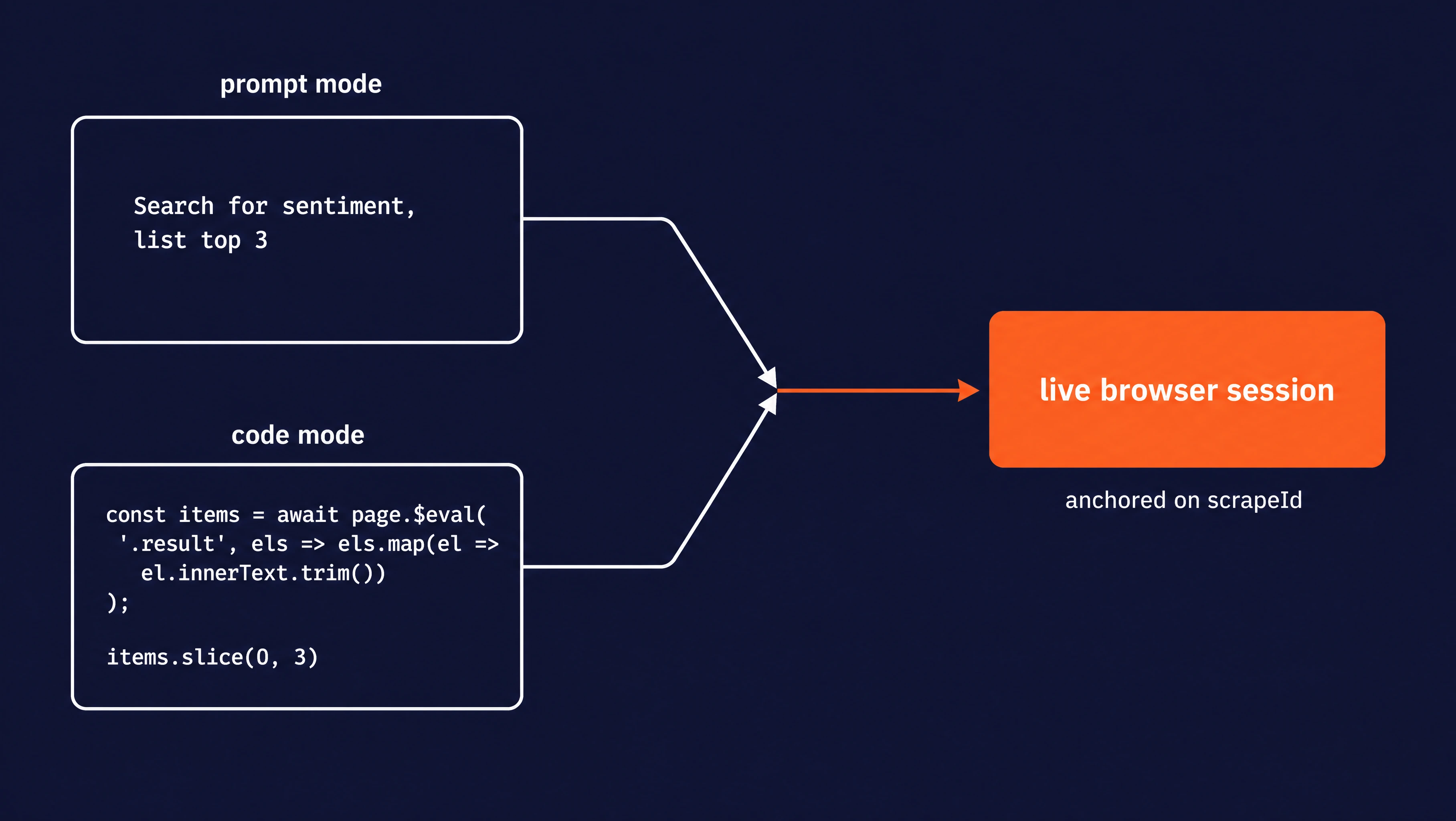
Both modes operate on the same session, so you can mix them call to call. Use prompt mode while exploring, code mode once you know the exact selectors.
Billing is per session-minute, prorated by the second. Code-only sessions cost 2 credits per minute. Sessions where any call uses a prompt cost 7. The underlying scrape bills separately at 1 credit per scrape.
When should you use the interact endpoint?
Three kinds of pages need an interactive session:
- Pages behind a login or paywall: A dashboard that only renders after sign-in won't give up its data on a single GET. You need a browser that fills the form, submits it, and follows the cookies to the next page.
- Pages where the data sits at the end of a multi-step path: Wizards, checkout funnels, search-then-filter flows where the URL stays the same while the body changes.
- Pages that only reveal data on real interaction: Infinite scroll, click-to-reveal sections, hover menus, lazy-loaded tabs. Each hides its data until something on the page tells it to render.
Two kinds of pages don't:
- Pages that hand the data over on the first call: If
/scrapealready returns the content, skip the session. - Bulk URL handling: If you have many URLs and no clicks stand between you and the data, use
/crawlor parallel/scrapecalls, not a per-page session.
A live session bills per session-minute, so use /interact only when the page itself needs real interaction. This is the core pattern for scraping for agents: data that only reveals itself after a login, a click, or a form submit.
Keep in mind that an empty scrape on its own is not enough of a signal to start using /interact.
If a markdown scrape looks empty because the page renders client-side, try wait_for or actions=[...] on /scrape first. A broader look at dynamic web scraping tools covers when each approach applies. Use /interact once you know the page actually needs a sequence of moves.
Once you've decided the page does need a session, one more yes/no question picks the control mode: can you describe the task in plain English? If yes, start with prompt mode.
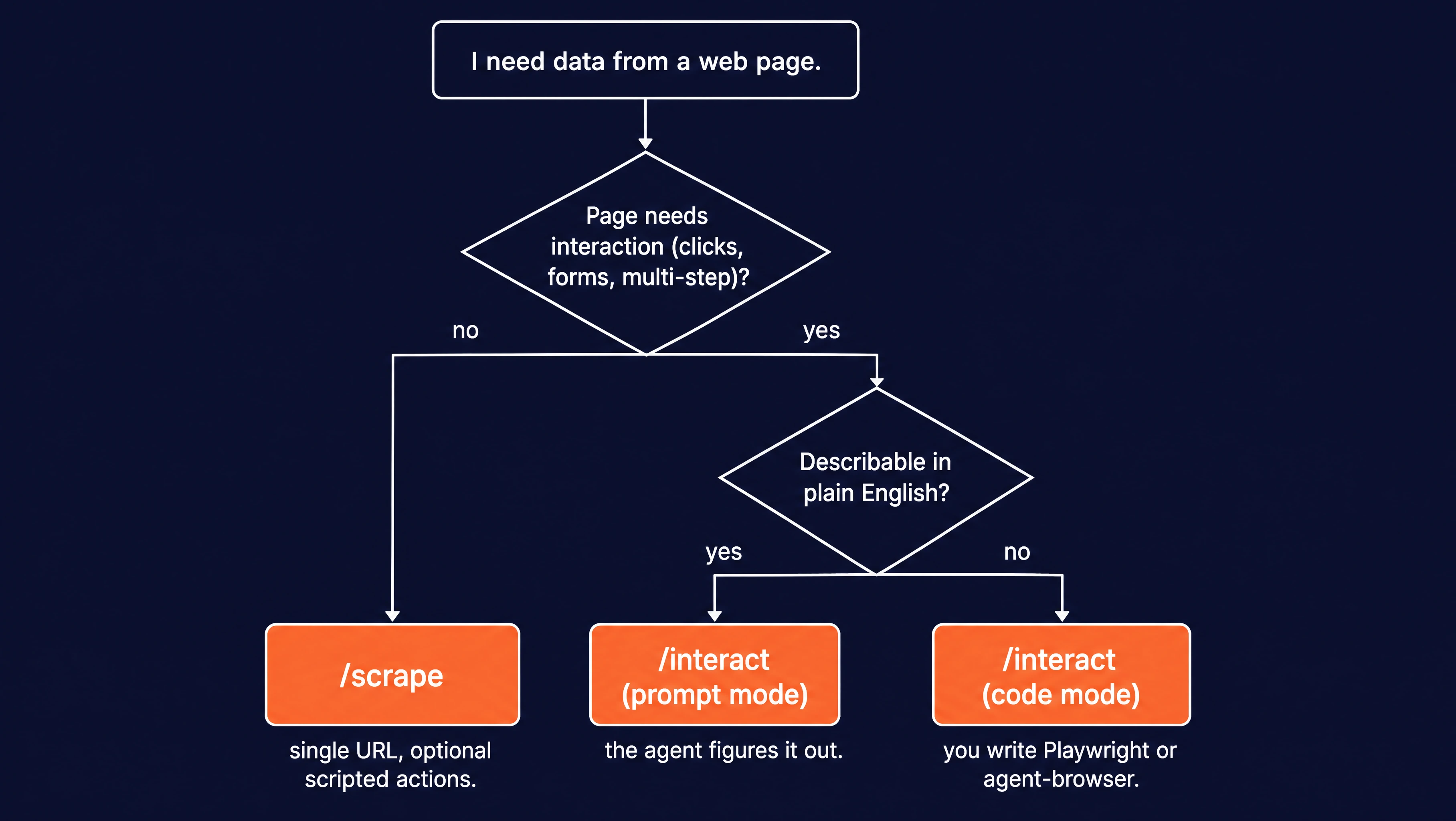
If you need exact selectors, conditional waits, or extracted lists, go straight to code mode.
Step-by-step: How to use the interact endpoint with a page by prompt or by code
Setup
Install the Firecrawl SDK with:
pip install firecrawl-pyor
uv add firecrawl-pyPython 3.9 or newer is required, per the Firecrawl Python SDK docs.
Grab an API key from the Firecrawl dashboard. The free tier includes 1,000 credits, enough to run every script here several times.
Set your API key in the environment:
export FIRECRAWL_API_KEY="fc-...your-api-key..."Verify the install with a one-liner:
python -c "from firecrawl import Firecrawl; print(Firecrawl)"Then run a test scrape and read back the scrape_id attribute you will use throughout this section:
import os
from dotenv import load_dotenv
from firecrawl import Firecrawl

load_dotenv()
app = Firecrawl(api_key=os.getenv("FIRECRAWL_API_KEY"))
result = app.scrape("https://example.com", formats=["markdown"])

print(result.metadata.scrape_id)
A successful run prints the scrape_id for the live session:
019e0784-6c13-75be-bb2f-850d14a80d2dThe smoke test confirms the SDK is wired up. The sections that follow each scrape their own target URL (Hugging Face, crates.io, etc.) and use the scrape_id from that scrape as the handle for every interact call on it.
Prompt mode
Prompt mode is the simplest way to call /interact. You give it natural language and it figures out the page and how to complete your request.
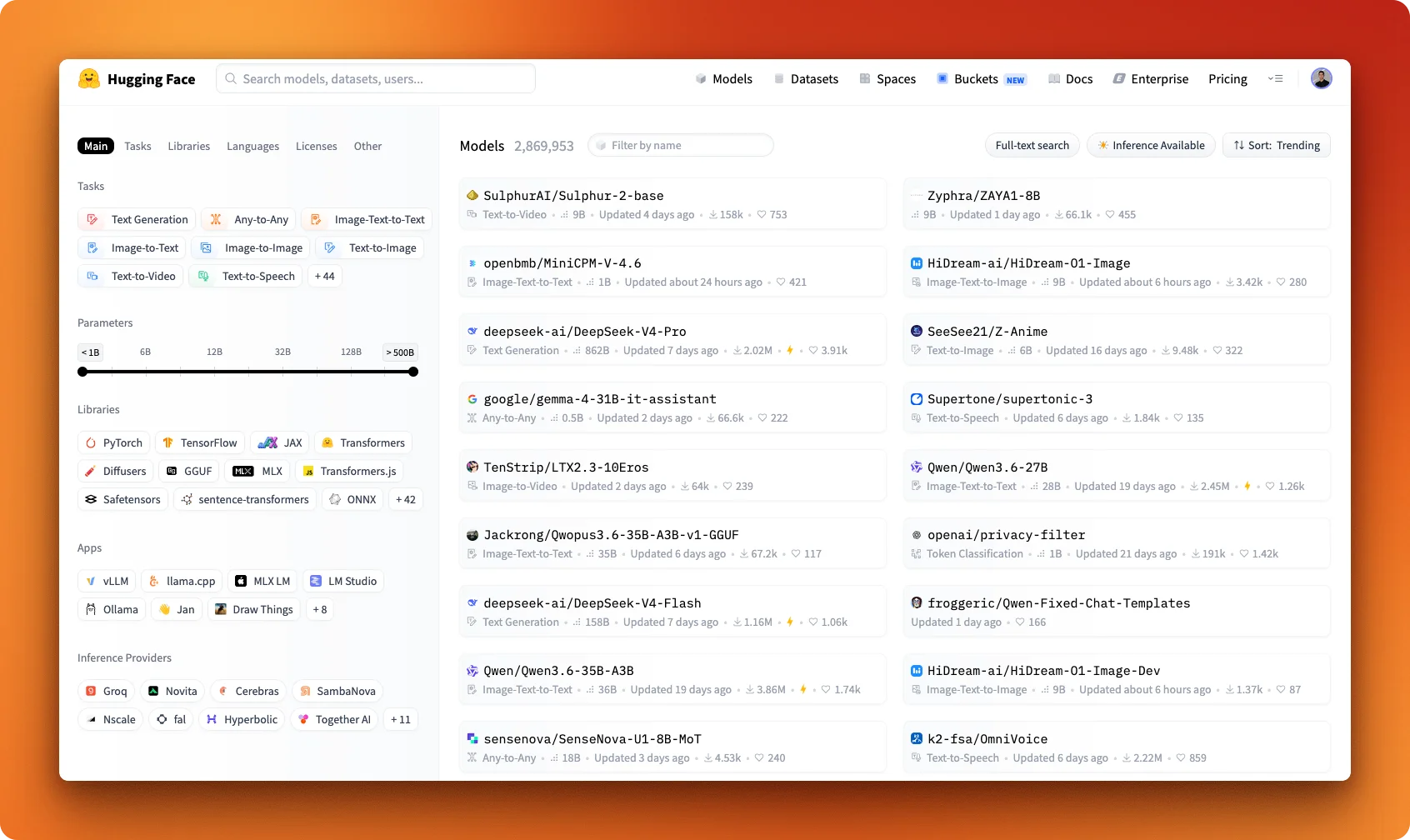
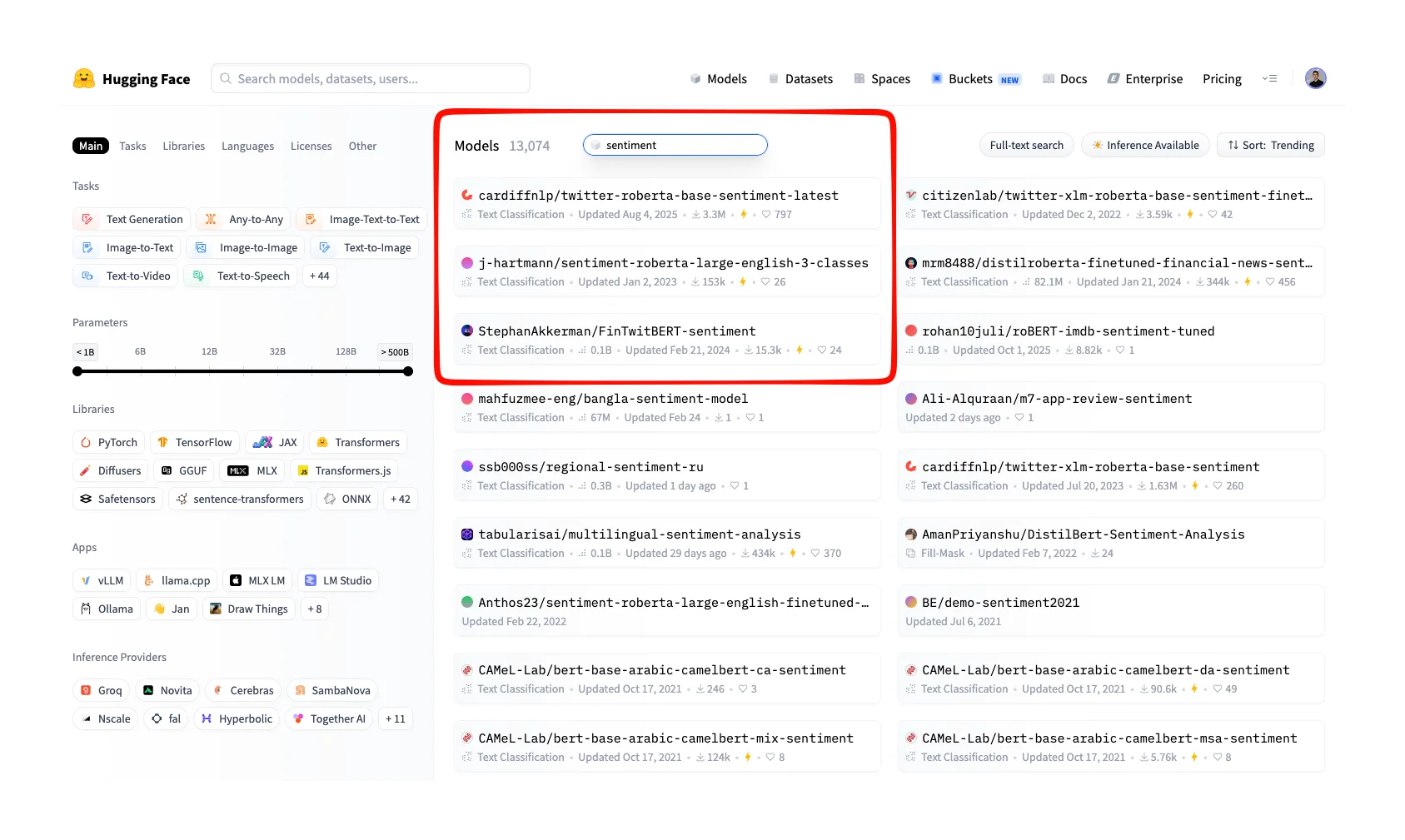
We'll start by scraping the Hugging Face models index and running one interact call that searches for sentiment models. The call returns the names and download counts of the top three results as a JSON list.
Here is the page we are starting from:
import os

from dotenv import load_dotenv
from firecrawl import Firecrawl

load_dotenv()
app = Firecrawl(api_key=os.getenv("FIRECRAWL_API_KEY"))

result = app.scrape("https://huggingface.co/models", formats=["markdown"])
scrape_id = result.metadata.scrape_id
print(f"scrape_id={scrape_id}")

response = app.interact(
    scrape_id,
    prompt="""
        Find the model search input (placeholder 'Filter by name').
        Type 'sentiment' and press Enter.
        Wait for the results to load.
        Return the names and download counts of the top 3 result rows as a JSON list.
    """,
)
print(response.output)

app.stop_interaction(scrape_id)
app.interact(scrape_id, prompt=...) sends one instruction to the live browser tied to scrape_id.
It returns a response object whose output field is the agent's natural-language answer. Call interact again with the same scrape_id to send the next step. The page state from the previous call carries forward. If a later call returns 409 with "Replay context unavailable", the session expired.
Start a fresh scrape_id by scraping the URL again.
app.stop_interaction(scrape_id) closes the live session. Sessions also expire on their own (10-minute total time-to-live, 5-minute inactivity timeout). Explicit stop is cheaper than letting the timer run out.
response.output is the agent's natural-language answer. For a prompt that asks for JSON, the agent returns JSON inside that answer:
scrape_id=019e0784-6c13-75be-bb2f-850d14a80d2d
[
  {"name": "cardiffnlp/twitter-roberta-base-sentiment-latest", "downloads": "3.36M"},
  {"name": "mrm8488/distilroberta-finetuned-financial-news-sentiment-analysis", "downloads": "352k"},
  {"name": "tabularisai/multilingual-sentiment-analysis", "downloads": "504k"}
]
Do a sanity check by actually going to the Hugging Face Models index and type "sentiment" into the filter. You will see that the top results match the JSON output produced above:
The prompt we used above follows the small-prompts rule:
- Name the input by something stable (here, the
'Filter by name'placeholder, not "the search box"). - List each step in order.
- Keep each prompt to one task.
The Firecrawl interact docs make the same point: break complex workflows into separate interact calls. Each call reuses the same browser session, so state carries between them. Clicking into one result to read its README would be a separate call on the same scrape_id.
Run the snippet and read the printed output. Then swap the prompt for a different question, for example "How many models tagged 'sentiment' have more than 1M downloads?", and re-run to feel how state carries between calls.
Code mode
Use code mode when prompt mode is not specific enough. Both modes drive the same live browser session, so you can mix them call to call:
Four cases read better as code than as English:
- Exact CSS or XPath selectors.
- Conditional waits.
- Retries.
- Lists extracted from many matching elements.
Code mode runs in three languages:
- Node.js is the default and runs against Playwright.
- Python uses the Playwright async API.
- Bash runs through the
agent-browserCLI.
The examples below use Node and Bash. language="python" is currently affected by a sandbox issue. Once it is resolved, a Python snippet maps almost one-for-one to the Node version. The same workflows are available in Python using Playwright's Python API.
All three languages run on Firecrawl's servers, inside the same browser sandbox the agent uses. Node and Python receive a Playwright web scraping page object already connected to the live browser.
Bash receives agent-browser, a CLI that ships pre-installed in the sandbox. You don't install it locally and it doesn't run on your machine.
The only way to call it is to pass a code string to app.interact with language="bash", and Firecrawl runs that string inside the sandbox where agent-browser is on the path. The CLI builds an accessibility tree of the current page and assigns each interactive element a short handle called a ref (for example @e1, @e2) that you can target in later commands. The commands you'll use most:
agent-browser snapshot: print the accessibility tree, including each element's ref.agent-browser click @e1: click the element with ref@e1.agent-browser fill @e1 "text": type into the element with ref@e1.agent-browser get text <selector>: print the text of the first match for a CSS selector.agent-browser screenshot: capture a PNG of the page.
To illustrate code mode, the example below runs against crates.io's serde page, a Svelte single-page app.
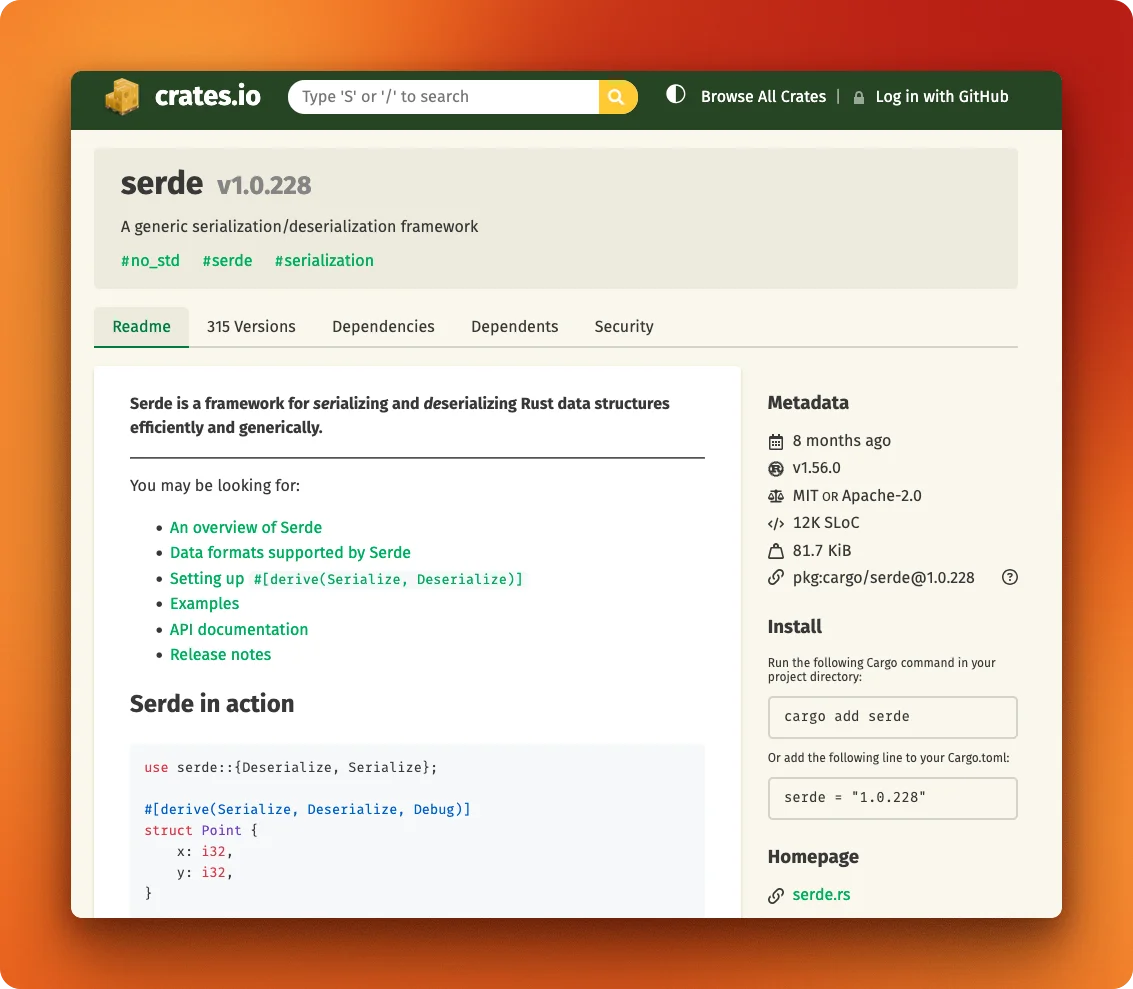
A plain scrape returns the HTML shell that the server sends first. The Stats Overview block (downloads, version count) only fills in after hydration, the step where JavaScript renders the real content into the shell. A live session can wait for hydration to finish and then read what filled in:
import os

from dotenv import load_dotenv
from firecrawl import Firecrawl

load_dotenv()
app = Firecrawl(api_key=os.getenv("FIRECRAWL_API_KEY"))

result = app.scrape("https://crates.io/crates/serde", formats=["markdown"])
scrape_id = result.metadata.scrape_id

node = app.interact(
    scrape_id,
    code="""
await page.waitForLoadState('networkidle');
const stats = await page.$$eval('.stats .num__align', els =>
  els.map(e => e.textContent.trim())
);
JSON.stringify({ downloads: stats[0], versions: stats[1] });
""",
)
print("node:", node.result)

bash = app.interact(
    scrape_id,
    code="""
echo "downloads: $(agent-browser get text '.stats .stat:nth-of-type(1) .num__align')"
echo "versions:  $(agent-browser get text '.stats .stat:nth-of-type(2) .num__align')"
""",
    language="bash",
)
print("bash:", bash.stdout.strip())

app.stop_interaction(scrape_id)
Output:
node: {"downloads":"979,503,976","versions":"315"}
bash: downloads: 979,503,976
versions:  315
await page.waitForLoadState('networkidle') waits for hydration to finish. Without it, the .stats block is still empty when the selector runs.
The last expression in the code string (the JSON.stringify(...) call) is what comes back in response.result. Everything before it just runs for its side effects.
Pick Node or Bash, change the selector to target a different element, and re-run. node.result or bash.stdout should update.
How do you chain calls on the same page?
To see state carry between calls on one page, we'll do three things on a single Hugging Face model card:
- Scrape the model card to open a live session.
- Click the Files tab and read the top file names and sizes.
- Click the Community tab and read the top discussion threads.
The snippets below build the flow in small chunks with an explanation after each one. The full version, ready to run end to end, is on a public gist.
The first call opens the page. The model card's README renders on the URL, but the Files and Community tabs only load when you click them.
import os

from dotenv import load_dotenv
from firecrawl import Firecrawl

load_dotenv()
app = Firecrawl(api_key=os.getenv("FIRECRAWL_API_KEY"))

result = app.scrape(
    "https://huggingface.co/Qwen/Qwen2.5-7B-Instruct",
    formats=["markdown"],
)
scrape_id = result.metadata.scrape_id
The second call clicks the Files tab and asks for the top 5 file names and sizes as a JSON list. Same scrape_id, same browser:
files = app.interact(
    scrape_id,
    prompt="""
        Click the 'Files' tab in the model navigation.
        Wait for the file list to render.
        Return the names and sizes of the top 5 files at the repo root as a JSON list.
    """,
)
print("Files tab:")
print(files.output)
The third call clicks the Community tab. The previous call left the page on the Files view. The agent starts from there, not from a fresh model card.
community = app.interact(
    scrape_id,
    prompt="""
        Click the 'Community' tab.
        Wait for the discussion list to render.
        Return the titles and reply counts of the top 3 discussion threads as a JSON list.
    """,
)
print("\nCommunity tab:")
print(community.output)

app.stop_interaction(scrape_id)
Output from a real run:
scrape_id=019e0784-ccd6-754a-82f5-6f30fa5e6927

Files tab:
[
  {"name": ".gitattributes", "size": "1.52 kB"},
  {"name": "LICENSE", "size": "11.3 kB"},
  {"name": "README.md", "size": "6.24 kB"},
  {"name": "config.json", "size": "663 Bytes"},
  {"name": "generation_config.json", "size": "243 Bytes"}
]

Community tab:
[
  {"title": "If you are getting undefined symbol: _ZN3c1013MessageLoggerC1EPKciib when following instructions or other errors on vLLM", "replies": "1"},
  {"title": "Qwen2.5-7b-Instruct", "replies": "0"},
  {"title": "Qwen 4 7b", "replies": "0"}
]
Both follow-up calls reused the same scrape_id, so state from each previous call (the active tab, any scroll position) carried into the next.
How do you persist login state across scrapes?
State inside a single scrape only lasts until stop_interaction runs.
For anything that needs to survive past that point, like the cookies a login earns, you need a named profile. A profile stores cookies, localStorage, and session state under a name you pick. Pass that name on the next scrape and the previous session's state is already loaded.
The example below is two scrapes against the same profile. The first logs in. The second lands on the authenticated page with no second login.
result = app.scrape(
    "https://app.example.com/login",
    formats=["markdown"],
    profile={"name": "my-app", "save_changes": True},
)
scrape_id = result.metadata.scrape_id
app.interact(scrape_id, prompt="Fill in user@example.com and password, then click Login")
app.stop_interaction(scrape_id)

result = app.scrape(
    "https://app.example.com/dashboard",
    formats=["markdown"],
    profile={"name": "my-app", "save_changes": True},
)
scrape_id = result.metadata.scrape_id
response = app.interact(scrape_id, prompt="Extract the dashboard data")
print(response.output)
app.stop_interaction(scrape_id)
Profile state writes back when stop_interaction runs. If you skip the stop the login you just performed never saves.
Inspecting state for debugging
When the agent picks the wrong element or returns the wrong answer, you need to see what it saw. Three tools cover almost every "why did the prompt return that" investigation:
- A screenshot
- The page's accessibility tree
- The raw return value of any code-mode call.
One extra tool hands the session to a human for the cases the agent cannot handle alone.
The snippets below run all three tools against crates.io/crates/serde.
To understand the snippets, let's formally list all remaining response fields an interact call carries (you use them with response.attribute syntax):
output: prompt-mode answer in plain English.result: the last expression in code mode, or the raw page snapshot the agent saw in prompt mode.stdout,stderr,exit_code: standard process semantics.success: boolean.killed:Trueif the per-calltimeouthit.live_view_url: read-only stream of the browser (Noneuntil the session is active).interactive_live_view_url: same stream, but lets the embedder click and type.
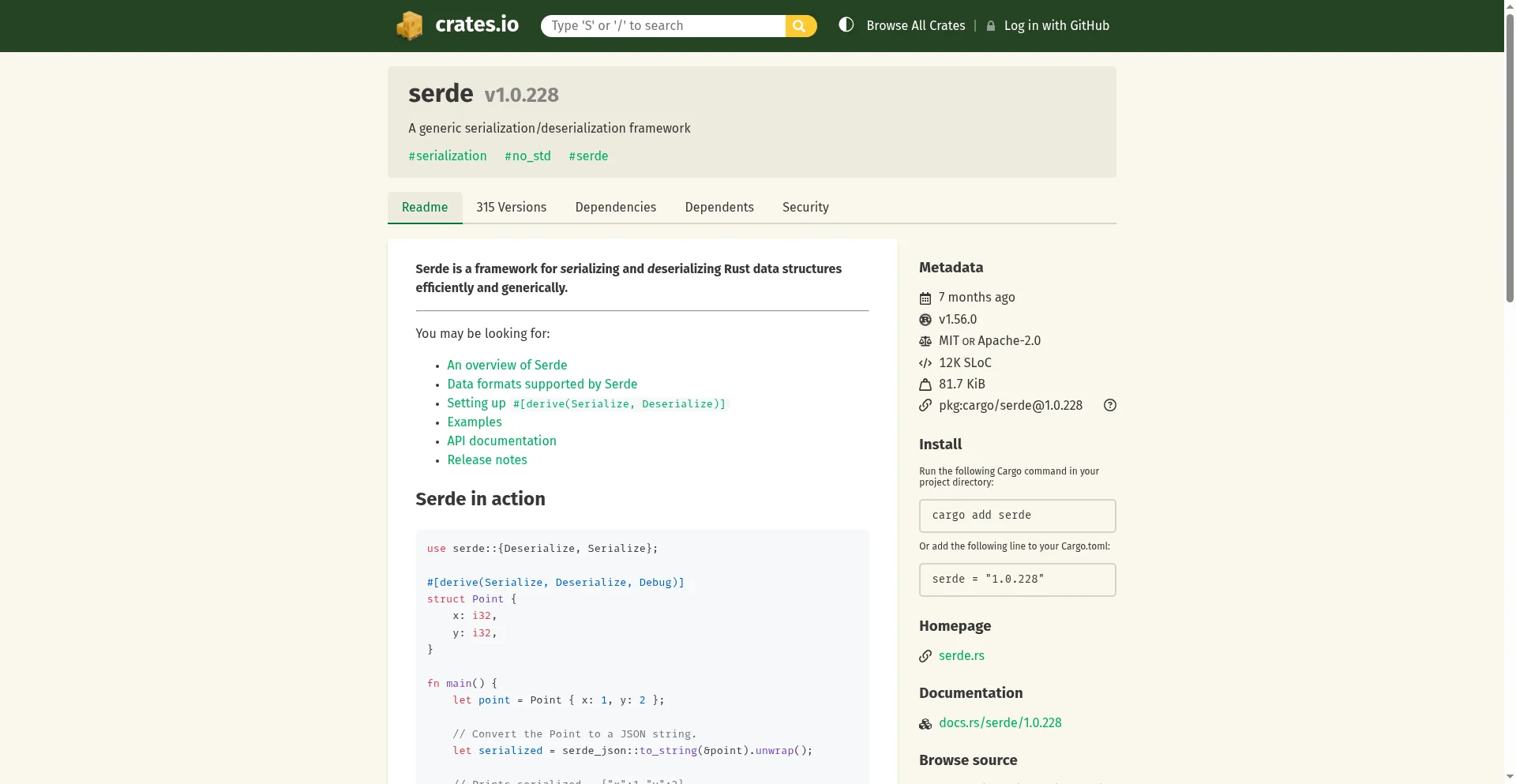
The first tool is a screenshot to understand what the sandbox is seeing in the browser. You take it from a Node code-mode call.
page.screenshot() returns a buffer, you encode it to base64, return that as the last expression, and response.result gives you the bytes to write to disk. The snippets below assume base64 and pathlib.Path are imported at the top of the running script:
import base64
from pathlib import Path

shot = app.interact(
    scrape_id,
    code="""
await page.waitForLoadState('networkidle');
const buf = await page.screenshot({ fullPage: false });
buf.toString('base64');
""",
)
out = Path("crates-screenshot.png")
out.write_bytes(base64.b64decode(shot.result))
print(f"1. screenshot saved: {out} ({out.stat().st_size:,} bytes)")
The output, from a real run:
1. screenshot saved: crates-screenshot.png (140,478 bytes)The saved PNG is the first render of the page from the live browser, after networkidle:
The second tool is the accessibility tree. agent-browser snapshot -i returns the same labeled outline introduced in the Code mode section, filtered to interactive elements only. Each line carries an element ref you can target in later Bash calls:
snap = app.interact(
    scrape_id,
    code="agent-browser snapshot -i",
    language="bash",
)
print(snap.stdout[:600])
- link "crates.io" [ref=e1]
- heading "crates.io" [level=1, ref=e12]
- textbox "Search" [required, ref=e13]
- button "Submit" [ref=e14]
- button "Change color scheme" [expanded=false, ref=e71]
- link "Browse All Crates" [ref=e15]
- button "Log in with GitHub" [ref=e16]
- heading "serde v1.0.228" [level=1, ref=e2]
- link "#serialization" [ref=e39]
- ...This is what the agent sees. If a prompt picked the wrong element, this is the first place to look. Once you have a ref like @e2, you can drive the page through it with agent-browser click @e2, agent-browser fill @e2 "text", and so on.
The third tool is response.result itself. After a code-mode call, result holds the last expression evaluated. After a prompt-mode call, result holds the page snapshot the agent used to write output. A one-line code-mode call is the fastest way to read the live page directly:
title = app.interact(scrape_id, code="await page.title()")
print(f"response.result after `await page.title()`: {title.result!r}")
response.result after `await page.title()`: 'serde - crates.io: Rust Package Registry'The fourth tool sits outside the debug loop. interactive_live_view_url is an embeddable stream that lets a real human drive the same browser. Drop it in an iframe when the agent hits a captcha, a 2FA prompt, or any step it cannot solve:
<iframe src="LIVE_VIEW_URL" width="100%" height="600" />Take a prompt that returned a wrong-looking answer. Run agent-browser snapshot -i first, read the tree, then send a more specific prompt targeting an @e1/@e2 ref.
Firecrawl actions vs interact
If you already use actions=[...] on /scrape, the next question is whether /interact does anything you don't already have.
| Axis | actions=[...] on /scrape | /interact |
|---|---|---|
| Control style | Scripted: a list of declarative steps the scrape runs before extraction | Live: each call decides what to do based on what the previous call saw |
| Session model | One-shot, ends when the scrape returns | Reusable browser session bound to a scrapeId, persists across calls until you stop it |
| Step count | Best for 1-3 deterministic steps | Unbounded, chain as many interact calls as the page needs |
| Branching / conditional logic | None, steps run in order with no inspection between | Yes, read response state between calls and decide the next step |
| Credit model | Folded into the scrape (1 credit per scrape plus format costs) | Per session-minute: 2 with code only, 7 with a prompt, prorated by the second |
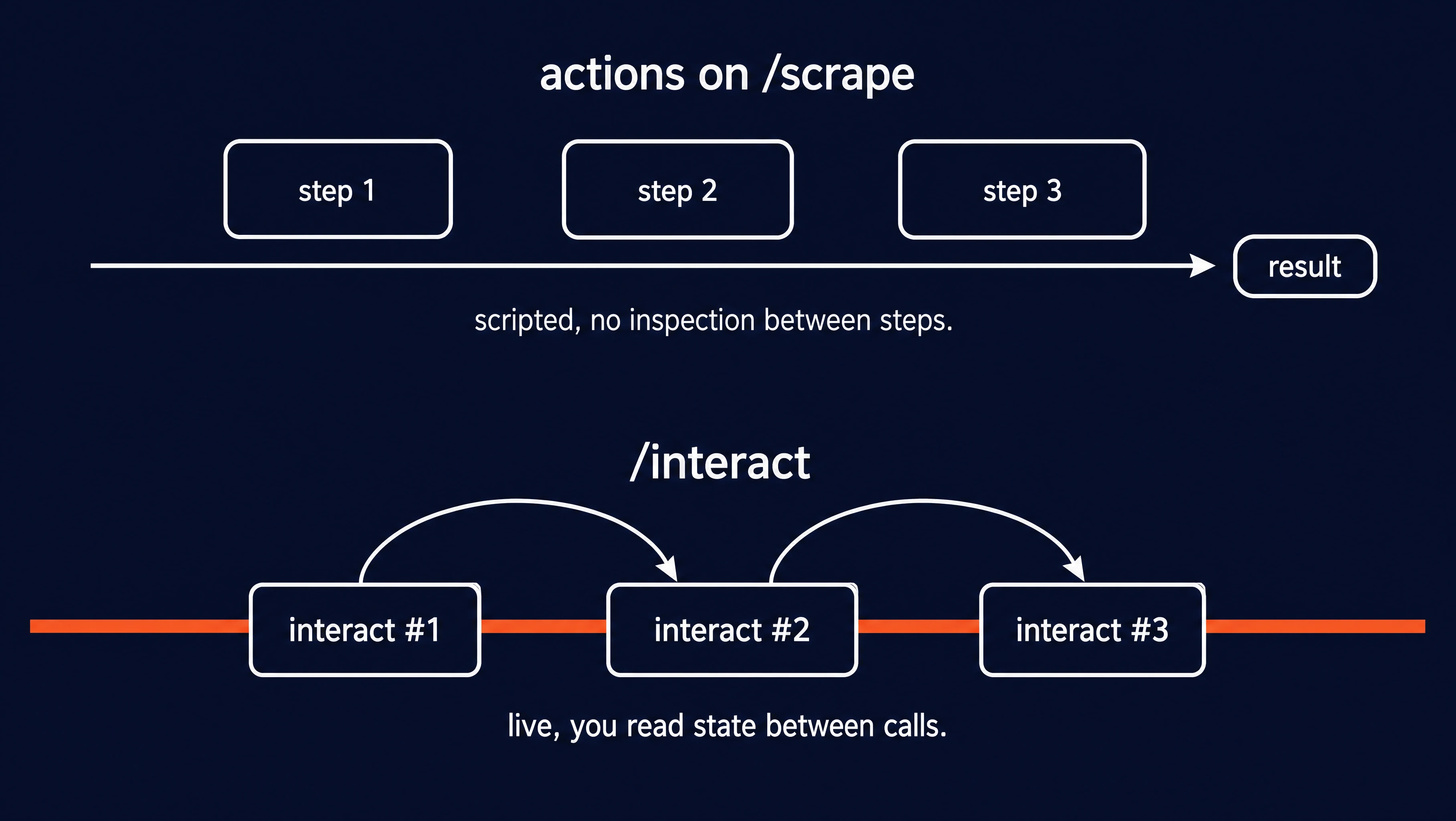
Three of those rows are worth expanding, because they describe what actions cannot do at all.
The first is human takeover. A scripted action list runs offline before extraction, with no live browser to embed. /interact exposes interactive_live_view_url, an embeddable stream that lets a real person drive the live browser. Use it when a captcha or a 2FA prompt blocks the agent.
The second is branching on what is on the page after a click. With actions, the next step runs whether or not the previous step did anything useful. With /interact, you read the response, decide what to do, and send the next call.
The third is sessions that outlive a single scrape. actions ends when the scrape returns and the cookies it earned go away. /interact plus a named profile keeps the session state between scrapes. You log in once and reuse the auth in later runs.
Which Firecrawl endpoint should you use?
As a web scraping API, Firecrawl has a few endpoints beyond /interact and /scrape. Here is how they compare:
| Endpoint | Input | Output | Use it when |
|---|---|---|---|
/interact | scrapeId from a previous scrape, plus a prompt or code per step | A live session, plus per-call output / result | The page needs real interaction (login, multi-step, branch on state) |
/scrape (+ optional actions) | A known URL, optional 0-3 scripted steps | One markdown / JSON / screenshot payload | You have the URL and 0-3 deterministic steps will reach the data |
/crawl | A root URL plus path filters | Every page in scope, in your chosen format | You want a site or section traversed end to end |
If you don't even have a URL yet, /search is the entry point. It returns ranked, scrape-ready results you can feed into any of the endpoints above.
For a deeper walkthrough of the search endpoint, see mastering the search endpoint.
Conclusion
A scrape opens a live session. One or more interact calls drive the page by prompt or code. stop_interaction closes the session and returns usable web context your agent can act on. Once those three steps are clear, the rest is picking the right control mode and knowing when state needs to live longer than a single scrape.
A good next move: pick a login flow you actually care about and try it with a named profile. Run two scrapes against the same profile name. The first logs in and earns the cookies, then stop_interaction writes them back to the profile. The second scrape lands you straight on the authenticated page. That two-scrape pattern covers almost every auth-gated website you will hit.
The free tier includes 1,000 credits. Get your API key and run the first example in under five minutes. If you work inside Claude Code, Cursor, Codex, or another MCP-compatible environment, /interact is also available through the Firecrawl MCP server without any extra setup. For pages that expose developer-registered WebMCP tools, headless agents can call those tools through Firecrawl's cloud browser — no local Chrome or flag required.
Frequently Asked Questions
How does the Firecrawl interact endpoint bill?
Per session-minute, prorated by the second. Code-only sessions cost 2 credits per minute. Sessions that use prompt mode cost 7 credits per minute. The underlying scrape bills separately at 1 credit per scrape plus any format-specific costs.
Can I run multiple interact sessions in parallel?
Yes. All plans get up to 20 concurrent browser sessions at launch. Hitting the cap returns HTTP 429.
How long can an interact session stay open?
Default 10-minute total TTL with a 5-minute inactivity timeout. Always call stop_interaction explicitly so you don't pay for idle session-minutes.
Does Firecrawl interact support authenticated sessions and cookies?
Yes. Within a single scrape, every interact call reuses the same browser, including cookies and login state. To persist auth across separate scrapes, pass a named profile (save_changes True) to scrape. One writer per profile, and concurrent writers get 409. Read-only access is available with save_changes False.
When should I use actions on /scrape vs /interact?
Use actions for 1-3 deterministic pre-scrape steps with no branching. Use /interact for live, multi-step flows where each call inspects the page state and decides what to do next.