
TL;DR
- Build a changelog tracker in TypeScript using Mastra for the agent layer and Firecrawl for web scraping
- Wire up two tools with
createTooland Zod schemas: one for Firecrawl search, one for Firecrawl scrape - Chain a batch workflow with
.foreach()and.then()that scrapes URLs in parallel and returns typed JSON - Get structured output from agents via Zod schemas, no string parsing required
TypeScript finally has a real agent framework. Not a wrapper around Python, not a half-port of LangChain, but something built for the ecosystem from the ground up. Mastra gives you typed tool definitions, structured output via Zod, multi-step workflows, and a local dev server with a chat UI. It already has 19k+ GitHub stars.
This mastra tutorial walks through the framework by building a changelog tracker with Firecrawl. You'll wire up tools, let an agent decide its own call sequence, and compose a batch workflow that returns typed JSON. The project is deliberately small so the framework stays in focus.
What is Mastra?
Mastra is an open-source TypeScript framework for building AI agents. Created by the team behind Gatsby, it graduated from Y Combinator (W25 batch, $13M funding) and hit v1.0 in January 2026. As of writing, it sits at around 19.4k GitHub stars and over 300k weekly npm downloads.
Mastra organizes everything around three ideas:
- Agents run conversational tool-calling loops where the LLM picks which functions to invoke;
- Tools are typed functions with Zod schemas that agents can call
- Workflows are deterministic pipelines where you lock down the execution order, branching, and parallelism yourself.
We'll focus on tools and workflows here. For a broader comparison of where Mastra fits alongside other agent frameworks, see the best open-source agent frameworks roundup. For a current 2026 comparison covering LangChain, Microsoft Agent Framework, CrewAI, Agno, Haystack, LlamaIndex, and the OpenAI Agent SDK, see Best AI Agent Frameworks of 2026.
What are we building?
In this tutorial, we're building a changelog tracker that covers two sides of Mastra:
- An interactive agent for ad-hoc queries
- A deterministic workflow for batch processing. The changelog use case keeps the code simple while touching every part of the framework you'd reach for in a real project.
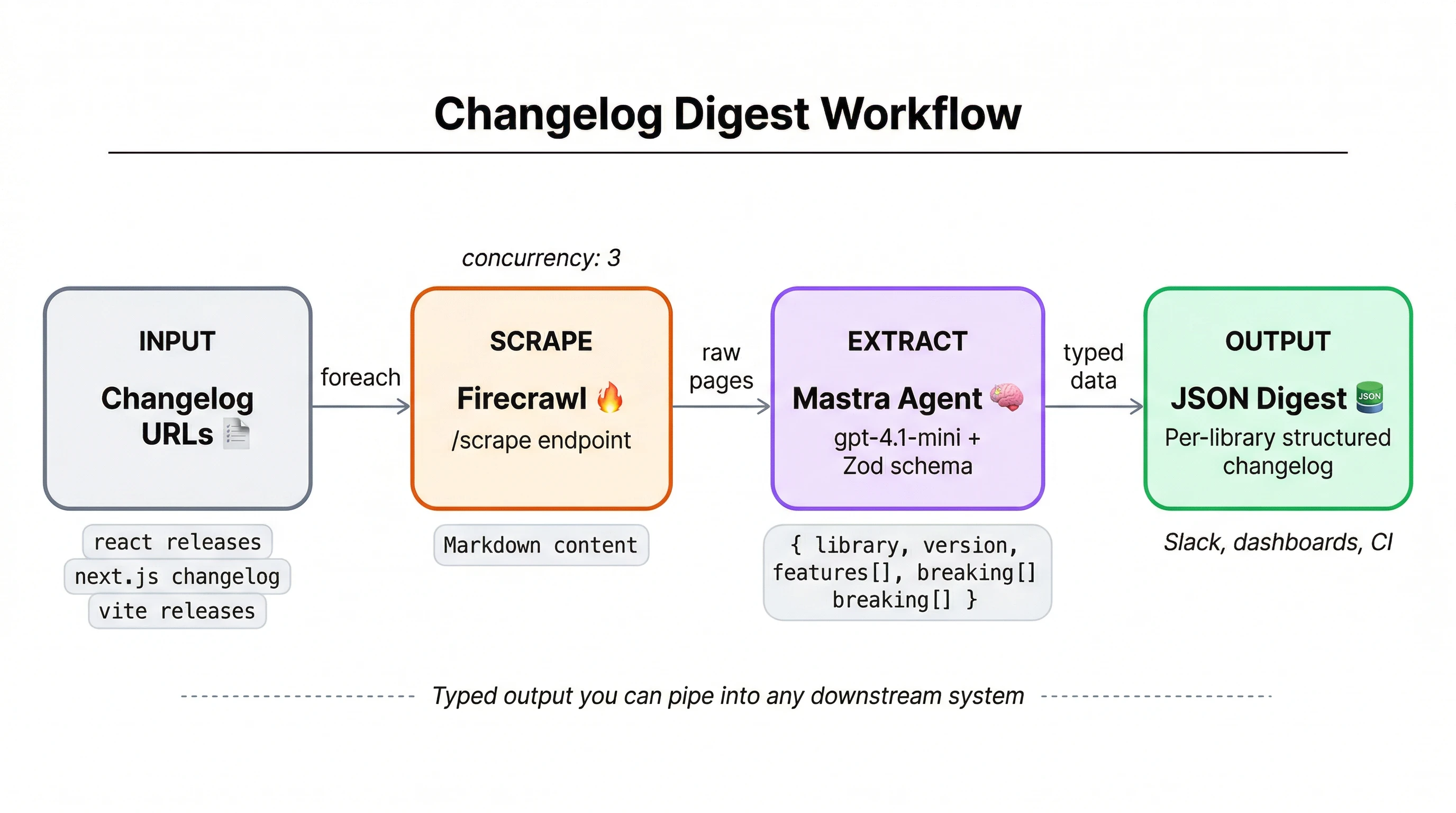
The agent wires up tools, follows a system prompt, and lets the LLM figure out the right call sequence. Give it a library name like "Next.js" and it searches for the changelog page using Firecrawl's search API, scrapes the content into markdown, then summarizes what changed. Multi-step reasoning is where agents pull ahead of simple scripts: the agent identifies which URL is the actual changelog (not a blog post or tutorial), decides how far back to look, and distinguishes breaking changes from minor patches.
Changelog pages come in wildly different formats, like GitHub releases, Notion docs, custom documentation sites, raw markdown files. Firecrawl normalizes all of them into clean markdown that the LLM can process without fighting HTML soup.
The workflow scrapes a list of URLs in parallel, enforces output shapes with Zod schemas, and produces typed JSON with version numbers, change categories, and severity levels. Deterministic execution plus enforced schemas make workflows the right fit for batch jobs where every run needs to look the same.
Prerequisites
- Node.js 18 or later
- A Firecrawl API key (free tier works for this tutorial)
- An OpenAI API key (the agent uses GPT-4.1)
- Working knowledge of TypeScript and comfort with async/await patterns
Project setup
Mastra's CLI scaffolds the project structure, config files, and a starter agent. Run:
npx create-mastra@latest --llm openaiSelect the defaults when prompted. You'll get a src/mastra/ directory with subdirectories for agents, tools, and workflows, plus a root index.ts that registers everything with the Mastra runtime.
Install the Firecrawl TypeScript SDK:
npm install firecrawlOur agent needs to search the web for changelog pages and scrape their content. Firecrawl gives us both through a single SDK: a search endpoint that finds URLs and a scrape endpoint that returns clean markdown from any page, regardless of how it's built.
You'll also need the Vercel AI SDK's OpenAI provider, which Mastra uses for model interaction:
npm install @ai-sdk/openaiAfter installation, npm may flag a high severity Rollup vulnerability in Mastra's deployer package. This is a known issue with the current version and poses no risk in local development. Don't run npm audit fix --force — it will downgrade Mastra to a breaking version.
Create a .env file in the project root:
FIRECRAWL_API_KEY=fc-xxxxx
OPENAI_API_KEY=sk-xxxxx
Mastra loads these automatically at runtime. Here's the final structure:
changelog-tracker/
├── src/
│   └── mastra/
│       ├── agents/
│       │   └── changelog.ts
│       ├── tools/
│       │   └── firecrawl.ts
│       ├── workflows/
│       │   └── digest.ts
│       └── index.ts
├── .env
├── package.json
└── tsconfig.json
Each subdirectory maps to one of Mastra's primitives. index.ts ties them together as the entry point.
Building the Firecrawl tools
Before writing a single line, it's worth internalizing what actually determines how capable an agent becomes. In his book Principles of Building AI Agents, Mastra CEO Sam Bhagwat puts it plainly:
Agents are only as powerful as the tools you give them.
Mastra ships with an official @mastra/firecrawl integration, but we'll use the direct Firecrawl JS SDK for more control over request parameters and response handling. Create src/mastra/tools/firecrawl.ts:
import { createTool } from "@mastra/core/tools";
import { Firecrawl } from "firecrawl";
import { z } from "zod";

const firecrawl = new Firecrawl({ apiKey: process.env.FIRECRAWL_API_KEY! });
Zod provides runtime schema validation for tool inputs and outputs. Each tool gets an id, a description the agent reads at runtime to decide what fits, typed inputSchema/outputSchema contracts, and an execute function with the actual logic.
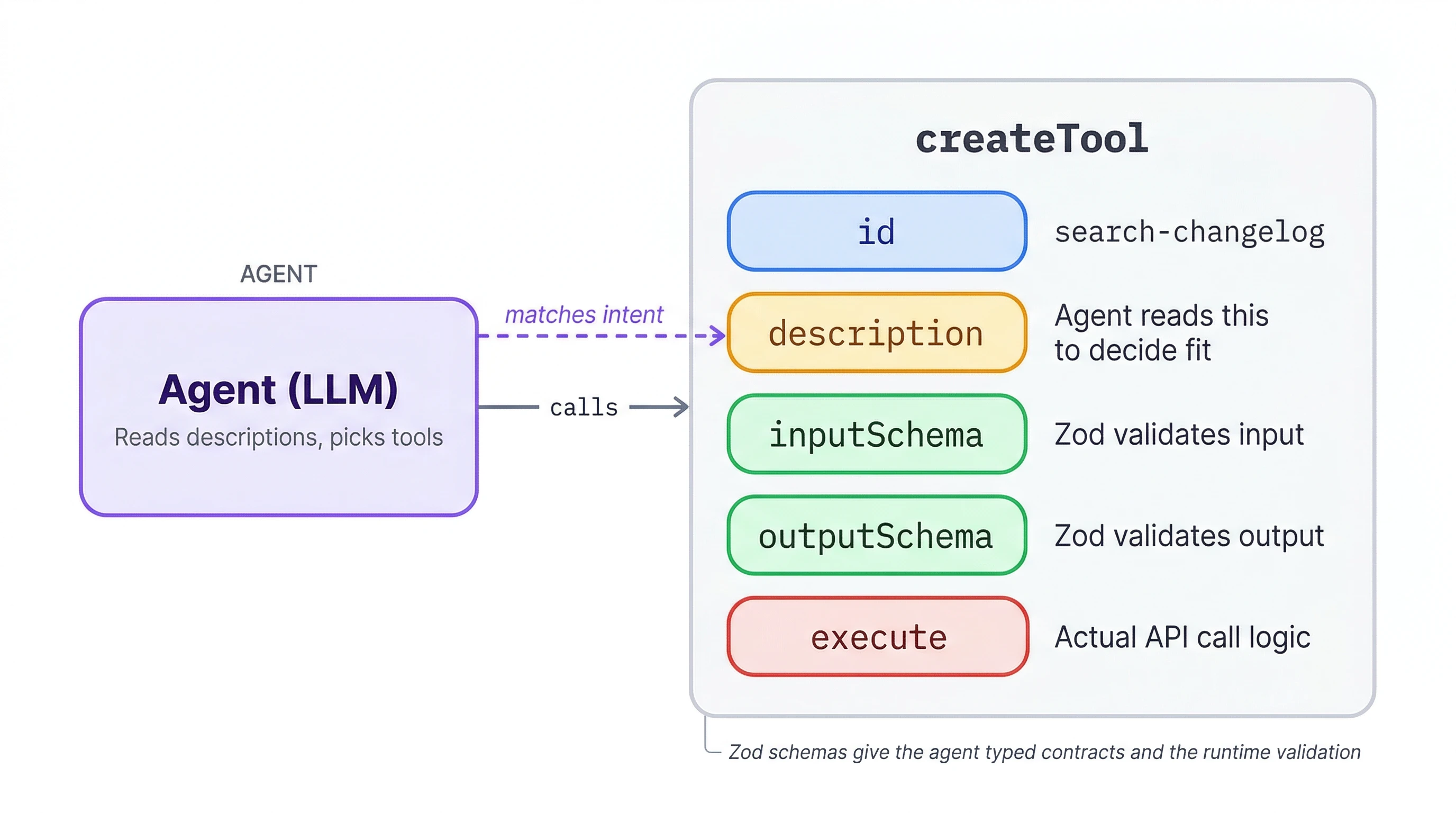
createTool is imported from @mastra/core/tools and is the standard way to define agent tools in Mastra. Every tool you build in this tutorial follows the same shape.
First up, a tool that searches the web for a changelog page:
export const searchChangelog = createTool({
  id: "search-changelog",
  description: "Search the web for a library changelog or releases page.",
  inputSchema: z.object({
    query: z.string().describe('Library name plus "changelog" or "releases"'),
  }),
  outputSchema: z.object({ url: z.string(), title: z.string() }),
  execute: async ({ query }) => {
    const results = await firecrawl.search(query, { limit: 1 });
    const top = results.web?.[0] as { url: string; title?: string } | undefined;
    return { url: top?.url ?? "", title: top?.title ?? "" };
  },
});
This wraps Firecrawl's search API to find a changelog URL given just a library name. Setting limit: 1 keeps it tight since we only need the top result.
And one for the actual page scraping:
export const scrapeChangelog = createTool({
  id: "scrape-changelog",
  description: "Scrape a changelog or releases page and return its content.",
  inputSchema: z.object({
    url: z.string().describe("URL of the changelog page"),
  }),
  outputSchema: z.object({ markdown: z.string() }),
  execute: async ({ url }) => {
    const result = await firecrawl.scrape(url, {
      formats: ["markdown"],
      onlyMainContent: true,
    });
    return { markdown: result.markdown ?? "" };
  },
});
Firecrawl's scrape endpoint pulls page content as clean markdown. onlyMainContent: true strips navigation, footers, and ads so the agent gets just the changelog text. Both tools together are under 40 lines of actual logic.
Creating the changelog agent
With both tools ready, the agent file itself is surprisingly short. Create src/mastra/agents/changelog.ts:
import { Agent } from "@mastra/core/agent";
import { openai } from "@ai-sdk/openai";
import { searchChangelog, scrapeChangelog } from "../tools/firecrawl";

export const changelogAgent = new Agent({
  id: "changelog-agent",
  name: "Changelog Agent",
  instructions: `You analyze software changelogs and release notes. When given a library name, search for its changelog page, scrape it, and summarize the recent changes. Focus on version numbers, breaking changes, new features, and deprecations. Format your response as a structured summary.`,
  model: openai("gpt-4.1"),
  tools: { searchChangelog, scrapeChangelog },
});
Not much to it. The instructions field is the system prompt, and without clear guidance on what to extract, the agent would dump the entire page instead of a focused summary. The model comes from the Vercel AI SDK, which Mastra uses under the hood, so you can swap openai("gpt-4.1") for any supported provider without changing the rest of the code.
Registering the agent
Make the agent available at runtime by registering it in src/mastra/index.ts:
import { Mastra } from "@mastra/core/mastra";
import { changelogAgent } from "./agents/changelog";

export const mastra = new Mastra({
  agents: { changelogAgent },
});
The index.ts might come with CLI scaffolds example code that includes storage, observability, and scoring configuration. You can delete the contents and replace it with the above.
Testing in Mastra Studio
Running npx mastra dev launches a local web UI for testing agents without building a frontend. Studio reads registered agents from your Mastra instance and gives you a chat interface for each one.
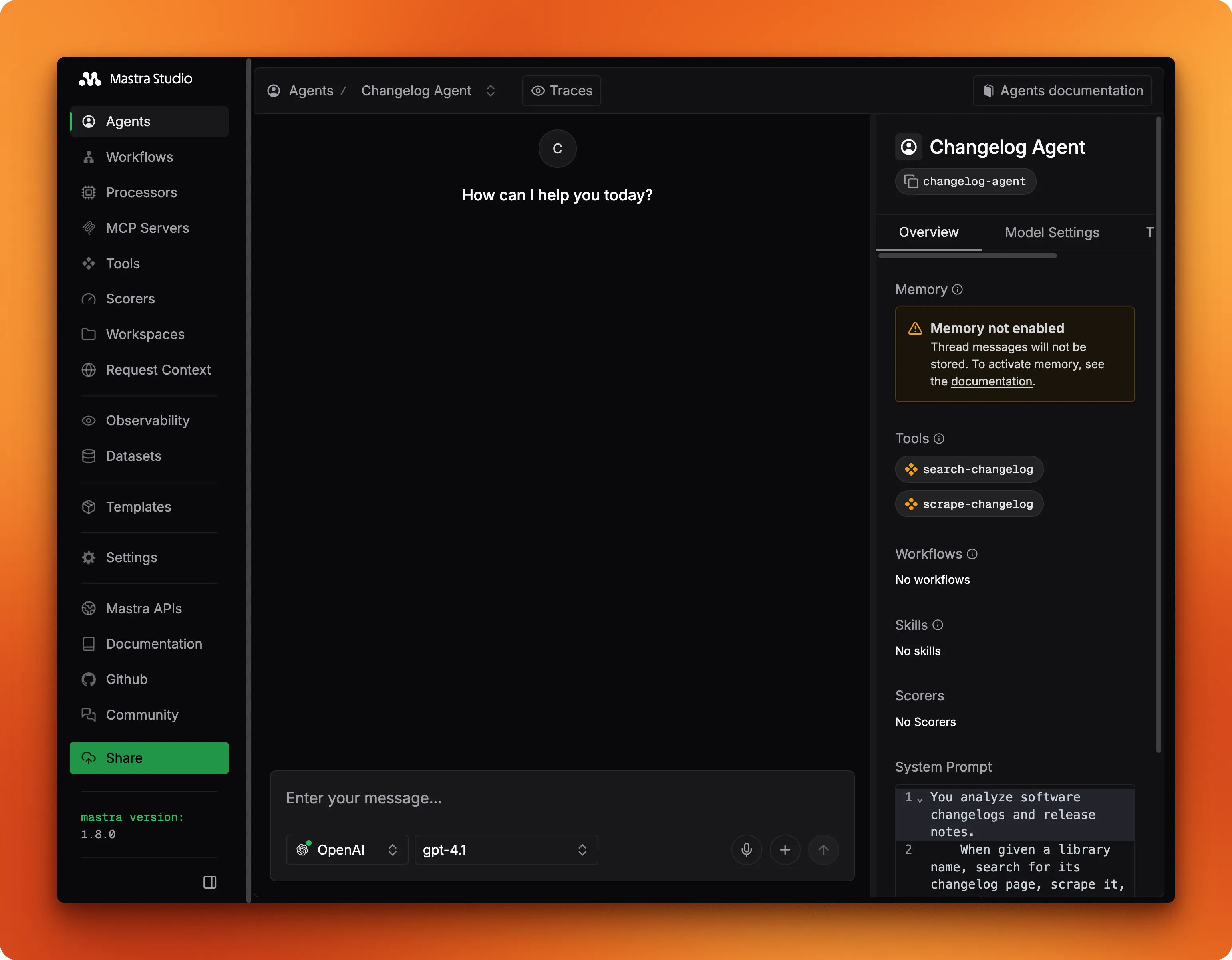
The detail view shows the system prompt, model, and attached tools at a glance so you can verify the configuration before sending any messages.
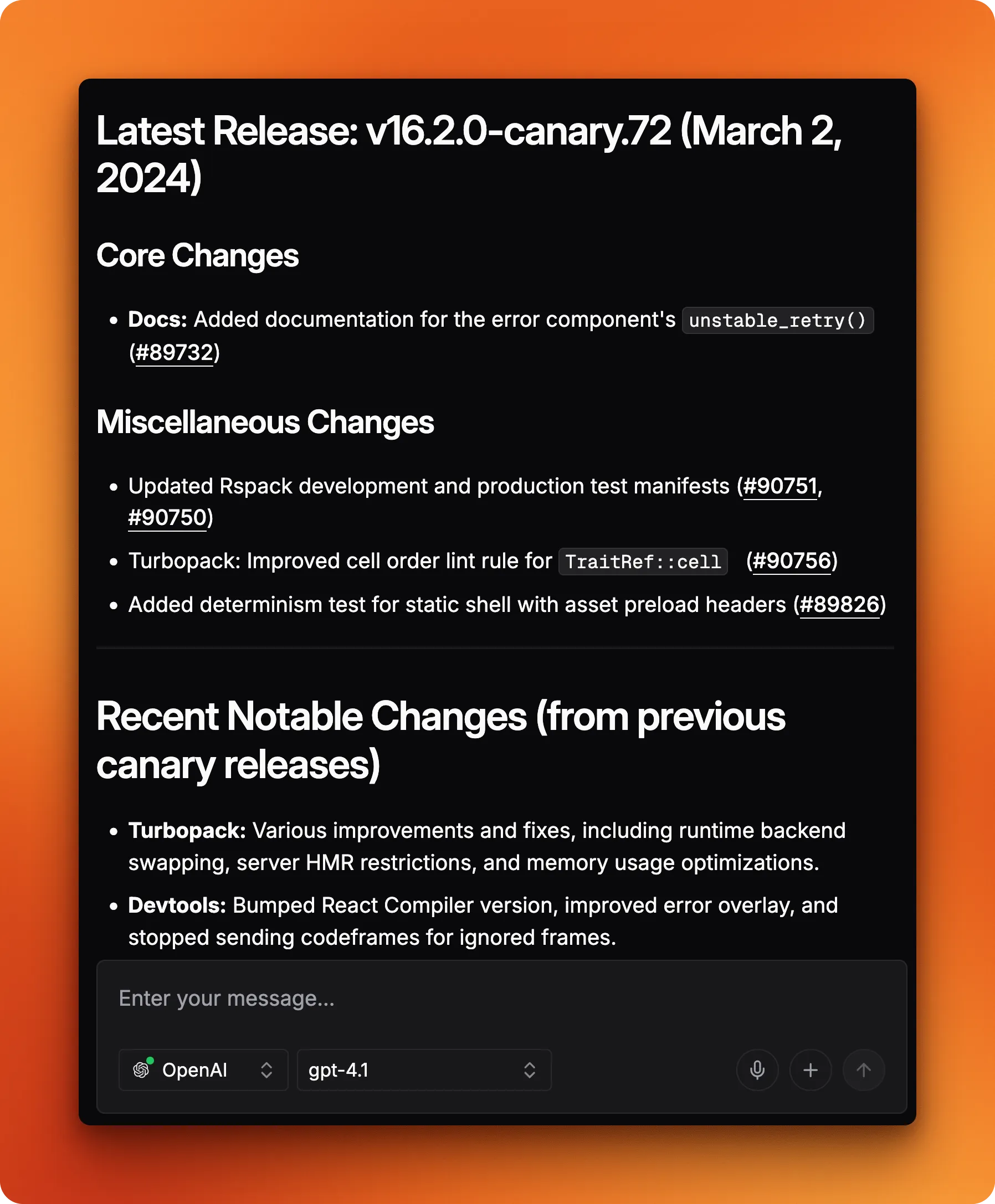
Try typing "Next.js" into the chat. The agent calls searchChangelog first to find the releases page, then scrapeChangelog to pull the content.
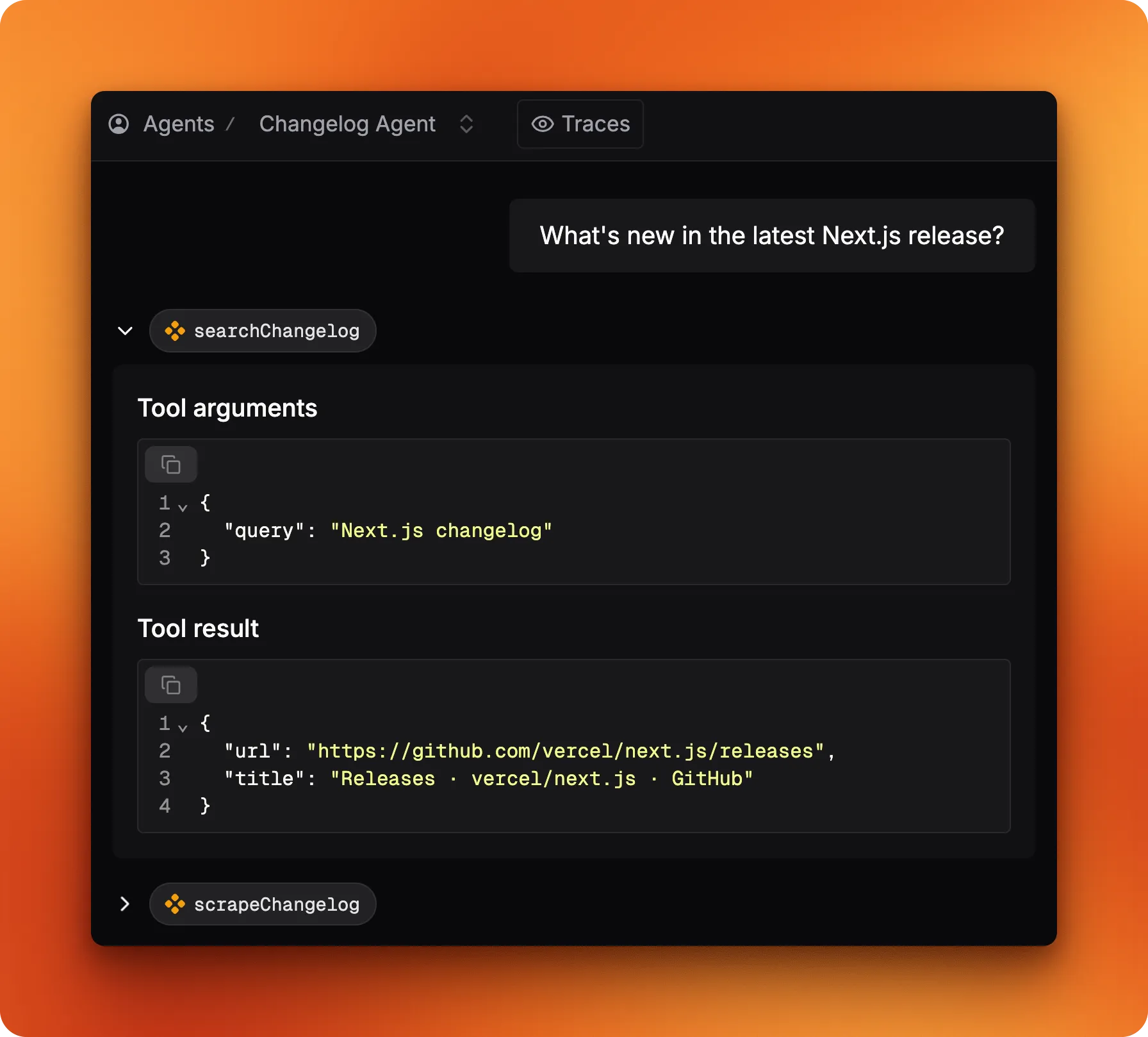
Studio displays each tool call with its arguments and return values, so you can trace the reasoning step by step.
Now try passing a direct URL like https://www.firecrawl.dev/changelog instead of a library name.
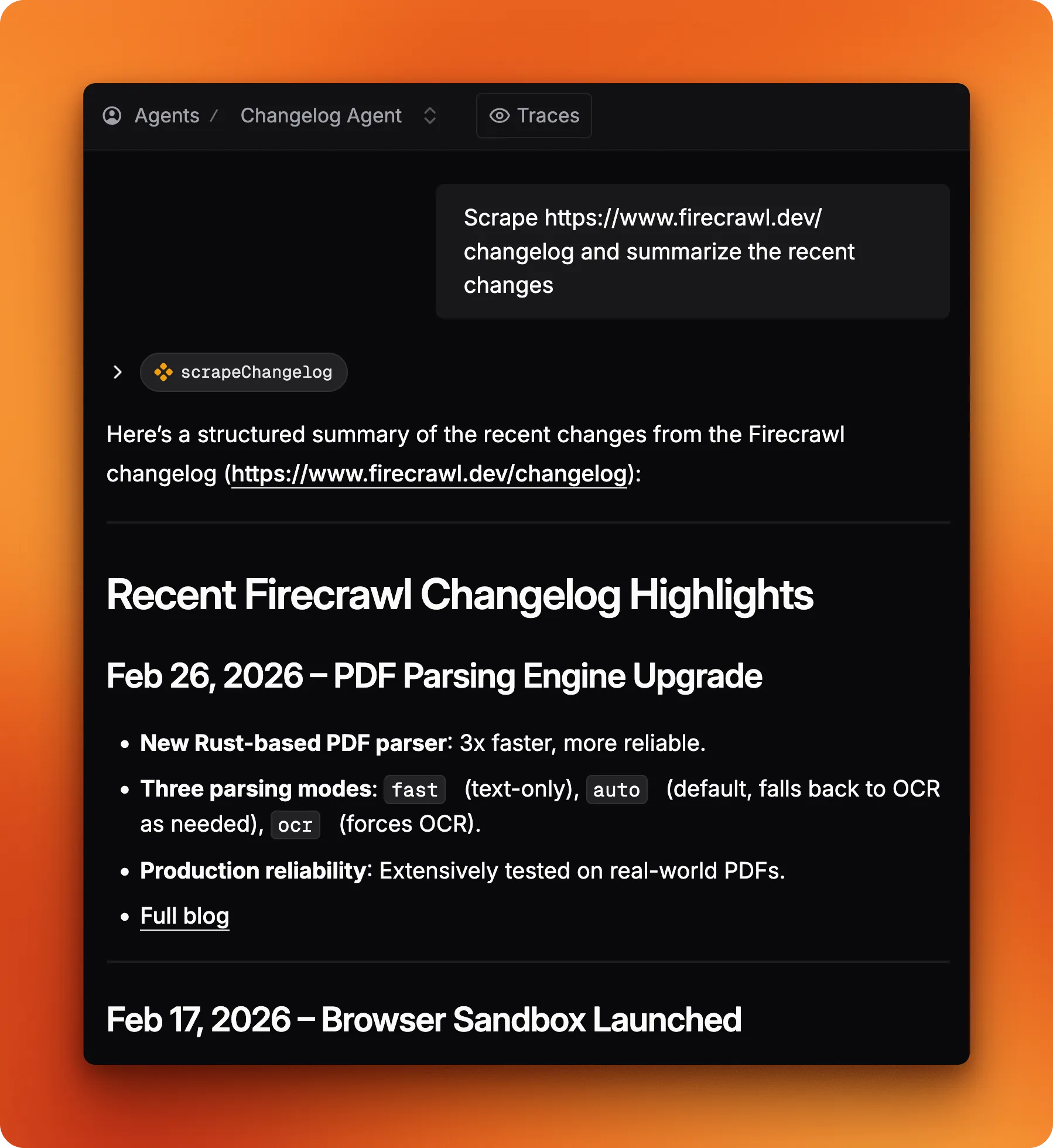
The agent skips the search step entirely and jumps straight to scraping. That's a nice moment: it read the searchChangelog description ("search for a library changelog"), realized it already had a URL, and decided that tool wasn't needed. No special branching logic, just good tool descriptions doing their job. That behavior is the whole point — tool descriptions aren't documentation for humans, they're instructions the model reasons against at runtime. In his book, Sam mentions this is one of the most consequential decisions you'll make:
The more clearly you communicate a tool's purpose and usage to the model, the more likely it is to use it correctly. You should describe both what it does and when to call it.
— Sam Bhagwat, CEO of Mastra, in Principles of Building AI Agents
Calling the agent from code
Studio is useful for testing, but production code calls the agent directly. Import the mastra instance, grab the agent by ID, and call generate():
import { mastra } from "./src/mastra/index.js";

const agent = mastra.getAgent("changelogAgent");
const result = await agent.generate("Summarize the latest Next.js changelog");
console.log(result.text);
Same tool-calling loop as Studio. Here's a trimmed excerpt from a real run:
## Latest Releases

### v16.2.0-canary.72
- Docs: Added `unstable_retry()` to error component.
- Turbopack: Improved cell order lint rule for TraitRef::cell.

### v16.2.0-canary.71
- Turbopack: Use posix.join for client URL manifest paths on Windows.
- Devtools: Bumped React Compiler version to latest experimental.
- Published @next/playwright to npm as part of canary releases.

### v16.2.0-canary.70
- `experimental.prefetchInlining`: Bundled segment prefetches into a single response.
- `instant()`: Fixed cookie handling for fresh page loads.
For structured data instead of free-form text, pass a structuredOutput option with a Zod schema, the same approach the workflow uses. structuredOutput takes a Zod schema and tells the LLM to return typed JSON instead of free-form text. The response comes back on response.object, already parsed and type-checked.
How do Mastra workflows differ from agents?
Agents are the right tool for exploratory, open-ended tasks — but freedom has a cost. When you need every run to produce the same shape of output, an agent's willingness to improvise becomes a liability. In his book, Sam mentions why workflows emerged as a solution to exactly this problem:
Graph-based workflows have emerged as a useful technique for building with LLMs when agents don't deliver predictable enough output.
— Sam Bhagwat, CEO of Mastra, in Principles of Building AI Agents
The changelog agent works well for one-off questions: you ask about a library, it figures out which tools to call. But if you need to scrape five changelog URLs and get identically-shaped JSON from each one, that kind of improvisation is a liability.
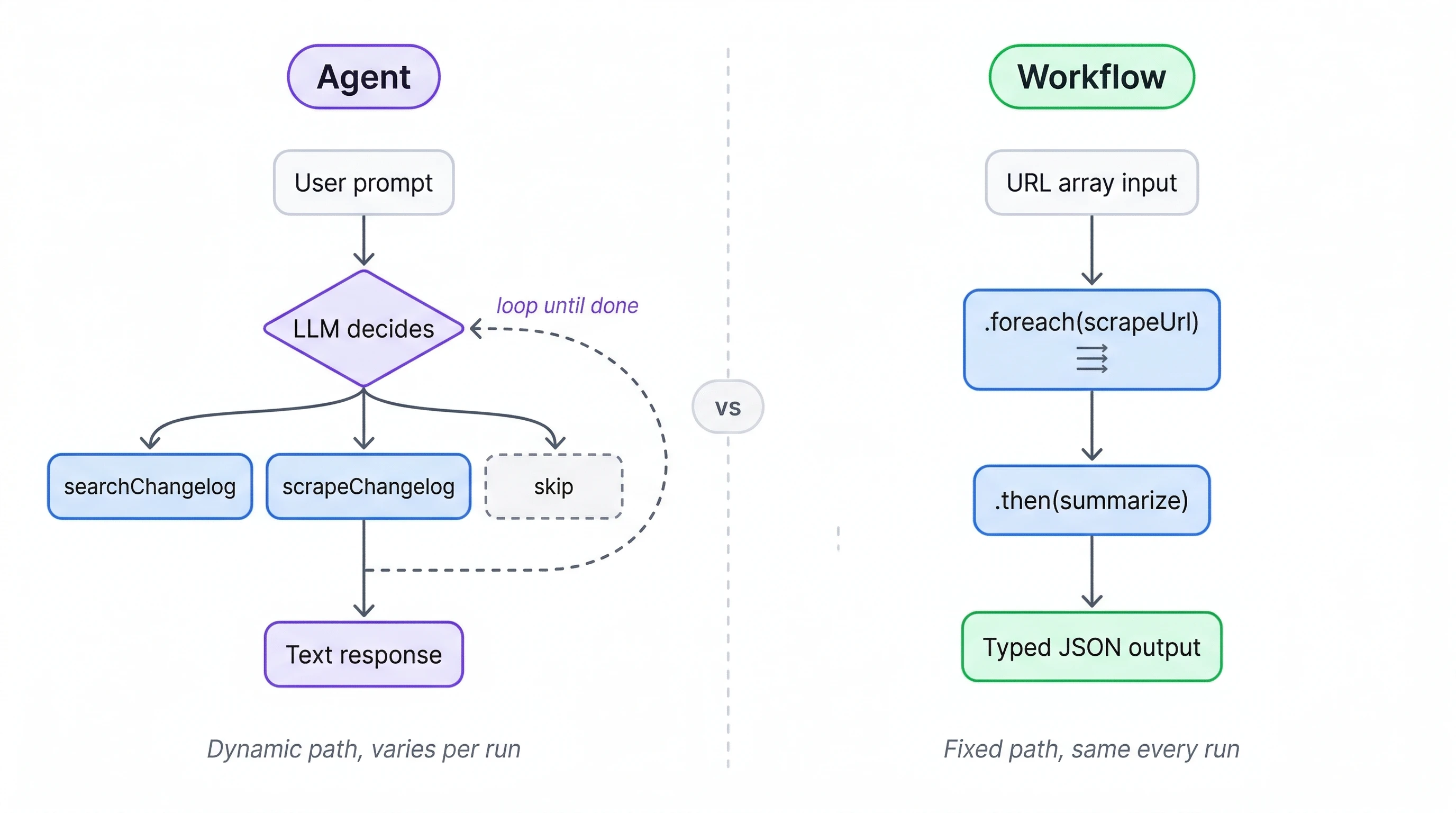
Workflows lock down the execution path at build time. Every run follows the same steps in the same order. A workflow that scrapes five URLs will always scrape all five and always pass results to the same summarization step. No variation, no surprises.
For batch jobs where consistency matters (processing a list of URLs, running the same extraction across documents, generating periodic reports) that predictability is the whole point. Most Mastra projects use both: agents for interactive requests, workflows for scheduled batch jobs. The rest of this mastra tutorial builds the workflow side.
Building the batch workflow
The workflow code is compact. It lives in src/mastra/workflows/digest.ts: scrape a list of changelog URLs with Firecrawl's scrape endpoint, extract structured data from each page, return typed JSON.
Start with imports and the Firecrawl client:
import { createWorkflow, createStep } from "@mastra/core/workflows";
import { Firecrawl } from "firecrawl";
import { openai } from "@ai-sdk/openai";
import { z } from "zod";

const firecrawl = new Firecrawl({ apiKey: process.env.FIRECRAWL_API_KEY! });
createWorkflow and createStep follow the same id + schema + execute shape as createTool, so this should feel familiar.
Defining the output schema
Before writing any steps, define the shape of the data you want out:
const changelogSchema = z.object({
  library: z.string(),
  latestVersion: z.string(),
  releaseDate: z.string(),
  breakingChanges: z.array(z.string()),
  newFeatures: z.array(z.string()),
  deprecations: z.array(z.string()),
});
This schema is the reason the workflow exists instead of just asking the agent. Every changelog entry gets the same six fields with the same types. A database insert, a Slack block, a monitoring dashboard can all rely on this shape without parsing free-form text.
How does the scrape step work?
The first step takes a single URL and returns its markdown content:
const scrapeUrl = createStep({
  id: "scrape-url",
  inputSchema: z.object({ url: z.string() }),
  outputSchema: z.object({ url: z.string(), markdown: z.string() }),
  execute: async ({ inputData }) => {
    const result = await firecrawl.scrape(inputData.url, {
      formats: ["markdown"],
      onlyMainContent: true,
    });
    return { url: inputData.url, markdown: result.markdown ?? "" };
  },
});
Same Firecrawl call as the tool from earlier, but steps run in a fixed sequence defined by the workflow rather than being invoked by an agent.
How does the summarize step extract structured data?
Here's where the LLM does the extraction:
const summarize = createStep({
  id: "summarize",
  inputSchema: z.array(z.object({ url: z.string(), markdown: z.string() })),
  outputSchema: z.object({
    changelogs: z.array(changelogSchema),
  }),
  execute: async ({ inputData, mastra }) => {
    const agent = mastra.getAgent("changelogAgent");
    const changelogs = await Promise.all(
      inputData.map(async (page) => {
        const response = await agent.generate(
          `Extract changelog data from this page:\n\n${page.markdown}`,
          {
            structuredOutput: {
              schema: changelogSchema,
              model: openai("gpt-4.1-mini"),
            },
          },
        );
        return response.object;
      }),
    );
    return { changelogs };
  },
});
Worth highlighting: mastra.getAgent() reuses the same agent definition from earlier. Promise.all processes all pages concurrently rather than one at a time. The structuredOutput option passes the Zod schema so response.object comes back typed, not as a raw string. And the model override uses gpt-4.1-mini instead of the agent's default gpt-4.1, which cuts cost for what's a straightforward extraction task.
Composing the workflow
With both steps defined, composing them is a short chain:
export const digestWorkflow = createWorkflow({
  id: "changelog-digest",
  inputSchema: z.array(z.object({ url: z.string() })),
  outputSchema: z.object({
    changelogs: z.array(changelogSchema),
  }),
})
  .foreach(scrapeUrl, { concurrency: 3 })
  .then(summarize)
  .commit();
Input goes in as an array of URL objects. .foreach(scrapeUrl, { concurrency: 3 }) runs the scrape step for each URL, processing up to three pages at once. .then(summarize) pipes the collected results into the summarize step. .commit() finalizes the definition. Reads top-to-bottom: scrape each URL, then summarize everything.
Register it alongside the agent in src/mastra/index.ts:
import { Mastra } from "@mastra/core/mastra";
import { changelogAgent } from "./agents/changelog";
import { digestWorkflow } from "./workflows/digest";

export const mastra = new Mastra({
  agents: { changelogAgent },
  workflows: { digestWorkflow },
});
Testing the workflow in Studio
Open Mastra Studio and go to the workflow tab. The DAG view shows the two-step pipeline:
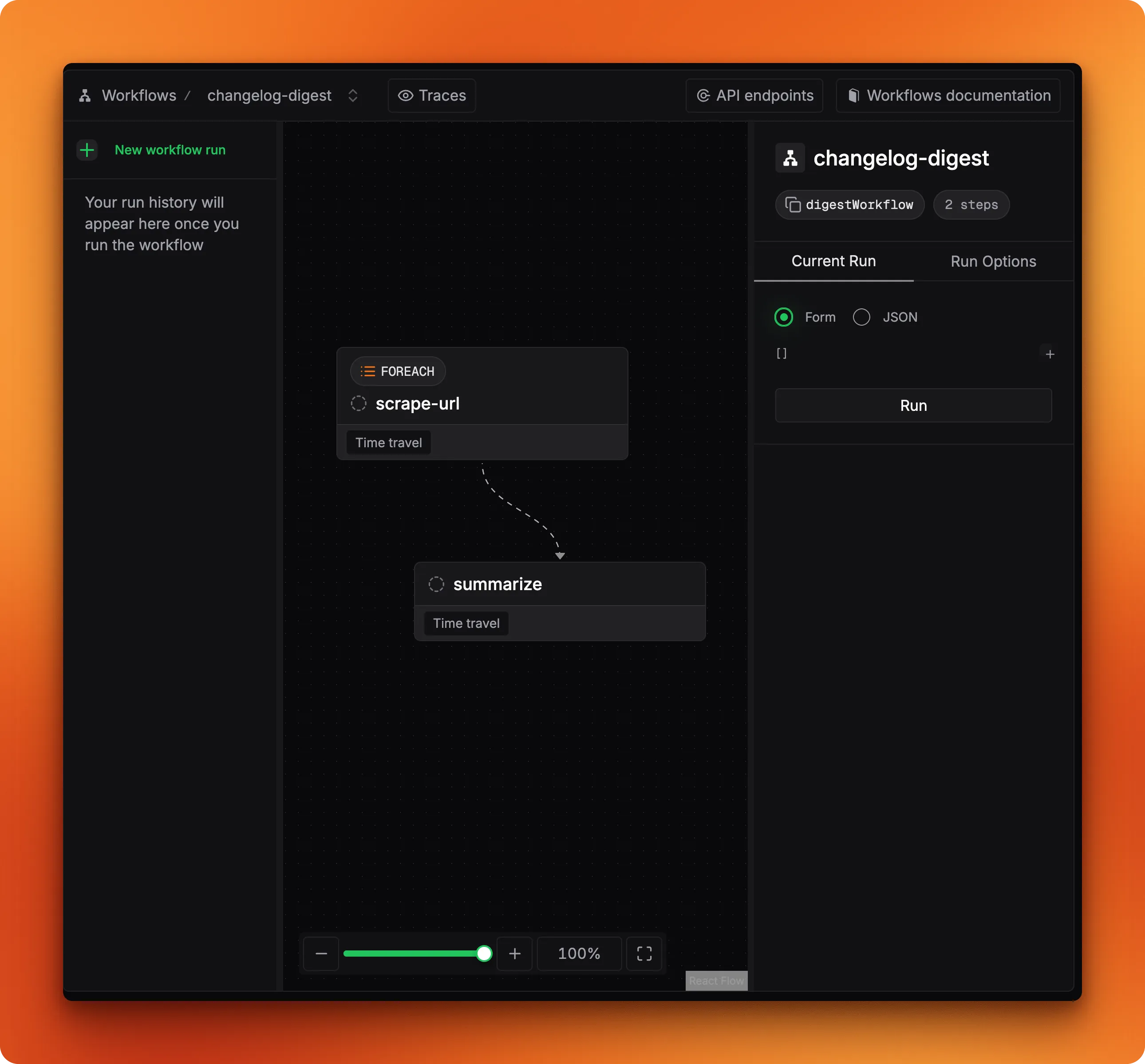
Pass an array of changelog URLs as input and run it. When both steps turn green, the output panel shows data matching your changelogSchema:
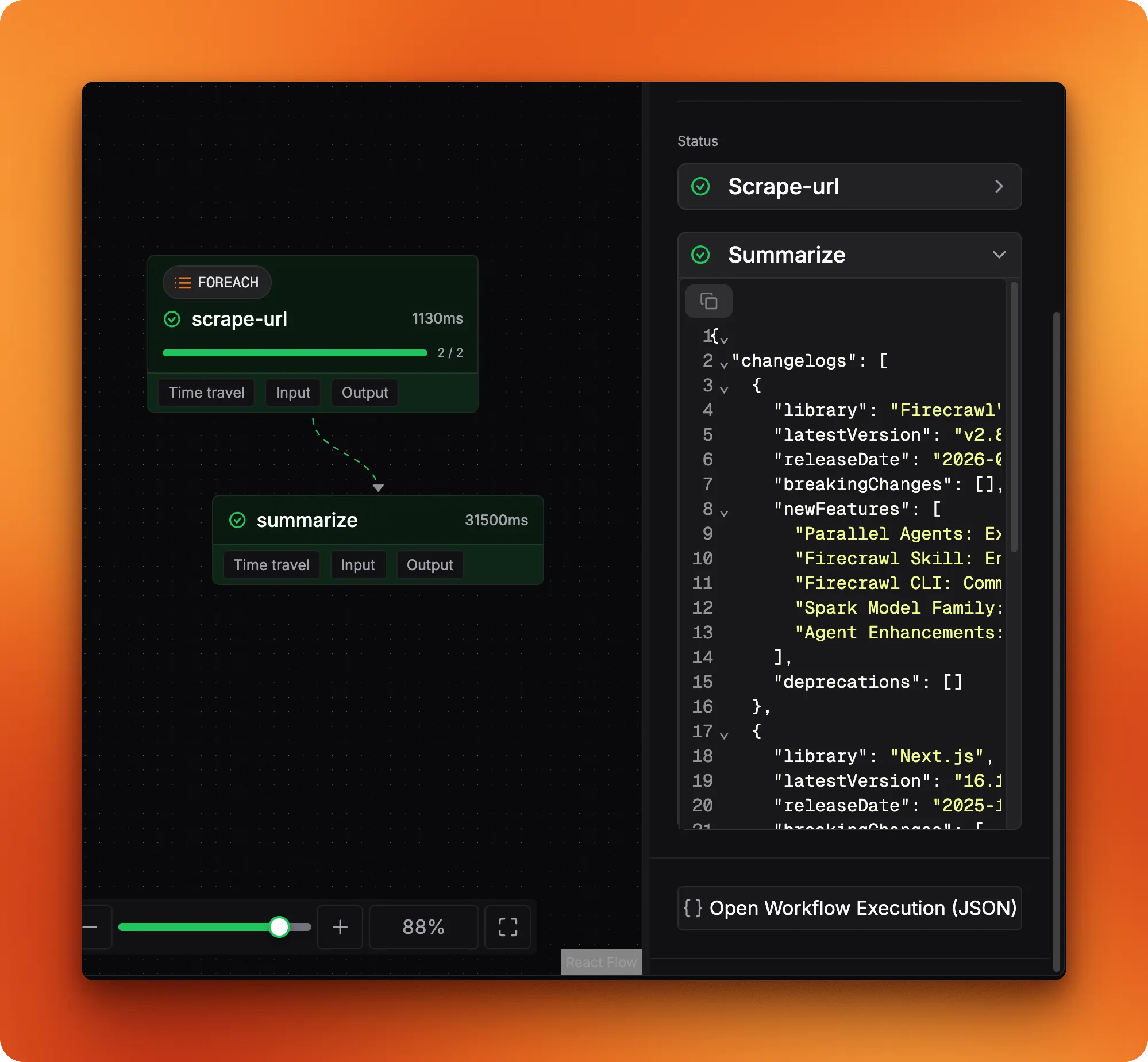
The JSON tab has the full execution trace, including foreach progress for individual URL processing:
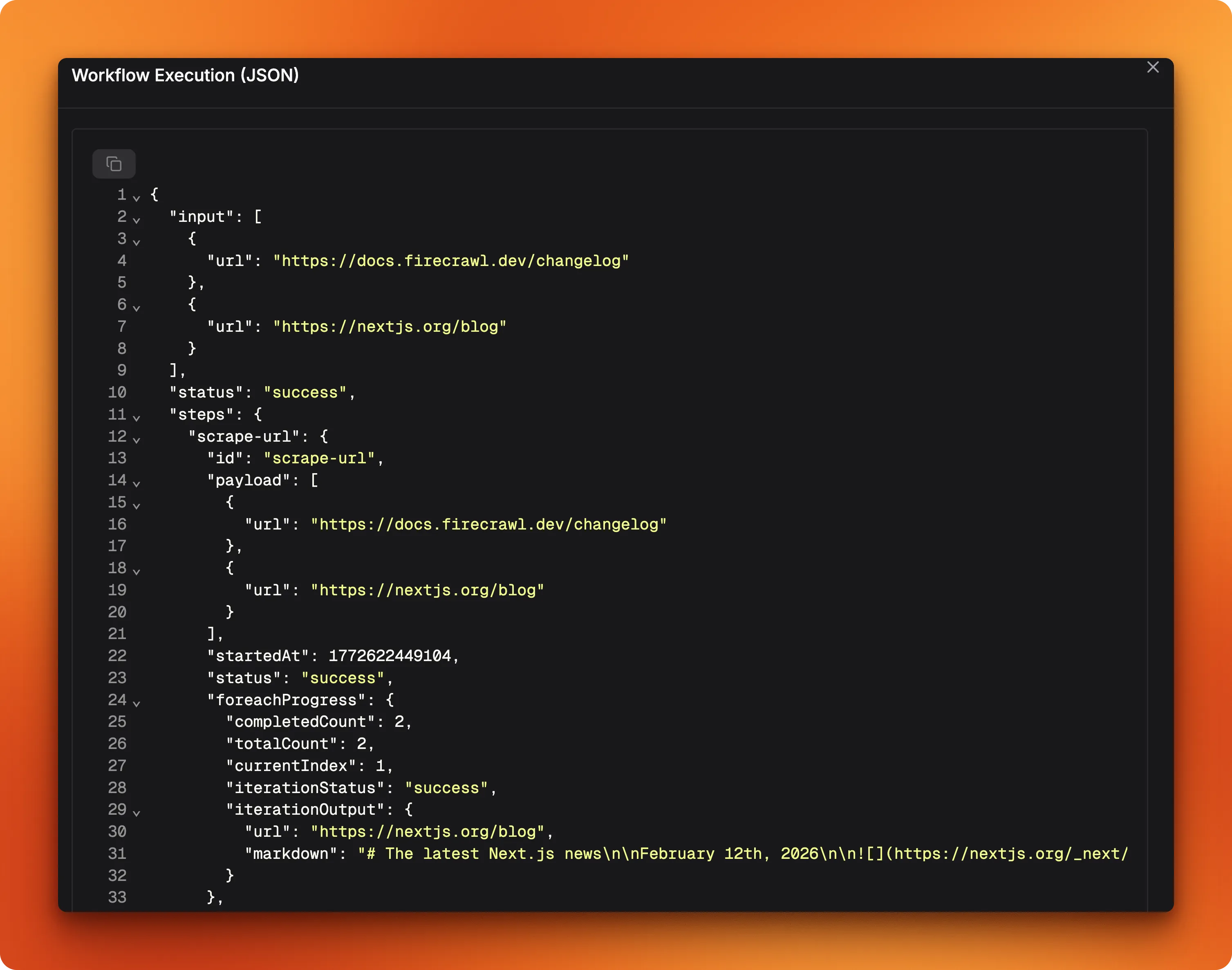
That output is ready to pipe straight into a database, Slack message, or dashboard.
What should you add for production?
The tutorial code works end to end, but a production deployment needs a few more pieces. Here's what will bite you first:
Streaming. Most chat UIs can't wait for the full response. agent.stream() returns a textStream you can pipe to a frontend over SSE or WebSockets. The streaming reference has the API details.
Memory. Right now, every call starts fresh with no conversation history. For multi-turn interactions, add @mastra/memory with a storage backend like libSQL or Postgres. The agent then tracks threads per user, so follow-up questions work without re-explaining context. Setup is in the agent memory docs.
Error handling in workflow steps. The scrape step assumes every URL returns valid markdown. Wrap the Firecrawl call in a try/catch and return a fallback payload, otherwise one broken URL kills the entire batch.
Observability. Mastra integrates with logging and tracing tools to track agent decisions, tool call latency, and token usage across runs. Check the Mastra docs for available integrations.
How do you deploy a Mastra project?
Running mastra build compiles your agents, tools, and workflows into a self-contained output directory at .mastra/output/. The build step bundles a Hono HTTP server that exposes everything as API endpoints.
npx mastra build
npx mastra start
mastra start runs the compiled server locally on port 4111. From there, three deployment paths:
- Vercel: Install
@mastra/deployer-verceland deploy as a serverless function. If your project uses Firecrawl, install it from the Vercel Marketplace andFIRECRAWL_API_KEYgets injected into your environment automatically. - Cloudflare Workers: Install
@mastra/deployer-cloudflarefor edge deployment - Any Node.js server: Copy
.mastra/output/to your server and runnode index.mjs
The deployment docs walk through platform-specific configuration.
Conclusion
This Mastra tutorial built a changelog tracker covering Mastra's main primitives: typed tools with createTool, an agent that picks its own tool sequence, and a batch workflow with structured output. Not a bad surface area for one project.
If you want to go further, memory for multi-turn conversations, a cron trigger for weekly digests, and deployment to Vercel or Cloudflare are all natural next steps. The Mastra documentation and the Mastra GitHub repo have you covered.
Frequently Asked Questions
What is Mastra?
Mastra is an open-source TypeScript framework for building AI agents. It gives you primitives like createAgent, createTool, and createWorkflow that handle LLM interaction, structured output, and multi-step pipelines. Full docs at mastra.ai/docs.
How does Mastra compare to LangChain?
Mastra is TypeScript-native and builds on the Vercel AI SDK for model interaction, while LangChain started in Python and added a JS port later. Mastra also ships with a built-in visual IDE (Mastra Studio) for testing agents and workflows during development. It's more opinionated about structure, which reduces boilerplate but limits some lower-level customization.
What is Firecrawl?
Firecrawl is the context API to search, scrape, and interact with the web at scale, converting web pages into clean markdown or structured data. Its /search endpoint finds pages and can scrape them in one call, while Scrape can return structured JSON from a URL and prompt. In this tutorial, Firecrawl powers the scrape and search tools that feed changelog data to the agent.
Can I use a different LLM with Mastra?
Yes. Since Mastra builds on the Vercel AI SDK, you get support for OpenAI, Anthropic, Google, Mistral, and others out of the box. Switching means changing the model parameter in your agent or step definition.
How do I deploy a Mastra agent to production?
Mastra supports Vercel, Cloudflare Workers, and standalone Node.js servers. The framework generates API routes for your agents and workflows that you expose as HTTP endpoints. Platform-specific guides are in the Mastra docs.
What is structured output in Mastra?
A way to pass a Zod schema to an LLM call so the response comes back as typed JSON instead of free-form text. You use the structuredOutput option in agent.generate() with a schema definition, and response.object is already parsed and type-checked.
Can Mastra workflows run on a schedule?
Yes. Workflows support cron triggers that run the pipeline on a defined schedule. You configure the trigger in the workflow definition or through the deployment platform's scheduler.
How do I add more tools to a Mastra agent?
Create additional tools with createTool following the same pattern from this tutorial, then add them to the tools object in your agent definition. The agent picks them up based on each tool's description and the user's query.