We just launched Firecrawl Browser Sandbox - secure, fully managed environments where AI agents can interact with the web and extract data.
TL;DR:
Firecrawl Browser Sandbox is a browser environment your agents can control - no local setup, no infrastructure to maintain.
- Zero config - no Chromium to install, no framework to configure
- Skill + CLI first - one command and your agent has a browser ready
- Fully managed & scalable - runs in isolated, disposable environments; launch hundreds of parallel sessions without managing anything
- Persistent or temporary sessions - persistent sessions let agents pick up where they left off with saved auth and state; temporary sessions are clean, disposable browsers for one-off extracts
- Fully interactive - browser sessions are fully interactive, so you can click around alongside your agents
- Pre-loaded with Agent Browser - everything agents need to interact with the web, out of the box
- Works with Claude Code, Codex, OpenCode, and more
One call and your agent has a complete toolkit for handling any web task.
The problem: agents need more than scrape and search
Firecrawl already gives your agents fast scrape and search endpoints. For most web tasks, that's enough.
But when it comes to pagination, form fills, and auth flows, agents need an integrated browser to navigate and extract hard-to-reach data. A static scrape won't get you through a login page. Search won't click through a multi-step pricing flow. And local browser tooling means CPU spikes, Chromium installs, and infrastructure you have to maintain.
This is why we're launching Firecrawl Browser Sandbox.
What is Browser Sandbox?
Browser Sandbox is a secure, remote browser environment your agents can control. Each session runs in an isolated container - fully managed by Firecrawl, with nothing running on your local machine.
Every sandbox comes pre-loaded with the tools agents already use:
- Playwright - for precise browser control and scripting
- Agent Browser - for autonomous, AI-driven navigation
No setup. No configuration. Call it from the CLI or API and your agent has a browser ready in seconds. Read the docs →
How it works
# Install CLI, auth, and add skills to all your agents
npx -y firecrawl-cli@latest init --all --browser

# Install Browser Sandbox via CLI
npm install -g firecrawl-cli

# Use Browser Sandbox
firecrawl browser "open uspto.gov"
from firecrawl import Firecrawl
app = Firecrawl(api_key="fc-YOUR-API-KEY")
response = app.list_browsers()
print(response.sessions)Key capabilities
Fully managed sandbox, secure and scalable
Every session runs in an isolated, disposable environment. Agents and the sites they visit are fully contained within the sandbox, so you can run code securely without risk to your own infrastructure.
Since nothing runs locally, there are no CPU or RAM spikes on your machine. And you can launch parallel sessions - each in its own sandbox - scaling from one browser to hundreds without managing anything.
Zero config, pre-loaded with the tools agents already use
Browser Sandbox comes pre-loaded with Playwright and Agent Browser, so your agents have everything they need to interact with the web. No Chromium to install, no browser framework to configure.
Compatible with Claude Code, Codex, OpenCode, and more.
Persistent or temporary sessions - you choose
Persistent sessions let you create profiles where auth and state carry across runs. Your agents can pick up where they left off - no re-logging in, no re-navigating. Ideal for workflows that span multiple sessions or require saved credentials.
Temporary sessions are the opposite: clean, disposable browsers that spin up fresh every time. Perfect for one-off extracts where you don't need any state to carry over.
Fully interactive
Browser sessions are fully interactive. You can click around alongside your agents, watching what they do and stepping in when you need to.
Scrape, search, and browse - all through Firecrawl
Browser Sandbox works alongside Firecrawl's existing scrape and search endpoints. Instead of stitching together separate tools, agents can navigate pagination, fill out forms, and work through multi-step flows to get data that scraping alone can't reach - all through a single platform.
When to use Browser and other Firecrawl endpoints:
| Use Case | Right Tool |
|---|---|
| Extract content from a known URL | Scrape |
| Search the web and get results | Search |
| Navigate pagination, fill forms, click through flows | Browser |
| Multi-step workflows with interaction | Browser |
| Parallel browsing across many sites | Browser (each session is isolated) |
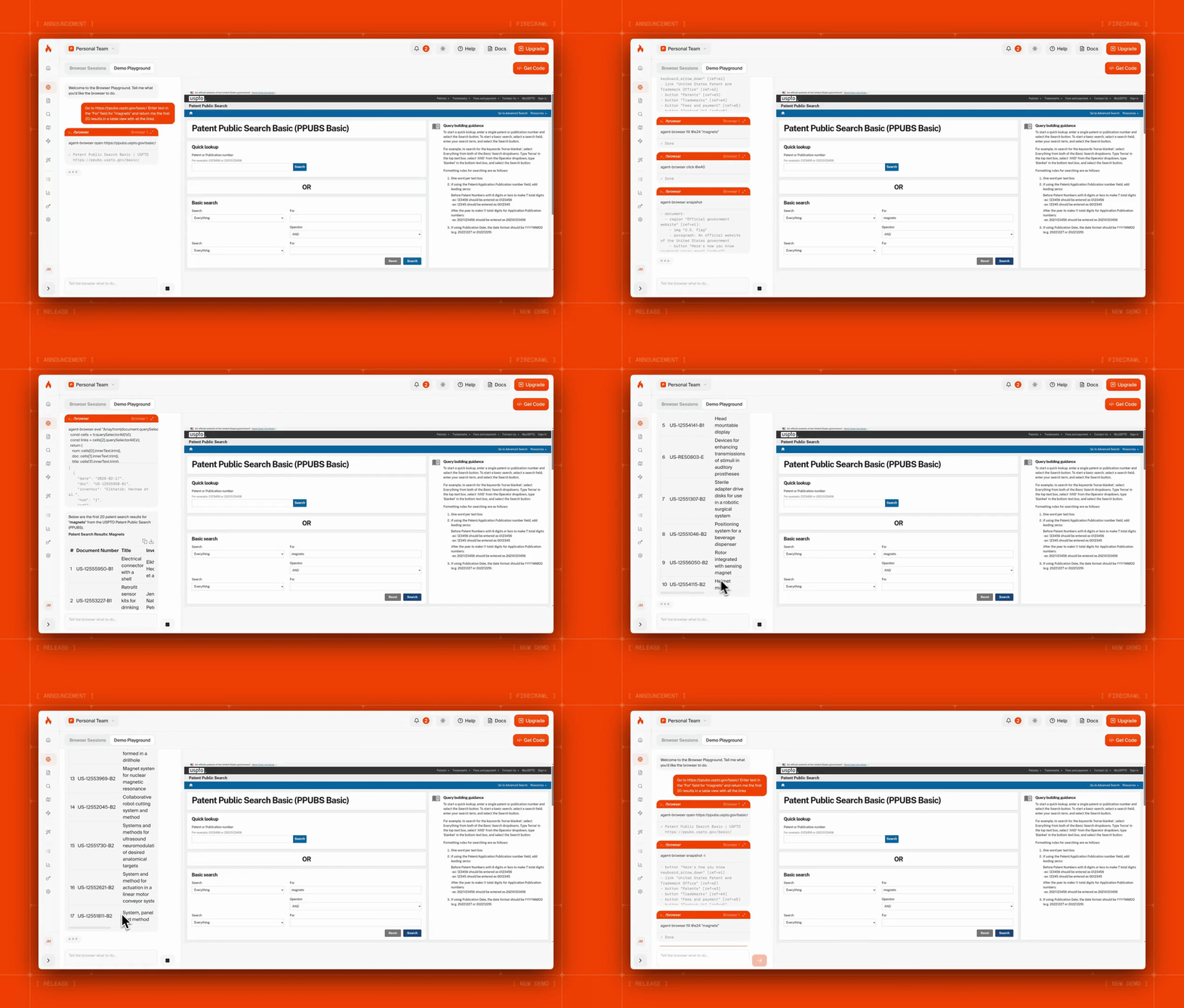
Here's Firecrawl Browser Sandbox fetching dozens of patents with a single prompt:
Real-world use cases
Competitive intelligence
Your agent browses competitor sites, navigates search forms and filters, and extracts pricing, features, and positioning into structured data. Browser handles the interactive navigation; your agent handles the logic.
Knowledge base ingestion
Agents use Browser to navigate help centers, docs sites, and support portals that require clicks, pagination, and authentication - then pipe the extracted content into RAG pipelines to power AI support agents.
Market research at scale
Launch a swarm of agents, each with its own browser session, to build structured datasets from hundreds of pages - legal databases, job boards, real estate listings - in parallel.
Available now
Browser Sandbox is live:
- API - Full control in your applications
- CLI - One command to get started
- Playground - Try it now
Let your agents scrape, search, and browse. Securely.
Resources:
- Documentation: docs.firecrawl.dev/features/browser
- Get an API key: firecrawl.dev