
TL;DR
- An AI SDR is software that researches potential customers and writes the first outreach message. This article builds an agent that does the research live, at send time, instead of reading from a stale list.
- The stack: Firecrawl web search (
/search) for fresh signals, Firecrawl's scrape endpoint with a JSON schema for structured company intel, OpenAI for the writing, Python to wire it together. - "Real time" means the signals (a funding round, a launch, a job post) are pulled off the live web the moment the agent writes, so they're current.
- You end with a script that runs the same research-and-write loop from 1 company to 50+ concurrently.
A sales rep can't research 100 accounts a day. So message creation is defaulted to a template, and templates get ignored.
The numbers back that up. The average B2B cold-email reply rate fell to 5.8% in 2024, down from 6.8% the year before, across 16.5M emails (Belkins, 2025). Personalized emails reply at 17% against 7% for generic ones, a 2.4x difference, across 20M+ sends (Woodpecker). The difference comes from the specificity, and specificity costs research time.
Research time is the part you can automate. This guide builds an agent that researches each company before it writes a word, using Firecrawl web search to read the live web. We point it at one company, watch it run, then scale the same loop across a list.
What is an AI SDR?
An AI SDR (sales development representative) is software that finds potential customers, researches them, and writes the first outreach message. It does the early work a junior rep would do, up to the point of starting a conversation, not closing the deal. It's one of the higher-leverage AI automation examples teams are shipping today, and one of many categories covered in our roundup of the best AI sales automation tools for GTM.
Most AI SDR tooling personalizes from static data, like CRM fields or a contact list scraped once when it was built. Only about 25% of teams use any intent or signal tooling at all (Autobound, 2026, vendor-sourced and directional). The rest write from whatever was true the day the list was made. For building that initial contact list, see our guide on sales lead extraction in Python.
The problem with static personalization is that signals decay. A funding round, a product launch, a new VP of Engineering job posting are the hooks that make a first line land, and they're only worth citing while they're fresh. A list built three months ago has none of them.
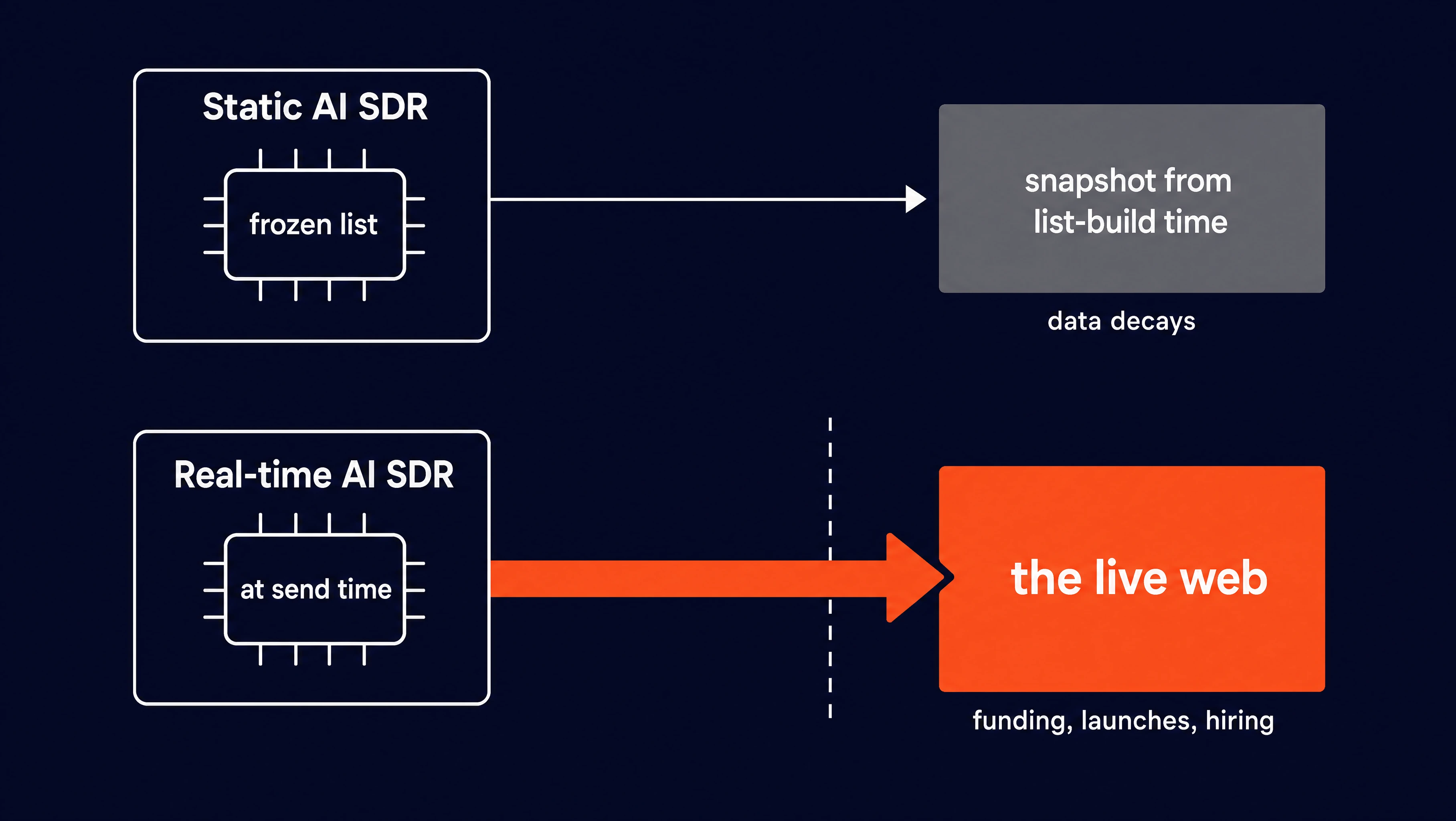
The agent we are going to build researches live, per company, at the moment it writes, so the information is always fresh.
How to build an AI SDR
Setup and prerequisites
Firecrawl gives AI agents fast, reliable web context through search, scraping, and browser interaction tools. This agent uses two of those: web search to read the live web, and scraping to read a company's own site. OpenAI writes the message.
For this project, you need Python 3.10+, a Firecrawl API key, and an OpenAI API key.
Install the SDKs:
uv pip install firecrawl-py openai pydantic python-dotenv
# or: pip install firecrawl-py openai pydantic python-dotenv
firecrawl-py and openai are the two API clients. pydantic defines the shape of the data we pull from each site, and python-dotenv reads your API keys from a file so they stay out of the code.
Put both keys in a .env file at the project root:
FIRECRAWL_API_KEY=fc-...
OPENAI_API_KEY=sk-...
Set up the API clients:
import os
from dotenv import load_dotenv
from firecrawl import Firecrawl
from openai import OpenAI

load_dotenv()

firecrawl = Firecrawl(api_key=os.environ["FIRECRAWL_API_KEY"])
openai = OpenAI(api_key=os.environ["OPENAI_API_KEY"])
load_dotenv() reads the .env file into environment variables, and the two clients pick up their keys from there. The rest of the code in this guide uses these firecrawl and openai objects directly.
The agent runs as four stages, one per section below:
- Search pulls live signals off the web (Firecrawl
/search). - Extract pulls structured identity off the company's own site (Firecrawl scrape with a JSON schema).
- Write hands both to OpenAI and gets a message.
- Batch runs the whole loop across a list.
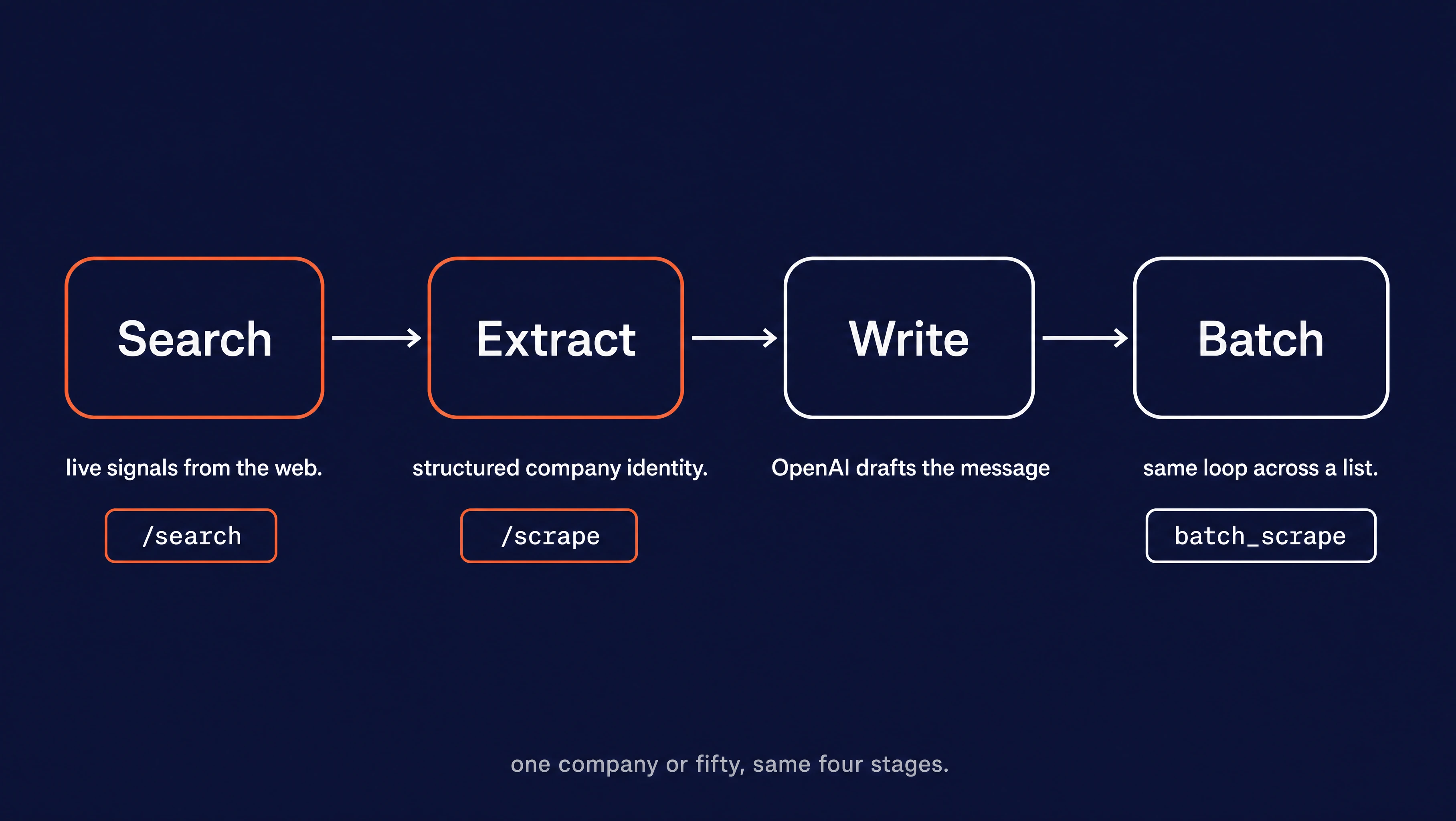
Search and extract are the Firecrawl stages, where the web context comes from. One company or fifty, the four stages don't change.
(For a broader look at how AI agents work and why web context matters, see our guide to AI agents.)
How do you search for live company signals?
Firecrawl /search endpoint is web search built for agents: you give it a query and get back ranked live results with the page content already pulled, in one call. It's the stage that makes the agent "real time," because it reads the web as it is today.
The query matters most here. You want recent events worth mentioning in a message, not the company's About page. A plain query plus a recency filter gets you there.
def find_signals(company: str, limit: int = 5) -> list[dict]:
    """Search the live web for recent, outreach-worthy signals about a company.

    `tbs="qdr:m"` scopes results to the past month so we get fresh hooks
    (funding, launches, hiring) instead of evergreen background pages.
    """
    results = firecrawl.search(
        query=f"{company} latest news",
        limit=limit,
        tbs="qdr:m",  # past month, so signals are fresh
    )
    return [
        {"title": r.title, "url": r.url, "summary": r.description}
        for r in (results.web or [])
    ]
Two things to know about this snippet. firecrawl.search() returns an object with the results under results.web, which can be None if nothing matched, so the or [] keeps the loop from breaking on an empty search. Each result r has .title, .url, and .description, and those three are all we need to feed the writer.
The tbs="qdr:m" argument is the recency filter. It limits results to the past month, which surfaces recent events over a company's older pages. Change it to qdr:w for the past week if a company moves fast. Keep the query itself plain too: "{company} latest news" works, while stacking operators like funding OR launch OR hiring on top of the recency filter often returns nothing.
Run the script to research one company:
python ai_sdr.pyCalling find_signals("Tailscale") returns the live results. Here are two of them, each with the title, URL, and summary that become a signal:
[
  {
    "title": "How to backup tailscale configuration on Linux host - Reddit",
    "url": "https://www.reddit.com/r/Tailscale/comments/1tlvq3q/...",
    "summary": "I recently had the nightmare scenario of corrupting the Linux installation on the host I use for an exit node..."
  },
  {
    "title": "Canada's Bill C-22 and the security cost of collecting more data",
    "url": "https://tailscale.com/blog/bill-c22-canada",
    "summary": "Canada's Bill C-22 risks forcing secure services to retain more metadata and build access systems. Tailscale explains why the bill should change."
  }
]
The title and summary are the hook. A blog post on Bill C-22 or a fresh security bulletin is something a rep can open a message with, and both are dated to this month. This is the volatile half of the research: events that are only worth mentioning while they're current.
How do you extract structured company intelligence?
This step reads what a company is: what it sells, who it sells to, how it describes itself. That identity lives on the company's own homepage, so you scrape it.
The scrape endpoint pulls a single page, and with a JSON schema it returns that page as a typed object instead of raw text. You hand Firecrawl a Pydantic model, and Firecrawl fills the fields from the page.
Start with the schema. Keep it to what a sales rep would skim a homepage for before writing a first line:
from pydantic import BaseModel, Field


class CompanyIntel(BaseModel):
    name: str = Field(description="The company's name as it presents itself.")
    products: list[str] = Field(description="The main products or services it sells.")
    sells_to: str = Field(description="Who it sells to, in one short phrase.")
    positioning: str = Field(description="How it describes itself in one sentence.")
    pain_points: list[str] = Field(description="The customer problems it claims to solve.")
The description on each field is the instruction Firecrawl follows when it fills that field, so each one reads like a note to a researcher. Then the extract step:
def extract_intel(domain: str) -> CompanyIntel:
    """Pull structured company intel off the company's own site.

    Uses the scrape endpoint's JSON format with our Pydantic schema, so the
    page comes back as a typed object instead of raw text.
    """
    doc = firecrawl.scrape(
        f"https://{domain}",
        formats=[{"type": "json", "schema": CompanyIntel.model_json_schema()}],
    )
    return CompanyIntel.model_validate(doc.json)
Two arguments do the work here. formats=[{"type": "json", ...}] tells the scrape to return structured JSON instead of markdown, and the schema key passes in CompanyIntel.model_json_schema(), which converts the Pydantic model into the JSON Schema that Firecrawl reads. The result comes back on doc.json as a plain dict, and model_validate turns it into a typed CompanyIntel object.
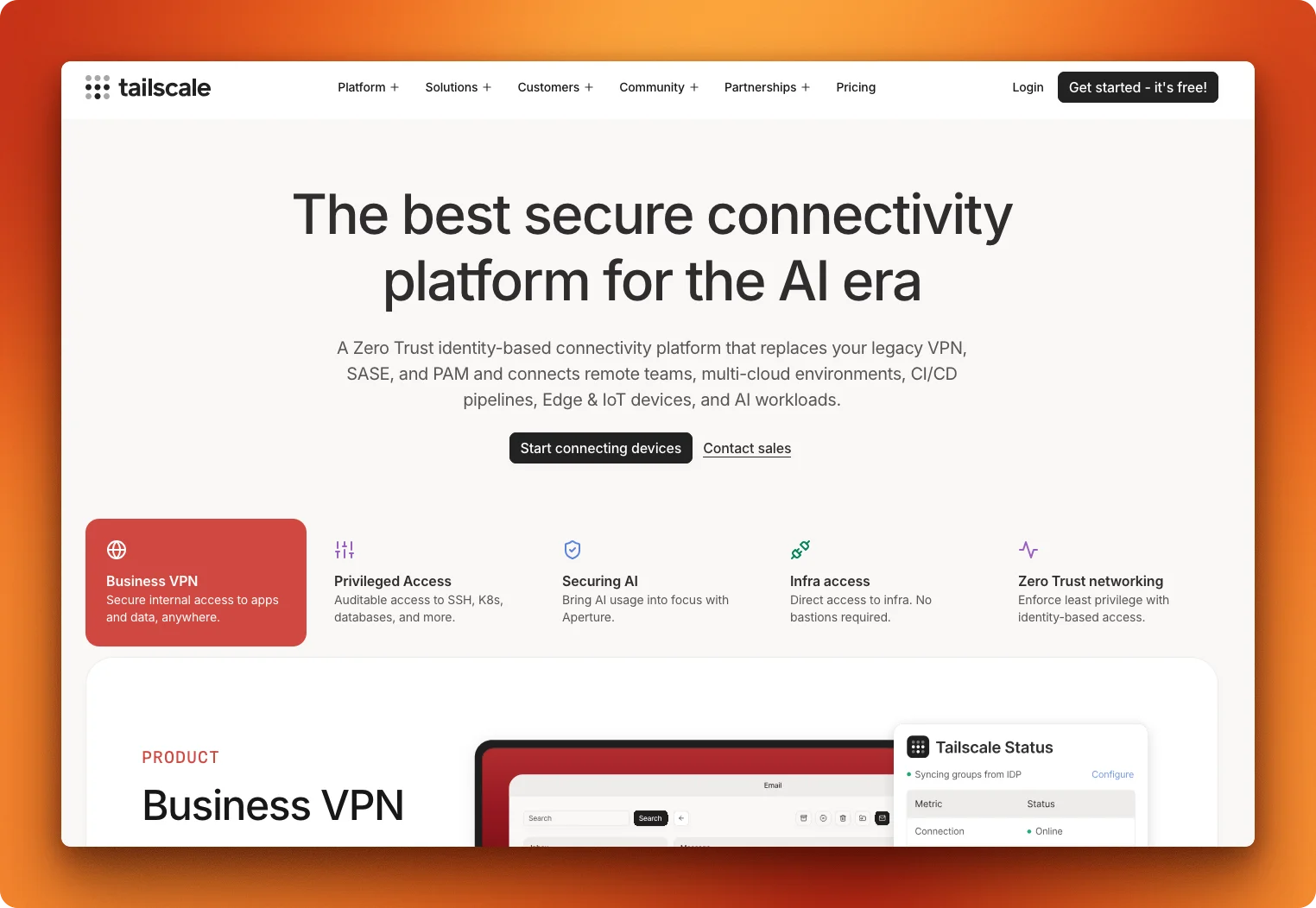
Calling extract_intel("tailscale.com") against that page returns:
{
  "name": "Tailscale",
  "products": [
    "Business VPN",
    "Privileged Access",
    "Securing AI",
    "Infra access",
    "Zero Trust networking"
  ],
  "sells_to": "Businesses and remote teams",
  "positioning": "The best secure connectivity platform for the AI era",
  "pain_points": [
    "Legacy VPN replacement",
    "Complex privileged access management",
    "Securing AI workloads",
    "Infrastructure access without bastions",
    "Implementing zero trust networking"
  ]
}
With the signals from search and this object from the scrape, the agent now has the full research it needs to write.
How do you write the personalized message?
The writing step takes the research and turns it into a message. The prompt does the work, so it's worth getting specific about what you ask for.
WRITER_PROMPT = """You are an SDR writing a first-touch outreach email.

Write a short message (under 90 words) to {company}. Rules:
- Open by citing ONE specific recent signal from the research below. Name it.
- Reference what they sell and who they sell to, so it could only have been
  written for this company.
- End with one clear, low-friction ask. No "let's hop on a call to explore
  synergies" filler.
- Plain text. No subject line. No placeholders like [Name].

RECENT SIGNALS:
{signals}

COMPANY INTEL:
- Sells: {products}
- To: {sells_to}
- Positioning: {positioning}
- Pain points they solve: {pain_points}
"""


def write_message(company: str, signals: list[dict], intel: CompanyIntel) -> str:
    """Turn the research object into a specific outreach message via OpenAI."""
    signal_lines = "\n".join(f"- {s['title']} ({s['url']})" for s in signals)
    prompt = WRITER_PROMPT.format(
        company=company,
        signals=signal_lines or "(no recent signals found)",
        products=", ".join(intel.products),
        sells_to=intel.sells_to,
        positioning=intel.positioning,
        pain_points=", ".join(intel.pain_points),
    )
    response = openai.responses.create(model="gpt-5", input=prompt)
    return response.output_text.strip()
A couple of details on the OpenAI call. signal_lines joins the search results into a bullet list, and the or "(no recent signals found)" fallback keeps the prompt honest when a company has no recent news. openai.responses.create(model="gpt-5", input=prompt) sends the filled prompt to the model, and response.output_text returns the reply as a plain string.
The rules in the prompt map to the research. "Cite one specific recent signal" uses the search results. "Reference what they sell and who they sell to" uses the schema fields. The single-ask rule keeps the model from defaulting to "let's hop on a call."
Here's what it wrote for Tailscale:
I saw your recent blog discussing Bill C-22 and the rising security risks tied to data collection. With Tailscale helping IT Security and DevOps teams unify access across remote, multi-cloud, and edge environments, would it be helpful to see how peers are automating granular access controls while reducing overhead under evolving compliance pressures? If so, I can share one-page best practices from similar zero trust rollouts. Interested?
And here's what a generic template might look like when a rep sends something with no time to research:
Hi there,
I hope this email finds you well. I wanted to reach out because I think our solution could be a great fit for your team. We help companies like yours improve efficiency and drive growth. Would you be open to a quick 15-minute call this week to explore potential synergies?
Looking forward to connecting.
The first message could only have been written for Tailscale, this month, and the agent put it together in seconds. It names a real, recently published blog post and references the company's products and positioning. The second message is generic and could have been sent to any company.
Of course, the message has a couple of classic AI-generated signals. But you can easily tune that with a more detailed prompt on banned words, patterns and tone rules, which is outside the scope of this article.
How do you scale to a full list?
One company works end to end. Now run the identical loop across a list without babysitting it.
The slow step is scraping each company's site, because that's network-bound and you're hitting one site at a time. batch_scrape is the fix: it's a single Firecrawl job that scrapes every URL you pass it concurrently, so the part that dominates wall-clock time runs in parallel instead of in a loop.
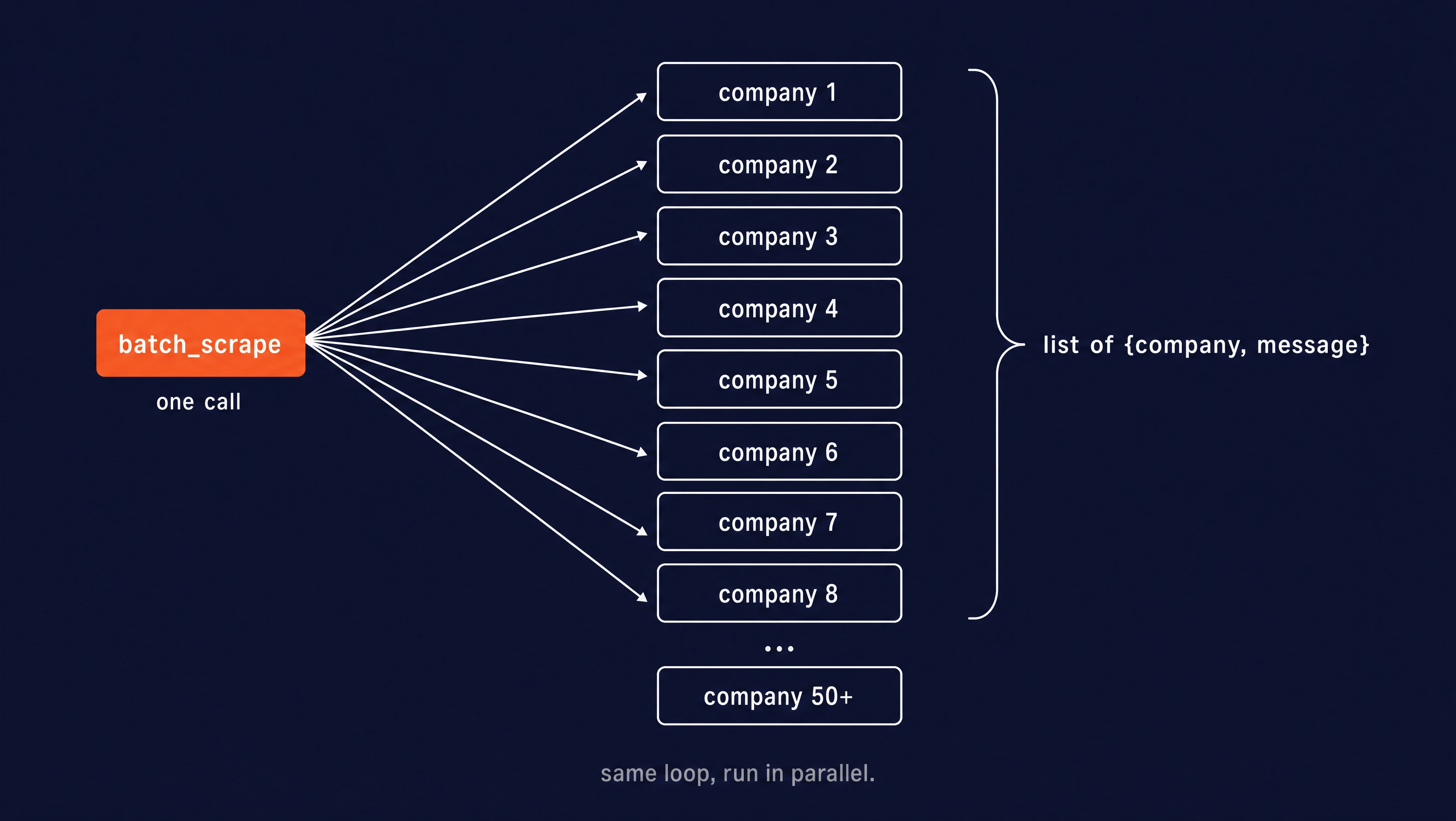
The search and write steps still run per company (they're fast and cheap), but the scrape gets hoisted out into one batch call:
from ai_sdr import find_signals, write_message
from schema import CompanyIntel

# (company name, domain). In practice this list is 50+ rows from your CRM.
COMPANIES = [
    ("Tailscale", "tailscale.com"),
    ("Resend", "resend.com"),
    ("Plausible", "plausible.io"),
]


def batch_research_and_write(companies: list[tuple[str, str]]) -> list[dict]:
    domains = [f"https://{domain}" for _, domain in companies]

    # One job, every site scraped concurrently. max_concurrency caps how many
    # sites run in parallel; max_pages caps how much of each site is read so
    # document-heavy domains don't run up the bill.
    job = firecrawl.batch_scrape(
        domains,
        formats=[{"type": "json", "schema": CompanyIntel.model_json_schema()}],
        max_concurrency=10,
        max_pages=1,
    )

    # batch_scrape returns results in completion order, not input order, so
    # map each result back to its company by source URL instead of position.
    intel_by_url = {doc.metadata.source_url: doc.json for doc in job.data}

    results = []
    for company, domain in companies:
        raw = intel_by_url.get(f"https://{domain}")
        if not raw:
            continue
        intel = CompanyIntel.model_validate(raw)
        signals = find_signals(company)
        message = write_message(company, signals, intel)
        results.append({"company": company, "message": message})
    return results
Two arguments keep costs manageable. max_concurrency caps how many sites scrape at once, and max_pages caps how much of each site Firecrawl reads, which matters for document-heavy domains where an unbounded scrape can run up the bill.
Run the batch script the same way:
python batch.pyYou get a list of {company, message} records, ready to push into your outreach tool:
[
  {"company": "Tailscale", "message": "I saw users recently discussing how to back up Tailscale configuration files on Linux hosts in your Reddit community. Since you help remote teams and enterprises replace legacy VPNs with zero trust access, would it be useful to see how other platforms automate secure config backup and restore?..."},
  {"company": "Resend", "message": "Saw your 'How we got here' handbook detailing Resend's journey to simplifying email for developers. With your focus on reliable transactional and marketing email APIs, how are you currently measuring real-time deliverability?..."},
  {"company": "Plausible", "message": "Saw your YouTube Honest Review on Plausible for Privacy Focused Analytics, a great look at how you help website owners get simple, privacy-first insights without the usual GA complexity..."}
]
Each message opens on a different, current signal, including a Reddit thread for Tailscale, a company handbook for Resend, a review video for Plausible. The same loop runs for three companies, each with a fresh hook.
How do you add data providers beyond the web?
The signals stage reads the web and the extraction stage reads the company's own site. Neither tells you who at the company to write to, and a homepage rarely lists headcount or the name of the person who runs support. That data sits with people and company data providers, each with its own API, pricing, and format.
Firecrawl Alexandria puts those providers behind the search call you already make.
One of them is FullEnrich, which exposes ten capabilities through Firecrawl: people search, person lookup, and person match for finding and resolving people; company search, company lookup, and company match for doing the same with companies; and work email, personal email, mobile number, and reverse email lookup for contact enrichment.
The search, lookup, and match capabilities cost 5 credits per record returned, work email and reverse email lookup cost 20 credits per result found, and an empty result costs nothing.
Pass sources=["alexandria"] and the response returns ranked tools instead of pages, each naming its provider and capability, describing when to use it, and listing its price in credits. Finding a tool costs nothing.
def find_data_tools(company: str) -> list[dict]:
    """Ask Firecrawl Alexandria which data providers cover this company beyond the web."""
    results = firecrawl.search(
        query=f"{company} company profile and decision makers",
        sources=["alexandria"],
        limit=5,
    )
    return [
        {"provider": t.provider, "capability": t.capability, "why": t.description}
        for t in (results.tools or [])
    ]
Running a tool is a scrape call with an alexandria block (provider, capability, options) in place of a URL, and the result lands in doc.alexandria[0].data. For the SDR agent that means two FullEnrich calls: a people search filtered to the company's domain and the role you sell into, then a work email lookup for the person it returns.
def find_buyer(domain: str, title: str) -> dict | None:
    """Find one senior person in the target function, then their verified work email."""
    people = firecrawl.scrape(
        alexandria={
            "provider": "fullenrich",
            "capability": "people/search",
            "options": {
                "current_company_domains": [{"value": domain, "exact_match": True}],
                "current_position_titles": [{"value": title}],
                "current_position_seniority_level": [{"value": "VP"}, {"value": "Director"}],
                "limit": 1,  # 5 credits per record returned, nothing for an empty result
            },
        }
    )
    found = (people.alexandria[0].data or {}).get("people") or []
    if not found:
        return None
    person = found[0]

    email = firecrawl.scrape(
        alexandria={
            "provider": "fullenrich",
            "capability": "contacts/work-email",
            "options": {
                "first_name": person["first_name"],
                "last_name": person["last_name"],
                "domain": domain,
            },
        }
    )
    results = (email.alexandria[0].data or {}).get("results") or []
    contact = results[0]["contact_info"] if results else {}
    return {
        "name": person["full_name"],
        "headline": person.get("headline"),
        "email": contact.get("most_probable_work_email"),
    }
The people search returns records under a people key and the work email lookup under results, which is why the code reads each one by name rather than assuming a shape.
Read the tool's contract before calling it, since each capability declares its required options and response key; the Firecrawl Alexandria docs cover that discover, inspect, execute flow, including find_tools for reading a contract.
FullEnrich also requires an org admin to accept its terms once before the first call, and those terms bar marketing to personal addresses, so use the work email capability for outreach and leave personal email and mobile number for the cases that need them.
For the SDR agent this is a fifth stage between extraction and writing. Once you know what a company sells, ask Firecrawl Alexandria who runs the function you sell into, and hand that name and email to the writer.
Conclusion
The whole agent is four stages: search for live signals, scrape and extract structured identity, write with OpenAI, batch across a list. The win is specificity per company, produced at send time, not send volume.
Three easy changes adapt it to your use case:
- Swap the
CompanyIntelschema fields for whatever your vertical cares about. - Add a second signal source alongside web search, such as a Firecrawl Alexandria provider for people or company data.
- Change the message goal in the prompt to include a meeting, a reply, or a demo.
To go deeper on the research layer, start with Firecrawl web search and the scrape and batch scrape docs. If you need to evaluate web search API options for your agent stack (Firecrawl, Brave, Exa, Tavily, and Parallel), Firecrawl's comparison covers install commands, token costs, and live test results.
Frequently Asked Questions
What is an AI SDR?
An AI SDR (sales development representative) is software that finds potential customers, researches them, and writes the first outreach message. It does the early sales work, up to starting a conversation, not closing the deal.
What does real-time company research mean for outreach?
It means pulling fresh signals (a funding round, a product launch, a new job post) and a company's current positioning at the moment you write, rather than from a list built weeks or months earlier. The message reflects what's true about the company today.
Why does personalized outreach get more replies?
Personalized cold emails reply at about 17% versus 7% for generic ones, roughly a 2.4x difference across 20M+ sends. A message that cites a specific, recent event about the company reads as written for them, not blasted to a list.
What's the difference between real-time research and static personalization?
Static personalization fills templates from data captured once, like CRM fields or a scraped contact list. Real-time research reads the live web and the company's own site when the message is written, so signals are current instead of stale.
What kind of signals make good outreach hooks?
Recent, time-sensitive events, like funding rounds, product launches, security disclosures, hiring for a specific role, or a notable blog post. These are worth mentioning only while they're fresh, which is why they have to be pulled at send time.
Can company research outreach scale to a whole list?
Yes. The slow step is reading each company's site, and that can run concurrently across a list rather than one at a time. The same research-and-write loop that handles one company handles 50 or more in a single batch.
Can the AI SDR agent find the people to contact at a company?
Yes, through Firecrawl Alexandria. Pass alexandria as the sources value on a search call and the response returns data tools instead of pages. FullEnrich is one of the providers, with people search, person lookup, person match, company search, company lookup, company match, work email, personal email, mobile number, and reverse email lookup available as capabilities. Each tool lists its inputs and price in credits, and the agent runs it through the scrape endpoint with an alexandria block in place of a URL. FullEnrich requires an organization admin to accept its terms once before the first call.
What does Firecrawl Alexandria cost compared with a web search?
Finding tools is free on any search. Running a tool goes through the scrape endpoint with an alexandria block (provider, capability, options) in place of a URL and is billed at the price listed on the tool, which is deducted from your Firecrawl credits. Prices vary by provider, so read the contract before wiring a tool into a loop. Firecrawl Alexandria needs an API key on a team where it is enabled, and some licensed publishers require an organization admin to accept their terms once before the first call.