TL;DR: best AI search engines for AI agents
| Tool | What it does | Agent Score (AIMultiple) |
|---|---|---|
| Brave Search | Fast, independent search index with no content extraction | 14.89 (#1, statistically tied) |
| Firecrawl | Search + full content scrape in one call (the most complete option for agents) | 14.58 (#2, statistically tied) |
| Exa | Semantic search API with neural indexing | 14.39 (#3, statistically tied) |
| Tavily | Search API focused on agent pipelines | 13.67 (#5) |
| Perplexity Sonar | Conversational search with built-in LLM synthesis | 12.96 (#7) |
| Parallel | Parallel query architecture for multi-hop research | 14.21 (#4, statistically tied) |
The question of which AI search engine to give your agent is not the same as which one you'd use yourself. Consumer AI search tools are built for browsing. The AI search engines that matter for agents are the ones designed to return clean structured fields for AI search and RAG — machine-readable results that can drop into a reasoning loop without preprocessing.
In his book Principles of Building AI Agents, Mastra CEO Sam Bhagwat puts it plainly: "Agents are only as powerful as the tools you give them." Search is the tool that determines how much of the world an agent can actually see.
Every agent eventually needs to look something up. The search layer you choose determines how fresh that information is, how much token budget it burns, how reliably it handles edge cases, and how it behaves at production scale. I've spent time working with these providers across different use cases: RAG pipelines, deep research systems, competitive monitoring, and general-purpose web agents.
These are the best AI search engines for AI agents I'd recommend in 2026. Five providers that are actually built for programmatic use, not just search with an API bolted on.
What are AI search engines for agents?
AI search engines for agents are a different category from the ones you interact with in a browser. They are built around a few specific requirements that human-facing search tools don't need to solve.
First, agents need structured outputs. When a model reads a search result, it needs clean text, accurate metadata, and ideally a relevance signal, not a rendered HTML page with navigation and ads. The best search APIs return markdown, JSON, or highlighted excerpts that feed directly into context windows.
Second, agents need content, not just links. A list of URLs is useless to an agent that can't browse. The most useful search APIs for AI agents either return scraped content alongside results or support content extraction in the same call.
Third, agents run in loops. Search happens inside a reasoning cycle, often multiple times per query. Latency, cost predictability, and reliability under load matter more for agents than for a developer doing a one-off lookup. Latency compounds: a research agent that makes five search calls in sequence will wait between 3 seconds (Brave Search at 669ms p50) and 68 seconds (Parallel Search Pro at 13.6s average) just on search alone, based on latency data from an independent 8-API benchmark. At that difference, the choice of search provider becomes a UX decision, not just an infrastructure one.
One of the core use cases for agents is browser use: navigating real pages, filling forms, and extracting content that only appears after JavaScript runs. A search engine for agents needs to either return that content directly or give the agent the tools to retrieve it. That distinction shapes which provider is right for a given workflow.
The five providers below are the ones that take these requirements seriously.
1. Firecrawl
Firecrawl's search endpoint is the only one that returns full scraped page content alongside web results in a single API call.
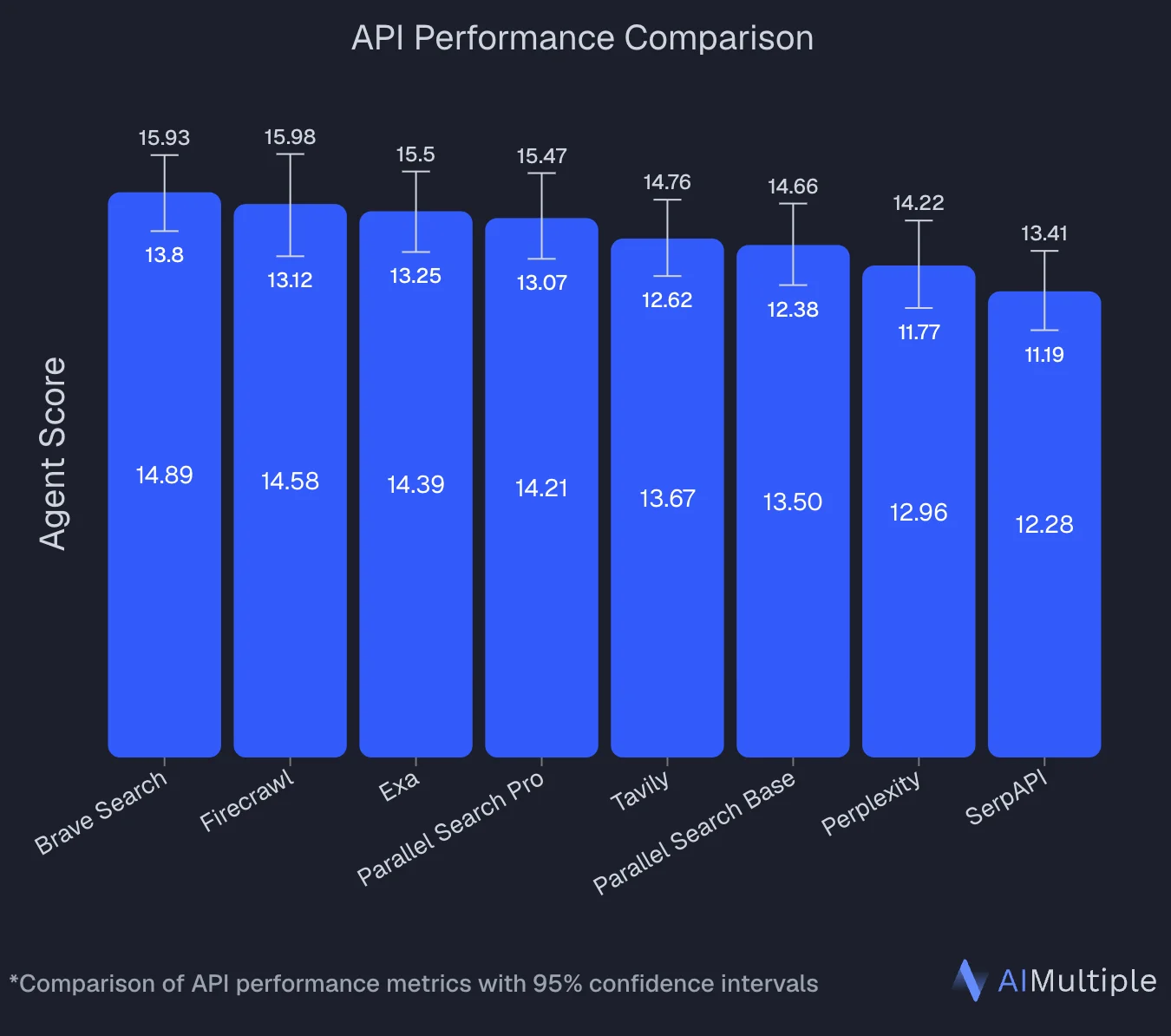
In an independent benchmark by AIMultiple that evaluated 8 search APIs across 100 real-world AI/LLM queries, Firecrawl ranked second overall with an Agent Score of 14.58, statistically tied with the top performer, Brave Search (14.89). The confidence intervals overlap (Firecrawl: 13.12–15.98, Brave: 13.80–15.93), meaning the performance gap is within random variation. Firecrawl posted a mean relevant score of 4.30 out of 5 and performed best on deep content retrieval tasks where full-page context was critical to answer quality.
Most search APIs give you links and snippets. Firecrawl gives you the full markdown content of each result page, already cleaned of ads, navigation, and boilerplate, with no second round-trip required. For RAG pipelines and research agents, this eliminates an entire step from the architecture.
The search endpoint supports specialized categories: standard web, news, images, GitHub repositories, and academic research sources like arXiv, Nature, IEEE, and PubMed. You can filter by location, set time-based constraints (past hour through past year), and request multiple source types in a single call.
Firecrawl is the web data API to search, scrape, and interact with the web at scale. The same API key and SDK give your agent access to crawl, map, browser automation, and the agent endpoint for autonomous multi-step web research. There is also a CLI that installs directly into coding agents like Claude Code, Cursor, and Codex, so agents can search and scrape without any API wrappers. It is also the default web search provider for OpenClaw, the open-source AI web search framework built on Firecrawl.
Install:
Use the Firecrawl CLI (Claude Code, Cursor, Codex, and others) — one command installs the Firecrawl skill and authenticates automatically:
npx -y firecrawl-cli@latest init --all --browserFor Python and Node.js:
pip install firecrawl-pynpm install firecrawlSearch with content in one call:
from firecrawl import Firecrawl

firecrawl = Firecrawl(api_key="fc-YOUR-API-KEY")

results = firecrawl.search(
    query="latest AI agent frameworks 2026",
    limit=5,
    scrape_options={"formats": ["markdown"]}
)

for r in results.data:
    print(r["url"], r["markdown"][:500])
Specialized category search:
# Search GitHub repos and academic papers together
results = firecrawl.search(
    query="web scraping python",
    categories=["github", "research"],
    limit=10
)
What agents get access to:
search: Web search with optional full-page content extractionscrape: Clean markdown from any page, including JavaScript-heavy sitesinteract: Scrape a page, then keep acting on it — click buttons, fill forms, navigate deeper, or extract content that only appears after user actions. Works via natural language prompts or Playwright code, with a live view stream your agent (or your users) can watch in real timecrawl: Recursively follow links across entire sitesmap: Discover all URLs on a domain
The interact endpoint is where Firecrawl goes beyond retrieval. Most search APIs stop at content. Interact lets your agent scrape a page and keep a live session open: the agent can click through paginated results, submit a search form, log into an app via a persistent profile, or pull data that only appears after a user action — all without leaving the Firecrawl SDK. You describe what you want in natural language, or write Playwright code directly when you need full control. Every interact response includes a liveViewUrl you can embed to watch the session in real time, and an interactiveLiveViewUrl that lets end users take control of the browser themselves.
Firecrawl is the best choice today for AI agents that need web data access. And increasingly, those agents can onboard themselves. AI agents can now self-onboard to Firecrawl by choosing the integration path that fits the task: replacing native fetch and search with Firecrawl's scrape, search, and interact endpoints, or embedding the API directly into the app they're building to give it real-time web data. Once you authorize, they're ready to go.
Honest take: Firecrawl is the right choice when your agent needs to read the content of search results, not just retrieve links. If you're doing RAG or building a research pipeline, the single-call search-and-scrape design saves real infrastructure complexity. The limitation is that it is optimized for content retrieval, not pure semantic relevance ranking. For tasks that need highly precise semantic matching on a specific corpus, Exa's purpose-built index may outperform it.
Cons: You can try the endpoints without an API key, but ongoing use needs one and consumes credits per call. The free tier is 1,000 credits a month and takes no card, which covers substantial testing. Scraping content on top of search multiplies the credit cost, so leave scrapeOptions off for the ranking pass and turn it on only for the results you actually read; heavy workflows will still want a paid plan.
Full documentation at docs.firecrawl.dev/features/search. Get a free API key at firecrawl.dev/app/api-keys.
2. Exa
Exa is a semantic AI search engine built for AI agents, designed around meaning and intent rather than keyword matching.
Where most search engines wrap a traditional index, Exa built its own neural search system. It uses embeddings to understand what a query is actually asking, not just what words appear in it. This tends to surface more contextually relevant results on complex or open-ended queries where keyword matching falls short.
A few features worth knowing about:
The highlights feature extracts excerpts from each page most relevant to your query rather than the full content. This can reduce the amount of text passed to your model on each call.
Structured outputs let you define a schema and get back JSON-formatted data extracted from search results, useful for enrichment workflows.
Domain and similarity filtering let you restrict searches to specific domains or find pages similar to a given URL.
Install:
pip install exa-pyBasic semantic search:
from exa_py import Exa

exa = Exa(api_key="your-api-key")

result = exa.search(
  "blog post about artificial intelligence",
  type="auto",
  contents={
    "highlights": {
      "max_characters": 4000
    }
  }
)
Honest take: Exa is a solid option when semantic relevance is the primary concern. The highlights feature is genuinely useful for keeping context efficient. The limitation is that it is API-first with a basic UI: there is no polished product for human browsing, and some advanced features require technical setup. It can also get expensive at enterprise scale.
Cons: Pricing at high query volumes becomes a factor. The UI is minimal and not intended for casual use. Works best when you have a clear query strategy rather than exploratory browsing. For a wider look at semantic search APIs across providers, we've covered more options separately.
Comparing options? See our Exa alternatives guide.
3. Tavily
Tavily is a search API focused on connecting AI agents to the web, with integrations across common agent frameworks.
Tavily positions itself as a search layer for agents rather than a human-facing search engine. It claims 99.99% uptime, 180ms p50 latency, and 100M+ monthly requests across its developer base of 1M+.
Requests pass through security and content validation layers intended to reduce PII leakage and prompt injection risks. Whether these matter depends on your use case: most agent workflows that use Firecrawl or similar tools handle this at the application level instead.
Tavily also offers a /research endpoint for multi-step research: it breaks a question into sub-queries, searches across sources, and returns a cited answer. In late 2025, Tavily raised a $25M Series A and has since joined forces with Nebius, which introduces some uncertainty about product direction.
Install:
pip install tavily-pythonBasic search:
from tavily import TavilyClient

tavily_client = TavilyClient(api_key="tvly-YOUR_API_KEY")
response = tavily_client.search("Who is Leo Messi?")

print(response)
Cons: No built-in browser interaction for pages that require clicks or dynamic UI navigation (Firecrawl's /interact covers that). The acquisition by Nebius introduces some uncertainty about product direction.
Full reference at tavily.com. API docs at docs.tavily.com. See our Tavily alternatives guide for a side-by-side comparison.
4. Perplexity Sonar
Perplexity Sonar is a conversational search API that combines web search and LLM synthesis in a single call.
Rather than returning raw search results, Sonar produces a synthesized, cited answer from a model that runs live web search internally. This is a different trade-off from raw retrieval: you get a ready-made answer, but you give up control over which sources were used and how the reasoning happened.
Sonar is OpenAI-compatible: you swap in the Perplexity base URL and API key. Existing code that uses OpenAI's chat completions format will work with minimal changes.
The Perplexity developer platform offers several distinct APIs beyond Sonar:
- Sonar: grounded LLM responses with live web search and citations (most popular for agents)
- Search API: raw, ranked web search results with advanced filtering and real-time data
- Agent API: run third-party models (OpenAI, Anthropic, etc.) with web search tools as presets
- Embeddings API: high-quality embeddings for semantic search and RAG pipelines
For agents that need the actual search results rather than a pre-synthesized answer, the Search API is the right endpoint. It returns ranked results with filtering by recency, domain, and source type.
Honest take: Sonar is genuinely useful when you want a cited answer and do not need to control the reasoning step. The OpenAI-compatible interface makes integration fast. The honest limitation is cost structure: you are paying for both LLM tokens and search, which adds up faster than a raw search API when the agent needs to run many queries. If you already have a capable reasoning model and just need search results to feed it, Firecrawl, Exa, or Tavily are often cheaper for that specific step.
Cons: You have limited control over which sources are cited or how the synthesis is done. The pricing model (tokens + search) can be expensive at scale for search-heavy workflows. Answer depth varies by topic and model tier.
Full documentation at docs.perplexity.ai. Get an API key at console.perplexity.ai. We also cover Perplexity alternatives if you're evaluating other options.
5. Parallel
Parallel is a search API built around running multiple sub-queries simultaneously, aimed at complex multi-hop research tasks.
Parallel's approach breaks a query into parallel sub-searches, runs them simultaneously, and synthesizes the results. The idea is that hard questions require information from many sources at once, and sequential search misses things.
They publish benchmark comparisons claiming strong accuracy on the HLE-Search and BrowseComp benchmarks at competitive cost. These are self-reported, so take them as directional. The product is newer than the other providers on this list, with a smaller ecosystem and less community tooling.
The platform includes a Deep Research API, a Find All tool for building structured datasets, a web enrichment API, and a Monitor API for tracking web changes. Parallel raised $100M and is SOC-2 Type II certified.
Install:
Access Parallel via their REST API or Search MCP server.
# Using the REST API
curl -X POST https://api.parallel.ai/v1/search \
  -H "Authorization: Bearer YOUR_PARALLEL_API_KEY" \
  -H "Content-Type: application/json" \
  -d '{"query": "recent developments in AI agent memory architectures", "model": "base"}'
Tiers (CPM = USD per 1000 requests):
Lite:  $5 CPM   (64% accuracy on WISER-Atomic)
Base:  $10 CPM  (75% accuracy on WISER-Atomic)
Core:  $25 CPM  (77% accuracy on WISER-Atomic)
Ultra: $300 CPM (deep research with high verification)
Deep research for agents:
# Run a deep research query
curl -X POST https://api.parallel.ai/v1/research \
  -H "Authorization: Bearer YOUR_PARALLEL_API_KEY" \
  -H "Content-Type: application/json" \
  -d '{"query": "Compare AI search API providers for production agent workflows"}'
Honest take: Parallel is worth evaluating if your agent specifically needs to handle hard, multi-hop research questions and you want to experiment with a newer architecture. For most agent use cases, Firecrawl covers the same ground with a more mature ecosystem. Parallel's value is narrow: complex questions where a single search call is not enough, and you do not want to orchestrate the sub-queries yourself.
Cons: API design and documentation are less polished than the more established providers. Pricing tiers are complex. The accuracy advantage on hard benchmarks may not translate to simpler retrieval tasks where all providers perform comparably.
Full reference at parallel.ai. Platform at platform.parallel.ai.
Building the top AI search engines for agents into your workflow
For most agent workflows, Firecrawl is where I'd start. The search-and-scrape-in-one-call design means your agent can retrieve full page content without a second tool, which simplifies the architecture. The additional endpoints (crawl, map, agent, browser) mean you can handle edge cases inside the same platform rather than stitching together multiple providers.
The other tools on this list are worth knowing about for specific situations. Exa is reasonable to consider if your use case is specifically semantic lookup across a defined domain. Perplexity Sonar is useful when you want a synthesized answer in one call and do not need to control the reasoning step. Parallel is worth testing if your agent faces consistently hard multi-hop research questions.
The practical recommendation: start with Firecrawl for search and content retrieval. The others fill specific gaps depending on how your agent is structured.
If you are building a research-heavy agent, our guide on deep research APIs for agentic workflows covers the providers specifically optimized for multi-step research tasks. If you want to understand how Firecrawl's search endpoint works in detail, the Firecrawl search endpoint guide walks through every parameter. And if you are thinking about the broader context layer that agents need beyond just search, our piece on building a context layer for AI agents covers how search, scraping, and extraction fit together in a complete agent architecture.
For a broader overview of agent tools beyond search, our guide covers the full stack. If you're transitioning from a traditional search API, our Bing Search API alternatives guide covers how these newer options compare.
For a complete walkthrough of wiring live web search into an LLM's context window with working Python code, the guide on LLM grounding with live web data covers the full pipeline. For a broader comparison that includes Serper, SERP API, and Perplexity Sonar, see the best search tools for AI agents guide. If you'd rather compare these as MCP servers with install commands for Claude Code, Cursor, and Codex, the web search MCP server roundup covers Firecrawl, Tavily, Exa, Brave, and more side by side. If you're building specifically with Claude, the Anthropic web search alternatives guide covers the Claude-native integration options.
Frequently Asked Questions
What are AI search engines for agents?
AI search engines for agents are tools that let your AI agent retrieve fresh, structured web data programmatically. Unlike consumer search engines built for human browsing, they return machine-readable results with optional content extraction, citations, and filtering, designed to drop directly into LLM reasoning loops.
How do AI search engines for agents differ from Google or Perplexity?
Consumer AI search engines like Perplexity and Google are optimized for human browsing: they return formatted pages, ads, and conversational answers. AI search engines for agents are optimized for code: they return structured JSON, support batch queries, offer fine-grained source filters, and are priced per API call.
Which AI search engine is best for RAG pipelines?
For RAG, Firecrawl is a strong choice because it returns full scraped page content alongside search results in one call, keeping your pipeline lean. Exa is also excellent for semantic retrieval with its highlights feature, which reduces token usage by extracting the most relevant excerpts per query.
What is the Firecrawl search engine?
Firecrawl's search endpoint lets you search the web and optionally scrape the full content of results in a single API call. It supports specialized categories (GitHub, research, news, images), location targeting, time filtering, and structured output formats like markdown and JSON.
What is the Perplexity Sonar API?
The Sonar API is Perplexity's developer offering that combines web search with LLM reasoning in one API call. You send a query and receive a grounded, cited answer. It is OpenAI-compatible, so you can integrate it using the standard chat completions interface with your Perplexity API key.
Are AI search engines for agents free to use?
Most offer a free tier or trial credits. Firecrawl includes search in its free plan (1,000 credits per month). Exa, Tavily, Perplexity, and Parallel all offer free tiers or trial access. Production workloads require paid plans on all of them.
Which AI search engine has the best benchmark performance?
An independent benchmark by AIMultiple evaluated 8 search APIs across 100 real-world AI/LLM queries and found the top four providers statistically indistinguishable: Brave Search (14.89), Firecrawl (14.58), Exa (14.39), and Parallel Search Pro (14.21). Firecrawl posted the highest mean relevant score at 4.30 out of 5 and performed best on deep content retrieval tasks. Brave had the lowest latency at 669ms. Tavily, Parallel Base, Perplexity, and SerpAPI ranked below the top tier by a meaningful margin. Most vendor-published benchmarks are self-reported and task-specific, so third-party evaluations like this are more reliable for comparisons.
How do I add an AI search engine to my agent?
The fastest way is to install one as an MCP tool (Firecrawl, Tavily, and Exa all publish official MCP servers) or call the REST API directly from your agent's tool-calling loop. Most support OpenAI tool-use format out of the box.