TL;DR: MCP vs CLI
Here's the quick comparison table:
| Dimension | CLI | MCP | Winner |
|---|---|---|---|
| Token Cost | ~200 tokens per command | ~44K tokens (full schema loaded upfront) | CLI |
| Native Knowledge | LLMs trained on billions of CLI examples | MCP schemas are new to the model at runtime | CLI |
| Composability | Unix pipes chain natively | No native chaining, multiple LLM calls needed | CLI |
| Multi-User Auth | One shared token for everyone | Per-user OAuth, revoke any user anytime | MCP |
| Stateful Sessions | New process per command (~200ms overhead) | Persistent connection (~5ms overhead) | MCP |
| Enterprise Governance | Only audit trail is bash history | Structured logs, access revocation built in | MCP |
Score: CLI wins 3, MCP wins 3.
The answer depends on who your agent is acting for. One useful frame: CLI for the inner loop (local dev, fast iterations), MCP for the outer loop (CI/CD, multi-user systems, enterprise integrations).
Why MCP vs CLI became the debate of 2026
In January 2026, Peter Steinberger, creator of OpenClaw, the personal AI agent that hit 190K GitHub stars in weeks, posted seven words on X:
mcp were a mistake. bash is better.
The quote spread fast. But what often gets lost: Peter was talking about ergonomics, not capability. MCP can do most of what CLI can do. His point was that for day-to-day agent workflows, CLI is a more natural fit. Lighter, faster, more composable. Less friction between the agent and the action.
He later built MCPorter, a tool that converts MCP servers into CLIs. Then OpenAI hired him to work on personal agents. The man put his career behind the thesis.
But that doesn't mean MCP is wrong. It means it's misapplied.
I use both every day. CLI for GitHub, Docker, Kubernetes. MCP for Google Tools, Playwright, Slack. I don't think of them as competitors. But before I get to that, here's why this comparison matters now.
Alex Xu, founder of ByteByteGo, posted a breakdown comparing CLI and MCP across six key dimensions.
MCP has 97 million monthly SDK downloads. CLI has been around for 40 years. Something interesting is going on here.
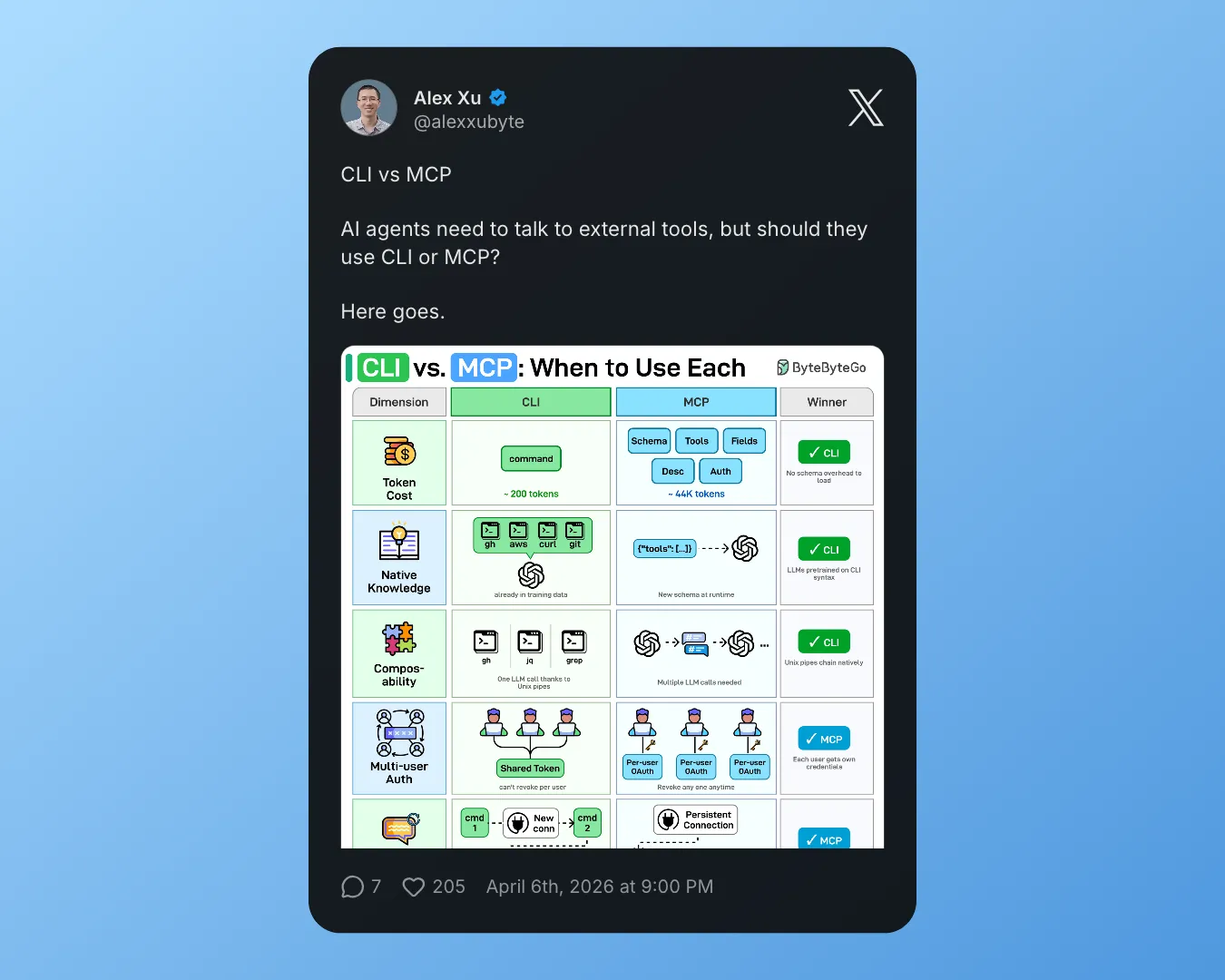
Alex Xu on X about MCP vs CLI
Around the same time, Perplexity's CTO announced an internal shift away from MCP, citing context waste and auth friction as the primary reasons. Engineers across major AI companies were running the same calculations and arriving at the same concerns: too many tokens burned before the agent does any actual work.
But the early backlash didn't stick. In our breakdown of agentic AI trends, we tracked how MCP went from hate to love over the first half of 2026 — and the data backs it up. Google Trends shows a clear resurgence in MCP search interest through mid-2026:
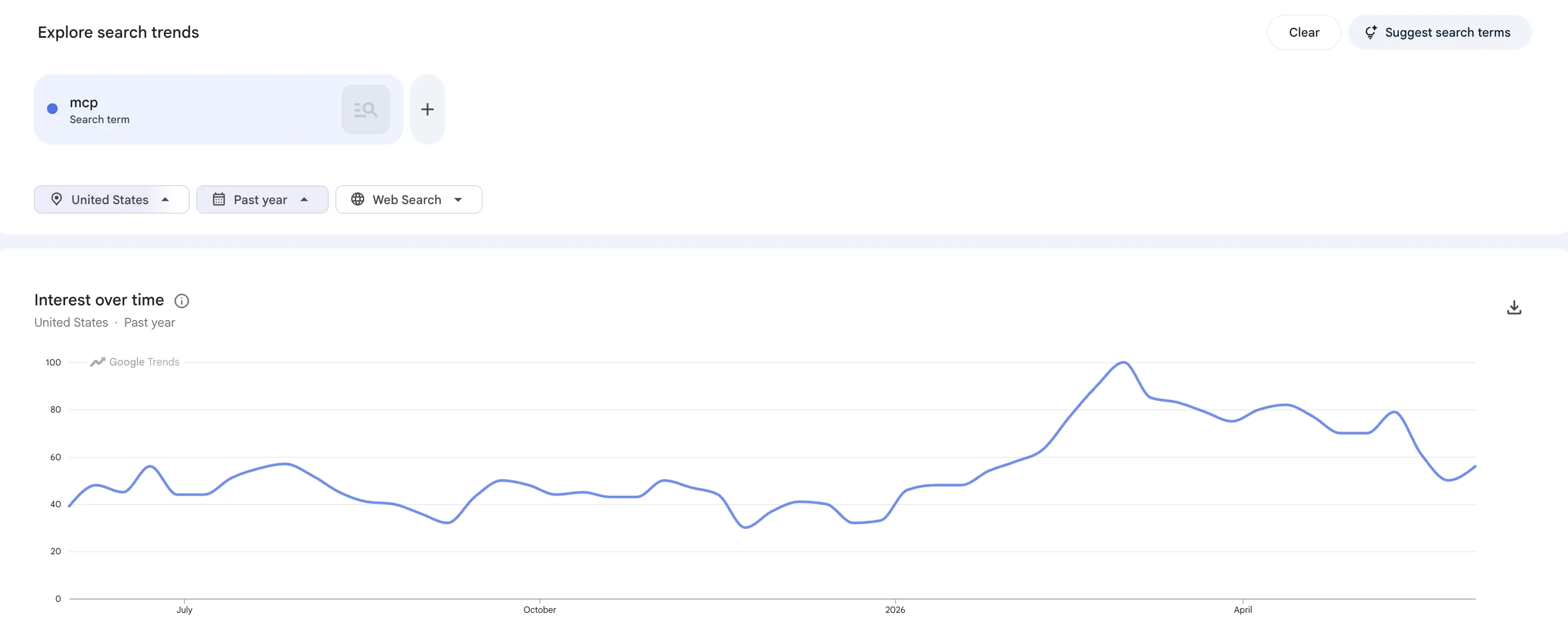
Search interest for "MCP" on Google Trends, January through June 2026
Firecrawl's own MCP usage grew roughly 35% in a single month. One product in a sea of many, but that kind of growth is hard to dismiss as noise. The early criticism was real — CLI wins on token efficiency, and that still holds. But the resurgence has reasons: OAuth per user, multi-tenant auth, enterprise audit trails. These are things CLI simply can't provide, and developers are increasingly building the kinds of products that need them.
What is MCP, and why did it become popular so fast
MCP stands for Model Context Protocol. Anthropic launched it in November 2024. The simplest way to think about it: it's USB-C for AI tools.
Before MCP, every AI agent integration was a custom build. GitHub? Write a GitHub integration. Slack? Write a Slack integration. With 10 tools and 10 models, you needed 100 custom connectors. MCP collapses that to 10 plus 10.
The protocol uses a host/client/server setup. Your AI app runs an MCP client. External tools run as MCP servers. They talk via JSON-RPC 2.0. When the agent wants available tools, it calls tools/list. The server responds with names, descriptions, and input schemas.
In November 2024, it was just Anthropic. By early 2026, OpenAI, Google, and Microsoft all backed it. It now sits under the Linux Foundation's Agentic AI Foundation. There are over 10,000 MCP servers. The SDK gets 97 million downloads a month.
Some popular servers you might already use:
- Playwright MCP (34K GitHub stars, built by Microsoft): browser automation for agents
- GitHub MCP (31K stars): interact with repos, PRs, issues
- Figma Context MCP (15K stars): design file access for coding agents
- Google GenAI Toolbox (15.5K stars): Google's AI database tools
- Chrome MCP (11.1K stars): control Chrome from your agent
- Firecrawl MCP (6.5K stars): web search, scraping, and crawling
- Supabase MCP: database access for Supabase projects
- Slack MCP: read and send Slack messages
- Sentry MCP: pull error reports and stack traces
The ecosystem isn't theoretical. These are tools developers use in production today.
Why agents already know how to use CLI
LLMs were trained on enormous amounts of CLI content. Stack Overflow answers, GitHub READMEs, blog posts, documentation, tutorials. All of it contains commands like git commit, docker build, kubectl get pods, aws s3 ls.
The model already knows how to use these tools. Not from memory exactly, but from patterns baked in during training. When you ask an AI agent to list open pull requests, it doesn't need to read a schema. It knows gh pr list.
Andrej Karpathy, AI researcher and former director of AI at Tesla, captured this perfectly in a February 2026 post with nearly 2 million views:
CLIs are super exciting precisely because they are a 'legacy' technology, which means AI agents can natively and easily use them, combine them, interact with them via the entire terminal toolkit.
His message to builders: "If you have any kind of product or service think: can agents access and use them? It's 2026. Build. For. Agents."
That's a huge advantage. CLI tools have zero schema overhead. Text in, text out. Exactly what language models are good at.
The Unix philosophy also works incredibly well for agents. Small tools that do one thing. Chainable with pipes. gh pr list | jq '.[] | .title' runs in a single LLM call and gives you exactly what you need.
In March 2026, Google did something that turned heads. They shipped the Google Workspace CLI (gws). A single Rust-based CLI covering Drive, Gmail, Calendar, Sheets, Docs, and every Workspace API.
# Install
npm install -g @googleworkspace/cli

# List recent Drive files
gws drive files list --params '{"pageSize": 10}'
It dynamically builds its command surface from Google's Discovery Service at runtime. Structured JSON output. Works with Claude Code, Cursor, and any agent with shell access.
Why does this matter? Google already has Google Workspace MCP servers. They didn't have to build a CLI. They chose to. That's a signal.
Other CLI tools for AI agents that are commonly used:
gh (GitHub), aws (AWS), az (Azure), gcloud (Google Cloud), kubectl (Kubernetes), terraform (HashiCorp), docker, mgc (Microsoft Graph), vercel, fly (Fly.io), wrangler (Cloudflare Workers), supabase CLI, stripe CLI, heroku CLI.
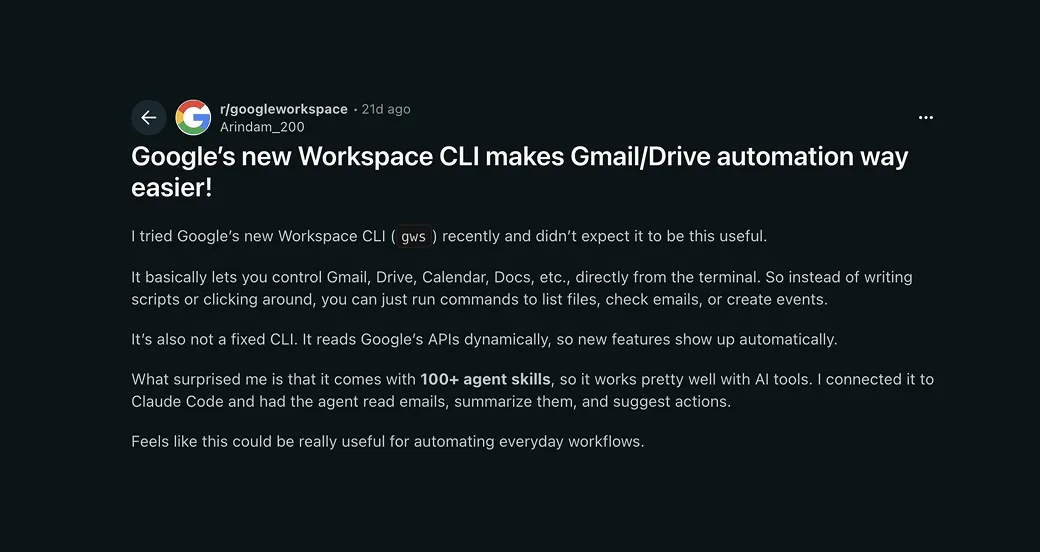
@Arindam_200 on Reddit about using GWS CLI
How much more does MCP cost compared to CLI
Scalekit ran 75 benchmark runs comparing CLI and MCP on identical GitHub tasks. Same model (Claude Sonnet 4), same prompts, same tasks. They used gh CLI against the official GitHub Copilot MCP server, which has 43 tools.
Here's what they found:
| Task | CLI Tokens | MCP Tokens | Difference |
|---|---|---|---|
| Repo language and license | 1,365 | 44,026 | 32x |
| PR details and review status | 1,648 | 32,279 | 20x |
| Repo metadata and install | 9,386 | 82,835 | 9x |
| Merged PRs by contributor | 5,010 | 33,712 | 7x |
| Latest release and dependencies | 8,750 | 37,402 | 4x |
At 10,000 monthly operations: CLI costs about $3.20. MCP costs about $55.20. That's 17x more expensive for the same work.
Jannik Reinhard, an enterprise IT architect and Microsoft MVP, tested a real enterprise task: listing non-compliant Intune devices. He compared Microsoft Graph MCP against mgc CLI combined with az and PowerShell.
| Approach | Tokens (50 devices) |
|---|---|
| Microsoft Graph MCP | ~145,000 tokens |
| mgc + az + PowerShell | ~4,150 tokens |
That's 35x cheaper. The CLI agent had 95% of its context window left for actual reasoning. The MCP agent burned half its budget on schema definitions before doing anything useful.
Composio found about 50% less context consumption for multi-app queries using their CLI. And someone built mcp2cli (2.2K stars), which converts MCP tool schemas into CLI commands. At scale they calculated about $21,000 per month in savings. Anthropic's own research showed writing code to call tools — the CLI pattern — cut one task from 150,000 tokens to 2,000, a 98.7% reduction; that is the token math behind why AI agents prefer the CLI.
The reason is what people call the "MCP Tax." Every time you use MCP, the server injects the full schema for every single tool it supports into your context window. GitHub's 43 tools include webhooks, gists, PR reviews, and dozens of things you probably don't need. But they all get loaded anyway.
Stack three or four MCP servers and you can hit 150,000+ tokens before asking your agent a single question.
MCP vs CLI: what are the main differences
This table maps the main differences between MCP and CLI in one pass.
| Dimension | CLI | MCP | Practical edge |
|---|---|---|---|
| Token and context | Often hundreds of tokens per command. No bulk tool schema in the prompt. | Large tools/list payloads routinely cost tens of thousands of tokens. Multiple servers stack fast. | CLI when cost or context headroom matters most. |
| Model familiarity | Mainstream tools (git, gh, curl, jq) show up heavily in training data. | Tools arrive as fresh JSON the model must read each session. | CLI when the binary is already model-native. |
| Composing work | Pipes and small scripts chain in one shell step. One model turn can cover the chain. | Chaining usually means several tool calls and more planning between steps. | CLI for extract-transform-filter style workflows. |
| Multi-tenant identity | Often one shared credential for every user. | Per-user OAuth and per-user revoke are first-class. | MCP when the agent acts for many customers or employees. |
| Sessions | New process per call. Cold starts add latency. | Persistent connections. Lower steady-state latency. | MCP for chatty APIs or long-lived sessions. |
| Naive benchmark reliability | Scalekit reported 100% success on their GitHub task suite. | Raw runs hit 72% in the same suite, mostly timeouts. Gateways and pooling change the story. | CLI if you do not run a hardened MCP path yet. |
| Safety model | The shell is powerful. One bad command can touch many systems. | Calls are limited to declared tools. Supply-chain and server quality still need audits. | Pick based on whether shell breadth or MCP server risk dominates for you. |
| Debugging and observability | Plain text output, visible in bash history, errors are human-readable. | JSON-RPC payloads, tool executions often opaque, harder to trace mid-run. | CLI when transparent, inspectable execution matters. |
CLI wins on token efficiency
Yes, and it's not close.
A typical CLI command uses around 200 tokens. A typical MCP operation uses 32,000 to 82,000 tokens, depending on how many tools the server has.
The 800-token skills file trick is worth knowing. Scalekit found that an 800-token markdown file with gh tips actually outperformed 28,000 tokens of MCP schemas. The agent using the skills file made fewer tool calls and finished faster.
If you're building cost-sensitive tools or running at scale, CLI is the obvious choice where it's available.

Kitze on X about MCPs and CLIs
AI models understand CLI better out of the box
CLI, by a wide margin.
MCP schemas are custom JSON. The model sees them for the first time when the server connects. It has to figure out what each tool does from its description. Sometimes that works. Sometimes it doesn't.
CLI tools like git, gh, curl, and jq appear in training data millions of times. The model doesn't need to learn them. It already knows them.
Here's a rough reliability breakdown:
Tier 1 (near-perfect reliability): git, gh, curl, jq, npm, pip, cargo, grep, ripgrep
Tier 2 (strong): docker, kubectl, aws, az, gcloud, terraform, mgc, gws
Tier 3 (can cause problems): sed, awk, find -exec, interactive tools like vim or ssh
For Tier 1 CLIs, modern models like Claude Sonnet 4 and GPT-4o are extremely reliable. Hallucinations are rare. For Tier 3, be more careful, especially with smaller or quantized models. A study on shell command hallucination confirmed that quantized models hallucinate package names much more often than full-size models.
Unix pipes beat MCP on composability
This is where CLI has a big advantage that doesn't get talked about enough.
Unix pipes let you chain tools together in a single command. That means a single LLM call. Here are real examples agents use:
# Find Alice's open PRs using GitHub + jq
gh pr list --json number,title,author | jq '.[] | select(.author.login == "alice")'

# Cross-tool compliance check: Azure VMs + Microsoft Graph
az vm list --query "[?powerState=='VM running']" -o json | jq -r '.[].name' | xargs -I {} mgc devices list --filter "displayName eq '{}'"

# Google Workspace: List recent Drive files and analyze
gws drive files list --params '{"pageSize": 50}' | jq '.files[] | {name, modifiedTime}'

# Kubernetes: Find unhealthy pods
kubectl get pods -o json | jq '.items[] | select(.status.phase != "Running")'
With MCP, each of these would require multiple separate tool calls. Multiple round-trips between the agent and the server. The agent has to manage intermediate state between calls. More tokens, more latency, more things that can go wrong.
MCP's strongest argument is security
CLI gives agents a lot of power. Maybe too much.
rm -rf, git push --force, DROP TABLE, arbitrary shell commands. One bad generation away from something you can't undo. And if you're building a product where multiple users run agents, everyone's sharing the same shell environment.
MCP was designed with this in mind. Agents can only call tools that are explicitly declared. Each user gets their own OAuth credentials via OAuth 2.1 with PKCE. You can revoke any single user without touching everyone else. MCP servers like Sentry MCP, Stripe's official MCP, Supabase MCP, and the AWS MCP servers all implement strong security boundaries.
But MCP has its own problems. CVE-2025-6514 (CVSS 9.6) showed exactly how bad it can get. The vulnerability was in mcp-remote, a widely-used OAuth proxy that 437,000 environments depended on. A malicious MCP server could return a crafted authorization_endpoint containing shell commands. mcp-remote passed it directly to the system without validation. One config change, one restart of Claude Desktop, and the attacker had full code execution on the host machine.
Here's how that attack actually unfolded:
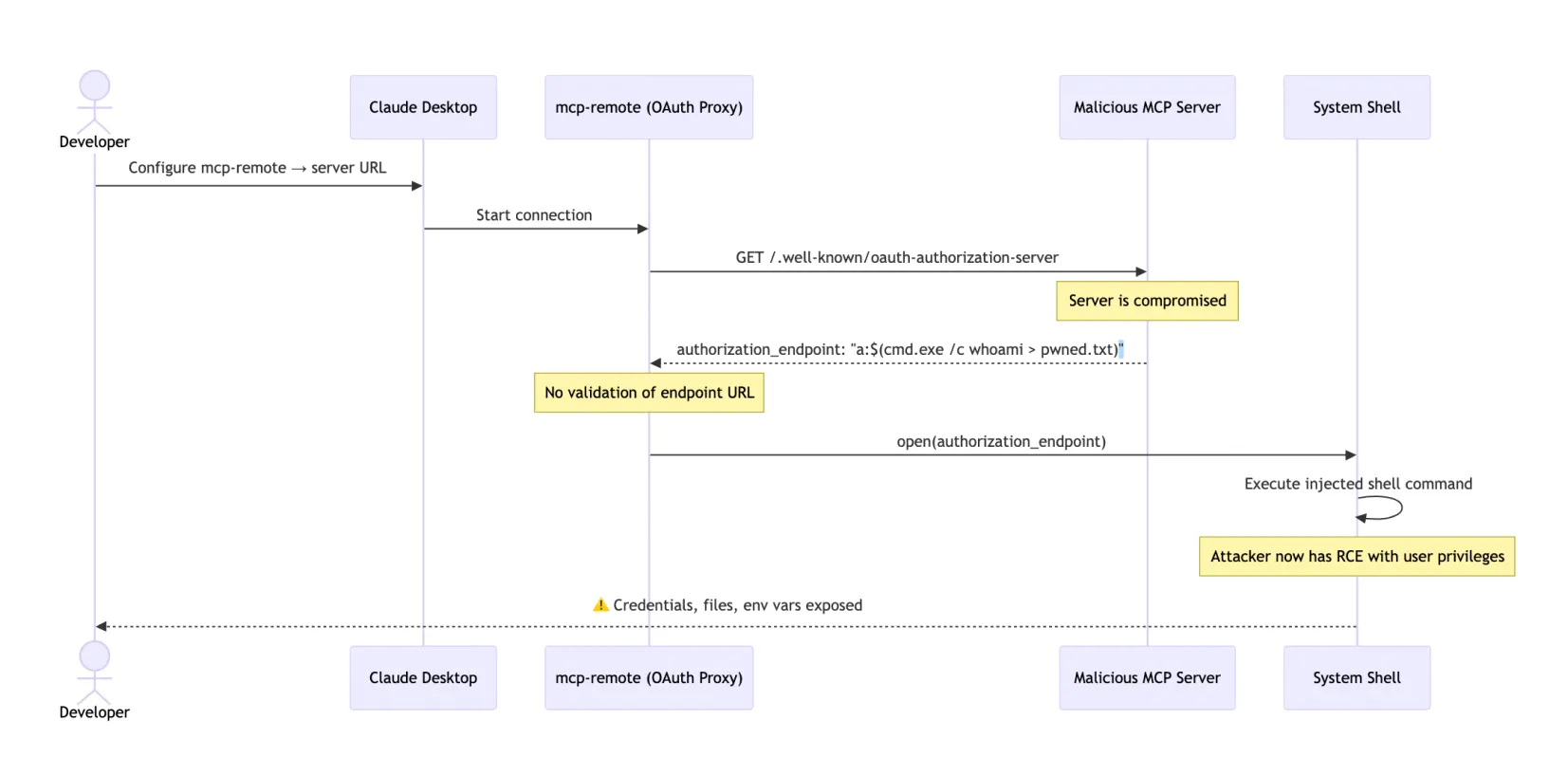
The mcp-remote library trusted whatever OAuth metadata the server returned. That trust was the vulnerability. It affected developers using Cloudflare, Hugging Face, and Auth0 integrations, all of which recommended mcp-remote in their docs.
The Postmark supply chain attack showed how a compromised MCP server can affect everyone using it. A survey by Astrix found 88% of MCP servers use insecure credential handling. OWASP published an MCP Top 10 list. And the agent-friend linter audited 201 MCP servers and found the four most popular ones all scored D or below. The most popular server got an F.
MCP is more secure for multi-user scenarios. But the ecosystem quality isn't there yet. Audit any MCP server before you put it in production.
MCP was built for enterprise auth and audit
MCP wins here, and it's not close.
The core problem with CLI in enterprise settings is identity. When an agent runs a CLI command, whose identity is it using? Usually a shared service account. There's no way to know which user triggered the action. There's no way to revoke access for one person without affecting everyone. The only audit trail is bash history.
MCP solves this. Every tool call is attributed to a specific user. You can revoke access individually. Audit logs are structured and searchable. This is why Salesforce, Workday, SAP SuccessFactors, and Oracle all have MCP servers. And why Jira's MCP server has 4.8K stars.
But there's a bigger point here, made well by StackOne:
The CLI-vs-MCP debate benchmarks the 5% of integrations where the comparison makes sense. The other 95% are SaaS systems where no CLI exists and never will.
There is no Workday CLI. There is no Greenhouse CLI. There is no BambooHR CLI. These systems have OAuth APIs with custom subdomain routing, refresh tokens, and org-level access control. MCP was built to handle exactly this.
When your agent acts on behalf of a specific user across a specific tenant, MCP isn't just better. It's the only option that makes sense.
In production, CLI failed zero times
In Scalekit's benchmark: CLI was 100% reliable. MCP was 72% reliable. 7 out of 25 MCP runs failed, mostly due to TCP timeouts connecting to GitHub's Copilot MCP server.
CLI runs locally. No remote server to time out. No network dependency. No service to go down.
But MCP's reliability problems are infrastructure problems, not protocol problems. The MCP Gateway pattern fixes most of them. Scalekit's own architecture uses connection pooling and schema filtering to reach about 99% reliability and about 90% token reduction. Cloudflare's Code Mode covers 2,500 API endpoints in around 1,000 tokens instead of 244,000 tokens by doing smart schema filtering at the gateway level.
Raw MCP is unreliable and expensive. MCP through a well-built gateway is competitive on both fronts.
When should you use MCP
1. Remote SaaS with OAuth
Workday, Greenhouse, Salesforce, BambooHR, Lever, SAP. These have no CLI and never will. MCP is the right tool.
2. Multi-tenant products
If your agent acts on behalf of different users across different organizations, you need per-user auth and the ability to revoke access individually. Slack MCP, Jira MCP, and Stripe MCP are built for exactly this. CLI can't do it safely.
3. Enterprise governance
Audit trails, access revocation, compliance reporting. Sentry MCP, AWS MCP servers, and others are built with governance in mind. CLI gives you bash history and that's it.
4. Tools without CLIs
Figma (15K stars), Notion MCP, Linear MCP, Asana MCP, Airtable MCP. These are powerful tools with no CLI alternative. MCP is your only path.
5. Runtime tool discovery
If your agent needs to browse thousands of available agent tools at runtime, MCP has the infrastructure for it. Smithery.ai and the MCP Registry let agents discover tools programmatically. CLI doesn't have this.
When should you use CLI
1. A mature CLI already exists
git, docker, gh, kubectl, aws, az, gcloud, terraform, gws, stripe, vercel, fly, wrangler. These are all well-documented, model-native, and reliable. Use them.
2. Single-tenant or solo developer setup
You are the user. Your credentials, your machine, your agent. CLI is fast, simple, and cheap. You don't need per-user OAuth when there's only one user.
3. Cost-sensitive or high-volume work
$3.20 vs $55.20 per month at 10,000 operations. At scale those numbers compound fast. If you're running hundreds of thousands of agent operations, the difference is significant.
4. Composable pipelines
gh | jq | grep. kubectl | jq. gws | jq. aws s3 ls | sort | tail. These pipelines run in a single LLM call. Faster, cheaper, and more reliable than orchestrating multiple MCP tool calls.
5. Strong training data coverage
If the model already knows the tool well (all Tier 1 and Tier 2 CLIs above), you get better reliability and fewer hallucinations. The model has seen these tools thousands of times in training.
How the best agents use MCP and CLI
Claude Code uses its Bash tool for git, file operations, grep, curl, and build commands. It uses MCP servers for the Firecrawl plugin, Playwright, Slack, Sentry, and custom integrations. It's not one or the other. It's both.
Cursor does the same thing. Shell commands for local dev work. MCP for Figma, Supabase, Linear, and Firecrawl MCP in Cursor for web scraping.
And then there's the Google signal again. Google ships both gws CLI and Google Workspace MCP servers. They're not competing with each other. They serve different jobs. gws for local dev workflows and single-tenant automation. The MCP servers for multi-tenant enterprise integration.
The pattern that's emerging:
Agent Runtime
├── CLI Tools: git, gh, docker, kubectl, aws, gws, terraform, jq
├── MCP Client: Figma MCP, Slack MCP, Salesforce MCP, Firecrawl MCP
└── Router: CLI if available, MCP for everything else
This is how I work personally. gh for GitHub. Firecrawl MCP for web scraping. Playwright MCP for browser testing. gws for Google Workspace. docker for containers. Slack MCP for notifications. The protocol doesn't matter. What matters is using the right tool for each job.
One clean way to frame the split: inner loop vs. outer loop.
The inner loop is everything fast and local: editing code, running tests, committing, checking PR status. The model already knows these tools, token costs stay low, and latency matters. CLI belongs here.
The outer loop is everything that crosses system or team boundaries: CI/CD pipelines, multi-user SaaS integrations, production monitoring, enterprise audit trails. These need structured access, per-user auth, and governance. MCP belongs here.
The agent runtime diagram above maps directly onto this. CLI handles the inner loop. MCP handles the outer loop. Most production agent setups end up at this split whether or not they name it that way.
Which will win in the long run: CLI or MCP?
MCP is getting better fast. The spec keeps improving. The 2025-11-25 version added OpenID Connect support. Schema filtering at the gateway level can cut token costs by 90%. The Agentic AI Foundation under the Linux Foundation means this isn't going away. OpenAI, Google, and Microsoft are all in.
At the same time, CLI agents are becoming a larger part of the agentic stack, and the CLI-first movement is growing. OpenAI Codex now has more than 5 million weekly users, and GitHub stars for terminal agents like OpenCode, Claude Code, and Gemini CLI all crossed 90,000 within a year of launch:
- mcp2cli (2.2K stars): converts any MCP server to CLI commands, claiming 96 to 99% token savings
- Composio CLI (29K stars): 1,000+ toolkits with lazy loading so you only load what you need
- CLI-Anything (HKU research): auto-generates CLIs from any codebase
- Google Workspace CLI: shows even Google is betting on CLI alongside MCP
- Gemini CLI (105K stars): Google's terminal AI agent, built on CLI-first principles
The ecosystem quality problem is real. The agent-friend linter graded 201 MCP servers. The top 4 most popular all scored D or below. The number one server got an F. The protocol is solid. The implementations need to catch up.
My prediction: MCP won't die. The Linux Foundation backing, network effects, and support from the three biggest AI companies make that basically impossible. But the hybrid pattern wins long-term. The smartest tools will export to both. Protocol-agnostic tools survive. Protocol-locked tools don't.
How MCP is closing the token gap
MCP's biggest weakness has always been token cost. But the gap is actively being engineered away. Two of the most interesting solutions came from Anthropic and Cloudflare, independently, within a few months of each other.
How Anthropic cut token usage by 98.7%
In November 2025, Anthropic's engineering team published a pattern that fundamentally rethinks how agents interact with MCP servers.
The problem they diagnosed: most MCP clients load every tool definition into the context window upfront. If you have three MCP servers with 40 tools each, you're burning 100K+ tokens before the agent does anything. And when tools pass large results back to the model, those results bloat context too. A 2-hour meeting transcript piped through two tool calls might touch the context window twice.
Their solution: instead of exposing tools as direct calls, present MCP servers as code-based APIs. Essentially TypeScript SDKs on a filesystem. The agent discovers tools by reading files on demand, the same way a developer would browse a library. It only loads what it needs for the current task.
The results: 98.7% token reduction, from 150,000 tokens to 2,000 tokens for the same workflow. Intermediate results stay in the execution environment and never pass through the model unless explicitly returned. They called the pattern "Programmatic Tool Calling," and it's now part of the Claude SDK.
Cloudflare: Code Mode
Cloudflare hit the same wall from a different angle. Their API has over 2,500 endpoints. Exposing each one as an MCP tool would require 1.17 million tokens, more than the entire context window of most foundation models. A traditional MCP server for the full Cloudflare API was simply impossible.
Their Code Mode solution, published February 2026, collapses the entire API into just two tools: search() and execute(). The agent writes JavaScript to explore the OpenAPI spec and call endpoints, running inside a sandboxed V8 Worker isolate.
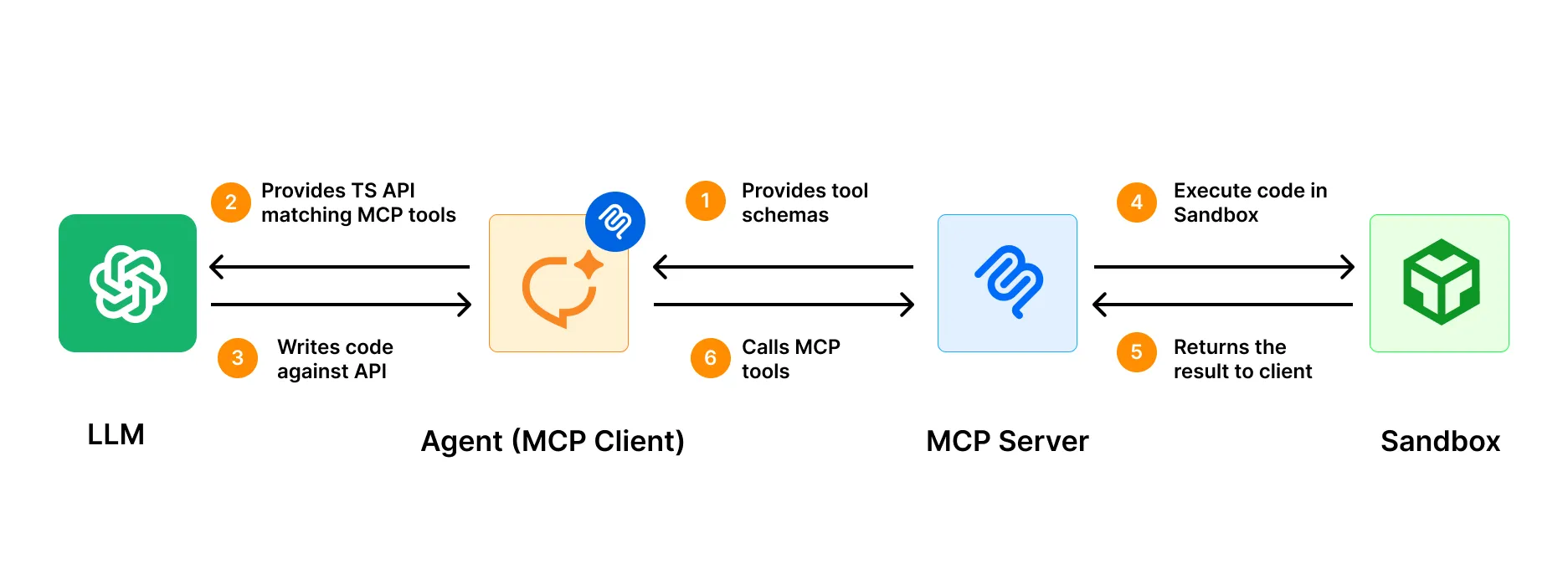
The footprint: ~1,000 tokens, regardless of how many endpoints exist. That's a 99.9% reduction versus a traditional MCP approach. When Cloudflare adds new products, no new tool definitions are needed. search() and execute() discover them automatically.
Cloudflare's own writeup explicitly compares this to the CLI approach:
Command-line interfaces are another path. CLIs are self-documenting and reveal capabilities as the agent explores... The limitation is obvious: the agent needs a shell, which not every environment provides and which introduces a much broader attack surface than a sandboxed isolate.
That's a fair characterization. CLI gives you progressive disclosure for free. It's been there for 40 years. Code Mode gives you the same progressive disclosure for MCP, but in a sandboxed environment that doesn't require shell access.
Cursor: dynamic context discovery
Cursor took a simpler route. Tool descriptions live on the filesystem, and only short tool names go into the context window at session start. When the agent decides it needs a specific tool, it fetches the full description on demand.
No gateway infrastructure required. Token costs drop from lazy loading alone. The same insight as Anthropic's Programmatic Tool Calling and Cloudflare's Code Mode, implemented at the client layer rather than the server or gateway level.
Both solutions arrive at the same insight
The MCP token problem isn't fundamental to the protocol. It's an implementation problem, and it's being fixed.
Three independent solutions — Anthropic's Programmatic Tool Calling, Cloudflare's Code Mode, and Cursor's dynamic context discovery — all converge on the same insight: agents shouldn't load what they don't need. Whether that's --help on a CLI or search() on a Code Mode server, the principle is identical.
The raw MCP numbers that benchmarks keep citing (32x, 35x more tokens than CLI) are real for naively implemented servers. But the gap closes dramatically when you build the server right. An MCP server with Code Mode can match CLI on token efficiency while adding OAuth, audit trails, and multi-tenant support that CLI can't provide.
This doesn't change the hybrid recommendation. It reinforces it. CLIs remain the right default for tools that have them. But MCP's evolution means it's catching up on the one dimension where it was hardest to defend.
My verdict after using MCP and CLI every day
I use both every day and I don't think about it as a choice anymore.
CLI for the 80% of tasks involving tools the model already knows. MCP for the 20% where I need auth, stateful connections, or integrations with tools that don't have a CLI.
Google shipping both gws CLI and Google Workspace MCP servers is the clearest signal available. The future is hybrid. The protocol matters less than the quality of the integration.
The agents winning in 2026 aren't CLI-only or MCP-only. Build tools that export to everything. The best agents are protocol-agnostic, and that's not going to change.
Whatever integration layer you pick, your agents still need web access. They need to search for live information, interact with pages that require clicks and logins, and extract structured data. Firecrawl handles all three — available as both an MCP server and a CLI, so it fits whichever pattern you're already using.
Frequently Asked Questions
Is MCP replacing CLI for AI agents?
No. CLI wins on token cost (4 to 32x cheaper), reliability (100% vs 72%), and composability. MCP wins on security, multi-user auth, and enterprise governance. Most production agents including Claude Code, Cursor, and Gemini CLI use both.
How much more expensive is MCP than CLI?
Scalekit's benchmark: MCP costs 4 to 32x more tokens. At 10,000 monthly operations: CLI costs about $3.20 vs MCP about $55.20 using gh vs GitHub Copilot MCP. Jannik Reinhard found a 35x difference with Microsoft Graph. The gap narrows with schema filtering gateways.
Which CLIs do AI agents use most reliably?
Tier 1 (near-perfect): git, gh, curl, jq, npm, pip. Tier 2 (strong): docker, kubectl, aws, az, gcloud, terraform, gws. Tier 3 (error-prone): sed, awk, find -exec, interactive tools.
What is Google Workspace CLI (gws) and why does it matter?
Google shipped gws in March 2026. It's a Rust-based CLI covering Drive, Gmail, Calendar, Sheets, Docs, and every Workspace API. It dynamically builds its command surface from Google's Discovery Service. Install with npm install -g @googleworkspace/cli. It matters because Google ships this alongside their MCP servers, which signals that CLI isn't going anywhere.
What is the MCP Tax on token usage?
Every MCP server injects all tool definitions into every conversation turn, whether you use them or not. GitHub Copilot MCP's 43 tools cost about 28,000 tokens per turn. Microsoft Graph MCP costs about 28,000 tokens. Stack three or four MCP servers and you're at 150,000+ tokens before asking your first question.
What is mcp2cli and should I use it?
mcp2cli (2.2K GitHub stars) converts MCP tool schemas to CLI commands and claims 96 to 99% token savings. At scale that adds up to about $21,000 per month in savings. It's great for single-tenant dev tools. It doesn't solve multi-user auth or enterprise governance.
What are the most popular MCP servers?
By GitHub stars: Playwright MCP (30.4K, Microsoft), GitHub MCP (28.6K), Figma Context (14.2K), Google GenAI Toolbox (13.9K), Chrome MCP (11.1K), AWS MCP (8.7K), Unity MCP (8.1K), Firecrawl MCP (6K), Sentry MCP (5K), Jira/Atlassian MCP (4.8K).
Can Claude Code use both MCP and CLI?
Yes. Claude Code uses its Bash tool for shell commands (git, gh, curl, file operations) and supports MCP servers for external integrations like Firecrawl, Playwright, and Slack. This hybrid approach is the emerging best practice.
Is MCP secure enough for production?
It depends. CVE-2025-6514 (CVSS 9.6), the Postmark supply chain attack, and OWASP's MCP Top 10 show real risks. But MCP's per-user OAuth and audit trails are more secure than shared CLI credentials for multi-tenant use cases. Always audit MCP servers before deploying them.
What did the Scalekit benchmark actually show?
75 runs comparing CLI, CLI with skills files, and MCP on GitHub tasks using Claude Sonnet 4. CLI: 100% reliable, 1,365 to 8,750 tokens per task. MCP: 72% reliable, 32,000 to 82,000 tokens per task. The 800-token skills file reduced CLI latency by 33%. Monthly cost at 10K operations: CLI $3.20 vs MCP $55.20.