TL;DR:
- CMS migration means moving your entire content (pages, media, metadata, URL structure, taxonomies) from one system to another, and it usually breaks more things than you expect.
- Broken links and lost 301 redirects are the two most common causes of post-migration SEO crashes.
- Headless CMS architectures have become the dominant migration target because they decouple content from presentation, giving you full frontend control.
- Firecrawl's scraping and extraction API lets you pull structured content from any live site and export it as migration-ready JSON or CSV, without writing custom crawlers.
- Phased rollouts with feature flags and parallel environments reduce risk when migrating large content volumes.
CMS migration is the content equivalent of a code rewrite. Joel Spolsky called rewriting from scratch the “single worst strategic mistake” a software company can make, because the old code, messy as it looks, contains years of bug fixes and edge case handling that aren't visible until they're gone.
The same applies to your content. You may see your WordPress install, notice the plugin bloat and the five-second load times, and convince yourself that moving to a headless CMS will be clean and fast. Then you discover the issues: most of your internal links are hardcoded to the old domain, your custom post type metadata has no equivalent in the new schema, and your redirect map is a spreadsheet someone started and abandoned when they left.
This guide is for developers who want a clear, technical map to migrate a CMS from start to finish.
I’ll walk you through what CMS migration actually involves, why it keeps going wrong, how to protect your SEO equity, and how to use web crawlers like Firecrawl to automate the end-to-end extraction and transformation pipeline.
What is CMS migration?
CMS migration is the process of moving all your website's content, structure, and configuration from one content management system to another. The scope includes pages, blog posts, media files, user data, taxonomies, categories, tags, custom fields, metadata (title tags, meta descriptions, canonical URLs), URL slugs, internal links, and any third-party integrations that plug into the CMS layer.
The technical challenge is mapping between two different data models since you are not just copying data.
WordPress stores content as wp_posts with custom meta tables. Contentful organizes everything as typed content models with linked entries. Sanity uses document-oriented GROQ queries.
These are structurally incompatible, which means migration requires extraction, transformation, and loading (ETL) rather than a straight copy.
Why migrate your CMS?
The reasons for migrating your CMS are almost always structural.
Teams notice that the current system can't support what the business needs next, whether that's multi-region localization, API-first content delivery, improved Core Web Vitals, or simply lower maintenance overhead.
| Reason | What it looks like in practice |
|---|---|
| Performance bottlenecks | Pages taking 4-6 seconds to load due to plugin bloat or monolithic rendering |
| Vendor lock-in | Can't update the frontend without touching CMS internals |
| Lack of API access | Can't automate pushing content to mobile apps, digital signage, or third-party tools |
| Poor developer experience | Deployments require database dump and there’s no version control for content |
| Security vulnerabilities | Unpatched plugins, outdated PHP versions, frequent exploit reports |
| Scaling limits | Can't handle 10x traffic without expensive server upgrades |
| Content modeling limitations | No way to enforce structured content types or editorial workflows |
| Multisite or localization needs | Current CMS can't manage content for multiple regions cleanly |
Why most people prefer migrating to a headless CMS
A headless CMS separates the content backend from the presentation layer.
Content is stored and managed in one place, then delivered via API to whatever frontend consumes it: a React app, a mobile app, a voice interface, a digital display. You get the ability to treat content as structured data that any system can query, without being locked into a specific rendering engine.
Here’s what the difference looks like when you compare headless CMS and traditional CMS side by side.
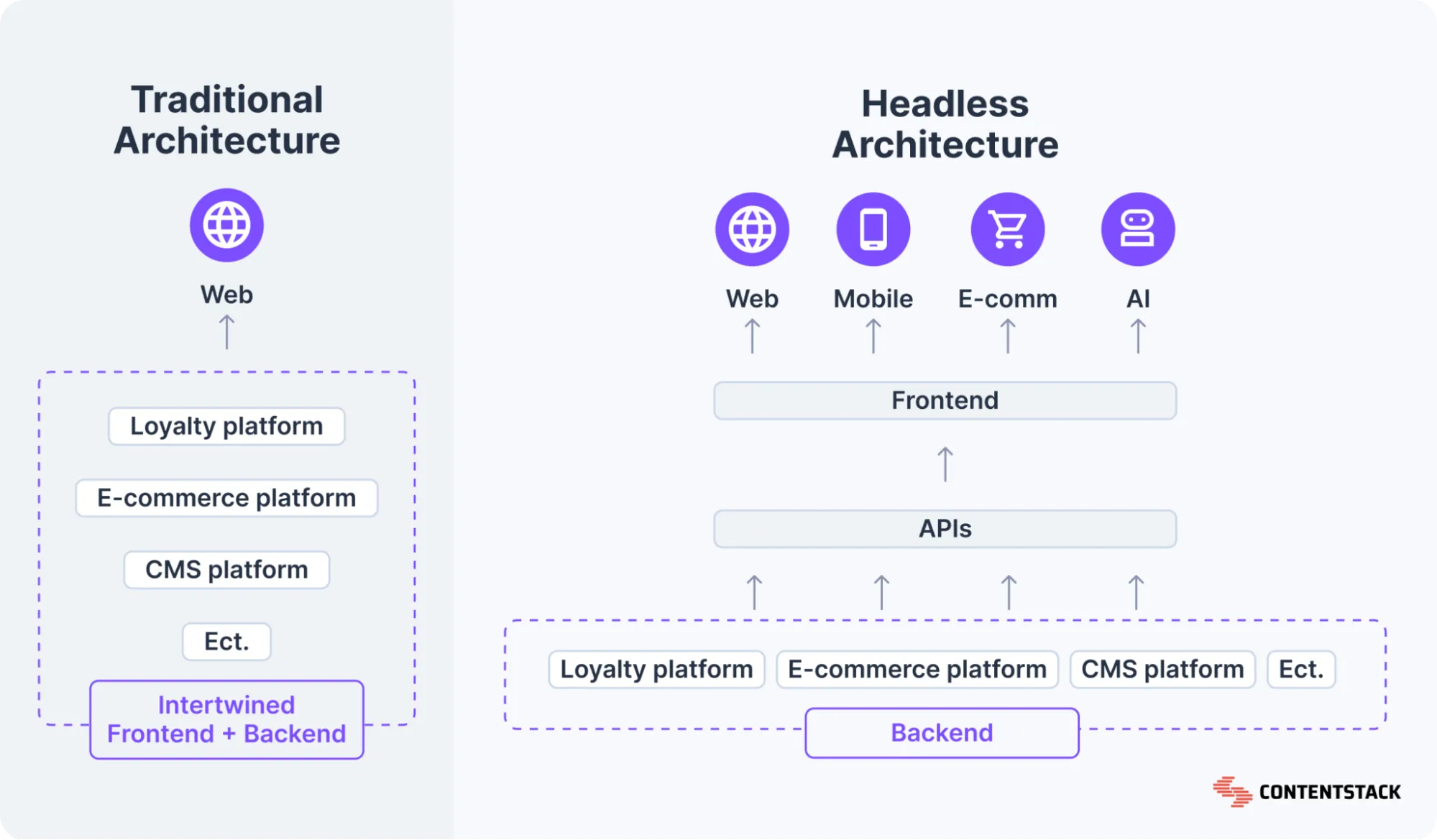
Source: Contentstack
This flexibility is why companies are moving to headless CMS’s. According to Storyblok’s 2025 State of CMS report, 69% of headless CMS users report improved time-to-market and productivity, 58% note better site performance, and 41% have seen a measurable ROI increase. Developers get full control over the frontend stack while editors get a clean, purpose-built content editing experience.
You do need to build or assemble the presentation layer yourself, which adds upfront work, but you’re free from the architectural debt of traditional CMSs.
Why is CMS migration such a hassle even in 2026?
CMS migration is difficult even today because while the tooling has improved, content still lives in production, and you can't stop the site while you migrate it.
Discussions across Reddit's r/webdev and developer forums surface some common, recurring issues:
- Dynamic content rendering: JavaScript-rendered pages require a headless browser to extract content correctly. Static crawlers miss huge chunks.
- URL structure mismatches: The old CMS uses /blog/category/post-slug, the new one enforces /content/post-slug, and nobody mapped the redirects before launch.
- Media asset management: Images embedded in body content as absolute URLs break when the CDN changes, and bulk re-referencing requires programmatic find-and-replace across thousands of pages.
- Custom field loss: Metadata fields, SEO overrides, schema markup, and custom post types don't have a 1:1 equivalent in the new system and get silently dropped.
- Database dependencies: Some CMS platforms embed shortcodes or custom syntax directly in content body text (WordPress [shortcode], Gutenberg block JSON), which becomes garbage data in any other system.
The WooCommerce 2023 migration is a high-profile case study in what can go wrong at scale. When they moved from WooCommerce.com to Woo.com, organic visibility dropped over 90% immediately. Five months later they rolled back to the original domain, at which point visibility recovered.
How to migrate your CMS easily with Firecrawl: Step-by-step
To make migration simple, and almost automated, I’m using Firecrawl as the extraction layer.
Firecrawl's crawl API handles dynamic content rendering, respects robots.txt, and returns clean structured data. This solves the hardest part of the extraction problem without you writing a custom crawler.
With Firecrawl you can easily migrate:
- Content: Pages, posts, articles, media files, metadata
- Structure: Hierarchies, categories, tags, taxonomies
- Users: Profiles and user-related data where publicly accessible
- Settings: Configurations, custom fields, workflows
- E-commerce: Products, catalogs, inventory, orders
Learn more about Firecrawl’s data migration use cases.
Step 1: Audit and inventory your current site
Before touching the new CMS, you need a complete map of what exists. That means every URL, its metadata, internal links, canonical tags, and content type. Skipping this step means you'll discover broken pages after launch, not before.
Firecrawl map endpoint gives you this in minutes:
curl -X POST https://api.firecrawl.dev/v2/map \
    -H 'Content-Type: application/json' \
    -H 'Authorization: Bearer YOUR_API_KEY' \
    -d '{
      "url": "https://firecrawl.dev"
    }'
This returns the full URL tree of your site:
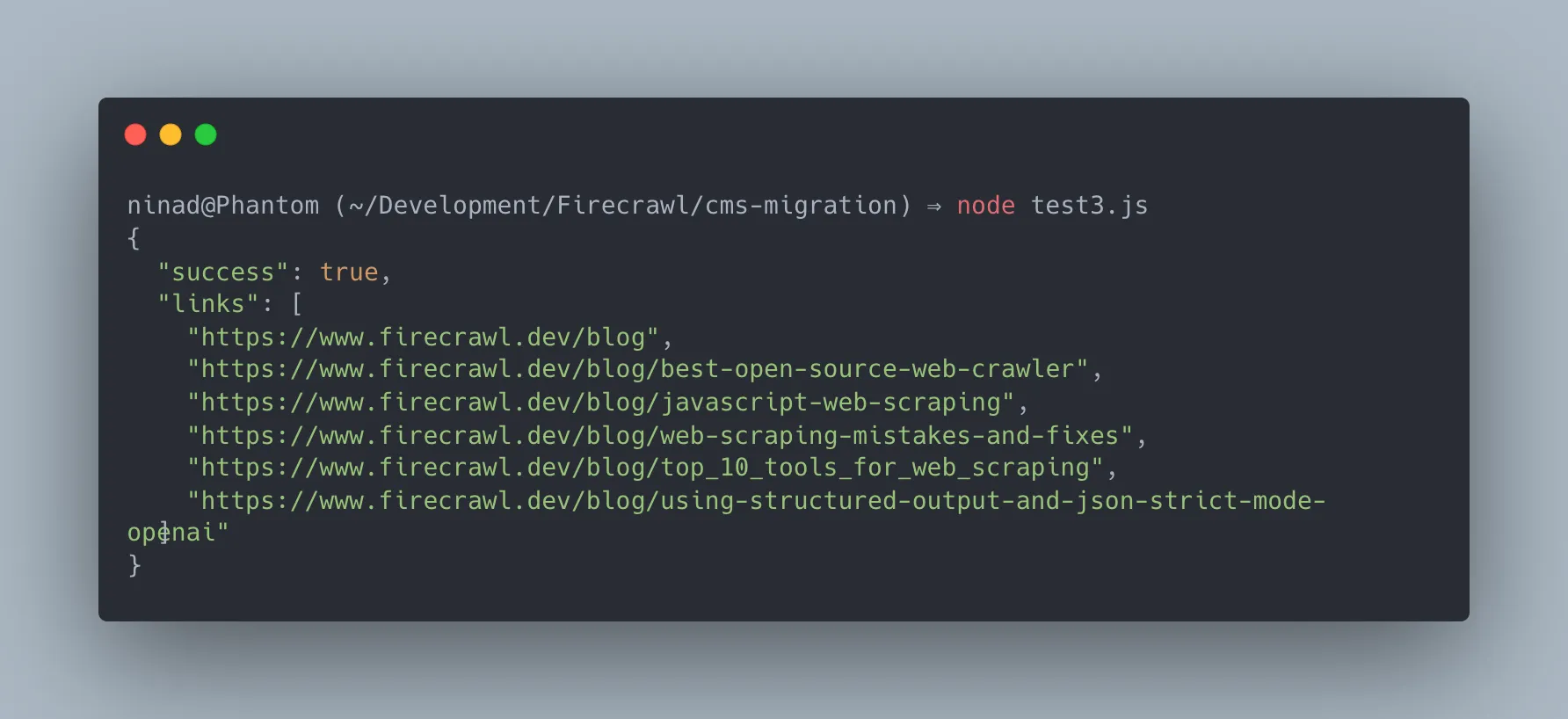
From this list, you can identify how many pages need migrating, flag orphaned pages, and build your redirect map before writing a single line of migration logic.
Step 2: Extract structured content via crawl
Once you have your URL inventory, run a full crawl to extract page content cleanly instead of manually using structured JSON. Firecrawl natively handles JavaScript-rendered pages, which means you won't miss body content loaded asynchronously.
import { Firecrawl } from "firecrawl";

const app = new Firecrawl({ apiKey: "fc-YOUR_API_KEY" });

const result = await app.crawl("https://yoursite.com", {
  limit: 500,
  scrapeOptions: {
    formats: [
      "markdown",
      {
        type: "json",
        schema: {
          type: "object",
          properties: {
            title: { type: "string" },
            date: { type: "string" },
            author: { type: "string" },
            categories: { type: "array", items: { type: "string" } },
            content: { type: "string" },
          },
        },
      },
    ],
  },
});
You'll instantly receive a well-formatted response containing both the json schema exactly as you defined it alongside the clean markdown content of the page:
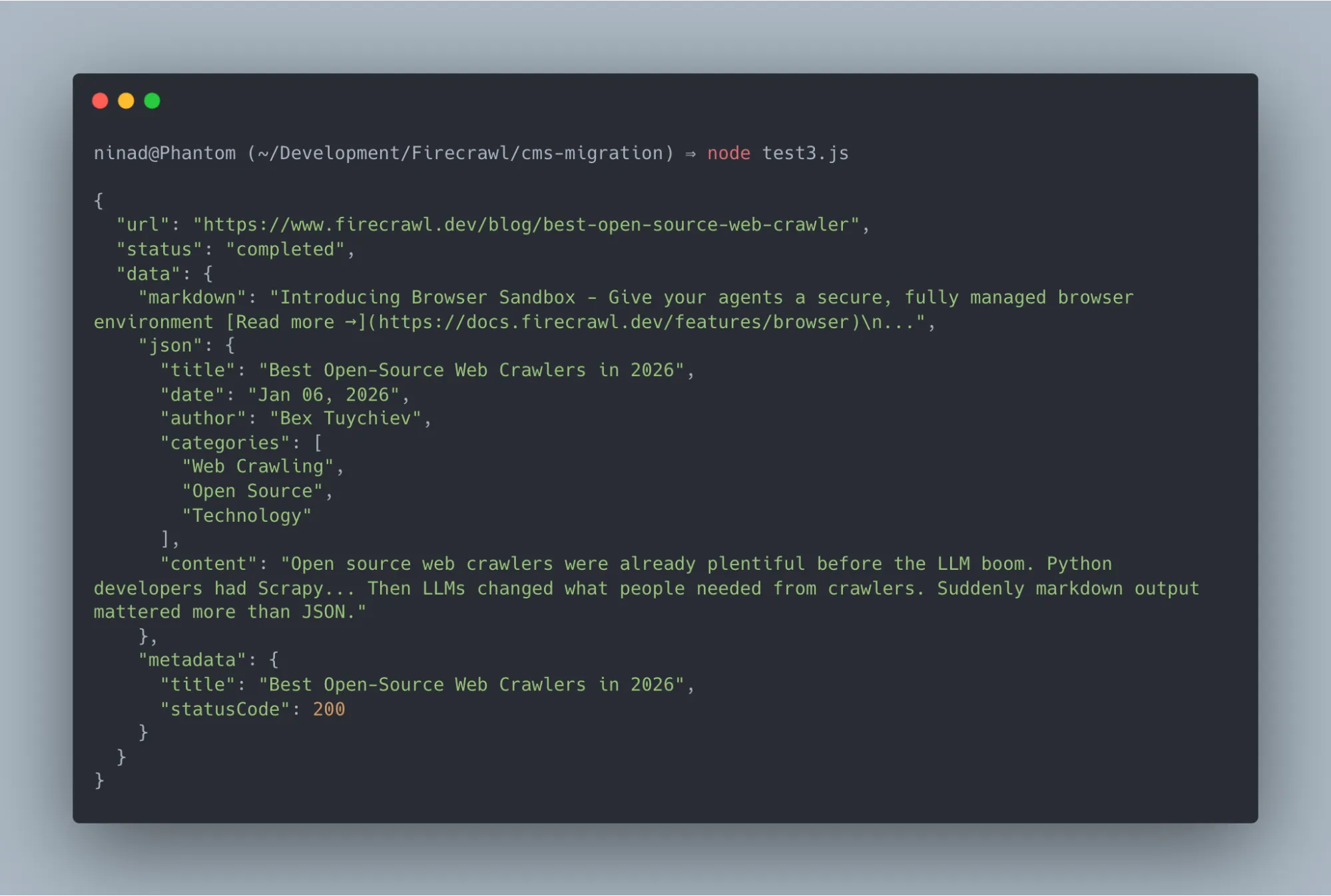
Firecrawl’s extraction mode uses LLM-powered field identification, so you can define a target schema and it will populate those fields from the page content automatically. This is particularly useful for migrating blog posts where date, author, and categories are embedded in HTML in inconsistent ways.
If you don't want to wire this up from scratch, Firecrawl has a ready-to-fork migrator template built with Next.js and TypeScript.
It gives you a visual interface to map your site, select URLs, define extraction schemas, and export to CSV or JSON. Clone it, add your API key to .env.local, and you have a working extraction pipeline in minutes:
git clone https://github.com/firecrawl/firecrawl-migrator.git
cd firecrawl-migrator
npm install
echo "FIRECRAWL_API_KEY=fc-YOUR_KEY" > .env.local
npm run dev
Step 3: Build your redirect map
Every URL that changes during the CMS migration needs a 301 redirect. This is non-negotiable from an SEO standpoint. 301 redirects pass link equity to the new URL, telling search engines the page has permanently moved. Without this redirect, all backlinks and internal links will end up with 404 errors, and Google's crawl budget gets wasted on dead pages.
Export your old URL list from Step 1, map each one to its new URL in the new CMS structure, and load that mapping into your web server config (nginx, Cloudflare redirect rules, or a CMS redirect plugin). Validate every redirect before launch using a crawler like Screaming Frog or the Firecrawl crawl endpoint against your staging environment.
Step 4: Transform and load content into the new CMS
With your extracted data (Step 2) and redirect map (Step 3), you transform the content into the new CMS's import format.
Each CMS has its own preferred ingest path: Contentful has a management API, Sanity has its own dataset import format, WordPress accepts WXR XML files, and Strapi exposes REST and GraphQL endpoints.
The transformation step is where you’ll need custom code. You're mapping fields from one schema to another, resolving media asset URLs, replacing old internal links with new ones from your redirect map, and stripping CMS-specific markup (shortcodes, block JSON) from body content.
A minimal transformation looks like this:
// Transform Firecrawl output to Contentful entry format
function transformToContentful(scraped) {
  return {
    sys: { contentType: { sys: { id: "blogPost" } } },
    fields: {
      title: { "en-US": scraped.title },
      slug: { "en-US": slugify(scraped.url) },
      body: { "en-US": scraped.content },
      publishDate: { "en-US": scraped.date || new Date().toISOString() },
      author: { "en-US": scraped.author },
    },
  };
}
Step 5: Validate SEO signals before going live
Before switching your DNS to the new CMS, run your staging environment through a full crawl and verify the following:
- Every old URL either returns a 301 redirect to the new URL or still exists at the same path.
- Title tags and meta descriptions are present on all pages.
- Canonical tags are set correctly.
- Your XML sitemap lists the new URLs and is referenced in robots.txt.
- Core Web Vitals (LCP, CLS, FID) meet or exceed your pre-migration baselines.
- Internal links in the content body point to new URLs, not old ones that'll hit redirects.
Step 6: Phase your rollout
For large migrations, don't flip everything at once. A phased rollout reduces blast radius when something breaks.
The standard approach is to migrate content in batches by section:
- Migrate the blog first
- Validate it for two weeks
- Then migrate product pages
- Then migrate static pages
Run your old and new CMS in parallel during this window. The old site stays live, the new one is behind a feature flag or subdomain. This lets you catch data integrity issues in one section before propagating them everywhere.
If you're migrating to a headless CMS, you can do an incremental migration at the component level. Start serving the new frontend for new content while legacy content still comes from the old CMS through an API shim. Gradually move content sections over until the old system is empty, then decommission it.
Monitor Google Search Console closely for the first 30-60 days:
- Watch for spikes in crawl errors (404s and 500s)
- Track drops in indexed pages
- Monitor impressions and clicks for your top-ranking pages
- React to issues within 24-48 hours: the longer broken redirects or missing metadata sit in production, the more crawl budget gets wasted on pages Google can't resolve
Wrapping up the CMS migration
I've found that the hardest part of any CMS migration is safely extracting structured data from a live production system and mapping it across incompatible schemas without breaking SEO.
As developers, we shouldn't have to waste weeks building, maintaining, and debugging custom web scrapers just to reliably pull our own website's content.
The solution is to automate your extraction pipeline.
Firecrawl removes the hardest piece from that equation. The crawl and extraction API efficiently maps your URLs and extracts your entire content structure via API, handling dynamic client-side rendering, large-scale batching, and AI-driven field extraction out of the box.
While you can integrate the raw extraction API directly into your custom scripts, you don't actually have to build the pipeline from scratch.
To get moving immediately, I'd suggest spinning up our open-source firecrawl-migrator template. It provides a complete, UI-driven extraction pipeline that lets you go from mapping URLs to exporting your full site's data in minutes.
Firecrawl is free to get started — no custom scrapers required.
Frequently Asked Questions
How do you avoid broken links during a CMS migration?
To avoid broken links during a CMS migration, build your redirect map before launch. Export every URL from your current site using a crawler (Firecrawl's map endpoint), then map each old URL to its new destination in the migrated CMS. Load those mappings as 301 redirects in your server config or CDN. Run a post-migration crawl against staging to verify every redirect resolves correctly before DNS changes.
How does CMS migration impact SEO?
CMS migration has direct SEO consequences if URL structure changes, metadata gets dropped, or internal links break. Changing URLs without 301 redirects causes Google to treat the new pages as entirely new content, losing all accumulated link equity and ranking history. Missing title tags and meta descriptions remove the search signals that tie your content to specific queries. A well-executed migration with redirects, metadata preservation, and a properly configured XML sitemap can actually improve SEO by moving to a faster, more technically sound platform.
How do you phase a headless CMS migration rollout?
The recommended pattern is section-by-section with parallel environments. Keep your old CMS live and serving traffic. Deploy the new CMS to a staging environment. Migrate one content section (blog, documentation, landing pages) at a time, validate it in staging, then switch that section's routing to the new system in production. Use a feature flag or routing proxy to control which sections go where. At any point, most of your site is still running on the proven old system, and only the sections you've explicitly validated have moved.
What can Firecrawl extract during a CMS migration?
Firecrawl can extract pages, posts, articles, media file references, taxonomies, categories, tags, custom field data, and page metadata from any publicly accessible website. It handles both static and JavaScript-rendered content. Through its LLM-powered extraction mode, you can define a target schema (title, date, author, content body, categories) and Firecrawl populates those fields automatically from each page, even if the source site doesn't expose a structured API or data export.
What's the difference between CMS migration and a site redesign?
A redesign changes visual presentation (layouts, colors, typography) without necessarily moving to a different CMS. A CMS migration moves the underlying data and content management infrastructure, which may or may not involve a redesign. The two often happen together, which is why CMS migrations have a reputation for being high-risk. You're changing both the data layer and the presentation layer simultaneously. If you can decouple them, migrate the CMS first and redesign second, you reduce the number of variables that can fail at once.
Do I need to migrate all content at once?
No, and you usually shouldn't. Incremental migrations reduce risk significantly. Start with lower-traffic sections, validate them thoroughly, and expand from there. This approach also lets you refine your transformation scripts and extraction schemas before applying them to your highest-value content.