Claude Web Fetch vs Firecrawl: Which One Actually Works for Web Extraction?
 Ninad Pathak
TL;DR: Should you use Claude web fetch or Firecrawl?
- Claude web fetch is Anthropic's built-in tool for pulling a single URL into a Claude session. It's free at the point of use, but it has three real gaps: no JavaScript rendering (React, Vue, and Angular pages return empty), a smaller model pre-summarizes fetched pages before Opus sees them (a documented source of hallucinated citations), and the only prompt injection defense is an
allowed_domainssafelist. - Firecrawl runs a real headless browser on every URL, returns clean markdown from the actual DOM instead of a pre-summary, and guards JSON extraction with
checkPromptInjection, which blocks poisoned pages with HTTP 403 before extraction runs. - Firecrawl leads on agentic retrieval with independent numbers. On our open DevDex benchmark, Firecrawl's Developer Index scores
63.1%overall Recall@10 versus Claude web search at45.4%. On AIMultiple's agentic search benchmark, Firecrawl finished second of eight APIs with the top mean relevance score. - Firecrawl cuts input tokens by roughly 93% per page vs raw HTML on our token efficiency benchmark: a page that costs Claude ~38K tokens as HTML lands at ~2.8K.
- Firecrawl also ships what Claude web fetch doesn't:
/interactfor stateful browser sessions,/crawland/batch/scrapefor scale, webhooks, change tracking, PDF and DOCX parsing, and SDKs for TypeScript, Python, Go, and Rust plus an MCP server.
Every sufficiently advanced scraper eventually implements its own browser.
This popular axiom in systems programming perfectly captures how web scraping evolves. This quote dates back to the early days when cURL was enough. Then came Selenium, headless Chrome, and eventually managed APIs and headless browser orchestration.
The comparison between Claude web fetch vs Firecrawl for your agentic workflows often comes down to this exact technical boundary. While Anthropic's native tool handles simple static retrieval, it fails at the "eventually implements its own browser" stage and struggles with JavaScript rendering, dynamic URLs, and complex multi-page structures. Firecrawl, by contrast, is purpose-built to navigate these complexities for high-scale web scraping, structured JSON extraction, and autonomous agent workflows.
With this comparison, I'll provide the technical breakdown you need to decide which tool fits your production requirements.
Claude web fetch vs. Firecrawl: What is the difference?
Use this feature breakdown to decide which tool fits your specific agentic use case:
| Capability | Claude web fetch | Firecrawl |
|---|---|---|
| JavaScript rendering (SPAs, lazy load) | ❌ (static HTML only) | ✅ Real headless Chromium |
| Structured JSON extraction | ❌ (freeform markdown + prompt) | ✅ Schema-based, typed output |
| Prompt injection guard on extraction | Domain safelist only | ✅ checkPromptInjection classifier + 403 |
| Interactive browsing (click, fill, login) | ❌ | ✅ /interact sessions with state |
| Developer index (repos, PRs, docs) | ❌ | ✅ Developer Index, 63.1% Recall@10 on DevDex |
| Research index (arXiv, GitHub, papers) | ❌ | ✅ Research Index |
| Token efficiency vs raw HTML | Raw HTML into context | ✅ ~93% fewer input tokens (median 92.7%) |
| Static HTML pages | ✅ | ✅ |
| PDF extraction | ✅ | ✅ |
| PDF and DOCX parsing | PDF only | ✅ PDF, DOCX, HTTP or local |
| Full-site crawling | ❌ | ✅ /crawl with depth, regex, sitemap-first |
| URL discovery / mapping | ❌ | ✅ /map returns every URL on a domain |
| Search with content hydration | ❌ | ✅ /search returns results + full markdown |
| Batch scraping (parallel URLs) | ❌ (one URL at a time) | ✅ /batch/scrape |
| Change tracking (diff across scrapes) | ❌ | ✅ changeTracking format |
| Output formats | Markdown only | markdown, html, rawHtml, links, screenshot, json, changeTracking, summary |
| Proxy rotation | ❌ | ✅ Managed infra |
| Auth handling | ❌ | ✅ Browser Sandbox holds session state |
| Async jobs and webhooks | ❌ (synchronous per call) | ✅ Crawl and batch webhooks |
| SDKs and MCP | Claude tool only | TypeScript, Python, Go, Rust + MCP server |
| Cost model | Token-based (unpredictable) | Credit-based (forecastable) |
What is the Claude web fetch tool?
The Claude web fetch tool is a server-side API feature that allows Claude to retrieve full text content from specified URLs and PDFs during a conversation. Anthropic released this tool in beta in late 2025.
It functions by including the tool in your API request, passing a URL, and letting Claude autonomously fetch the page content. The latest web_fetch_20260318 version supports Claude Opus 4.8 (along with Claude Fable 5.1, Mythos 5.1, Opus 4.7, Opus 4.6, Sonnet 5, and Sonnet 4.6) and includes dynamic filtering: Claude can write and execute code to filter fetched content before it enters the context window, plus response inclusion control for agentic workflows. Earlier versions (web_fetch_20260309, web_fetch_20260209, web_fetch_20250910) remain available.
What are the limitations of the Claude web fetch tool?
While convenient, the native fetch tool has several hard limits that frequently break production agent workflows:
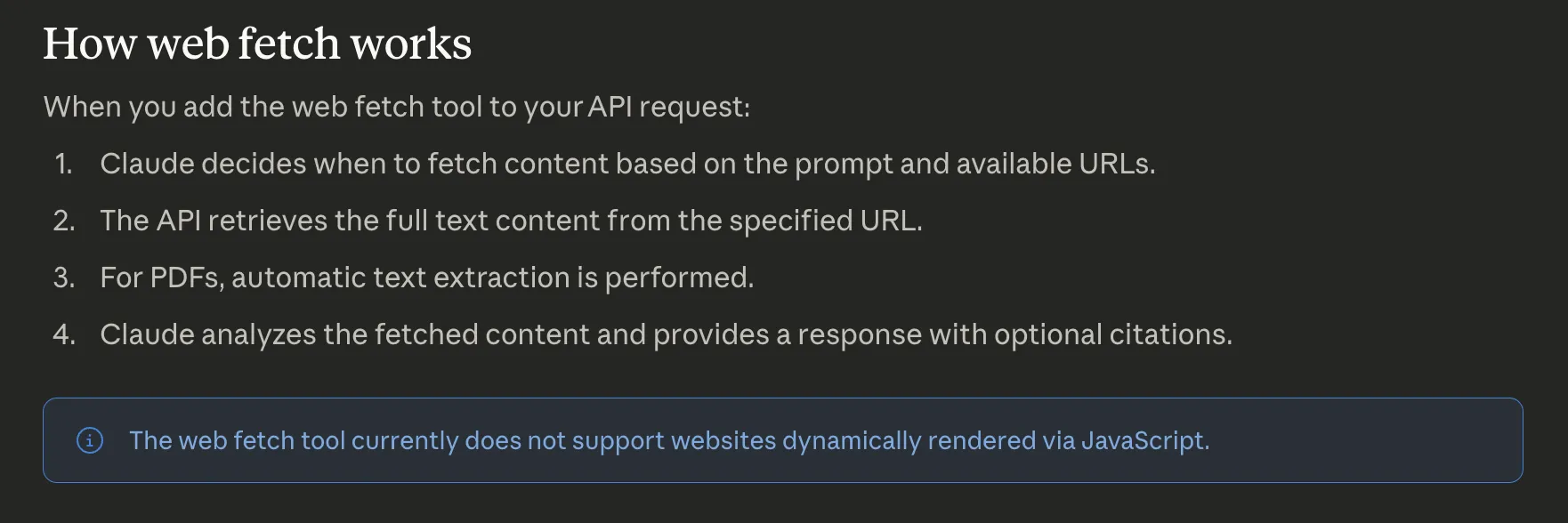
- No JavaScript rendering: The tool only fetches the initial HTML. Pages built on React or Vue return an empty shell.
- No dynamic URL construction: Claude can't generate and fetch a new URL. It only accesses links already present in the conversation history.
- Prompt injection risks: Injected content in a user message can trigger unintended fetches. Anthropic recommends using
allowed_domainsas a critical safety mitigation. Firecrawl handles the same problem at the extraction layer with an opt-incheckPromptInjectionguard on JSON extraction: a classifier inspects the scraped page before extraction runs and blocks the request with HTTP403and error codeSCRAPE_PROMPT_INJECTION_DETECTEDif a hidden instruction is detected. See what is prompt injection for a deeper look at the attack surface. - Zero handling for complex sites: The tool can't handle JavaScript-heavy pages, login walls, or navigate multi-page structures.
This is what Anthropic's official documentation says about the Claude web fetch tool's limitations:
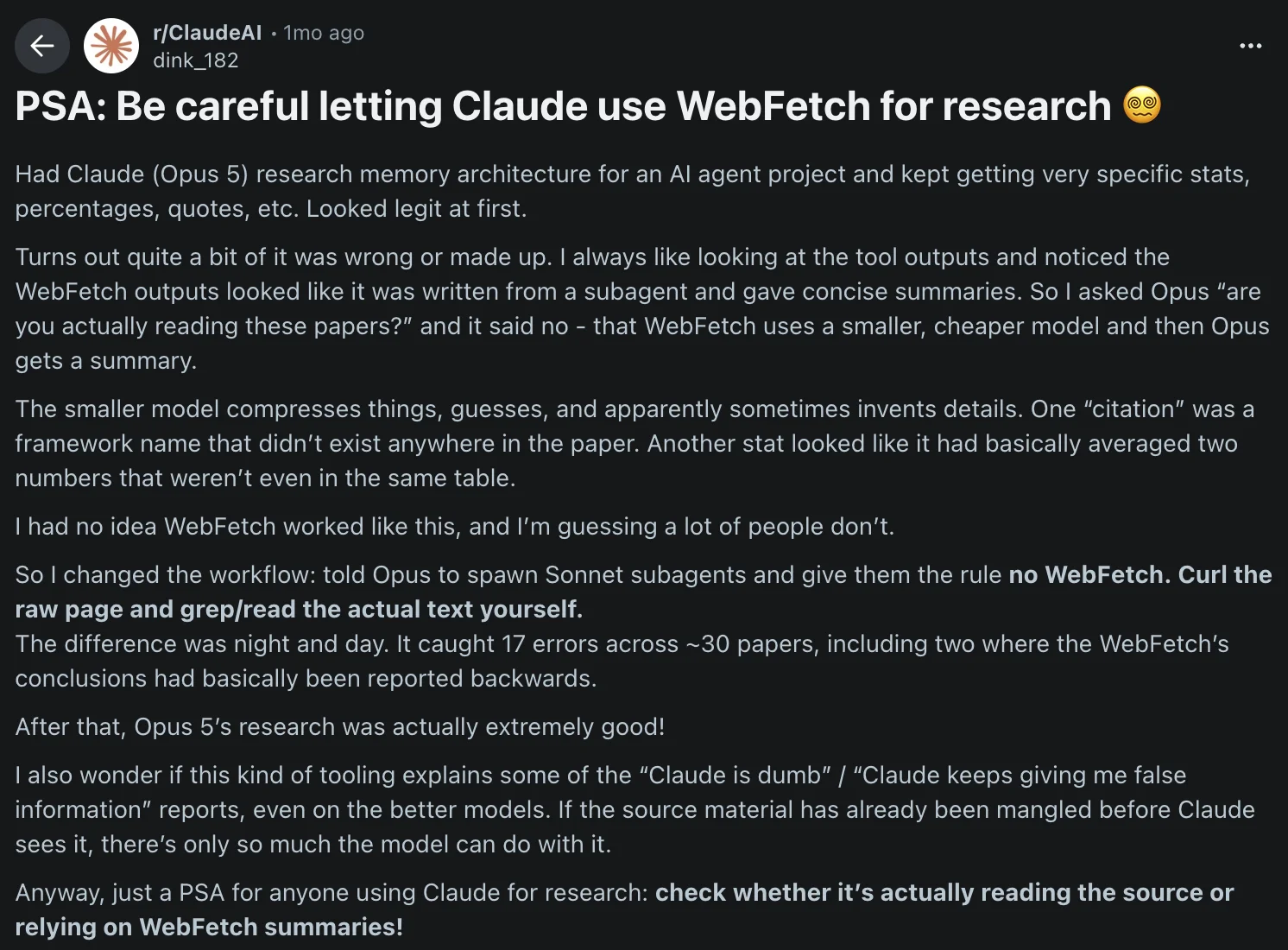
There's also a subtler failure mode worth flagging. A recent r/ClaudeAI post reports that WebFetch outputs are summarized by a smaller, cheaper model before Opus ever sees them, and the summarizer compresses, guesses, and sometimes invents details. The author caught 17 errors across ~30 papers, including two where the conclusion was reported backwards. Fabricated framework names, averaged-across-tables stats, the kind of hallucination that looks authoritative because Opus is faithfully repeating whatever the pre-summarizer handed it.
How does web fetch work in Claude models?
In a typical research pipeline, the harness uses a "search-then-fetch" pattern. First, web_search finds relevant URLs. Then, web_fetch pulls the full content from specific results. This works well for static documentation and PDF analysis.
The official documentation defines four parameters for the tool:
max_uses: Limits fetches per request.allowed_domains: Restricts accessible URLs for safety.max_content_tokens: Controls how much text enters the context window.citations: Enables source attribution in the model's response.
How can you use the Claude web fetch tool in your workflows?
The simplest option requires no setup at all. Web fetch is enabled by default in the Claude web app, Claude desktop app, and Claude Code CLI: just paste a URL into your prompt and Claude will fetch it automatically. No API keys, no tool configuration, no code.
For programmatic control, you can implement a basic fetch loop using the Python SDK. This approach works for simple research tasks where site structure is predictable.
import anthropic
from dotenv import load_dotenv

load_dotenv()
client = anthropic.Anthropic()

response = client.messages.create(
    model="claude-opus-4-8",
    max_tokens=4096,
    messages=[
        {
            "role": "user",
            "content": "Summarize the content at https://docs.firecrawl.dev/introduction"
        }
    ],
    tools=[
        {
            "type": "web_fetch_20260318",
            "name": "web_fetch",
            "max_uses": 5,
            "citations": {"enabled": True}
        }
    ]
)

for block in response.content:
    if getattr(block, 'text', None):
        print(block.text)
You can see Claude fetches the full page content as markdown and provides you with a response.
Here's a summary of the Firecrawl introduction/quickstart page:
***
## 🔥 What is Firecrawl?
Firecrawl allows you to turn entire websites into LLM-ready markdown.
It provides a powerful API for web scraping, searching, and browser automation.
***
## 🚀 Getting Started
You can get started by calling the API directly without a key to try it, then add one for higher rate limits. You can also try it instantly in the Playground without writing any code, or sign up for a key when you scale.
The Firecrawl skill is the fastest way for agents to discover and use Firecrawl, and can be installed via a simple CLI command.
You can also use the MCP Server to connect Firecrawl directly to Claude, Cursor, Windsurf, VS Code, and other AI tools.
***
## ✅ Why Firecrawl?
Key benefits include:
- LLM-ready output: Clean markdown, structured JSON, screenshots, and more
- Handles the hard stuff: Proxies, JavaScript rendering, and dynamic content
- Reliable: Built for production with high uptime and consistent results
- Fast: Results in seconds, optimized for high-throughput
- Browser Sandbox: Fully managed browser environments for agents, zero config, scales to any size
- MCP Server: Connect Firecrawl to any AI tool via the Model Context Protocol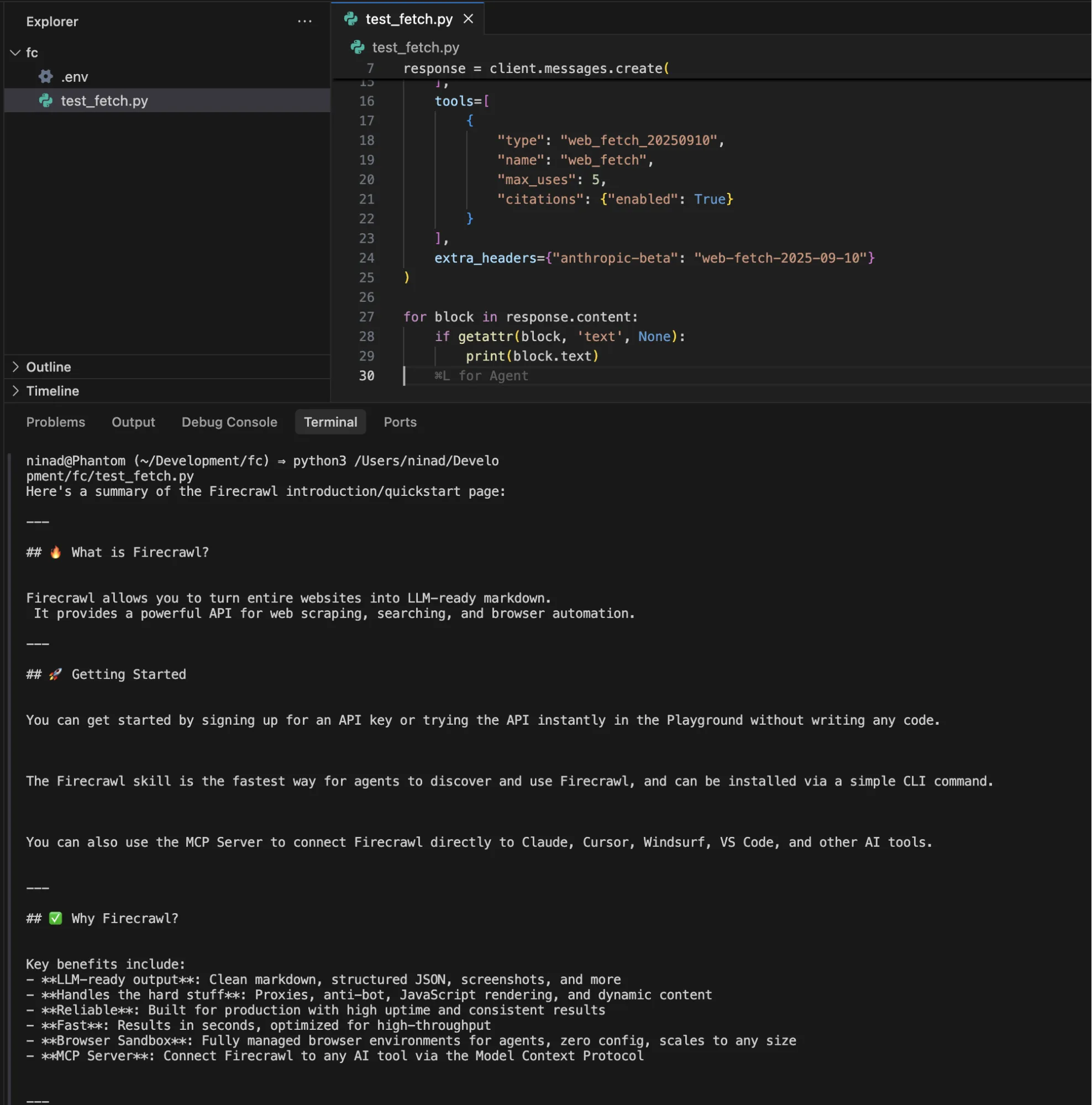
For workflows that combine discovery and retrieval, pair it with web_search:
tools=[
    {"type": "web_search_20260209", "name": "web_search", "max_uses": 3},
    {
        "type": "web_fetch_20250910",
        "name": "web_fetch",
        "max_uses": 5,
        "max_content_tokens": 50000
    }
]
The code works well for pulling static documentation into context before coding, summarizing research papers from known URLs, analyzing blog posts or changelogs referenced by a user, and PDF text extraction for reports or contracts.
As I'd already mentioned in the limitations, our fetch tool code will break if:
- A site loads content via JavaScript after the initial HTML response
- The URL is behind a login wall
- The link has multi-page crawl requirements
- Any domain that returns
url_not_accessibleorurl_not_allowederrors
These limitations mean, a meaningful chunk of modern sites won't be fetchable.
Why use Firecrawl with Claude for web extraction
Claude web fetch was built to fetch a URL you already have. Firecrawl was built to be an agent's web layer. Every limitation in the previous section maps to something Firecrawl already does:
- Firecrawl runs a real headless Chromium browser against every URL, so React, Vue, and Angular pages return the same content a human would see. This is why OpenClaw uses Firecrawl as its
web_fetchfallback: when a plain HTTP request comes back empty, Firecrawl catches it automatically. - Firecrawl treats URL discovery as a first-class action.
/mapreturns every URL on a domain,/crawlrecursively walks a site with depth and regex controls,/searchstarts from a query instead of a URL, and/agentruns multi-step, multi-site extraction from a natural-language prompt. Your agent decides what to fetch instead of being handed a fixed list. - Firecrawl returns clean markdown from the real DOM, not a compressed summary written by a cheaper model. Whatever Claude reasons over is what was actually on the page. This is the direct fix for the r/ClaudeAI failure mode described above.
- Firecrawl guards the extraction step with an actual classifier.
checkPromptInjectioninspects the scraped page before extraction runs and blocks the request with HTTP 403 and error codeSCRAPE_PROMPT_INJECTION_DETECTEDif a hidden instruction is detected. Claude web fetch'sallowed_domainsstops requests to unsafe domains, but does nothing about hostile content on an allowed page. - Firecrawl outperforms Claude's native web search on developer retrieval by a wide margin. On our DevDex benchmark, Firecrawl's Developer Index scores
63.1%overall Recall@10 versus Claude web search at45.4%, with the biggest gaps on issue-to-fix (66.0%vs27.5%) and docs (47.2%vs28.0%). Same agent, same harness. - Firecrawl exposes a stateful browser through the
/interactendpoint, so your agent can click, fill, scroll, log in, and paginate before extracting. Content behind any of those steps is unreachable from Claude web fetch. - Firecrawl cuts input tokens by roughly 93% per page compared to raw HTML on our token efficiency benchmark. A page that costs Claude ~38K input tokens as raw HTML lands at ~2.8K after Firecrawl (median 92.7% reduction), so every downstream LLM call is cheaper for the same information.
Install is one line in Claude Code:
claude plugin install firecrawl@claude-plugins-officialThen /firecrawl:setup to bind your API key. Full walkthrough in the official Claude plugin announcement.
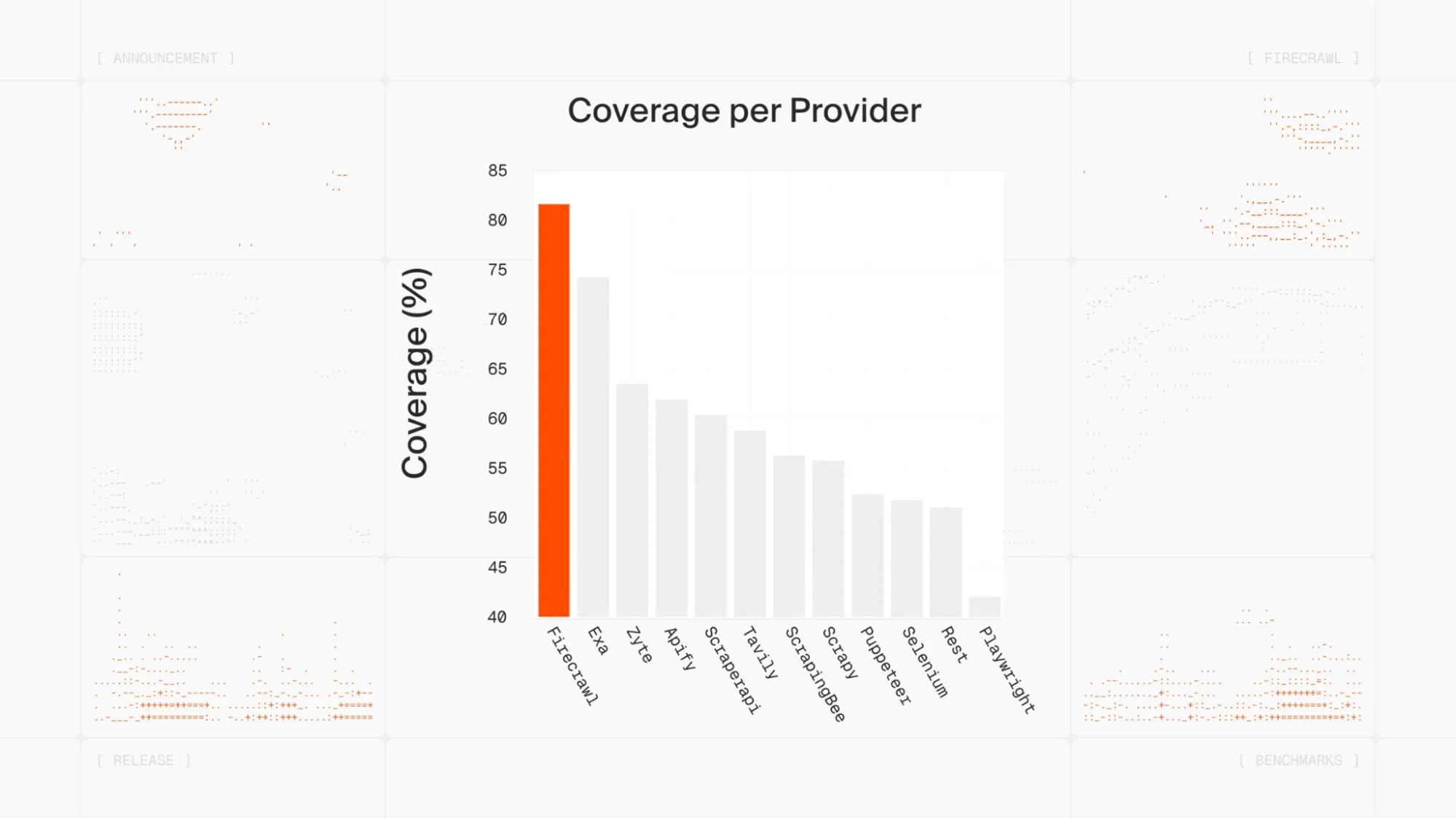
For context on where Firecrawl sits in the ecosystem: more than half a million developers use it, Zapier and Replit run production workloads on it, and the open-source repo passed 130K GitHub stars. Alex Reibman put the practical version on X:
Moved our internal agent's web scraping tool from Apify to Firecrawl because it benchmarked 50x faster with AgentOps.
Which Firecrawl commands work inside Claude?
Once installed, Firecrawl exposes five commands to your agent:
- /firecrawl:scrape: Extracts a single page as clean markdown.
- /firecrawl:crawl: Recursively extracts content from an entire domain.
- /firecrawl:search: Searches the web and returns scraped results in one turn.
- /firecrawl:map: Discovers all nested URLs on a target site.
- /firecrawl:agent: Uses natural language to find and extract data across multiple sites autonomously.
With these five tools, your agent is better capable of crawling and reading through website content. You can prompt it as below:
Use Firecrawl agent to find the most recent research papers on browser automation and reference it in my article on browser automation
Firecrawl navigates, searches, and extracts, handling the multi-step browsing that web fetch just can't do.
The five commands cover most extraction scenarios you'll hit in production. Here's what the full pattern looks like using both SDKs directly: Firecrawl pulls clean markdown from the target page, then hands it to Claude as context.
The full capability surface
The five commands are the shape of the API. Underneath each, there's a set of options and formats that web fetch simply doesn't have. A tour of what actually differs, in production terms:
Structured extraction with a schema. Web fetch returns freeform markdown and lets you prompt Claude for the fields you want. There is no schema, no validation, no guarantee the output matches the shape your code expects. Firecrawl's /scrape accepts formats: [{ type: "json", schema, checkPromptInjection: true }] and returns typed structured data. /agent does the same across many pages autonomously. Your downstream code parses once and moves on.
Output formats beyond markdown. Per scrape you can request markdown, cleaned html, rawHtml, categorized links, viewport or full-page screenshot (PNG), schema-driven json, changeTracking (diff vs prior scrape), and summary. Web fetch is markdown, full stop.
Batch scraping. /batch/scrape takes a list of URLs and returns all of them in parallel with a single call. Web fetch is one URL per call, serial, one round trip each.
Change tracking as a first-class format. The changeTracking format returns a diff plus a status flag (new, same, changed, removed) between the current scrape and the prior one, with optional JSON-diff of extracted fields. Useful for monitoring pricing pages, changelogs, competitor sites, or any content where "did this change" is the actual question. Web fetch has no concept of a prior state.
File-format parsing. Firecrawl parses PDF and DOCX over HTTP (and local files) directly into markdown. Web fetch handles PDF text; DOCX and other document formats are out of scope.
Crawling primitives that a job scheduler expects. /crawl accepts depth limits, include/exclude path regex, subdomain toggles, external-link toggles, sitemap-first strategy, and concurrency limits, then returns a job id you poll or subscribe to via webhook. Web fetch has no notion of a crawl at all.
Search that hydrates. /search returns web search results and hydrates each result with full-page markdown in the same call. Web fetch has no search primitive; you have to already have the URL.
Content quality on messy pages. Web fetch's HTML-to-markdown pass is naive: navigation, footers, ads, cookie banners, and inline scripts often end up as text your model has to reason around. Firecrawl runs main-content detection, strips chrome, deduplicates repeated blocks, and returns LLM-optimized markdown. This is where the ~93% token reduction actually comes from.
Operational surface. Firecrawl ships TypeScript, Python, Go, and Rust SDKs plus an MCP server, so the same agent code composes into non-Claude workflows (OpenAI, Gemini, local models, custom orchestration). It has server-side rate limit and retry handling, tunable caching (maxAge per scrape), and webhooks on crawl and batch jobs. Web fetch is an Anthropic tool that runs inside a Claude session, with a 15-minute cache that isn't tunable.
The one-line version: web fetch is curl | pandoc for a Claude session. Firecrawl is the web-data layer you'd build if you had to ship a product that depends on web content, and it's the layer you can call from anything, not just Claude.
Search quality: general web, papers, and code
Static fetch is one axis. Search quality is the other, and it's the one that decides whether an agent finds the right source in the first place. Firecrawl exposes three retrieval surfaces, each with its own evidence.
General web search
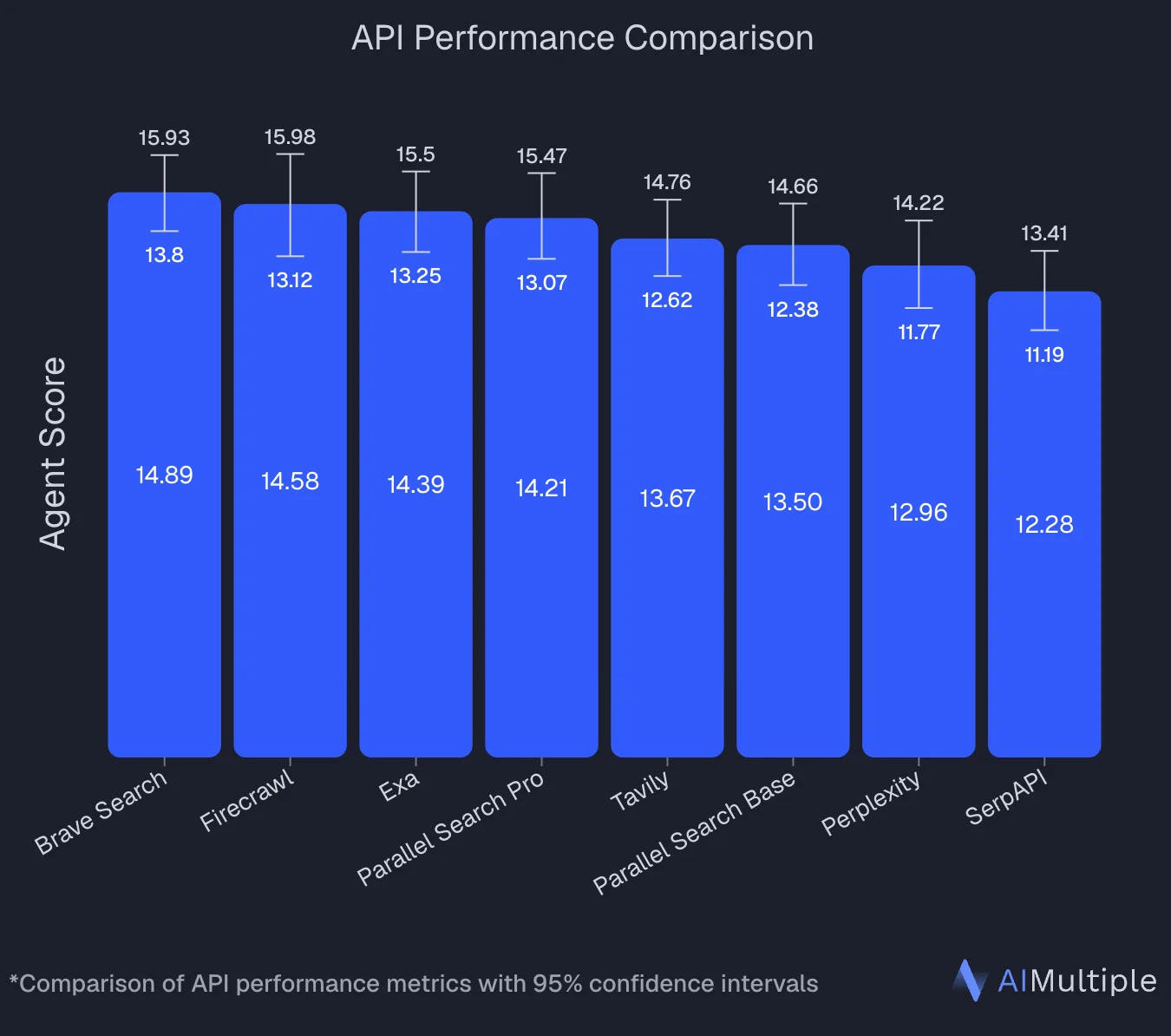
An independent benchmark by AIMultiple tested 8 search APIs on 100 real AI and LLM queries. Firecrawl finished second overall with an Agent Score of 14.58, statistically tied with Brave Search at the top (14.89), and posted the highest mean relevance score in the run at 4.30/5. Two independent runs across the industry now put Firecrawl in the top tier of agentic web search APIs. See the full methodology and per-provider breakdown in the best web search APIs guide.
Papers and academic content: Research Index
For agents that do research (surveying prior work, chasing citations, method-level lookups), the Research Index gives direct access to arXiv, GitHub search, and academic literature without a separate scraping step. It's a purpose-built surface for the deep-research pattern: query, hydrate, cite. Claude's web fetch has no equivalent primitive; it can retrieve one URL you already have, but it can't search academic sources or hydrate paper metadata.
Developer content: Developer Index (DevDex)
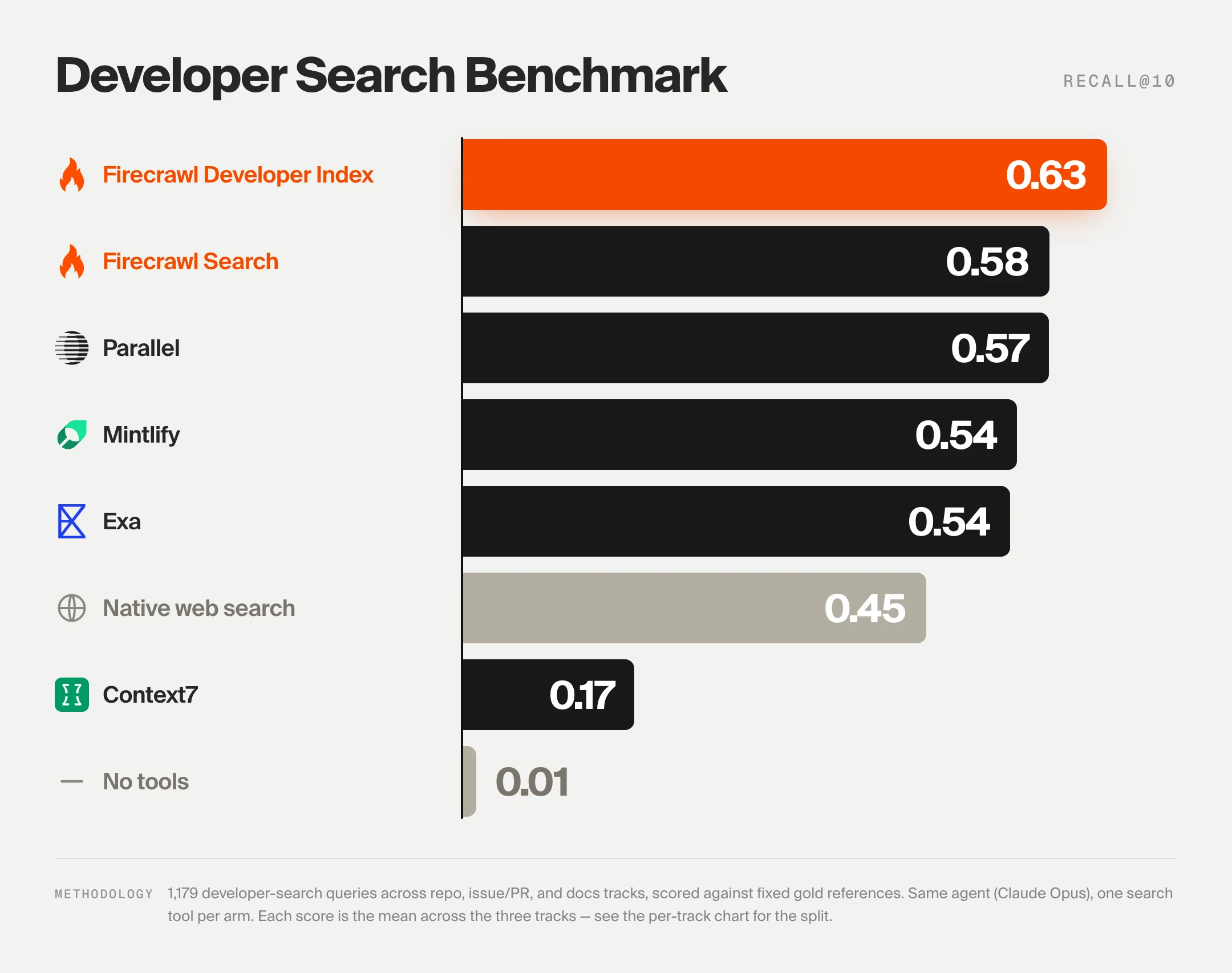
For code, issue, and docs retrieval, our open DevDex benchmark drives one agent (Claude Opus 4.8) through the same harness on every system: one search tool per call, ten results per call, answers scored deterministically against fixed golds. 1,179 tasks across three tracks (repo, issue-to-fix, docs).
Claude's own web search scores 45.4% overall Recall@10, dropping to 27.5% on issue-to-fix and 28.0% on docs. It ranks well on the repo track (80.7%), where the query leaks enough surface signal, but issue and docs retrieval are outside what a general web index is tuned for.
Firecrawl's Developer Index, queried through its MCP server, leads the field at 63.1% overall Recall@10 (ahead of Parallel 57.7%, Firecrawl Search 57.6%, Mintlify 54.6%, Exa 53.7%). It also leads on the two tracks Claude's web search struggles with: 66.0% on issue-to-fix and 47.2% on docs. That's ~40% more correct answers cited in the first ten results, absolute Recall@10. For a coding agent, that gap is the whole product. See the full methodology and confidence intervals on the DevDex benchmark page.
Going deeper: Firecrawl's /interact endpoint
One capability that has no equivalent in Claude's native web fetch is the /interact endpoint. Rather than fetching a static snapshot, it keeps a live browser session open so you can take actions inside the page after scraping it (clicking buttons, filling forms, navigating pagination, or extracting content that only appears after user interaction). For a full guide to this browser automation API for agents, including scraping-for-agents patterns and code examples, see the dedicated interact endpoint guide.
The workflow has three steps:
- Scrape a URL with
POST /v2/scrape. The response includes ascrapeId. - Interact by calling
POST /v2/scrape/{scrapeId}/interactwith either a natural languagepromptor Playwrightcode. - Stop the session with
DELETE /v2/scrape/{scrapeId}/interactwhen you're done.
Here's a minimal example that searches Amazon and extracts a price. Starting with the CLI:
# Step 1: scrape the page (scrape ID is saved automatically)
firecrawl scrape https://www.amazon.com

# Step 2: interact using natural language prompts
firecrawl interact "Search for iPhone 16 Pro Max"
firecrawl interact "Click on the first result and tell me the price"

# Step 3: stop the session
firecrawl interact stop
For more complex workflows you can pass raw Playwright code instead of a prompt, giving you full programmatic control over the browser. The endpoint also returns a liveViewUrl you can embed as an <iframe> to watch or share the session in real time.
Claude's web fetch has no concept of a stateful browser session. If the data you need is behind a button click, a login wall, or a lazy-loaded tab, /interact is the only path forward.
This is where the two tools divide cleanly. Firecrawl runs the extraction independently, against any URL, handling JavaScript rendering and proxy rotation before your model call ever happens. Claude receives clean markdown instead of raw HTML, which means less noise in the context window and more reliable reasoning over the content.
Pricing and operational limits
Firecrawl uses a credit-based model. 1 credit = 1 page on a basic scrape, crawl, or map. Search costs 2 credits per 10 results, /interact costs 2 credits per browser minute, and the JSON, Question, and Highlight formats on scrape and crawl add 4 credits per page (this is where checkPromptInjection and other advanced extraction features are billed).
| Tier | Price (billed monthly) | Price (billed annually) | Credits/month | Best for |
|---|---|---|---|---|
| Free | $0 | $0 | 1,000 | Prototyping only |
| Hobby | $19/mo | $16/mo | 5,000 | Light production use |
| Standard | $99/mo | $83/mo | 100,000 | 100,000 pages/mo |
| Growth | $399/mo | $333/mo | 500,000 | High-volume pipelines |
| Scale | $749/mo | $599/mo | 1,000,000 | Enterprise workloads |
A few things worth knowing before you commit to a plan:
- Credits do not roll over month to month on standard plans
- The free tier is 1,000 credits per month, refreshed monthly
- Pay-as-you-go adds credits in $5 USD increments on paid plans when your balance runs out, up to a monthly cap you set
- A scrape that returns no result is not charged; a page that responds with an error status (403, 404) is still returned and costs 1 credit
Claude web fetch has no per-request cost beyond standard token fees, but token consumption is unpredictable on long or complex pages. Firecrawl's credit model makes costs easier to forecast at scale.
You get clean Markdown and structured JSON output which also helps with context engineering. What you feed into an agent's context window directly shapes what it produces, and raw HTML from a basic fetch is far noisier than the filtered, structured content Firecrawl returns.
That noise is a real bill. On our own token efficiency benchmark, Firecrawl returns roughly 93% fewer input tokens than raw HTML per URL (median 92.7%, mean 93.7%), a direct discount on every LLM call your agent makes. A page that costs Claude ~38K input tokens as raw HTML is closer to ~2.8K after Firecrawl. Multiply that across a research session and the credit-based price starts to look like the cheaper line, not the added one. If Claude Code is burning tokens on web research mid-session, see Claude Code web research token optimization for four Firecrawl techniques that cut what lands in context.
If you want to go deeper on how Firecrawl fits into Claude workflows, we cover the full setup in our official Claude plugin announcement.
There are also a few other interesting Claude Code plugins you can try if you're building out a broader Claude Code stack.
If you're using OpenAI Codex CLI instead, Firecrawl works there too, via either the MCP server or the Firecrawl CLI skill. Codex's built-in web search returns snippets only, and fetching full documentation pages from Codex hits the same JavaScript rendering wall. Both integration paths fix that.
When to stay with Claude web fetch vs Firecrawl
Though I'm writing on the Firecrawl blog, I still have to say that Firecrawl is not always the solution for everyone.
If you're scraping simple static pages like documentation where you already have the URL, extracting text from a PDF, or analyzing a known blog post, Claude's web fetch does the job almost perfectly. You can use the built-in tool and not think about add-ons.
Once you're hitting JavaScript-rendered pages, login walls, or need to crawl more than a handful of URLs, web fetch won't get you there. When those limitations start to hamper your workflows, that's when you need a more robust scraping solution like Firecrawl.
And if the content you need is behind any kind of interaction (infinite scroll, a login form, a multi-step checkout, a lazy-loaded tab) Firecrawl is the clear choice. The /interact endpoint lets your agent click, fill, scroll, and navigate just like a human would, then hand the extracted content back to Claude as clean text. Web fetch has no equivalent for this; it sees only what the server sends on the first response.
Final thoughts on Claude web fetch vs Firecrawl
The native Claude web fetch tool is an excellent entry point for simple retrieval workflows. It is zero-setup and free for API users. But for production agents that need to act autonomously across the modern web, its limitations are a bottleneck.
Firecrawl removes the scraping infrastructure burden, letting you focus on the reasoning logic of your agent rather than proxy rotation or DOM parsing. And with the /interact endpoint, it goes further than any fetch tool can, keeping a live browser session open so your agent can click, scroll, log in, and extract content that never appears in a static HTML response.
If I wanted to make a long-term bet, I'd go with Firecrawl. It's robust, handles most scraping scenarios perfectly, and there's a team of devs working to make the crawling and data extraction experience better every day. For a broader look at how it compares against other AI web scraping solutions, see the full tool comparison.
Ready to give your agent complete web access? Try Firecrawl for free today.
Frequently Asked Questions
What is the Claude web fetch tool?
The Claude web fetch tool is a beta API feature from Anthropic that allows Claude models to retrieve full text content from web pages and PDF documents as part of a conversation. It's enabled via the web-fetch-2025-09-10 beta header and costs nothing beyond standard input token fees for the fetched content.
Does Claude web fetch support JavaScript-rendered pages?
No. The web fetch tool retrieves static HTML from the initial server response. If a page loads its content dynamically via JavaScript, web fetch returns incomplete or empty content. For JavaScript-heavy sites, you need a headless browser-backed tool like Firecrawl.
Can Claude construct URLs to fetch on its own?
No. For security reasons, Claude can only fetch URLs that have already appeared in the conversation context, from user messages, previous search results, or earlier fetch results. This prevents prompt injection exfiltration attacks but also limits how much autonomy an agent has when discovering new URLs.
Is Firecrawl free to use with Claude?
Firecrawl offers 1,000 free credits per month on its free tier, enough for prototyping and testing. Production use requires a paid plan; Standard covers 100,000 pages at $99/month billed monthly, or $83/month billed annually. The Firecrawl Claude plugin and MCP server are free to install.
How do I install Firecrawl in Claude Code?
Run claude plugin install firecrawl@claude-plugins-official in your terminal, then run /firecrawl:setup and add your API key from firecrawl.dev/app/api-keys. The full setup takes about two minutes. Alternatively, add the Firecrawl MCP server directly: claude mcp add firecrawl -e FIRECRAWL_API_KEY=your-api-key -- npx -y firecrawl-mcp.
When should I use web fetch instead of Firecrawl?
Use web fetch when the target page is static, you already have the URL in your conversation, and you need a quick text extraction or PDF summary. Firecrawl is the better choice when you need JavaScript rendering, multi-page crawling, structured JSON output, or autonomous agent-style extraction across multiple sites.
Can Firecrawl work with self-hosted Claude or other LLMs?
Yes. Firecrawl's MCP server and API are LLM-agnostic. They work with Claude, GPT-4, Gemini, and any model that supports tool calling. You can also self-host the Firecrawl backend using Docker by pointing the CLI to a custom --api-url.
What is Firecrawl's /interact endpoint and when should I use it?
The /interact endpoint lets you scrape a page and then take actions inside it (clicking buttons, filling forms, scrolling, or navigating) using either natural language prompts or Playwright code. Use it when the content you need only appears after a user interaction, such as infinite scroll, a login wall, a multi-step form, or a lazy-loaded tab. Claude's native web fetch has no equivalent; it only sees the initial HTML response and cannot interact with the page at all.
How does Firecrawl handle prompt injection compared to Claude web fetch?
Claude web fetch's only defense is an allowed_domains safelist, which blocks fetches to unsafe domains but does nothing about hostile content on an allowed page. Firecrawl offers an opt-in guard on JSON extraction called checkPromptInjection. A classifier inspects the scraped page before extraction runs, and if a hidden instruction aimed at the extraction LLM is detected the request fails with HTTP 403 and error code SCRAPE_PROMPT_INJECTION_DETECTED. No extraction output is returned, so attacker-controlled data never reaches your agent. The same guard is available on crawl, since crawl calls scrape per page and supports the same JSON extraction format.
How much cheaper is Firecrawl on tokens than raw HTML through web fetch?
On our token efficiency benchmark, Firecrawl returns roughly 93% fewer input tokens per URL than raw HTML (median 92.7%, mean 93.7%). A page that costs Claude around 38,000 input tokens as raw HTML lands at around 2,800 after Firecrawl. Across a research session that adds up quickly, and the credit-based price often ends up cheaper than the token bill you would have paid for raw HTML.
Does Claude web fetch actually read the pages it fetches?
Not directly. WebFetch outputs are summarized by a smaller, cheaper model before Opus ever sees them. That pre-summarizer compresses, guesses, and sometimes invents details, which is a documented source of hallucinated citations and fabricated stats. Firecrawl returns clean markdown from the actual DOM instead, so whatever your model reasons over is what was on the page.
How does Firecrawl compare to Claude's native web search on developer retrieval?
On our open DevDex benchmark (1,179 tasks across repo, issue-to-fix, and docs tracks, one agent driving every system through the same harness), Firecrawl's Developer Index scores 63.1% overall Recall@10 versus Claude's native web search at 45.4%. The biggest gaps are on issue-to-fix (66.0% vs 27.5%) and docs (47.2% vs 28.0%). That is roughly 40% more correct answers cited in the first ten results, absolute Recall@10.
What Firecrawl features have no equivalent in Claude web fetch?
Real headless-browser rendering for JavaScript-heavy pages, structured JSON extraction against a schema, checkPromptInjection, the /interact endpoint for stateful browser sessions, /crawl for full-site walks with depth and regex controls, /batch/scrape for parallel URLs, /search that hydrates results with full markdown in one call, the Developer Index and Research Index, change tracking as a first-class format, PDF and DOCX parsing, webhooks on crawl and batch jobs, tunable caching, and SDKs for TypeScript, Python, Go, and Rust plus an MCP server that composes into non-Claude workflows.