If you've built a Context Layer for your AI agents, you've solved the architecture problem. But architecture is only half the battle.
The real challenge isn't having a context system. It's operating one.
How do you measure if your context is actually good? How do you debug when your agent hallucinates despite having "all the right context"? How do you maintain context quality as your knowledge base grows from 100 documents to 100,000?
This is where Context Engineering comes in: the emerging discipline of designing, monitoring, and maintaining context pipelines for production AI systems. Just like DevOps transformed how we deploy software and MLOps transformed how we train models, Context Engineering is transforming how we build reliable agents.
TL;DR
- Context engineering is the new meta-skill - Writing prompts is table stakes; curating what fills the context window is what separates demos from production
- Models suffer from "context rot" - Research shows LLM accuracy degrades as input length increases, even on simple tasks
- Context fails in four distinct ways - Poisoning, distraction, confusion, and clash each require different fixes
- Bigger windows don't solve the problem - A Databricks study found accuracy drops around 32K tokens, long before million-token limits
- Context engineering is a system, not a string - It's dynamic, format-aware, and runs before every LLM call
- Real-time web data keeps agents current - Firecrawl gives agents access to live web data so they don't rely on stale training knowledge
- Guard JSON extraction against prompt injection - Firecrawl's opt-in
checkPromptInjectionflag scans scraped pages for hidden instructions and blocks the request (HTTP 403) instead of returning attacker-controlled data
What is Context Engineering?
Let's start with a definition. Andrej Karpathy put it simply:
Tobi Lutke, CEO of Shopify, describes it as "the art of providing all the context for the task to be plausibly solvable by the LLM."
Here's my working definition:
Context Engineering is the discipline of designing dynamic systems that provide the right information and tools, in the right format, at the right time, to give an LLM everything it needs to accomplish a task.
Notice the key words:
- Dynamic systems - Context isn't a static prompt template. It's the output of a system that runs before every LLM call.
- Right information - Not all information. The minimal set of high-signal tokens.
- Right format - How you present information matters. A concise summary beats a raw data dump.
- Right time - Context is assembled just-in-time for the immediate task.
What fills your context window? Everything the model sees before generating a response:
| Component | Description |
|---|---|
| System Prompt | Instructions that define model behavior, rules, and examples |
| User Prompt | The immediate task or question |
| Conversation History | Prior turns in the current session |
| Long-Term Memory | Persistent knowledge from prior sessions |
| Retrieved Information | External docs, databases, or API responses (RAG) |
| Tool Definitions | Schemas for available functions the model can call |
| Structured Output | Format specifications for the response |
Context engineering is the craft of curating all of these for every single inference call.
Context engineering vs prompt engineering
This is the question everyone asks. Here's the simplest way to think about it:
Prompt engineering is what you do inside the context window. It's crafting instructions for a single task: "You are an expert X. Do Y like Z."
Context engineering is how you decide what fills the window. It's designing the entire mental world the model operates in: memory, retrieval, tools, history, and yes, the prompt.
Prompt engineering is a subset of context engineering, not the other way around.
| Aspect | Prompt Engineering | Context Engineering |
|---|---|---|
| Focus | Writing clear instructions | Curating the information environment |
| Scope | Single input-output pair | Everything the model sees |
| Mindset | "What do I say?" | "What should the model know?" |
| Scale | One-off tasks, demos | Production systems, many users |
| Debugging | Rewording and guessing | Inspecting full context, token flow, memory |
| Tools | ChatGPT, prompt boxes | Memory modules, RAG, API chaining, MCP servers |
You can engineer a killer prompt. But if it gets buried behind 6K tokens of irrelevant chat history or poorly formatted retrieved docs? Game over.
Prompt engineering gets you the first good output. Context engineering makes sure the 1,000th output is still good.
Why context engineering matters: the research
The arrival of million-token context windows felt transformative. "Just dump everything in," they said. "Gemini has 2 million tokens."
This is lazy engineering. And the research proves it doesn't work.
Lost in the middle
The foundational Stanford research on "lost in the middle" proved that LLM performance degrades significantly when relevant information is placed in the middle of long contexts. Models perform best when key information appears at the very beginning or end of the input. This isn't just about total length. It's about position.
This is why context engineering obsesses over structure, not just content. Where you place information matters as much as what information you include.
Context rot is real
Chroma Research published a comprehensive study in July 2025 testing 18 LLMs, including Claude 4, GPT-4.1, Gemini 2.5, and Qwen3. Their findings are stark:
Models do not use their context uniformly; instead, their performance grows increasingly unreliable as input length grows.
Even on trivially simple tasks (like replicating a sequence of repeated words) models failed as context grew. This isn't a reasoning failure. It's a fundamental limitation of attention mechanisms.
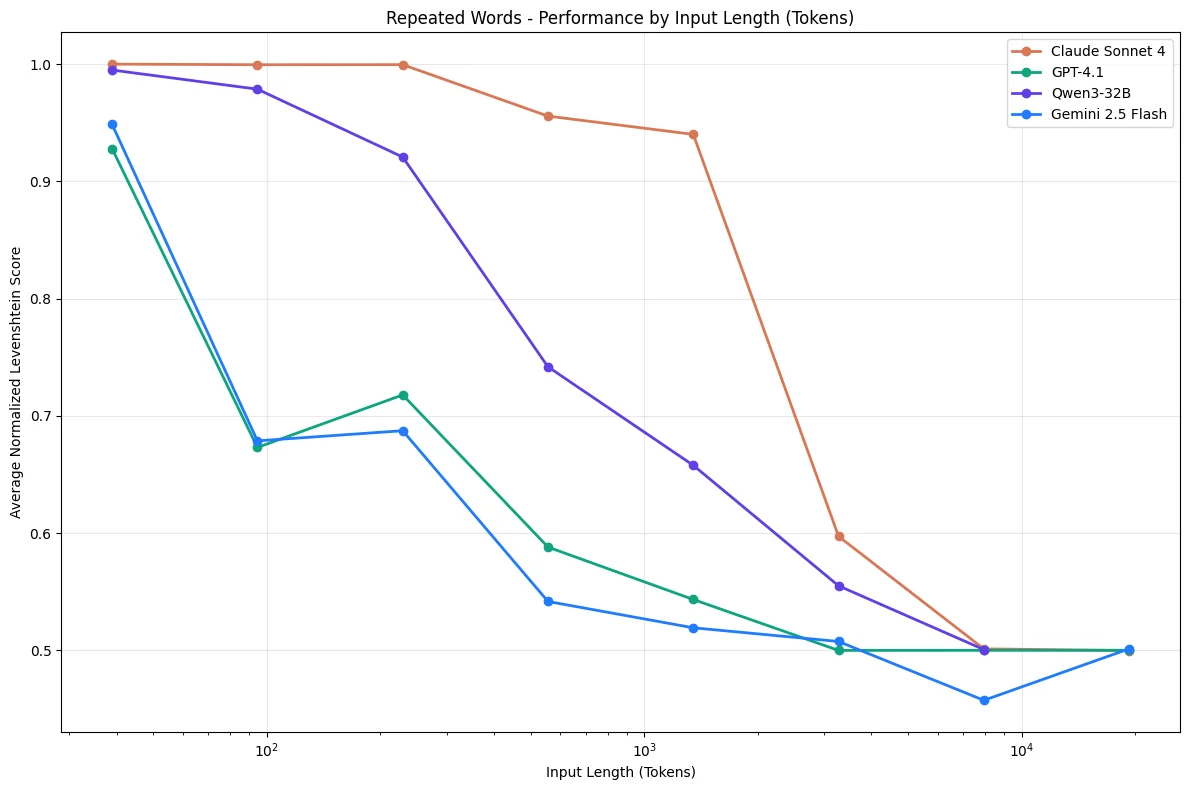
Performance degrades non-uniformly as context length increases, even on simple retrieval tasks.
The study found that:
- Lower similarity needle-question pairs degraded faster with length
- Distractors have non-uniform impact that amplifies with context size
- Even haystack structure affects performance (shuffled content performed better than logically structured content)
The distraction ceiling hits early
A Databricks study found that model correctness begins dropping around 32,000 tokens for Llama 3.1 405b, and earlier for smaller models.
If models start to misbehave long before their context windows are filled, what's the point of super large context windows? Summarization and fact retrieval. If you're not doing those specific tasks, be wary of your chosen model's distraction ceiling.
The Gemini 2.5 technical report documented this while building a Pokémon-playing agent:
As the context grew significantly beyond 100k tokens, the agent showed a tendency toward favoring repeating actions from its vast history rather than synthesizing novel plans.
Instead of developing new strategies, the agent became fixated on repeating past actions from its extensive history.
Long context hurts, even when relevant
Research on long context utilization found something counterintuitive: adding more relevant context can actually hurt performance. Models struggle to synthesize information spread across many locations. The optimal context isn't "all the relevant information." It's the minimum relevant information, structured for attention.
Sharded prompts cause massive drops
A study on multi-turn conversations took benchmark prompts and "sharded" them across multiple conversation turns, mimicking how real conversations unfold. The results were devastating: an average performance drop of 39% across all tested models, including frontier reasoning models.
Why? The assembled context contains early attempts by the model to answer before it has all the information. These incorrect answers remain in context and poison subsequent reasoning.
The four ways context fails
Based on research from Drew Breunig and the Gemini team, context fails in four distinct ways. Each requires a different fix.
1. Context poisoning
What it is: A hallucination or error makes it into the context, where it's repeatedly referenced.
Real example: The Gemini Pokémon agent would occasionally hallucinate about the game state, poisoning its "goals" section. The agent then developed nonsensical strategies pursuing impossible objectives for a long time.
The fix: Context validation and quarantine. Isolate different context types in separate threads. Validate information before it enters long-term memory. Start fresh threads when you detect poisoning.
2. Context distraction
What it is: Context grows so large that the model over-focuses on accumulated history, neglecting what it learned during training.
Real example: Models start repeating past actions instead of developing new strategies. They lean heavily on their context history rather than reasoning from first principles.
The fix: Context summarization. Compress accumulated information into shorter summaries that preserve important details while removing redundant history. This is what compaction techniques achieve.
3. Context confusion
What it is: Superfluous content in the context influences the response, even when irrelevant.
Real example: The Berkeley Function-Calling Leaderboard shows that every model performs worse when given more than one tool. Models will occasionally call tools that aren't relevant to the task.
A recent study gave a quantized Llama 3.1 8b a query with 46 tools. It failed, even within the 16k context window. With only 19 tools, it succeeded.
The fix: Tool loadout management using RAG. Research shows that applying RAG to tool descriptions and keeping selections under 30 tools gives 3x better tool selection accuracy.
4. Context clash
What it is: Different parts of your context directly contradict each other.
Real example: When connecting to MCP tools you didn't create, their descriptions might clash with the rest of your prompt. Or information gathered in stages disagrees with earlier assumptions.
The fix: Context pruning and offloading. Remove outdated or conflicting information as new details arrive. Use techniques like Anthropic's "think" tool that give models a separate workspace to process information without cluttering the main context.
How to do context engineering: practical techniques
Now that we understand the problems, let's talk solutions. These techniques come from production systems at companies like Anthropic, Google, and the teams building Claude Code.
1. Structure your prompts as specs, not prose
The most effective approach for agent prompts isn't free-form text. It's a structured "prompt spec" that clearly defines:
- Objective: What the agent should accomplish
- Constraints: Hard boundaries (budget limits, forbidden actions, style requirements)
- Tools available: What capabilities the agent can use
- Output contract: The exact format expected back
This structure helps both you and the model. You're forced to think through edge cases. The model gets unambiguous boundaries instead of vague instructions it might misinterpret.
2. Use JSON contracts for structured outputs
When your agent needs to produce structured data, define a schema upfront. JSON contracts prevent the model from improvising field names or formats that break downstream code.
from pydantic import BaseModel, Field

class ExtractedEntity(BaseModel):
    name: str = Field(description="Entity name")
    type: str = Field(description="Entity type: person, company, or location")
    confidence: float = Field(ge=0, le=1, description="Extraction confidence score")
This isn't just about parsing convenience. It's context engineering. The schema becomes part of the context, constraining the model's output space and reducing hallucination.
3. Find the smallest possible high-signal tokens
The guiding principle: find the minimum set of tokens that maximizes the likelihood of your desired outcome.
This means ruthlessly curating what enters the context. AI data preparation is half the battle:
- Don't dump entire docs - Retrieve only the relevant sections
- Summarize when possible - A 100-token summary often beats 10,000 raw tokens
- Remove stale information - Old conversation turns might be hurting, not helping
- Use tool result clearing - Once a tool has been called deep in history, clear the raw result
4. Embrace tool-augmented prompting (ReAct)
Instead of stuffing all possible information into the prompt upfront, give agents tools to retrieve context on demand. This is the ReAct (Reasoning + Acting) pattern: the model reasons about what information it needs, acts to retrieve it, then reasons again with the new context.
This shifts context engineering from "predict everything the model might need" to "give the model ways to get what it needs." It's more robust because you're not guessing what will be relevant.
The trade-off: more LLM calls, higher latency. But for complex tasks, it dramatically improves accuracy.
5. Implement just-in-time context retrieval
Rather than pre-processing all data upfront, maintain lightweight identifiers (file paths, stored queries, URLs) and load data dynamically at runtime.
Claude Code uses this approach for complex data analysis:
- The model writes targeted queries
- Stores results
- Uses commands like
headandtailto analyze large volumes - Never loads full data objects into context
This mirrors human cognition. We don't memorize entire corpuses but use organization systems to retrieve what we need on demand. It's also why CLIs are better for agents than GUIs: they provide structured, predictable outputs that fit cleanly into context. For Claude Code users, the same principle applies at the session level — Firecrawl's Claude Code token efficiency guide documents techniques like path-scoped rules, CLAUDE.md trimming to under 500 tokens, and filtering tool output before it enters context, benchmarked at 77–91% cost reduction. For the techniques specific to web research within Claude Code sessions — where each fetched page accumulates in context — see Claude Code web research token optimization.
6. Separate static and dynamic context
As we covered in the Context Layer article, rigorously separate your context:
Decision Context (Static) - Goes at the beginning of your prompt:
- Coding standards
- Business rules
- API specifications
- Brand guidelines
This enables prompt caching that can save up to 90% of token costs.
Operational Context (Dynamic) - Goes at the end of your prompt:
- Current user state
- Error logs
- Session variables
- Real-time data
Placing dynamic context last leverages recency bias so the model attends to it strongly.
7. Layer memory: short-term, episodic, long-term
Static vs dynamic is one axis. The other is time horizon. In agents that run for more than a single conversation, treat memory as three distinct tiers with different retention rules and token budgets:
- Short-term memory (current task) - The scratchpad for the task in flight: the current message thread, active tool outputs, and the working plan. Lives entirely in the context window. Aggressively pruned or compacted the moment it stops being load-bearing for the next step.
- Episodic memory (recent sessions) - Summaries of what happened in the last N sessions: what the user asked for, what the agent decided, what worked, what failed. Stored externally (a database row or a vector index), retrieved by recency or relevance, and injected as a short digest rather than a full transcript. This is what stops an agent from feeling amnesiac between conversations.
- Long-term memory (persistent knowledge) - Facts that outlive any single session: user preferences, account state, learned conventions, domain knowledge. Curated deliberately (agents shouldn't self-write to long-term memory without a review step) and retrieved by explicit query, not dumped in wholesale.
The mistake is collapsing these into one bucket ("just put the last 50 messages in the prompt"). Each tier deserves its own budget: short-term gets the largest slice because it's actively reasoned over, episodic gets a compressed digest, long-term gets a targeted lookup. When tokens get tight, evict from short-term first (compact it), then trim the episodic digest, and only touch long-term if a specific fact is no longer needed.
8. Use compaction for long-horizon tasks
For tasks spanning tens of minutes to hours, you'll exceed the context window. Compaction distills the contents while preserving critical details.
Example from Claude Code:
- Pass message history to the model for summarization
- Preserve architectural decisions, unresolved bugs, implementation details
- Discard redundant tool outputs
- Continue with compressed context plus five most recently accessed files
The art is knowing what to keep versus discard. Overly aggressive compaction loses subtle but critical context.
9. Keep context fresh with real-time web data
Your agents need real-time web context. Documentation changes. APIs deprecate methods. Policies update. Your agent's training data is already stale.
For a structured breakdown of when to use training data, RAG, or live web data for AI agents — including trade-offs, latency considerations, and how to combine all three — see the dedicated guide.
This is where Firecrawl fits into your context engineering stack. It gives your agents access to real-time web data, turning the adversarial web into structured, fresh context that keeps your agents current. (See how it compares to other scraping tools, explore how OpenClaw uses Firecrawl for real-time agent context, or see how Stanford's AI Playground achieves LLM grounding across 15,000+ domains with zero scraping infrastructure.) If you are new to Firecrawl, Firecrawl 101 covers the core endpoints — scrape, search, crawl, and interact — with examples for each.
The modern web is hostile to simple GET requests:
- Client-side rendering - Content is injected by React 700ms after load
- Access controls - Some sites restrict automated access
- Navigation traps - Infinite scroll, shadow DOMs, iframe injections
Firecrawl abstracts this chaos. Here's how you create a self-healing context pipeline using the /agent endpoint:
from firecrawl import Firecrawl
from pydantic import BaseModel, Field
from typing import List, Optional

app = Firecrawl(api_key="fc-YOUR_API_KEY")

# Define schema for structured context extraction
class APIChange(BaseModel):
    method: str = Field(description="The API method name")
    status: str = Field(description="Current status: deprecated, removed, or changed")
    replacement: Optional[str] = Field(None, description="The replacement method if any")

class APIChangesSchema(BaseModel):
    changes: List[APIChange] = Field(description="List of API changes")

# Agent searches, navigates, and extracts without needing specific URLs
result = app.agent(
    prompt="Find any deprecated or changed API methods from the Stripe changelog",
    schema=APIChangesSchema
)

# This becomes your agent's decision context
print(result.data)
Set this as a cron job, and your context layer becomes self-healing. When an API deprecates a method:
- Without Firecrawl: Agent uses the old method from training data. Code crashes. You debug for hours.
- With Firecrawl: The cron job detects the changelog. Updates decision context. Agent generates correct code on the first try.
A warning on web-sourced context: Any time you pull context from the open web, you're opening a vector for prompt injection. Malicious pages can embed instructions that hijack your agent. Always sanitize web-sourced content and consider isolating it from high-privilege operations. For scraping workloads where the URL itself might be attacker-controlled, Firecrawl's Lockdown Mode restricts /scrape to cache-only results so no live outbound request is ever made. For a full breakdown of AI agent sandbox strategies (from Docker isolation to Firecrawl's Browser Sandbox), see our dedicated guide.
For the specific case of JSON extraction (where a hidden instruction on the page can rewrite what your LLM returns), Firecrawl ships an opt-in guard: checkPromptInjection. Turn it on inside the json format object on scrape (check_prompt_injection in the Python SDK) and Firecrawl will scan the scraped page for instructions aimed at the extraction model before running extraction. If it finds any, the request fails with HTTP 403 and error code SCRAPE_PROMPT_INJECTION_DETECTED (see the errors reference) rather than returning attacker-controlled JSON. The check is marked non-retryable, and it applies to crawl and search too since both call scrape per page. This shipped on 2026-08-26 after Faire reported a prompt injection through a JSON-mode scrape.
from firecrawl import Firecrawl

firecrawl = Firecrawl(api_key="fc-YOUR_API_KEY")

result = firecrawl.scrape(
    "https://example.com/product",
    formats=[{
        "type": "json",
        "schema": {"type": "object", "properties": {"price": {"type": "number"}}},
        "check_prompt_injection": True,
    }],
)
For research agents, competitive intelligence, or keeping RAG pipelines fresh, this pattern is essential.
The five styles of context instructions
Recent academic research studying AGENTS.md files in open-source projects identified five distinct styles for writing context instructions:
| Style | Description | Example |
|---|---|---|
| Descriptive | Documents existing conventions without explicit instructions | "This project uses the Linux Kernel Style Guideline." |
| Prescriptive | Direct imperatives that instruct how to act | "Follow the existing code style and conventions." |
| Prohibitive | Explicitly indicates what NOT to do | "Never commit directly to the main branch." |
| Explanatory | Rules with justification for why they exist | "Avoid hard-coded waits to prevent timing issues in CI." |
| Conditional | Specifies actions for certain situations | "If you need to use reflection, use ReflectionUtils APIs." |
The research found no established best practice yet. Teams are still experimenting. But the most effective context files combine multiple styles, using prohibitive statements to set hard boundaries and conditional statements to encode situational logic.
Measuring context quality
How do you know if your context engineering is working? Here are the metrics that matter:
1. Task success rate
The ultimate metric. Are your agents completing tasks correctly? Track this across context lengths to identify your distraction ceiling.
2. Hallucination rate
Measure how often agents generate information not grounded in the provided context. Contradiction detection can automate this.
3. Context utilization
Of the tokens you provide, how many actually influence the output? Low utilization suggests you're providing noise.
4. Latency and cost
Context isn't free. More tokens = slower responses and higher costs. Track these against task success to find the optimal balance.
5. Context freshness
For dynamic context, measure the age of information. Stale context causes context drift, where agents use outdated information. Web search grounding is the primary fix for AI agents hallucinating outdated facts — agents that can query live data never drift from what's current.
What's next?
We are entering the era of Context Engineering. For the last two years, we obsessed over models. "Is GPT-5 better than Claude 3.5?" "What's the MMLU score?"
Now, all the frontier models are good enough. The differences between them are marginal compared to the difference between "an agent with the right context" and "an agent without it."
If you're building agents in 2026, you are a data engineer, an architect of context. Stop obsessing over model weights you can't control. Start obsessing over your context pipeline, which you can.
Here's your checklist:
- Audit your current context - What's actually entering your prompts? Is it high-signal?
- Identify your failure modes - Which of the four failure types are hitting you?
- Implement dynamic retrieval - Move from "dump everything" to just-in-time loading
- Separate static and dynamic context - Enable prompt caching, leverage recency bias
- Automate ingestion - Use Firecrawl to keep context fresh
- Harden your extraction path - Turn on
checkPromptInjectionon JSON scrapes so a hidden instruction on a page can't rewrite the data your agent acts on - Measure and iterate - Track success rates across context configurations
The agents that win won't be the ones with the biggest context windows. They'll be the ones with the most carefully engineered context.
Try Firecrawl for free, test it in the Playground, or get inspired by 10 AI projects you can build today.
Frequently Asked Questions
What is context engineering?
Context engineering is the discipline of designing dynamic systems that provide the right information and tools, in the right format, at the right time, to give an LLM everything it needs to accomplish a task. Unlike prompt engineering (which focuses on writing instructions), context engineering focuses on the entire information environment the model operates in: memory, retrieved documents, tool definitions, and conversation history.
What is the difference between context engineering and prompt engineering?
Prompt engineering focuses on crafting the perfect set of instructions in a single text string. Context engineering is broader: it's about curating what information enters the model's context window at each step. Prompt engineering is what you do inside the context window; context engineering is how you decide what fills the window. Think of it this way: prompt engineering gets you the first good output, context engineering makes sure the 1,000th output is still good.
Why is context engineering important for AI agents?
Research shows that LLM performance degrades significantly as context length increases. Models exhibit 'context rot' where accuracy drops even on simple tasks. A Databricks study found model correctness begins falling around 32,000 tokens for Llama 3.1 405b, and earlier for smaller models. Context engineering ensures agents receive high-signal, curated information rather than overwhelming them with data they can't reliably process.
What are the main ways context can fail?
Context fails in four main ways: (1) Context Poisoning, when hallucinations enter the context and get repeatedly referenced; (2) Context Distraction, when context grows so large the model over-focuses on history instead of using training; (3) Context Confusion, when superfluous content influences responses; and (4) Context Clash, when parts of the context contradict each other. Each requires different mitigation strategies.
What is the 'lost in the middle' phenomenon?
Stanford research found that LLM performance degrades when relevant information is placed in the middle of long contexts. Models perform best when key information appears at the beginning or end of input. This is why context engineering focuses on both what information to include and where to position it.
What is the ReAct pattern in context engineering?
ReAct (Reasoning + Acting) is a pattern where instead of pre-loading all context, you give agents tools to retrieve information on demand. The model reasons about what it needs, acts to retrieve it, then reasons again with new context. This is more robust than trying to predict all relevant context upfront.
How do I protect against prompt injection from web-sourced context?
When pulling context from the open web, malicious pages can embed instructions that hijack your agent. Always sanitize web-sourced content before injecting it into prompts, and isolate it from high-privilege operations. For JSON extraction specifically, Firecrawl offers an opt-in guard called checkPromptInjection that scans the scraped page for hidden instructions aimed at the extraction LLM and blocks the request (HTTP 403, error code SCRAPE_PROMPT_INJECTION_DETECTED) instead of returning attacker-controlled data. It applies to crawl and search as well, since both call scrape per page.