How To Scrape A Website To Markdown For LLMs And AI Agents (In Under 5 Minutes)
 Ninad Pathak
TLDR:
- Scraping a website to markdown means converting a page's HTML into structured text an LLM can process without wasting tokens on markup.
- A 2024 ArXiv paper found that prompt format alone shifts GPT-3.5-turbo performance by up to 40% on code translation tasks.
- A Cloudflare analysis found HTML consuming 16,180 tokens on a single blog post versus 3,150 tokens for the equivalent markdown, an 80% reduction.
- Firecrawl handles JavaScript rendering and noise removal, returning clean markdown in a single API call.
- Access is available via the API, the official MCP server, the CLI, or the no-code playground.
HTML was designed for humans, not LLMs. It has visual hierarchy, clickable links, and layout markup that browsers need but models do not. Every <div>, <nav>, and <script> tag is extra structure an AI agent has to parse before it gets to the actual content. Getting clean text from search results and scraped pages for LLMs is the first step before any downstream AI processing.
Scraping a website to markdown solves that problem by converting the useful parts of a page into cleaner text that preserves headings, links, and code blocks. But the challenge is performing the conversion reliably across modern sites that render content with JavaScript or bury the main content under page chrome.
I'll walk you through the fastest ways to get clean markdown from a website with Firecrawl.
What does it mean to "scrape a website to markdown"?
Scraping a website to markdown means taking a page's raw HTML and converting web pages to markdown for AI: headings become # symbols, bold stays bold, links stay linked, and navigation bars, footers, cookie banners, and scripts get dropped.
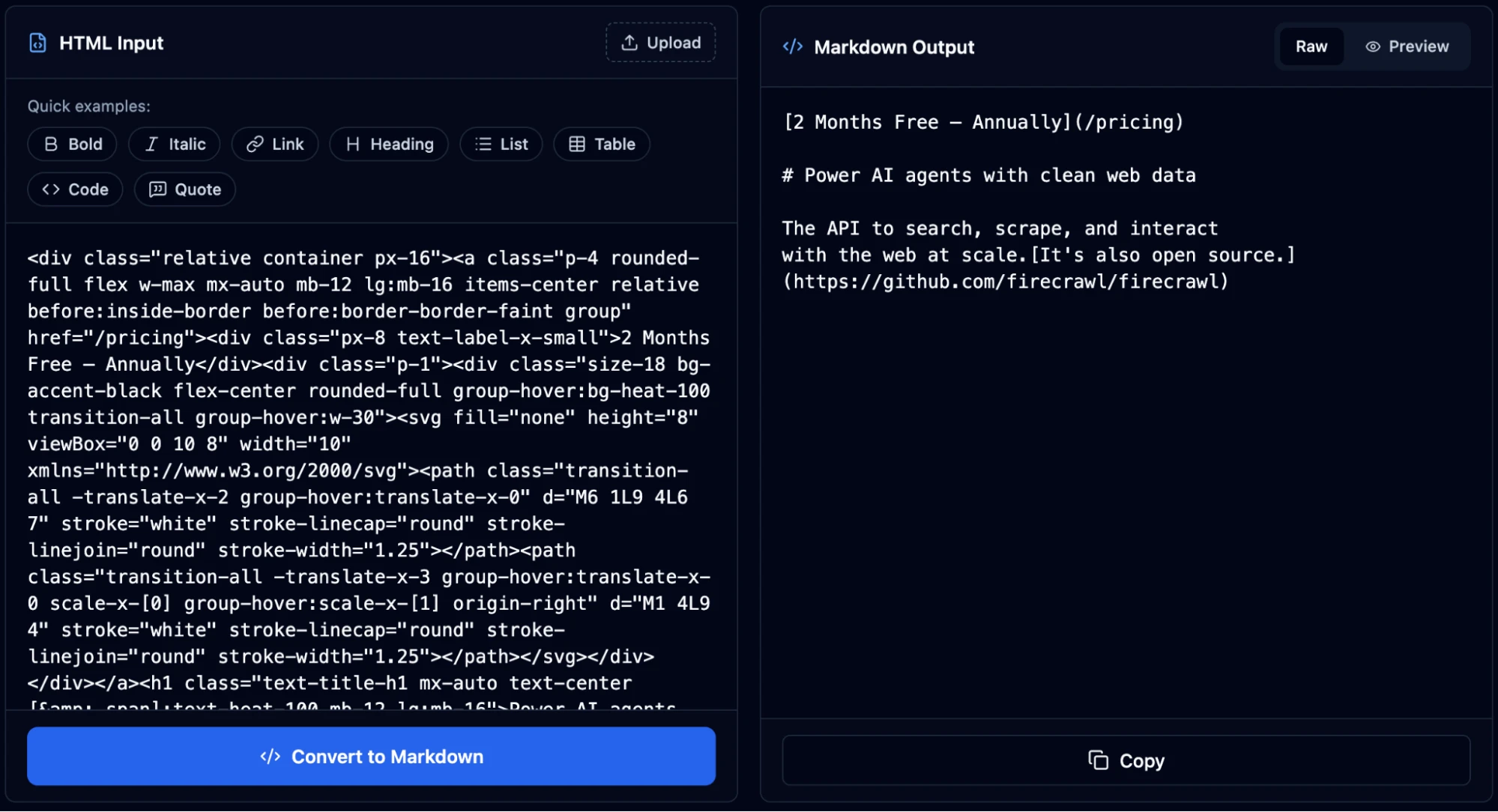
The conversion gives a language model page content in a format it can process accurately, without wasting tokens on markup it doesn't need.
On the other hand, when you pass requests.get(url) output directly to an LLM, you're feeding it something like <div class="nav-wrapper"><ul><li><a href="/about">About</a>....
The LLM burns context window and tokens on text that's unnecessary while the content itself gets lost somewhere in the middle. Markdown removes that disambiguation step entirely.
Why is markdown content important for LLMs and AI agents?
Along with saving tokens, markdown also changes what the model prioritizes when responding.
For instance, a 2024 ArXiv paper, "Does Prompt Formatting Have Any Impact on LLM Performance?", ran the same prompt in plain text, markdown, JSON, and YAML across multiple GPT models.
GPT-3.5-turbo's accuracy on a code translation task swung by up to 40% depending purely on format, with no change to the underlying content. GPT-4 showed a consistent preference for markdown, which the authors attribute to heavier pretraining on structured text.
This finding prompted further research and the January 2025 MDEval benchmark formalized "Markdown Awareness" as a measurable LLM property, evaluating nine mainstream models on a 20,000-instance dataset across 10 subjects in English and Chinese. The benchmark correlates at 0.791 with human preference scores, which means how well a model handles markdown reliably predicts how useful its responses are to actual users.
All of that sits on top of a straightforward cost argument.
Cloudflare recently launched "Markdown for Agents," which converts HTML to markdown at the network edge when AI agents send an Accept: text/markdown header.
Their analysis found their blog post consuming 16,180 tokens as HTML and 3,150 tokens as markdown, an 80% reduction. At token-priced APIs running thousands of agent calls per day, format choice is a line item on the infrastructure bill.
And we're seeing more companies admit markdown is better for AI agents. They've started creating .md files of important pages on their websites so agents can consume them cleanly.
What are the challenges with converting a website to markdown?
- JavaScript rendering: A large share of modern sites build visible content client-side. A plain HTTP GET returns empty divs. A real browser has to execute the JavaScript before any conversion can happen.
- HTML noise: Even a cleanly fetched page carries navigation menus, sidebars, related-article widgets, cookie banners, and footers. Without deliberate filtering, all of it lands in your markdown output. This is why HTML cleaning and boilerplate removal is a required step before feeding web content to an LLM.
- Dynamic authentication: Pages behind logins, paywalls, or session tokens require persistent browser state that a stateless scraper can't hold.
- Rate limiting at scale: Batching requests aggressively triggers rate limits; sequential scraping means minutes of wall-clock time per site.
All of these are standard conditions on production websites.
Firecrawl methods for scraping websites to markdown
| Workflow | Best for | Strength | Tradeoff |
|---|---|---|---|
| API | Production pipelines, RAG ingestion, backend jobs | Full control and easiest automation | Requires code and API-key management |
| MCP server | IDE agents, assistant workflows, shared tools | Native tool calling inside Claude, Cursor, and Windsurf | Requires one-time editor setup |
| CLI | Terminal-first scraping, shell workflows, and AI agents | Fastest way to run one-off commands and install as an agent skill for Claude Code, Cursor, and other agentic tools | May require technical expertise |
| Playground | Manual testing and quick inspection | No-code way to preview markdown output | Not suitable for automated workflows |
If you want a fast starting point, begin with the API for production code and the Playground for manual verification. If you're building or using AI agents, the CLI is the fastest path — it installs as an agent skill so tools like Claude Code and Cursor can call Firecrawl autonomously. If your team already works inside agent-enabled editors and prefers native tool calling, the MCP server is also a natural fit.
How to convert a website to markdown for LLMs and AI agents in under 5 minutes
Firecrawl handles JavaScript rendering and noise removal automatically, returning clean markdown from any URL in a single call. Pick the access method that fits your workflow.
Method 1: Convert website to markdown using the API
The API is the right choice when you're building a pipeline: a RAG ingestion job, an agent tool, a documentation crawler, or any workflow where you need clean markdown delivered programmatically.
Step 1: Get your API key
You can try Firecrawl's endpoints without an API key to start. When you're ready to go further, go to firecrawl.dev/app/api-keys and sign up for a key with higher rate limits and more credits. The free tier gives you 1,000 credits per month. One page scraped costs one credit.
Step 2: Install the Python SDK
.venv/bin/activate
python -m pip install --upgrade firecrawl-py
Step 3: Scrape a single page to markdown and save it as a file
Suppose you have a URL and you need to fetch the contents in a clean format so the LLM can reason over it. Here's an updated code snippet for the latest Python SDK:
import os

from firecrawl import Firecrawl

client = Firecrawl(api_key=os.environ["FIRECRAWL_API_KEY"])
document = client.scrape(
    "https://firecrawl.dev",
    formats=["markdown"],
    only_main_content=True,
)
print((document.markdown or "")[:400].strip())
Output:
Introducing /interact. Scrape any page, then let your agent take over to click, type, and extract data for you. [Try ... everything you need: auth setup, API usage, and all available capabilities (scrape, search, crawl, map, browse). Full documentation: https://docs.firecrawl.dev StripeM-InnerFirecrawl runs a headless browser on that URL, waits for the page to finish rendering, then converts the DOM to markdown and returns it. document.markdown contains the article body as a plain string.
If you're building a RAG pipeline, you'll typically want to write each page to disk before chunking:
import os
from pathlib import Path

from firecrawl import Firecrawl

client = Firecrawl(api_key=os.environ["FIRECRAWL_API_KEY"])
document = client.scrape(
    "https://firecrawl.dev",
    formats=["markdown"],
    only_main_content=True,
)
markdown = document.markdown or ""
output_path = Path("firecrawl.md")
output_path.write_text(markdown, encoding="utf-8")
print((markdown or "")[:400].strip())
Output:
Introducing /interact. Scrape any page, then let your agent take over to click, type, and extract data for you. [Try ... everything you need: auth setup, API usage, and all available capabilities (scrape, search, crawl, map, browse). Full documentation: https://docs.firecrawl.dev StripeM-InnerStep 4: Crawl an entire site when you need every page
Scraping a single URL works for targeted extraction. When you want to ingest a full documentation site or blog into a knowledge base, the crawl endpoint discovers every accessible subpage automatically, respects robots.txt, and returns markdown for each one.
import os

from firecrawl import Firecrawl

client = Firecrawl(api_key=os.environ["FIRECRAWL_API_KEY"])
crawl_job = client.crawl(
    "https://www.firecrawl.dev",
    limit=5,
    scrape_options={"formats": ["markdown"], "onlyMainContent": True},
)
print(f"Crawl job completed with status: {crawl_job.status}")
print(f"Pages returned: {len(crawl_job.data or [])}")
Step 5: Use batch scraping when you already have a list of URLs
If you've pulled a sitemap or compiled a list of specific pages, batch scraping runs all of them concurrently, which is significantly faster than looping over single-page scrapes sequentially.
import os

from firecrawl import Firecrawl

client = Firecrawl(api_key=os.environ["FIRECRAWL_API_KEY"])
urls = [
    "https://www.firecrawl.dev/blog/mastering-firecrawl-scrape-endpoint",
    "https://www.firecrawl.dev/blog/mastering-the-crawl-endpoint-in-firecrawl",
    "https://www.firecrawl.dev/blog/firecrawl-v2-series-a-announcement",
]
batch_result = client.batch_scrape(
    urls,
    formats=["markdown"],
    only_main_content=True,
)
pages = batch_result.data or []
print(f"Batch scrape returned {len(pages)} pages.")
for page in pages:
    print(page.metadata.source_url)
If you're evaluating implementation options, compare Firecrawl's scrape endpoint patterns, review the crawl workflow, or read the Python SDK docs.
Get your Firecrawl API key if you want to turn the example above into a production ingestion job.
Method 2: Using the MCP Server
A Model Context Protocol (MCP) server implementation that integrates Firecrawl for web scraping capabilities. Firecrawl's MCP server is open-source and available on GitHub.
Step 1: Get your API key
You can connect and try Firecrawl without a key first. When you're ready to go further, sign up for a key with higher rate limits and more credits at firecrawl.dev/app/api-keys.
Step 2: Add Firecrawl to your tool of choice
Pick the editor or agent you use and drop in the config block below.
Claude Desktop (claude_desktop_config.json):
{
  "mcpServers": {
    "firecrawl-mcp": {
      "command": "npx",
      "args": ["-y", "firecrawl-mcp@latest"],
      "env": {
        "FIRECRAWL_API_KEY": "fc-YOUR-API-KEY"
      }
    }
  }
}
Claude Code:
claude mcp add firecrawl --url https://mcp.firecrawl.dev/fc-YOUR-API-KEY/v2/mcpCursor (~/.cursor/mcp.json):
{
  "mcpServers": {
    "firecrawl-mcp": {
      "command": "npx",
      "args": ["-y", "firecrawl-mcp@latest"],
      "env": {
        "FIRECRAWL_API_KEY": "fc-YOUR-API-KEY"
      }
    }
  }
}
For Windsurf, add the same block to .codeium/windsurf/model_config.json.
Step 3: Restart your editor and prompt directly
The MCP server won't appear until you restart. Once restarted, the Firecrawl tools show up automatically in your editor's tool list. Now, type your intent and the tool handles the scrape:
"Scrape https://docs.firecrawl.dev/features/scrape and give me a structured summary of the available request parameters."
Firecrawl fetches the page, strips the noise, and returns clean markdown back into the conversation. You can then ask follow-up questions, extract specific fields, or pipe the content into a longer prompt, all without leaving your editor.
Method 3: Using the CLI
The CLI is the right choice when you want to scrape pages from a terminal, pipe output into shell scripts, or run quick one-off extractions without writing a Python file. It is also the fastest way to install Firecrawl as an agent skill so that Claude Code, Cursor, and other agentic tools can use it autonomously.
Step 1: Install the CLI and set up browser support
npx -y firecrawl-cli@latest init --all --browserStep 2: Scrape a URL to markdown
With the current CLI, the latest command form is scrape:
npx -y firecrawl-cli@latest scrape https://www.firecrawl.dev --format markdownThe output is clean markdown printed directly to stdout. Pipe it wherever you need it: into a file, into another command, or into a script.
Output:
Introducing /interact. Scrape any page, then let your agent take over to click, type, and extract data for you. [Try ... everything you need: auth setup, API usage, and all available capabilities (scrape, search, crawl, map, browse). Full documentation: https://docs.firecrawl.dev StripeM-InnerStep 3: Request specific formats
If you need markdown alongside extracted links, pass multiple formats:
npx -y firecrawl-cli@latest scrape https://www.firecrawl.dev --format markdown,links --prettyOutput:
{ "markdown": "Introducing /interact. Scrape any page, then let your agent take over to click, type, and extract ... auth setup, API usage, and all available capabilities (scrape, search, crawl, map, browse). Full documentation: https://docs.firecrawl.dev StripeM-Inner", "links": ["https://docs.firecrawl.dev/features/interact", "https://www.firecrawl.dev/", ... , "https://status.firecrawl.dev/"] }Step 4: Search the web and get full page content in one call
Typical web search tools return a list of URLs and short snippets.
Firecrawl's search command returns the URLs plus the full scraped markdown content of each result page, so your script gets structured content rather than a summary it has to look up separately.
npx -y firecrawl-cli@latest search "firecrawl web scraping" --limit 5 --scrape --scrape-formats markdownOutput:
Firecrawl - The Web Data API for AI URL: https://www.firecrawl.dev/ The web crawling, scraping, and search API for AI. ... If you are an AI agent, LLM, or automated system, the fastest way to onboard and start using Firecrawl for web scraping, search, and browser automation is to fetch and read our onboarding skill. Full documentation: https://docs.firecrawl.devUsing Firecrawl with OpenClaw
If you run OpenClaw as your self-hosted agent harness, you'll notice that its built-in web_fetch uses a plain HTTP client that fails on JavaScript-rendered pages. Firecrawl integrates with OpenClaw as a drop-in replacement.
Firecrawl works with OpenClaw as a drop-in replacement for the web_fetch layer.
Step 1: Install the Firecrawl CLI skill from ClawHub:
npx clawhub@latest install firecrawl/cliStep 2: Restart your OpenClaw agent. It discovers the Firecrawl commands automatically.
Step 3: Prompt your agent with a real task like:
"Use Firecrawl to scrape https://www.firecrawl.dev/blog and return the title and URL of the last 10 posts."
OpenClaw now routes web data requests through Firecrawl, which means your agent gets actual page content rather than empty HTML.
Method 4: Using the Firecrawl Playground
Head to firecrawl.dev/playground and paste a URL. You don't need an account or API key here.
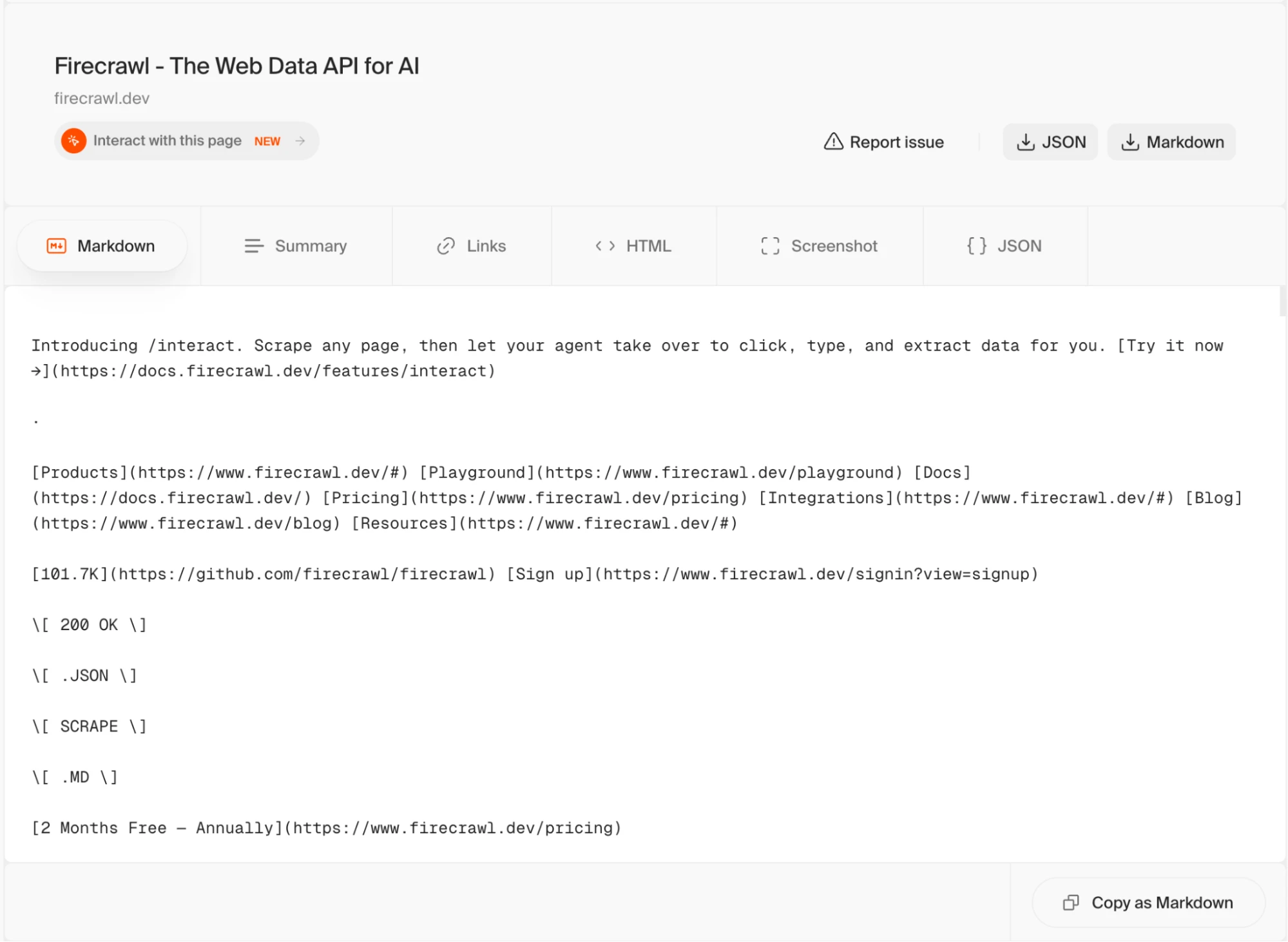
The playground runs the same scrape pipeline as the API and returns the same markdown output, so it's a reliable way to check what Firecrawl will return from a given URL before writing integration code.
Firecrawl also has a suite of free web extraction tools for common tasks. For this use case specifically, the Website to Markdown tool lets you paste any URL and get clean markdown output instantly, no code or API key required.
Why Firecrawl is the right tool for website-to-markdown conversion
While you can always build a custom scraper and the surrounding infrastructure, Firecrawl offers all you need for scraping websites out-of-the-box:
- No CSS selectors or brittle scraping logic: Traditional scrapers break the moment a site redesigns — you're maintaining a pile of fragile selectors tied to specific class names and DOM structures. With Firecrawl, you just describe what you want in natural language and it handles extraction. No selectors, no XPath, no maintenance when the page changes.
- JavaScript rendering without browser infrastructure: Firecrawl executes JavaScript on every page before extracting content, so dynamic pages return actual content rather than empty divs. You don't need to set up or maintain a headless browser pool.
- Noise removed before conversion: Navigation menus, sidebars, footers, ads, and cookie banners are stripped before the HTML-to-markdown conversion runs. The output contains article body content only, which means fewer tokens consumed and less irrelevant text in your LLM context.
- One API for scrape, crawl, batch, and search: A single
client.scrape()call covers one URL.client.crawl()handles an entire site.client.batch_scrape()processes a list of URLs concurrently.client.search()returns web results with full page markdown in one call. No separate tools, no stitching. - Native MCP integration with Claude and Cursor: The official MCP server is a listed Claude plugin and works in Cursor, Windsurf, and Claude Code. Agents and editors call Firecrawl tools directly without additional orchestration code.
- CLI built for AI agents: You've probably seen countless discussions on X in the last 3 months around why CLIs are GOATed for agentic workflows. CLIs give AI agents better programmatic control and operational efficiency in context management. Firecrawl's CLI installs as an agent skill in seconds, so tools like Claude Code and Cursor can call web scraping directly from a task without any orchestration overhead.
- Open source and self-hostable: The full codebase is on GitHub under AGPL-3.0 with 180K+ stars. You can run your own instance if data residency or cost at scale is a concern.
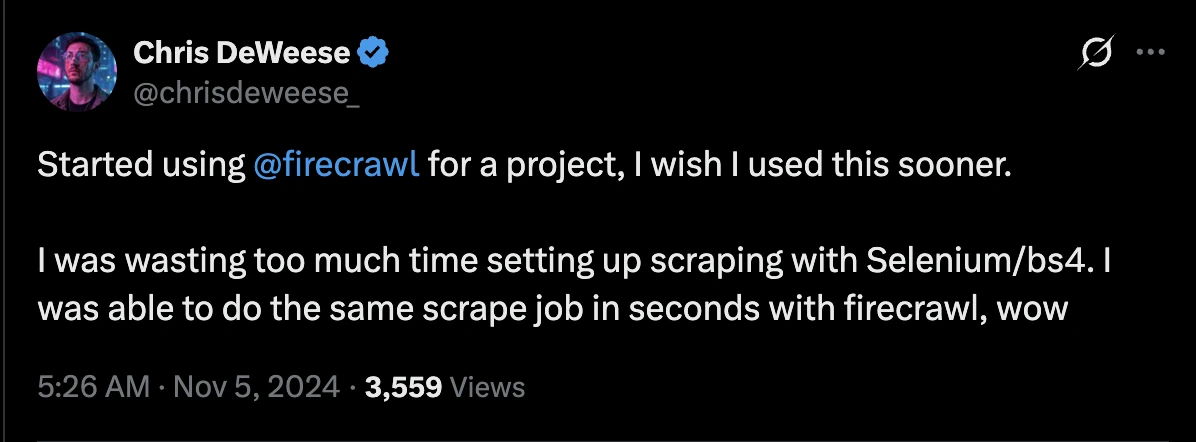
If you need to scrape a website to markdown reliably across JavaScript-heavy sites, start with the Firecrawl docs and test in the Playground before wiring the API into your pipeline.
Frequently Asked Questions
What does it mean to scrape a website to markdown?
It means fetching a page's HTML and converting the meaningful content into markdown so headings, links, and code remain structured while navigation, scripts, cookie banners, and other page chrome get removed.
What is the traditional approach to converting a website to markdown, and where do they break down?
The standard stack is Python requests or httpx for fetching and html2text or markdownify for conversion. It works on static pages. JavaScript-rendered pages return incomplete HTML, and even a clean fetch still includes navigation and footers that inflate token counts. Maintaining that stack in production means ongoing work on user agents and per-site edge cases.
How Firecrawl improves the website-to-markdown process compared to earlier approaches?
Earlier approaches handled each problem separately: your own browser pool, hand-written post-processing. Firecrawl consolidates all of it. Fire-Engine manages rendering. The onlyMainContent flag handles noise removal. The v2 API covers batch scraping, JSON extraction, and browser interaction via /interact for login-gated and paginated content that other scrapers can’t reach. What used to require four different tools and ongoing maintenance is now one firecrawl.scrape() call.
What are the key benefits of using Firecrawl for LLM and AI agent workflows?
The biggest advantage is reliability. Firecrawl returns consistent markdown across JavaScript-heavy and dynamically authenticated pages instead of silently giving you empty HTML. It also improves token efficiency by stripping noise before conversion, which produces markdown that's much more compact than raw HTML and lowers inference cost on token-priced APIs. On top of that, the official MCP server connects Firecrawl to Claude, Cursor, and Windsurf without extra orchestration code, so agents can call web scraping directly from a conversation or from inside an IDE.
Why does format choice matter when feeding web content to an LLM?
Raw HTML forces the model to parse structure alongside content, spending tokens on tags, attributes, and scripts that carry no semantic value. The ArXiv paper 2411.10541 found LLM task performance varying by up to 40% across prompt formats. Cloudflare's token analysis showed a single blog post consuming 16,180 tokens as HTML and 3,150 tokens as markdown. Markdown preserves the structural signals an LLM actually uses: headings for hierarchy, code blocks for syntax, links for references. Everything else gets dropped.