TL;DR
We've got 20 real AI automation examples that are shipping today. Each one automates tedious work across various categories and frees up time for your team.
- Marketing: Use AI automation to create auto-drafted social posts, SEO briefs, personalized campaigns, and review responses.
- Sales and customer communications: Automate cold outreach research, call summaries, automated scheduling, and lead prospecting at scale.
- CRM management: Manage your CRM with auto-logged calls, relationship mapping, lead enrichment, and self-updating CRM records
- Reporting and analysis: Create recurring reports, integrate spreadsheet-native AI, competitor monitoring, and chat with your docs interactively.
- Project management and operations: Automate your resource planning, inventory forecasting, cross-tool sync, and review checks.
AI automations drastically reduce your resources spent on administrative tasks and project management. Representational-State Transfer (REST) Application Programming Interfaces (APIs) powered the productivity wave we witnessed in the mid-2010s. Today, AI-powered workflows are increasing our productivity again. We've put together 20 AI automation examples you can use to improve your business workflows.
AI automations are now so user friendly, you can record yourself doing a task and turn it into a skill that Claude can repeat.
What are AI automations?
AI automations combine AI models with deterministic software to automate repetitive tasks and reduce friction. Traditional software automation is entirely deterministic. AI models are predictive, and non-deterministic.
- Traditional automation: Software processes input data. The data goes through a hardcoded, conditional chain usually involving if/else, switch, or match statements depending on the programming language we use.
- AI automation: AI automation reads natural language instructions. It breaks these instructions down into tasks. When combined with traditional automation, productivity can skyrocket.
Let's think about how this works with Firecrawl. If I want to perform a search, I'd use the search API, and I'd get structured search results. The process ends there. We've extracted our data. We still need to transform and load it.
When we add an AI agent (usually built with one of the best AI agent frameworks) to this same workflow, we're no longer coding things one step at a time. Instead, I can tell an agent, "find the latest AI and enterprise news and give me a summary."
The agent will automate this process entirely. First, it runs the search. Then it reads the results. If they aren't satisfactory, it can decide to dig deeper. Once the results are complete, the agent interprets them and gives me a summary.
AI automation examples for marketing teams
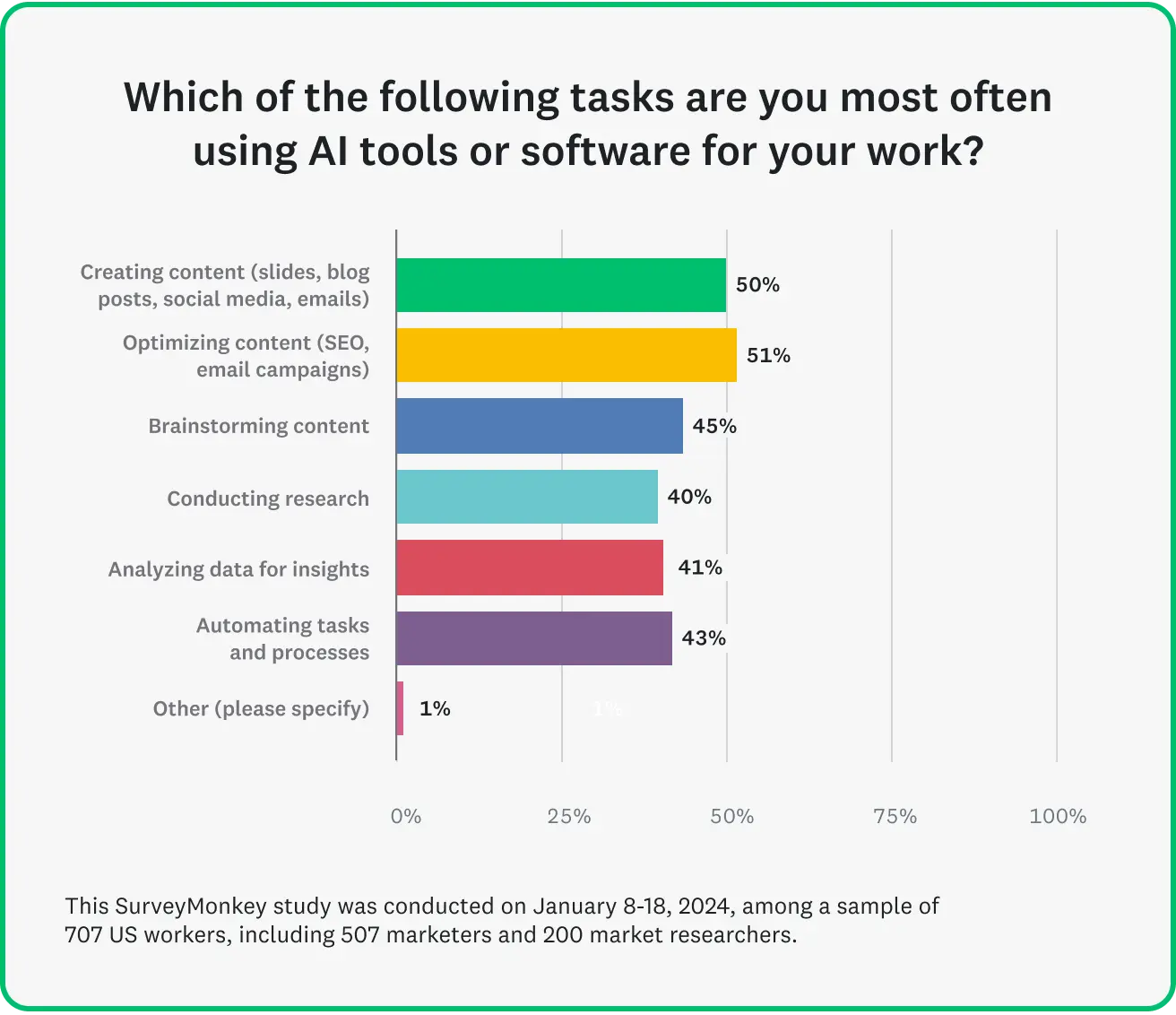 Source: SurveyMonkey
Marketing teams can use AI automation to improve social media presence, content planning, and personalized email campaigns. Tools like Claude Code for marketing are making these workflows accessible to non-engineers. They can also help us monitor company and product reviews so we can respond accordingly. Momentum is building fast: a PwC survey found that nearly 88% of executives plan to grow their AI budgets this year, driven largely by the rise of agentic AI.
| Automation | What it solves |
|---|---|
| AI-generated social media posts | New blog content sits unpromoted until someone manually drafts posts |
| SEO content briefs and keyword clusters | Content planning takes hours of manual competitor research |
| Personalized email campaigns | Generic updates get ignored; one-by-one personalization doesn't scale |
| Automated review responses | Reviews across multiple platforms are too scattered to check daily |
AI-generated social media posts from new blog content
Using Firecrawl's monitor service, you can monitor websites and trigger workflows when they change. An AI agent hooked into this endpoint alongside X (formerly Twitter) API runs when the post is detected. It can then draft social media posts to promote the new blog piece. Review the drafts, and social marketing is done. You can use tools like Buffer and Hootsuite to automate across all major social media platforms simultaneously.
Nobody needs to copy and paste. Write your blog piece. AI drafts the social promotions. Review the drafts and post to everything at once.
SEO content briefs and keyword clusters
SEO is a grind. Content planning and keyword research can make or break a marketing department. We can use AI agents to automate most of this process. Even on Firecrawl's free plan, teams run concurrent searches. When combined with scrape, an agent can find the top results for two separate queries and look at all of them in the time it takes for a human to analyze one.
Once you've verified that half of the workflow, tweak the prompt, tell it to generate content briefs based on the search data. Almost immediately (depending on the AI model you choose), you can have a full content calendar complete with briefs/outlines for each article you're writing.
Personalized email campaigns from product briefs
Product updates are tricky to handle. Customers need to know about them. If your update email is too generic, you land in the spam folder. If you spend too much time on one customer, you're failing to reach thousands, maybe even millions of others.
With AI automation for your business, life gets easier. An AI agent can look at customer history and even infer use cases for customers individually. Instead of sending the same cold email to thousands of customers, your AI agent can identify customers who are likely to need the feature. Then, it can draft a personalized email for all of them. You don't need to think of 200 ways to write the same email. Review your drafts and click the send button.
Automated responses to customer reviews
Monitoring for reviews can be especially difficult. When companies scale, they're dealing with reviews on Google, Yelp, G2, Trustpilot, and often more. They need to be checked daily. With Firecrawl's monitoring, you can trigger a workflow every time a new review drops.
Monitor can trigger an AI agent. After reading a review, an AI agent can draft an appropriate response. If a review needs your immediate attention, the AI agent can pass it directly to you for response.
AI automation examples for sales and customer communication
AI automations can drastically reduce the amount of time spent on cold outreach. They can provide meeting summaries, automate scheduling, and assist teams when prospecting. Our roundup of the best AI sales automation tools for GTM breaks down the modern stack revenue teams are actually using.
| Automation | What it solves |
|---|---|
| AI-powered cold outreach | Cold email has a ~0.45% average reply rate; targeting the right people matters more than volume |
| Call summaries and transcription | Meeting takeaways get forgotten or never written down |
| Personalized automated scheduling | Back-and-forth scheduling emails lose deals to faster competitors |
| Prospecting at scale | Manually enriching a large lead list takes days to weeks |
AI-powered cold outreach and follow-ups
Cold outreach is basically a lottery ticket. According to a report by Belkin, the average reply rate is around 0.45%. Numbers peaked at 0.54%. When done manually, the success rate is nothing short of abysmal. You might send out 200 emails just to get one response, and that response can still be a politely worded rejection.
The study isn't all bad news. Apparently, founders and executives respond at a much higher rate. An AI agent can use Firecrawl's search and scrape features to identify the right people, essentially acting as an AI SDR for your team. Then it can draft personalized outreach messages. Let your AI agent find the people who are most interested. No need to draft 200 emails and hope for a response. Review the drafts and send the messages. Cold outreach only needs your undivided attention when someone is actually interested.
Call summaries and transcription
Video calls can be one of the biggest productivity drains in all of remote work. If you've been in this industry long enough, you've likely sat through a two-hour meeting about "how to have better meetings" at some point. You get back to doing real work only to freeze, thinking, "Wait, what am I supposed to be doing right now?"
AI meeting assistants are all the rage right now. They take notes so you don't have to. Services like Fireflies AI can convert your entire meeting into a structured action plan. If your needs are more nuanced, you could even feed a full transcript to your personal Slack bot.
Personalized automated scheduling
Calendly
has almost entirely taken over call scheduling. It's simple deterministic software and it solves a major pain point: asking everyone on your team, "What time are you free?" With Calendly, you choose an open slot on someone's calendar, input your information, and you've got a meeting.
If a customer service agent has access to Calendly, you've now got an automated receptionist. Your bot can greet customers and handle the basics. If a customer is actually interested in buying, your AI agent can schedule a sales call between you and the customer. Human beings talk to your receptionist agent and the agent schedules an appointment.
Prospecting at scale
With Parallel Agents, teams can process hundreds or thousands of search queries simultaneously and return a spreadsheet of real, qualified leads. Rather than researching one company at a time, AI agents work through your entire target list at once.
Imagine you've got a list of 500 company names. From here, you need to enrich the list. You need company size, industry, funding stage, and correct contact information. This takes hours of manual lookups per lead. Parallel agents handle the whole batch at once: it tries a fast lookup first, and only escalates to deeper research as needed. A weeklong hunt is now reduced to a single run. Review the finished list, and decide who to reach out to.
AI automation examples for CRM management
In CRM, AI automations can help across the entire process. Whether it's logging, relationship intelligence, lead enrichment, or even a fully automated CRM, these things typically rely on human memory. With AI automations for your business, they don't.
| Automation | What it solves |
|---|---|
| Logging calls and emails into CRM | Reps forget to update records after every call, so pipeline data goes stale |
| Relationship intelligence | Finding the actual decision-maker at a company takes guesswork |
| Lead enrichment | Reps enter calls without basic company context |
| Fully automated lightweight CRM | CRM records don't reflect real-time signals like funding rounds or leadership changes |
X user, Lewis Carhart, built an open-source, MIT-licensed, agentic CRM application.
Logging calls and emails into CRM
Customer Relationship Management (CRM) is a process all its own. Before AI, teams needed to manually update their CRM software after a call to track deal progression. With tools like HubSpot, you can bring an AI assistant directly into the call.
When the call ends, you don't need to remember everything and manually enter everything into your CRM. Instead, you can review the assistant's work, and it can update records upon approval.
Relationship intelligence
Affinity
provides a service called "Relationship Intelligence." This tool tracks communication patterns and allows you to identify the real decision makers within a company. When looking to sell your product or service, this is a game changer. Teams should note that relationship intelligence software isn't for everyone. These products are built on communications monitoring, and they identify patterns within the data. If your email contains sensitive or private data, you should not plug it into third-party monitoring software.
When courting large buyers, the most difficult part is often discovering who to talk to. With relationship intelligence workflows, you don't need to. You can map out your path to a decision maker and simply make your pitch.
Lead enrichment
When an AI agent is hooked into Firecrawl, we can ask it directly, "What does this company do? What is their position within their industry? How big is their team?" This provides us with immediate intelligence before we've created a record within the CRM.
With lead enrichment workflows, you don't just get better updates to the CRM. You get better initial data, and you get it fast. Instead of spending hours on research before a call, your team can enter a call prepared and knowing where the client stands.
Fully automated lightweight CRM
This is one of the most ambitious workflows. Some teams want to automate CRM entirely. Instead of a linear workflow, the agent runs on a loop. We can begin by continuously monitoring socials and other websites for hiring pages, announcements, leadership changes, and any other relevant data.
For example, imagine a company you serve gets a new round of funding. The automated CRM will flag this through site monitoring. AI models can and do sometimes hallucinate. Even if the CRM is updated autonomously, your team still needs the option to review and rollback the changes in the event of a hallucination. Both prior review and post-hoc correction can be acceptable here. What's important is that the hallucinated data doesn't make it into your next interaction with the customer.
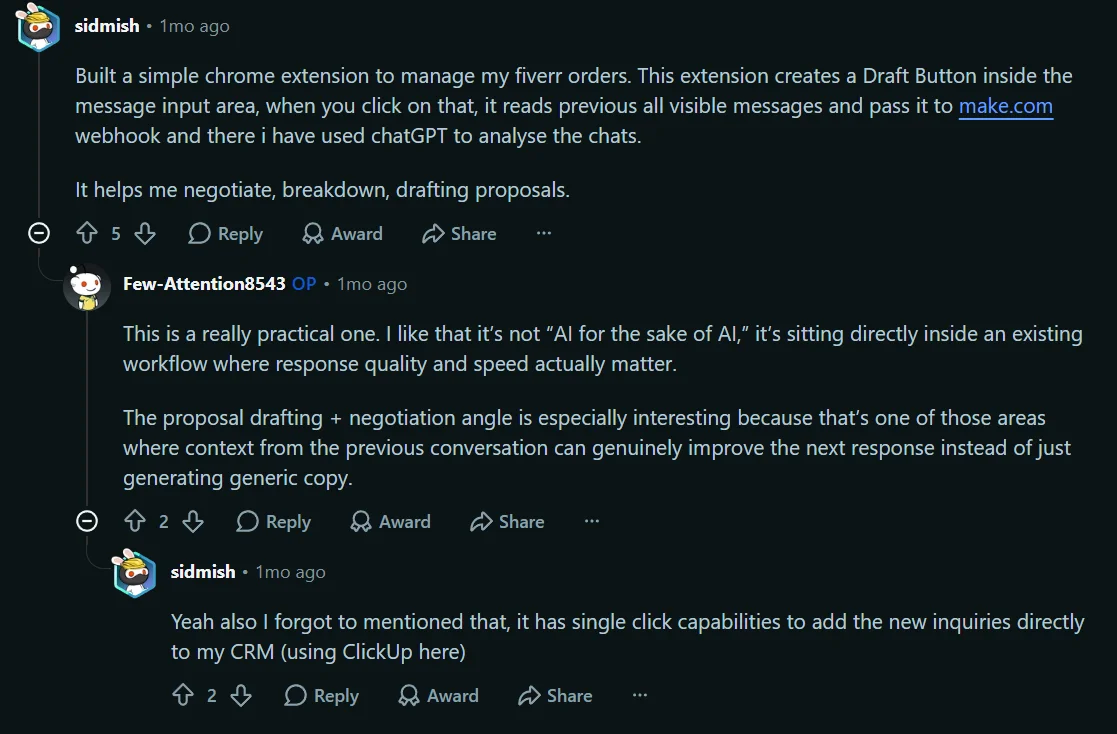
Reddit user, sidmish has even automated Fiverr orders, and they have also added one-click abilities CRM updates.
The Firecrawl team runs something similar internally. We call it Firebrain: a single project that pulls sales, marketing, support, and other context into one place. Anyone on the team can spin up context-aware agents without hunting through five different tools first.
AI automation examples for reporting and analysis
In reporting an analytics, AI can automate recurring reports, integrate with spreadsheet software, monitor competitors, and even allow you to chat with your docs interactively. Reports can be ready before you get to the office, and time spent digging through data can be minimal.
| Automation | What it solves |
|---|---|
| Recurring reports | Reports get manually rebuilt from scratch on the same schedule every time |
| Spreadsheet-native AI analysis | Teams don't want to leave spreadsheets for a new BI tool |
| Competitor and anomaly monitoring | Slow-moving problems (a competitor's price drop) go unnoticed for months |
| Chat with your internal docs | Finding an answer buried in old documentation eats an hour |
Generate recurring reports
Report generation eats time. AI agents can generate them at any time of day or week. Automated reports have existed for a long time, but they've always been deterministic. You get the data, but you need a human to find and explain the patterns. Often, they need to be triggered manually too.
You can set an AI agent to generate reports daily, weekly, or at really any schedule you want (see how teams wire this up with scheduled tasks in Claude Desktop). When it's finished analyzing data, it can add human-readable summaries before anybody's day has even begun. You can take it a step further and deliver the reports directly into Slack. By the time standup hits, everyone has seen the data and read the report.
Spreadsheet-native AI analysis
Spreadsheets are just as important in 2026 as they were in 2006, maybe more important. Coefficient can plug live data directly into spreadsheet software like Excel. Instead of manually running formulas and transformations, you can simply tell your AI assistant in natural language which operations to perform.
Your team can ask questions and build tools from the software they already use. Coefficient even allows teams to build dashboards using natural language. With data pipelines and AI, teams can fully manage their data while rarely leaving their tried and true spreadsheet software.
Competitor and anomaly monitoring
Sales anomalies don't always show up immediately. Imagine your company sells hot dogs for $4. You also sell a variety of other items. Hot dog sales begin to drop, but it's a slow drop. The first month, it looks like it might be a natural fluctuation. The next month, they've dropped again. By the third month, you wonder, "Why aren't people buying my hot dogs anymore?" You discover a competitor selling them for $3. They've been running this sale for three months.
With proper monitoring, you would have seen the price drop. You could have caught this by walking into the store yourself, but this means walking away from your own shop. With a continuous competitor monitoring setup, the price drop would have been caught by an AI agent. The AI agent can notify you so your pricing stays competitive. On Hacker News, people are already building workflows like this.
Chat with your internal docs
When someone has a policy question, usually, they (or a manager) needs to dig through internal docs manually. If an additional question arises, we need to dig through more documentation. A 30-second Q&A session can quickly turn into a one-hour deep dive.
Firecrawl's parse tool lets teams convert local documents into LLM-ready data. This changes existing workflows. When you connect an AI agent to a Retrieval-Augmented Generation (RAG) system, you can simply talk to the agent as it searches documents. The one hour deep dive is gets cut to a five minute workflow. The Firecrawl team actually implemented this when building Mendable. One of our founders, Eric Ciarla, posted about it on Hacker News.
AI automation examples for project management and operations
AI automations help track employee data so the best management patterns can be identified, even if the manager is new. Teams can automate scheduling, inventory management, work reviews, and they can keep projects synchronized across applications.
| Automation | What it solves |
|---|---|
| Resource capacity and structural planning | New or overloaded managers make scheduling mistakes without full visibility |
| Inventory tracking | Simple reorder-point systems miss real-world signals like weather or competitor stockouts |
| Synchronize project updates across apps | The same status update has to be manually copied into three or four tools |
| Automated work reviews | Basic QA checks (broken links, forms) eat time before a human review even starts |
Resource capacity and structural planning
No matter what industry you're in, scheduling issues can derail a team. We've all seen this story before. Managers get shuffled around. Everyone's in charge of a department they know nothing about. They've known their employees for all of five minutes, and now they're expected to write a perfect schedule. I'll let you imagine the next part. I'm sure it's accurate.
Kantata
and
Epicflow
can track people's skills and performance. Then, it can match them to the times and places they function best. When you automate resource capacity and structural planning, even new managers are less likely to make scheduling mistakes. They can let AI juggle the resources and only intervene when there's an issue.
Inventory tracking
Inventory levels fluctuate. When you run a warehouse or a high-volume store, they're near impossible to track manually. Automation can help solve this. When an item hits zero, order more. On the surface, this is a no-brainer. However, "order more" isn't very specific and it's subject to market fluctuation. Imagine you run a store, and you sell icemelt. There's a snowstorm coming, and your competitor sold out. A deterministic system flags the low inventory and orders more. It doesn't account for the weather.
An AI agent with web access can monitor inventory, check the weather, and monitor competitor pricing for this product. Through monitoring, it sees your competitor is also out of product. It can adjust the order proportionally to real business needs. We used to run low, order more, and hope for the best. Now, when an item is running low, it can trigger an agent to check the exact conditions that impact supply. Then, it makes a highly educated guess when creating an order.
Synchronize project updates across business applications
A client asks for a status update, so someone opens Jira, then Slack, then a spreadsheet. By the time they reflect the same data, the "quick update" has taken forty-five minutes, and half of it was just finding out where the truth actually lives.
When an AI agent is plugged into your applications, it can update them instantly. When status changes, Slack, Jira, and the spreadsheet can all relfect the same information.
Automated work reviews
Before announcing a new webpage or prototype, someone (or something) still has to check the basics. Does the form actually submit? Do the links route correctly? Are elements visibly broken? That's real work, and it happens before the review needs human judgment. Before AI, we'd write tests manually using headless browsers like Selenium and Playwright.
Interact spins up a headless browser in the cloud. AI agents can control it. This used to require a manual script checking each element on the page, usually by class or CSS selector. Instead, the workflow has changed. Ask an AI agent, "Do the page elements work?" Your AI agent can verify the entire page before you tell the world it exists.
Build AI automations iteratively, and focus on security
Most of the projects listed above are quick integrations. They aren't week-long projects requiring an integration team. You should mainly be focused on technical and security requirements. Timeline is a concern, but iterative builds leave teams with a tangible product at every stage of the process.
- Technical requirements: Back in the day, even the simplest of these integrations would take several days of building and testing before deployment. Today, it often doesn't even require code. You need natural language, API keys, and an AI model. A curated list of low-code AI workflow automation tools can help you pick a starting point.
- Security considerations: The moment an AI agent touches your data, you're making a decision about who gets to see the data. If you've got the infrastructure, you can self-host open-weight models like GLM 5.2 and Kimi K2.7. Third-party hosting often allows teams to train models on the data. For companies worried about data retention, Firecrawl also provides Lockdown Mode for cache-only access with Zero Data Retention (ZDR) and no data leakage to the target site.
- Timeline: It's best to iterate quickly and fail fast. If something doesn't work or isn't useful, you want to know ASAP, not three months down the road. With each iteration, make improvements to the workflow. Iterate daily or weekly and watch your workflow improve over time.
AI automations increase output, but they don't replace human judgment.
These tools don't replace human judgment. They increase productivity. It doesn't matter if it's an outreach agent, an ordering assistant, or a documentation/policy bot; you don't want it passing hallucinations into your production system. Everything needs to be subject to some level of human review.
To optimize your project, look at where you spend the most time and resources. Automate that first. It frees up time to work on the additional things. When you build iteratively, your AI automations improve over time.
Frequently Asked Questions
What is AI automation?
AI automation combines traditional automation with an AI layer that can interpret natural language, make judgment calls, and adapt when something doesn't match the expected pattern. Traditional automation moves data from one place to another. AI automation can also decide what that data means and what to do next.
Is AI automation actually worth it for a small business, or just large companies?
It's worth it when it removes repetitive work from your team. It's a poor fit for rare, high-judgment work, where a wrong AI output costs more than the time saved. Most of the examples in this piece are aimed at exactly the first category.
Will AI automation work with the software my business already uses?
In almost every case, yes. AI tools are built to plug into existing systems like your CRM, inbox, and spreadsheets, not replace them. If a workflow does need a new tool, that's usually a deliberate choice you make, not a hidden requirement.
Is AI automation safe for company data?
It depends on the platform, not AI automation as a category. Open-weight models can be hosted on your own infrastructure. Cloud-hosted model providers are known to retain data for training purposes.
How hard is it to set up these automations?
It depends on scope. Some automations take minutes to an hour. A full pilot workflow could take several weeks depending on the level of integration and testing your team requires. Teams who build iteratively get a tangible product quickly and improvements are added as needed.
Do I need to know how to code to build these automations?
Most automations are buildable with natural-language or no-code setup. Teams can benefit from scripting knowledge, but with the rise of no-code development, it's not a hard requirement.
What does it cost to run these AI automations?
Most tools here have functional free tiers. Paid plans typically start around $10-50/month (depending on the provider you're using). For example, Firecrawl offers a free tier plus paid plans that scale with volume, up to enterprise plans for larger workloads.
What is Firecrawl?
Firecrawl is a web data API built for AI agents. It lets an agent search, scrape, monitor, and interact with live web pages, and turns messy HTML or PDFs into clean, LLM-ready data. It can be helpful with all sorts of workflows: monitoring a page for changes, enriching a lead list at scale, or letting an agent click through a live page to check that it works.
What tools can I use to set up no-code AI automations?
Several platforms let non-developers build AI automations visually. n8n is an open-source workflow builder with hundreds of integrations and self-hosting options. Gumloop offers a drag-and-drop canvas focused on AI-first workflows. Cursor Automations run scheduled agent tasks directly in your codebase. Claude Cowork lets you delegate multi-step work to Claude with shared context. Most of these have free tiers to test before committing.
Which automation should I start with?
Whichever workflow is currently costing your team the most hours or causing the most mistakes. A high-friction, high-frequency task produces a clearer, faster payoff than automating something merely convenient.