Loop Engineering: Should You Stop Prompting Agents and Start Designing Loops
 Hiba Fathima
A six-word sentence has tech Twitter in a chokehold this month. Peter Steinberger posted it on June 7, 2026:
You shouldn't be prompting coding agents anymore. You should be designing loops that prompt your agents.
It cleared 2.2 million views and the replies turned into a brawl over what it actually meant. The reaction outside Twitter has been just as split. Over on a Reddit thread asking whether loop engineering is the next AI dev buzzword, developers swing from "this is genuinely the next abstraction layer" to "it's a cron job wearing a hat."
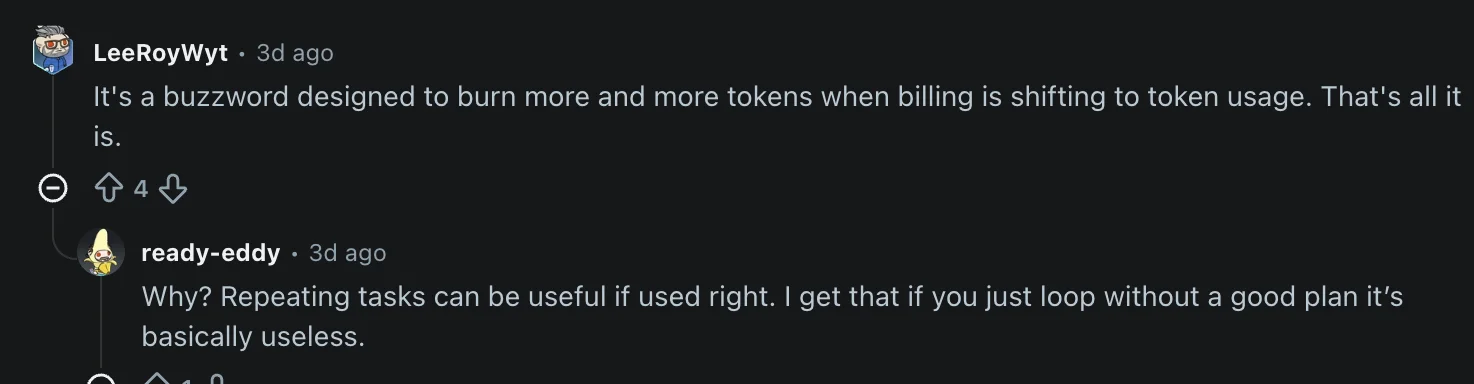 Developers are split on whether loop engineering is the next real layer of abstraction or just renamed cron jobs.
Boris Cherny, who built Claude Code, gave the cleanest version of the same idea on stage two days earlier:
I don't prompt Claude anymore. I have loops that are running. They're the ones that are prompting Claude and figuring out what to do. My job is to write loops.
So what is a loop, why is everyone arguing about it, and what does it look like when you build one? Here is the practitioner version.
What loop engineering actually is
For most of the last two years, working with a coding agent has felt like high-effort ping-pong. You craft an instruction. You wait. You skim what came back, adjust, send the next one. Your attention is the engine. Step away from the keyboard and the agent freezes mid-turn.
Loop engineering is the move where you stop being the engine.
You write a small program — sometimes a shell loop, sometimes a hosted task, sometimes a few hundred lines of TypeScript — and that program is what talks to the model. It picks the next task, dispatches it, grades what comes back, logs the outcome, and decides whether to fire again. The model isn't a collaborator on the other side of a chat anymore; it's a function the program calls in a while.
Addy Osmani's framing is useful here: prompt engineering is one floor. Agent harness engineering, designing the environment a single agent runs inside, is the next floor. Loop engineering sits one floor above the harness. The harness still matters. The loop runs on top of it, on a schedule, spawning helpers and feeding itself.
Shann Holmberg sketches the two scales it shows up at. At the small end, a single agent walks through research, drafting, self-review, and revision on repeat until what it produced meets the bar. At the large end, an orchestrator carves a goal into chunks, farms each one out to a specialist, and those specialists in turn lean on their own helpers. The mechanic is identical; only the headcount changes.
At the center of any loop is the same four-step cycle: act, observe, reason, repeat. The agent does something, reads what came back, decides what that means against the goal, and decides whether to go again. Everything else (the schedule, the worktrees, the sub-agents, the state file) is scaffolding around that cycle.
Prompt engineering vs agentic workflows vs loop engineering
The three terms get used interchangeably and they should not be — much like the prompt engineering vs context engineering confusion that played out earlier this cycle. Here is the actual difference.
| Prompt engineering | Agentic workflows | Loop engineering | |
|---|---|---|---|
| What you do | Write a good prompt for a single turn | Chain multi-step calls with branching logic | Design the system that prompts the agent for you |
| Autonomy | None. You are in the chair | Medium. Predefined steps, model fills the gaps | High. Runs on a schedule until a stopping condition holds |
| Best for | One-shot tasks, content, simple queries | Structured pipelines with a known shape | Open-ended, iterative work where the path is not fully known |
| You optimize | The prompt | The chain | The loop and the rubric inside it |
Is your task actually loop-shaped?
Knowing the category is one thing; knowing whether your specific task belongs in it is another. Before you build a loop, run the candidate through three checks:
- Repetitive. You do this often enough that designing the system pays back the design cost.
- Reviewable. "Done" can be expressed as a check the agent or a verifier sub-agent can actually run. If you cannot define what passing looks like, the loop will not know when to stop.
- Valuable. The output is worth the tokens. Loops have a floor cost in time and money. Trivial work does not clear it.
If a flow has all three, it wants a loop. If it is missing one, you are usually better off prompting it by hand or writing a regular script.
Anatomy of a working loop
Every loop that survives contact with production solves the same set of problems: when it runs, how concurrent agents stay out of each other's way, what knowledge they bring with them, how the work is divided and verified, how the loop reaches the rest of your stack, how it gets handed to a teammate, and what gets remembered between runs. Codex and Claude Code give these parts different names, but the responsibilities line up.
The trigger. Something has to start a run that isn't you typing. In Codex that's the Automations tab — pick a repo, a prompt, a schedule, a sandbox, and the run results queue into Triage. In Claude Code it's some combination of /loop, /goal, scheduled tasks, hooks, and GitHub Actions. The trigger has to come bundled with a stop condition; we'll get to what that looks like later.
Isolation between concurrent agents. Once two agents touch the same checkout at the same time, you get one of two failure modes: silent overwrites or a thrashing merge. Git worktrees solve this by giving each agent its own branch and its own working copy, all backed by the same repository. Both harnesses spin worktrees up for you now. Run agents in parallel without them and you've built a race condition. For how companies like Stripe, Spotify, and Shopify deploy git worktrees as the isolation layer inside a production coding-agent fleet — alongside intake queues, verification loops, and merge gates — see our guide to building an AI software factory.
Codified context the agent doesn't have to re-discover. A skill — a folder containing a SKILL.md plus whatever scripts and fixtures it needs — is how project-specific knowledge survives between runs. The agent loads a skill when the description in its frontmatter matches the task; that description is what most people botch. Write it like a tag line, not a manifesto. Same skill format in Codex and Claude Code.
Division of labor between sub-agents. The loop pattern that pays for itself fastest is splitting the writer from the reviewer. One agent (or chain of sub-agents) makes the change; a separate one, often on a leaner model, grades it against the project's rules and the tests it can run. The grader does not have to be smarter than the writer — it just has to be different, with its own instructions and its own rubric.
Connectors. A loop locked inside the working directory is a glorified script. Connectors are how it reaches everything else: the issue tracker, the staging API, the data warehouse, Slack, your monitoring stack, the live web. They run on MCP, which both Codex and Claude Code speak, so the connector you set up for one harness almost always slots into the other without rewriting. This is the line between an agent that hands you a patch to apply and a loop that opens the PR, links the Linear ticket, posts in #engineering, and waits for CI on its own.
Plugins. Claude Code plugins and their Codex equivalents go one level up from connectors: they bundle a set of connectors with the skills that know how to use them, so a teammate can install your whole loop setup in a single command instead of reverse-engineering it from your repo. The connector is the wiring; the plugin is the wiring plus the manual.
Memory that outlives the process. None of the above matters if the loop can't remember what it did yesterday. The form is boring on purpose: a markdown checklist in the repo, a JSON file beside it, a Linear board, a SQLite database. Pick one and have every run read it at the start and append to it at the end. This is how a loop survives a crash, a context-window reset, or a 3 a.m. process kill.
Open vs closed loops
Holmberg also draws the open versus closed distinction, which is the most useful axis I've seen for picking a loop shape.
Open loops trade structure for surface area. You hand the agent a target plus guardrails and let it pick its own route through the problem. Great for prototyping or unknown terrain. The catch: if the project's standards are vague, the output is mostly noise.
Closed loops flip the contract. You map the route first — what each step does, how it's checked, when the loop is allowed to stop — and the agents iterate inside that scaffolding. The runtime cost stays predictable, and the results tend to improve over time because every run is graded against the same rubric.
In production, closed wins by default. You keep one loop in charge of the goal, give the steps to dedicated specialists, push the narrow grunt work down to subagents, and let an automated check decide what gets through. Open loops are worth running when you're still figuring out what the work even is, or on side projects where burning tokens is the point.
Why making the loop halt is the hard part
The romantic version of loop engineering is that you write the loops and a thousand agents build your company overnight. The production version is that you write the loops, and most of your job is making sure they halt.
Walk into any thread on the topic and the first concern most developers raise is tokens, not architecture. On the same Reddit thread, the loudest replies are about runaway spend: people sharing receipts from loops that quietly chewed through hundreds of dollars overnight, asking how anyone affords this outside a company expense account. One underappreciated contributor: every time an agent looks something up on the web mid-loop, that page's content stays in context for all subsequent turns — four Firecrawl techniques cut what actually lands in Claude Code's context during web research.
 The first thing most devs want to know about loops is how to keep one from emptying their account, not how to build one.
That concern is correct, and the fix is unglamorous: every loop ships with hard guards or it doesn't ship.
Uber capped its engineers at 1,500 dollars per person per tool per month for Claude Code and Cursor after burning its annual AI budget in four months. The expense moved from writing the code to running the thing that writes the code. The practitioner write-ups this year keep landing on the same three guards:
- A hard ceiling on iterations so a stuck loop cannot keep spinning.
- A diff check that kills the run once the last few passes have stopped changing anything.
- A spend cap, in tokens or dollars, that ends the run before billing does.
Without all three, what you are running isn't a loop. It's an open invoice.
The second risk is quieter and bigger. The faster a loop ships code you did not write, the wider the gap between what exists in your repo and what you actually understand. Addy Osmani calls it comprehension debt, and the better the loop runs, the faster the debt accrues, unless someone is actually reading the diffs going by. Verification is on you. "Done" is a claim, not a proof.
There is a third risk and it is the one nobody flags upfront: a loop without taste behind it. Greg Brockman made the broader version of this point recently: as models keep getting more capable, the bottleneck on output stops being the model and starts being the taste of the person directing it.
That applies almost word-for-word to loops. A loop multiplies whatever judgment you put into the rubric, the skills, and the verification step. Those three things have to reflect real taste: what "good" means in your codebase, which edge cases actually matter, when something is genuinely ready to ship versus technically passing. When they do, the loop compounds in the right direction. When they don't, you've just built a faster way to ship work that wasn't worth doing: more docs nobody reads, more PRs nobody asked for, more tickets autoclosed against the wrong root cause. The loop lets you be wrong at machine speed. Loop engineering rewards the people who already had taste; the harness is the easy part to copy, the rubric inside it is the part that's actually yours.
Where Firecrawl fits in the loop
The pattern that keeps showing up across every working loop is the same: the loop is only as good as the feedback inside it. An open loop that writes code with no feedback is a machine for generating confident mistakes.
For loops that touch the web (and most production loops eventually do) the feedback layer is web data. The loop needs to research a competitor before drafting copy. It needs to pull a docs page before generating code against a fast-moving API. It needs to check a status page before retrying. It needs structured data extracted from a directory before deciding which entry to act on.
Firecrawl is built for that step. Three endpoints cover most of what a loop needs:
search— returns full-page content for a query, not just titles and snippets.scrape— converts any URL to clean markdown the agent can reason over, including JavaScript-rendered pages.crawl— pulls a whole section of a site at once.
Two ways to call them from inside a loop: the Firecrawl MCP server snaps into Codex and Claude Code as a connector, and the Firecrawl CLI lets the loop hit the same endpoints straight from a shell step. Either way, Firecrawl shows up as just another tool the loop can reach for.
Two shapes worth calling out specifically.
The first is the ambitious-goal loop. Hand /goal in Claude Code or Codex something genuinely hard and let it run. Concrete examples of what "genuinely hard" looks like:
- "Find every public competitor in our category, score them on these five dimensions, draft a positioning brief."
- "Audit our docs against every breaking change in the last six minor releases of the SDKs we depend on."
The agent keeps searching, scraping, reading, and revising for as long as the rubric is unmet. A /goal run with real scope can take a long time to finish, and Firecrawl is the supply line that keeps that run grounded in live data instead of model memory.
The second is using Firecrawl itself as the trigger. The monitor endpoint watches a URL or a set of URLs and fires when the content changes. Wire that into a Claude Code hook or a Codex Automation and you have a loop whose heartbeat is the live web — a pricing-page change kicks off a competitive-response loop, an API changelog update triggers a docs-rewrite pipeline, a status-page incident wakes an on-call agent. The loop doesn't poll on a fixed schedule; it runs when there's actually something new to react to.
Either shape lands at the same place. A loop with a Firecrawl call inside it stops guessing about the web every run; it reads what's actually there. That's what keeps the rubric honest and the skills useful. In the end, it's what lets the loop you wrote yesterday be more useful than the one you'll write tomorrow.
Sign up at firecrawl.dev and you get 1,000 free credits a month, no credit card needed. That's enough to wire search, scrape, and monitor into your first real loop and see what changes when the web stops being a guess.
Frequently Asked Questions
What is loop engineering?
Loop engineering is the practice of designing the system that prompts a coding agent instead of prompting the agent yourself. You write a small program that handles discovery, planning, execution, verification, and iteration, and the loop calls the model on a schedule until a stopping condition is met. The model becomes a subroutine inside your loop, not a chat partner on the other side of a prompt box.
How is loop engineering different from prompt engineering?
Prompt engineering optimizes a single turn: one input, one output, one human in the chair. Loop engineering optimizes a system that runs many turns without you. The loop decides what to ask next, reads the result, checks it against a goal, and either continues or stops. You design the loop once and let it run, instead of typing prompts all day.
What is the difference between an open loop and a closed loop?
An open loop gives the agent a wide space to explore. It has a goal but loose constraints, and it can try paths you did not specify. It is powerful for discovery and brutal on your token budget. A closed loop is bounded: a defined path, an eval at each step, and a clear stopping condition. Closed loops are cheaper, more predictable, and the right default for production work.
What is a closed loop in agent design?
A closed loop is an agent loop where a human has designed the path end to end before the loop runs. You define what each step does, what counts as passing for that step, which sub-agent handles it, and when the loop is allowed to halt. The agents still iterate inside the loop, but they iterate inside a fixed scaffold instead of choosing their own route. Closed loops are the default for production work because the runtime cost is predictable, the output is gradeable against a stable rubric, and a failure in one step does not put the whole goal off-track.
Do I need new tools to do loop engineering?
No. The primitives ship inside Claude Code and Codex today. Claude Code has /loop, /goal, scheduled tasks, hooks, worktrees, skills, sub-agents, and MCP. Codex has Automations, /goal, agent skills, sub-agents in .codex/agents/, and connectors. The shape is the same in both. You design the loop once and it runs in either harness.
What is the biggest risk of running agent loops?
A loop that does not stop. Without an explicit iteration cap, a no-progress check, and a token or dollar budget, an agent can burn through a billing cycle in a weekend. The second risk is comprehension debt: code lands in your repo that you did not write and do not understand. A loop is only as good as its verification step and its stopping condition.
Where does Firecrawl fit in a loop?
Firecrawl is the feedback layer for loops that touch the web. When the loop needs to research a competitor, pull a docs page, check a status URL, or extract structured data from a site before deciding the next step, Firecrawl returns clean markdown the agent can reason over. Loops without fresh external context degrade fast. Firecrawl is how you keep the loop grounded.
How do you use web search inside an agent loop?
Web search is the discovery step of a loop. Before the agent drafts, debugs, or decides, it runs a query and reads what the live web returned. The Firecrawl search endpoint returns full-page content for a query, not just snippets, so the loop has real text to reason over instead of titles and URLs. The pattern is simple: take the goal, derive a query, call search, feed the top results back into the loop's context, then let the next step act on grounded information. Loops that skip this step generate confident answers from stale training data.
How do you use web scrape inside an agent loop?
Web scrape is the read step of a loop when you already know the URL. The loop hits the Firecrawl scrape endpoint, gets clean markdown back (including JavaScript-rendered pages), and hands that markdown to the agent as context for the next decision. Common shapes: scrape a docs page before generating code against a moving API, scrape a status page before retrying a failing call, scrape a competitor page before drafting copy, or scrape a directory entry before opening a PR. Pair scrape with a verifier sub-agent that checks the page actually contains what the loop assumed it would.