TL;DR
| Problem | Manual competitor tracking is always a little stale and hard to keep constantly updated. |
|---|---|
| Solution | Firecrawl's Monitoring endpoint handles scraping, diffing, and AI noise filtering in a single call. |
| What you build | A system that watches competitor pages on a schedule and alerts only when something meaningful changes. |
| What you need | ~30 lines of Python and a Firecrawl API key, or skip the key with Firecrawl Keyless (1,000 free credits a month). |
| No-code option | Set up monitors and email alerts from the Firecrawl dashboard, or use it with Claude Code, Codex, and other coding agents. |
| Time to first alert | Under an hour. |
| What it replaces | The spreadsheet, the cron job, the scraper, and the person who maintained all three. |
Our marketing team used to spend some time every week clicking through competitor changelog, pricing pages, and documentation to see what’s changed. The findings would then be saved into a spreadsheet which was permanently a little stale because the team could only sustainably check for changes once a week.
I knew this was an automatable job but basic diffing wasn't the right solution. The team would see notifications for random changes (like date changes on the footer, etc.), and after a couple of false alarms they'd stop using the tool altogether.
Firecrawl solved this problem with the Monitoring endpoint. It put the scraping, diffing, and judging behind one API.
And with that, my only reason for delaying building the tool was gone. I got to work, and two days later, had a competitor feature alert system ready for use. Here’s what it looks like.
If you're non-technical, you can skip the code entirely: set up a monitor straight from the Firecrawl app dashboard with email alerts, or wire monitoring into a Claude remote routine and Slack the way our marketing team does. I'll cover both at the end.
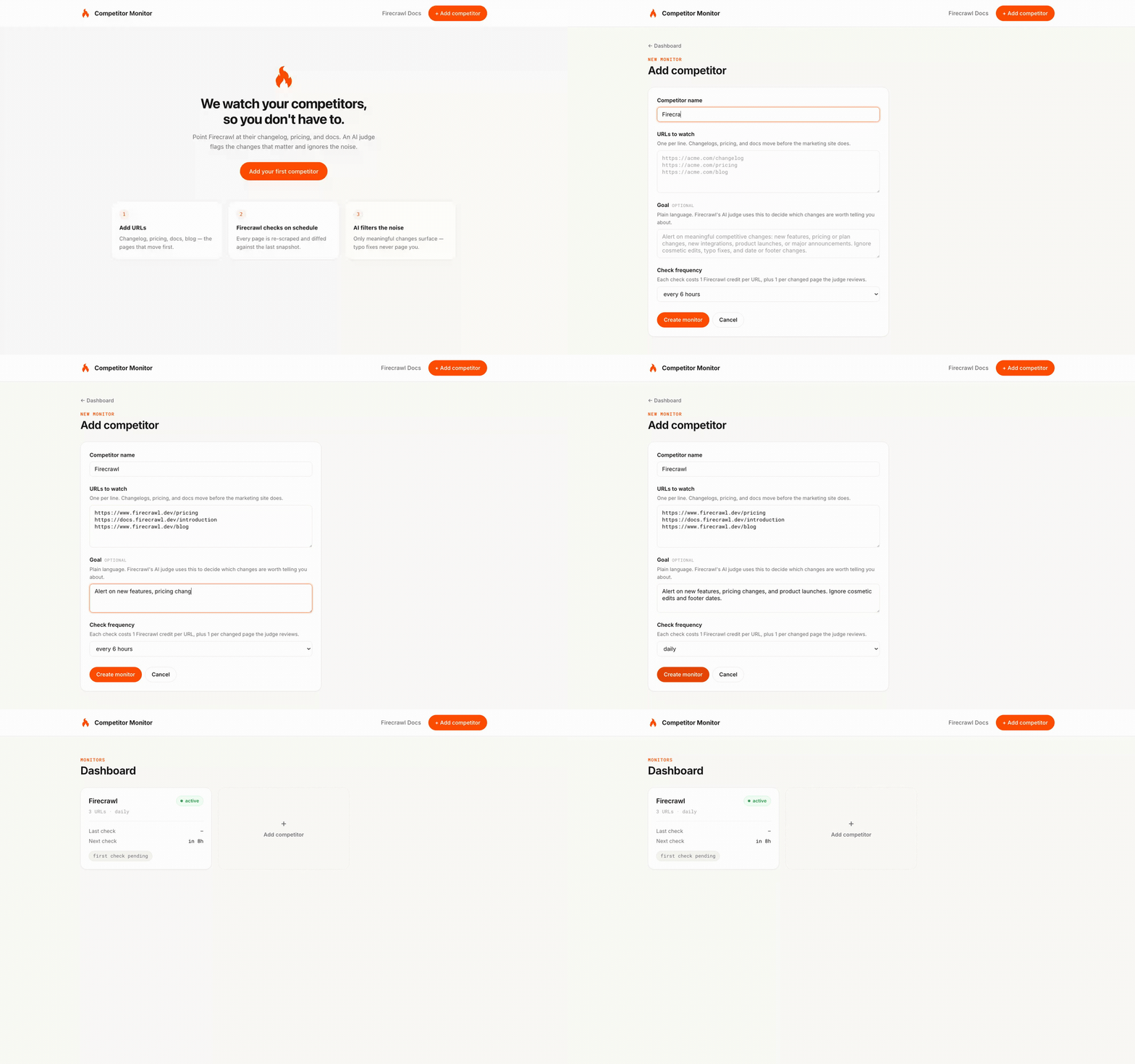
What competitor monitoring actually needs
Good competitor monitoring needs three things:
- Ability to add competitors quickly
- Automated checks on a schedule without human intervention
- An alert only when a human (someone on our marketing team) would agree something changed
A cron job plus a scraper handles the first two, but the filtering signal out of the noise is genuinely hard.
Firecrawl’s monitoring endpoint, fortunately, covers all three. You pass it a URL list, a schedule, and a plain-language goal describing what counts as meaningful. Firecrawl handles the scraping, diffing, and AI judgment on its side.
The only thing I had to build was an SQLite database to store competitors and a Flask app to display results. The code that does the monitoring is barely 30 lines of Python.
For a broader introduction to the monitor endpoint — page monitoring, web-scale search monitoring, AI judging, and webhook delivery — the Firecrawl website monitoring tutorial covers it all from a single scrape target to monitoring the entire web.
Pre-requisites
- A Firecrawl API key from firecrawl.dev. The free tier is enough for everything here. (Or skip the key entirely: with Firecrawl Keyless every developer gets 1,000 free credits a month automatically, and you only sign up when you need more.)
- Install the official Python SDK with pip install firecrawl-py and every snippet below runs as-is.
The same endpoints are plain REST if you'd rather call them directly.
What competitor pages should you consider watching?
The first decision is what to point the monitor at, and manual tracking had already taught us which pages move first. Here’s a simple set of pages you can consider as starting points.
| Page type | Signal | Path to watch |
|---|---|---|
| Changelog / releases | Feature launches | /changelog, /releases, /whats-new |
| Docs | New endpoints before marketing | /docs/api-reference, /docs/sdk |
| Pricing | Tier changes, feature gating | /pricing, /plans |
| Blog | Official positioning | /blog, /case-studies |
Companies generally push endpoint documentation days or weeks before the announcement, so a docs monitor is the earliest signal available.
Setting up your first monitor with Firecrawl
Here are the four steps it took me to set up competitor monitoring with Firecrawl.
Step 1: Create the monitor
First up, we set up the basic monitor. Everything goes into one create_monitor call: the URLs, the schedule, and the goal. I pointed it at our own pricing and changelog pages, so every output you see below is real.
from firecrawl import Firecrawl
firecrawl = Firecrawl(api_key="fc-YOUR-API-KEY")
monitor = firecrawl.create_monitor(
    name="Competitor: Firecrawl",
    schedule={"text": "daily", "timezone": "UTC"},
    goal=(
        "Alert on new features, pricing or plan changes, integrations, "
        "and product launches. Ignore cosmetic edits, typo fixes, "
        "and date or footer changes."
    ),
    targets=[{
        "type": "scrape",
        "urls": [
            "https://www.firecrawl.dev/pricing",
            "https://www.firecrawl.dev/changelog",
        ],
        "scrapeOptions": {
            "formats": ["markdown"],
            "onlyMainContent": True,
            "location": {"country": "US"},
        },
    }],
)
print(monitor.id)
print(monitor.schedule.cron)
print(monitor.estimated_credits_per_month)
print(monitor.judge_enabled)
Output:
019eb10a-2a25-7769-9153-60d9ca79a39c
0 0 * * *
120
True
The create_monitor function hands the whole job to Firecrawl: from here it scrapes both URLs once a day, diffs each one against the last snapshot, and judges anything that changed against my goal.
The goal does most of the work in this payload. What you write here becomes the standing instruction the AI applies to every future diff. So be very specific about what should trigger an alert, state the scope, and only add exclusions when you need them.
Note: You'll notice I have a location pin in the code snippet. Firecrawl routes scrape requests through a proxy pool, so without a pinned location the egress region can vary between checks, and a geo-localized page (currency, language, regional banners) can show up as changed even though nothing really happened.
Step 2: Trigger the first check
You can set up monitors on a schedule, but sometimes you want to run a monitor cycle on demand, especially to get the first crawl for later comparison. That's what the run_monitor function allows you to do:
check = firecrawl.run_monitor(monitor.id)
print(check.id, check.status)
019eb10a-2bbe-7318-9eb0-f1c558147ce3 queuedA few seconds later, my first check was complete, with every page reporting new, because there was no previous snapshot to compare against. Check one establishes the baseline, and diffing starts from check two.
Step 3: Read the results
Once you have the monitor set up and running, you need to be able to read the results, and for that you need the get monitor check function.
detail = firecrawl.get_monitor_check(monitor.id, check.id)
print(detail.summary)
for page in detail.pages:
    print(page.url, page.status)
    if page.judgment:
        j = page.judgment
        print(f"  meaningful={j.meaningful} ({j.confidence}): {j.reason}")
    if page.diff and page.diff.text:
        print(page.diff.text[:500])
total_pages=2 same=1 changed=1 new=0 removed=0 error=0
https://www.firecrawl.dev/changelog same
https://www.firecrawl.dev/pricing changed
meaningful=True (high): The page has updated its pricing display from USD to NOK. …
--- previous
+++ current
@@ -34,7 +34,7 @@ Monthly credits
Custom
-🇺🇸 USD
+🇳🇴 NOKThis was my second check and the pricing page came back changed with the judge returning meaningful: true at high confidence with this full reason:
The page has updated its pricing display from USD to NOK. This includes changes to the currency indicator, specific plan prices, savings amounts, and the addition of a currency conversion disclaimer, all of which fall under the user's goal of monitoring pricing changes.
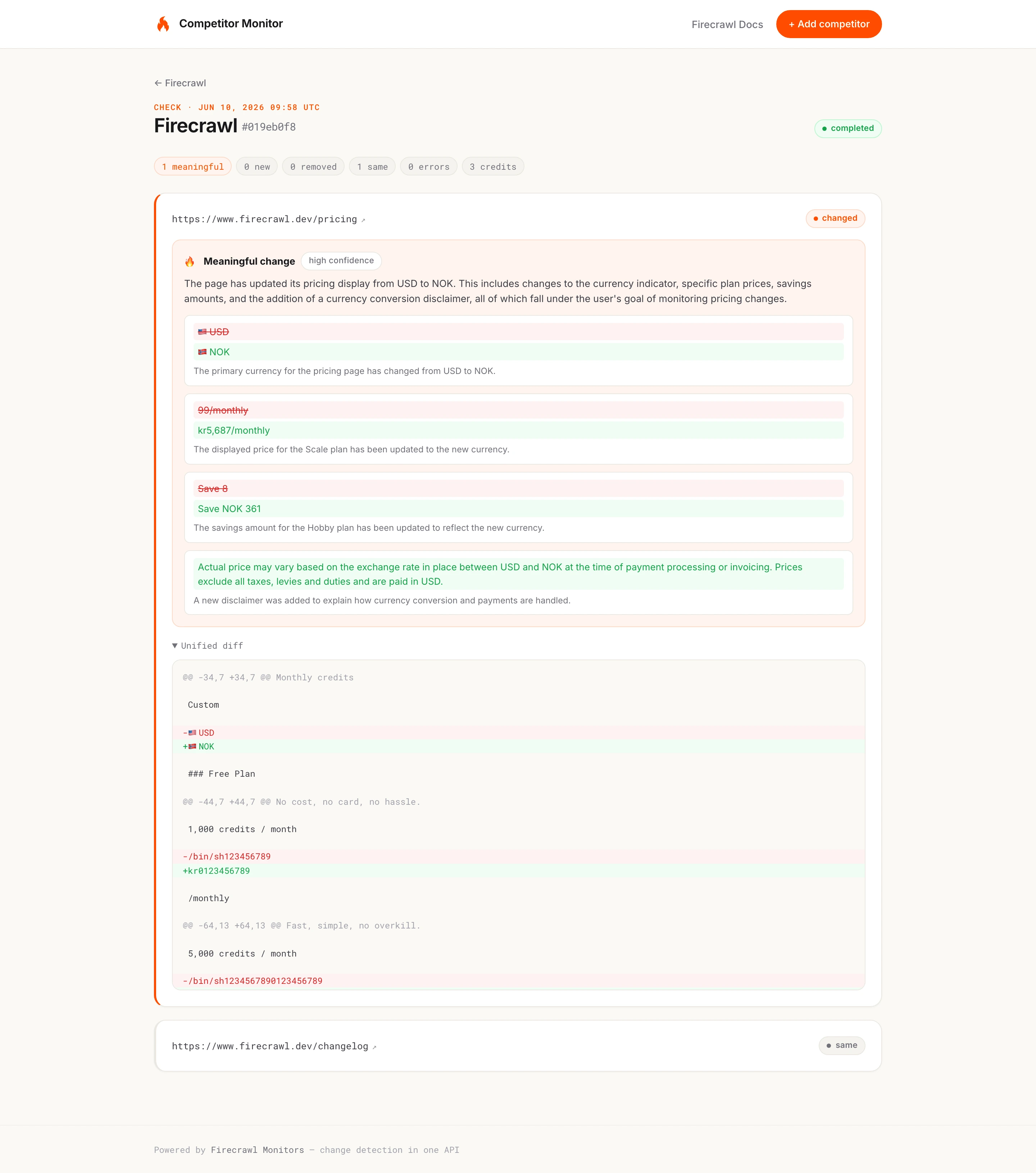
Our pricing didn't actually change, to be clear.
For this demonstration, I let the monitoring endpoint run without a country pin and my request was routed from a Norwegian proxy. The page rendered every price in NOK instead of USD, and the judge tracked that exact change, listing each before and after pair (the currency indicator, the per-plan prices, the savings amounts, the new exchange-rate disclaimer).
Set location.country to NO on a US baseline if you want to reproduce it, and pin it to one country (as the snippet above does) if you never want to see it in production.
Step 4: Wire up notifications
The dashboard I created can use polling because it's a local tool, but if you want to use monitoring in production, I would recommend adding the webhook block to the same create_monitor call and letting Firecrawl push events to the specified URL.
webhook={
    "url": "https://example.com/webhooks/firecrawl",
    "headers": {"Authorization": "Bearer your-secret"},
    "events": ["monitor.page", "monitor.check.completed"],
},
notification={
    "email": {"enabled": True, "recipients": ["alerts@example.com"], "includeDiffs": True},
},
The monitor.page event arrives per page with the diff and judgment inline, and monitor.check.completed carries the summary counts. Email only sends when a check has changed, new, removed, or errored pages. If a check finds no changes, you won't receive an email at all.
What you can build
Here are some ways you can use the monitor endpoint.
| Use case | Monitor targets | Goal | Output |
|---|---|---|---|
| Feature launch alerts | /changelog, /releases | "Alert on new feature or integration launches" | Slack to the product team via monitor.page webhook |
| Pricing intelligence | /pricing, /plans | "Alert when a plan price or included feature changes" | JSON diff with field-level changes |
| Docs monitoring | /docs (crawl target) | "Alert when API behavior or endpoint docs change" | Email digest with diff |
| Competitive positioning | /blog, /case-studies | "Alert when new case studies or use-case pages are added" | Weekly briefing |
Pricing pages are the most common target here, and if that's your focus, our walkthrough on competitor price scraping goes deep on field-level price diffs.
There are two options we haven’t discussed above: content format and crawling URLs.
By default, Firecrawl’s monitor endpoint diffs each page’s markdown and returns same, changed, new, removed, or error. If you specifically need to change the format, you can use the scrapeOptions field in the target and set modes: [“json”].
            "scrapeOptions": {
                "formats": [
                    {
                        "type": "changeTracking",
                        "modes": ["json"],
                        "prompt": "Extract pricing tiers and headline features for each plan.",
                        "schema": Pricing.model_json_schema(),
                    }
JSON mode turns each page into structured data instead of a markdown diff, and if you're weighing options for that, we compared the best web extraction tools separately.
We also have a crawl target option that lets you swap the URL list for one base URL ({"type": "crawl", "url": "https://acme.com/docs", "crawlOptions": {"limit": 100}}), re-crawl the base URL on every check, and diff every page it discovers.
This is an easy way to diff a new endpoint page before anyone has linked to it.
Honestly, you don't even need to set this up with code if you're non-technical. You can use the Firecrawl app dashboard directly to create a monitor and turn on email notifications for when changes are detected. Or you can do what the Firecrawl marketing team does: they run Firecrawl monitoring inside their Claude remote routines hooked up to Slack, which works very smoothly without writing a single line of code. We've written more about Claude Code for marketing if you want to see how those routines come together.
Scaling to multiple competitors
One competitor maps to one monitor, so scaling to ten competitors is just a loop over the same create_monitor call. The rest of our code is going to be just as simple as it was before, but this time with a user interface.
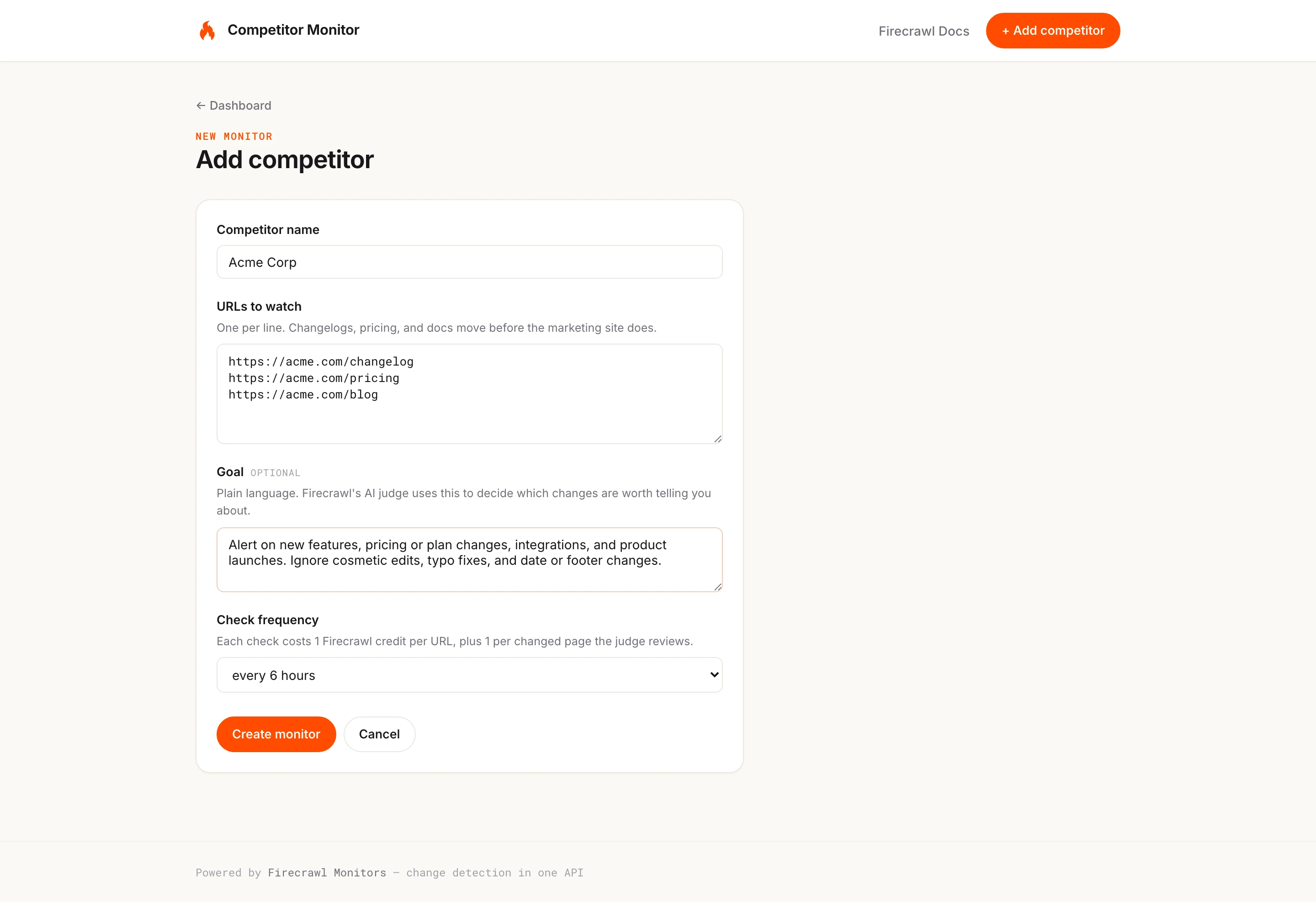
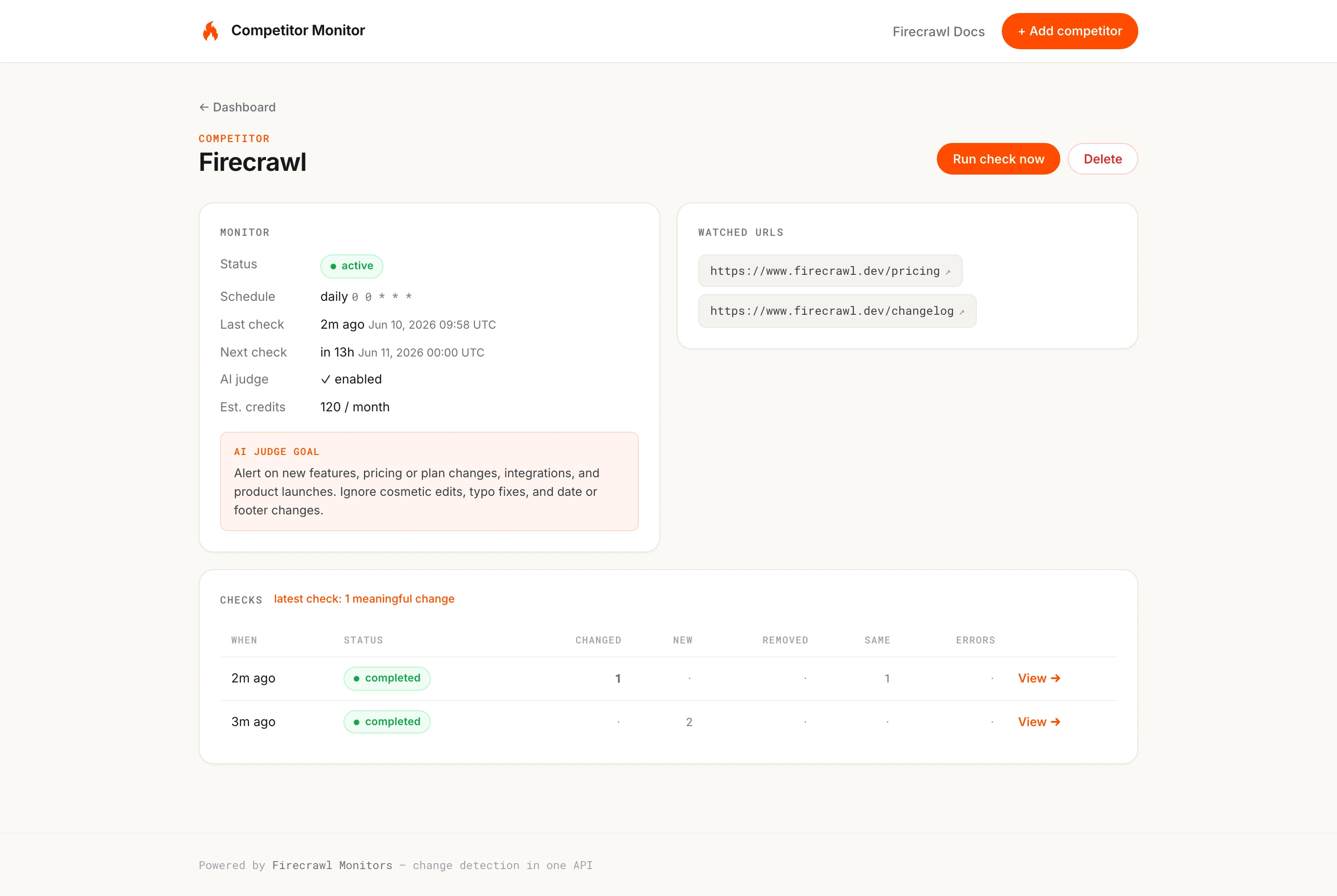
The form I have created above asks for the same information that the create_monitor call requires, and once you create a monitor, you'll see the competitor page with the monitor, the watched URLs, and the check history as shown below.
When to use something else
If you only need to run one scraping call, the monitor endpoint will be overkill. You can use the Firecrawl scrape endpoint for these use cases. And if you want recurring scrapes but not the full monitor stack, you can take on scheduling web scrapers yourself.
Paywalled or login-gated pages are also not supported. The monitor endpoint only handles publicly accessible URLs, so anything behind authentication needs a custom scraping setup before change detection can run.
Grab the code
Repo: https://github.com/ninadpathak/firecrawl-competitor-monitor
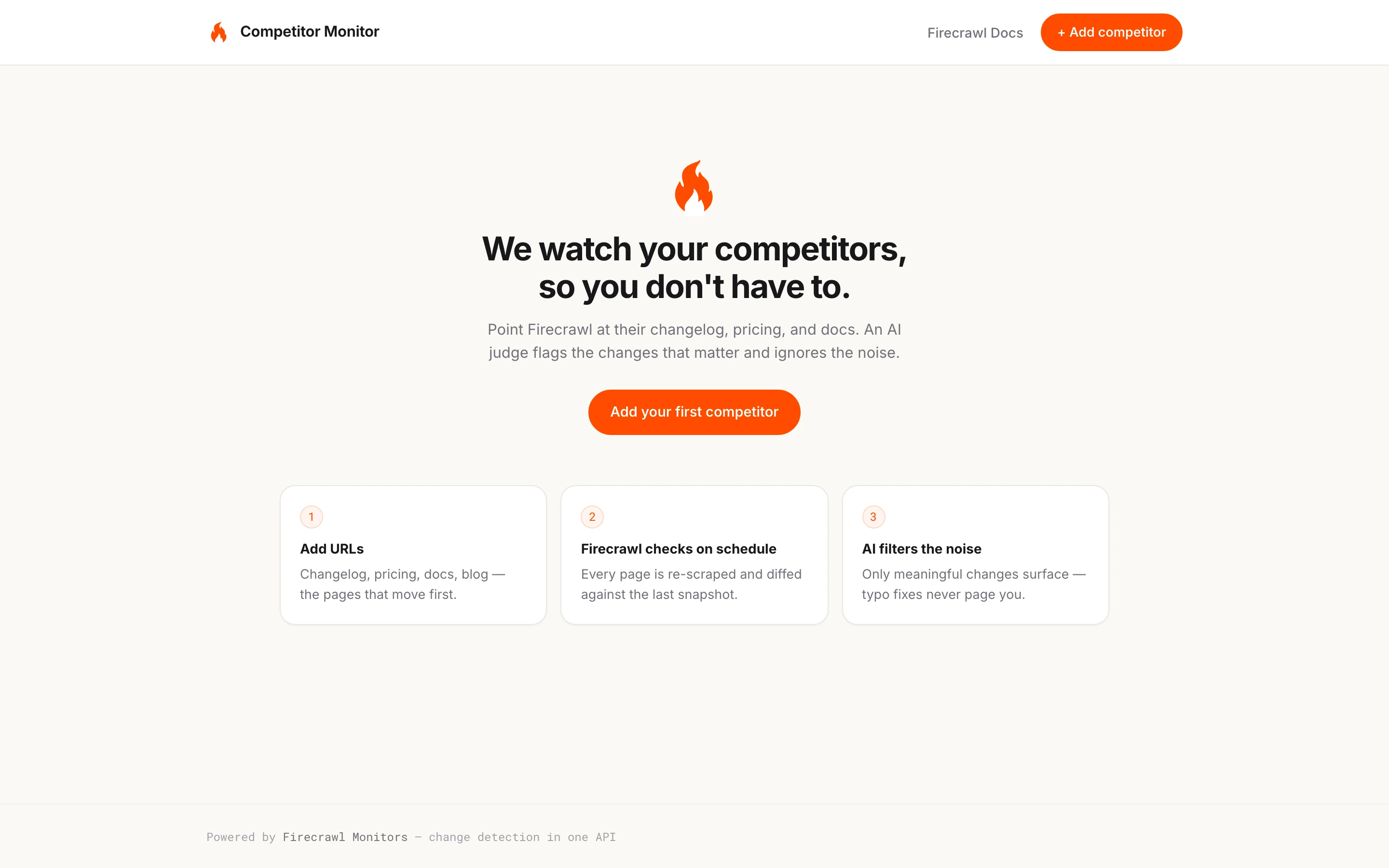
Try this competitor monitoring tool out: point it at the competitors you're tracking by hand today, and write one honest goal per competitor to see it in action.
Frequently Asked Questions
How much does Firecrawl monitoring cost?
Monitors have no separate fee. Each check costs 1 credit per URL for scrape targets (or 1 per discovered page for crawl targets), plus 1 additional credit per changed page the AI judge evaluates. A 2-URL monitor checking daily comes to an estimated 120 credits per month, and checks with no changed pages use no judge credits.
What is the minimum check interval for a Firecrawl monitor?
15 minutes. Schedules accept cron expressions or natural language like every 30 minutes, hourly, or daily at 9am, and the API always returns the normalized cron expression. Text schedules are spread by monitor ID so many monitors do not all fire at the same instant.
Does Firecrawl filter out noise like rotating tokens and timestamps?
Yes, when a monitor has a plain-language goal. An AI judge runs on every changed page and returns a meaningful flag, a confidence level, and a reason. On a real pricing page it correctly tracked a USD to NOK currency switch as meaningful, and it filters out mechanical noise like rotating tokens and footer dates that do not match the goal.
Can a Firecrawl monitor watch an entire docs site instead of fixed URLs?
Yes. A crawl target takes one base URL plus crawl options such as limit and includePaths, runs a full crawl on each check, and diffs every page it discovers. New, removed, and changed pages are all reported, so docs sections can be tracked without listing each page by hand.
How do notifications work with Firecrawl Monitors?
There are two built-in channels. Webhooks, which send a monitor.page event as each page finishes (including the diff and the AI judgment) and a monitor.check.completed event with summary counts, and email summaries that send only when a check has changed, new, removed, or errored pages.
Can a monitor track specific fields like prices instead of whole pages?
Yes. JSON-mode change tracking accepts a JSON schema or prompt describing the fields to extract, then emits a per-field diff keyed by JSON path, such as plans[0].price changing from $19/mo to $24/mo, plus a full snapshot of the current extraction. Mixed mode returns the structured field diff and the raw markdown diff together.
Why does a monitored page show a different currency or language between checks?
Scrape requests route through a proxy pool, and the egress region can vary between checks when no location is set, so geo-localized pages render different currencies or languages and diff as changed. Setting scrapeOptions.location.country (for example to US) on the monitor target pins the region, emulates the matching language and timezone, and keeps every check comparing the same version of the page.