TL;DR
| GLM-5.2 | Kimi K2.7 Code | |
|---|---|---|
| Strengths | Runtime understanding, follows constraints | Algorithmic consistency, clean syntax |
| Weaknesses | Inconsistent problem-solving approach | Runtime-naive, inconsistent constraint-following |
| Scraping latency | 6–39 s | 22–58 s |
| Context window | 1,000,000 tokens | 262,144 tokens |
| Best for | Refactoring, runtime sensitive code | Algorithm implementation, greenfield builds |
| Open source | Yes | Yes |
GLM-5.2 and Kimi K2.7 Code are two of the strongest new AI models to land as open source GPT alternatives and Claude Code alternatives in 2026. Both benchmark near mainstream LLMs like ChatGPT and Claude, and their strengths diverge cleanly: GLM-5.2 grasps the runtime environment and holds constraints, while Kimi K2.7 produces cleaner syntax and more consistent algorithmic solutions.
We ran both coding models across four tasks: web scraping, a calculator build, a calculator refactor, and a Fibonacci function. The goal was not to stress-test these LLMs but to expose how each one actually solves problems.
What is GLM-5.2?
 Source: Z.ai GLM-5.2 docs
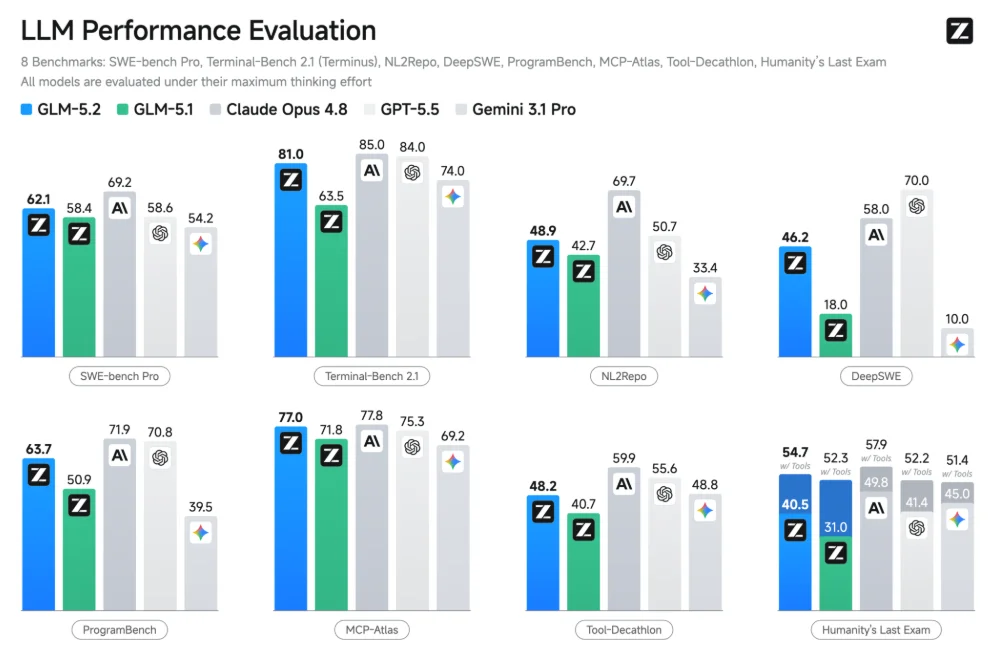
The GLM family of models is provided by Z.ai. GLM-5.2 is their flagship model, and the direct successor to the GLM-4.5 line we covered earlier. Benchmarks cited in their docs put GLM-5.2 within striking distance of better-known LLMs like GPT-5.5 and Claude Opus 4.8 on coding metrics.
According to Composio, GLM-5.2 beat Claude Opus 4.8 and GPT-5.5 on several tasks, and tied on the rest.
-
Context limit: 1,000,000 tokens
-
Thinking Mode: GLM-5.2 can use multiple different "thinking" modes to handle problems with appropriate context.
What is Kimi K2.7 Code?
 Source: Kimi K2.7 Code product page
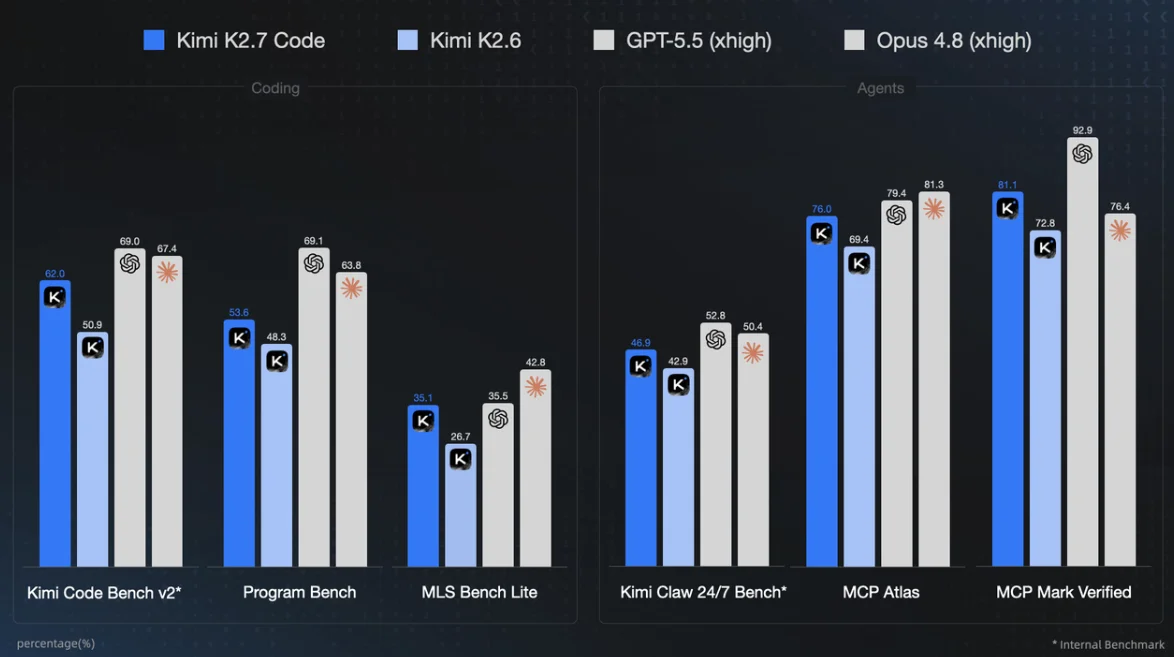
Kimi publishes a full breakdown of K2.7 Code here. The cited benchmarks put it in the same class as GPT and Claude on coding tasks. Moonshot's earlier release, Kimi K2, has already seen real-world app usage.
X user Przemek Chojecki recently posted benchmarks from Ulam ranking Kimi K2.7 near Claude Fable and above GPT-5.5.
-
Context limit: 262,144 tokens
-
Mixture of Experts: This is similar to GLM-5.2's Thinking Mode feature. The model contains a variety of subnetworks, "experts." Prompts are routed to the proper network for better context and more efficient computing.
How do GLM-5.2 and Kimi K2.7 actually approach problems?
Testing will be done via OpenRouter. For web access, we'll use MCP to connect each model to the Firecrawl MCP — one of many MCP servers for developers. Both models will then be tasked with building a calculator, refactoring the calculator, and finally, writing a Fibonacci function.
Rather than run maximum benchmark testing, we'll run tangible tests to see how these models perform under everyday usage. Each test gets measured for latency, input tokens, output tokens, and some other task specific metrics.
We don't just want to know how fast these models are. We want to know how they think.
If you'd like to test them yourself, feel free to create a virtual environment and install the deps. The harness requires Python 3.10 or newer (the mcp package does not support 3.9).
Create a venv instance.
python -m venv .venvActivate on Linux/macOS
source .venv/bin/activateActivate on Windows.
.\.venv\Scripts\Activate.ps1Install the dependencies.
pip install openai "mcp>=1.27,<2"Scraping test
Using the Firecrawl MCP, each model will be required to extract the first page of books from Books to Scrape. Results will be compared against an existing JSON file for grounding. Models are judged on five separate things: valid_json (the model outputs valid JSON as a response), matched_books (the total books extracted by the model that are also in the ground truth file), book_total (on a perfect run, there should be 20), field_matches (total matching fields extracted from the site, maximum of 60), and field_total (total fields extracted from the site, maximum of 60).
This site has been a common benchmark for humans when they need to demonstrate a hard baseline of web scraping efficacy. Here's the prompt given to the AI agent.
Using the firecrawl_scrape tool, scrape {TARGET_URL} "
f"and extract: {FIELDS} for every book on the page. Return only a JSON "
f"array of objects, one per book, with those fields "
'here is some example json [{"title": "A Light in the Attic", "price": "£51.77", "availability": "In stock"}, '
'{"title": "Tipping the Velvet", "price": "£53.74", "availability": "In stock"}] '
Can GLM-5.2 and Kimi K2.7 build a calculator with a GUI?
A GUI calculator tests whether a model can decompose a prompt, wire JavaScript logic to the DOM, and do it in vanilla HTML, CSS, and JS instead of reaching for React. Fluency with the basics is what lets a model (or a person) write performant software when it counts. If it can't build a calculator without a framework, it can't be trusted with real frontend work.
"Build a GUI calculator web app as a single HTML "
"file (inline CSS/JS, no dependencies). Support +, -, *, /, and handle "
"invalid input gracefully. Return only the complete HTML file."
Can GLM-5.2 and Kimi K2.7 refactor the calculator?
A refactor tests whether a model can read a 300 to 600 line single-file codebase, compartmentalize it, and shrink it without losing performance or style. The model cannot think JavaScript in the middle of a CSS rewrite. This is a hard exercise even for humans.
"Refactor the code you just wrote to the minimum "
"necessary for secure, maintainable software: no large if/else/switch "
"chains (use a lookup table), no dead code, no eval() on user input. "
"Return only the complete revised HTML file."
Do GLM-5.2 and Kimi K2.7 memorize solutions or solve problems?
Fibonacci exposes whether a model reasons about algorithms or just remembers common solutions. The sequence is infinite, so no model can memorize it end to end. The only way to compute an arbitrary F(n) is to understand the recurrence.
The rule is F(n) = F(n-1) + F(n-2), with base cases F(0) = 0 and F(1) = 1. From there:
F(2) = F(1) + F(0) = 1F(3) = F(2) + F(1) = 2F(4) = F(3) + F(2) = 3F(5) = F(4) + F(3) = 5
Aside from 0 and 1, there is no way to produce a value without recursively calling F() on smaller inputs.
True expression of the algorithm is memoization; a fake expression relies on memorization. A competent coding model writes a recursive function with a cache. We check by counting how many times the function is called when computing F(30). A memoized implementation stays roughly linear in n; naive recursion is exponential.
This is not a Python baseline test. Coding models have handled single-function Python well since before ChatGPT shocked the world in 2023. We also expect a docstring, which is a short string of text explaining the function. We are not judging the docstring's quality, only that it exists.
"Write a Python function returning the nth Fibonacci "
"number using memoization. Include a brief docstring. Return only code."
The test code
Below is the full code for testing. Make sure to swap the placeholders with your own API keys for Firecrawl and OpenRouter.
"""GLM-5.2 vs Kimi K2.7 Code harness. pip install openai "mcp>=1.27,<2" """
import json, time, os, csv, asyncio
from openai import OpenAI
from mcp.client.streamable_http import streamablehttp_client
from mcp import ClientSession

client = OpenAI(base_url="https://openrouter.ai/api/v1", api_key="<your-openrouter-api-key>", timeout=60.0)


MODELS = {"glm-5.2": "z-ai/glm-5.2", "kimi-k2.7-code": "moonshotai/kimi-k2.7-code"}
FIRECRAWL_MCP_URL = "https://mcp.firecrawl.dev/v2/mcp"
FIRECRAWL_API_KEY = "<your-firecrawl-api-key>"

TARGET_URL, FIELDS = "books.toscrape.com", "title, price, availability"
GROUND_TRUTH = json.load(open("ground_truth.json", encoding="utf-8"))

RUN_ID = time.strftime("%Y%m%d_%H%M%S")
RUN_DIR = f"runs/{RUN_ID}"
CSV_PATH = "overall_results.csv"
CSV_FIELDS = ["run_id", "model", "task", "latency_sec", "input_tokens",
              "output_tokens", "valid_json", "matched_books", "book_total",
              "field_matches", "field_total", "runs", "error", "correct",
              "has_docstring", "fib30_calls", "memoized"]

TASKS = [
    #scrape a url using firecrawl mcp
    ("firecrawl_scrape", f"Using the firecrawl_scrape tool, scrape {TARGET_URL} "
     f"and extract: {FIELDS} for every book on the page. Return only a JSON "
     f"array of objects, one per book, with those fields "
     'here is some example json [{"title": "A Light in the Attic", "price": "£51.77", "availability": "In stock"}, '
     '{"title": "Tipping the Velvet", "price": "£53.74", "availability": "In stock"}] '),

    #build a calculator that runs client side in the browser
    ("calculator_build", "Build a GUI calculator web app as a single HTML "
     "file (inline CSS/JS, no dependencies). Support +, -, *, /, and handle "
     "invalid input gracefully. Return only the complete HTML file."),

    #refactor the calculator
    ("calculator_refactor", "Refactor the code you just wrote to the minimum "
     "necessary for secure, maintainable software: no large if/else/switch "
     "chains (use a lookup table), no dead code, no eval() on user input. "
     "Return only the complete revised HTML file."),

    #fibonacci test
    ("fibonacci", "Write a Python function returning the nth Fibonacci "
     "number using memoization. Include a brief docstring. Return only code."),
]


#save task output to an html file inside this run's own directory
def save_html(label, task, content):
    text = content.strip()
    if text.startswith("```"):
        text = text.split("\n", 1)[1].rsplit("```", 1)[0]  # strip code fences
    os.makedirs(RUN_DIR, exist_ok=True)
    path = f"{RUN_DIR}/{label}_{task}.html"
    open(path, "w", encoding="utf-8").write(text)
    print("saved", path)


#score a scrape result against ground truth, field by field
def score_scrape(content):
    text = content.strip()
    if text.startswith("```"):
        text = text.split("\n", 1)[1].rsplit("```", 1)[0]
    try:
        scraped = json.loads(text)
    except json.JSONDecodeError:
        return {"valid_json": False, "matched_books": 0, "field_matches": 0, "field_total": 0}

    by_title = {b.get("title"): b for b in scraped if isinstance(b, dict)}
    field_matches = field_total = matched_books = 0
    for truth in GROUND_TRUTH:
        entry = by_title.get(truth["title"])
        if entry is None:
            field_total += len(truth)
            continue
        book_correct = all(entry.get(k) == v for k, v in truth.items())
        matched_books += book_correct
        for k, v in truth.items():
            field_total += 1
            field_matches += entry.get(k) == v

    return {"valid_json": True, "matched_books": matched_books,
            "book_total": len(GROUND_TRUTH), "field_matches": field_matches,
            "field_total": field_total}


#extract and run the fibonacci function, checking correctness + real memoization
def score_fibonacci(content):
    text = content.strip()
    if text.startswith("```"):
        text = text.split("\n", 1)[1].rsplit("```", 1)[0]

    namespace = {}
    try:
        exec(text, namespace)
    except Exception as e:
        return {"runs": False, "error": str(e)[:200]}

    name = next((k for k, v in namespace.items()
                 if callable(v) and "fib" in k.lower()), None)
    if name is None:
        return {"runs": False, "error": "no fibonacci function found"}

    expected = {0: 0, 1: 1, 10: 55, 20: 6765}
    try:
        correct = all(namespace[name](n) == v for n, v in expected.items())
    except Exception as e:
        return {"runs": False, "error": str(e)[:200]}

    # wrap the function under its own name so every recursive self-call,
    # which is resolved by name lookup at call time, gets counted too
    calls = [0]
    original = namespace[name]
    def counted(*args, **kwargs):
        calls[0] += 1
        return original(*args, **kwargs)
    namespace[name] = counted
    result = counted(30)
    n = 30
    # generous bound: real memoization (recursive-with-cache or iterative)
    # stays roughly linear in n; naive recursion is exponential and blows past it
    memoized = calls[0] <= 5 * n + 10

    return {
        "runs": True,
        "correct": correct,
        "has_docstring": bool(getattr(original, "__doc__", None)),
        "fib30_calls": calls[0],
        "memoized": memoized,
    }


#append one task's metrics as a row to the cumulative CSV (across all runs)
def append_csv_row(meta):
    row = {k: meta.get(k) for k in ("model", "task", "latency_sec",
                                     "input_tokens", "output_tokens")}
    row["run_id"] = RUN_ID
    row.update(meta.get("score", {}))  # flattens scrape-score fields if present
    is_new = not os.path.exists(CSV_PATH)
    with open(CSV_PATH, "a", newline="") as f:
        writer = csv.DictWriter(f, fieldnames=CSV_FIELDS)
        if is_new:
            writer.writeheader()
        writer.writerow(row)


#basic model call wrapper
def call_model(model_id, messages, tools=None):
    start = time.time()
    kwargs = {"model": model_id, "messages": messages}
    if tools:
        kwargs["tools"] = tools
    resp = client.chat.completions.create(**kwargs)
    usage = resp.usage
    return resp.choices[0].message, {
        "input_tokens": usage.prompt_tokens,
        "output_tokens": usage.completion_tokens,
        "latency_sec": round(time.time() - start, 2),
    }

#run scrape a site using firecrawl
async def run_firecrawl_task(model_id, prompt):
    print("  connecting to firecrawl mcp...")
    headers = {"Authorization": f"Bearer {FIRECRAWL_API_KEY}"}
    async with streamablehttp_client(FIRECRAWL_MCP_URL, headers=headers) as (read, write, _):
        async with ClientSession(read, write) as session:
            await session.initialize()
            print("  listing tools...")
            listed = await session.list_tools()
            tools = [{"type": "function", "function": {
                "name": t.name, "description": t.description, "parameters": t.inputSchema}}
                for t in listed.tools]

            print("  calling model (initial)...")
            history = [{"role": "user", "content": prompt}]
            msg, meta = call_model(model_id, history, tools=tools)
            history.append(msg)
            for tc in msg.tool_calls or []:
                print(f"  calling tool: {tc.function.name}...")
                result = await session.call_tool(tc.function.name, json.loads(tc.function.arguments))
                history.append({"role": "tool", "tool_call_id": tc.id, "content": result.content[0].text})
            if msg.tool_calls:
                print("  calling model (final, with tool result)...")
                msg, meta2 = call_model(model_id, history)
                meta["latency_sec"] += meta2["latency_sec"]
            return msg.content, meta


#loop through the model tasks
def main():
    results = []
    for label, model_id in MODELS.items():
        history = []
        for task, prompt in TASKS:
            if task == "firecrawl_scrape":
                content, meta = asyncio.run(run_firecrawl_task(model_id, prompt))
                meta["score"] = score_scrape(content)
            else:
                history.append({"role": "user", "content": prompt})
                msg, meta = call_model(model_id, history)
                content = msg.content
                history.append({"role": "assistant", "content": content})
            meta.update(task=task, model=model_id, content=content)
            if task == "fibonacci":
                meta["score"] = score_fibonacci(content)
            results.append(meta)
            print(label, task, meta["latency_sec"], "s")
            if task in ("firecrawl_scrape", "fibonacci"):
                print("  score:", meta["score"])
            if task in ("calculator_build", "calculator_refactor"):
                save_html(label, task, content)
            append_csv_row(meta)
            if task != "calculator_build":
                history = []  # reset context except going into the refactor step

    #save this run's full metadata inside its own directory too
    os.makedirs(RUN_DIR, exist_ok=True)
    json.dump(results, open(f"{RUN_DIR}/results.json", "w"), indent=2)
    print(f"Saved {RUN_DIR}/results.json and appended to {CSV_PATH}")


if __name__ == "__main__":
    main()
How did GLM-5.2 and Kimi K2.7 perform across these various tests?
How did the models handle scraping?
 Source: overall_results.csv
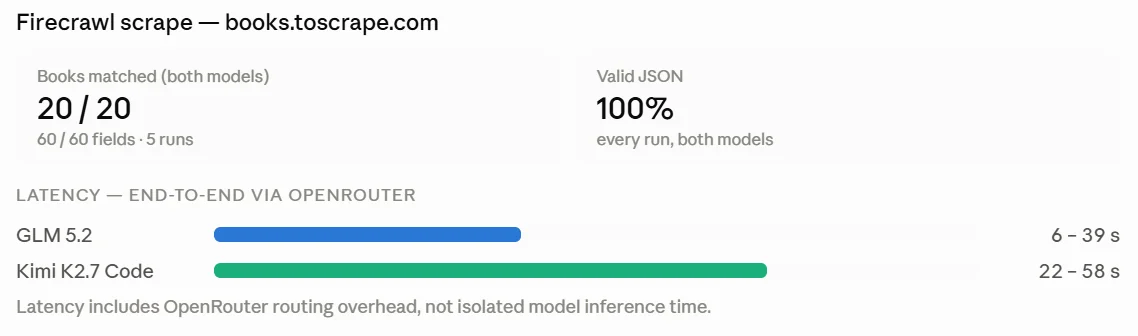
When scraping, both models were proficient. They extracted 20/20 products on five separate runs each. Their only real difference was in latency. GLM-5.2 ranged between 6 and 39 seconds when scraping the page. Kimi K2.7 took between 22 and 58 seconds to perform the exact same task. The Firecrawl MCP distills page size for more digestible inputs. Using the MCP, the average input tokens were about 15,000, well within the context limits of both models.
Both of these models demonstrate the ability to extract data consistently from web pages. Their only variance was the speed at which they do so.
How did the models build and refactor a calculator?
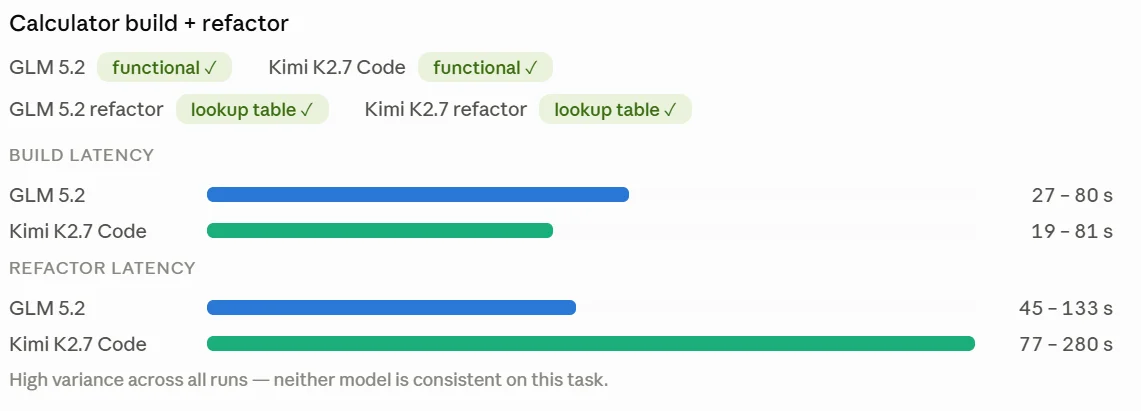 Source: overall_results.csv
GLM-5.2
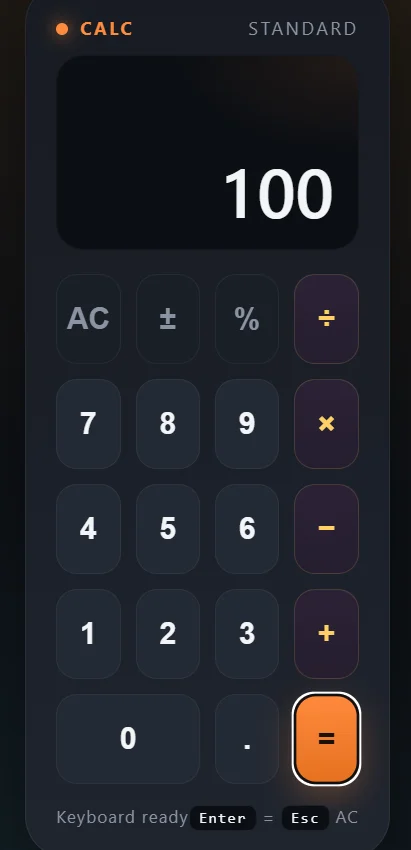
Its code was initially over 500 lines. Here's its compute() function. It's a perfectly valid calculator built on top of a switch statement.
function compute(a, b, op) {
  let x = Number(a),
    y = Number(b);
  if (!isFinite(x) || !isFinite(y)) return null;
  let r;
  switch (op) {
    case "+":
      r = x + y;
      break;
    case "-":
      r = x - y;
      break;
    case "*":
      r = x * y;
      break;
    case "/":
      if (y === 0) return null; // division by zero
      r = x / y;
      break;
    default:
      return null;
  }
  if (!isFinite(r)) return null;
  // round to avoid floating noise
  r = Math.round(r * 1e12) / 1e12;
  return r;
}
The refactor cut the codebase to 217 lines. What's really interesting, it decided the switch statement above qualified as "too big." It reframed its approach and built a lookup table.
const OPERATIONS = {
  "+": (a, b) => a + b,
  "-": (a, b) => a - b,
  "*": (a, b) => a * b,
  "/": (a, b) => (b === 0 ? null : a / b),
};
Despite removing 300 lines of code, the refactored calculator still looks like a calculator and handles user operations as it should.
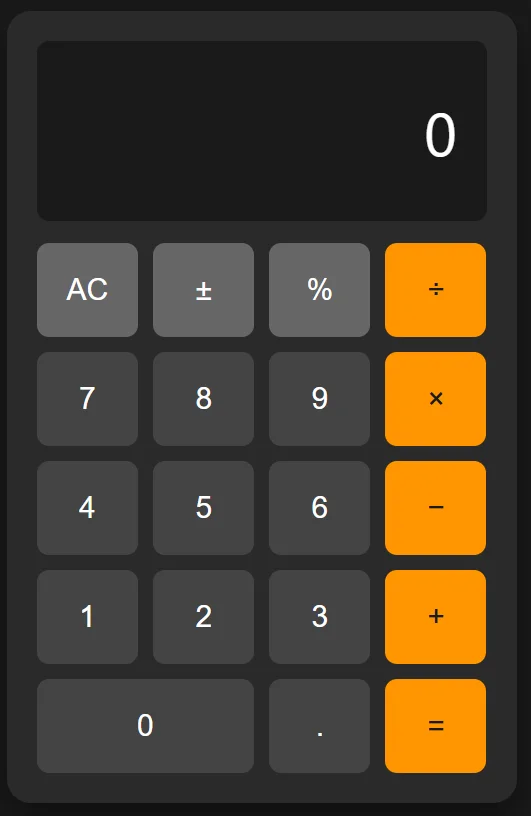
Kimi K2.7
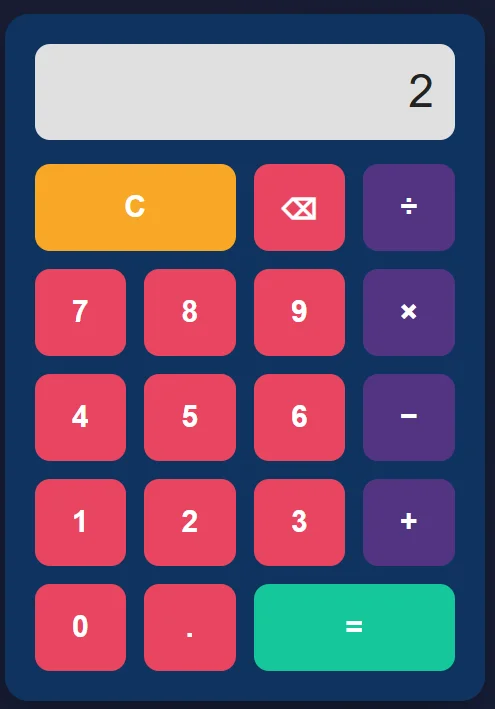
Kimi K2.7 tells a different story. Its first choice was to embed new Function() inside the UI. This technically works and completes the job as required. It just does not make much sense for an operation that gets called over and over.
JavaScript runs on a Just In Time (JIT) compiler. Functions get compiled once, and the resulting bytecode gets reused on every call. Embedding new Function() inside calculate() forces a fresh compile every time the user hits equals.
It looks pretty, but this reflects a disconnect. K2.7 knows what good code "looks" like. It does not have a solid grasp of the engineering behind the runtime environment. In a locally hosted calculator, this isn't a big deal. If you're building performance intensive apps, this can be a deal breaker for some teams.
function calculate() {
  const raw = display.value.trim();
  if (!raw) return;

  if (!/^[0-9+\-*/.()]+$/.test(raw)) {
    display.value = "Error";
    return;
  }

  try {
    const result = new Function("return (" + raw + ")")();

    if (!Number.isFinite(result)) {
      display.value =
        result === Infinity || result === -Infinity ? "Cannot divide by zero" : "Error";
      return;
    }

    display.value = String(result);
  } catch (err) {
    display.value = "Error";
  }
}
The refactor is stranger. The design decisions improve on the first attempt: instead of embedding new Function() inside the calculate function, K2.7 built a small recursive-descent parser with anonymous inner functions. Given the JIT constraint, this is closer to the right shape.
The line count went the wrong way. The refactored file grew from 169 to 222 lines, a direct violation of the prompt's request for the minimum necessary for secure, maintainable software.
function evaluate(input) {
  const tokens = tokenize(input);
  let i = 0;

  const current = () => tokens[i];
  const next = () => tokens[i++];

  const expression = () => {
    let value = term();
    while (current() && (current().value === "+" || current().value === "-")) {
      const op = next().value;
      value = op === "+" ? value + term() : value - term();
    }
    return value;
  };

  const term = () => {
    let value = factor();
    while (current() && (current().value === "*" || current().value === "/")) {
      const op = next().value;
      if (op === "*") {
        value *= factor();
      } else {
        const divisor = factor();
        if (divisor === 0) throw new Error("Cannot divide by zero");
        value /= divisor;
      }
    }
    return value;
  };

  const factor = () => {
    const token = current();
    if (!token) throw new Error("Unexpected end");

    if (token.type === "number") {
      next();
      return token.value;
    }
    if (token.value === "+") {
      next();
      return factor();
    }
    if (token.value === "-") {
      next();
      return -factor();
    }
    if (token.value === "(") {
      next();
      const value = expression();
      if (!current() || current().value !== ")") throw new Error("Missing )");
      next();
      return value;
    }

    throw new Error("Invalid syntax");
  };

  const result = expression();
  if (i < tokens.length) throw new Error("Unexpected token");
  return result;
}
Kimi K2.7 writes syntactically correct JavaScript. It's pretty to look at. However, its output in both the original build and the refactor prioritizes syntax and edge cases rather than for raw implementation. This is especially true when you compare these outputs to the ones from GLM-5.2.
How did the models solve Fibonacci?
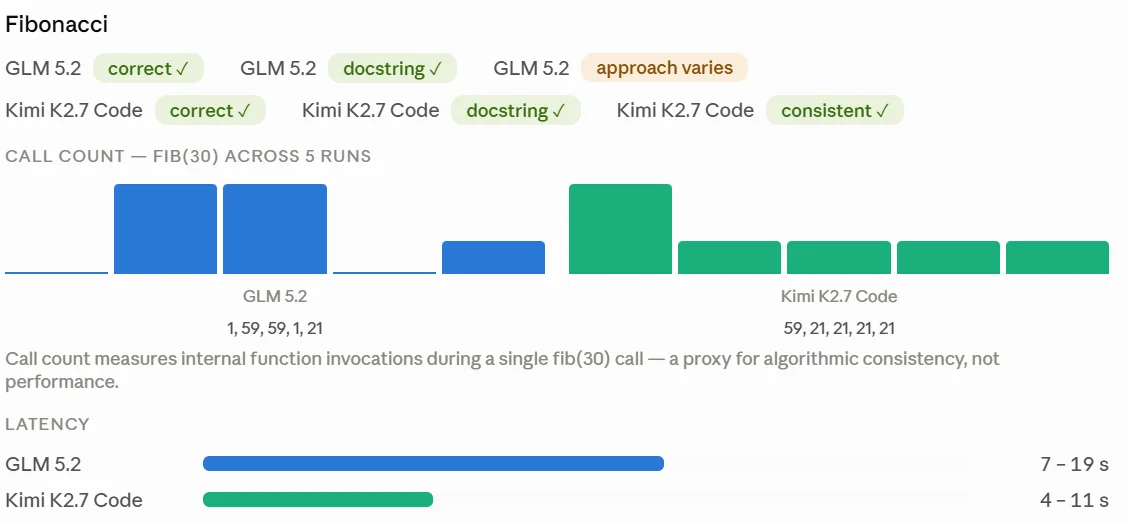 Source: overall_results.csv
The Fibonacci results were decent for both models. Both models used docstrings. Both models generated Fibonacci sequencers. However, K2.7 did show more consistency. When we call fib(30), we expect to see recursion calls. Kimi showed 59 recursive invocations on the first run and 21 on every run afterward. GLM was weirder: 1, 59, 59, 1, 21. This likely reflects an inconsistent solution. Its first and fourth Fibonacci algorithms produced a single invocation when calling fib(30). This is indicative of either a lookup table or memorization. Neither implementation would be memoization. However, the other runs (59, 59, 21) show evidence of real recursion and therefore memoization.
On algorithmic thinking, Kimi K2.7 is more consistent than GLM-5.2. The calculator results point the same way: Kimi's training data likely leans on traditional exercises like LeetCode. It handles algorithms cleanly but does not reason about the environment executing them. GLM-5.2 grasps the runtime and sometimes cuts corners on the algorithmic side.
Which model should you pick?
Both models handle everyday coding work. Pick GLM-5.2 for engineering-heavy tasks: its 1M token context window and runtime awareness make it the better refactoring and repo-analysis tool. Pick Kimi K2.7 Code for clean algorithmic implementation and greenfield builds where syntactic quality matters more than runtime nuance. Both scrape the web reliably. If you'd rather compare against a broader field, see our roundup of the best AI coding agents.
Frequently Asked Questions
What are the architectures of GLM-5.2 and Kimi K2.7 Code?
GLM-5.2 is a Mixture-of-Experts (MoE) model with approximately 744 billion total parameters, while Kimi K2.7 Code features a 1 trillion parameter MoE architecture with 32 billion active parameters per token. Both models use MoE to balance high total parameter counts with manageable inference costs.
How can I use Firecrawl with these AI models?
Both of these models support MCP (Model Context Protocol) for access to external tools. With the Firecrawl MCP, each model gets access to unique features like search, scrape, parse, and deep research.
What is the licensing for GLM-5.2 and can it be used commercially?
GLM-5.2 is released under the MIT License, a fully permissive open source license. It permits commercial use, modification, and self hosting without restrictions. This license applies to its open weights, making it highly accessible for enterprises.
What are the context window sizes for GLM-5.2 and Kimi K2.7 Code?
GLM-5.2 offers a 1,000,000 token context window, built to input full code repositories in a single pass. Kimi K2.7 Code supports a context length up to 262,144 tokens. It's good for coding tasks and complex agentic workflows.
How can I run GLM-5.2 and Kimi K2.7 Code on local hardware?
Both models can be run locally using tools like Unsloth and vLLM. However, the hardware requirements are substantial. Even for suboptimal performance, each model requires over 200GB of RAM.
Does GLM-5.2 have different reasoning or 'thinking' modes?
Yes, GLM-5.2 features three distinct thinking modes: Non-thinking, High Thinking, and Max Thinking. Users can select Max Thinking for complex tasks requiring deeper reasoning. Non-thinking mode is suitable for more straightforward queries.
What makes these models suitable for agentic tasks?
Both models are specifically trained for complex workflows and reasoning. They are built to analyze repos and perform complex debugging.