TL;DR
- OCR has been "reading" characters since the 1800s. Deep learning largely solved raw accuracy on clean text by the 2010s. Semantic understanding of document structure struggled long after.
- Traditional OCR is one flat pass: Input image -> Output text. Catching issues and minor imperfections is tedious. At scale, it's very difficult for humans to review every portion of an OCR text.
- Agentic OCR adds a loop to the extraction process. An AI agent evaluates output, and either accepts it, corrects it, or sends it back for another look.
- The evaluation loop is the actual differentiator. The LLM isn't guessing text from context alone. The agent can go back and re-examine the source.
- Agentic OCR is capable of addressing backlogs all over the place, such as healthcare records, banking archives, government paperwork, even ancient texts like undeciphered cuneiform tablets.
- Firecrawl's /parse is a fast, vision-model-powered OCR engine on its own. Wrapping an agent around it (evaluate, correct, or retry) gives your team an agentic pipeline.
- We built a barebones agent (no memory, no fine-tuning) and it caught a real OCR mistake. It then produced a useful summary on a genuinely hard document (a 1929 bilingual Greek/English text), on just five pages of over 500.
What is OCR?
Optical Character Recognition (OCR) is a process that extracts text from images and converts it into machine-readable data. It's the technology that turns a scanned invoice, a photographed page, or a screenshot into text a computer can search, edit, and process.
On X, Firecrawl recently announced that they've open sourced their PDF parsing engine, pdf-inspector. You can read more about it below.
A brief history of OCR
OCR predates the computer. The core idea (turn images of text into a machine-usable signal) was in prototypes by the 1870s, long before it became office equipment in the 1990s. Here's the timeline.
- 1870: Charles Carey invents the retina scanner.
- 1884: The Nipkow disk was patented. This image scanning device would later power the worlds first TVs. Most mechanical scanners later used disk-powered scanning.
- 1912: The optophone was first prototyped. This device could scan text images and output chord sounds corresponding to different characters on a page. While not full OCR, the workflow was taking shape: Input text -> generate an output.
- 1929: Gustav Tauschek invented the Reading Machine. While this device was mechanical, a user could input a document. The machine would then scan characters from a document and match them to characters on a disk.
- 1951: GISMO was invented. This device could scan all 26 alphabetic characters and convert them into machine code. A machine interpreting the code could then output them as text or audio.
- 1976: Ray Kurzweil released the Kurzweil Reading Machine for the Blind. Kurzweil's company went on to make numerous breakthroughs in both AI and in helping sensory impaired people. He went on to write several books from the 1980s to 2000s outlining the concepts we use to power AI agents today.
- 1980s-1990s: Document scanners saw massive adoption, eventually becoming a requirement in many offices around the world.
- 2005: HP and the University of Nevada, Las Vegas released Tesseract as open source. Google took over sponsorship of its development in 2006. Anyone could now view the code and architecture powering OCR software around much of the world.
- 2010s: Deep learning sees a variety of advances. This laid the foundations of modern AI training.
- 2020s-present: High quality computer vision and text models become generally available to the average consumer.
In 2020, many offices were still using scanners and even photocopiers. By late 2024, anybody could upload an image file to GPT-4o and the model could interpret nearly everything (text, objects, people, animals) within the image. Today, anyone with a mobile phone can run image recognition workflows for a fraction of a penny.
What is agentic OCR?
Agentic OCR is document reading with an AI agent in the loop. Instead of running a single OCR pass and shipping whatever comes out, an agent sits between the OCR engine and the final document.
It evaluates each extracted chunk, decides whether it looks right, and can re-examine the source, switch models, or apply corrections before writing the result. The agent isn't just recognizing characters. It's reasoning about layout, meaning, and its own confidence, then acting on that judgment.
The practical difference: traditional OCR gives you text and hopes for the best. Agentic OCR gives you text plus a system that knows when it's unsure and does something about it.
What the loop looks like
A traditional OCR workflow is a straight line: image goes in, text comes out.
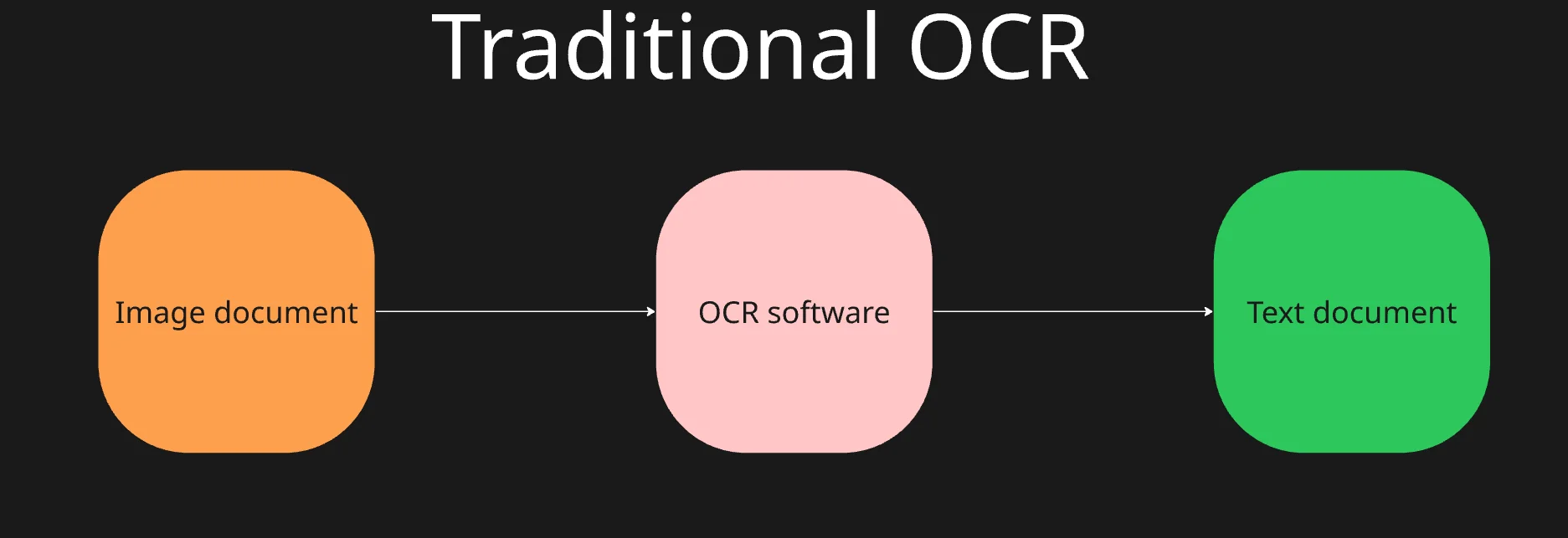
Agentic OCR routes that same input through an agent. The document goes to the OCR engine, the output comes back to the agent, and the agent decides what to do with it: accept, correct, or send it back for another pass.
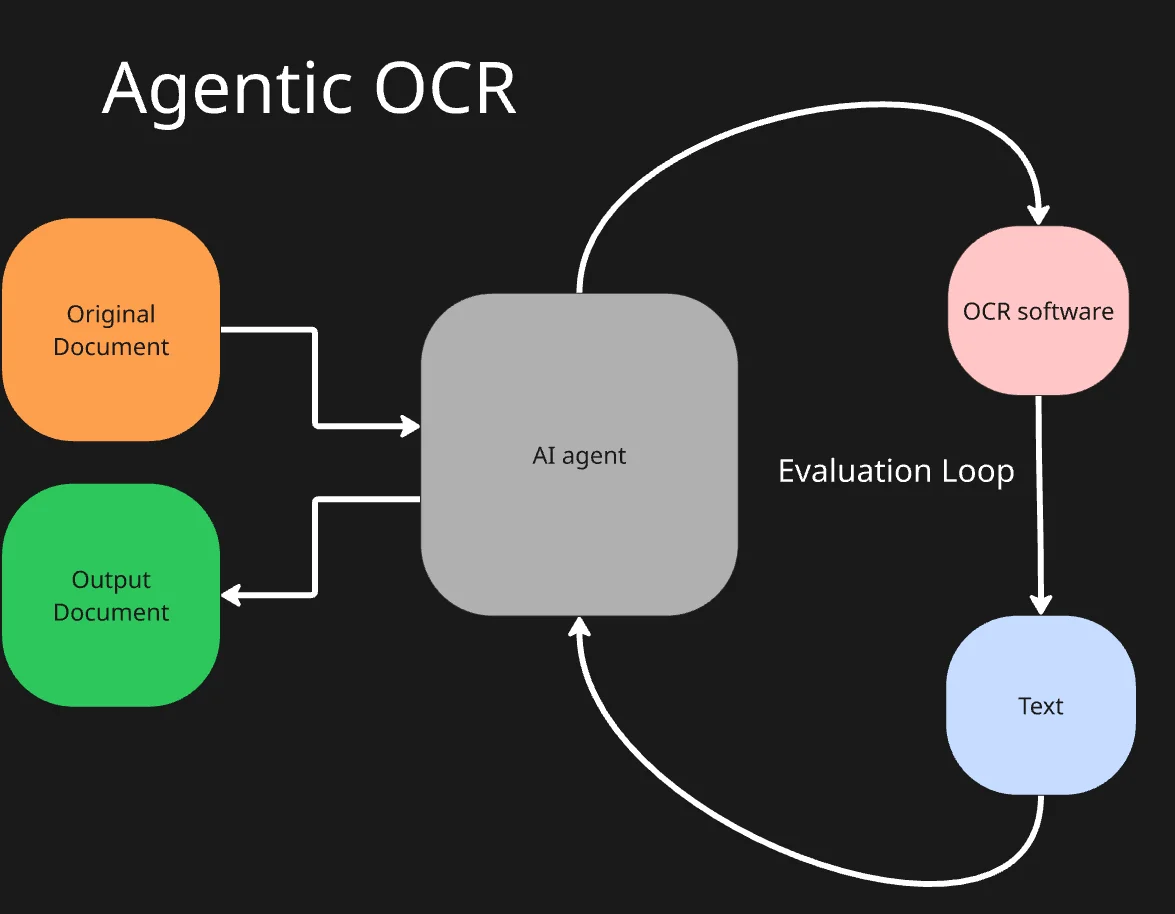
Take the word "aegean," as in the "Aegean Sea." A poorly scanned image might come out of traditional OCR as "age an sea" or "aeg ean sea." An agent can read that, recognize "Aegean Sea" as the intended phrase from context, and either patch it or ask the OCR engine to retry with different parameters. If you've ever made a typo mid-sentence to a chatbot and still gotten a useful response, you've already seen the same mechanism at work.
Agentic OCR vs. Traditional OCR vs. IDP
These three terms get used interchangeably, but they describe different generations of document processing. Here's how they actually differ:
- Traditional OCR: Pixel to character conversion. A single linear pass that matches character shapes against a known set. It has no understanding of what a document is, only what letters appear on it. Works well on clean, consistent formats. Fails on layout changes, tables, handwriting, and anything degraded.
- Intelligent Document Processing (IDP): OCR plus a layer of machine learning for classification and entity extraction. It knows an invoice from a receipt, and it can pull "vendor name" or "total" if it has seen enough examples. But it still runs a fixed pipeline, still needs training data per document type, and still routes exceptions to a human queue.
- Agentic OCR: Adds a reasoning loop on top. An AI agent evaluates the output, decides whether it looks right, and can re-examine the source, switch models, or correct itself before shipping the result. Instead of a one-shot pipeline, the extraction becomes a task the agent keeps working on until it converges.
The short version: traditional OCR reads characters. IDP labels them. Agentic OCR checks its own work.
| Capability | Traditional OCR | IDP | Agentic OCR |
|---|---|---|---|
| Core operation | Character recognition | OCR plus ML classification | Reasoning loop over extraction |
| Handles layout changes | Poorly | Somewhat, with retraining | Adapts on the fly |
| Tables and multi-column pages | Flattens into text | Partial reconstruction | Preserves structure |
| Handwriting | Weak | Better with ICR add-ons | Vision language models push accuracy further |
| Error correction | None | Manual review queue | Self-corrects, escalates only when unsure |
| Setup for a new format | New template | Days of retraining | Minutes, sometimes zero |
| Output | Flat text | Structured fields | Structured data with provenance |
The gap that matters most is the last row. Traditional OCR gives you text. IDP gives you fields. Agentic OCR gives you an answer you can trace back to a specific page, along with a system that flags itself when it isn't sure.
Where is agentic OCR being used today?
Agentic OCR is being applied wherever old, messy, or high-volume document backlogs pile up: healthcare, banking, government, and historical archives. Anywhere OCR was tried once, produced garbage, and got shelved. If you ever want to see the raw output, try reading an OCR book from Wikisource. It won't fail to disappoint.
- Healthcare: Some healthcare companies have been keeping records for a century, maybe more.
- Banking: Modern banks have been operating continuously for decades. Some have been running for centuries. The world's oldest one, Monte dei Paschi di Siena, has been running since 1472.
- Governments: Like banks and healthcare systems, many countries have been producing documents for decades or centuries. This results in tons of imperfectly digitized artifacts.
- Historical Archives: Digitized data isn't limited to the industries listed above. Today, we even have anthropologists and archaeologists producing digital data. Today, the Cuneiform Digital Library Initiative is host to over 230,000 cuneiform texts. Many of these remain undeciphered. There simply aren't enough people to do the work.
Agentic OCR relieves bottlenecks in every part of the industry where digitization has produced poor results. Whether you've got a photocopy of a 1930s health record, or a JPEG of a 5,000 year old piece of writing, agentic OCR is one of the biggest steps toward making the document readable.
Z.ai recently released GLM-OCR, and the open source community has been very excited about it.
Building an agentic OCR pipeline with Firecrawl
The video walks through a common gap: Claude Code can't natively read PDFs, Excel, or Word files, so it falls back to brittle workarounds like pdftoppm or hand-parsing xlsx XML that breaks on merged cells and multi-sheet workbooks.
The Firecrawl parse endpoint, wired up as a Claude Code MCP tool, handles the extraction in one API call. Supported formats:
- DOCX
- XLSX
- HTML
- RTF
- ODT
If you're building AI agents, MCP tools, or a RAG pipeline that needs reliable extraction from these formats, this is the setup you're missing.
Firecrawl isn't an agentic OCR system on its own, but it's the piece you build one on top of. The parse endpoint handles the extraction (including vision-model OCR on scanned pages), and an AI agent wrapped around it does the reasoning: reviewing output, correcting errors, and deciding when to re-examine the source. If you're comparing options first, we've written up how it stacks up against other PDF parsers for AI workflows.
I'm using Philo's first volume to test this setup. You can use any model you choose.
However, I was running into context issues. Dropping from GPT-5 Mini to GPT-4.1 Mini increased my context window and the AI agent was able to complete the task.
To get started, we'll need to install the Firecrawl Python SDK and the OpenAI Agents SDK.
Requirements: Python 3.10+, and pin openai<2.48 (newer versions break openai-agents 0.8.x).
pip install firecrawl-py openai-agents "openai<2.48"Please note that this agent is incredibly minimal. It has no task memory. It relies entirely on the model's context window.
from firecrawl import Firecrawl
from firecrawl.v2.types import ParseOptions
from agents import Agent, Runner, function_tool
import os
from pydantic import BaseModel

class Correction(BaseModel):
    original: str
    corrected: str
    reason: str


os.environ["OPENAI_API_KEY"] = "your-openai-api-key"


firecrawl = Firecrawl(api_key="your-firecrawl-api-key")


@function_tool
def parse_and_save(pdf_file_path: str, output_filename: str) -> str:
    """Parse a PDF with Firecrawl and save the markdown directly to disk."""
    doc = firecrawl.parse(
        pdf_file_path,
        options=ParseOptions(
            formats=["markdown"],
            parsers=[{"type": "pdf", "mode": "fast", "maxPages": 5}],
        ),)
    with open(output_filename, "w", encoding="utf-8") as f:
        f.write(doc.markdown)
    return f"Saved {len(doc.markdown)} characters to {output_filename}"

@function_tool
def apply_corrections(filepath: str, output_filepath: str, corrections: list[Correction]) -> str:
    """
    Apply corrections to a text file, annotating each fix inline as
    ***original*** -> ***corrected*** and saving the result.
    """
    with open(filepath, "r", encoding="utf-8") as f:
        text = f.read()

    applied = []
    for c in corrections:
        if c.original in text:
            annotated = f"***{c.original}*** -> ***{c.corrected}***"
            text = text.replace(c.original, annotated, 1)
            applied.append(c)

    with open(output_filepath, "w", encoding="utf-8") as f:
        f.write(text)

    log = "\n".join(f'- "{c.original}" -> "{c.corrected}" ({c.reason})' for c in applied)
    return f"Applied {len(applied)} annotated corrections. Log:\n{log}"

@function_tool
def read_text_file(filepath: str) -> str:
    """Read a file and return a string"""
    with open(filepath, "r", encoding="utf-8") as file:
        return file.read()

@function_tool
def write_text_file(filepath: str, text: str):
    """write text to a given filepath"""
    with open(filepath, "w", encoding="utf-8") as file:
        file.write(text)


agent = Agent(
    name="Parser",
    instructions=(
        "1. Call parse_and_save on the given file path.\n"
        "2. Call read_text_file to review the parsed content for OCR errors.\n"
        "3. Call apply_corrections with a list of {original, corrected, reason} dicts. "
        "This tool handles the *** annotation automatically. Do not reproduce or annotate document text yourself.\n"
        "4. Call write_text_file only to save a short plain-text summary of changes made, in a separate file."
    ),
    tools=[parse_and_save, read_text_file, apply_corrections, write_text_file],
    model="gpt-4.1-mini",
)

path_to_pdf = "Philo 01 Creation, Allegorical Interpretation.pdf"

result = Runner.run_sync(
    agent,
    f"Parse this file: {path_to_pdf}, flag OCR errors, correct them, and write a summary of changes made."
)

print(result.final_output)
Now, let's take a look at the change summary the model wrote.
Corrected OCR errors such as "8T" to "It" and capitalization of letter "a" at the beginning of sentences.
Reviewed and flagged many OCR artifacts and formatting issues due to the complexity of the source.
The document contains extensive allegorical interpretation with complex inline original Greek and English translation.
Summary contains identification and correction of recognized OCR and formatting errors, while manual review of historical context and detailed interpretation beyond scope.
No major content or semantic changes applied, only minor corrections to OCR mistakes.
Mind you, we only went through the first five pages. There are over 500 total.
Our OCR agent went through and corrected "8T" to "It." It also gave us a pretty in-depth summary of the document itself, citing the inline original Greek and the English translation. At scale, this can save tons of time and digging. If summarization is the whole goal, see our roundup of the best AI PDF summarizer tools.
Why does OCR need semantic understanding?
Character accuracy is a solved problem. Reasoning about what those characters mean is where agentic OCR earns its place. Deep learning cleaned up recognition on good-quality documents by the 2010s, but it never fixed the failure mode underneath: no review, no correction, no second look.
That's the gap the agent closes. Our version here was minimal (no memory, no retry) and it still caught real errors and produced a usable summary on a genuinely difficult source.
Digitization is no longer a one-shot process. You no longer have to live with bad results. And once your documents are clean, they're ready for the next step: feeding a PDF RAG system so an agent can actually answer questions against them.
Try Firecrawl
Sign up for Firecrawl to get 1,000 free credits a month and swap this agent onto your own PDFs. Or skip the signup entirely and try it keyless: the REST endpoints are open, no API key or account required.
Frequently Asked Questions
What is OCR (Optical Character Recognition)?
OCR converts images of text (printed, typed, or handwritten) into machine-readable text. It works by detecting character shapes in an image and matching them to known letters and numbers. OCR turns pixels into text that a machine can search, copy, and process.
What is agentic OCR?
Agentic OCR is a document reading process powered by AI models that reason about a document's layout, structure, and meaning, then decide how to handle the extracted data. Instead of relying on fixed templates, an agentic system can adjust for new formats, poor quality, and even tabular data without being reprogrammed for each one.
What's the difference between OCR and agentic OCR?
Traditional OCR converts an image of text into a flat string of characters. Agentic OCR uses AI models that interpret output. It reconstructs tables, preserves reading order across columns, and can validate things semantically. It pipes this data to your desired output format like JSON or Markdown instead of a wall of unstructured text.
What are the biggest limitations of traditional OCR?
Traditional OCR is highly sensitive to image quality. It often breaks down on handwriting and unusual fonts. If a vendor moves a field or changes a layout, accuracy can plummet. It also has no real understanding of structure, meaning a table of numbers often comes out as a disconnected string of digits rather than usable rows and columns.
Can OCR read handwritten text?
Traditional OCR struggles with handwriting because it's designed around consistent, printed character shapes. A related technology called ICR (Intelligent Character Recognition) was built specifically for handwriting, and newer vision-language-model-based OCR has pushed handwriting accuracy further still, though legibility remains the biggest factor in how well any of these perform.
How accurate is OCR today?
On modern print documents, deep-learning-based OCR now performs with very strong character accuracy. That number drops considerably on harder source material such as degraded scans, historical documents, dense tables, or handwriting. This is exactly the gap agentic and vision-language-model approaches are designed to close.
What's the difference between OCR and IDP (intelligent document processing)?
OCR is one step inside a bigger process. It turns an image into text. IDP is the broader category that takes that text or bypasses OCR entirely with a vision-language model. IDP can add classification, structured field extraction, validation, and routing into business systems.
What is Firecrawl's /parse endpoint, and does it use OCR?
Firecrawl's /parse endpoint turns PDFs, Word docs, spreadsheets, and other documents into clean, LLM-ready Markdown or structured JSON. It only runs OCR when a page actually needs it. Firecrawl's Fire-PDF engine classifies every page first, extracts text-based pages natively without touching a GPU, and routes only scanned or image-heavy pages through OCR. This helps balance cost and speed.
Does Firecrawl support agentic OCR?
Firecrawl's /parse endpoint uses a vision-language model (GLM-OCR) to read scanned regions with layout awareness. This preserves tables as Markdown tables, formulas as LaTeX, and correct reading order across multi-column pages. By itself, that's AI-native OCR, not an agentic loop. Pairing /parse with an orchestrating agent turns this workflow into an agentic pipeline.