TL;DR: fixing production bugs with a coding agent
| What to do | How | Source |
|---|---|---|
| Let the agent read your errors | One command connects Sentry, nothing to install | mcp.sentry.dev |
| Let it read your logs and metrics | Datadog ships a Claude Code plugin | Datadog docs |
| Keep it safe | The agent borrows your permissions and gets no extra access | Datadog docs |
| Make it prove the fix | Devin records one path through the app and reports pass or fail | Devin docs |
| Check if the bug is even yours | Search 70M+ GitHub issues, pull requests, and docs | Firecrawl |
| Expect better hit rates than web search | Right answer in the top ten 63% of the time, against 45% | Firecrawl |
The short version: your coding agent can read your code, but a production bug usually involves three things your code does not contain. Connect an error tracker so the agent can see what actually broke. Make it record before and after screenshots so you can check the fix instead of trusting it. Search a live index of GitHub so it can find out whether someone else already hit this bug and fixed it.
Your coding agent has your whole repository open. It has the failing test, the commit history, and the stack trace you pasted in. It still hands you a fix that sounds right and is wrong.
That is not the model being dumb. You asked a question about what happened on a server, and gave it only the files on your laptop. The error hit one specific user, on one specific release, in a library that shipped a broken update eleven days ago. None of that is in your repository.
The good news is that all three missing pieces are things you can hand it today. You do not need a different agent to debug production bugs well. You need to connect the one you already have to more information.
If you are still choosing an agent, our comparison of coding agents covers that separately. This post is about what you plug into it.
What is agentic debugging?
Agentic debugging is when a coding agent investigates a live bug the way an engineer would. It looks up the real error, works out a likely cause, and changes the code. Then it runs the app to check that the change actually worked.
The difference from pasting a stack trace into a chat box is that the agent fetches its own evidence and tests its own fix. You review the result instead of feeding it every fact by hand.
The three things your agent cannot see
Your repository tells the agent how the software is meant to behave. A production bug is about how it actually behaved, once, for a real person. Three kinds of information sit outside your code, and each one causes a different kind of wrong answer.
It cannot see what happened on the server. Which release was running, which users hit the error, how often it fired, and what the rest of the system was doing at that moment. Without this, the agent fixes the bug that is most common in general, rather than the one you actually have.
It cannot see the rest of the software world. Whether the bug is in your code at all. Some of the worst incidents are perfectly good code breaking because a library underneath it changed. That discussion is happening in someone else's GitHub issues, not in your repo.
It cannot see whether its fix worked. If the agent never runs the app, it has no way to tell a real fix from a plausible looking edit. It will tell you the bug is fixed either way, because from inside the diff, it does look fixed.
Which context source answers which question?
Each missing piece has a tool that supplies it. They are not interchangeable, so it helps to know which one answers which question.
| Source | The question it answers | How you connect it |
|---|---|---|
| Sentry | What broke, on which line, for how many users | Hosted server at mcp.sentry.dev/mcp |
| Datadog | When it started, how far it spread, what else changed | Claude Code plugin, or an HTTP endpoint |
| Your repository | Where the fix goes | Already open on your machine |
| Firecrawl Developer index | Whether someone else already hit this bug | /v2/search/developer |
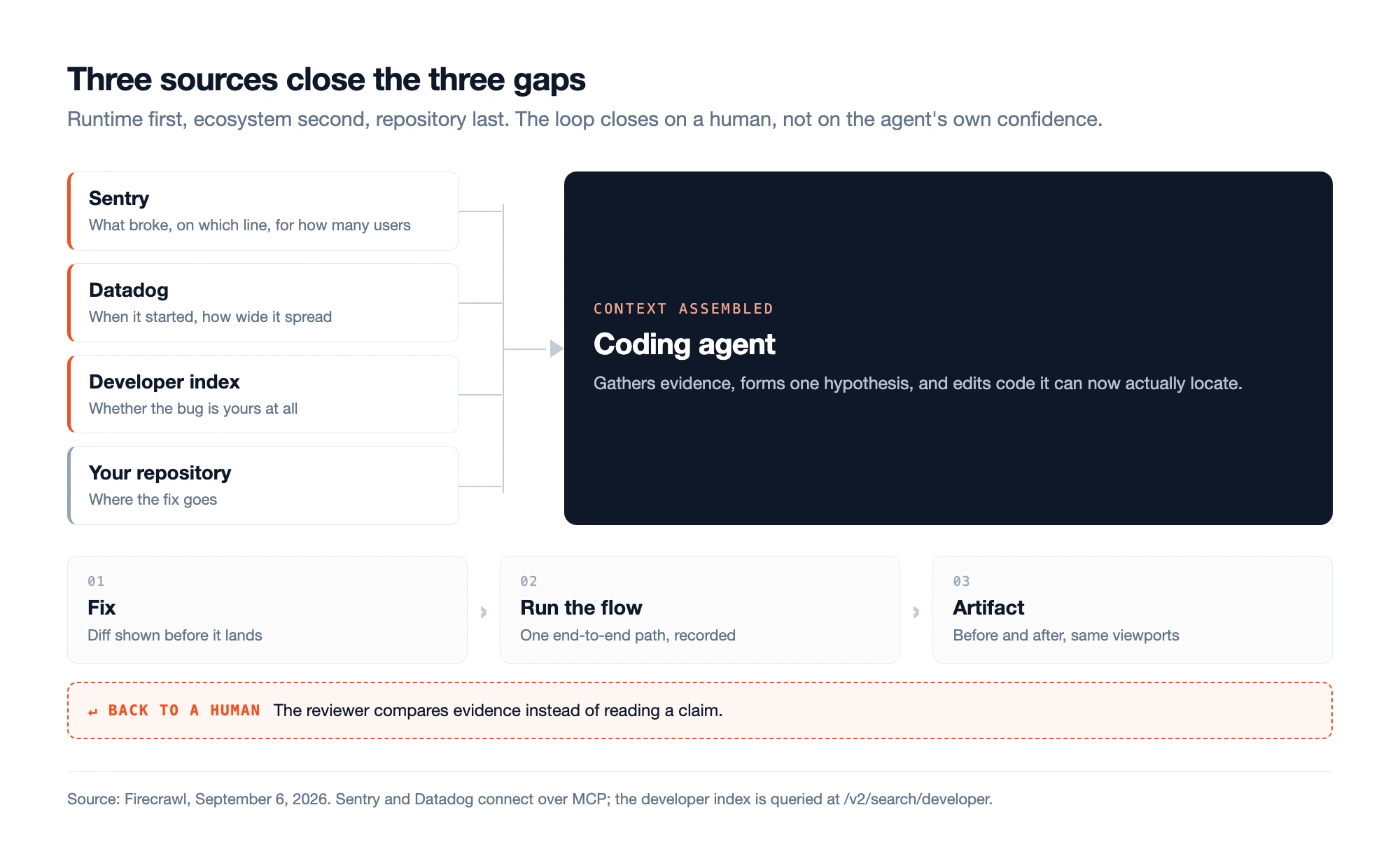
Source: Firecrawl, September 6, 2026. The loop is only finished when a person looks at the evidence.
Sentry and Datadog connect through MCP, short for Model Context Protocol. It is a standard way of plugging a tool into an AI agent so the agent can call it, the same way it calls a file read. If you want the background, we compared MCP against plain command line tools separately.
Work through them in order. Start with what happened on the server, because that tells you which bug you are actually chasing. Check the outside world second, because it can end the investigation before you edit anything. Go into your own code last, once you know what you are looking for.
How to connect Sentry and Datadog to a coding agent
Sentry hosts the Sentry MCP server for you, so there is nothing to install. One command tells Claude Code about it. The first time you use it, a browser window opens and asks you to log in:
claude mcp add --transport http sentry https://mcp.sentry.dev/mcpIf you are debugging one service, point it at one project instead of your whole account. Less noise, and the agent cannot wander into unrelated data:
claude mcp add --transport http sentry https://mcp.sentry.dev/mcp/{organizationSlug}/{projectSlug}There is also a plugin version, documented in the sentry-mcp repository. It adds a dedicated Sentry helper. The main agent hands Sentry questions to that helper, so your main conversation stays focused:
claude plugin marketplace add getsentry/sentry-mcp
claude plugin install sentry-mcp@sentry-mcp
That comes with Seer, Sentry's automatic root cause analysis, switched on. Seer reads the error and the surrounding code and suggests why it happened. You can turn it off with --disable-skills=seer.
The Datadog MCP server covers the other half: logs, metrics, and traces over time. Install the plugin, then run /ddsetup to pick your region and log in:
/plugin install datadog@claude-plugins-official
Now the important part, and the step most people skip. Datadog groups its tools by product area, and you can switch those groups on and off with /ddtoolsets. You can also fix them in the connection URL, like ?toolsets=apm,llmobs.
Turn off everything you are not using. An agent with access to all of Datadog will go browsing through dashboards while you are trying to fix a null pointer. That wastes its limited working memory. If you have not picked a monitoring tool yet, our roundup of LLM observability tools covers that choice.
The safety model is reassuring. The Datadog server "forwards the authenticated user's own credentials to Datadog APIs". In plain terms, the agent logs in as you. It sees exactly what you see and nothing else.
Changing anything, like editing a monitor, needs a specific permission you have to grant. You get 50 requests every 10 seconds and 100,000 tool calls a month, as of September 2026. It does not work on Datadog's government cloud sites.
Scenario A: a flood of 500 errors after a deploy
The mistake here is asking one big question. "Something is broken in production, go find it" gives the agent a wall of errors and no way to tell which ones matter.
Sentry's own cookbook recipe splits this into three prompts, and the splitting is the whole trick.
- Get the shortlist. Ask for the top five open issues from the last 24 hours, with what is failing, how often, and how many users are affected. Now you have five candidates instead of a feed.
- Go deep on one. Pick the worst one and ask for the most recent occurrence: the full stack trace, the log lines from around that moment, and a Seer root cause pass.
- Only now, touch the code. Ask it to find the matching code and fix it. The recipe asks to see the diff before anything changes, which is your chance to catch a bad idea early.
For a bug that appeared right after a deploy, add two questions. Ask when the error first showed up, then ask which release was live at that time. An error that started four minutes after a deploy is a completely different problem from one that has been quietly firing for a month.
How do you make the agent prove the fix?
An agent that never runs your app cannot tell a working fix from a reasonable looking edit. It will report success either way. Saying "fixed" costs it nothing. This is the whole argument for closed loop coding agents that execute their own output before declaring the work done.
Devin solved this by making the agent show its work, and you can copy the approach with any agent that can drive a browser. Its testing runs in three steps.
- Set up. It reads the pull request and the code. It looks for project specific instructions in a
.agents/skills/folder, then logs in to whatever services the app needs. - Plan. It picks "the single most important end-to-end flow that proves the feature works" and shows you that plan before running anything.
- Run. It starts a screen recording, clicks through the app, and labels the important moments as it goes.
What you get back is evidence instead of a claim. There is a short report with labeled screenshots for a quick look. There is also a full video with chapters and a list of every check that passed or failed.
Cognition, the team behind Devin, calls this the agent being able to "test its own work". It starts the app and clicks through it the way a person would.
How you word the instruction decides whether any of this helps. Devin's docs give one good example and two bad ones.
Good: "test checkout flow: add item to cart, proceed to checkout, fill form, verify order confirmation shows correct total". Bad: "test everything" and "make sure the app works".
The difference is simple. The good one names a path through the app and says what a correct result looks like.
You can save the whole routine as a file so you never retype it. Devin's own example is short enough to copy:
---
name: test-before-pr
description: Run the local dev server and verify pages before opening any PR that touches frontend code.
---

## Setup
1. Install dependencies: `npm install`
2. Start the database: `docker-compose up -d postgres`
3. Run migrations: `npx prisma migrate dev`
4. Start the dev server: `npm run dev`
5. Wait for "Ready on http://localhost:3000"

## Verify
1. Read the git diff to identify which pages changed
2. Open each affected page in the browser
3. Check for: console errors, layout issues, broken links
The clever line is the first one under Verify: read the diff to work out which pages changed. That keeps the check focused on what you touched, instead of testing the entire app badly. Files like this work in other tools too, and Claude Code skills use the same format.
Scenario B: the layout breaks on mobile
A CSS change makes the desktop view look right and quietly breaks the phone view. Every test passes, because nobody writes tests that check whether a page looks reasonable.
Tell the agent to screenshot the affected page before it changes anything. Use two window widths: 1280 pixels for desktop and 375 pixels for a phone, the two sizes Devin's example uses.
Then apply the fix and screenshot the same page at the same two widths. Attach all four images to the pull request, along with anything the browser console printed.
Now your reviewer compares four pictures instead of reading a sentence that says "fixed". One honest limit: this proves the page loaded and the flow ran. It does not prove the fix is well built or that it will hold up next month. Agent verification kills the "said it was fixed, never actually ran it" failure. It does not replace code review.
What to do when the bug is not in your code
The most expensive debugging sessions are the ones where you hunt for a bug that was never yours. Your code is fine. A library changed underneath you, somebody else hit the same wall last month, and the thread explaining it is sitting in a repository your agent has never opened.
The model cannot rescue you here, for a simple reason. It stopped learning on a fixed date, its training cutoff. Everything published after that date is invisible to it, so a bug reported six weeks ago is not in there at any setting.
We covered that problem in giving coding agents up-to-date documentation, why cached answers are not good enough in agentic search, and how the main developer retrieval tools compare against each other.
This is what the Firecrawl developer index is for. It is a search index built only out of developer sources: GitHub issue threads, merged pull requests, README files, and documentation sites. That is more than 70 million items, most of them refreshed daily.
The difference is what comes back. A normal web search hands you articles about a library. This hands you the issue where the bug was reported and the pull request that closed it.
One command adds it to your agent:
npx -y firecrawl-cli@latest setup developer-indexOr call it yourself. The types filter is the useful part: it narrows the search to issues and pull requests, which is where bugs actually get discussed and fixed.
curl -X POST https://api.firecrawl.dev/v2/search/developer \
  -H "Authorization: Bearer $FIRECRAWL_API_KEY" \
  -H "Content-Type: application/json" \
  -d '{
    "query": "retry backoff not firing on 429",
    "k": 3,
    "types": ["issue", "pull_request"]
  }'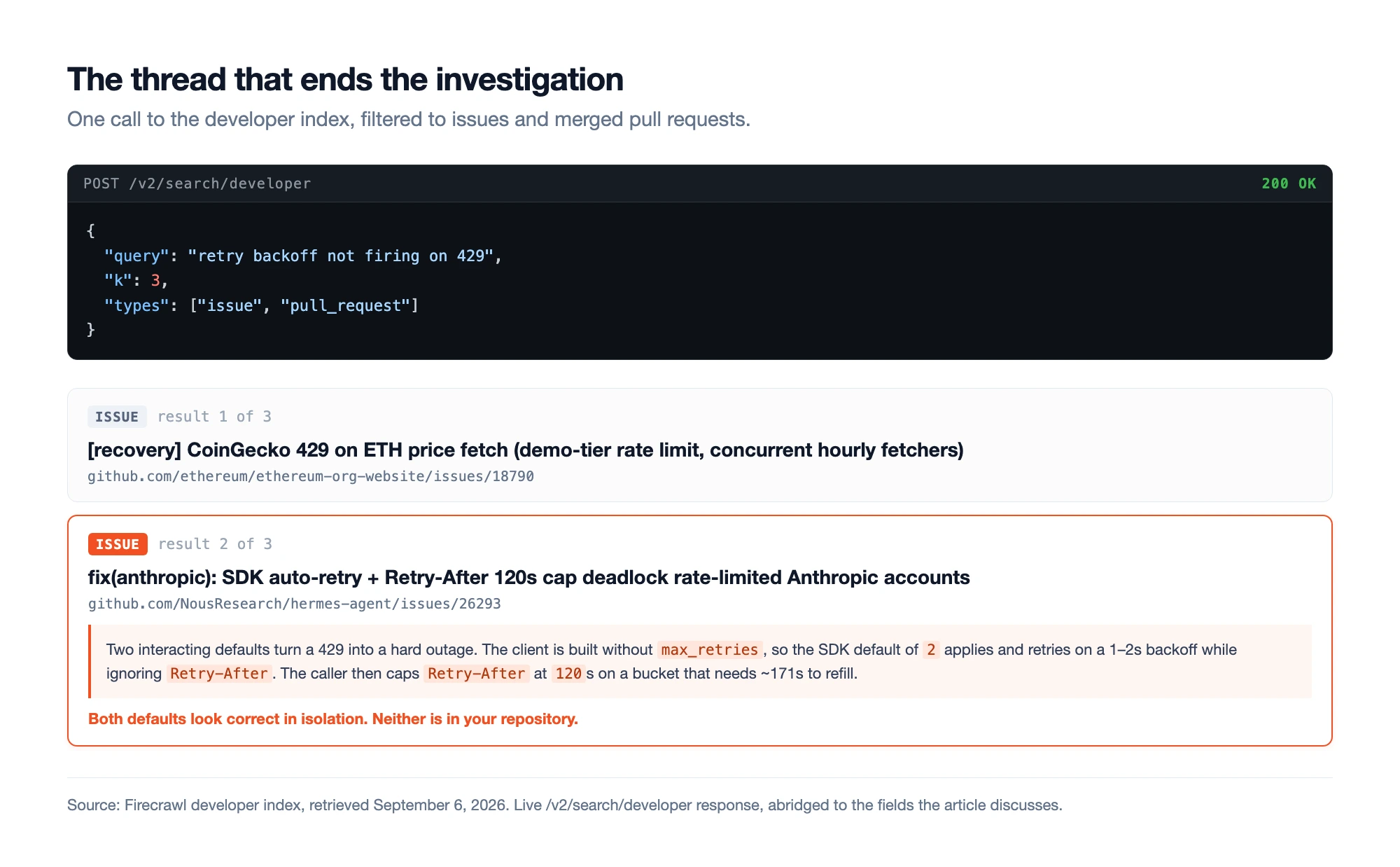
Source: Firecrawl developer index, retrieved September 6, 2026. A live /v2/search/developer response to the query above, filtered to issues and pull requests.
We ran that exact search. The second result was hermes agent's issue #26293, and it is a good example of a bug you could never find by reading your own code.
Here is what that thread describes, in plain terms. An API started returning 429, the status code for "you are sending too many requests, slow down". Two separate pieces of retry logic then fought each other:
- The API client retried on its own. It was created without setting
max_retries, so it used its built in default of 2. It waited only a second or two between tries, and ignored theRetry-Afterheader that said how long to actually wait. - The app had its own retry loop wrapped around it. That loop capped its wait at 120 seconds.
- The rate limit needed about 171 seconds to reset. Every retry therefore fired too early.
So each attempt spent another request against a limit that had not recovered yet. A temporary slowdown turned into a full outage.
Both settings look completely sensible on their own. That is exactly why reading your own code more carefully would never have found it.
Scenario C: a library update breaks your retries
Your errors spike right after you upgrade a dependency. Before letting the agent theorize about your own retry code, have it search for the error message, limited to the library's repository:
curl -X POST https://api.firecrawl.dev/v2/search/developer \
  -H "Authorization: Bearer $FIRECRAWL_API_KEY" \
  -H "Content-Type: application/json" \
  -d '{
    "query": "breaking change after upgrading major version TypeError module not found",
    "k": 5,
    "types": ["issue", "pull_request"],
    "repos": ["vercel/next.js"]
  }'
Then you have a real decision with three options, and the thread usually tells you which one to take.
- Pin. Go back to the old version and stay there for now.
- Patch. Work around the new behavior in your own code.
- Wait. A fix is already merged, so you just need the next release.
Three things in the thread tell you which to pick. Has anyone actually fixed it? Which version carries the fix? And do the maintainers think the old behavior was the bug, or the new one?
Two caveats, so you know what you are getting. On Firecrawl's DevDex benchmark, the index found a correct answer within its top ten results 63% of the time. That beats ordinary web search at 45%, but it also means about a third of searches still come up short. This narrows the hunt, it does not end it.
Also, the free no-key tier is not guaranteed. When we called the API without a key from a normal laptop, we got HTTP 403 and a message about the IP address looking suspicious. Get a free key and skip the uncertainty.
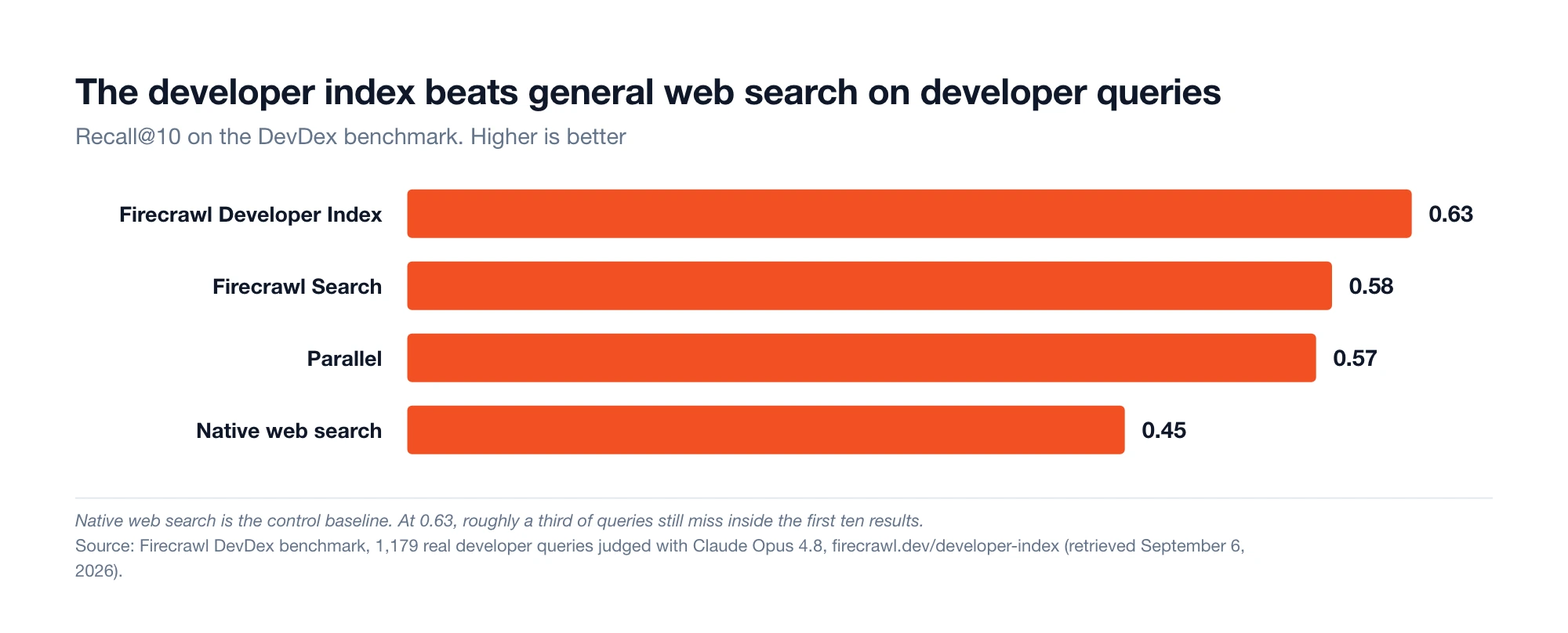
Source: Firecrawl DevDex benchmark, retrieved September 6, 2026. 1,179 real developer questions, graded with Claude Opus 4.8.
How to pick a library that will not become next quarter's bug
The cheapest bug to fix is the one you avoid by not installing the wrong library. This is the same search problem as before, just moved earlier: instead of asking "who else hit this bug", you are asking "what should I install".
Ask a model straight out and it will name whatever was popular while it was being trained. That is not the model making things up. It is an accurate description of the world as of a year or two ago. Searching the index asks a better question: what exists right now, filtered down to things you could actually run.
The filters do that narrowing. You can restrict by language, topic, license, min_stars, max_stars, and skip archived projects and fork copies. So you can say "Python only, at least a thousand stars, not abandoned" and see what comes back:
curl -X POST https://api.firecrawl.dev/v2/search/developer \
  -H "Authorization: Bearer $FIRECRAWL_API_KEY" \
  -H "Content-Type: application/json" \
  -d '{
    "query": "background job queue library for Python with retries and scheduling",
    "k": 6,
    "types": ["readme"],
    "language": "Python",
    "min_stars": 1000
  }'
Scenario D: choosing a Python job queue
We ran that one too. Along with the expected rq results, it returned pgqueuer, which runs scheduled and recurring jobs straight out of Postgres with no separate scheduler process, plus procrastinate and dbos-transact-py.
That result list is the whole argument for doing this. Ask a model cold and it says Celery, which needs Redis.
Now suppose your team already runs Postgres and does not want to run and monitor a second database just for background jobs. These Postgres based options are the genuinely better answer for you, and they are newer than most models' training data. Choosing a library from memory means choosing from an old snapshot.
Once you have a shortlist, spend ten minutes reading the bad news before you commit. Change types to issue and search each candidate's repository for the problems you would be signing up for. Those are the ones that only show up under real load and never make it into the README.
The number of open issues matters less than two other things: what those issues are about, and whether anyone is still merging fixes.
One practical note about the results. You can filter by stars and language, but the API does not send those values back. Each result gives you id, url, title, passages, and license. So you can narrow a search by star count, you just cannot read the star count off the result.
Add the Firecrawl developer index to your coding agent
Your agent can already read your code. Connecting Sentry or Datadog lets it read what happened on your servers. The last missing piece is everyone else's code, and that is what Firecrawl covers.
The Firecrawl developer index puts GitHub issues, merged pull requests, READMEs, and documentation behind a single search call: more than 70 million items, most refreshed daily. Your agent can check whether a bug is already known and fixed before it starts editing your files.
On Firecrawl's DevDex benchmark of 1,179 real developer questions graded with Claude Opus 4.8, the index returned a correct answer in its top ten results 63% of the time. Ordinary web search managed 45%. Parallel came in at 57%, Firecrawl's general web search at 58%. That is the difference between an agent finding the fixed pull request on the first try and an agent guessing from a two-year-old blog post.
One command sets it up in Claude Code, Cursor, or Codex:
npx -y firecrawl-cli@latest setup developer-indexCalling it from your own code is about as involved as any other search:
from firecrawl import Firecrawl

firecrawl = Firecrawl(api_key="fc-YOUR-API-KEY")

result = firecrawl.search(
    "retry backoff not firing on 429",
    categories=["developer"],
    limit=10,
)
for item in result.web or []:
    print(item.url, item.title)
Searches cost 2 credits per 10 results as of September 2026. You can try it at firecrawl.dev. For the related tooling decisions, see 10 best MCP servers for developers and best search tools for AI agents.
Give it the information, then check the work
Most advice about coding agent production bugs is really advice about prompting. The prompt was rarely the problem. The agent was thinking carefully about a system it could only see a third of, and no amount of careful thinking fills in the other two thirds.
So do three things. Connect your error tracker so it can see what broke. Search a live index so it can find out whether the bug is even yours. Ask for screenshots before and after, so you can check the fix instead of believing it.
Frequently Asked Questions
Can a coding agent actually fix a production bug on its own?
It can fix bugs where the cause shows up in a stack trace and the broken line is in your own code. It cannot fix what it cannot see. Most production bugs involve something outside your repository: the state of the running server, a recent deploy, or a library you did not write. Give the agent access to those things and it does well. Leave it with only your files and you get a confident guess.
Is it safe to give an AI agent access to my production error data?
It is safer than most people expect, because the agent borrows your account rather than getting its own. Datadog's server passes your own credentials through, so the agent can see exactly what you can see and nothing more. Changing anything needs a separate permission. Sentry asks you to log in through OAuth. Two habits help: connect one project rather than your whole account, and remember that error messages can contain text a stranger typed into your app, so treat them as data rather than instructions.
Why does my agent recommend an outdated library?
Because it is recommending what was popular when it was trained, not what is good now. Ask for a Python job queue and you will usually get Celery, which has been the standard answer for about ten years. Newer options that store jobs in Postgres instead of Redis will not come up unless the agent searches a live index of GitHub.
How do I stop an agent from claiming it fixed something it never tested?
Ask for proof, not a summary. Devin does this by picking one path through the app, recording itself clicking through it, and handing back labeled screenshots plus a video with each check marked pass or fail. You can do a smaller version with any agent that can open a browser: screenshot the broken page, apply the fix, screenshot the same page again at the same window sizes, and attach both to the pull request.
What is the difference between the Firecrawl developer index and letting the agent search the web?
A normal web search gives you blog posts and tutorials about a library. The Firecrawl developer index gives you the GitHub issue where the bug was reported and the pull request that fixed it. That is where real problems get discussed. On Firecrawl's DevDex benchmark of 1,179 questions, the index found a correct answer in its top ten results 63% of the time, against 45% for ordinary web search.
Will connecting an observability tool flood the agent with too much data?
Yes, if you connect everything and ask a vague question. Datadog lets you switch off whole product areas with the /ddtoolsets command, so the agent only sees logs and traces if that is all you need. How you ask matters just as much. Request the top five errors from the last 24 hours, pick one, then go deep on that one. Do not paste in the whole error feed.
Do I need a paid Firecrawl API key to query the Firecrawl developer index?
The website advertises a free tier with no key, but that depends on your network looking trustworthy. When we called it without a key from an ordinary laptop we got back HTTP 403 and a message saying the IP address looked suspicious. A free key avoids the guesswork. Searches cost 2 credits per 10 results as of September 2026.
Should I connect Sentry or Datadog first?
Start with whichever one you open first during an incident. Sentry tells you what broke, which line broke, and how many users hit it, which covers most application bugs. Datadog tells you when it started and what else changed at the same time, which is what you need when the error is a side effect of a deploy or an infrastructure change rather than a bad line of code.