
TL;DR: AI coding agents hallucinate APIs because their training data went stale the moment the library shipped its next release. The fix is retrieval, not a bigger model. Crawl the docs, chunk and embed them, plug the index into your agent over MCP, and refresh on a schedule. If the docs are public, the Firecrawl Developer Index covers 70M+ artifacts and leads the open DevDex benchmark at 63.1% Recall@10.
AI coding is the norm now, and the outdated context problem got louder
AI-assisted coding is not a lab demo anymore. The 2024 Stack Overflow Developer Survey reported that 76% of developers are using or planning to use AI tools in their workflow, and 62% are already using them. GitHub has said Copilot is the most adopted AI developer tool in its history, and the newer wave of agentic tools (Cursor, Claude Code, Codex CLI, Windsurf) is compounding on top of that.
The quality problem is loud too. GitClear's AI code quality research found that "code churn" (the share of lines revised within two weeks of being written) roughly doubled between 2020 and 2024, tracking almost exactly with copilot adoption. A 2024 study on package hallucinations found that around 20% of package names suggested by popular code LLMs do not exist in the target registry. And an earlier Purdue analysis of ChatGPT programming answers found that 52% contained incorrect information.
The pattern behind those numbers is not that models are getting worse. It is that they are being asked to write code against a moving target using a frozen snapshot.
Addy Osmani (Head of Chrome Developer Experience at Google) frames the response to this in his post on agentic code quality: at agent volumes, humans can no longer read every diff, so quality moves into "constraints and back-pressure" around the agent, including tests, linters, CI, and security scans.
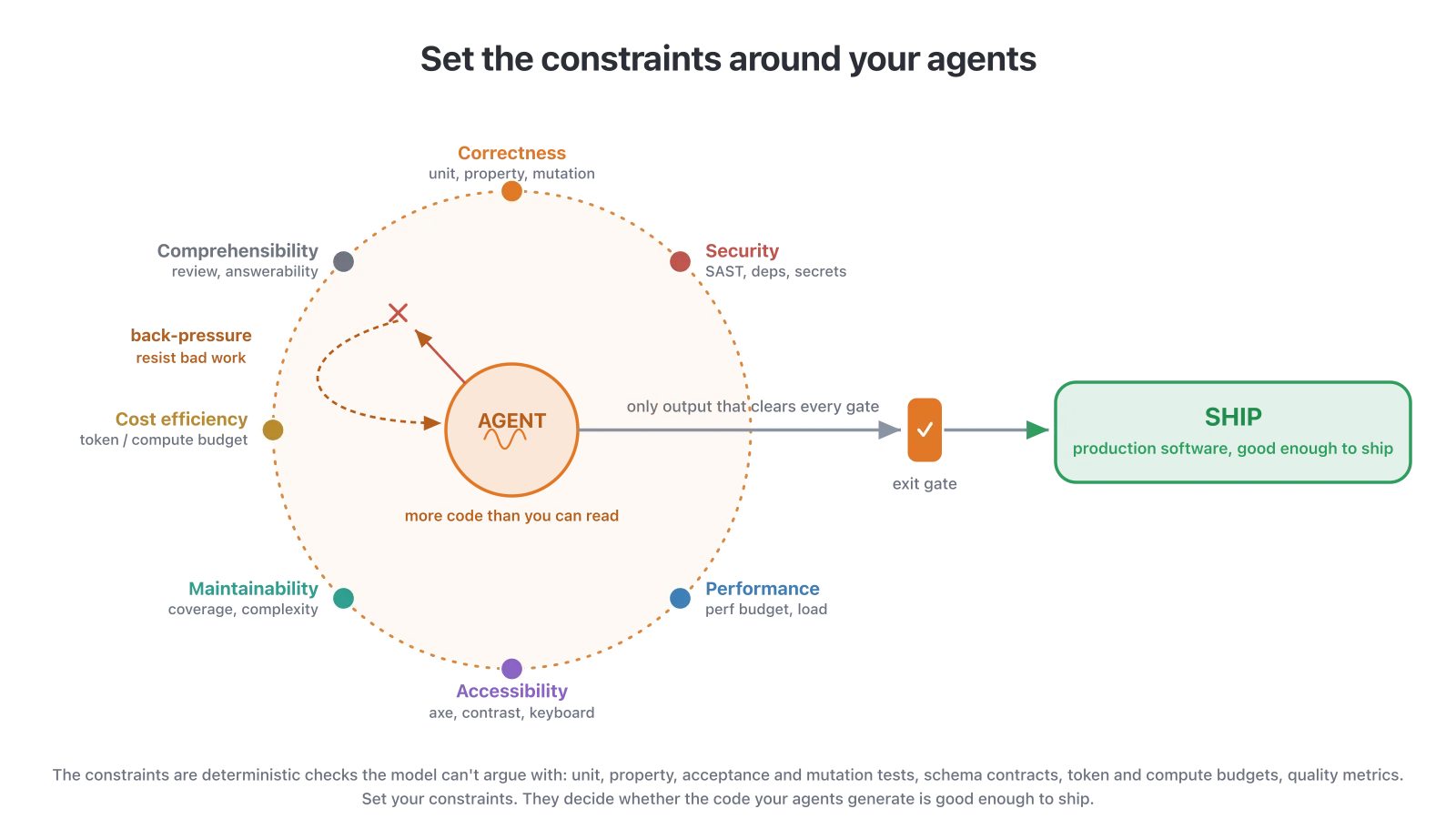
Source: Addy Osmani, "Agentic code quality"
Fresh documentation is the input-side version of that same idea. Retrieval prevents an entire class of bug (wrong API, deprecated method, hallucinated import) before the downstream constraints ever have to catch it. Cheaper to keep the agent from writing the bad line than to catch it three checks later.
Developers noticed. Context7, the Upstash MCP that pulls current library docs into coding agents at query time, grew to over 61,000 GitHub stars and became one of the most-installed MCPs of 2026 for exactly this reason: the training snapshot is stale on release day, and pasting docs into chat one page at a time does not scale across a coding session, a team, or a fast-moving codebase.
Coding agents work well when the library they are calling has not changed since the training run. They fail in familiar, recognizable ways when it has: wrong argument names, deprecated methods called as if they were current, imports from packages that were split or renamed, and the occasional import of a package that never existed at all.
This post is a working guide for closing that gap. We will walk through why the failures happen, what a documentation RAG pipeline actually looks like, how to crawl and refresh a docs site with Firecrawl, how to expose the result to Cursor and Claude Code over MCP, and when to build your own index versus pointing at the Firecrawl Developer Index.
Why LLMs use outdated APIs and context
Three things are stacked together, and each of them is unavoidable at the model layer alone.
The training cutoff is real. A model's parameters are frozen the day the training run ends. Any release, breaking change, method rename, or new provider that shipped after that date is invisible to the model. Even models with a "January 2026" knowledge cutoff have blind spots for anything published in the final months before the cutoff, because coverage inside the training set thins out near the edge.
Popular APIs pull hardest. The base model has seen the last stable version of a popular library thousands of times in training. When you ask it about React, Next.js, or Stripe, it defaults to whatever version dominated its training corpus. That is fine if you are on that version. It is a bug factory if you are on the next one.
Small libraries barely register. For anything below the top few thousand packages, the model has seen a handful of examples at most. It fills the gap by pattern-matching against libraries with similar names or shapes, which is how you get hallucinated method signatures that look plausible and do not exist.
The fix is not a smarter model. It is handing the model the current doc page at the moment it needs to answer. That is retrieval.
Lee Robinson (VP of Product at Vercel) put the underlying constraint plainly in a July 2026 post on model behavior:
Learning only happens when the model is training. Your conversations don't update the model's intelligence in real time. Instead, you need to write down things to remember, typically as rules or skills. Agents can then read these files and include them in context when prompting the model.
Docs are the same shape of problem. The model cannot learn Next.js 16 by talking to you about Next.js 16. You have to hand it the current docs each time.
See our writeup on reducing LLM hallucination
Common patterns where outdated docs cause failures
The failures cluster in three domains and share one shape: the API changed in a minor or major release, the old pattern still works syntactically or fails silently, and the agent had no way to know the difference.
Authentication and session libraries. Auth libraries revise their initialization flow and token storage patterns constantly. An agent writing middleware from training memory produces code that compiles and boots but follows a deprecated pattern (cookie-based session on an SDK that has moved to short-lived JWTs, for instance) that a security review will flag.
Cloud SDKs. AWS, GCP, and Azure clients rename constructors and reshape config between major versions almost every year. An agent writing a storage upload or a serverless handler against a two-year-old contract produces code that does not compile, or worse, silently uses defaults that differ from what you intended.
ORMs and database clients. Prisma, Drizzle, Mongoose, SQLAlchemy all revise their query builders, relation syntax, and migration APIs across majors. A migration generated for the wrong major version passes type checking and fails at runtime, sometimes after it has already touched production.
Beyond those three domains, the individual failure shapes look like this:
- Deprecated method still called. The model remembers
useRouter().queryfrom Next.js 12 and writes it into a Next.js 15 app where the router API has moved touseSearchParams. - Argument order swap. A library added a keyword argument that pushed the positional argument order. The model writes the old order, tests pass locally because of default values, and something silently breaks in production.
- Renamed export. A package split
foointofoo-coreandfoo-plugins. The model imports fromfooand the build fails with a module-not-found error. - Hallucinated method. The model invents a method that "should" exist based on similar libraries. The IDE autocompletes it and the type checker catches it, but not before it appears in a review.
- Wrong version pinned. The model recommends a version of a dependency that ships a known CVE, because it does not know a patched release exists.
- Fixed bug re-suggested. The model suggests a workaround for a bug that was fixed in the last minor release. The workaround is now the bug.
The last one is the tell that raw docs are not enough. Docs describe intended behavior. The fix for a real bug lives in a merged pull request or a closed issue thread, which is why the section on GitHub issues and pull requests exists further down.
When to trigger docs retrieval. As a rule of thumb, hand the agent current docs whenever it is about to touch a boundary with a dependency: routing, auth, payments, database clients, queues, UI libraries, observability, cloud SDKs, or anything with versioned setup instructions. If a human would open the docs tab before writing the code, the agent should too.
What good actually looks like: how documentation RAG works
Retrieval-augmented generation for documentation is straightforward to describe and, without a good pipeline underneath it, easy to get wrong.
The end-to-end shape:
- Crawl the docs site and export each page as clean markdown.
- Chunk each page into passages that are small enough to embed cleanly and large enough to be useful on their own (typically 300 to 800 tokens, split on headings).
- Embed each chunk with a text embedding model and store the vectors in an index (pgvector, Pinecone, Qdrant, or a managed one).
- Store metadata alongside each chunk: source URL, section heading, library version, last-modified timestamp.
- Query. When the agent needs docs, embed the natural-language question, retrieve the top K nearest chunks (usually 5 to 10), optionally rerank, and hand the passages to the model with the source URLs.
- Refresh. Re-crawl on a schedule, diff, and re-embed only the pages that changed.
Two things distinguish a working docs RAG from a demo:
- Retrieval quality is dominated by the crawl and the chunking, not the embedding model. A pipeline that returns "the whole page including the sidebar navigation" will lose to a pipeline that returns "the three paragraphs under the correct heading" every time, even with a worse embedding model.
- Freshness is a first-class concern. A docs index that is one release behind is worse than no index, because the model will now confidently cite a deprecated API and link to the deprecated doc page.
How Firecrawl helps
Firecrawl covers every stage of the pipeline above with one API and one SDK:
- Crawl: /crawl walks the docs subtree and returns clean markdown ready for chunking.
- Map: /map lists every doc URL without pulling content, useful for planning ingest.
- Refresh: /monitor watches pages and fires a webhook only when content changes, so you re-embed the diff, not the whole index.
- Retrieve: the Developer Index is a hosted index of GitHub issues, pull requests, READMEs, and public docs, refreshed daily, addressable by natural language.
- Serve: the Firecrawl MCP server plugs all of the above into Cursor, Claude Code, Codex, Gemini CLI, Windsurf, and OpenCode with one command.
Every section below uses one of these. If you would rather skip building the pipeline yourself for public library docs, jump straight to the Developer Index section.
How to crawl an entire docs site with Firecrawl
A good docs crawler needs to render JavaScript (a lot of docs sites are Next.js or Docusaurus apps), stay inside the docs subtree, and return clean markdown that survives chunking. Firecrawl's crawl endpoint does that in one call.
Install:
npm i @mendable/firecrawl-jsCrawl the docs section of a site and get back one markdown document per page:
import Firecrawl from "@mendable/firecrawl-js";

const app = new Firecrawl({ apiKey: process.env.FIRECRAWL_API_KEY });

const result = await app.crawl("https://nextjs.org/docs", {
  limit: 500,
  includePaths: ["^/docs/.*"],
  scrapeOptions: {
    formats: ["markdown"],
    onlyMainContent: true,
  },
});

for (const page of result.data) {
  console.log(page.metadata?.url, page.markdown?.length);
}
Three parameters do most of the work:
includePathsscopes the crawl to the docs subtree, so you do not accidentally index the blog and the marketing pages.onlyMainContentstrips navigation, footers, and search widgets before returning markdown, which keeps chunks focused on the actual documentation.limitcaps the crawl so a runaway link graph does not surprise your bill.
The output is a flat array of { markdown, metadata: { url, title, ... } } objects that plug straight into a chunker.
For deeper coverage of the crawl endpoint and its options, the Firecrawl /crawl docs walk through path filters, sitemap discovery, and traversal limits. To find every doc URL first without pulling content, /map returns just the URL list.
If your target is a popular public library, the Firecrawl Developer Index has already crawled it, alongside its READMEs, issues, and merged pull requests. Query it directly instead of standing up your own crawl for docs you do not need to customize.
How to keep documentation automatically refreshed
A one-shot crawl is fine for a proof of concept. Anything you plan to ship needs a refresh schedule, because docs move.
The simple pattern:
- Run the crawl on a cron (daily for libraries you care about, weekly for the long tail).
- Compare each returned page's
markdownagainst the version already in your index. - Re-embed only the pages whose content hash changed.
- Update the
last_modifiedmetadata on refreshed chunks so retrieval can prefer newer content on ties.
If you would rather not run the diff loop yourself, Firecrawl's /monitor product watches URLs and pages for changes on a schedule and fires a webhook when something moves. You subscribe to change events on the docs pages you care about, and only pay to re-embed the pages that actually changed.
For most production pipelines, daily is enough. Anything more frequent starts to hit rate limits on the source site without adding much freshness value, because docs teams do not deploy hourly.
If you are pointing at the Firecrawl Developer Index instead of running your own pipeline, refresh is not your problem. The index re-crawls most sources daily and re-indexes issues and pull requests as they land, so the retrieved passage reflects what shipped, not what shipped last quarter.
How to give an LLM version-specific documentation
Version-specific docs are the single biggest quality unlock for an agent working on a real codebase, because most of the failure patterns above are version mismatches.
Two patterns work well.
Version in the URL, filter at query time. Most modern docs sites already encode the version in the URL: nextjs.org/docs/16/..., react.dev/reference, docs.stripe.com/api?ver=2024-06-20. Store the version as metadata on each chunk during ingest, and at query time filter to the version the user's project is on. You can pull the version from the project's package.json or lockfile.
Example query with a metadata filter (pseudocode, structure depends on your vector store):
const results = await index.query({
  vector: await embed(question),
  topK: 8,
  filter: { library: "nextjs", version: "16" },
});
Separate indexes per version. For libraries where breaking changes are large and version overlap matters (React, Next.js, Prisma, LangChain), some teams find it cleaner to run one index per major version and route the query at the retriever layer. This is more infrastructure but easier to reason about.
Whichever you pick, make the version explicit in the retrieved context you hand to the model. A citation of "React 19: Reference for use" is worth more than "React docs: use", because the model uses the version tag to reject its own priors.
The Firecrawl Developer Index stores repository and version metadata on every artifact, so a query can scope to repos: ["vercel/next.js"] and retrieve the passages from the active release without hand-rolling per-version indexes.
How to build a docs RAG pipeline
Putting crawl, refresh, and version filtering together, here is what a working docs RAG pipeline looks like in code. The pieces are: Firecrawl for crawl and refresh, a chunker, an embeddings model, a vector store, and an MCP surface for your agent.
import Firecrawl from "@mendable/firecrawl-js";
import { OpenAI } from "openai";
import { PgVector } from "./pgvector"; // your vector store client

const fc = new Firecrawl({ apiKey: process.env.FIRECRAWL_API_KEY });
const openai = new OpenAI();
const store = new PgVector();

async function ingest(root: string, library: string, version: string) {
  const { data } = await fc.crawl(root, {
    limit: 500,
    includePaths: ["^/docs/.*"],
    scrapeOptions: { formats: ["markdown"], onlyMainContent: true },
  });

  for (const page of data) {
    const chunks = chunkByHeading(page.markdown ?? "", { min: 300, max: 800 });

    const embeddings = await openai.embeddings.create({
      model: "text-embedding-3-large",
      input: chunks,
    });

    await store.upsert(
      chunks.map((text, i) => ({
        id: `${library}:${version}:${page.metadata!.url}:${i}`,
        vector: embeddings.data[i].embedding,
        metadata: {
          library,
          version,
          url: page.metadata!.url,
          heading: extractHeading(text),
          last_modified: new Date().toISOString(),
        },
        text,
      }))
    );
  }
}

async function retrieve(question: string, library: string, version: string) {
  const q = await openai.embeddings.create({
    model: "text-embedding-3-large",
    input: [question],
  });

  return store.query({
    vector: q.data[0].embedding,
    topK: 8,
    filter: { library, version },
  });
}
chunkByHeading is a heading-aware splitter. LangChain's MarkdownHeaderTextSplitter and LlamaIndex's MarkdownNodeParser both work; a fifty-line hand-rolled splitter on ^#{1,3} also works. The exact chunker matters less than making sure each chunk is a coherent unit of the docs (one API method, one concept, one section), not an arbitrary sliding window.
Reranking is optional and helps on ambiguous questions. Cohere Rerank, Voyage's reranker, and open-source ones all fit here.
For a more opinionated walkthrough with a working repo, our post on building a documentation RAG assistant covers the same shape end to end.
How to connect documentation to Cursor and Claude Code via MCP
The Model Context Protocol is how modern coding agents call external tools mid-conversation. Both Cursor and Claude Code speak it natively, along with Codex CLI, Windsurf, Gemini CLI, and OpenCode.
To give your agent access to the Developer Index, we strongly recommend using our CLI or MCP, combined with our dedicated developer skill, which you can install with:
npx -y firecrawl-cli@latest setup developer-indexThat single command registers the Firecrawl MCP with every detected agent on the machine (Claude Code, Codex, Cursor, Gemini CLI, Windsurf, OpenCode) and gives them access to the Developer Index for GitHub issues, pull requests, READMEs, and documentation. Restart the agent and it is available as a tool.
Runs keyless with 1,000 free credits per month; add an API key for higher limits.
How to use GitHub issues and pull requests alongside official docs
Docs describe intended behavior. Issues and pull requests describe how the library actually behaves right now.
That distinction matters most when the agent is debugging production bugs. If a user's error message is "TypeError: Cannot read properties of undefined (reading 'get') at Router", the fix is almost never on the doc page for Router. It is in the closed issue where someone else hit the same error last month, or the merged pull request that shipped a patch two releases ago.
A retrieval index that only covers docs will not find either of those. This is why the Firecrawl Developer Index treats issues, pull requests, READMEs, and docs as first-class artifact types, and why coding agents hitting it can filter by artifact type and repository:
curl -s "https://api.firecrawl.dev/v2/search/developer" \
  -H "Authorization: Bearer $FIRECRAWL_API_KEY" \
  -H "Content-Type: application/json" \
  -d '{
    "query": "retry backoff behavior in openai-python",
    "types": ["pull_request", "issue"],
    "repos": ["openai/openai-python"],
    "k": 10
  }'
Every result carries a stable id (like pull_request:openai/openai-python#123), a url, and matched passages in markdown, so the agent can cite the exact fix.
If you are building your own index, the same pattern applies. Ingest issues and pull requests from the repositories that back your critical libraries, embed the title plus the resolved discussion plus the diff summary, and store the state (open, closed, merged) as metadata so the retriever can prefer merged fixes over open speculation.
The GitHub REST and GraphQL APIs both expose issues and PRs at scale. Rate limits are the only thing to plan around; a per-repo cache and a nightly refresh handle the volume for most teams.
Firecrawl Developer Index vs building your own docs index
This is the last decision, and it splits cleanly.
Build your own when:
- The docs are private (internal SDKs, closed-source libraries, company runbooks). This is the biggest one. A shared public index cannot see your internal wiki, your monorepo READMEs, or the design doc that explains why the payments service works the way it does. Team docs are usually a mix of markdown in a private repo, Notion or Confluence pages, and a handful of code comments. A private pipeline reads all of them and enforces access control at query time so an agent only retrieves what the calling developer is allowed to see.
- You need custom chunking or metadata that a shared index cannot express (per-tenant filters, feature flags, permission scopes).
- Latency and cost need to be tuned to your workload, or you have a compliance requirement to keep the index inside your VPC.
Use the Firecrawl Developer Index when:
- The docs are public and you would rather not run a crawl and refresh pipeline for every library your agent touches.
- You want issues and pull requests alongside docs without stitching four APIs together.
- You want current data. The index refreshes daily for most sources and covers over 70M artifacts across GitHub and external docs sites.
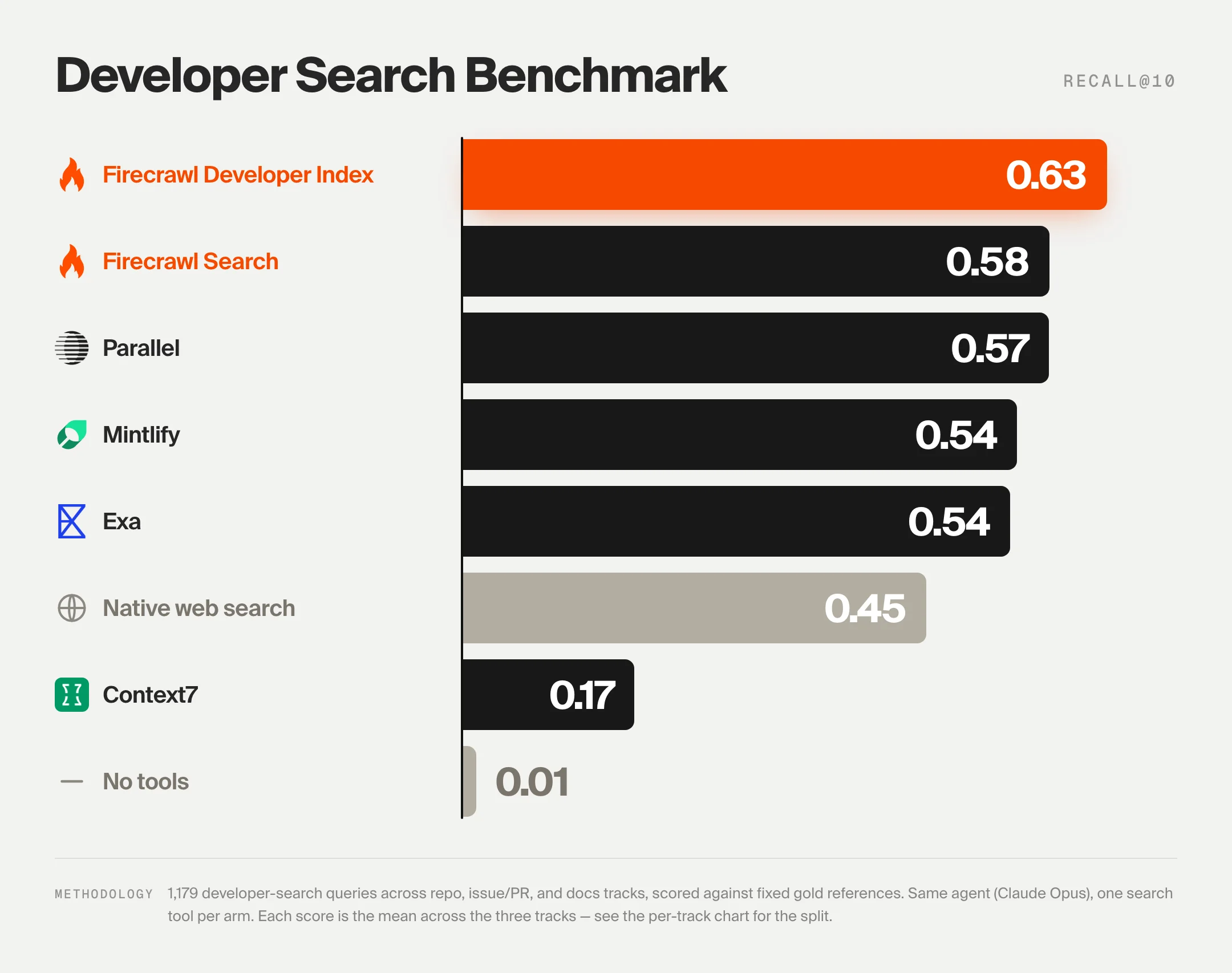
On retrieval quality specifically, the DevDex benchmark scores eight retrieval systems on 1,179 real developer questions across three tracks (repository, issue-to-fix, documentation):
- Firecrawl Developer Index leads overall at 63.1% Recall@10, and leads the issue-to-fix track at 66.0% and the documentation track at 47.2%.
- Parallel follows at 57.7% overall, with the strongest repository track at 81.9%.
- Firecrawl Search lands at 57.6% overall.
- Mintlify lands at 54.6% overall.
- Exa lands at 53.7% overall.
- Context7, the incumbent docs MCP, lands at 46.6% on the docs track alone and 16.8% overall, because it does not index repositories, issues, or pull requests.
If you are choosing between docs-only tools, our writeup on the best Context7 alternatives walks through the full landscape with the DevDex numbers side by side.
The benchmark and a 594-item public sample are open source at github.com/firecrawl/benchmark-devdex, so you can run your own numbers before you commit.
A note for the teams whose docs the agents are reading
The other side of this: retrieval is only as current as the docs on the other end. If you ship a product, keeping your own documentation up to date is what lets tools like the Firecrawl Developer Index, Mintlify, and Context7 actually serve your users' agents the right answer. An outdated doc page indexed by any of these tools becomes a confidently wrong response in someone's Claude Code session.
Hahnbee Lee, co-founder of Mintlify, framed this well in a recent piece on knowledge management in the agent era:
The chatbot giving the wrong answer is not an AI problem, but a documentation problem. This is not some abstract future scenario. Your documentation is out of date right now, today, and it's only compounding as your team ships faster.
If your product ships daily and your docs ship monthly, every agent that reaches for your docs is answering questions from a version of your product that no longer exists. Keeping the source clean is what lets everyone downstream (indexers, agents, and developers building on top of your API) actually leverage, debug, and build faster.
The short version
- AI coding agents fail on outdated APIs because their weights are frozen and their training data is old. Retrieval fixes this; a bigger model does not.
- Documentation RAG works when the crawl is clean, chunks are heading-aware, versions are stored as metadata, and the index refreshes daily.
- Firecrawl's /crawl does the ingest, /monitor handles refresh, and the MCP server exposes the result to Cursor and Claude Code with one install command.
- For public library docs plus issues and PRs, the Firecrawl Developer Index leads the open DevDex benchmark at 63.1% Recall@10, and there is nothing to run.
- For private docs, build your own with the pipeline above and wrap it as an MCP server so your agent can call it like any other tool.
The gap between "agent guesses last year's API" and "agent cites the current doc page" is one retrieval call. Wire it up once.
Frequently Asked Questions
Why do AI coding agents hallucinate outdated APIs?
The model's parameters were frozen the day the training run ended, so any library release, breaking change, or renamed method that shipped after that date is invisible to the base model. When the agent has no retrieval tool, it fills the gap by pattern-matching against what it saw during training, which is the last stable API for popular libraries and often nothing at all for newer ones. The fix is retrieval at query time, not a bigger model.
What is documentation RAG?
Documentation RAG is retrieval-augmented generation applied to library and framework documentation. The system crawls the current docs site, splits pages into passages, embeds each passage, stores the vectors in an index, and at query time retrieves the top matches to hand to the model as context. The model answers the developer's question using the retrieved passage rather than its training memory.
How do I crawl an entire documentation site?
Use a crawler that follows internal links, respects robots.txt, and returns clean markdown. Firecrawl's crawl endpoint takes a root URL, walks the docs subtree, and returns every page as markdown ready for chunking and embedding. Set a path filter to stay inside the docs section and a depth limit to avoid drift into blogs and marketing pages.
How do I keep documentation automatically refreshed?
Schedule a recurring crawl against the docs root, diff the new markdown against your existing index, and re-embed only the pages that changed. Firecrawl's monitor product handles the change detection so the pipeline only pays to embed pages that actually moved. A daily or weekly cron is enough for most libraries.
How do I connect documentation to Cursor or Claude Code?
Both agents speak MCP, the Model Context Protocol. Register a documentation retrieval tool as an MCP server in the agent's config, and it becomes a callable tool the agent can invoke mid-conversation. The Firecrawl MCP server exposes the Developer Index and general search to any MCP compatible agent with a one line install.
How do I give an LLM version-specific documentation?
Two ways. Crawl and index each version behind a version tag (v18, v19) so the retrieval query can filter to the version the developer is on, or point the agent at the docs URL that already encodes the version (nextjs.org/docs/16, react.dev/reference). At query time the retriever restricts results to the matching version and the agent cites the correct API.
Should I build my own docs index or use the Firecrawl Developer Index?
Build your own when the docs are private, when you need custom chunking or metadata that a shared index cannot express, or when latency and cost need to be tuned to your workload. Use the Firecrawl Developer Index when you want current public library docs, GitHub issues, and merged pull requests with no infrastructure to run. The Developer Index leads the open DevDex benchmark at 63.1 percent Recall at 10 across three retrieval tracks.
Why use GitHub issues and pull requests alongside official docs?
Docs describe the intended behavior. Issues and pull requests describe how the library actually behaves right now, including regressions, workarounds, and API changes that have not yet reached the docs site. When an agent is debugging, the fix is often in a merged pull request that shipped in the last release, not in the doc page that documents the previous version.
What is DevDex?
DevDex is the Firecrawl Developer Retrieval benchmark, an open evaluation that measures how reliably a retrieval tool surfaces the right developer answer across three tracks: repository, issue to fix, and documentation. It scores eight systems on 1,179 tasks using Recall at 10 and MRR at 10, driven by one agent (Claude Opus 4.8) through the same harness. The full code and a 594 item public sample are available on GitHub.
Is documentation RAG better than a bigger context window?
A bigger context window helps but does not solve the freshness problem. The model still needs to be handed the current docs somehow. Loading an entire docs site into context each request is slow and expensive, and it does not scale past one or two libraries. Retrieval fetches only the passages relevant to the current question, which is faster, cheaper, and works across hundreds of libraries in the same session.
