Building a Slack AI agent used to mean standing up a server, a bot token, an event webhook, and your own agent loop before the bot could say a word. eve, Vercel's new agent framework, collapses all of that into a directory of files. You describe what the agent does, and durable sessions, a sandbox, human approvals, evals, and channels like Slack come built in.
This guide shows you how to build a Slack AI agent of your own with eve. You'll scaffold it, give it a couple of typed tools, run it locally, and deploy it to Slack so your team can @mention it. Along the way you'll see how eve turns each capability into a single file, including the one tool that lets the agent answer with real information from the web.
TL;DR
- Vercel eve is a filesystem-first framework for durable agents. An agent is a directory of files, and it deploys as a normal Vercel project.
- Each capability is one file: a model, instructions, a tool, a skill, or a channel like Slack. Durable sessions, a sandbox, approvals, and evals are included.
- The build: scaffold an agent, give it a couple of typed tools and a skill, run it locally, then deploy and connect Slack.
- Slack auth runs through Vercel Connect, so there is no bot token or signing secret to manage.
- To answer questions that depend on the live web, we hand the agent a web search tool backed by Firecrawl for clean, citable content.
- The full, runnable sample lives in
apps/eve-slack-agent.
What is eve?
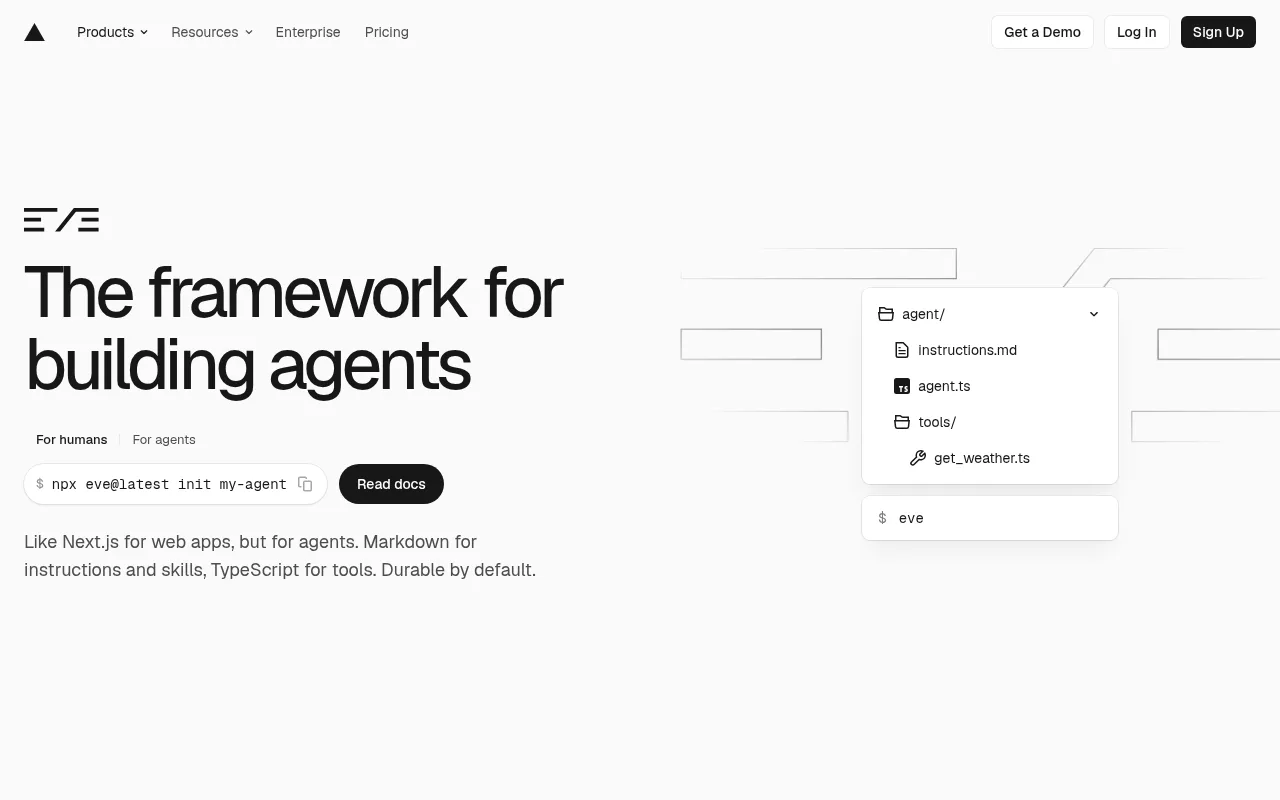
eve is an open-source agent framework from Vercel. As the docs put it, "eve is a filesystem-first framework for durable backend AI agents. You define each agent with files under an agent/ directory" (Vercel docs). eve discovers those files and compiles them into an app that runs on Vercel Functions.
The pitch is "like Next.js for web apps, but for agents." Next.js turned a folder into routes. eve turns a folder into a working agent, with durable sessions, a sandbox, approvals, and evals already built in. It launched in June 2026 and is in beta.
What you'll build
Your eve agent is a small tree of files. Each file is one capability, readable at a glance.
agent/
  agent.ts                 # the model it runs on
  instructions.md          # who it is
  lib/firecrawl.ts         # shared Firecrawl client
  tools/
    web_search.ts          # web search, powered by Firecrawl
    scrape_url.ts          # deep-read one page as clean markdown
  skills/
    research_a_topic.md    # how it does multi-source research
  channels/
    eve.ts                 # the built-in HTTP channel
    slack.ts               # where it lives: Slack
The end result is an eve Slack agent your team can talk to: a teammate types @research what's the latest stable Node.js version?, the Slack AI bot searches, confirms against the source, and answers in-thread with a link. No bot token, no crawler to maintain.
Why your Slack agent needs Firecrawl for web search
eve does ship a built-in web_search tool, so it is fair to ask why you would replace it. The answer is in eve's own docs: web_search "has no local executor; the provider runs it. To supply your own implementation, override it with defineTool()" (default harness). The built-in eve web search is a provider-managed black box that returns thin snippets. Firecrawl web search gives you the full page instead.
Firecrawl turns search into grounded context. It returns clean, LLM-ready markdown with headers, footers, and ads stripped, works on JavaScript-heavy pages and anti-bot friction, and lets you filter by domain, news, or time window. That is the difference between a bot that guesses and one that cites.
Built-in web_search | Firecrawl | |
|---|---|---|
| Setup | Zero, ships with eve | One API key |
| Output | Provider snippets | Clean markdown, full page on demand |
| JS-heavy / SPA pages | Depends on provider | Handled |
| Domain / news / time filters | No | Yes |
| Structured extraction | No | Yes (JSON schema) |
| Best for | Occasional, low-stakes lookups | Grounded, citable answers |
If you only need the odd casual lookup, the built-in is fine. For a Slack agent your team relies on, Firecrawl is the upgrade. The same approach powers our finance research agent and the Codex web search setup. Get a free Firecrawl key to follow along.
Prerequisites
- Node.js 24+ (eve pins the runtime to Node 24).
- A Vercel account (free tier works to start).
- A Slack workspace where you can install an app.
- A Firecrawl API key from firecrawl.dev.
- A model credential: an AI Gateway key, or run
vercel linkto use OIDC.
Step 1: Scaffold your eve agent
One command scaffolds the project, installs dependencies, initializes Git, and starts the dev server.
npx eve@latest init eve-slack-agentA minimal agent is two files. agent/agent.ts sets the model, routed through the Vercel AI Gateway so you do not manage provider keys directly. Haiku 4.5 keeps a high-volume Slack bot cheap; you can bump to Opus for harder questions. To use a direct Anthropic key locally instead of the Gateway, run npm install @ai-sdk/anthropic and pass model: anthropic("claude-haiku-4-5-20251001") from that package, with ANTHROPIC_API_KEY in your env. The Gateway model string above is the simpler path on Vercel, where OIDC means no key to manage.
// agent/agent.ts
import { defineAgent } from "eve";

export default defineAgent({
  // Any AI Gateway model id works. Haiku 4.5 is a cheap, fast default for a
  // high-volume Slack bot; bump to "anthropic/claude-opus-4.8" for harder reasoning.
  model: "anthropic/claude-haiku-4.5",
});
agent/instructions.md is the always-on system prompt. This is where you give the agent its job: search before answering, and cite every source.
# Identity

You are a web research assistant that answers questions about live, current
information from the public web. You work inside Slack, so teammates @mention
you with a question and you reply in the thread.

# Rules

- Always use `web_search` before answering anything that depends on current
  facts, news, prices, releases, or docs. Do not answer from memory.
- When a result looks promising but the snippet is thin, call `scrape_url` on
  that URL to read the full page before you rely on it.
- Cite your sources. End every researched answer with the URLs you used.
- Be concise. You are in a Slack thread, not writing a report.
Step 2: Give it web search with Firecrawl
Tools in eve are typed actions the model can call. Each file in agent/tools/ is one tool, and the filename is the name the model sees. Tools run in your app runtime with full access to process.env, so they can read your Firecrawl key.
Start with one shared client in agent/lib/firecrawl.ts.
// agent/lib/firecrawl.ts
import { Firecrawl } from "firecrawl";

// Tools read the key from the environment, never the model.
export const firecrawl = new Firecrawl({
  apiKey: process.env.FIRECRAWL_API_KEY,
});
Now the headline tool. Because the file is named web_search.ts, it overrides eve's built-in web_search with a Firecrawl-powered version built on Firecrawl's search endpoint.
// agent/tools/web_search.ts
import { defineTool } from "eve/tools";
import { z } from "zod";
import type { Document, SearchResultNews, SearchResultWeb } from "firecrawl";
import { firecrawl } from "../lib/firecrawl.js";

type WebHit = SearchResultWeb & Partial<Document>;
type NewsHit = SearchResultNews & Partial<Document>;

export default defineTool({
  description:
    "Search the live web with Firecrawl. Returns ranked results with titles, " +
    "URLs, and a content snippet. Use before answering anything time-sensitive.",
  inputSchema: z.object({
    query: z.string().min(1).describe("The search query."),
    limit: z.number().int().min(1).max(10).default(5),
    sources: z.array(z.enum(["web", "news"])).default(["web"]),
  }),
  async execute({ query, limit, sources }) {
    const result = await firecrawl.search(query, {
      limit,
      sources,
      scrapeOptions: { formats: ["summary"] },
    });
    const web = ((result.web ?? []) as WebHit[]).map((r) => ({
      title: r.title,
      url: r.url,
      snippet: r.summary ?? r.description ?? "",
    }));
    const news = ((result.news ?? []) as NewsHit[]).map((r) => ({
      title: r.title,
      url: r.url,
      snippet: r.snippet ?? r.summary ?? "",
      date: r.date,
    }));
    return { query, web, news };
  },
});
Add a second tool, scrape_url.ts, so the agent can deep-read a single page as clean markdown when a snippet is not enough.
// agent/tools/scrape_url.ts
import { defineTool } from "eve/tools";
import { z } from "zod";
import { firecrawl } from "../lib/firecrawl.js";

export default defineTool({
  description:
    "Read the full contents of a single URL as clean markdown. Use after " +
    "web_search when a result looks relevant but you need the full page.",
  inputSchema: z.object({ url: z.string().url() }),
  async execute({ url }) {
    const doc = await firecrawl.scrape(url, { formats: ["markdown"] });
    const markdown = doc.markdown ?? "";
    const MAX = 12_000;
    return {
      url,
      title: doc.metadata?.title,
      markdown: markdown.length > MAX ? markdown.slice(0, MAX) + "\n\n…[truncated]" : markdown,
    };
  },
});
Finally, teach it a repeatable workflow with a skill. A skill is a markdown file the model loads on demand, so the procedure does not sit in every prompt.
---
description: Use when the user asks for a thorough answer, a comparison, or a summary that needs more than one source.
---

When a question needs real research:

1. Run `web_search` with a focused query. Add `sources: ["news"]` for recent events.
2. Pick the two or three most authoritative URLs.
3. Call `scrape_url` on each to read the full page, not just the snippet.
4. Cross-check the sources. If they disagree, say so.
5. Answer in a few tight bullets, then list the exact source URLs.
Prefer the low-code path? Skip the custom tools and point eve at Firecrawl's keyless MCP endpoint instead. It serves search, scrape, and interact with no API key and 1,000 free credits a month, so you can wire it in before you sign up for anything. eve discovers MCP connections under agent/connections/, and the filename becomes the connection name.
// agent/connections/firecrawl.ts
import { defineMcpClientConnection } from "eve/connections";

export default defineMcpClientConnection({
  url: "https://mcp.firecrawl.dev/v2/mcp",
  description:
    "Firecrawl web data: search the live web, scrape pages to markdown, and interact with sites.",
});
That is the whole integration. eve reads the server's published schemas and surfaces its tools as firecrawl__search, firecrawl__scrape, and the rest, so the model can call them with no extra registration. When you outgrow the free credits, bring your own key with an auth.getToken resolver and the same connection keeps working. The custom tools above still earn their place when you want tighter control over output shape and cost, which is why we lead with them.
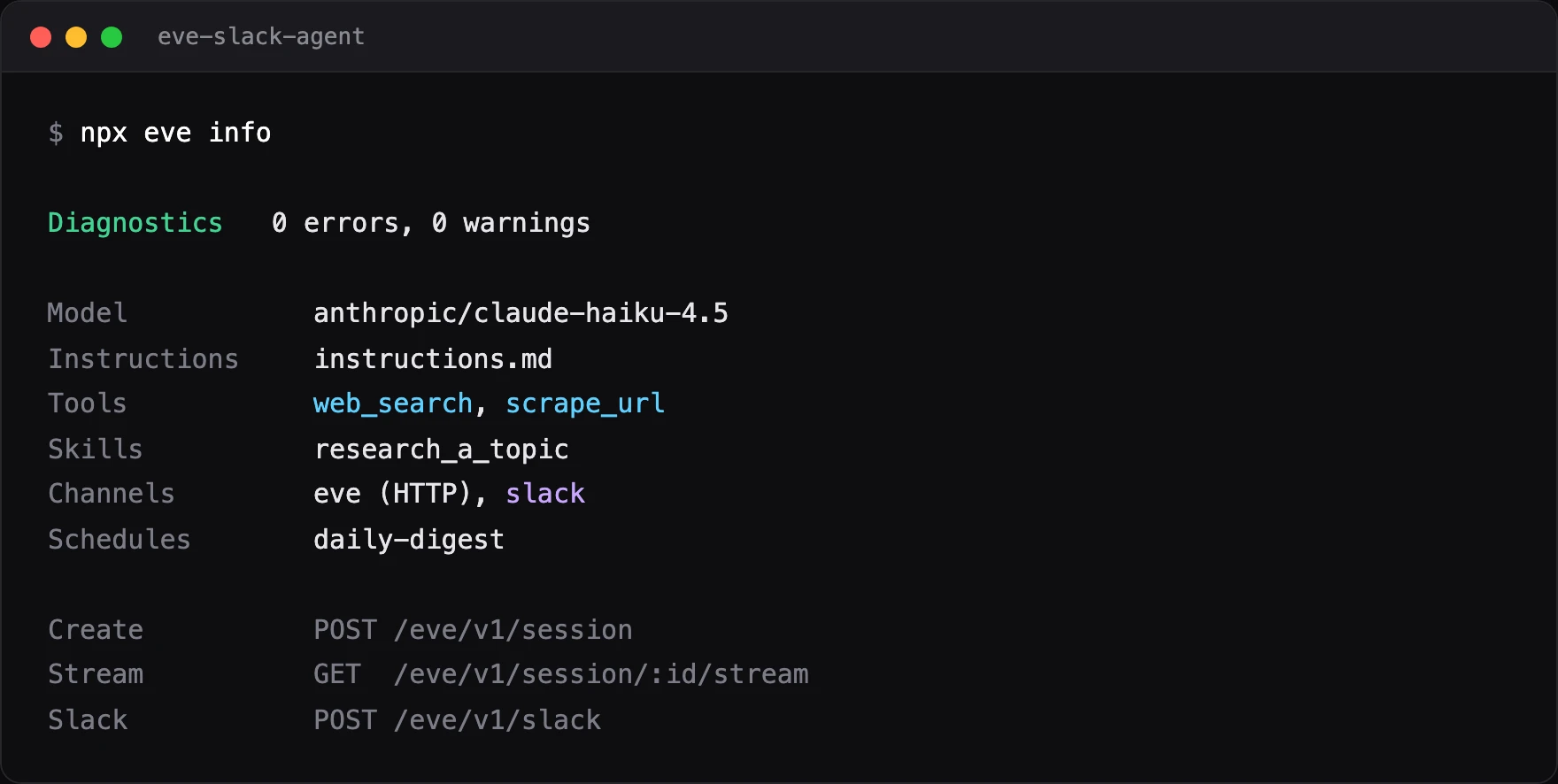
There is no registry file to keep in sync. eve discovers everything by scanning the project folders on startup, so a tool exists the moment you save it in agent/tools/. Run npx eve info to see what it found on disk: your two tools, the skill, the channels, and any schedules.
Step 3: Run and test it locally
Set your keys, then start the dev server.
cp .env.example .env.local   # add FIRECRAWL_API_KEY and a model credential
npm run dev
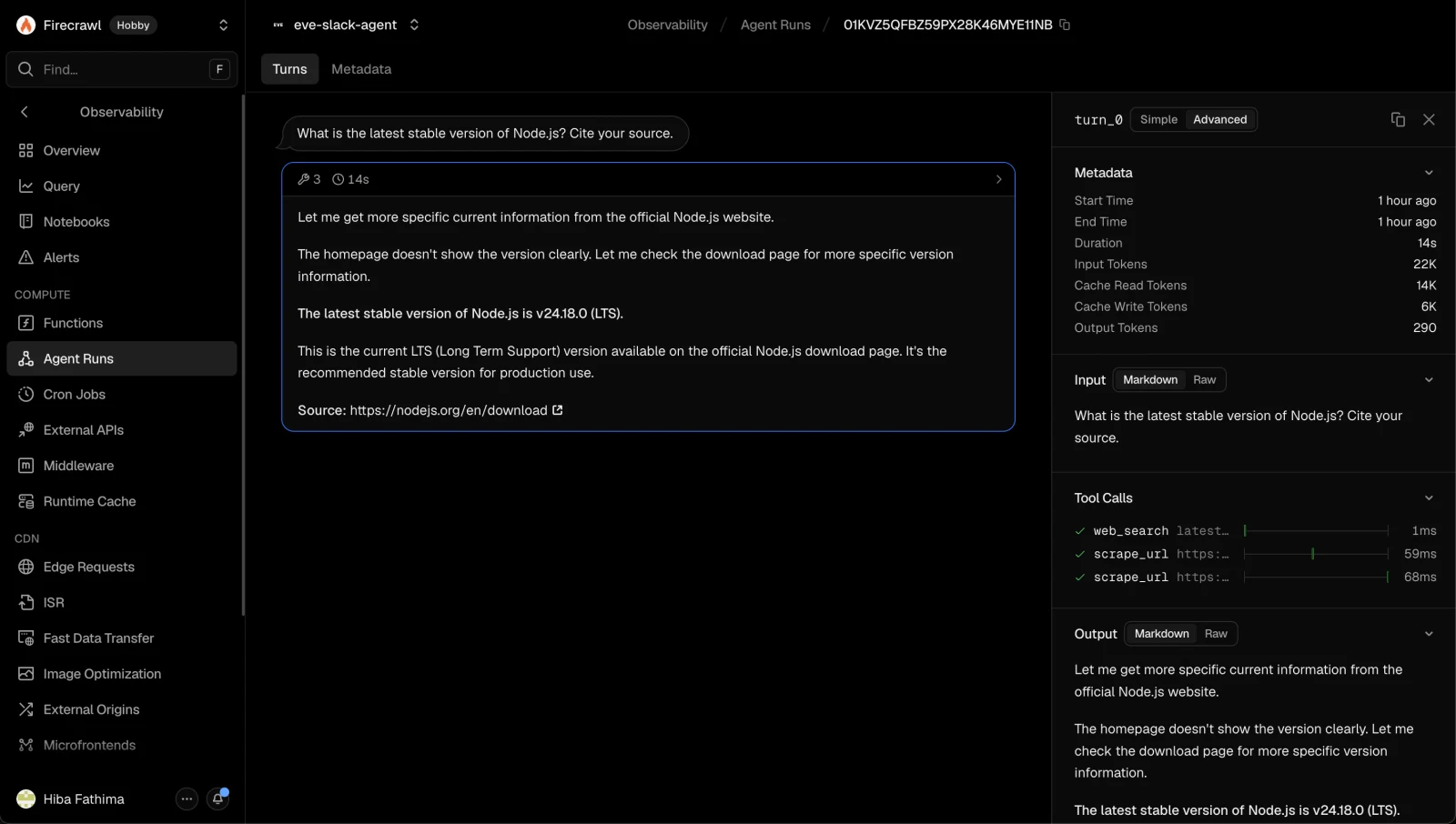
Ask it a live question in the terminal UI, such as "What is the latest stable Node.js version? Cite your source." You will watch it call web_search, then answer with a link. The same agent is also reachable over a stable HTTP API.
curl -X POST http://127.0.0.1:3000/eve/v1/session \
  -H 'content-type: application/json' \
  -d '{"message":"What is the latest stable Node.js version?"}'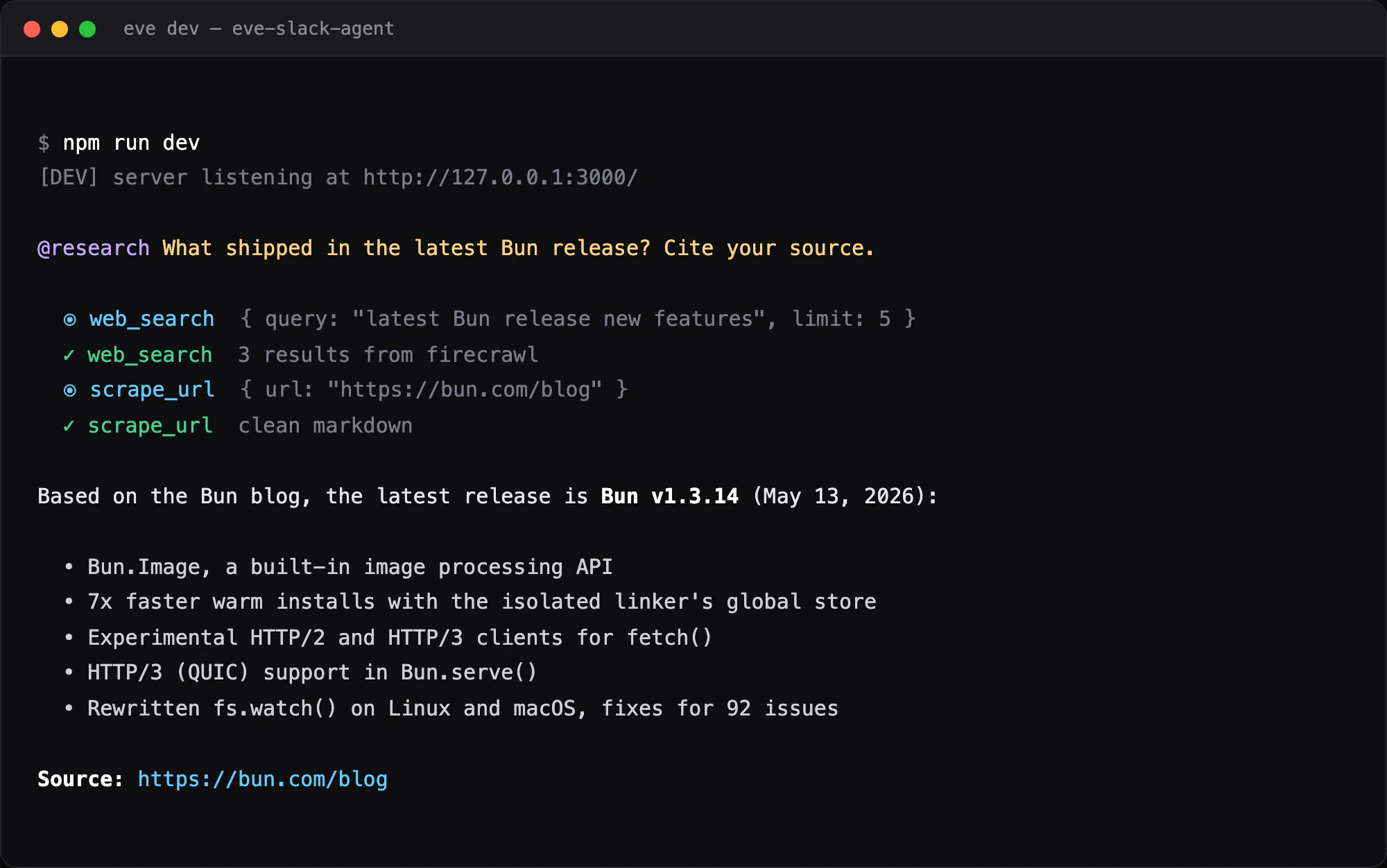
Because the agent serves structured events, you can test it like any other software. eve discovers evals under evals/. This one asserts the agent actually searched and cited a source instead of answering from memory.
// evals/research.eval.ts
import { defineEval } from "eve/evals";
import { includes } from "eve/evals/expect";

export default defineEval({
  description: "The agent searches the web and cites a source for a live question.",
  async test(t) {
    await t.send("What is the latest stable version of Node.js? Cite your source.");
    t.completed();
    t.calledTool("web_search");
    t.check(t.reply, includes("http"));
  },
});
Run it with npm run eval. A green run means the agent booted, took the request, and produced a cited answer. Wire eve eval into CI and that becomes your deploy gate.
Step 4: Add the Slack channel
A channel is the surface your agent lives on, and in eve it is one file. Scaffold the Slack channel:
eve channels add slackThat writes agent/channels/slack.ts. The whole Slack surface is a handful of lines, because Vercel Connect handles the credentials.
// agent/channels/slack.ts
import { connectSlackCredentials } from "@vercel/connect/eve";
import { slackChannel } from "eve/channels/slack";

export default slackChannel({
  credentials: connectSlackCredentials(process.env.SLACK_CONNECTOR ?? "slack/eve-slack-agent"),
});
There is no SLACK_BOT_TOKEN or SLACK_SIGNING_SECRET here. As eve's docs note, credentials "run through Vercel Connect, which handles both the outbound bot token and inbound webhook verification" (Slack channel docs). eve serves Slack events at /eve/v1/slack, and the bot replies in threads, shows typing indicators, and renders approvals as Slack buttons.
One thing to know up front: you cannot test the Slack surface on localhost. Slack forwards events to Vercel Connect, which delivers them to your deployed project. Iterate on tools and instructions in the local dev UI, and test Slack against a deployment.
Step 5: Deploy to Vercel
An eve agent is an ordinary Vercel project, so shipping it is one command.
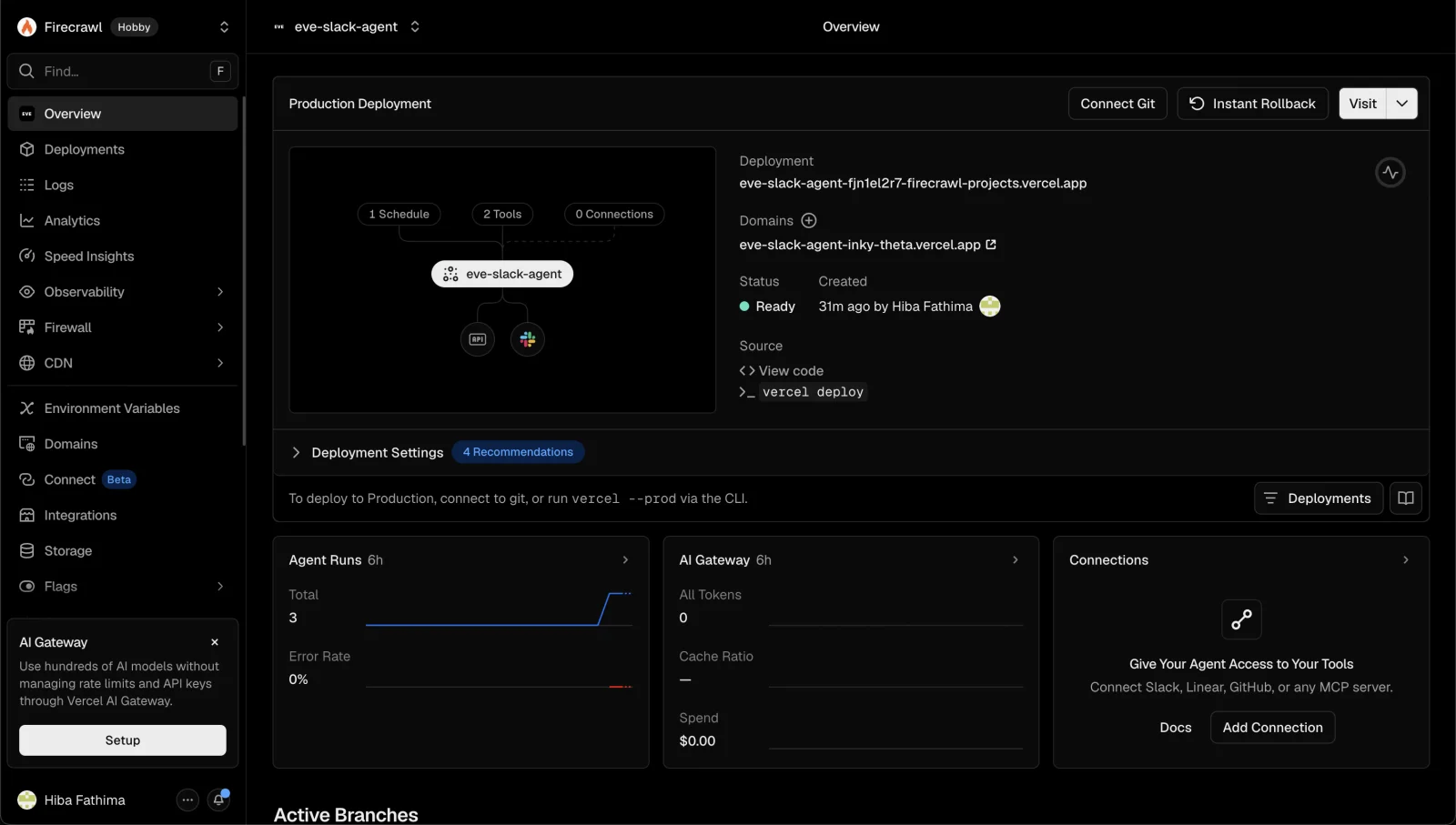
eve deployeve deploy wraps vercel deploy --prod, installs dependencies, and pulls your environment variables. Set FIRECRAWL_API_KEY on the Vercel project so your tools can reach Firecrawl in production. Once the deploy finishes, your agent is live at a public URL, and every run shows up under Observability as Agent Runs, with each session, tool call, and token count visible.
Step 6: Connect Slack and talk to your agent
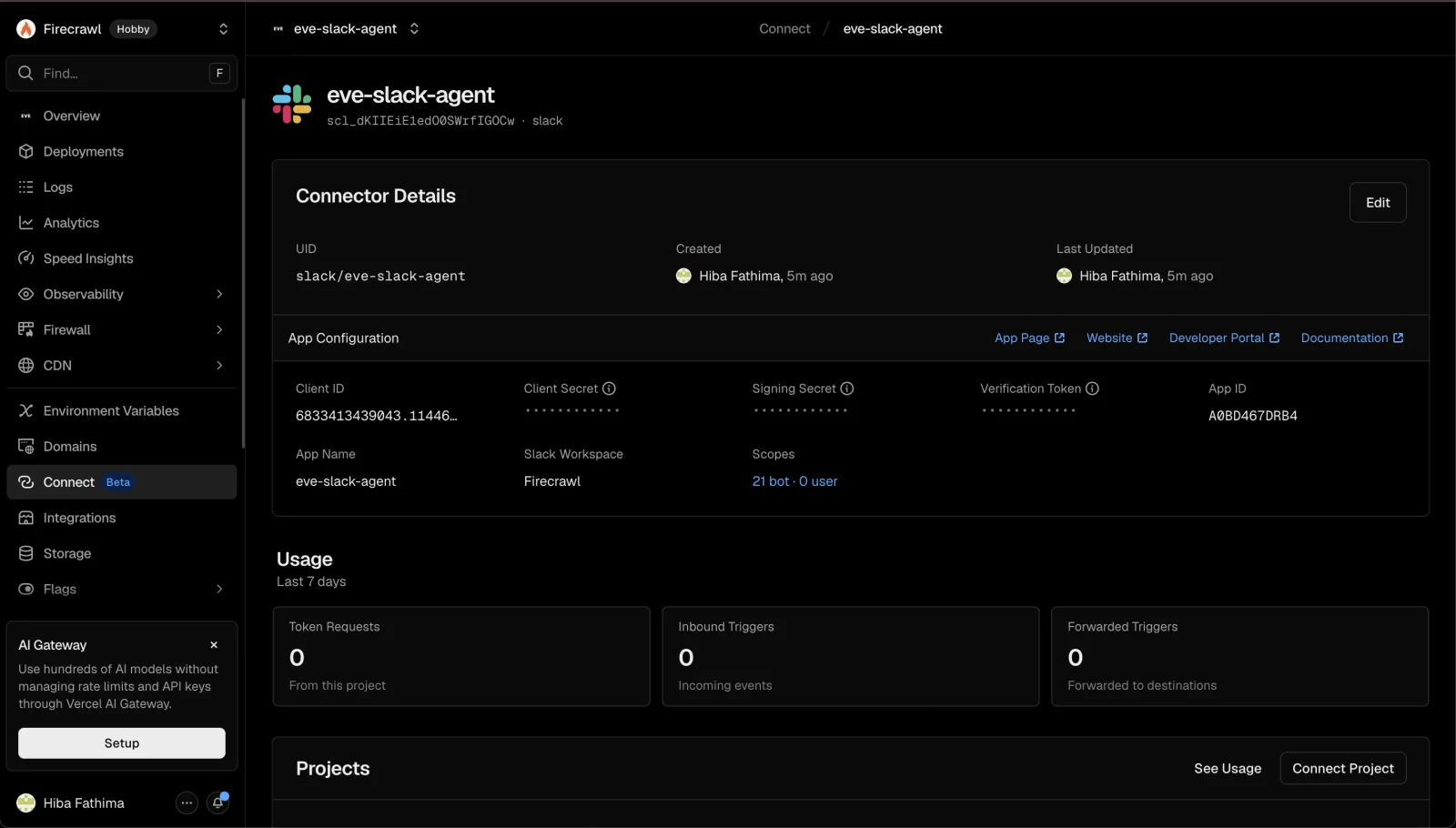
With the agent deployed, connect Slack through Vercel Connect. You authorize Vercel's managed Slack app in the browser, point its event trigger at the route eve serves (/eve/v1/slack), and the connector UID lands in SLACK_CONNECTOR. No OAuth client to register, no secrets to copy.
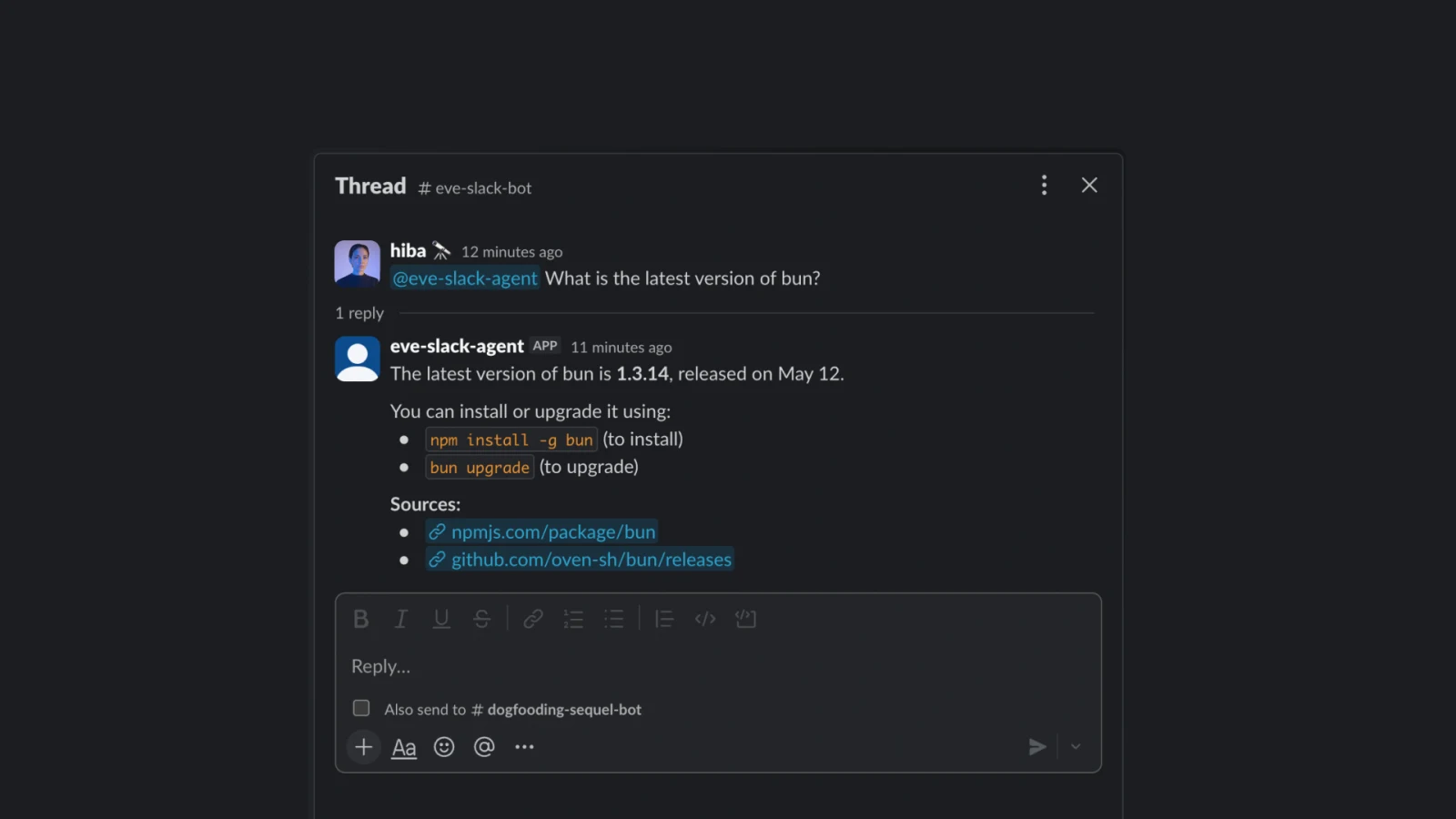
Now invite the bot to a channel and @mention it. Ask something that needs the live web, like "what shipped in the last Next.js release?" The agent searches with Firecrawl, reads the release notes, and answers in the thread with a link. Follow-up messages keep the thread's context.
Going further
Your slack ai bot is live. A few directions to take it next:
- Put it on a schedule. A file under
agent/schedules/with a cron expression posts a digest on its own. Have it research the day's AI engineering news and post a five-bullet summary with links to a channel every weekday.
// agent/schedules/daily-digest.ts
import { defineSchedule } from "eve/schedules";
import slack from "../channels/slack.js";

export default defineSchedule({
  cron: "0 9 * * 1-5",
  async run({ receive, waitUntil, appAuth }) {
    waitUntil(
      receive(slack, {
        message:
          "Research the top AI engineering news from the last 24 hours and post a 5-bullet digest with source links.",
        target: { channelId: "C0123ABC" },
        auth: appAuth,
      }),
    );
  },
});- Add human-in-the-loop approvals. Gate any sensitive tool with
needsApproval, and eve pauses for a Slack button before it runs. - Delegate to a subagent. Hand deep research to a child agent with its own tools and a fresh context window.
- Reuse the pattern elsewhere. The same Firecrawl tools drop into any agent. See how agents use the web in why AI agents prefer the CLI, the trade-offs in MCP vs CLI, and how a clean web index sets the ceiling for what an agent can answer. For multi-agent setups, see Codex multi-agent orchestration, and to pick a build environment, the best AI coding agents.
eve is one week old at the time of writing, so the ecosystem is still forming. For background and outside perspective, see Vercel's launch announcement, MarkTechPost's writeup, and an early r/LangChain comparison of eve against other agent frameworks. eve also has a near-identical rival in Flue, from the Astro team: our agent framework breakdown shows how the two converged on the same shape.
Conclusion
eve makes the agent itself trivial: a directory of files that deploys like any Vercel project, with Slack as one more file. Firecrawl makes that agent useful, turning the live web into clean, citable context your team can trust in a thread. Most tools help an agent find sources. Firecrawl helps it find sources and turn them into usable answers.
Ready to give your Slack agent real eyes on the web? Start with a free Firecrawl key and clone apps/eve-slack-agent to ship yours today.
Frequently Asked Questions
What is eve?
eve is Vercel's open-source, filesystem-first framework for durable backend AI agents. You define an agent as files under an agent/ directory (a model, instructions, tools, skills, and channels), and eve compiles it into an app that deploys as an ordinary Vercel project. It launched in June 2026 and is currently in beta.
Do I need a Slack bot token or signing secret to build an eve Slack agent?
No. The Slack channel authenticates through Vercel Connect, which brokers the outbound bot token and inbound webhook verification for you. There is no SLACK_BOT_TOKEN or SLACK_SIGNING_SECRET to copy into your environment. The only key you add for this tutorial is your Firecrawl API key, set on the Vercel project.
Can I test the eve Slack agent locally?
Not the Slack surface. Slack delivers events to Vercel Connect, which forwards them to your deployed project rather than to localhost. Iterate on your tools, instructions, and skills in the local dev terminal UI, then test the Slack path against a preview or production deployment.
Does eve have built-in web search, and why use Firecrawl?
eve ships a built-in web_search tool, but it is provider-managed and resolved from the model provider, so it returns opaque snippets. The docs recommend overriding it with your own defineTool. Firecrawl returns clean, LLM-ready markdown, handles JavaScript-heavy pages and anti-bot friction, and supports domain, news, and time filters, which gives your agent grounded, citable answers.
What models can an eve agent use?
Any model id available through the Vercel AI Gateway, for example anthropic/claude-haiku-4.5 for a cheap, fast default or anthropic/claude-opus-4.8 for the strongest reasoning. You set it in agent/agent.ts or switch live with /model in the dev terminal UI.
How do I deploy an eve Slack agent?
Run eve deploy, which wraps vercel deploy --prod, installs dependencies, and pulls environment variables. An eve agent is a normal Vercel project, so each commit also gets a preview deployment, and you can roll back instantly. Schedules become Vercel Cron Jobs automatically.
How much does it cost to run?
You pay for model tokens through the AI Gateway, Firecrawl usage (search is 2 credits per 10 results and scrape is 1 credit per page), and Vercel compute for the deployed functions. A low-traffic internal Slack agent is inexpensive; cost scales with how often your team asks it questions.
How do I add more tools or skills to the agent?
Add a file. Drop a defineTool default export in agent/tools/ (the snake_case filename becomes the tool name) or a markdown file in agent/skills/ with a description in frontmatter. eve discovers both from the filesystem with no registration step.