TL;DR
- A web search API is a programmatic interface that lets your code query the live web and get back structured, machine-readable results instead of an HTML page built for human browsing.
- AI developers reach for them because LLMs are stuck behind a training-data cutoff. A web search API gives an agent live information at inference time and grounds its answers in verifiable sources.
- The pipeline behind every web search API has four stages: a request your application sends, an index or live crawler that finds matches, a structured response, and the integration step where your code uses the data.
- Modern APIs built for AI agents return full page content alongside search results, support time and source filtering, expose specialized categories like research papers and code repositories, and bundle the search-plus-scrape step into one call.
- The fastest way to evaluate a web search API is to run a representative query and check three things: did it find the right sources, is the content clean enough for an LLM to read, and can you filter for freshness when you need it.
- Firecrawl Search is the web search API in the Firecrawl context stack. It finds fresh sources from the live web and returns clean Markdown in a single call. Free tier: 1,000 credits per month, no card.
An LLM with no web access is stuck answering yesterday's questions. Anything that's changed since the model was trained, prices, documentation, news, product pages, regulations, is invisible to it. The fix is a web search API: a programmatic interface that lets an application query the live internet and pull back structured results a model or agent can use.
The category is having a moment. Brave's Search API has grown more than 50x since Q1 2024. Perplexity hit 22 million MAU and processed roughly 780 million queries in May 2025 alone. Firecrawl has fetched over 8 billion pages in the last two years and passed 1 million developers. On the funding side, Exa raised an $85M Series B led by Benchmark, and Parallel raised a $100M Series A led by Kleiner Perkins and Index Ventures.
Underneath the growth is a build-versus-buy shift. Teams are buying real-time web search as a managed API rather than running the infrastructure themselves, because modern apps and AI agents need fresh, machine-readable results with citations on every request.
The barriers to building with agentic search are dropping at the same time. Firecrawl just shipped Keyless: search, scrape, and interact with the web without an API key. Every developer gets 1,000 free credits a month, automatically.
What is a web search API?
A web search API is a programmatic interface that takes a search query as input and returns structured results as output. Your code sends an HTTP request with a query and a few parameters. The API returns JSON containing titles, URLs, descriptions, and often the full content of each result.
The contrast with a browser search is the easiest way to see what makes an API distinct. Type a query into Google and you get a rendered page: ranked links, ads, a Knowledge Graph card, sometimes a featured snippet. The whole layout assumes a human is reading it. A web search API strips the interface away and returns the underlying data: no ranking widgets, no sponsored slots, no Javascript to render.
That difference matters more than it looks. A pipeline that drives an AI agent or an automated workflow cannot tolerate the visual quirks a user can. It needs structured input, predictable response shapes, and the ability to run thousands of queries without a person watching. A web search API exists because the browser is the wrong abstraction for software.
Why AI developers need programmatic web search
The web is the closest thing we have to a real-time record of human knowledge. Firecrawl CEO Caleb Peffer frames the problem this way:
This knowledge is trapped, scattered across millions of domains, locked behind JavaScript, and constantly changing. AI needs this data to be useful, to answer questions accurately, to take actions confidently, and to understand the world as it exists right now.
The first reason is the knowledge cutoff. Every LLM is trained on a static snapshot of the world. Ask a model what happened last week, what a product currently costs, or what version of a library shipped yesterday, and it either guesses or refuses. Web search closes that gap by handing the model fresh context at inference time. Grounding model outputs in verifiable, current sources is the single most reliable way to reduce hallucinations on time-sensitive tasks.
The second reason is the cost of building the pipeline yourself. A naive setup looks something like this: query a search engine, scrape each result URL, parse the HTML, chunk the text, re-rank against the query, hand it to the model. Five separate tools, each with its own failure modes, latency budget, and maintenance overhead. A site redesign breaks the scraper. A model context limit forces a chunk-size rewrite. An API quota change means rebuilding rate handling across the stack. The pipeline becomes a thing you maintain instead of a thing you ship.
A web search API built for AI consolidates that pipeline into one call. You send a query, you get back structured, clean content, and the integration is a few lines of code. The orchestration burden goes away because the provider absorbed it.
The third reason is token efficiency. A full webpage usually contains 80 percent boilerplate: navigation, footer, sidebars, ads, cookie banners. Feeding all of that to an LLM wastes tokens on noise. A good web search API returns only the main content, already cleaned, in a format the model can read directly. Firecrawl returns 94 percent fewer input tokens than fetching raw HTML: on a typical page, 2,788 tokens of clean Markdown instead of 38,381 tokens of HTML. Fewer tokens means lower cost and faster responses, and at agent volume that compounds fast.
How does a web search API work?
Under the surface, every web search API follows the same four-stage flow.
- Request. Your application sends an HTTP request to the API endpoint with a query and a set of parameters: result count, time range, language, source type, and so on. Authentication is handled with an API key in the header.
- Processing. The API matches the query against its index, or hits a downstream search engine, or activates a live crawler depending on the provider's architecture. Ranking algorithms weigh keyword relevance, source authority, freshness, and increasingly semantic similarity.
- Response. The matching results are packaged into a structured payload, almost always JSON, and returned over a secure connection. Each result typically includes a URL, title, description, position, and metadata. APIs that include extraction add the full page content as a
markdownorcontentfield. - Integration. Your code parses the response and routes it to wherever it needs to go: an LLM's context window, a database, a dashboard, a downstream tool call.
What separates a basic API from a useful one is what happens in stages two and three. A SERP wrapper scrapes Google and returns the snippets it found. An AI-native API runs its own index over a wider slice of the web, applies semantic ranking, and returns full content so the next step in your pipeline already has what it needs.
The data source matters too. Some providers depend on a single upstream search engine, which means their availability and result quality move with that engine's policies and outages. Others maintain proprietary indexes that crawl the open web continuously, which gives them control over freshness and coverage for niche sources major engines deprioritize.
How do web search APIs support agentic workflows?
Sam Bhagwat, Mastra's CEO, captures the principle in his book Principles of Building AI Agents:
Agents are only as powerful as the tools you give them.
Search is the tool that decides how much of the live web an agent can actually reach.
Agentic workflows are where modern web search APIs earn their keep. A single-shot search call is the easy case. The harder case is a multi-step agent that reasons across sources, follows up on partial answers, and refines its query as it learns. A single user question often fans out into dozens of search calls before the agent settles on an answer. Search has become 10 to 30 percent of monthly variable COGS (cost of goods sold) at AI-agent startups for exactly this reason.
Three capabilities make that work in practice:
- Enough content per result. The API has to return enough to evaluate a result, not just decide whether to click it. Short snippets force the agent into a search-then-scrape loop that doubles latency and cost. Full content alongside the result lets the agent extract, summarize, or quote in the same turn.
- Targeted filtering. A finance agent looking at a company's last quarter does not want results from 2019. A research agent looking at a recent paper does not want a press release. Time filters (past hour, day, week, custom date range), source type filters (web, news, images, research papers, code repositories, PDFs), and domain include or exclude controls turn the API from a general-purpose search box into a precision tool.
- Model-ready output. Clean Markdown rather than raw HTML, predictable JSON shapes, and metadata the agent can use without preprocessing. The cleaner the output, the more of the context window goes toward reasoning rather than noise.
When all three are in place, the agent loop simplifies dramatically. The agent decides what to search, calls the API once, reasons over the response, and decides what to do next. The search step is no longer a bottleneck or a source of brittle plumbing.
What are the features of modern web search APIs?
Compared to early SERP wrappers, modern web search APIs offer a much larger feature surface. Mainstream search engines were built for a human user clicking through results, with keyword queries, two-line teaser snippets, and pages laid out around ads. Agents need the opposite. They reason better over dense, machine-readable passages than over the short excerpts a browser returns. For agent pipelines, the payoff shows up in three places:
- Lower cost. Fewer input tokens per call.
- Better reasoning. Less noise in the agent's context window.
- Lower latency. Fewer hops before the agent converges on an answer.
A few capabilities matter more than others for AI workloads.
- Full-page content extraction in one call. The biggest practical difference between APIs designed for browsing tools and APIs designed for agents. Returning clean Markdown for every result removes the second scrape step entirely.
- Time-based filtering. Parameters like
qdr:h,qdr:d,qdr:w, and custom date ranges let an application target the past hour, day, week, month, year, or a specific window. Essential for news monitoring, pricing, and any workflow tied to current state. - Specialized categories. Search inside GitHub repositories, academic and research websites (arXiv, IEEE, PubMed, Nature), or PDFs without writing a custom integration for each source.
- Source type filtering. Restrict a call to
web,news, orimages. Combine them in one request when an agent needs cross-modal context. - Domain include and exclude controls. Whitelist trusted sources or strip out domains an agent should never cite from. Both are useful for compliance and brand safety.
- Location and language settings. Run the same query from different regions to pull localized results. Important for pricing, regulation, and market intelligence work.
- Structured metadata. Publication date, author, page category, and provider-specific schema like product price or stock availability, returned as fields rather than buried in HTML.
- Zero Data Retention options. Some providers expose a configuration that prevents either themselves or any upstream search engine from retaining the query or the result. Required for many enterprise deployments.
- Native framework integrations. LangChain and LlamaIndex tools, MCP server support, and SDKs in the languages most teams use. Saves the days a custom wrapper takes to write and maintain.
A search API that ships most of these is built for agent and pipeline use. A search API that ships only the first one or two is built for someone running queries by hand.
What are the common use cases of web search APIs?
The same primitive shows up across different applications.
Retrieval-augmented generation. RAG pipelines pull live context into the model's prompt before generation. Instead of relying on training data, the model answers with sources it just fetched. A web search API is the retrieval layer when the relevant context lives on the open web instead of a private corpus. See the practical pattern in how to ground your LLM with live web data.
Autonomous research agents. Multi-step agents that take a question, decompose it into queries, search, evaluate, and iterate until the answer is good enough. Web search is the part of the loop that turns reasoning into real-world information. For the architecture and patterns behind these systems, see agentic search, or web search in Hermes Agent for a concrete open-source implementation.
Market and competitive intelligence. Continuously query for mentions of brands, products, competitors, or industry keywords. New results trigger alerts, dashboards, or downstream workflows. Replaces manual monitoring of dozens of sites.
Live monitoring of fast-moving topics. News, regulations, stock prices, sports results, anything where the value of an answer drops off after a few hours. Time filters and continuous indexing matter here more than raw coverage. For provider-specific tradeoffs, see our roundup of the best news APIs for AI applications and agents.
Lead enrichment and sales intelligence. Look up a company by name, pull recent funding, hiring, or product news, and feed it into a CRM or SDR workflow. Web search is the cheapest way to keep enrichment data fresh without buying a dedicated data feed.
Internal search over public content. Build a search experience over a curated slice of the web, like documentation, support content, or a specific industry. Faceted filtering, autocomplete, and ranking can be layered on top without operating a crawler.
Dataset construction. Bulk-collect URLs, snippets, or full content matching a query and use the results to seed downstream training, evaluation, or analysis pipelines.
A different sub-category, semantic search APIs, handles vector-style retrieval over a fixed index. Useful when the corpus is yours, less useful when the relevant content lives on the open web and changes constantly.
How to call a web search API: implementation guide
Here is the full flow from sign-up to a working call using the Firecrawl Python SDK. The same shape applies to most modern web search APIs.
1. Skip the signup (or grab a key)
Thanks to Firecrawl Keyless, you can skip the account step entirely. Every developer gets 1,000 free credits a month, automatically, no API key required. That covers most prototypes and side projects.
When you need higher rate limits or more credits, sign up at firecrawl.dev, generate a key from the dashboard, and store it as an environment variable so it never lands in source control:
export FIRECRAWL_API_KEY="fc-YOUR-API-KEY"2. Install the SDK
pip install firecrawl-py3. Run a basic search
The minimal call takes a query and a result limit. The response gives you the standard fields for every result.
from firecrawl import Firecrawl

# No API key needed to get started. Add one for higher rate limits:
# firecrawl = Firecrawl(api_key="fc-YOUR-API-KEY")
firecrawl = Firecrawl()

results = firecrawl.search(
    query="vector databases 2026",
    limit=5,
)

for r in results.web or []:
    print(r.title)
    print(r.url)
    print(r.description)
    print("---")
The shape you get back has web, news, and images arrays. Each web result includes a title, url, description, and position. Source-type filtering is one parameter away.
4. Search and extract content in one call
This is the call that replaces the search-then-scrape pipeline. Pass scrape_options and every result comes back with clean Markdown.
results = firecrawl.search(
    query="vector databases 2026",
    limit=5,
    scrape_options={
        "formats": ["markdown"],
    },
)

for r in results.web or []:
    print(r.title)
    print((r.markdown or "")[:500])
    print("---")
The model can now read full page context without a second round trip.
5. Filter by time, source, and domain
Recency controls and source filters turn the same API into a precision tool.
# News from the past 24 hours
news_results = firecrawl.search(
    query="openai release",
    limit=5,
    sources=["news"],
    tbs="qdr:d",
)

# Research papers only
research_results = firecrawl.search(
    query="attention mechanism",
    limit=10,
    categories=["research"],
)

# Restrict to specific domains
docs_results = firecrawl.search(
    query="rate limit retry",
    limit=10,
    include_domains=["docs.firecrawl.dev", "firecrawl.dev"],
)
tbs accepts the standard recency tokens: qdr:h (past hour), qdr:d (past day), qdr:w (past week), qdr:m (past month), qdr:y (past year), and sbd:1 to sort by date. Custom ranges are supported via cdr:1,cd_min:12/1/2025,cd_max:12/31/2025.
6. Use the results
What you do with the response depends on the application. For RAG, concatenate the Markdown blocks with the user's question and pass the combined text to your model. For agents, feed the structured array into a tool-calling loop. For monitoring, persist the results to a database and diff against the previous run. The API is intentionally agnostic about what happens next.
Call from the CLI
Skip the SDK entirely. The Firecrawl CLI runs the same search from your terminal, and search works keyless out of the box.
npm install -g firecrawl-cli

# Keyless: search works without logging in
firecrawl search "vector databases 2026" --limit 5

# Search and scrape in one call
firecrawl search "vector databases 2026" --limit 5 --scrape --scrape-formats markdown

# Time-filtered news
firecrawl search "openai release" --sources news --tbs qdr:d

# Research papers only
firecrawl search "attention mechanism" --categories research --pretty
Run firecrawl login for higher rate limits, plus access to crawl, map, agent, and the rest of the toolset. See the CLI reference for the full flag list, and our roundup of the best CLI tools for AI agents for what else lives in the same workflow.
Connect via MCP
If you're building an agent in Claude Code, Cursor, or any MCP-compatible client, wire Firecrawl Search in as a tool. No SDK code required.
# Hosted, with your API key for higher limits
claude mcp add --transport http firecrawl https://mcp.firecrawl.dev/YOUR-API-KEY/v2/mcp

# Keyless, no signup
claude mcp add --transport http firecrawl https://mcp.firecrawl.dev/v2/mcp
Your agent now has firecrawl_search available alongside firecrawl_scrape, firecrawl_crawl, and the rest of the toolset. See the MCP server docs for setup in Cursor, Codex, VS Code, Claude Desktop, and other clients, or our roundup of the best MCP servers for developers for what else fits the same workflow. For Claude Code specifically, agent skills are another integration path: drop a SKILL.md into your project and Claude Code picks it up automatically.
For the full parameter list, including categories, domain filters, ZDR controls, location settings, and advanced scrape options, see the Firecrawl Search documentation and the deeper guide to the Search endpoint.
How to choose the right web search API
Prateek Joshi, VC at Moxxie Ventures, puts the stakes plainly in his deep dive on the search-API category:
If the search step fails, agent answers degrade or hallucinate.
That's why the comparison matters more than it looks. A real one comes down to six questions. Run each against a candidate API with a representative query before committing.
Does it return full content or only snippets?
A snippets-only API forces a second scrape step for every result. If your workload is RAG or any agent that has to reason over page content, the cost difference between a one-call API and a two-step pipeline shows up immediately in latency, error rate, and code volume.
How fresh is the index, and can you filter freshness?
A fixed crawl schedule means stale results for anything time-sensitive. Look for continuous indexing on news, research, finance, and government sources, plus exposed time parameters down to the past hour.
What's the actual cost at your volume?
The advertised per-query price almost never matches the bill. Factor in token processing for content extraction, premium fees for PDF parsing, rate-limit overages, and the cost of any pipeline steps you still have to run on top. Prototype on a free tier first and project from there.
How is the index built, and what happens if it changes?
Wrapper APIs depend on a single upstream search engine, which exposes you to upstream shocks. Microsoft retired the public Bing Search API in August 2025 after raising entry-tier prices 3x in 2023. Production teams hedge by multi-sourcing: one primary provider, one fallback, and an integration written so a swap doesn't mean a rewrite. Independent indexes give the provider control over coverage and freshness, but smaller indexes can miss niche content. Test with queries from your domain before committing.
What does the integration story look like?
REST documentation, language SDKs, MCP server support, LangChain and LlamaIndex tools, and clear example code all reduce time from sign-up to first useful call. A clean SDK in your language is worth more than a feature you may never use.
What compliance controls are available?
For regulated workloads, confirm the provider offers Zero Data Retention, a Data Processing Agreement, SOC 2, and any data residency requirements your team has to meet. These are easy to verify in advance and impossible to retrofit later.
If you want a side-by-side comparison of every major provider against these criteria, the best web search APIs guide covers pricing, features, and use cases in detail.
Build with the Firecrawl Search API
The web search API category has reorganized itself around AI agents. The old shape, a SERP wrapper that hands back snippets and lets you build the rest, still ships in plenty of products. The new shape, a search-plus-extraction API that returns clean, LLM-ready content from the live web in a single call, is what production agent workflows need.
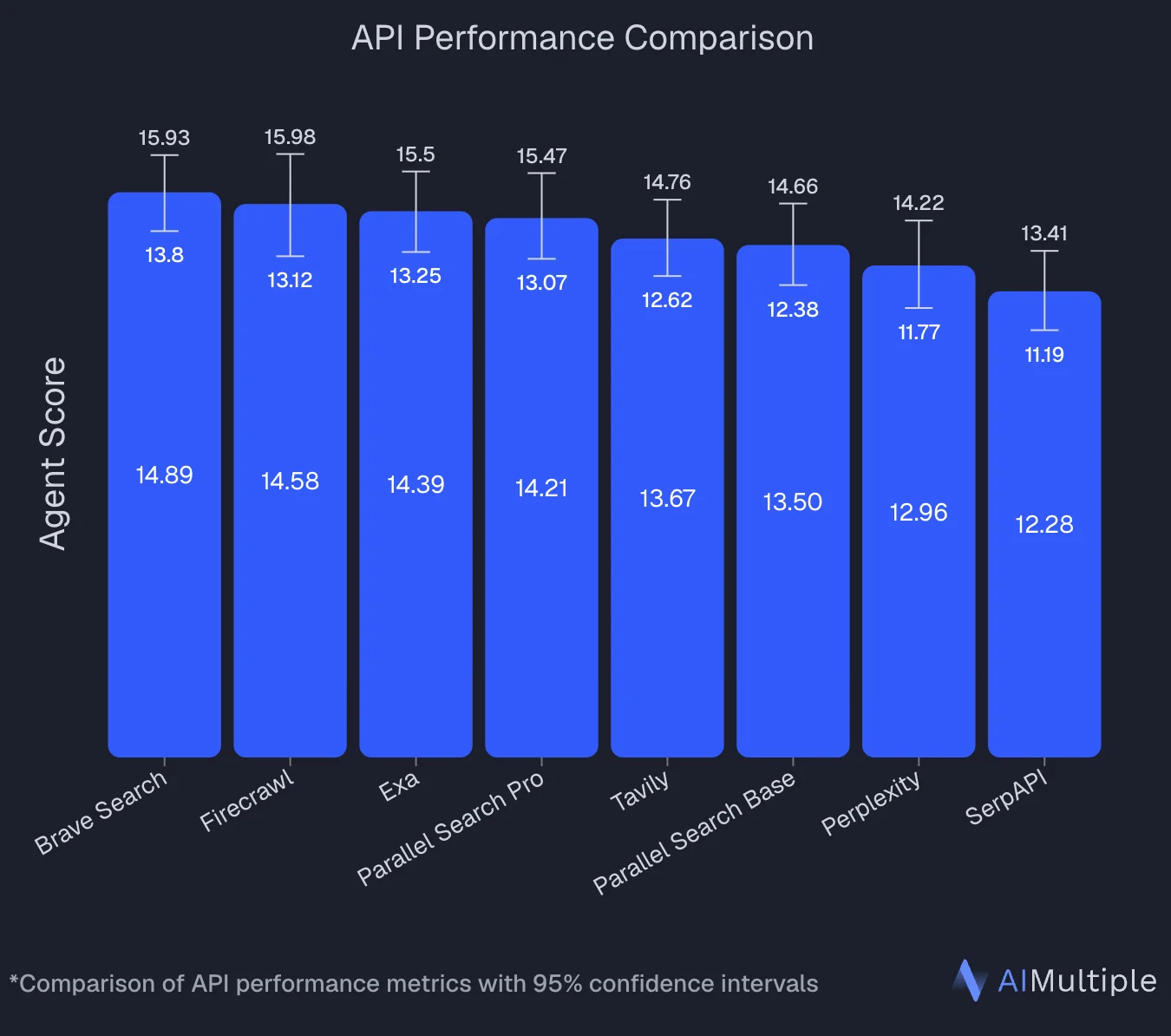
Independent benchmarks back this up. AIMultiple's agentic search evaluation ran 100 real-world AI and LLM queries against 8 search APIs. Firecrawl finished second with an Agent Score of 14.58, statistically tied with the leader (Brave at 14.89), and posted the benchmark's highest mean relevance score at 4.30 out of 5. Firecrawl led on deep content retrieval tasks, where full-page context drives answer quality.
Aemon (YC W26), which builds autonomous AI research engineers, saw the same pattern in their own internal benchmark of scientific and technical retrieval systems:
Aemon is building autonomous AI research engineers that solve hard scientific and technical problems. To do that, our systems must continuously learn from the frontier of research: papers, implementations, benchmarks, and technical discussions across the web.
We use Firecrawl Research as part of the retrieval stack behind Aemon. In our internal benchmark of scientific and technical retrieval systems, it delivered the strongest recall of any provider we tested, particularly at deeper search depths where comprehensive coverage is critical. Firecrawl consistently surfaced relevant scientific and technical sources that would otherwise have been missed.
Yifei (Ray) Xu, Co-Founder, Aemon (YC W26)
Firecrawl Search is the front door of the Firecrawl web context stack: Search, Scrape, Parse, Map, Crawl, and Interact, all in one platform. Search finds fresh, relevant sources from the live web. The rest of the stack handles extraction, document parsing, interactive flows, and anything else the agent needs to turn discovery into clean, usable context.
Free plan: 1,000 credits per month, no card. Search costs 2 credits per 10 results. Time, source, and category filters, native LangChain and MCP integrations, and Zero Data Retention options for compliance-sensitive workloads ship in the box.
Sign up and run your first search in under five minutes.
Frequently Asked Questions
What is a web search API?
A web search API is a programmatic interface that lets your code query the live web and get back structured, machine-readable results. Instead of returning an HTML page built for human browsing, it returns JSON containing titles, URLs, descriptions, and often the full content of each result so an agent or application can consume it directly.
How is a web search API different from a Google search in the browser?
A browser search returns a rendered page with ranked blue links, ads, and feature widgets. A web search API strips out the interface and returns the same kind of information as structured JSON, which is what agents and pipelines actually need. The API is also designed for high request volume, programmatic filtering, and integration into automated workflows that a manual browser session cannot support.
What is the difference between a SERP API and a web search API?
A SERP API is a narrow type of web search API that scrapes results from a major search engine like Google or Bing and reformats them as JSON. A web search API is the broader category. It can wrap a major engine, run on a proprietary index, or combine search with full-page content extraction. SERP APIs return only result metadata. Modern web search APIs built for AI workflows often return clean page content alongside the result so you skip the second scrape step.
Do I still need a scraper if I'm using a web search API?
It depends on what the API returns. Most traditional SERP APIs return titles, URLs, and short snippets, which means you have to fetch and parse each URL separately to get usable text for an LLM. Search APIs built for AI return the full page content alongside the result, usually as clean Markdown, so a single API call covers both discovery and extraction. If you choose the second kind, you can skip the scraping step entirely for most use cases.
How fresh is the data returned by a web search API?
Freshness depends on the provider. Some keep a near-real-time index and let you filter results to the past hour, day, week, or a custom date range. Others rely on slower crawl schedules and lag behind the live web by days. For news monitoring, pricing, and other time-sensitive use cases, look for an API that exposes time filters and indexes sources continuously rather than on a fixed schedule.
Can a web search API be used in regulated or compliance-sensitive applications?
Yes, but the provider has to support it. For healthcare, legal, financial, and government workflows, look for an API with a Zero Data Retention option that does not store queries or results, a Data Processing Agreement available on request, and either SOC 2 Type II certification or a clear path to one. If the provider also offers data residency controls, that matters in regions with stricter regulations.
How do web search APIs work with RAG and AI agents?
A web search API gives a retrieval-augmented generation system or AI agent live access to the internet at inference time. The agent issues a query, receives structured results with clean content, and uses those results as grounded context for the model's response. This reduces hallucinations by anchoring outputs in current, verifiable sources rather than the model's static training data, and it lets agents handle tasks that depend on real-world information that changes after the model was trained.
What does a web search API cost?
Pricing varies a lot. SERP-only APIs are typically priced per thousand searches. Search APIs that include content extraction usually charge by credits or per request, with extra fees for premium features like PDF parsing. As a rough anchor, Firecrawl's search costs 2 credits per 10 results, with a free tier of 1,000 credits per month and no credit card required. Always factor in token processing, premium features, and rate-limit overages when comparing per-query prices.