
TL;DR
- Clay is a data enrichment platform built around a spreadsheet. Each column can call a data provider or an AI step, its waterfall enrichment tries a second provider when the first one misses, and it bills actions and data credits as separate meters.
- Most Clay alternatives are other sales platforms. Apollo combines company data, people search and outreach. ZoomInfo and Cognism sell managed sales intelligence on custom quotes. Lusha and Seamless.AI focus on contact discovery, and HubSpot enriches records inside its CRM.
- n8n gives technical teams a workflow builder, but no data of its own. You connect it to the APIs and providers you already pay for.
- You can build a Clay-style table yourself with Firecrawl Alexandria. It puts company and people data providers such as Apollo, Fireround, FullEnrich and People Data Labs behind one Firecrawl API key, priced in Firecrawl credits, and runs from ChatGPT or Claude with no code, at 88% less than Clay at scale for a typical enriched record.
What is Clay and why do teams look for alternatives?
Clay is a waterfall enrichment platform built around a spreadsheet, and teams that look for alternatives usually cite its learning curve, its price, the accuracy of its contact data or how fast its credits run out. With waterfall enrichment, you run a sequence of queries to fill in missing data, trying the next provider when one comes back empty. You typically start with a small table of just a few columns, then add enrichment columns until it becomes a useful dataset. If you'd like to learn more, take a look at our guide to data enrichment for AI agents.
What Clay costs
Clay bills two separate meters: actions (for the work Clay does in your table) and data credits (for the data it buys from providers on your behalf). Every enrichment column you add uses one or both, so the cost of a table grows with its rows and columns. Clay also offers a free plan, with monthly limits on actions and data credits and a cap on rows per table.
Common reasons teams switch
Clay's users rate it highly: 4.6 out of 5 across 234 reviews on G2 as of November 11, 2026, and multi-source enrichment is the strength reviewers mention most. The same reviews also show why teams look elsewhere. These are the most common cons in G2's summary of them:
- Learning curve: reviewers say Clay takes time and training to use well. When each column depends on prompts, scrapers and providers, a large table has a lot of moving pieces, and what started as a simple data pipeline can grow into something that needs real data engineering to maintain.
- Price: reviewers find it expensive, especially for small teams. Clay's paid plans start at $167 a month for Launch, on top of the two meters, and multi-step AI workflows make the bill harder to predict because each step can use actions and data credits.
- Data accuracy: reviewers say contact data can be inaccurate or inconsistent, so some records need a manual check.
- Credits running out: reviewers say credits go quickly during enrichment, and that failed lookups can still use them.
Each of these maps to something to compare in an alternative: how much setup it needs, how it bills, which data sources it checks, and what a miss costs.
What to look for in a Clay alternative
When we look at alternatives to Clay, it helps to break Clay down into the pieces it's made of.
- Tabular dataset: this is the bedrock of the workflow. You begin with a table or spreadsheet that has just a few columns, and the goal is to expand it into a complete dataset.
- Data coverage: this is where the enrichment data actually comes from. Say we want detailed information on Firecrawl. We'd begin with the company name and website, Firecrawl and firecrawl.dev, and expand that into a full company profile. Our roundup of company enrichment APIs compares the main data sources.
- Workflow control: you need a way to chain steps, add AI research and stop when something looks wrong. If a step fails or returns something unexpected, you should be able to stop the workflow before it continues. Our list of AI sales automation tools covers the workflow side.
- Cost model: price is one of the most common reasons teams leave Clay. With multi-step AI workflows, you need to see what each step costs before it runs.
Clay alternatives at a glance
| Platform | What it offers | Best for | Pricing model | Recommendation |
|---|---|---|---|---|
| Firecrawl Alexandria | Company and people data providers through one Firecrawl API key | Teams building custom enrichment workflows | Free plan and paid plans based on Firecrawl credits | Can easily use with Firecrawl connected |
| Apollo | Company data, people search, work emails and outreach | Teams that want prospecting and sequencing together | Free plan, paid plans and credits | Can easily use with Firecrawl connected, through Firecrawl Alexandria |
| ZoomInfo | Company and contact data, intent signals and sales intelligence | Larger sales and marketing organizations | Custom quotes | Request pricing through its form |
| Cognism | Sales intelligence, contact data and prospecting | Sales teams that want a managed data platform | Custom quotes | Get a quote from its sales team |
| Lusha | Contact and company data through a web app and browser extension | Individual sellers and smaller teams | Free plan and paid credit-based plans | Start on the free plan |
| Seamless.AI | Contact discovery, company data and prospecting tools | Sales teams building prospect lists | Free sign-up, paid plans priced on request | Sign up free, then book a demo for paid pricing |
| HubSpot | Company and contact enrichment within its CRM | Teams already using HubSpot | Included in paid HubSpot Smart CRM plans | Use it for records already in HubSpot |
| n8n | Visual workflow automation connecting APIs and services | Technical teams building custom automations | Self-hosted Community Edition and paid cloud plans | Self-host the Community Edition, then connect your providers |
Best Clay alternatives in 2026
Waterfall enrichment isn't limited to Clay. Here are the alternatives worth a look, with each tool's pricing model as published in November 2026.
1. Firecrawl Alexandria: build your own enrichment workflow
Firecrawl Alexandria gives you company and people data providers through a single Firecrawl API key, so you can build your own enrichment workflow without a canvas. Providers include Apollo, Fireround, FullEnrich, People Data Labs and Data Legion, and you can call any of them, and others, from the same key. To explore all providers, browse the company and people categories. Discovery is free, and each tool shows its price in Firecrawl credits before you call it.
Firecrawl describes this as headless Clay for agents: the same enrichment flows, run from ChatGPT, Claude or your own code. At scale, that comes to 88% less than Clay for a typical enriched record, a profile plus a work email (Firecrawl Standard billed annually vs Clay Launch, list prices as of November 2, 2026). It works with or without developers: a GTM engineer or anyone on your sales team can run it from ChatGPT with plain prompts, or a developer can run the same calls from code. In our run below, the hands-on steps took about 30 minutes. Firecrawl offers a free plan to get started, with paid plans that scale by Firecrawl credits.
To try it, ask in plain English from ChatGPT or Claude:
Use Firecrawl Alexandria to enrich datadoghq.com and find the work email
of its Head of Marketing, and tell me what each call cost.Saurav Singh, a founder building in public, shared this result from Claude and Firecrawl:
2. Apollo
Apollo combines company data, people search and email lookup with its own outreach tools. It fits teams that want prospecting and sequencing in a single product. Apollo offers a free plan, paid plans and credits. In Firecrawl's company enrichment benchmark, Apollo scored 89.3% on four common company fields across 200 US companies, 8.7 points ahead of the next provider. That benchmark covers company enrichment only. Apollo is also available as a provider in Firecrawl Alexandria.
3. ZoomInfo
ZoomInfo provides contact data, intent signals and workflow tools. It fits teams that want a single vendor for both data and prospecting. ZoomInfo doesn't publish prices on its site. Its products are grouped into Sales, Marketing and Talent, and you request pricing through a form.
4. Cognism
Cognism provides sales intelligence and contact data. It fits teams that want a managed data platform with a sales-led purchase process. Cognism lists Standard and Pro prospecting plans, plus CRM enrichment. Prices aren't published; you get a quote from Cognism's sales team.
5. Lusha
Lusha offers a web app and a browser extension, built for teams who want to look up contact details while browsing. Pricing is credit-based, with tiers from a free plan up to Scale, a customizable plan for larger organizations.
6. Seamless.AI
Seamless.AI combines prospecting, people data and contact information. You can sign up for free, but paid plan prices aren't published: the pricing page offers special pricing for "unlimited users, bulk credits, prospector, job changes, buyer intent, and enrichment" after you book a demo.
7. HubSpot data enrichment
HubSpot includes data enrichment in its CRM, filling in company and contact records automatically. It's included in paid HubSpot Smart CRM plans at no extra cost. HubSpot data enrichment fits teams that already work in HubSpot and don't want another service. HubSpot only enriches records that are already in your CRM. It matches contacts on first name, last name and work email, and companies on domain, so it fills in details on people you already have rather than finding new contacts or their emails. It fills a fixed list of HubSpot properties.
8. n8n
n8n covers the workflow side of Clay. Instead of a table where each column runs an enrichment step, you build the same flow as connected nodes: a trigger or a sheet of companies, a call to a data provider, an AI step, and a fallback branch when the first provider comes back empty. n8n doesn't provide GTM data on its own, so you connect the providers and APIs you already pay for. n8n's cloud plans run from Starter through Pro and Business to Enterprise, and teams can self-host the Community Edition instead.
Why is a data enrichment API aggregator better than a single provider?
A data enrichment API aggregator puts several company and people data providers behind one API, so a single vendor's coverage no longer limits your table. Clay works as an aggregator inside its own spreadsheet. Firecrawl Alexandria offers the same multi-provider access headless, on one Firecrawl key, with each provider's price listed in Firecrawl credits before you call it.
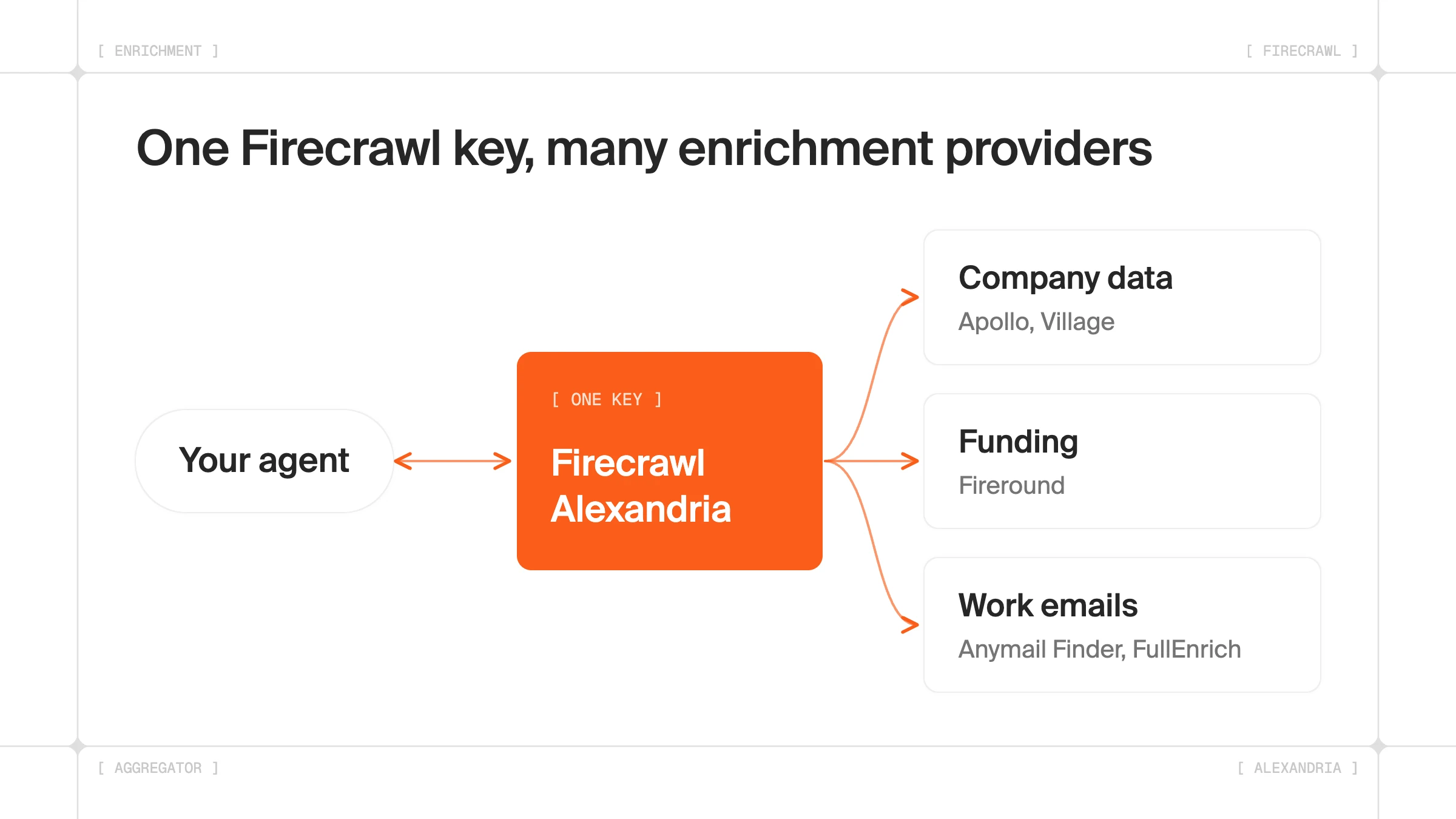
- More of the table filled. Providers are strong at different fields. In our run below, Village filled company details, Fireround added funding, and Anymail Finder found work emails for eight of 10 contacts. When Anymail Finder missed, the fallback tried Leadocean and FullEnrich on the same key.
- The best provider for each field. In Firecrawl's company enrichment benchmark, Apollo led on four common company fields across 200 US companies, so you can send company lookups to Apollo and email lookups to a provider built for them.
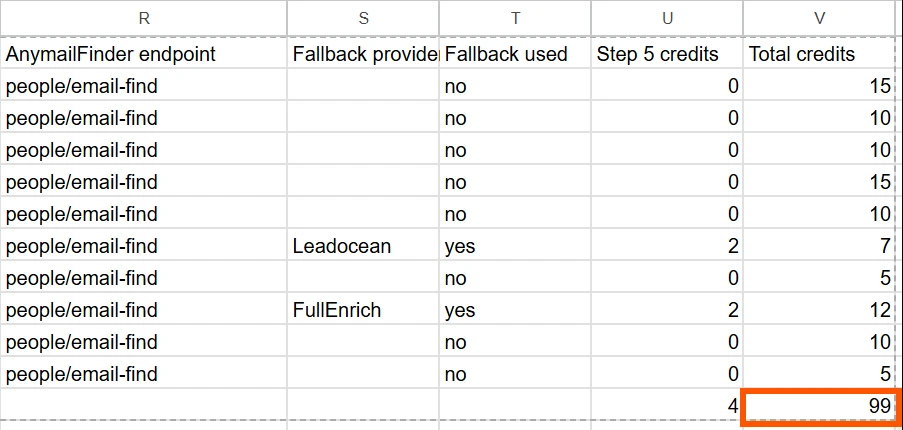
- Costs you can see per call. Each tool lists its price before you run it, and our 10-company run came to 99 Firecrawl credits. ZoomInfo and Cognism price on custom quotes instead.
- No lock-in. Moving a column to another provider means changing the provider in the call, with the same key and the same JSON format.
A reviewer on G2 who works on GTM automation and AI agents described the same benefit:
What I find most exciting about Alexandria is the idea behind it: instead of building and maintaining dozens of individual integrations to access different data sources, you get a unified way to discover and interact with hundreds of them.
As someone working extensively with B2B SaaS, GTM automation and AI agents, I see enormous potential here. Imagine building an agent that needs to research a company, understand its market, identify key decision-makers, enrich prospect data and qualify an opportunity. Traditionally, this would require stitching together multiple APIs, data providers and custom workflows. Alexandria makes that much more accessible.
— Verified user in Computer Software, small business (review on G2)
How to build your own Clay alternative with Firecrawl, Google Sheets and ChatGPT
With Firecrawl, Google Sheets and ChatGPT, you can build your own alternative to Clay. Firecrawl Alexandria gives you access to a range of data providers, and ChatGPT calls them for you from a chat window.
What you are building
You'll start with a sheet of company names and domains. ChatGPT, connected to Firecrawl, fills in company details and funding from Firecrawl Alexandria providers, adds an AI research column from each company's own website, finds one marketing contact per company with a work email and a fallback provider, and logs what each row cost in Firecrawl credits. Every step runs on two rows first, so you can check the output before spending more.
Step 1: Add Firecrawl to ChatGPT
We'll begin by adding the Firecrawl plugin to ChatGPT. In the ChatGPT web app, open Plugins and search for "firecrawl".
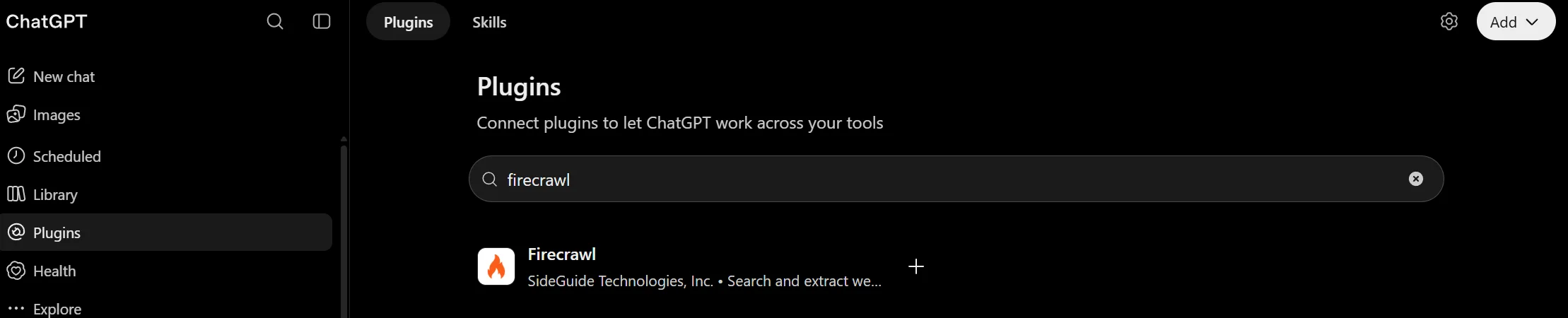
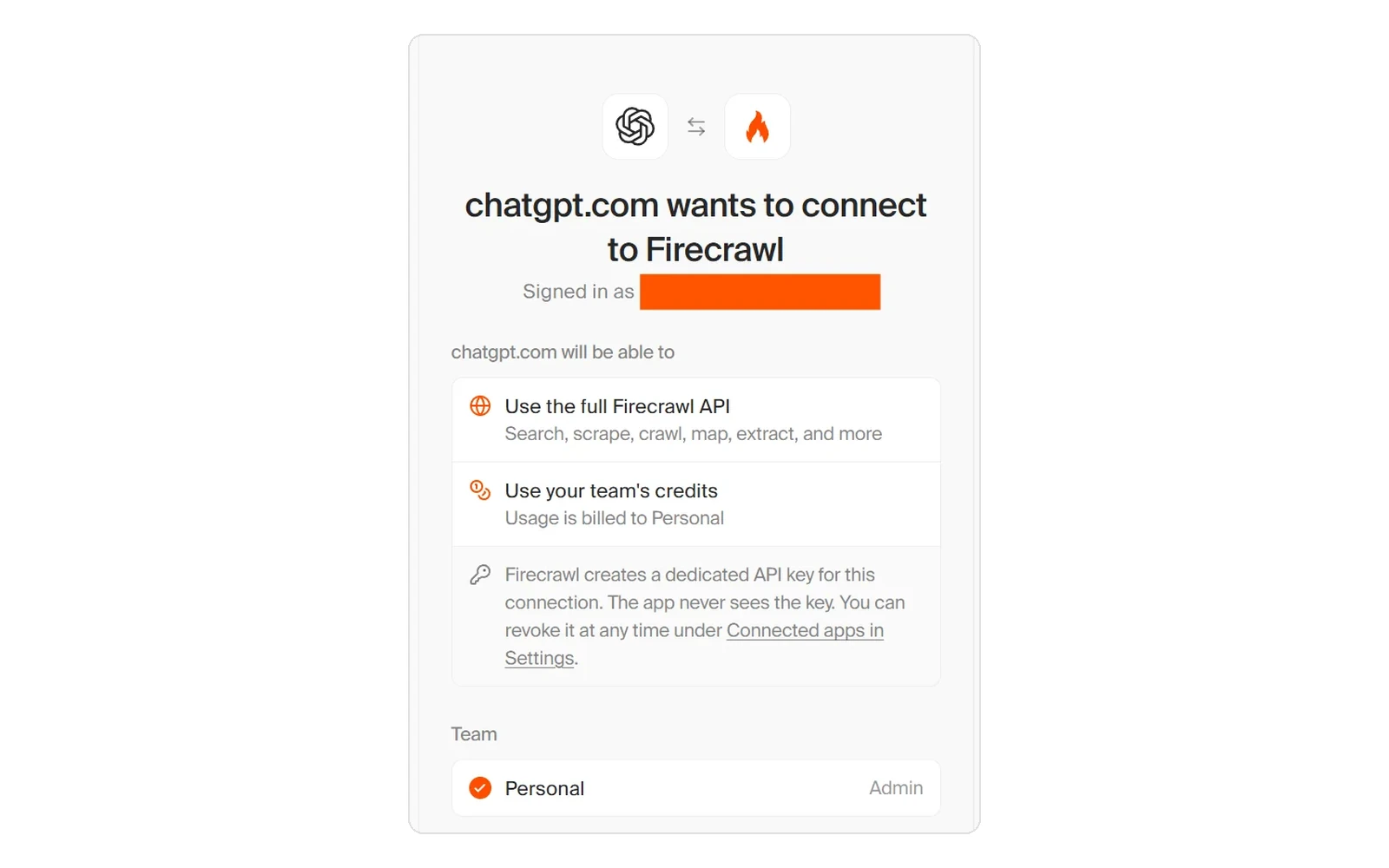
Select the plugin to install it. ChatGPT opens Firecrawl in your browser, where you sign in, choose a team and approve access.
Shortly after, you should see a pop-up confirming that Firecrawl was installed. Start a new chat so ChatGPT loads the plugin.
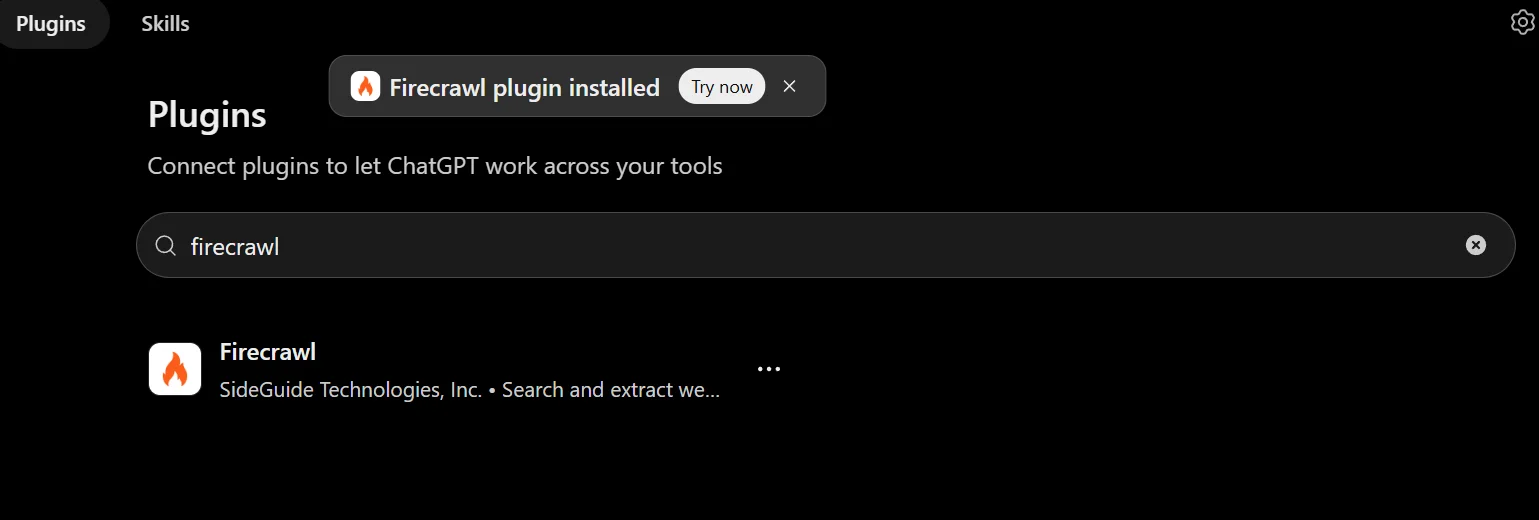
In total, this step took me about one minute.
Step 2: Connect Google Sheets and set up your sheet
To let ChatGPT write rows into a spreadsheet, we used OpenAI's ChatGPT add-on for Google Sheets, which works on the workbook you have open. In Google Sheets, open the Google Workspace Marketplace and search for ChatGPT.
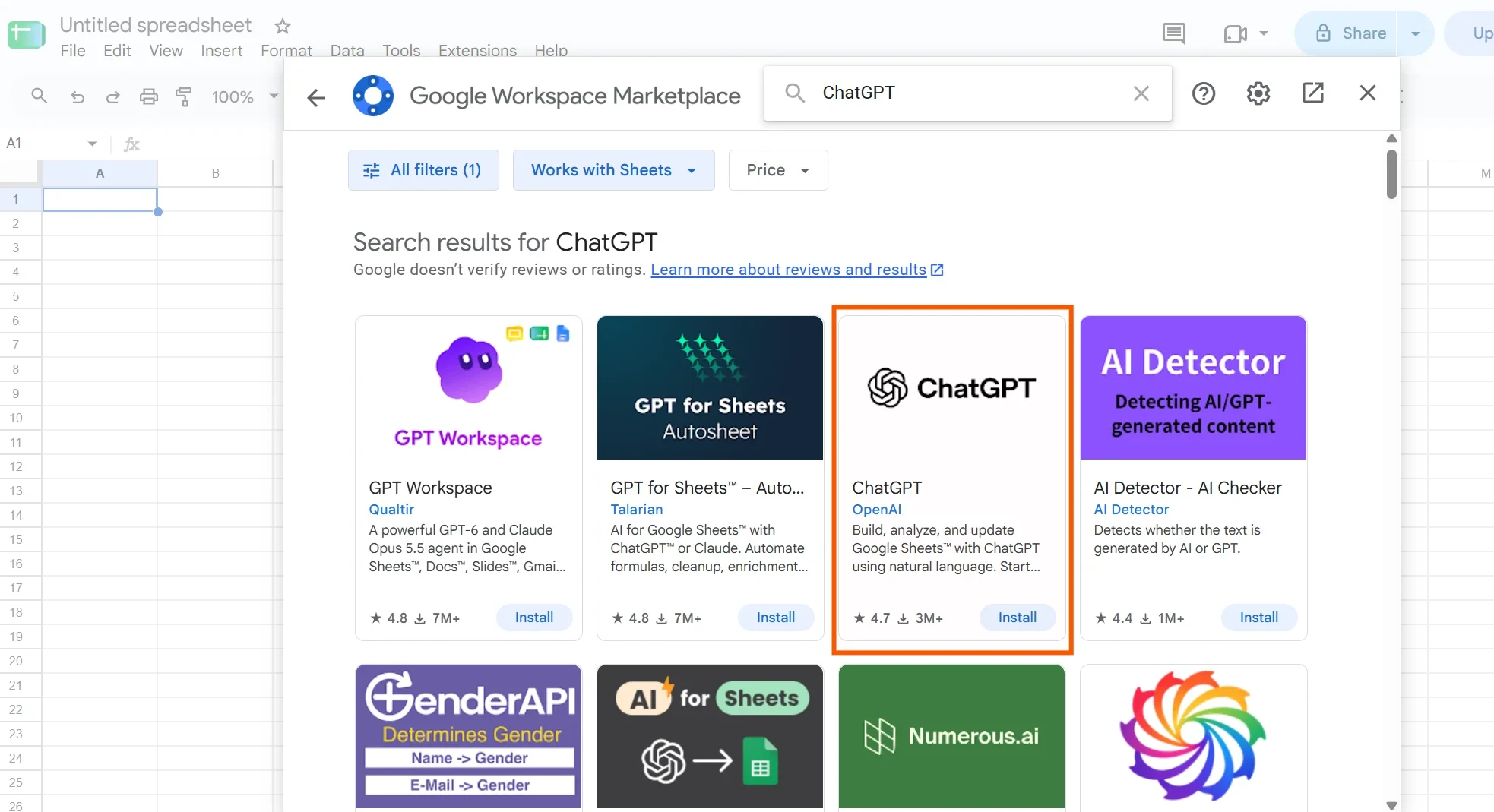
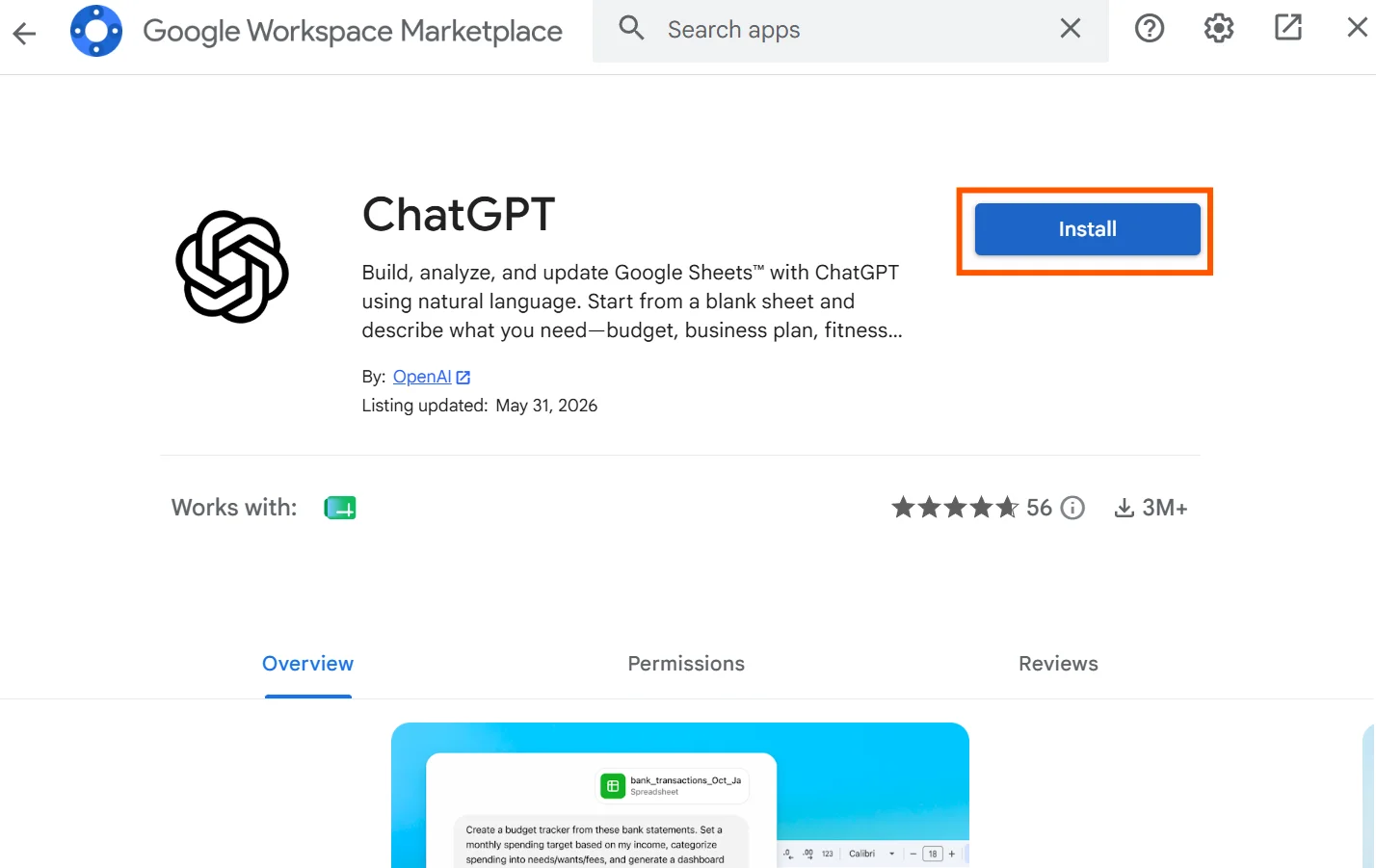
Once you've found the add-on, click Install.
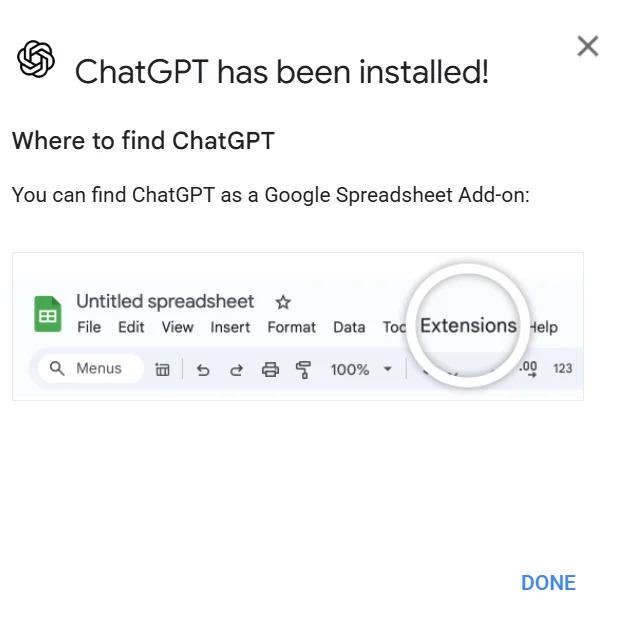
When the install finishes, Google Sheets tells you where to find it.
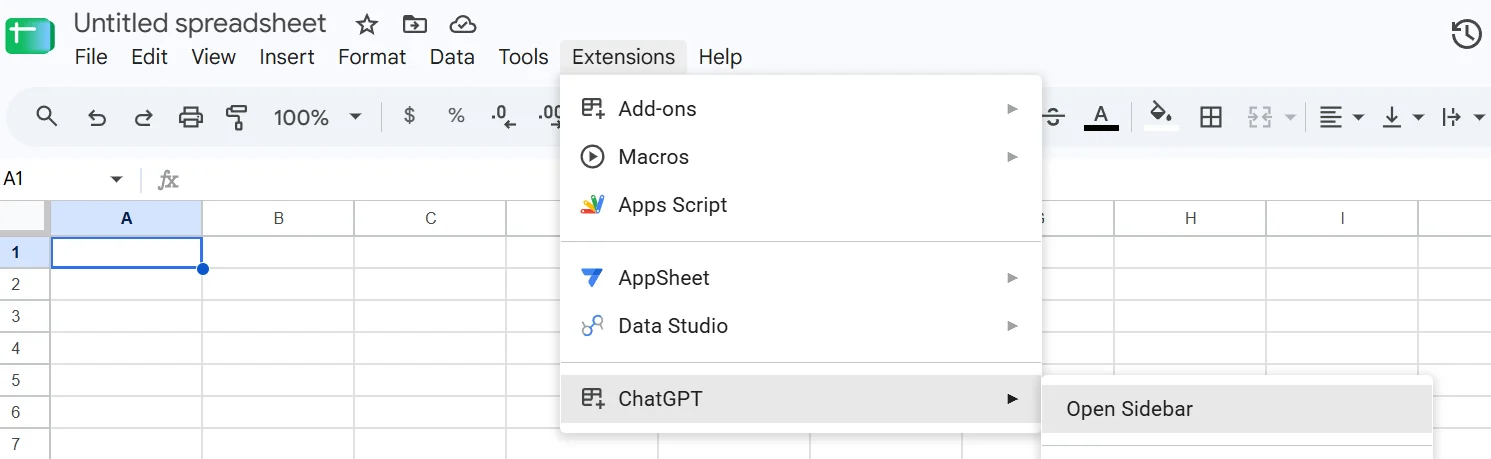
To open ChatGPT from Google Sheets, select the Extensions menu, choose ChatGPT and click Open Sidebar.
As you did with Firecrawl, you'll now sign in to your OpenAI account.
Once you're signed in, you'll have a chat window at the side of your screen. It's a good idea to test that everything is connected. I used the prompt below. If everything works, ChatGPT finds a current news headline with Firecrawl and writes it to the spreadsheet.
I need to confirm that you've got access to both Firecrawl and to the Google Sheets workbook I have open.

Using Firecrawl, get me a news headline from today.

For Google Sheets, you are not connected as a plugin, but you do have access to a workbook.

Write the scraped news headline, the time and date of the headline, and the URL of the article to this workbook.
As you can see in the image below, ChatGPT wrote a news headline at the top of the spreadsheet.
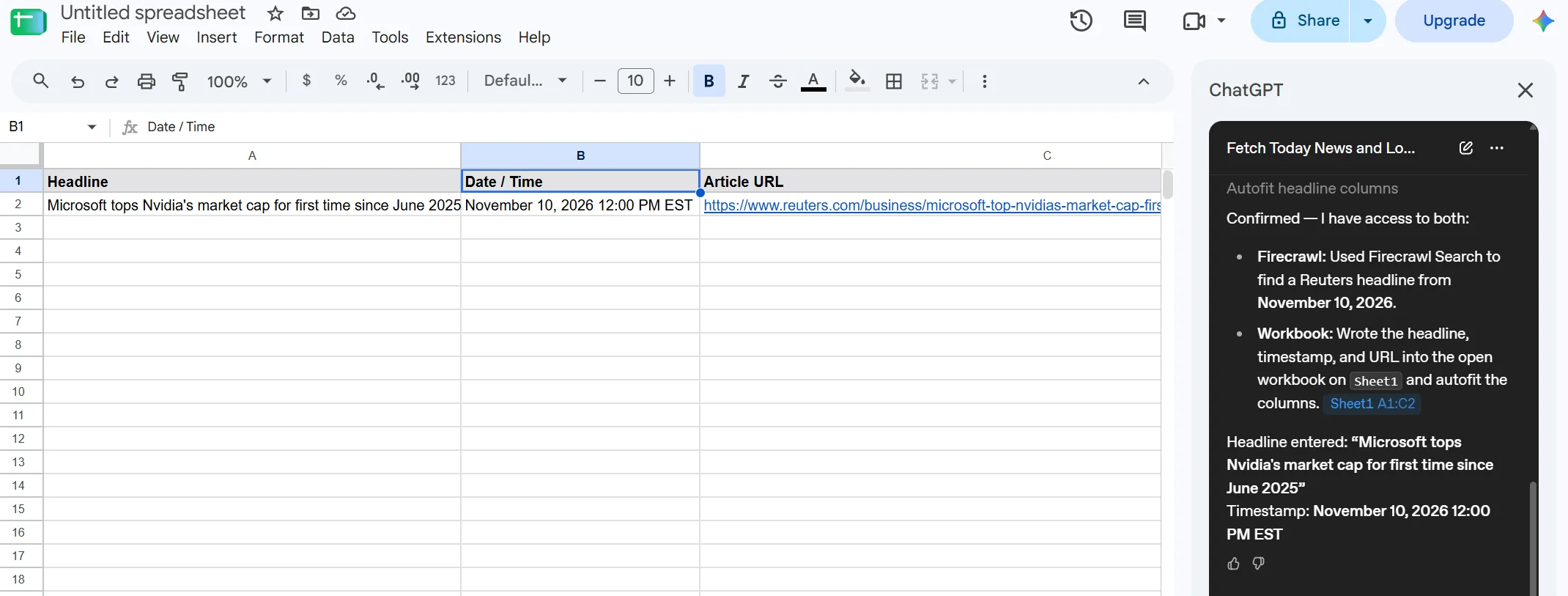
This step took about five minutes.
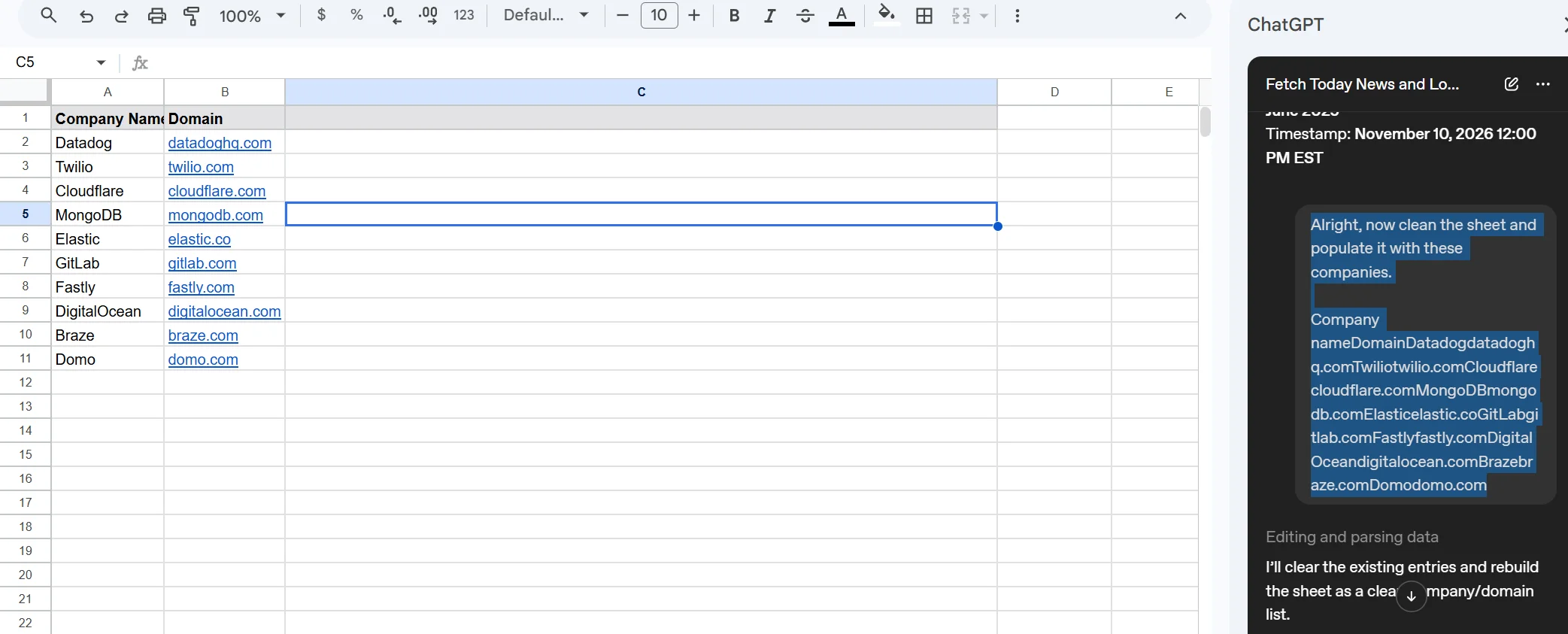
Now paste the following prompt into the ChatGPT window. Notice how messy the company list is. That's the point: replace these companies with your own list of leads, and ChatGPT turns it into a clean sheet.
Alright, now clean the sheet and populate it with these companies.

Company nameDomainDatadogdatadoghq.comTwiliotwilio.comCloudflarecloudflare.comMongoDBmongodb.comElasticelastic.coGitLabgitlab.comFastlyfastly.comDigitalOceandigitalocean.comBrazebraze.comDomodomo.com
If everything is working, ChatGPT gives you a clean spreadsheet of companies and websites.
Step 3: Enrich each company
Next, we'll enrich the dataset with company details and funding. Firecrawl Alexandria lists several company data providers, including Apollo, Village and Fireround for funding data. Some providers, Apollo among them, need an org admin on your Firecrawl team to accept their terms once in the Firecrawl dashboard before the first call, and ChatGPT will tell you when that's the case. Apollo's full company records were also larger than the ChatGPT connector would return in one response, so in this run we used Village for company fields and Fireround for funding. If you use Apollo, ask ChatGPT to return only the fields you need.
The prompt below names the providers, asks ChatGPT to check prices before any paid call, and logs the Firecrawl credits charged for each row, which gives us an easy way to track costs.
You have access to my open workbook and Firecrawl Alexandria.

Use the existing workbook as the source of truth. The active sheet contains company names in column A and domains in column B, with these enrichment columns:

A: Company Name
B: Domain
C: Industry
D: Employee count
E: HQ location
F: Funding stage
G: Total raised
H: Provider used
I: Step 3 credits

Complete this workflow using only these Alexandria providers:

- Village for company enrichment:
  - Industry
  - Employee count
  - HQ location, only if explicitly returned
- Fireround for funding enrichment:
  - Funding stage
  - Total raised

Do not use Apollo or any other provider.

Before making any paid call:
1. Browse the Alexandria catalog and check that Village and Fireround are available for the required capabilities.
2. Confirm the listed price per call for each provider.
3. Confirm whether unmatched records are charged.
4. Check whether either provider requires org-admin terms acceptance.
5. If terms acceptance is required for either provider, stop and tell me which provider requires it. Do not make paid calls until I confirm acceptance.

After I approve:
1. Process companies one row at a time using narrowly scoped calls.
2. For each company, call Village using the domain in column B.
3. Call Fireround using the same company/domain for funding data.
4. Do not guess, infer, backfill, or use outside knowledge.
5. If a field is not explicitly returned, leave that cell blank.
6. If a provider does not match a company, leave that provider's output cells blank and report the missed row.
7. Record the actual Firecrawl credits charged for each row from the charge/usage response, not the catalog estimate.
8. Put the total actual credits charged for both provider calls for that row in column I.
9. Put the provider names used in column H, for example:
   - "Village + Fireround"
   - "Village only"
   - "Fireround only"
   - "No match"
10. Preserve existing values unless a new provider explicitly returns a replacement value. Do not overwrite an existing nonblank value with a blank.
11. Do not write raw JSON, long descriptions, profile URLs, or unrequested fields into the workbook.

Use compact responses or projected fields wherever possible to avoid oversized connector responses. Return only the fields needed for the workbook.

Processing sequence:
- Start with the first two populated company rows only.
- Write the results to the workbook.
- Re-read and check those rows.
- Show me the completed first two rows, including any missed matches and actual credits charged.
- Then stop and wait for me to say "continue".
- Only after I say "continue", process the remaining rows using the same one-company-per-call workflow.

At the end, check:
- No requested output cells are populated with guesses.
- No #REF!, #DIV/0!, #N/A, or #VALUE! errors were introduced.
- Actual credits are recorded correctly.
- All missed rows are explicitly listed.
With Village and Fireround, this step took about five minutes.
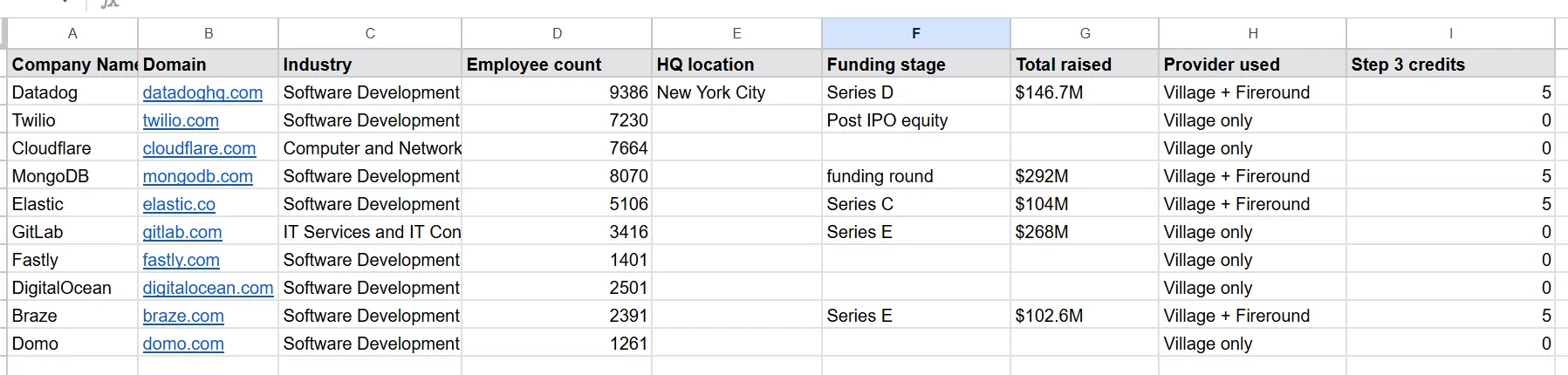
As you can see above, ChatGPT added the columns and filled the cells. The Fireround calls cost 5 Firecrawl credits each, and the sheet recorded 0 Firecrawl credits for the Village calls.
NOTE: LLMs can make mistakes. When you're finished, double-check your data, especially the costs, against the activity logs in your Firecrawl dashboard.
Step 4: Add an AI research column with Firecrawl /scrape
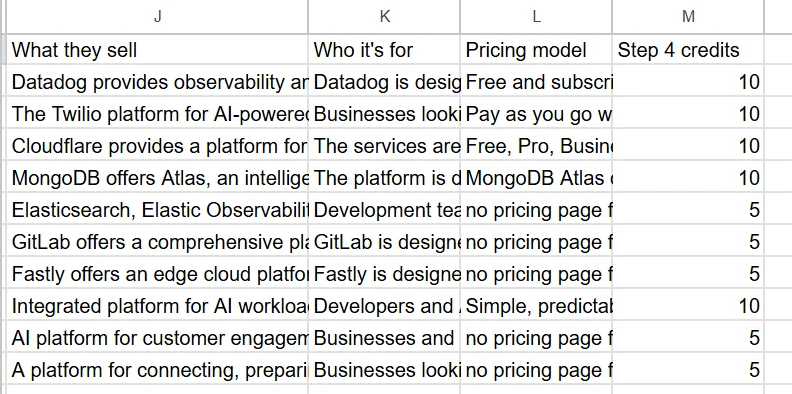
Now we'll add research from each company's own website with Firecrawl /scrape. The prompt below has ChatGPT read each company's homepage and pricing page. As with the other prompts, it stops after the first two rows so we can check the data before approving more calls.
Now I want to add an AI research column to the same sheet, using Firecrawl
/scrape on each company's own website only. Do not use any other source, and
do not fill anything in from your own knowledge.

Before scraping:
1. Tell me which pages you plan to scrape for each company (the homepage and
   the pricing page, if one exists) and the cost in Firecrawl credits per
   page with JSON output.
2. Give me the total estimated cost for two rows, then wait for my approval.

After I approve, run only the first two rows and add these columns:
- What they sell (one sentence)
- Who it's for (one sentence, based on the site's own wording)
- Pricing model (for example free tier, usage-based, contact sales, or
  "no pricing page found")
- Step 4 credits (the Firecrawl credits actually charged for that row, read
  from the charge itself, not estimated)

If a page can't be scraped or doesn't exist, leave that cell blank, put 0 or
the actual charge in Step 4 credits, and tell me which rows had problems.
Keep every answer short and based only on what the page says.

Show me the two rows and wait for me to say continue before running the rest.
This step worked on the first try. In total, it took ChatGPT eight minutes of reasoning and tool calls. You can see the results below.
This kind of company research is what 11x runs at scale. 11x uses Firecrawl /crawl and /search to build research briefs for its AI outbound, more than 11 million requests across 175,000 unique domains, as described in how 11x automates prospect research:
Firecrawl gathers and structures information from across the web to give us a detailed picture of any company, from its position in the market down to the tools in its tech stack. That depth of research is what makes our outbound so context-rich.
— Jeson Patel, CTO at 11x
Step 5: Find the right people and their work emails, with a fallback provider
Now we'll find one contact per company that we can reach out to. Firecrawl Alexandria's people data providers cover people search and work emails, including FullEnrich, Anymail Finder and Leadsforge. The prompt below asks for work emails only, with no personal emails or mobile numbers, and sets up a primary provider plus a fallback that runs only when the primary finds nothing. As before, it runs the first two rows and pauses so we can check the output without spending more Firecrawl credits or OpenAI usage. For more on this part, see people enrichment in Firecrawl Alexandria.
Now I want to find one contact per company and their work email, using
Firecrawl Alexandria providers only. Work emails only. Do not collect
personal emails or mobile numbers, and do not use any source outside
Alexandria. Don't fill anything in from your own knowledge.

Target contact: Head of Marketing (or the closest equivalent title if a
company has no exact match).

Before making any paid call:
1. Browse the Alexandria catalog (discovery is free) and tell me which
   providers can search for people at a company by domain and title, and
   which can return a work email. Use the providers we've already had
   success with if they cover this, and tell me if any provider's response
   is likely to be too large for the connector.
2. Propose a primary provider for finding the person and their work email,
   and a fallback provider that only runs when the primary returns no work
   email. Show the price per call in Firecrawl credits for each, and say
   whether unmatched records are charged.
3. If a provider needs terms accepted by an org admin, tell me and stop.
4. Wait for my approval before making any paid call.

After I approve, run only the first two rows and add these columns:
- Contact name
- Contact title
- Work email
- Email provider (which provider returned the email)
- Fallback used (yes or no)
- Step 5 credits (the Firecrawl credits actually charged for that row,
  including any fallback call, read from the charge itself, not
  estimated)

If neither provider finds a work email, leave the email cell blank, enter
the actual charge in Step 5 credits, and tell me which rows missed. Don't
guess or construct an email address from a naming pattern.

Show me the two rows and wait for me to say continue before running the
rest.
From start to finish, including our approval step, this took 11 minutes. You can see the results below. Names and email addresses are redacted out of respect for the people found.
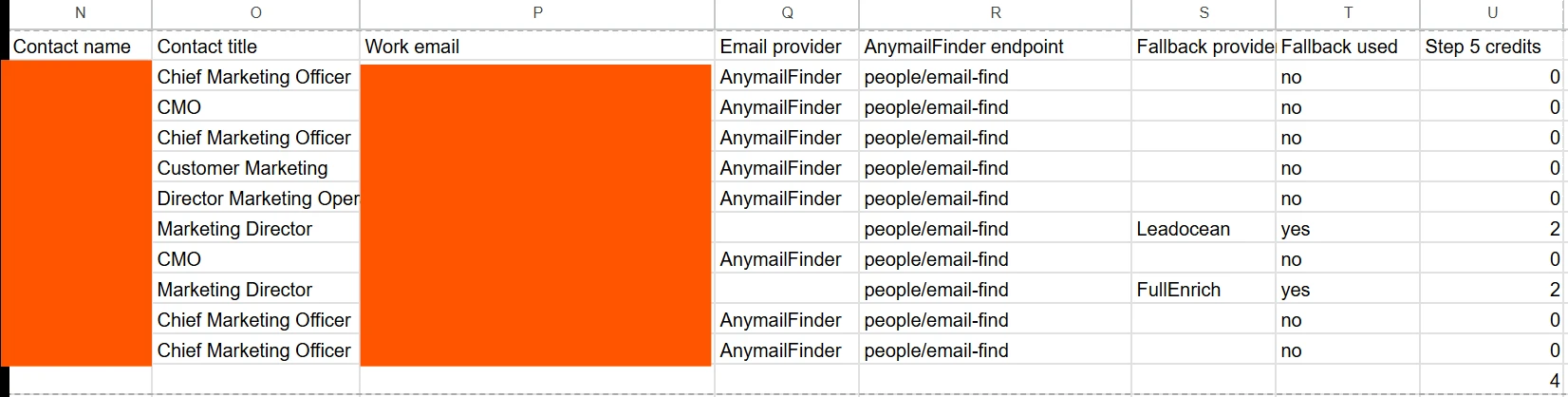
ChatGPT used Anymail Finder's email finder as the primary provider, and in our run those calls cost 0 Firecrawl credits. It found work emails for eight of the 10 contacts. For the other two rows, the fallback ran (Leadocean on one, FullEnrich on the other) at 2 Firecrawl credits per call. Neither returned an email, so we left those two rows as not found.
Step 6: Check the sheet and what each row cost in Firecrawl credits
The enrichment workflow is done. We need a running total of the Firecrawl credits spent, and the next prompt asks ChatGPT for exactly that.
Now I want to total what each row cost. Do not make any paid calls
(Alexandria or /scrape) in this step. Use only the data already in the sheet.

Add one column:
- Total credits: the sum of Step 3 credits, Step 4 credits and Step 5 credits
  for that row

Don't change any existing cells. If a credits cell is blank, treat it as 0
and tell me which rows had a blank.
Within a minute, ChatGPT finished this step. The whole run cost 99 Firecrawl credits for 10 companies, about 10 Firecrawl credits per row. See Firecrawl pricing for what that comes to on each plan; the free plan includes 1,000 Firecrawl credits a month.
The whole workflow took me about an hour, including debugging and searching for providers, and about 31 minutes of steps that worked. Once your prompts are refined, you can trim that further. I set ChatGPT's reasoning to medium; instant responses are faster, but more prone to errors.
You can read the full Firecrawl Alexandria documentation for every option.
Prefer code? Run the same workflow from the API, CLI or a coding agent
This workflow isn't limited to ChatGPT and Google Sheets. Firecrawl works from its SDKs, the REST API, the CLI and the MCP server, so you can run the same steps from Python, a terminal or a coding agent. Below, Firecrawl Alexandria serves as a data enrichment API and a people enrichment API from the same key.
Call the providers from the Firecrawl API
In Python, you call Firecrawl Alexandria through the SDK's scrape method, passing provider calls in the alexandria argument instead of a URL. Start by installing the Python SDK.
pip install firecrawlOne request can carry several provider calls. The example below enriches a company with Apollo and searches for its marketing leads in the same request, then prints what each call cost.
import os
from firecrawl import Firecrawl

firecrawl = Firecrawl(api_key=os.environ["FIRECRAWL_API_KEY"])

result = firecrawl.scrape(alexandria=[
    {
        "provider": "apollo",
        "capability": "companies/enrich",
        "options": {"domain": "datadoghq.com"},
    },
    {
        "provider": "apollo",
        "capability": "people/search",
        "options": {
            "q_organization_domains_list": ["datadoghq.com"],
            "person_titles": ["Head of Marketing", "VP Marketing"],
            "per_page": 5,
        },
    },
])

for call in result.alexandria:
    print(call.provider, call.capability, call.credits_cost)
    print(call.error if call.error else call.data)
Each capability has its own options, so check them with Find Tools (below) before you swap one capability for another.
Run it from the Firecrawl CLI
You can also do this with the Firecrawl CLI. Install it with npm, then sign in.
npm install -g firecrawl-cli
firecrawl login
To find Firecrawl Alexandria tools for a task, use firecrawl search alexandria, which returns tool matches only. Discovery is free.
# Find relevant Alexandria tools.
firecrawl search alexandria "company enrichment and people search"
To inspect a provider's inputs, outputs and pricing in detail, use find-tools. The --include-costs flag adds prices, and --json returns JSON.
# Inspect the provider's inputs, outputs and pricing.
firecrawl find-tools --options '{"providers":["apollo"],"capabilities":["companies/enrich"],"level":"tools","expand":["options","response"]}' --include-costs --json
To enrich a company, pass its domain.
# Enrich a company by domain.
firecrawl scrape apollo/companies/enrich --options '{"domain":"firecrawl.dev"}'
Hand it to a coding agent
You can also hand the whole job to a coding agent. Any agent that supports MCP can use Firecrawl Alexandria through the Firecrawl MCP server. Add the server, then sign in to your Firecrawl account in the browser window that opens.
- Claude Code: run
claude mcp add --transport http firecrawl https://mcp.firecrawl.dev/v2/mcp-oauth, then finish signing in from/mcp. - Codex: install the Firecrawl plugin in the Codex app, or run
codex mcp add firecrawl --url https://mcp.firecrawl.dev/v2/mcp-oauthand thencodex mcp login firecrawl. - Cursor or any client with a JSON config: add
https://mcp.firecrawl.dev/v2/mcp-oauthas theurlof afirecrawlserver in your MCP settings.
There are step-by-step guides for Firecrawl in Claude and Firecrawl Alexandria in ChatGPT and Codex, and more prompt ideas in how to use ChatGPT for lead generation. Once Firecrawl is connected, drop in a prompt like the one below and let the agent build the workflow in Python.
Build a Python company and people enrichment workflow using Firecrawl Alexandria.

Start by discovering the available providers and reading their input,
output and pricing contracts.

Enrich the company using its domain. Search for the Head of Marketing
at that company, then use a primary provider to find their work email.

If the primary provider returns no work email, use a fallback provider.
Only run the fallback when necessary.

Use work emails only. Do not request personal emails or mobile numbers.

Show the provider used for each result and the actual Firecrawl credits
charged. Do not guess missing values or construct email addresses.
What else Firecrawl Alexandria covers
Firecrawl Alexandria skips the scrape-and-parse step for data that providers already structure. Instead of fetching a page, converting it to Markdown and extracting fields, you query the provider and get typed records back. Company and people data is one category among many:
| Category | What it covers |
|---|---|
| Companies and people | Company profiles, funding, people search and work emails |
| Developer and software | Package registries, repositories and developer documentation |
| Research | Scientific papers, abstracts and citations |
| Health and healthcare | Population health statistics and healthcare provider registries |
| Energy and agriculture | Official energy, crop, food and trade statistics |
| Apps | App store listings, ratings, reviews and charts |
| Travel | Hotels, guest ratings and public reviews |
| Real estate | Property records and home valuation comparables |
| Entertainment and music | Films, TV, books, games and music catalogs |
| Sports | Tournament calendars, match results and rankings |
Browse the full catalog of Alexandria providers.
Which Clay alternative fits your team?
Clay isn't the only option for waterfall data enrichment. Firecrawl Alexandria fits teams who want control over their workflow and what each row costs, with company and people data providers behind a single API key; see lead enrichment with Firecrawl for more. Apollo fits teams who want prospecting data, people search and outreach tools in a single product. Cognism and ZoomInfo are worth a look for teams who want a fully managed option. HubSpot data enrichment fits teams already working in HubSpot.
Use Firecrawl in your agent
Add Firecrawl to ChatGPT, Claude, Cursor and more in one click.
Frequently Asked Questions
What is the best free Clay alternative?
Firecrawl Alexandria is a good starting point if you want to build your own data enrichment workflow. Firecrawl's free plan includes 1,000 Firecrawl credits a month, and browsing the Firecrawl Alexandria provider catalog is free; provider calls use Firecrawl credits at each tool's listed price. If you prefer a ready-made sales platform, Apollo also offers a free plan with limited prospecting and enrichment features.
What is the cheapest Clay alternative?
Firecrawl Alexandria, Apollo and n8n all let you start without a large subscription. Firecrawl includes 1,000 free Firecrawl credits a month, Apollo has a free plan, and n8n's Community Edition can be self-hosted. These products serve different purposes, so count data provider usage, hosting and other API costs when you build your own workflow.
Can Apollo replace Clay?
Firecrawl Alexandria gives you Apollo's company and people data alongside other providers through one Firecrawl API key, so you can use Apollo inside your own workflow. Apollo on its own combines company and contact data, outreach tools and waterfall enrichment in one platform. It can replace Clay for straightforward sales prospecting, but it isn't a one-to-one replacement for every custom Clay workflow.
Is Clay a data provider or a workflow tool?
Firecrawl Alexandria gives you access to individual data providers, while Clay is primarily a data enrichment and workflow platform. Clay lets users build tables, connect enrichment providers, add AI steps and automate processes. It orchestrates those providers rather than working only as its own contact database.
Does Clay have a free plan?
Clay has a free plan with 500 actions and 100 data credits a month, and tables are capped at 200 rows (as of November 2026; limits can change). That's enough to try a small enrichment workflow before you pay. Firecrawl also has a free plan, with 1,000 Firecrawl credits a month that cover Firecrawl Alexandria provider calls.
Is there an open-source Clay alternative?
Firecrawl Alexandria can be combined with self-hosted automation tools to build a custom alternative to Clay. n8n is one option for orchestrating APIs and enrichment providers, though it is source-available under its Sustainable Use License rather than an OSI-approved open-source license. You'll still pay for the underlying data providers.
Can Claude Code replace Clay?
Firecrawl Alexandria and Claude Code can be combined to build custom enrichment workflows without Clay's visual interface. A coding agent can write Python scripts, call data providers through Firecrawl, handle fallback logic and automate enrichment. Claude Code doesn't hold company or contact data itself, so you still need the providers and a workflow someone can maintain.
Is Clay worth the money?
Firecrawl Alexandria is worth considering if you want more control over individual providers and what each row costs. Clay can be worth its subscription when its visual workflow builder, integrations and managed enrichment save your team enough development and maintenance time. The decision comes down to whether you value an integrated platform more than the flexibility of assembling your own workflow.
What is waterfall enrichment?
Waterfall enrichment means querying data providers one after another until you find the data you need. For example, you look up a work email with one provider and try a second provider only if the first returns no match, which improves coverage without relying on a single source. With Firecrawl Alexandria, you can build waterfall enrichment by combining calls to different data providers behind one Firecrawl API key.