TL;DR
- A web crawler starts from a few web addresses and follows the links it finds to discover more pages.
- It collects each page's content as it goes, so the pages can be indexed, stored, or fed to a model.
- The loop is simple. Start with seed URLs, fetch and parse each page, then add the links you find to a queue. Repeat until a stop condition ends the crawl.
- Four policies govern how it behaves: which links to follow, when to revisit a page, how hard to hit a server, and how to split the work.
- Search engines run crawlers to index the web. AI systems run them to gather text for training or to answer live questions.
Introduction
Bots send more web traffic than ever. In May 2026, about 32.6% of all HTTP requests came from bots instead of human visitors, up from 31.2% earlier in the year. That share is on track to pass human traffic by 2027 (Cloudflare Radar). The figure comes from telemetry across roughly 81 million requests per second, so it reflects real traffic at scale.
A growing slice of that is AI. Crawlers built to feed AI models make up about 20.3% of all bot traffic. Once you add the bots that fetch pages to answer live questions, AI-related traffic reaches 26.7% of bot activity.
For a developer, crawling is what turns the open web into data your code can use. That code might build a search index or track prices across a hundred sites.
This guide walks through what a crawler is, how the crawl loop works step by step, the policies that govern it, and how to run one for an AI agent.
What is a web crawler?
A web crawler is an automated program that browses the web by following links. It fetches each page so the content can be indexed, stored, or processed.
What makes it a crawler, rather than a program that just downloads one page, is that it finds its own next pages. Each page it reads hands it new links, and those links become the pages it reads next.
People also call crawlers spiders or bots. The spider name comes from the way a crawler moves across the connected links between pages. It visits one page and then the ones it points to. Search engines follow the same naming pattern for their own crawlers.
Many organizations run crawlers. Search engines run them to index the web. AI companies like OpenAI (GPTBot) and Anthropic (ClaudeBot) run them to gather text. Individual developers run them to collect data or feed a model.
The scale and the rules differ from one to the next, and the loop underneath stays the same.
What a web crawler doesn't do
Crawling is discovery, not processing. A crawler by itself:
- Does not pull specific fields out of a page (that is scraping)
- Does not render complex JavaScript unless it is paired with a headless browser
- Does not clean, normalize, or reconcile the data it collects
- Does not itself build a searchable index; the index/store layer in the loop handles that
Each of those jobs sits in a separate layer on top of the crawl loop.
How does web crawling work?
A crawl is one loop repeated, and each pass runs the same steps on the next page.
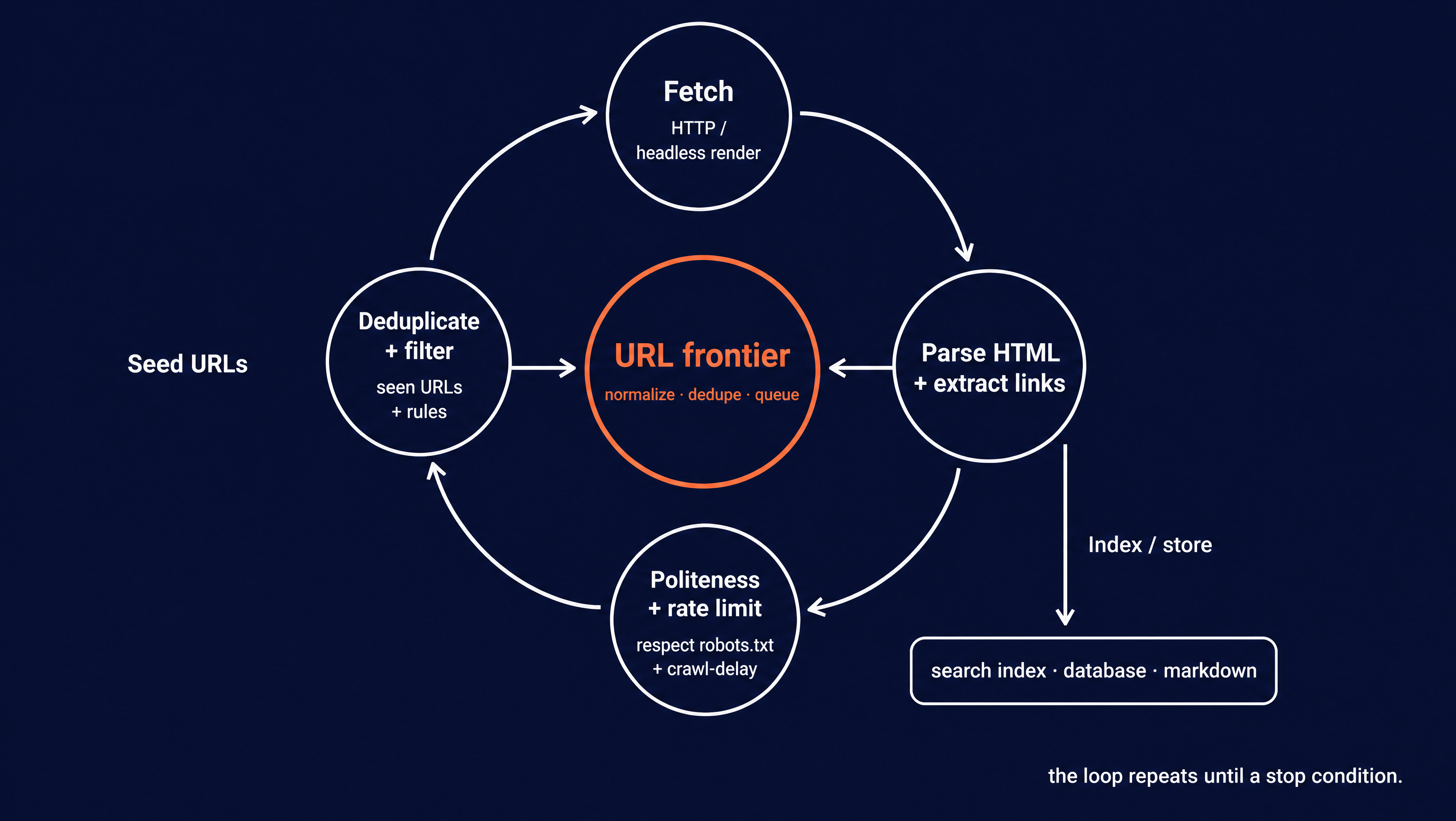
Seed URLs: Every crawl starts from one or more known addresses. For a site crawl that might be the homepage. For a focused crawl it might be a single section like a blog index.
Fetch: The crawler sends an HTTP request and gets the page back. Older or simpler crawlers stop at the raw HTML the server returns.
Many pages today build their content with JavaScript after they load. A crawler aimed at modern sites renders the page in a headless browser like Playwright or Puppeteer first, the same way Chrome would. That way, the JavaScript-rendered content is there to read.
Parse: The crawler reads the page's HTML and pulls out two things. First, the content it wants to keep. Second, every hyperlink on the page, since those links are how the crawl finds its next pages.
URL frontier queue: The newly found links go into a queue often called the frontier. This is the crawler's list of pages still to visit. Before a link joins the queue, the crawler normalizes it so that Example.com/Page and example.com/page/ count as the same address. It also deduplicates the link, so the crawl does not fetch the same page twice.
Normalization and dedup only help when two links point to the same page. A crawler trap slips past both. That's a part of a site that generates endless unique URLs, like a calendar that links to next month forever. Because each URL really is distinct, dedup has nothing to merge, and the crawl keeps following the links. Traps like these are what the stop conditions later (a page cap, a depth limit) are there to catch.
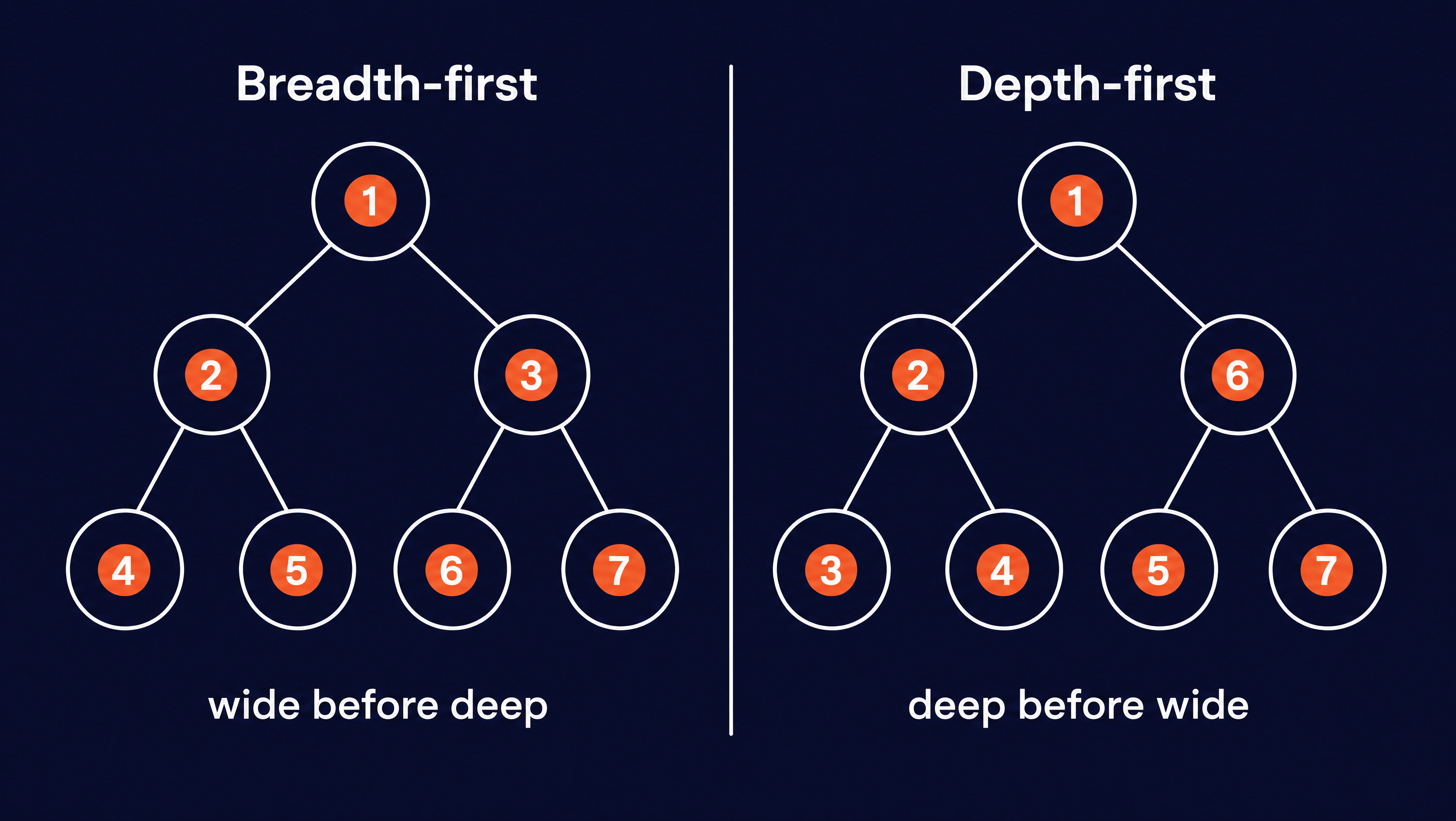
Schedule: The crawler decides which URL to pull off the frontier next. The two common orders are breadth-first and depth-first, wide before deep or deep before wide. Large crawlers rank by estimated importance instead. The selection policy below goes into how that choice gets made.
Politeness gate. Before fetching, a well-behaved crawler runs a few politeness checks so it does not overload the server. The politeness policy below covers them.
Index or store. The content the crawler kept gets written somewhere useful. That might be a search index, a database, or clean markdown for a language model to read.
This loop repeats. The crawler takes the next URL off the frontier and runs the same steps. The frontier grows as each new page adds more links to it. A crawl ends on a stop condition. That might be a page cap, a depth limit, a URL filter, a time budget, or an empty frontier with nothing left to visit.
What's the difference between web crawling and web scraping?
These two terms often get used interchangeably, but they are different jobs. A crawler follows links to find pages it does not know about yet, while a scraper reads data out of a page it was already given.
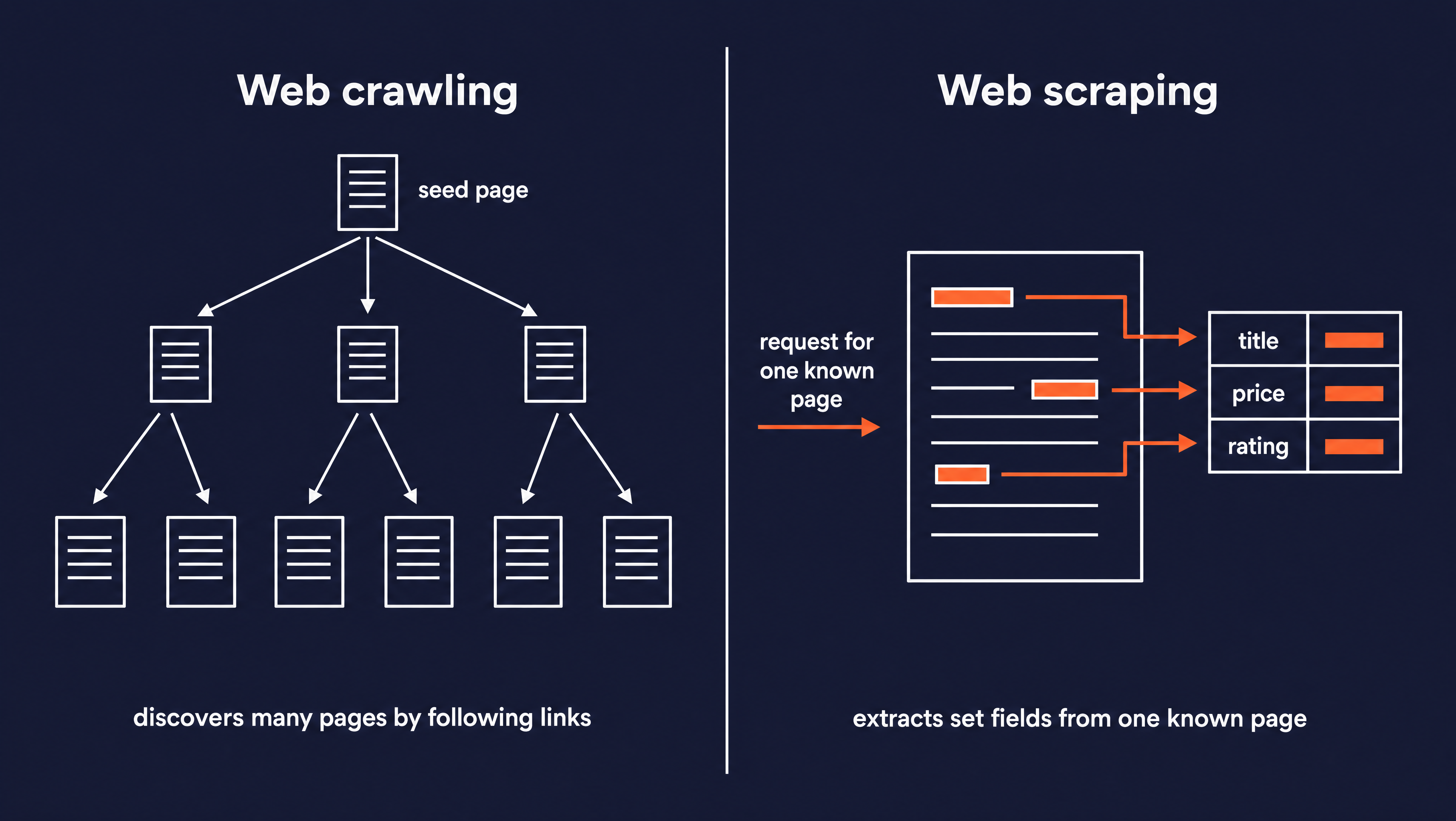
| Aspect | Web crawling | Web scraping |
|---|---|---|
| Scope | Many pages across a site | One known page or URL |
| Goal | Discover and map pages | Extract specific data |
| Output | A set of URLs or pages | Structured fields (JSON, CSV) |
| Speed | Slower, it has to traverse links | Faster, it targets known pages |
In practice they run together. A crawler traverses a store's catalog to find every product page. A scraper then reads the price and title off each one. For a full breakdown with worked code examples, see the guide on when to use a scraper versus a crawler.
If you already know what it's looking for, like a specific topic, a question, a or company name, but don't know exactly where to find it, you don't need to crawl or scrape. In these cases, you'd want to do a search instead. Firecrawl's search endpoint, for example, works for AI agents, by takeing a search query and returning relevant pages from across the web.
What are the core crawling policies and algorithms?
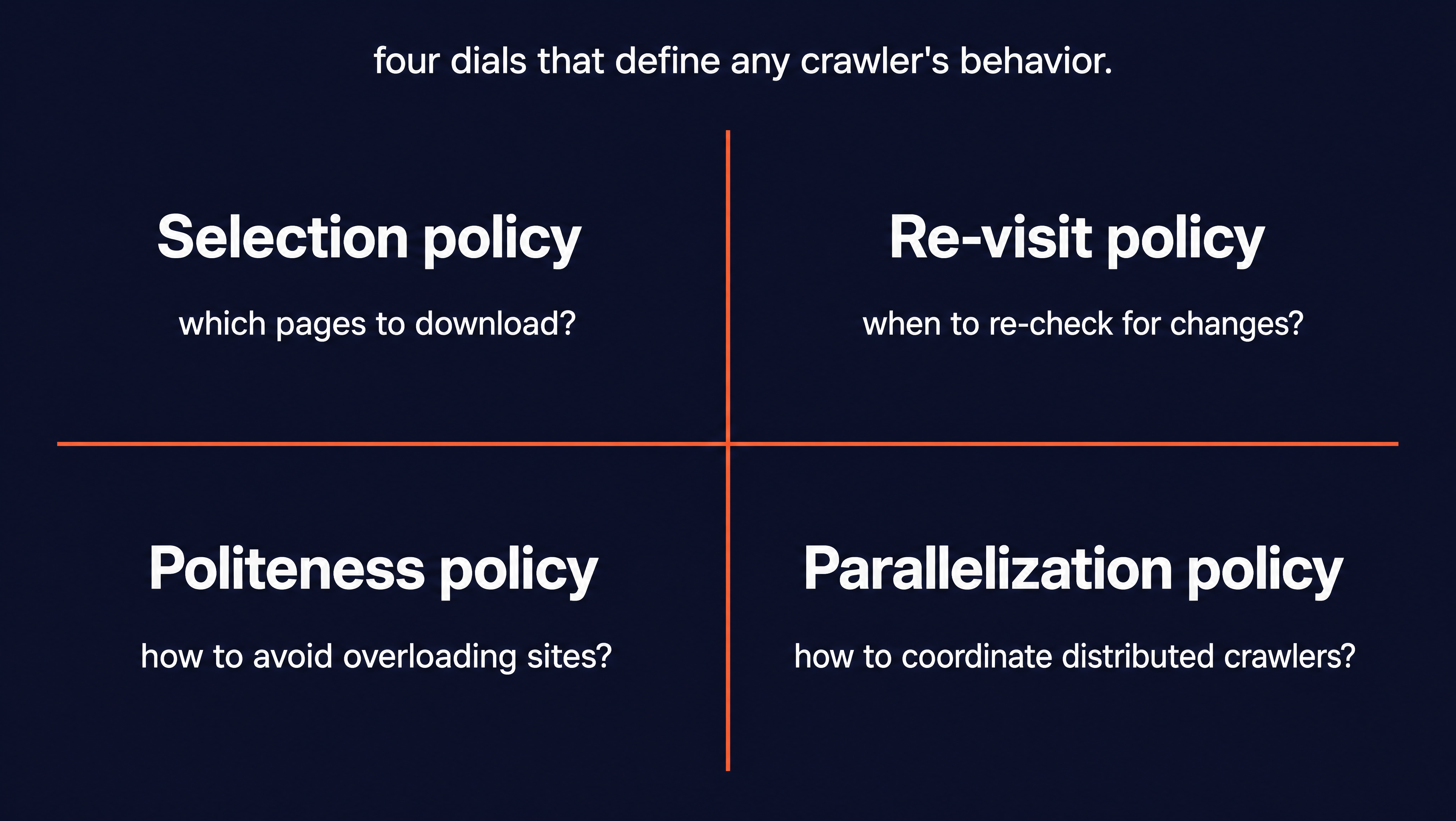
A crawler faces the same four decisions over and over:
- Which links to follow
- When to revisit a page for changes
- How hard it can hit a server
- How to split work across machines without doing the same page twice
The answers to those are managed by policies, and they are grouped into the four below (Wikipedia).
What is a selection policy?
The selection policy decides which pages to download. No crawler can fetch the whole web, because even a single large site holds more pages than most crawls have time for. So the crawler has to rank what to fetch and what to skip.
In general, the crawler scores URLs by signals like page quality, how many other pages link to them, and sometimes the URL itself. The hard part is that it works with partial information. The full set of pages never exists as a list, so every fetch decision is a guess made from an incomplete view of the site.
Two mechanisms fall under the selection policy too:
- URL normalization rewrites addresses into one canonical form so the crawler does not fetch the same page through three different links. We saw discussed this technique earlier.
- Focused crawling restricts the crawl to a single topic or domain. This is how academic crawlers like
citeseerxbotstay on scholarly papers instead of crawling the open web.
From the site owner's side, the selection policy is what SEO people call a crawl budget. That is the number of pages a search crawler will fetch on your site before it moves on. Site authority, page-load speed, and clean internal links all raise it.
The risk is a site with thousands of thin or duplicate pages. Those can use up the budget before the crawler reaches the pages that matter. For site owners trying to optimize their SEO results, cutting dead URLs and tightening internal links is how owners keep the budget on the pages they care about.
What is a re-visit policy?
The web changes after a crawler reads it, so a stored copy goes stale. The re-visit policy decides when to come back and fetch a page again. It balances two costs:
- Freshness is a yes-or-no measure of whether the local copy still matches the live page.
- Age measures how long the copy has been out of date.
A crawler tunes its schedule to keep average freshness high or average age low. In practice that means re-crawling a fast-changing news page often and a static archive page rarely.
What is a politeness policy?
A crawler can send requests far faster than a person ever would. That is fast enough to slow a site down or overload it. The politeness policy sets the limits that prevent that.
The fetch-time checks from the loop earlier all live here, which includes the robots.txt, a per-host request cap, and an honest user-agent. The policy adds the timing too, favoring off-peak hours for heavy jobs. The glossary page on polite crawling covers what it requires in practice.
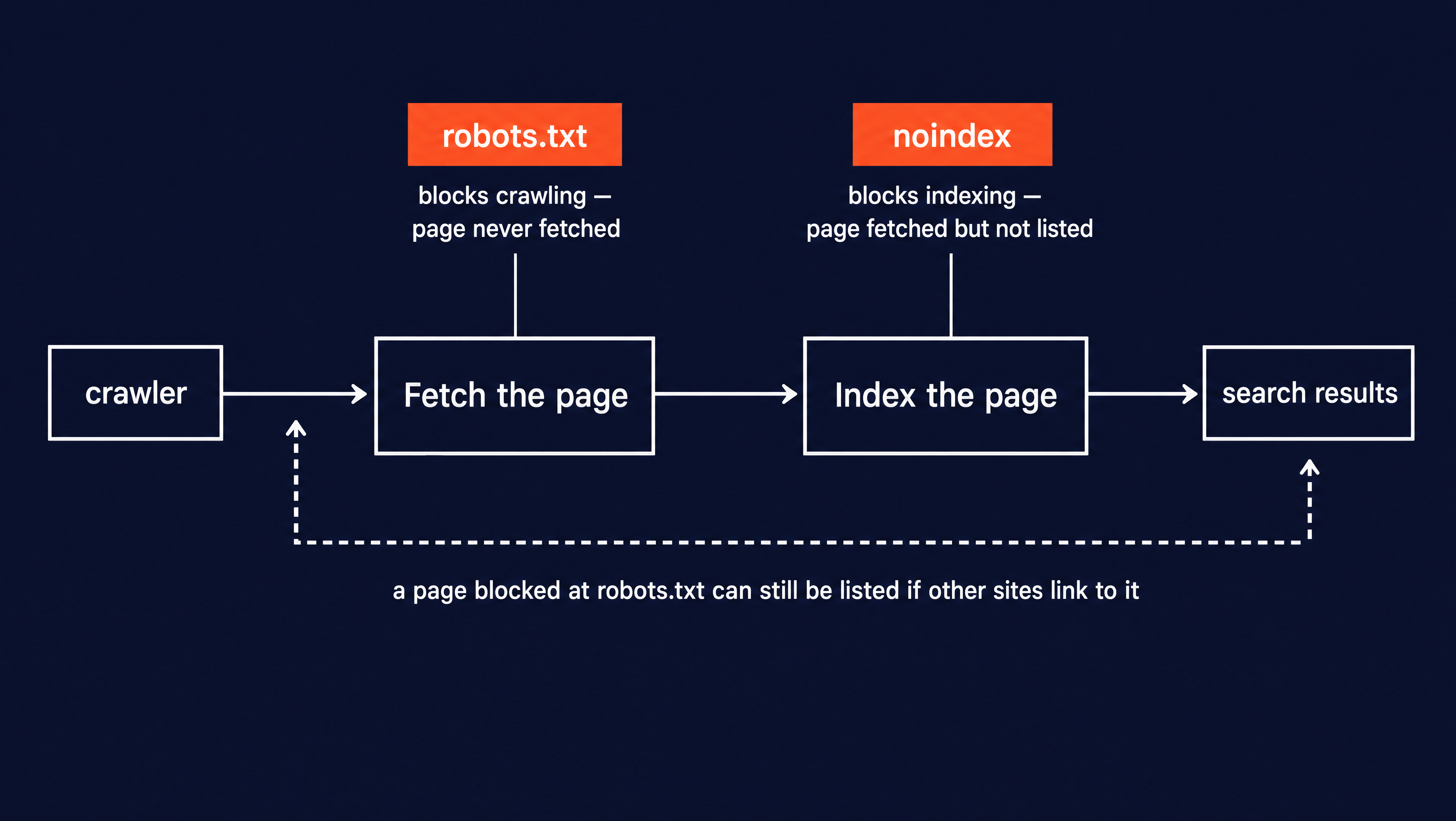
Site owners get two separate controls over crawlers, and they work at different stages:
- robots.txt stp[s] crawling. A disallow rule tells a well-behaved crawler to skip that path, so it never fetches the page.
noindexblocks indexing. Set it in a meta tag or anX-Robots-TagHTTP header. The crawler still fetches the page, but it is told not to list the page in search results.
They are not interchangeable. A page blocked in robots.txt can still appear in search results if other sites link to it. The crawler never gets in to read the noindex tag that would have suppressed it. To keep a page out of search, you let the crawler in and serve it noindex.
What is a parallelization policy?
A serious crawl runs on many machines at once. One machine fetching pages one at a time would take years to cover a large site. The parallelization policy coordinates those machines so they divide the work instead of duplicating it.
Without coordination, two workers can grab the same URL from the shared frontier at the same moment. The policy prevents that by assigning URL ranges to specific workers, so each page is owned by one machine.
What are the types of web crawlers?
A type of crawler is just a particular setting of those four policies for a particular goal.
General-purpose crawlers cover as much of the web as they can to build a search index. They run a permissive selection policy, following almost every link they find. Googlebot and Bingbot are the well-known examples.
Focused crawlers restrict themselves to one topic or domain using a tight selection policy. Vertical search engines are the common case.
Incremental crawlers depend on the re-visit policy. Rather than crawling a site from scratch each time, they re-crawl only the pages most likely to have changed. That keeps an existing index current.
Deep-web crawlers reach content that ordinary crawling misses. Think of pages reachable only through a search form or a query parameter that no link points to directly. They fill in those forms or construct query URLs to reach content that simply isn't linked from anywhere.
AI crawlers collect text to train language models or to fetch current information for AI tools answering live questions. They run the same fetch-parse-follow loop, and the content feeds a model. This type is growing faster than any other. That is why your server logs now show names that were not there two years ago.
What are some popular web crawler examples?
Search engine bots are the crawlers most sites see most. Googlebot crawls for Google Search and is usually the busiest visitor in a server log. Bingbot does the same for Microsoft Bing. Both publish their address ranges so site owners can confirm a request claiming to be Googlebot really is.
AI crawlers each belong to a company building AI products. GPTBot is OpenAI's crawler, ClaudeBot is Anthropic's, Bytespider belongs to ByteDance, and PerplexityBot fetches pages for Perplexity's answer engine. Their share of traffic shifts month to month. In May 2026, GPTBot accounted for about 11.5% of AI-crawler traffic and Bytespider rose to about 10.3% (Cloudflare Radar).
Developer crawl frameworks let you build and run your own crawler. Some popular options are:
- Scrapy is a mature Python framework for custom crawlers.
- Crawlee is a Node.js library that manages the URL queue and politeness controls for you.
- Firecrawl crawls a site and returns clean, model-ready content in a single call.
For a comparison with pros, cons, and benchmarks, see the best open-source web crawlers.
What are the most common web crawling use cases?
Crawlers show up wherever a system needs pages it does not already know about. The most common uses:
- Search engine indexing. The original use case. Googlebot, Bingbot, and their peers crawl to build the index a search engine ranks against.
- AI training data and answer engines. Modern AI providers crawl the open web for pre-training corpora, and their answer engines (ChatGPT search, Claude, Perplexity) crawl live to ground each answer with current information. This is why Cloudflare's numbers show AI's share of bot traffic climbing every month.
- Price and inventory monitoring. E-commerce operators crawl competitor catalogs to track prices, promotions, product ranges, and stock levels. The re-visit policy matters most here: a stale price is worse than no price.
- SEO and site audits. Tools like Screaming Frog and Sitebulb crawl a single site to surface broken links, redirect chains, missing metadata, and orphaned pages. Same loop, tight scope.
- Competitor and brand monitoring. Crawlers watch competitor sites, review sites, and news pages for coverage of a brand or product line. Paired with a diff, "read the whole internet every morning" becomes a manageable feed.
- RAG and vector search corpora. Retrieval-augmented generation systems need a corpus. A crawl pulls the source documents into clean markdown so the ingestion pipeline can embed and index them.
- Regulatory and compliance monitoring. Legal, financial, and healthcare teams crawl government sites, standards bodies, and regulator portals to catch policy updates the moment they land.
What are the main challenges of web crawling?
Web crawling looks simple until real traffic hits real websites. Four things trip up most first crawls:
- Scale and infrastructure. A crawl of a hundred pages runs on a laptop. A crawl of a hundred million needs distributed workers, a shared frontier queue, deduplication at scale, and storage that keeps up. The parallelization policy is the theory; the ops bill is the practice.
- Access stability. Modern sites push back against traffic that does not look human. That means rate limits, IP-range blocks, CAPTCHAs, and behavioral fingerprinting. Rotating proxies and honest user-agent strings help, but any crawl that runs long enough will see 429s and 403s.
- JavaScript-heavy pages. A raw HTML fetch returns an empty shell for a page that renders its content client-side. Reaching that content means rendering the page in a headless browser first, which is 10x to 100x more expensive per page than a plain fetch.
- Data quality and parsing. A page fetched is not a page understood. Every domain has its own layout, its own boilerplate, its own way of nesting the field you actually want. Clean extraction across thousands of sites is often more work than the crawl itself.
How do you automate web crawling for AI agents?
An AI agent often needs information that is not in its training data. Think of a current price, a fresh doc page, or the latest posts on a blog. The agent does not know those URLs ahead of time, so it can't just fetch a list. It needs to discover the pages and read them, which is a crawl.
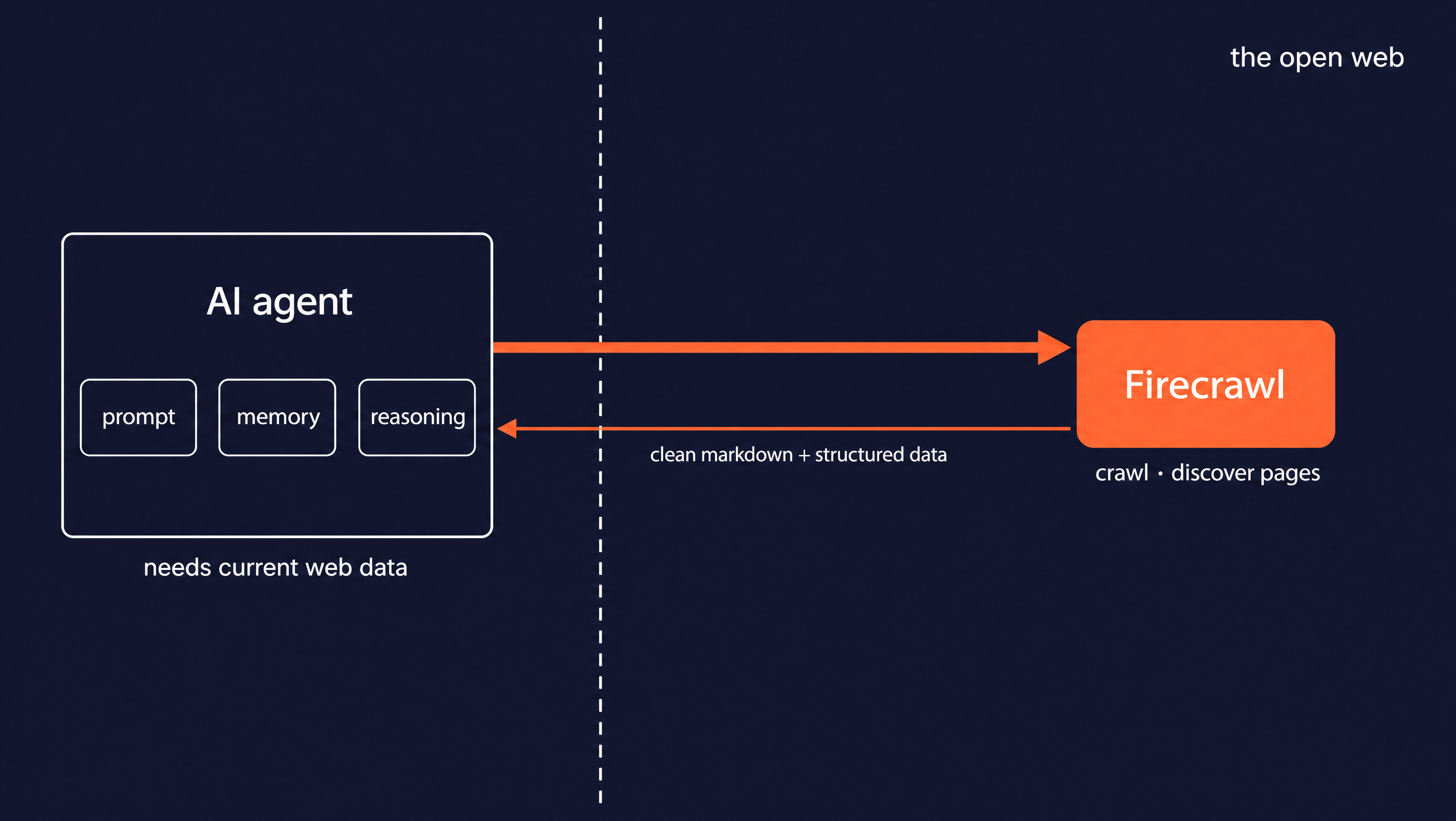
When crawling the formats of the returned results can be problematic. A raw page comes back as HTML full of navigation menus, scripts, and styling. A language model has to read past all of that, which wastes tokens and hides the actual content.
What a model wants is clean text it can read directly, in markdown. It also wants any structured fields pulled out against a schema. Producing that yourself means rendering JavaScript, removing boilerplate, converting to markdown, and running extraction on every page.
Firecrawl handles that layer for you. It gives AI agents and apps fast, reliable web context through search, crawling, and page interaction. Content comes back already in model-ready form.
You point Firecrawl at a starting URL, and it discovers the pages under that path. It deduplicates them and rate-limits itself, covering the same frontier and politeness steps from earlier.
The exaxmple crawl below discovers blog posts from a single seed URL. For each page it returns the full markdown plus an extracted title and short summary.
Start with the setup. The Firecrawl() client reads your API key from the environment, so first export your API key as an environment variable. Then load_dotenv() pulls it in from a .env file before the client is created:
from firecrawl import Firecrawl
from firecrawl.v2.types import ScrapeOptions, JsonFormat
from pydantic import BaseModel
from dotenv import load_dotenv

load_dotenv()

app = Firecrawl()


class PageInfo(BaseModel):
    title: str
    summary: str
That PageInfo class is the shape you want back for each page. You write it as a normal Pydantic model, and Firecrawl turns it into the JSON schema the extractor follows. Defining it as a class instead of raw JSON means your editor can autocomplete page.title later and catch typos before you run anything.
Next is the crawl call itself:
result = app.crawl(
    "https://www.firecrawl.dev/blog",
    limit=5,
    include_paths=["/blog/*"],
    scrape_options=ScrapeOptions(
        formats=[
            "markdown",
            JsonFormat(
                type="json",
                prompt="Extract the page title and a one-sentence summary of what the page covers.",
                schema=PageInfo.model_json_schema(),
            ),
        ]
    ),
)
A few of these arguments might not be obvious the first time you see them:
- The first argument is the seed URL, the one page the crawl starts from. Everything else is discovered by following links, the same frontier loop from earlier.
limit=5caps the crawl at 5 pages. This is the stop condition. Without it, a crawl of a large blog keeps going until it runs out of links.include_paths=["/blog/*"]is a glob filter on the URL path. The*matches anything after/blog/, so the crawl stays on blog posts and skips the pricing and login pages it finds along the way.scrape_optionscontrols what comes back for each page. Passing two entries informatsasks for both at once: the plain"markdown"string, and aJsonFormatthat runs an extraction against your schema.model_json_schema()is the Pydantic method that convertsPageInfointo the JSON schema the extractor reads.
The result holds every page the crawl found. Each page carries its markdown and the extracted fields side by side, so this loop reads both off the same object:
pages = result.data
print(f"Crawled {len(pages)} pages\n")
for page in pages[:3]:
    data = page.json or {}
    url = page.metadata.source_url if page.metadata else None
    md_len = len(page.markdown or "")
    print(f"- {data.get('title', '(no title)')}")
    print(f"  url: {url}")
    print(f"  summary: {data.get('summary', '')}")
    print(f"  markdown chars: {md_len}\n")
The page.json field holds the structured fields your schema asked for, and page.markdown holds the clean page text. Reading page.json or {} guards against a page where extraction returned nothing, so the loop does not crash on a missing field. Here is the output:
Crawled 5 pages

- Top 7 AI-Powered Web Scraping Solutions in 2026
  url: https://www.firecrawl.dev/blog/ai-powered-web-scraping-solutions
  summary: This page discusses the leading AI-powered web scraping tools available in 2026, focusing on their features, advantages, and pricing.
  markdown chars: 24021

- Firecrawl Blog
  url: https://www.firecrawl.dev/blog
  summary: The Firecrawl Blog features updates and announcements about various tools and integrations for web data extraction and monitoring.
  markdown chars: 30465

- AI Agent Sandbox: How to Safely Run Autonomous Agents in 2026
  url: https://www.firecrawl.dev/blog/ai-agent-sandbox
  summary: This page discusses the importance and implementation of AI agent sandboxes to ensure secure execution environments for autonomous agents, protecting them from malicious actions that could affect host systems.
  markdown chars: 31126
One call discovered five pages from a seed the agent did not know the contents of. It returned both clean markdown (24,000 to 31,000 characters per page) and a structured title and summary for each. That is the whole crawl loop from earlier, run for you: seed, fetch, parse, follow links, store. The agent gets back ready-to-read text and the fields it asked for, with no HTML cleanup of its own.
Once you have the markdown, pass it to a model. See how to build AI agents with the Claude Agent SDK and Firecrawl for a full end-to-end example.
There are more options to use, like depth limits, exclude paths, and webhooks for long crawls. To go deeper, see the crawl endpoint docs and the walkthrough on mastering the crawl endpoint.
Conclusion
A crawl is one loop run over and over. Start from your seed URLs, fetch each page, parse out the content you want plus every link on it, push the new links onto the frontier, and store what you keep. Repeat until a stop condition ends the run. Once the loop and the four policies make sense, everything else is configuration on top of them.
A good next move is to point Firecrawl at a site you actually care about, following the example above. Then tighten it. Add a max_discovery_depth to cap how far it wanders from the seed, and pass a couple of exclude_paths to keep it off the login and pricing pages. Run it again and watch the page count move as you adjust the filters. That feedback loop teaches you a site's shape faster than reading its sitemap does, and it's the same loop you will reach for whenever an agent needs pages it does not already know about.
Firecrawl's free tier includes 1,000 credits. Get your API key and run the first example in under five minutes. If you work inside Claude Code, Cursor, Codex, or another MCP-compatible environment, /crawl is also available through the Firecrawl MCP server without any extra setup.
Frequently Asked Questions
How often do web crawlers visit a site?
It depends on the crawler and the site. Search engines re-crawl pages they think change often (a news homepage) far more than static pages (an old archived post). This is governed by the crawler's re-visit policy, which weighs how fresh the copy needs to be against the cost of fetching it again. You can hint at your preferred rate in robots.txt, but crawlers are not required to honor it.
Do web crawlers run JavaScript?
Some do, some don't. A basic crawler fetches the raw HTML and stops, so it misses content that JavaScript adds after the page loads. Crawlers built for modern sites use a headless browser to render the page first, the same way Chrome would, so client-rendered content shows up before parsing.
Are AI crawlers different from search engine crawlers?
They use the same fetch-parse-follow loop, but their goal differs. A search crawler builds an index so people can find pages. An AI crawler collects text to train a model or to answer a live question with current information. Both identify themselves with a user-agent, like Googlebot for search and GPTBot for OpenAI.
What is the difference between a web crawler and a web scraper?
A crawler discovers pages by following links, so its job is navigation. A scraper extracts specific data from a page you already have, so its job is collection. They often run together: a crawler finds the pages, a scraper pulls the fields out of each one.
Why is a web crawler called a spider?
Because it moves across the connected links between pages the same way a spider moves along a web. Search engines followed the pattern for their own naming, and 'web spider' and 'web crawler' are now used interchangeably.
What is a robots.txt file?
A plain-text file at the root of a website that tells crawlers which paths they may or may not fetch. Well-behaved crawlers read it before their first request and honor the disallow rules. It is a convention, not a security control.
What is a crawl budget?
The number of pages a search crawler will fetch on your site before it moves on. Site authority, page-load speed, and clean internal links raise it. Thousands of thin or duplicate pages burn through it before the crawler reaches the pages that matter.