TL;DR: Best YouTube transcript extractors
| Tool | What it does |
|---|---|
| Firecrawl | Versatile web data tool: try free in the playground, or use via API, CLI, MCP, and integrations like n8n and Lovable |
| NoteGPT | Free web tool with no signup, batch playlist support, and AI summarization |
| SocialKit | Timestamped extraction with a Transcript API and Shorts support |
| Kome | 120+ language support with a Chrome extension for in-browser use |
I use YouTube transcripts to repurpose long-form video content into written formats, extract quotes, and feed video content into AI pipelines. For anyone building on top of video data or just trying to turn YouTube to text faster, a good video transcript tool is one of those things you reach for constantly.
The options range from no-login web tools you can use in 30 seconds, to full developer APIs that handle thousands of videos programmatically. All four tools covered here work without a login to some degree, from web-only interfaces to Firecrawl's interactive playground. Which one makes sense depends on whether you need a quick one-off extraction or an automated pipeline.
These are the best YouTube transcript extractors I'd recommend in 2026: four tools covering the range from zero-friction web interfaces to full API access.
What are YouTube transcript extractors?
YouTube transcript extractors are tools that retrieve or generate the text representation of a video's spoken content. Most tools work in one of two ways: they either fetch YouTube's built-in captions (auto-generated or manually added), or they use AI speech recognition to generate a transcript from the video's audio directly.
The built-in caption approach is fast and accurate for any video that already has captions. The AI-generated approach is useful for videos without captions but varies in quality depending on audio clarity, accents, and background noise.
For developers, there is a third path: extract the raw audio file from YouTube and run it through your own transcription service. This gives you full control over the transcription model, language handling, and output format.
1. Firecrawl
Firecrawl is the web data API to search, scrape, and interact with the web at scale. It can extract YouTube transcripts as text or pull the raw MP3 audio from any YouTube video, and you can use it however fits your workflow: via API, CLI, MCP server, or native integrations.
Firecrawl handles YouTube in two distinct ways, functioning as both a YouTube transcript API and a YouTube audio extractor. Scraping a YouTube URL returns the page content in clean markdown, which includes the video's transcript when captions are available. The audio format goes further: it extracts the full MP3 audio from the video and returns a signed Google Cloud Storage URL you can download or pass to any transcription service.
What makes Firecrawl YouTube support different from the other tools here is how flexible it is about where you run it. Use the Python or Node SDK to integrate YouTube scraping directly into your product. Use the CLI to give your AI agents web access, including YouTube transcripts and audio, with a single install command. Connect it to Claude, ChatGPT, Cursor, or Windsurf via the MCP server for in-conversation YouTube data access.
I use Firecrawl inside Claude personally, and pulling a YouTube transcript mid-conversation is one of the things I reach for most, in under 10 seconds.
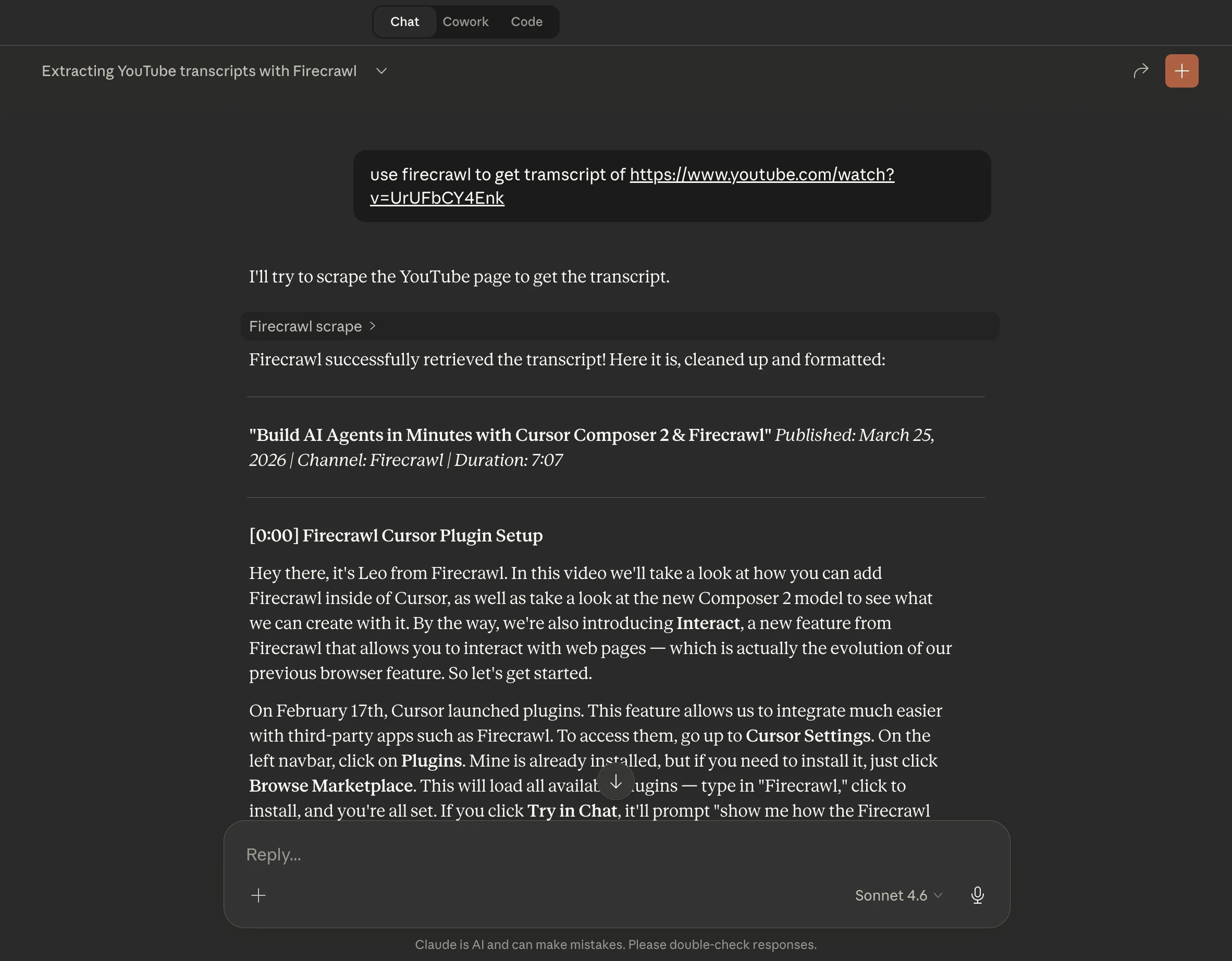
Or drop it into a no-code workflow via native integrations with n8n and Lovable without writing any infrastructure yourself.
formats=["markdown"]: Scrape the YouTube page and get the transcript embedded in the page's markdown outputformats=["audio"]: Extract the full MP3 audio track from any YouTube URL (returns a signed GCS URL, valid for 1 hour)formats=["json"]: Extract structured data from the YouTube page with a custom schema or promptBatch scrape: Process hundreds of YouTube URLs in parallel using the batch scrape endpoint- MCP server: Use Firecrawl inside Claude, ChatGPT, Cursor, and Windsurf directly
- CLI: Give AI agents YouTube access with
npx -y firecrawl-cli@latest init --all --browser - Native integrations: n8n and Lovable integrations for no-code and visual workflow use
Get transcript as text (Python SDK):
from firecrawl import Firecrawl

firecrawl = Firecrawl(api_key="fc-YOUR-API-KEY")

# Get transcript embedded in the page markdown
doc = firecrawl.scrape("https://www.youtube.com/watch?v=YOUR_VIDEO_ID", formats=["markdown"])
print(doc.markdown)
Extract audio for your own transcription pipeline:
from firecrawl import Firecrawl

firecrawl = Firecrawl(api_key="fc-YOUR-API-KEY")

# Extract MP3 audio from YouTube (signed GCS URL, expires after 1 hour)
doc = firecrawl.scrape("https://www.youtube.com/watch?v=YOUR_VIDEO_ID", formats=["audio"])
print(doc.audio)  # Download URL for the MP3 file
Install the CLI for agent use:
npx -y firecrawl-cli@latest init --all --browserHonest take: Firecrawl is primarily built for integration, whether that is code, agents, MCP, or no-code tools. That said, you can try it without any login via the Firecrawl Playground, where you can paste a YouTube URL and see the transcript output immediately. The audio URL expires after one hour, so you need to process or download it immediately. If you are running any kind of AI workflow that touches video content, Firecrawl is the most capable option to build around.
2. NoteGPT
NoteGPT is a free web-based YouTube transcript generator that requires no login and supports batch transcription of entire playlists.
NoteGPT has built a large user base around a simple proposition: paste a YouTube URL, click Generate, and get a transcript with timestamps in seconds. No account required for basic use. The tool has reached 80 million users and is trusted by 12,000+ schools and teams, which tracks given how frictionless it is to get started.
What sets NoteGPT apart from other no-login tools is the playlist support and the AI summarization layer. You can drop in a playlist URL and transcribe multiple videos in a batch, then use NoteGPT's built-in AI to summarize each transcript. The summaries are fast and save real time when you are working through a large video library. Transcripts can be downloaded as txt files with or without timestamp information, which is useful depending on whether you need clean text or time-indexed content.
Batch transcription: Paste a playlist URL to transcribe multiple videos in one sessionTimestamps: Download transcripts with or without timestamp annotationsMulti-language: Supports transcription and summarization across multiple languagesAI summarization: Built-in AI that summarizes any transcript so you can grasp the content in minutesCloud storage: Notes and transcripts are saved to your account if you sign inNo install required: Runs entirely in the browser, no extensions or plugins needed
How to use:
1. Go to: https://notegpt.io/youtube-transcript-generator
2. Paste a YouTube video or playlist URL
3. Click "Generate Transcript"
4. Copy or download the transcript (with or without timestamps)
Honest take: For no-friction single-video or playlist transcription, NoteGPT is the easiest option here. The no-login flow works well. The AI summarization is a genuinely useful add-on, not a gimmick. The main limitation is that it is a web tool, so there is no API for programmatic use. If you need to process more than a handful of videos in an automated way, you will outgrow it quickly.
Cons: No API for programmatic use. Free tier has credit limits (15 credits for free users). Not suited for bulk automation or pipeline use.
3. SocialKit
SocialKit is a YouTube transcript extractor with timestamped segment output, Shorts support, and an API for developers who need to go beyond the web interface.
SocialKit takes a middle-ground position between pure web tools and full developer APIs. The web interface is clean and works without signup for light use. Sign up and you get 20 free API credits to start building with the Transcript API. The tool works with standard YouTube videos and YouTube Shorts, which is not always a given with transcript extractors.
The timestamped segment output is one of the better implementations here. Rather than returning one big block of text, SocialKit returns individual segments each paired with a precise timestamp. That makes it easy to reference specific moments in a video, build navigation into a transcript viewer, or clip content by time range. SocialKit also explicitly does not store your video data or content, which matters if you are working with sensitive or proprietary material.
Timestamped segments: Each transcript segment is returned with a precise timestamp, not just bulk textYouTube Shorts support: Works with Shorts in addition to standard videosPrivacy focused: No video data or content stored after extractionTranscript API: Developer API for bulk processing and automation (20 free credits on signup)Multiple APIs: Transcript, Summary, and Stats APIs available; TikTok and Instagram coming soonNo scraping required: API access without needing to implement your own YouTube scraping
How to use (web):
1. Go to: https://www.socialkit.dev/youtube-transcript-extractor
2. Sign in to get 20 free credits (no credit card required)
3. Paste any YouTube video or Shorts URL
4. Copy the full transcript or individual timestamped segments
How to use (API):
# SocialKit Transcript API - see docs.socialkit.dev for full reference
curl "https://api.socialkit.dev/youtube/transcript?url=https://www.youtube.com/watch?v=YOUR_VIDEO_ID" \
  -H "Authorization: Bearer YOUR_API_KEY"
Honest take: SocialKit is a solid choice if you want timestamped segment output or need an API without setting up a full web scraping stack. The 20-credit free tier is enough to evaluate the API before committing. The limitation is that it is not fully free for heavy use, and the API documentation is less extensive than Firecrawl's. For teams doing moderate volume, it sits in a useful middle ground.
Cons: The web tool requires signup for more than light use. API credits are consumed per video. Less documentation than a full web scraping API.
4. Kome
Kome is a free YouTube transcript generator with support for over 120 languages and a Chrome extension for extracting transcripts directly from YouTube.
Kome's main differentiator is language breadth. With support for 120+ languages including English, Spanish, French, German, Japanese, Korean, Chinese, and Italian, it covers more ground than most tools here for non-English content. The tool is entirely free with some usage limits, and the Chrome extension makes it practical to grab a transcript without leaving the YouTube page.
The workflow is minimal: paste a URL, click Generate, and the transcript lands in your clipboard. Kome also includes a video summarization feature separate from the transcript tool, which the team says saves users around 25 hours a month. The Chrome extension has a 5-star rating on the Chrome Web Store.
120+ languages: Supports transcription in over 120 languages, continuously expandingChrome extension: Grab transcripts directly from the YouTube page without switching tabsFast generation: AI-powered transcription returns results in secondsFree to use: No cost for the core tool, with some rate limits in placeVideo summarization: Separate tool to extract key information and summaries from any YouTube videoClipboard copy: One click to copy the full transcript after generation
How to use:
1. Go to: https://kome.ai/tools/youtube-transcript-generator
2. Paste the YouTube video URL
3. Click "Generate Transcript"
4. Click to copy the transcript to your clipboard
Install the Chrome extension:
Search "Kome AI" on the Chrome Web Store, or visit:
https://chrome.google.com/webstore/detail/kome-ai/hidkfmpdopckdjpogoencckkbngdfggf
Honest take: Kome is the right pick when language coverage matters. For non-English content, 120+ language support is a real advantage over tools that lag on less common languages. The Chrome extension is also genuinely convenient for one-off extractions while browsing YouTube. The main limitation is that there is no API, so it does not scale beyond manual use. The "25 hours saved per month" claim from the summarization feature is also hard to verify.
Cons: No API for programmatic or automated use. Free tier has usage limits. No batch or playlist processing.
Building the top YouTube transcript extractors into your workflow
The right tool depends on what you are building. For one-off research and content repurposing, NoteGPT or Kome handle the job with zero setup. NoteGPT is better if you need batch playlist processing or AI summarization. Kome is better if you are working with non-English videos or want a Chrome extension for in-browser use.
For anything that involves code, SocialKit and Firecrawl are the two options worth evaluating. SocialKit's Transcript API is a clean middle option: less setup than a full scraping stack, and the timestamped segment output works well for building transcript viewers or navigation features. Firecrawl is the right call if your pipeline needs the raw audio file, if you need to batch-process at volume, or if YouTube is just one of many data sources you are already scraping with the same API.
The combination that works well for most use cases: Firecrawl for automated pipelines, agent workflows, and audio extraction, paired with whichever no-login web tool fits your spot-check needs. Firecrawl covers scripted bulk processing, MCP-based agent access, and no-code workflows via n8n or Lovable. For one-off manual lookups, any of the three web tools here will do the job.
If you want a broader view of the top YouTube transcript extractors and other video data tools available today, the Firecrawl scrape endpoint guide covers all the format options including audio extraction. The best web extraction tools post is a useful companion if you are evaluating a broader data stack beyond just video. And if you are processing transcripts as part of an AI application, the deep research API overview covers how to combine search, scrape, and structured extraction into a single pipeline.
Frequently Asked Questions
What is a YouTube transcript extractor?
A YouTube transcript extractor is a tool that pulls the spoken text from a YouTube video and converts it into readable text, usually with timestamps. These tools save you from watching a full video when you only need the content in text form.
What can I do with a YouTube transcript?
Transcripts are useful for repurposing video content into blog posts, social media threads, or newsletters; extracting quotes; building searchable text archives; training data collection; and accessibility support for hearing-impaired users.
Are free YouTube transcript extractors accurate?
Accuracy depends on the video. For videos with YouTube's built-in auto-generated captions, most tools return those captions directly and accuracy is generally high. For videos without captions, tools that use AI speech recognition tend to vary in quality.
Which YouTube transcript extractor works without signing up?
All four tools in this list work without a login to some degree. NoteGPT and Kome offer full transcript extraction with no account required. SocialKit requires signup for API access but works for light web use without. Firecrawl can be tried immediately in the playground at firecrawl.dev/playground without an account.
Is there a YouTube transcript API for programmatic use?
Yes. Firecrawl provides both a scrape endpoint that returns YouTube page content including transcripts and an audio extraction format that returns an MP3 file from any YouTube URL. SocialKit also offers a Transcript API with 20 free credits on signup.
Can these tools extract transcripts from YouTube Shorts?
SocialKit and NoteGPT both support YouTube Shorts in addition to regular videos. Firecrawl's scrape endpoint also works on Shorts URLs.
Do YouTube transcript extractors support multiple languages?
Yes. Kome supports transcription in over 120 languages. NoteGPT also supports multiple languages. Firecrawl returns whatever language the video's captions are in.
What is the difference between extracting a transcript and extracting audio from YouTube?
Extracting a transcript returns the text of what was spoken in the video. Extracting audio returns the raw audio file (MP3), which you can then pass to your own transcription pipeline or process however you need. Firecrawl supports both.
What is the best YouTube transcript extractor for AI agents and agentic workflows?
Firecrawl is the best option for AI agents and agentic workflows. It supports the Firecrawl CLI (one install command gives agents YouTube transcript and audio access), an MCP server that connects to Claude, ChatGPT, Cursor, and Windsurf, and a full API for programmatic use at scale. It fits naturally into agent pipelines without any manual steps.