Firecrawl turns any website into clean, LLM-ready data. n8n is the most popular AI workflow builder. Together, you get a complete pipeline: Firecrawl handles the data extraction, n8n handles the orchestration, logic, and connections to everything else in your stack.
Today, we're announcing a native integration with n8n that makes connecting the two completely seamless. Install the Firecrawl node on n8n Cloud, click Connect, and you're ready to build — no separate sign-up, no API keys to track down.
The launch offer has expired. Get 10,000 free credits when you connect Firecrawl through n8n Cloud.
Clean web data, straight into your AI workflows
If you're building RAG pipelines, AI agents, or any workflow that pulls data from the web, you've probably dealt with the mess that traditional scraping creates: bloated HTML, broken selectors, and content that needs heavy reformatting before an LLM can use it.
Firecrawl was built for this. It converts any webpage into structured, LLM-ready output — handling JavaScript rendering, dynamic content, and authentication automatically. The result is data you can pass directly to Claude, ChatGPT, or any model without wasting tokens on noisy HTML.
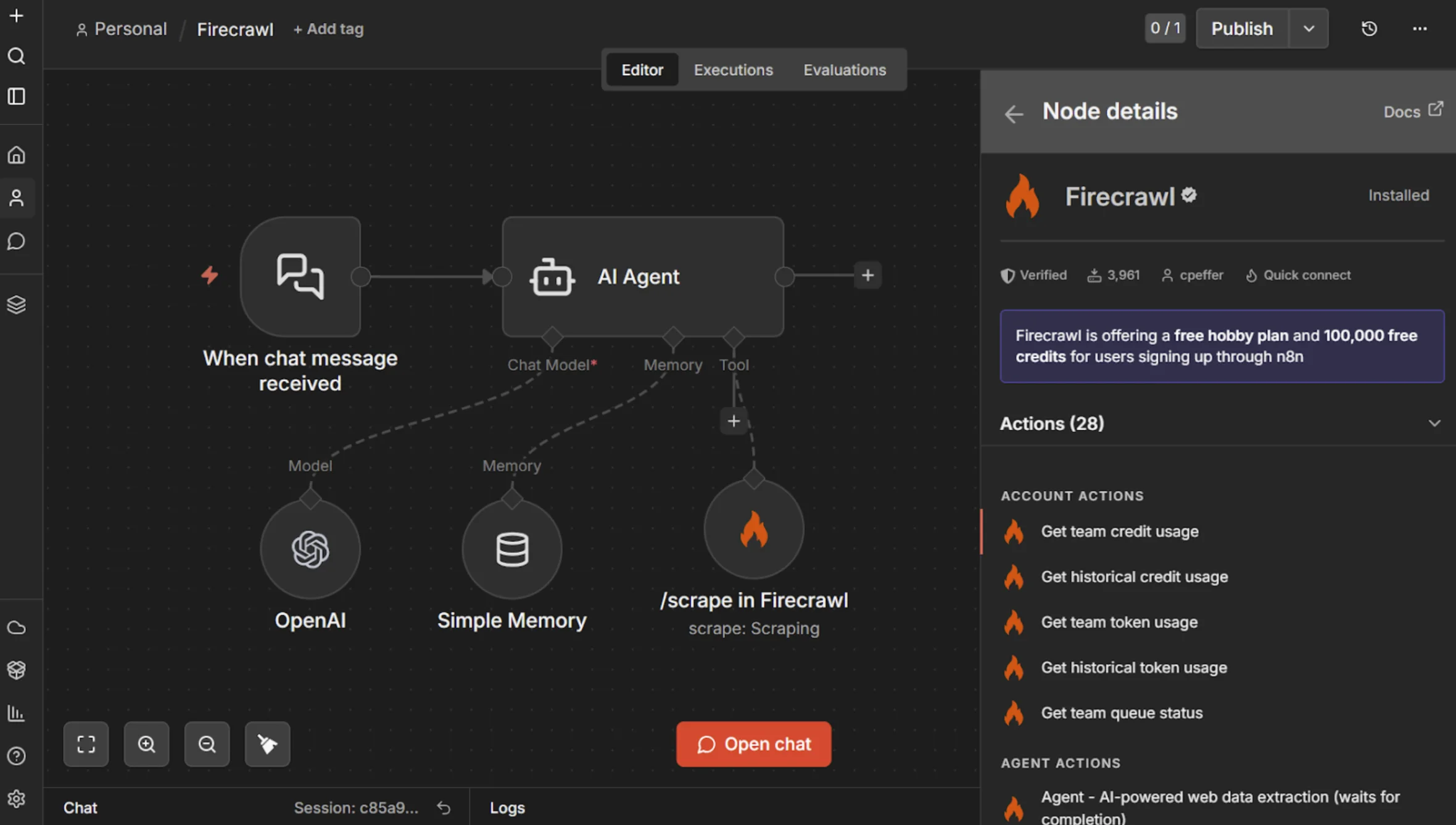
As the most popular AI workflow builder, n8n brings 500+ integrations, a visual editor, and the code flexibility to build exactly what you need. You can run batch operations and even use Firecrawl as a tool for your AI Agent nodes, letting agents decide what to fetch and how to interpret it.
With Firecrawl connected, your n8n workflows can:
- Scrape websites - Extract content from any webpage in clean, structured formats
- Search the web - Perform searches and pull relevant content from results
- Interact with the web - Automate browser actions after scraping
- Map entire sites - Automatically discover all URLs across a domain
- Crawl websites - Recursively gather data across entire websites
How it works
On n8n Cloud, install the Firecrawl node and click Connect to Firecrawl during node setup. You'll be asked to share your email address so Firecrawl can create your account. That's it — you're connected and ready to build.
If you're on a self-hosted n8n instance, an admin needs to enable community nodes and install the Firecrawl node via the Admin Panel. Once installed, everyone on the instance can connect.
Three templates to get you building immediately
With access to the entire web, you can use Firecrawl in your n8n workflows in so many different ways — competitive intelligence, lead enrichment, content monitoring, RAG knowledge bases, market research, price tracking. We've put together 3 official templates to get you started right away:
1. Scrape and ingest web pages into a Pinecone RAG stack
Send a URL, Firecrawl scrapes it into clean markdown, and n8n stores it as vector embeddings in Pinecone. A chat interface lets an AI agent query the knowledge base with better answers. Use this to build an internal knowledge base from documentation, support articles, or product pages. Check out the template here.
2. Scrape and ingest web content into Supabase pgvector
Same ingestion pattern, but with Supabase as your vector store — open-source, self-hostable, and with built-in deduplication. If you want full control over where your data lives, this is the template to start with. Check out the template here.
3. Enrich company leads with Firecrawl, OpenRouter AI, and Supabase
Point it at any company website and get back structured business signals: industry, pricing model, funding stage, tech stack, hiring status, and more. Sales teams can use this to enrich and qualify inbound leads or build a competitive landscape database — all running on your own infrastructure. Check out the template here.
The Firecrawl node exposes the full API surface, so you can build whatever market intelligence workflows you need beyond these templates.
Get started
- Log into your n8n instance or start n8n Cloud for free — no credit card required
- Install the Firecrawl node by searching for it in the Nodes Panel. Click Connect to Firecrawl — you'll be asked to share your email so Firecrawl can create your account. That's it, you're in and your 10,000 free credits are ready to use
- Pick a template and go, or start from scratch
Ready to add live web data to your AI workflows?
Get your free API key and explore what's possible at firecrawl.dev.
Frequently Asked Questions
Do I need a Firecrawl account before connecting through n8n?
No. When you install the Firecrawl node on n8n Cloud and click Connect, n8n creates your Firecrawl account automatically using your email address. If you already have a Firecrawl account, a new team linked to n8n will be created on it and the promotional credits will be applied there.
What's included in the current n8n Cloud credit offer?
The launch offer that included a free Hobby plan and 100,000 credits has expired. The current offer gives you 10,000 free credits when you connect Firecrawl through n8n Cloud. Scraping costs 1 credit per page, search costs 2 credits per 10 results, and browser interaction is 2 credits per minute.
Does this work on self-hosted n8n instances?
The one-click connect experience is available on n8n Cloud. For self-hosted instances, an admin needs to enable community nodes and install the Firecrawl node manually. Once installed, anyone on the instance can connect to Firecrawl.
Where can I track my Firecrawl usage after connecting?
Head to firecrawl.dev/app to see your credit usage, manage API keys, and track everything. You can also check usage programmatically via the Credit Usage API if you want to build that into your n8n workflows.
How long do the 10,000 promotional credits last?
The 10,000 credits are a one-time allotment and don't reset monthly. Once you've used them, you can subscribe to a paid plan for a monthly credit allotment or upgrade to a higher tier for more volume.
How do I upgrade if I need more credits or paid-plan features?
You can upgrade anytime from the Firecrawl pricing page. Upgrades take effect immediately with prorated billing. The Standard plan gets you 100,000 credits/month with 50 concurrent browsers, and Growth bumps that to 500,000 credits/month with 100 concurrent browsers. Firecrawl handles all billing directly — n8n is not involved.