TL;DR: Best Grok Plugins
| Plugin | What it does |
|---|---|
| Firecrawl | Live web context for Grok: search, scrape, crawl, browser interaction |
| Matt Pocock's Skills | Engineering skill pack: grill-me, handoff, tdd, diagnose, caveman |
| Composio | Connects Grok to 1,000+ SaaS apps with managed OAuth |
| Superpowers | Cross-harness agent workflow framework, now official in the marketplace |
| Vercel | Deploys, build logs, env vars, and a relational graph of the Vercel ecosystem |
| Sentry | Production error monitoring, issue triage, and Seer-powered fixes |
| Chrome DevTools | Drive a live Chrome session: performance traces, network, console |
| Cloudflare | Skills for Workers, Durable Objects, Wrangler, and the Cloudflare platform |
| Neon | Serverless Postgres with branch-based migrations |
| Caveman | Cuts Grok's response verbosity to save tokens on long sessions |
Grok Build's plugin system landed in 2026 and the official marketplace at github.com/xai-org/plugin-marketplace has been filling out fast. xAI ships a curated set (Vercel, Sentry, Chrome DevTools, Cloudflare, MongoDB, Neon, Superpowers, Firecrawl), and a wider community has been publishing skill packs and MCP servers that drop into the same install flow.
The reason plugins matter more than any single Grok feature this year is reach. One install can ship a workflow, an app connector, and an MCP server together. You stop pasting setup instructions into project docs and start sharing a single command from the marketplace. The right combination of plugins turns Grok from a capable agent into one that knows your APIs, your deploys, your tickets, and the live web.
These are the ten best Grok plugins I'd hand someone setting up a fresh Grok Build session today.
What are Grok plugins?
A Grok plugin is a directory that bundles any combination of these components into a single install:
- Skills (
skills/):SKILL.mdfiles that teach Grok how to handle a task. The format is shared across coding agents, which is why a lot of the most-installed agent skills work in Grok Build with no modification - Commands (
commands/): slash commands - Agents (
agents/): subagent definitions - Hooks (
hooks/hooks.json): lifecycle hooks - MCP servers (
.mcp.json): live tool surfaces over MCP - LSP servers (
.lsp.json): language server configs
One plugin can ship all of these. The Firecrawl plugin, for example, registers the hosted Firecrawl MCP server alongside skills that teach Grok when to reach for search, scrape, crawl, map, or interact. The full spec lives in the plugin marketplace repo, and the catalog itself sits in .grok-plugin/marketplace.json.
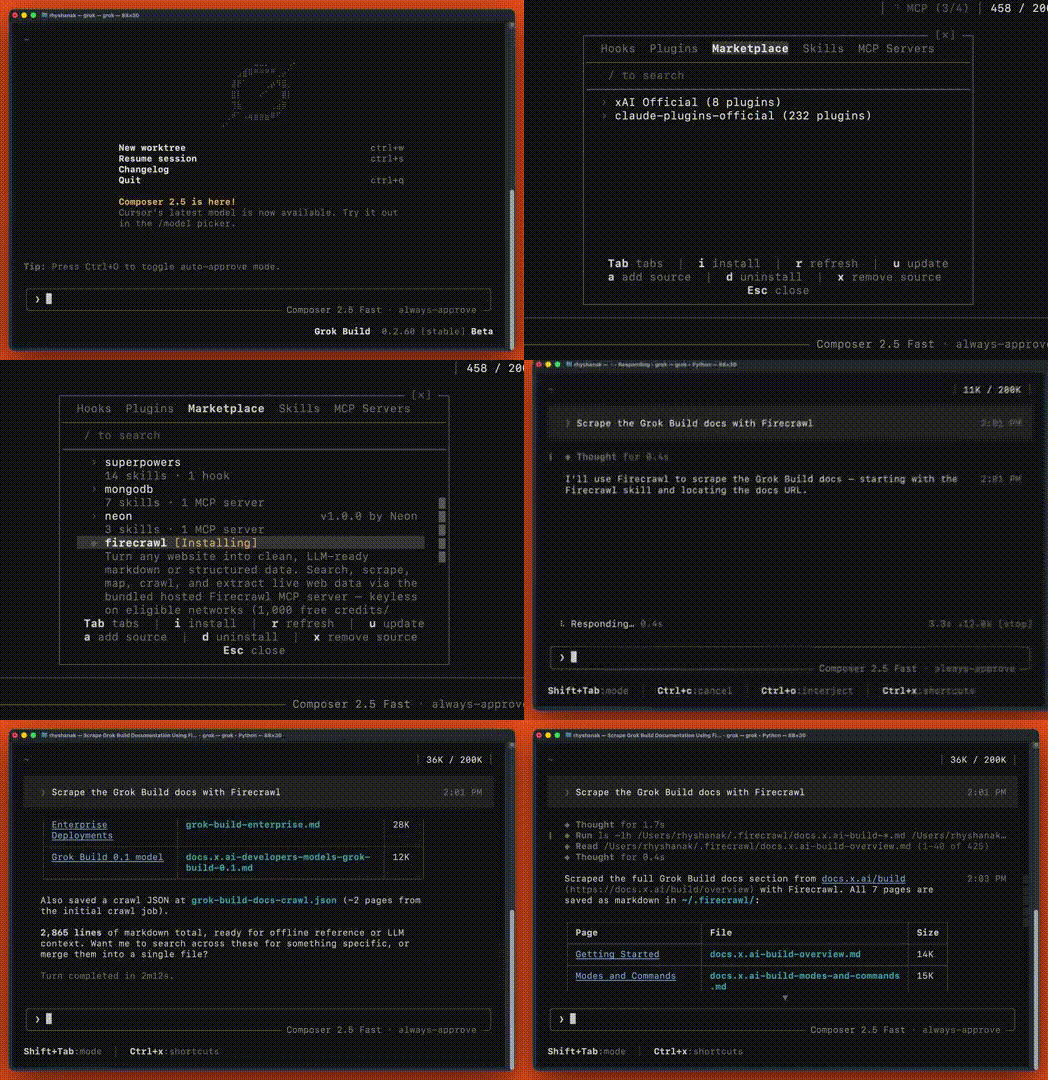 Running
 /plugin inside Grok Build opens the marketplace directly in the CLI.
How to install Grok plugins
The marketplace is browsable inside Grok Build via the /plugin slash command. The same directory ships in the Grok Build desktop app and CLI.
1. Open the marketplace. Type /plugin inside any Grok Build session. You get the catalog, searchable by name and keyword.
2. Install. Pick a plugin and Grok Build clones it from the pinned commit SHA, registers its skills, commands, MCP tools, and hooks, and prompts for any required credentials on first use.
3. Invoke it. Most plugins activate implicitly when your prompt matches a skill's trigger. You can also call a plugin explicitly with @plugin-name or run its slash commands.
4. Manage it. Plugins can be disabled, updated, or removed from the same /plugin panel.
The marketplace pins every third-party plugin to a full commit SHA so a vendor force-push can't silently change what gets installed. xAI's README is also explicit that third-party plugins are provided as-is and at your own risk.
What are the top Grok plugins to try out?
Not everything in this list is a first-party Grok plugin. A few are official entries in the xAI marketplace. The rest are a mix: MCP servers, skill collections, and plugin-style tools that fit naturally into a Grok Build workflow even though they live outside the curated catalog. Inside a real session, you stop noticing the difference, which is exactly how it should feel.
1. Firecrawl
An agent is only as smart as the context it has. The Firecrawl plugin gives Grok live web context.
Grok's built-in web tools have a place for quick lookups, but they aren't built for full-page extraction, recursive crawls, or live browser interaction. The Firecrawl plugin fills that gap. It bundles the hosted Firecrawl MCP server plus a set of skills, giving Grok the ability to search the web, scrape clean markdown from any URL, map a domain, crawl entire sites, and drive a live browser session on a scraped page.
The plugin works through MCP, so Grok can chain operations naturally: search to find sources, scrape to read them in full, crawl to index an entire documentation site, interact to click through pages that need logins or pagination. JavaScript rendering, anti-bot handling, and proxy rotation are all automatic. Results write to a local .firecrawl/ directory when output is large, so Grok's context window stays clean.
The bundled MCP is keyless on eligible networks (1,000 free credits per month, no signup), and the first action you take signs you in through your browser if you want a key for higher limits. No API key paste required.
Install:
In Grok Build, run /plugin and search for firecrawl, then select it to install. This installs the skills and the hosted Firecrawl MCP in one step.
/plugin
# search "firecrawl" and install
Example:
"Check the Next.js 16 migration guide and list every breaking change for App Router"
"Crawl the Stripe API docs and find every endpoint that supports idempotency keys"
"Research our top three competitors and extract their pricing pages as structured JSON"
Honest take: Live results replace anything cached for documentation lookups, research, and competitor analysis. File-based output keeps context efficient on big crawls. Used by 1.25M+ developers and 150,000+ companies, with 5B+ requests served. When xAI announced the plugin, the response was immediate:
Cons: Heavy usage consumes credits past the free tier of 1,000 credits a month. GET /v2/team/credit-usage reports the remaining balance mid-period, and very large crawls benefit from a paid plan. If you are comparing options across agents, the best web search MCP servers guide covers how Firecrawl stacks up against Tavily and Exa.
Full reference at github.com/firecrawl/firecrawl-grok-plugin.
2. Matt Pocock's Skills
The most-used third-party skill collection for AI coding agents, and it drops cleanly into Grok Build.
143k GitHub stars (as of June 2026)
Matt Pocock's skill repo started as a Claude Code companion and has grown into the most-installed engineering skill pack across every major coding agent. The pitch on the repo: skills built to fix the four recurring failure modes of AI coding agents, namely misalignment, verbosity, broken code, and ball-of-mud architecture. Each skill targets one of those directly.
The headliners: grill-me interviews you about every decision in a plan until you reach shared understanding before any code is written. handoff compresses a session into a markdown document so you can continue in a fresh worktree or hand off to a different agent. tdd runs a strict test-first loop. diagnose stress-tests a hypothesis before committing to a fix. caveman strips response verbosity to the bone (covered separately below).
Install:
npx skills@latest add mattpocock/skillsThen run /setup-matt-pocock-skills inside Grok Build to configure your issue tracker (GitHub, Linear, or local), triage labels, and documentation locations.
Example:
"Grill me on the auth refactor plan before I touch any code"
"Run handoff so I can continue this in a new Grok worktree"
"Use the tdd skill to add validation to the signup endpoint"
Honest take: The whole collection is built around a strong opinion about how to ship code with an agent, drawn from Pragmatic Programmer, DDD, and Ousterhout's A Philosophy of Software Design. The same SKILL.md files work across Grok Build, Claude Code, Codex, Cursor, and Gemini CLI, so there's nothing Grok-specific to learn.
Cons: Some skills (especially grill-me) are deliberately slow by design. They surface assumptions you would otherwise skip past, which means the agent moves more carefully. That is the point, but it adds friction on small tasks.
Full reference at github.com/mattpocock/skills and the deeper guide at aihero.dev.
3. Composio
Composio connects Grok to 1,000+ SaaS apps with managed OAuth in a single tool surface.
The reason Composio matters for Grok is the auth tax. Connecting an agent to Gmail, HubSpot, Salesforce, Notion, Linear, Stripe, or Slack means handling OAuth flows, refresh tokens, scopes, and rate limits for every service separately. Composio handles all of that as a hosted service: you authorize once per app, Grok gets a unified tool surface, and per-user credentials are managed for you. Composio is SOC2 and ISO 27001:2022 certified, with customers including Zoom, Letta, Glean, and HubSpot.
The integration pattern stays the same regardless of the app. Grok sees a tool like gmail_send or hubspot_create_contact, calls it, and Composio routes the request through the right OAuth session. Sandboxed execution and parallel calls across apps work out of the box.
Install:
Composio ships as an MCP server. Add it to Grok Build's MCP config:
npx composio-mcp@latest initThen sign in at composio.dev and authorize the apps you want Grok to act on.
Example:
"Pull the last 10 unanswered emails from my inbox and draft replies"
"Create a HubSpot deal for every Stripe invoice over $5,000 in the last week"
"Find the Notion page about Q3 planning and add today's standup notes"
Honest take: One install, hundreds of integrations. Managed OAuth means you stop building one-off connectors. Per-user credentials work cleanly for multi-tenant agent products. If you are building an agent that needs to act on third-party services rather than answer questions about them, Composio collapses weeks of integration work, and it shows up consistently on every roundup of the best MCP servers for developers.
Cons: Hosted service, so you depend on Composio's uptime and rate limits. The free tier is enough for development but production usage moves to paid plans. Some niche apps still expose only a subset of their full API through Composio.
Full reference at composio.dev.
4. Superpowers
Obra's Superpowers is a cross-harness agent workflow framework with first-class Grok Build support, and it's now an official entry in the xAI marketplace.
237k GitHub stars (as of June 2026)
Superpowers is the most-starred agent workflow framework on GitHub. It started in the Claude Code ecosystem, picked up Codex support, and now ships as an official Grok plugin in the xAI marketplace under the development category. The framework bundles a curated skill collection, subagent dispatch patterns (spawn_agent, wait_agent), code-review loops, and worktree management primitives.
If Matt Pocock's skills are about engineering judgment, Superpowers is about agent orchestration. It is the layer that turns Grok from one agent doing one thing into a coordinated set of subagents handling planning, implementation, review, and verification in parallel, which is the same Codex multi-agent orchestration pattern you'd recognize from the OpenAI side.
Install:
Install through the marketplace:
/plugin
# search "superpowers" and install
Or via the npx skills flow if you want the upstream version directly:
npx skills add https://github.com/obra/superpowersExample:
"Use subagent-driven-development to ship the new pricing page across plan, implement, review, and verify"
"Run executing-plans on the migration spec I wrote in spec.md"
"Spawn three parallel worktrees to refactor the auth, billing, and notifications modules"
Honest take: The most complete agent workflow framework that works across Grok Build, Claude Code, Codex, Cursor, Gemini, Copilot, and OpenCode. Heavy active development from the maintainer, and the fact that xAI vendored it into the official marketplace says something about how broadly applicable the pattern has become.
Cons: Steep learning curve. Worktree-based parallel agents need disk space and discipline. The full framework is more than most projects need. Start with the finishing-a-development-branch skill and add more as the use case becomes clear.
Full reference at github.com/obra/superpowers.
5. Vercel
The Vercel plugin gives Grok a relational knowledge graph of the entire Vercel ecosystem plus 25 skills covering deploys, env vars, AI SDK, AI Gateway, and the rest of the platform.
The pain Vercel's plugin targets is the gap between Grok's training cutoff and the current state of the platform. Vercel ships fast: AI Gateway, Cache Components, Fluid Compute, Workflow DevKit, Routing Middleware, and a dozen other products have shipped or moved meaningfully in the last twelve months. A coding agent built on stale knowledge recommends Edge Functions where you'd now reach for Fluid Compute, or suggests vercel.json where the better answer is vercel.ts.
The plugin replaces that stale picture with a text-form relational graph of the ecosystem plus skills that map cleanly to Grok prompts: deploy preview vs production, pull env vars, configure AI Gateway with provider failover, set up Routing Middleware, and so on.
Install:
/plugin
# search "vercel" and install
Or directly:
npx plugins add vercel/vercel-pluginExample:
"Deploy this to preview and tail the build logs"
"Pull production env vars into .env.local"
"Set up AI Gateway with Claude as primary and GPT as fallback"
Honest take: The ecosystem graph is the underrated part. It's not a doc dump, it's a relational picture that helps Grok pick the right product for a task instead of guessing. Skills stay quiet by default and only inject context when the prompt actually matches, which keeps the token cost low.
Cons: Most useful if you're already on Vercel. The full graph is heavy if you're only deploying a static site and don't touch the AI products, databases, or the marketplace.
Full reference at github.com/vercel/vercel-plugin.
6. Sentry
The Sentry plugin teaches Grok how to set up Sentry, triage production issues, and ship fixes for them in one session.
The Sentry plugin is one of the cleaner examples of a plugin that wraps an existing CLI and exposes it through skills plus an MCP. Grok can run the SDK setup wizard for a Next.js, Rails, or iOS app, then turn around in the same session and ask Seer (Sentry's AI debugging engine) what the top errors of the last 24 hours look like, what is causing them, and what the fix should be. PR-time integration closes the loop: Sentry comments on a PR, Grok reads them, and the fix lands without leaving the editor.
Install:
/plugin
# search "sentry" and install
Authentication uses your existing Sentry CLI login.
Example:
"Add Sentry to my Next.js app"
"/seer What are the top errors in the last 24 hours?"
"Fix the Sentry comments on PR #118"
Honest take: The setup wizard alone is worth the install. Grok asks the right questions about your stack and produces a Sentry config that actually matches it, instead of a generic copy-paste from the docs. The Seer integration is what makes it durable past initial setup.
Cons: Useful only if you're on Sentry. The Seer features depend on your plan tier, and very high-volume orgs will want to scope what Grok can access through Sentry permissions.
Full reference at github.com/getsentry/plugin-grok.
7. Chrome DevTools
The Chrome DevTools plugin lets Grok control and inspect a live Chrome browser: record performance traces, analyze network requests, and check console messages with source-mapped stack traces.
This is the official xAI marketplace entry for browser automation, built on top of the chrome-devtools-mcp project. The pitch is straightforward: Grok can drive a real Chrome instance for the same kinds of tasks you'd do manually with DevTools open. Performance audits, network inspection, console reading, JS evaluation, and DOM snapshotting all become things you can prompt for.
Install:
/plugin
# search "chrome-devtools" and install
Example:
"Open localhost:3000 and record a performance trace while I navigate to the dashboard"
"Check the console for errors on the checkout page"
"List every network request to api.stripe.com on this page and what they returned"
Honest take: This is the right tool when "scrape it" isn't enough and you actually need to use the page. Performance traces in particular are the kind of task that's hard to automate any other way. If you're doing pure markdown extraction, Firecrawl is the better fit; if you need to inspect runtime behavior, this is the one.
Cons: Requires Chrome installed locally and a free port for the DevTools protocol. Sessions can be heavy on memory, especially with performance recording.
Full reference at github.com/ChromeDevTools/chrome-devtools-mcp.
8. Cloudflare
The Cloudflare plugin ships skills for the entire Cloudflare developer platform: Workers, Durable Objects, the Agents SDK, MCP servers, Wrangler CLI, and web performance.
Cloudflare's plugin is closer in shape to Vercel's: a skill library that maps platform concepts to prompts. Grok learns how to scaffold a Workers project, work with Durable Objects, deploy with Wrangler, or build a Cloudflare-hosted MCP server. The agents-SDK skill in particular has been useful for me when scaffolding small Cloudflare-deployed agents.
Install:
/plugin
# search "cloudflare" and install
Example:
"Scaffold a Worker that proxies requests to my origin and caches GET responses"
"Deploy this Durable Object to staging with wrangler"
"Set up an Agents SDK project with a memory-backed conversation store"
Honest take: Strong fit if you're on Cloudflare for any meaningful piece of your stack. The Wrangler skill alone closes the loop between writing a Worker and shipping it. The Agents SDK skill is the part I reach for most often when building anything agentic that needs to live on Cloudflare.
Cons: Cloudflare-specific by definition. Some of the more advanced skills assume you're already familiar with Workers concepts like KV, R2, and D1, so the value compounds as you go deeper into the platform.
Full reference at github.com/cloudflare/skills.
9. Neon
The Neon plugin connects Grok to Neon's serverless Postgres with first-class support for branch-based migration testing.
The thing Neon does differently from other Postgres providers is the branch model: every database can spawn a copy-on-write branch in seconds, run a migration against the branch, and tear it down if anything looks off. The Neon plugin teaches Grok to use that workflow. Instead of "run this migration against prod and pray," it's "spin a branch, apply, verify, merge back." That pattern shows up across the skills in this plugin.
Install:
/plugin
# search "neon" and install
Example:
"Spin up a Neon branch and run the new auth migration against it"
"List my Neon projects and tell me which databases are unused"
"Pick the right connection method for a Vercel serverless function"
Honest take: The branch workflow is the part worth installing for. Postgres-as-a-service tools are easy to wrap; the harder thing is teaching Grok when to reach for a branch versus when to talk to the main database. The skills handle that distinction well.
Cons: Useful only if you're on Neon. Some of the more advanced branch workflows assume you're already comfortable with Postgres migrations, so the value is highest for teams that already think this way.
Full reference at neon.com.
10. Caveman
Caveman strips Grok's response verbosity to the bone, reportedly cutting token usage by ~75% on routine sessions.
Caveman is a single skill from Matt Pocock's collection that changes how Grok talks back. Pleasantries, restated context, transition phrases, and over-explained reasoning all get cut. The output reads like a developer talking to a coworker, not a chatbot performing helpfulness. Across a long coding session, that compression adds up: less context burned on the agent's own output means more room for actual work.
This is a behavioral skill, not a tool integration. It doesn't change what Grok can do, only how it responds.
Install:
Caveman ships as part of the Matt Pocock skill collection:
npx skills@latest add mattpocock/skills --skill cavemanExample:
"Caveman mode: explain why this test is failing"
"@caveman summarize the changes in this PR"
Honest take: Real token savings across long sessions. Lower verbosity also means Grok's actual reasoning stays in view rather than buried under preamble. Best for repeat tasks where you don't need the agent to re-explain its approach every time. For the wider playbook on cutting context usage, the claude code token efficiency guide covers patterns that apply just as well to Grok Build sessions.
Cons: Aggressive enough that some prompts come back too terse for the situation. Not the right default for collaborative planning sessions where you actually want Grok's reasoning visible.
Full reference at github.com/mattpocock/skills.
Building the top Grok plugins into your workflow
The ten above are a starting point. Every team has workflows that repeat, tickets that follow the same shape, and reviews that ask the same questions. Plugins are how you encode that once and reuse it indefinitely.
The combination I'd start with on a fresh setup: Firecrawl for live web context, Matt Pocock's Skills (or at least grill-me and handoff) for engineering judgment, and one platform plugin that matches your stack (Vercel, Cloudflare, Neon, or Sentry depending on where the team lives). That covers the three biggest pain points: stale knowledge, undisciplined agent behavior, and platform-specific context gaps. Add Composio when you need Grok to act on third-party SaaS rather than just answer questions about it, and add Caveman when long sessions start eating context.
A note on the difference between Grok plugins and standalone skills: a skill is one SKILL.md file with one task focus, while a plugin can bundle skills, slash commands, subagents, MCP servers, and hooks under a single install. Most of the entries here are full plugins, but a couple (Matt Pocock's collection and Caveman) are skill packs that fit naturally into a Grok Build workflow even though they predate the plugin spec. The SKILL.md format is the same across Grok, Claude Code, and Codex, which is why skills built for one tend to drop into the others with no modification, including the ones in the best Claude Code skills and best Codex skills roundups.
For discovery beyond this list, the official xAI plugin marketplace is the source of truth for first-party Grok plugins, browsable inside Grok Build with /plugin. skills.sh is the broader directory I'd point anyone to next: a curated, searchable index of top Grok plugins and skills across the wider agent ecosystem, including the ones that started life in Claude Code or Codex and drop straight into Grok Build. Matt Pocock's repo and obra/superpowers are the two third-party collections I check first for new entries. And if you're evaluating Grok against other coding agents, the best Codex plugins roundup covers the same ten-item shape on the OpenAI side, the best ChatGPT plugins roundup covers the consumer ChatGPT surface, and the Claude Code vs Codex comparison goes deeper on harness depth and sandboxing trade-offs.
The right combination of curated, community, and custom plugins is what turns Grok from a capable agent into one that knows your codebase, your stack, and your team's workflow.
Frequently Asked Questions
What are Grok plugins?
Grok plugins are reusable packages that bundle skills, slash commands, subagents, hooks, MCP servers, and LSP configs into a single installable unit. The official catalog lives at github.com/xai-org/plugin-marketplace and is browsable inside Grok Build with the /plugin command. A plugin can ship one capability or all of them under one install.
How do I install a Grok plugin?
Open Grok Build and run /plugin to browse the marketplace. Select a plugin and it installs the bundled skills, MCP servers, and commands automatically. Some plugins prompt for OAuth or an API key on first use. Community plugins outside the marketplace usually install via a one-line npx command from the project README.
What is the difference between a Grok plugin and a Grok skill?
A skill is a single SKILL.md file with one task focus. A plugin is a package that can bundle skills, commands, subagents, MCP servers, and hooks together. Skills are atomic, plugins are composable. The Firecrawl plugin, for example, ships an MCP server plus several skills under one install, while a standalone skill like caveman handles exactly one behavior.
Are Grok plugins free?
The official xAI plugins and most community ones are free and open source. Plugins that wrap paid services (Firecrawl, Composio, Vercel, Sentry, Neon, MongoDB) require an account or token for the underlying service, but the plugin itself is free to install. Free tiers on most of these services cover meaningful usage.
What is the Firecrawl Grok plugin used for?
The Firecrawl Grok plugin gives Grok live web context: search, scrape, map, crawl, and live browser interaction, all returning clean markdown or structured JSON. It bundles the hosted Firecrawl MCP server, so the first web action signs in through your browser with no API key to paste. JavaScript rendering, anti-bot handling, and proxy rotation are automatic.
Is Superpowers a Grok plugin or a Claude Code plugin?
Both. Superpowers started as a Claude Code skill collection and is now an official entry in the xAI plugin marketplace. With 237k+ GitHub stars, it is the most comprehensive agent workflow framework available as a plugin, with first-class support across Grok Build, Claude Code, Codex, Cursor, and Gemini.
What does Caveman do?
Caveman is a skill from Matt Pocock's collection that strips Grok's responses down to the essentials, cutting token usage on routine interactions. It is a behavioral skill rather than a tool integration: it changes how Grok talks back, not what it can do. Useful when you want fewer pleasantries and more signal across long sessions.
Where do I find more Grok plugins?
The official marketplace is github.com/xai-org/plugin-marketplace, browsable inside Grok Build with the /plugin command. For community plugins beyond the catalog, check Matt Pocock's skills repo, obra/superpowers, and the wider MCP server ecosystem. Skills built for Claude Code or Codex often work in Grok Build with little to no modification.
How do Grok plugins handle credentials?
Most marketplace plugins use browser-based OAuth on first use. Firecrawl signs you in through the browser and stores the token locally. Vercel, Sentry, Neon, and MongoDB use their existing CLI auth. Composio handles per-app OAuth on its hosted service so you authorize once per integration and Grok gets a unified tool surface.