Claude Code Uses Too Many Tokens on Web Search - Here's the Fix
 Richard Oliver Bray
Every time Claude Code scrapes a page or runs a search mid-session, whatever comes back gets added to context, and stays there for every message after it. A single bloated search doesn't cost once, it sits in context and gets reprocessed (if uncached) on every turn for the rest of the session.
But this can be fixed using four Firecrawl tips that cut down what actually lands in context in the first place:
- Asking a page a direct question instead of scraping it whole
- Shaping the response into JSON instead of a full page
- Batching multiple URLs into one call instead of looping
- Applying the same question format to search results
Let's go through these tips in detail.
Getting an API key
If you want to follow along, scrape and search, the two endpoints used throughout this post, both work with our no API key required option, so that's enough to get started.
Signing up at firecrawl.dev gets you a free API key with higher rate limits and starting credits, and the code below reads it from an environment variable if one is set.
First usage: the Node SDK
This walkthrough uses Firecrawl's Node SDK. A Python SDK, CLI, and MCP server all expose the same options if you're working in a different stack.
npm install firecrawlimport { Firecrawl } from "firecrawl";
const firecrawl = new Firecrawl({
apiKey: process.env.FIRECRAWL_API_KEY, // optional, keyless works too
});That client is reused across every example below, just swapping the method and formats option.
Tip 1: don't scrape, just ask
Imagine if we wanted to pull Apple's 3-year and 5-year stock return, plus the same numbers for Sony, Amazon, and GoPro, from Yahoo Finance. Doing this with Claude Code's default web fetch tool then using /context showed the whole exchange costing 15.8k tokens.
The exact same prompt, run through a Firecrawl scrape skill instead, cost 14.4k tokens, over 1,000 tokens less. Why is the difference so large?
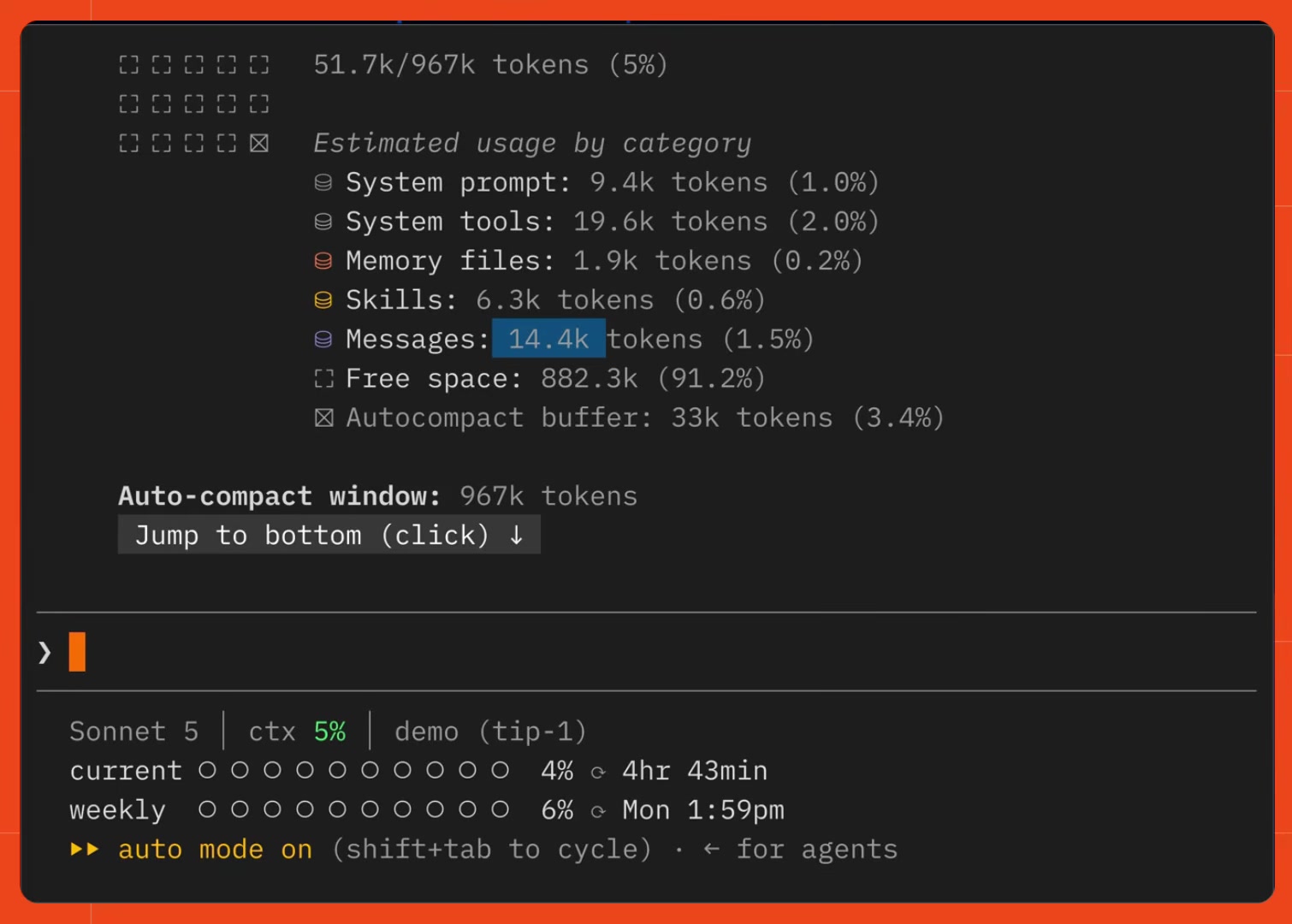
The big token savings come from Firecrawl's question type returning only the answer instead of the whole page. The difference is easier to see in code
Here's the same example using the Claude Agent SDK, restricting the agent to the Web fetch tool.
// claude.ts

import { query } from "@anthropic-ai/claude-agent-sdk";

const url = "https://uk.finance.yahoo.com/quote/AAPL/";

const result = query({
  prompt: `Use the WebFetch tool on ${url} to get the current stock price.`,
  options: {
    allowedTools: ["WebFetch"],
    settingSources: [],
  },
});

for await (const message of result) {
  if (message.type === "user" && message.tool_use_result) {
    const output = message.tool_use_result;
    console.log("bytes:", output.bytes, "result:", output.result?.length);
  }
}
That summarized answer came back at 295 characters. This is because Claude will scrape the page, then use a smaller model to summarize the result before it reaches the main model.
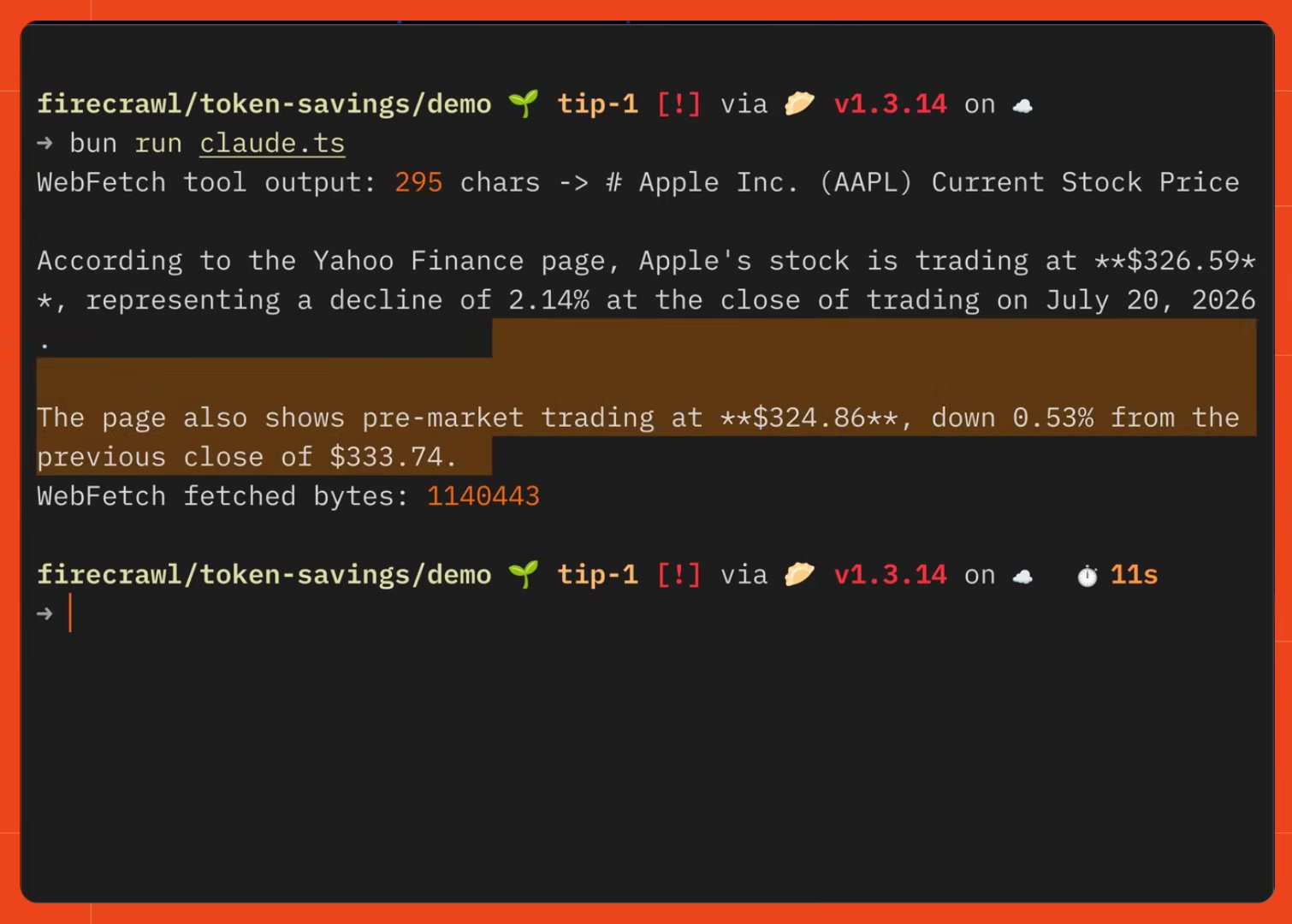
Now the Firecrawl version using a custom MCP tool that calls scrape with the question type instead of a plain scrape:
// claude-firecrawl.ts

import { Firecrawl } from "firecrawl";

const firecrawl = new Firecrawl({ apiKey: process.env.FIRECRAWL_API_KEY });

const url = "https://uk.finance.yahoo.com/quote/AAPL/";

const answer = await firecrawl.scrape(url, {
  formats: [{ type: "question", question: "what is the current stock price of AAPL" }],
  location: { country: "us" },
});

console.log("question format:", answer.answer?.length, "chars ->", answer.answer);
formats: [{ type: "question", question }] tells Firecrawl to scrape the page and extract just the answer, instead of returning the whole scraped markdown.
Firecrawl still does the real scrape behind the scenes, but the agent only receives the specific fact it asked for.
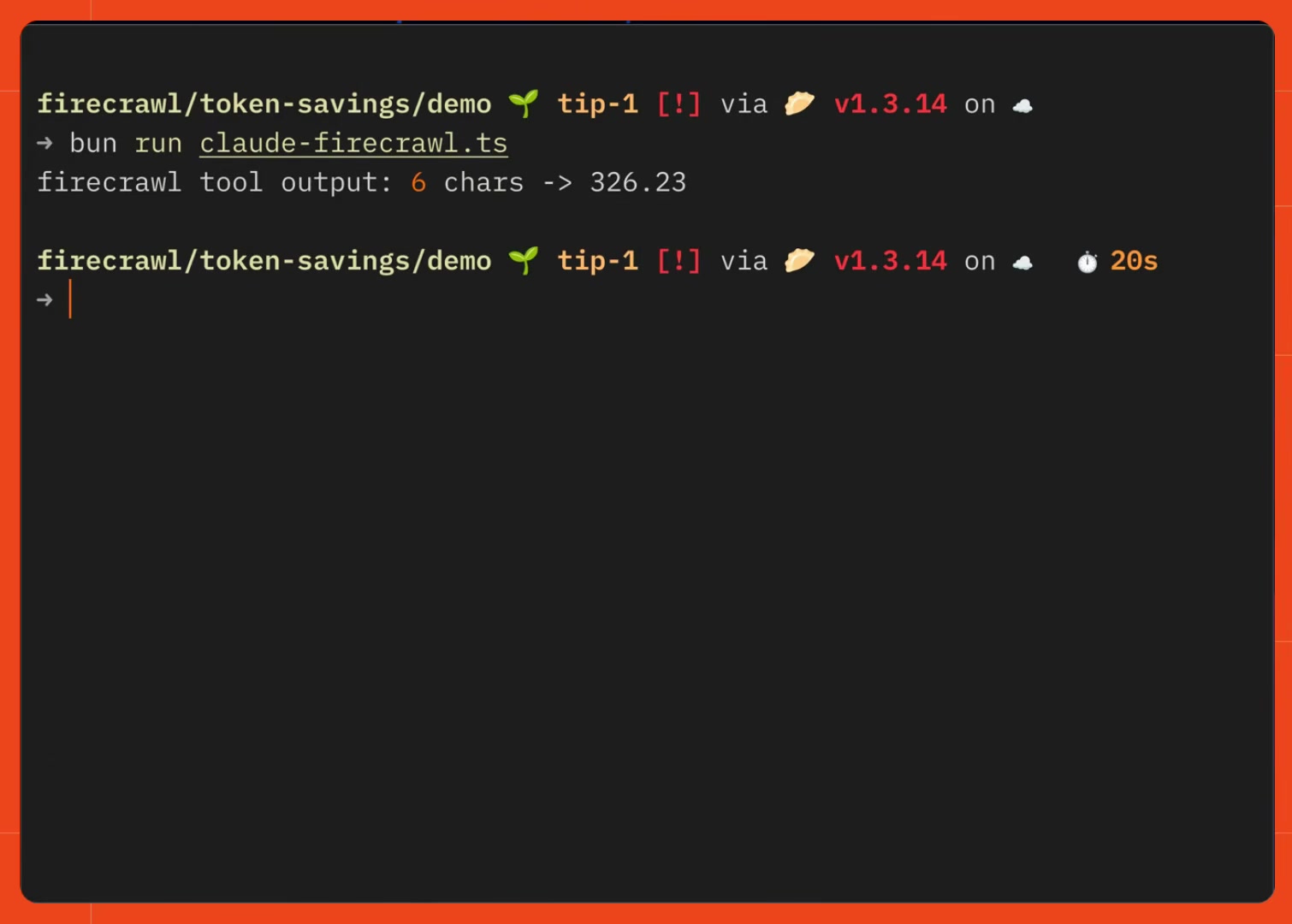
That call returned 6 characters: the price itself, nothing else.
Tip 2: shape the data, not the page
Let's go through another example. The Replit pricing page has a lot on it: three tiers, feature lists, an FAQ, a footer. Imagine we just need a small amount of information, like name, price, collaborator limit, and parallel agent limit, none of the surrounding page matters.
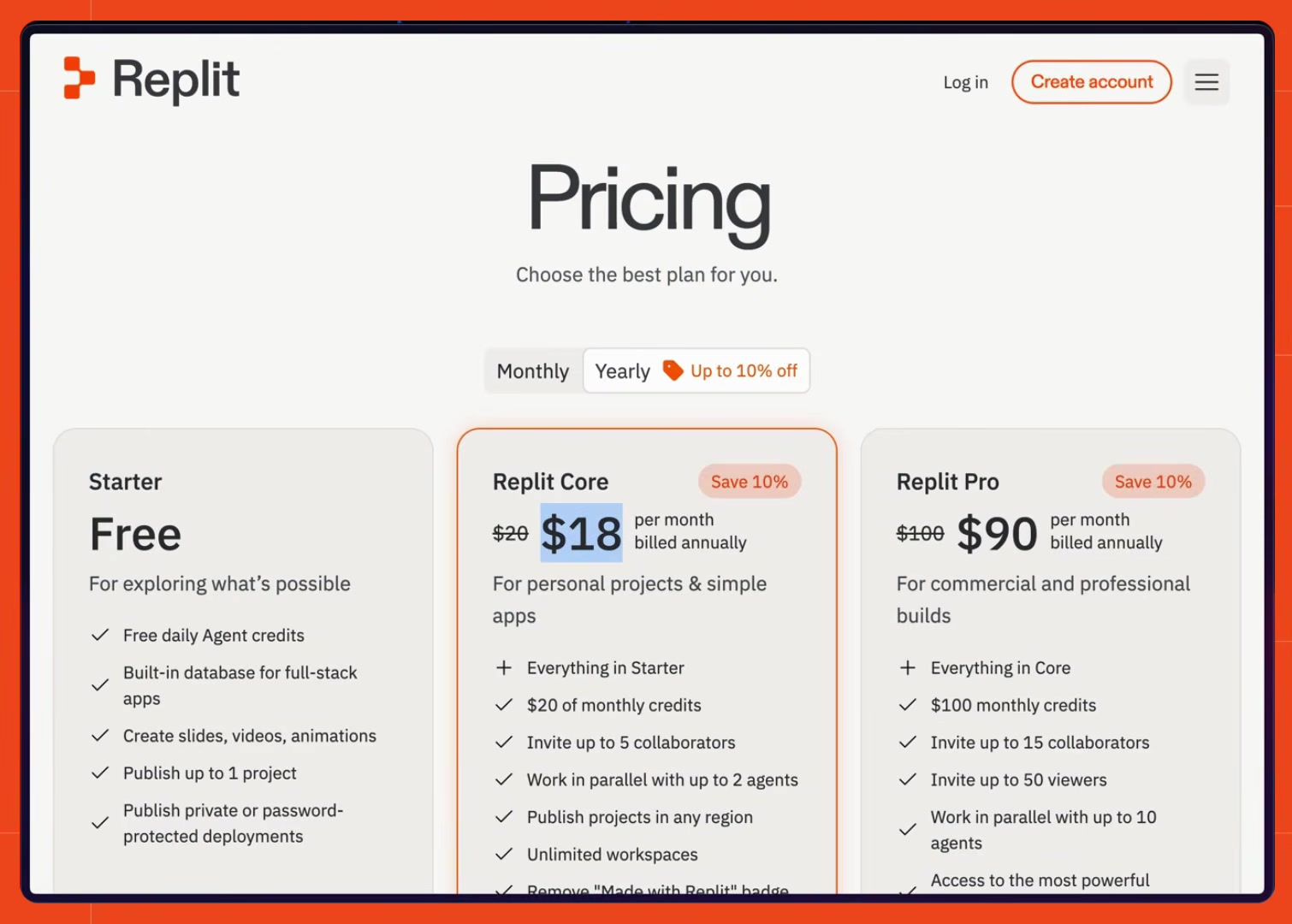
Run through Claude Code's default WebFetch tool with a prompt asking for exactly those fields, the result came back at 942 characters, since the built-in summarizer still writes prose around the extracted values.
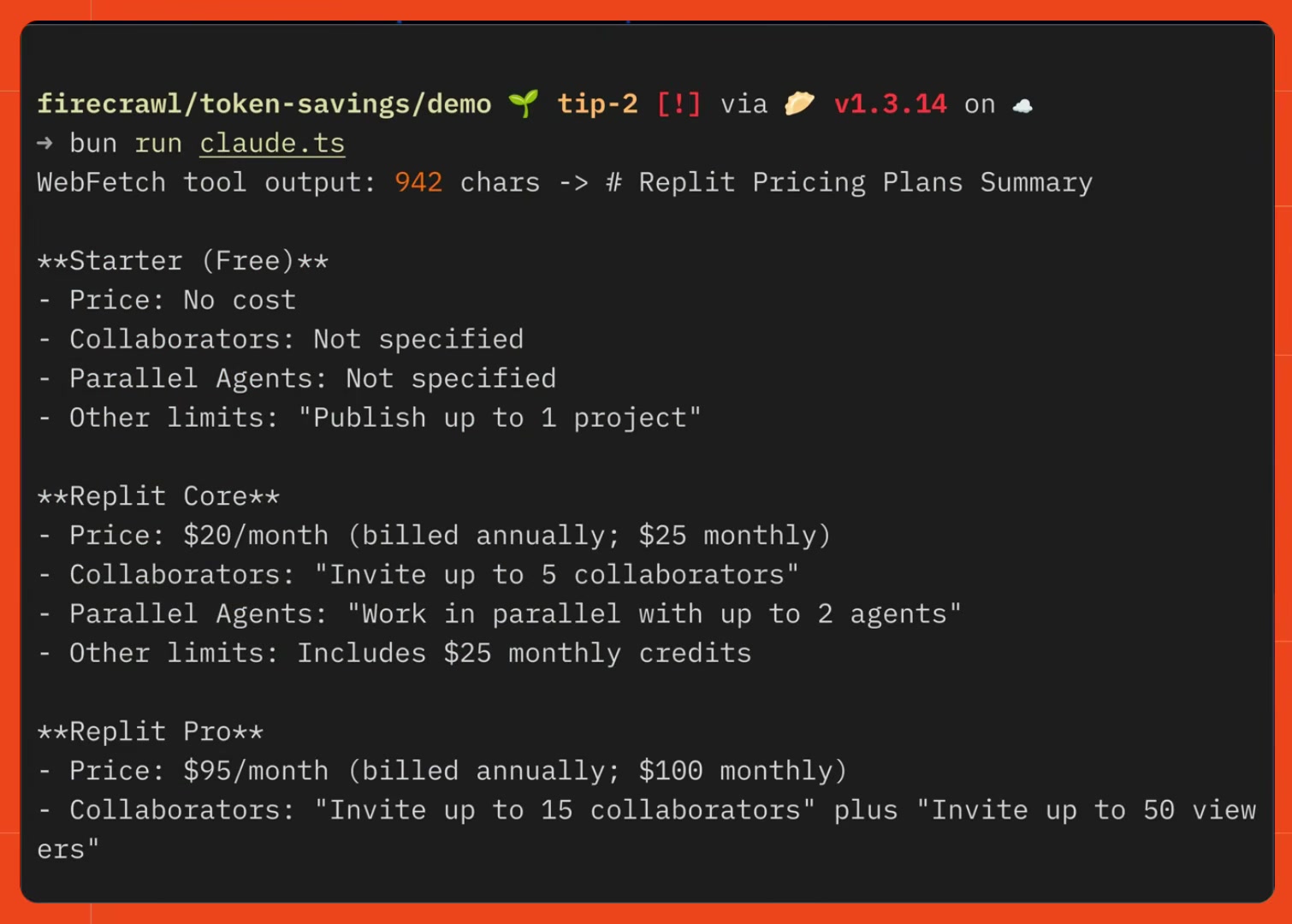
The same extraction through Firecrawl's JSON format returned 338 characters, using a schema instead of a written summary:
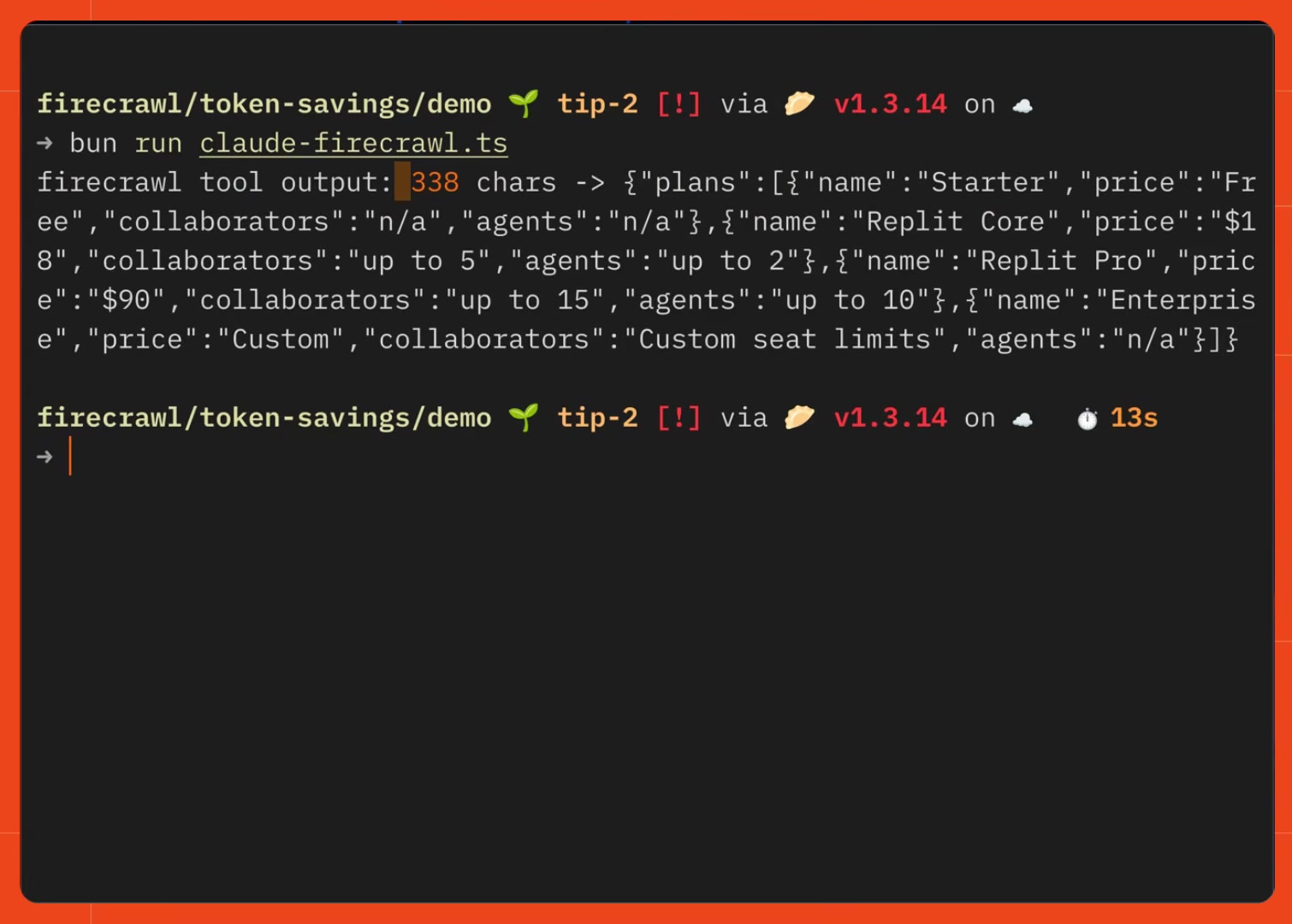
Let's see how to do this in code.
// index.ts

import { Firecrawl } from "firecrawl";
import { z } from "zod";

const firecrawl = new Firecrawl({ apiKey: process.env.FIRECRAWL_API_KEY });

const schema = z.object({
  plans: z.array(
    z.object({
      name: z.string(),
      price: z.string(),
      collaborators: z.string().describe("max collaborators allowed, or 'unlimited'/'n/a'"),
      agents: z.string().describe("how many agents can work in parallel, or 'n/a'"),
    }),
  ),
});

const extracted = await firecrawl.scrape("https://replit.com/pricing", {
  formats: [
    {
      type: "json",
      prompt:
        "Extract every pricing plan on the page with its name, price, collaborator limit, and parallel agent limit.",
      schema: z.toJSONSchema(schema),
    },
  ],
  onlyMainContent: true,
});

console.log("json format:", JSON.stringify(extracted.json).length, "chars ->", extracted.json);
This example uses z.toJSONSchema(schema) to convert a Zod object into plain JSON Schema, but Firecrawl's json format accepts a JSON Schema object directly too, so you can skip Zod entirely.
onlyMainContent: true strips nav and footer noise before the extraction step even runs. The result comes back as structured plans data, each with name, price, collaborators, and agents already parsed, no re-parsing a summary paragraph on the agent's end.
Tip 3: batch it, don't loop it
The first two tips both worked on a single URL however, research tasks rarely stop at one page. If we asked Claude to get the current stock price for five different companies, its default tools can't batch a fetch call, so it makes one WebFetch call per URL: five separate round trips, each carrying its own tool-call framing and instructions on top of the actual page content, landing around 1,100 characters total.
Firecrawl's batchScrape method sends the same five URLs as one job:
// index.ts

import { Firecrawl } from "firecrawl";

const firecrawl = new Firecrawl({ apiKey: process.env.FIRECRAWL_API_KEY });

const urls = [
  "https://uk.finance.yahoo.com/quote/AAPL/",
  "https://uk.finance.yahoo.com/quote/MSFT/",
  "https://uk.finance.yahoo.com/quote/GOOG/",
  "https://uk.finance.yahoo.com/quote/AMZN/",
  "https://uk.finance.yahoo.com/quote/TSLA/",
];

const batch = await firecrawl.batchScrape(urls, {
  options: {
    formats: [{ type: "question", question: "what is the current stock price" }],
    location: { country: "us" },
  },
});
The same question format from tip 1 applies to every URL in the batch, so each result comes back as a short answer rather than a full page. One tool call, five answers, a fraction of the characters a looped equivalent produces:
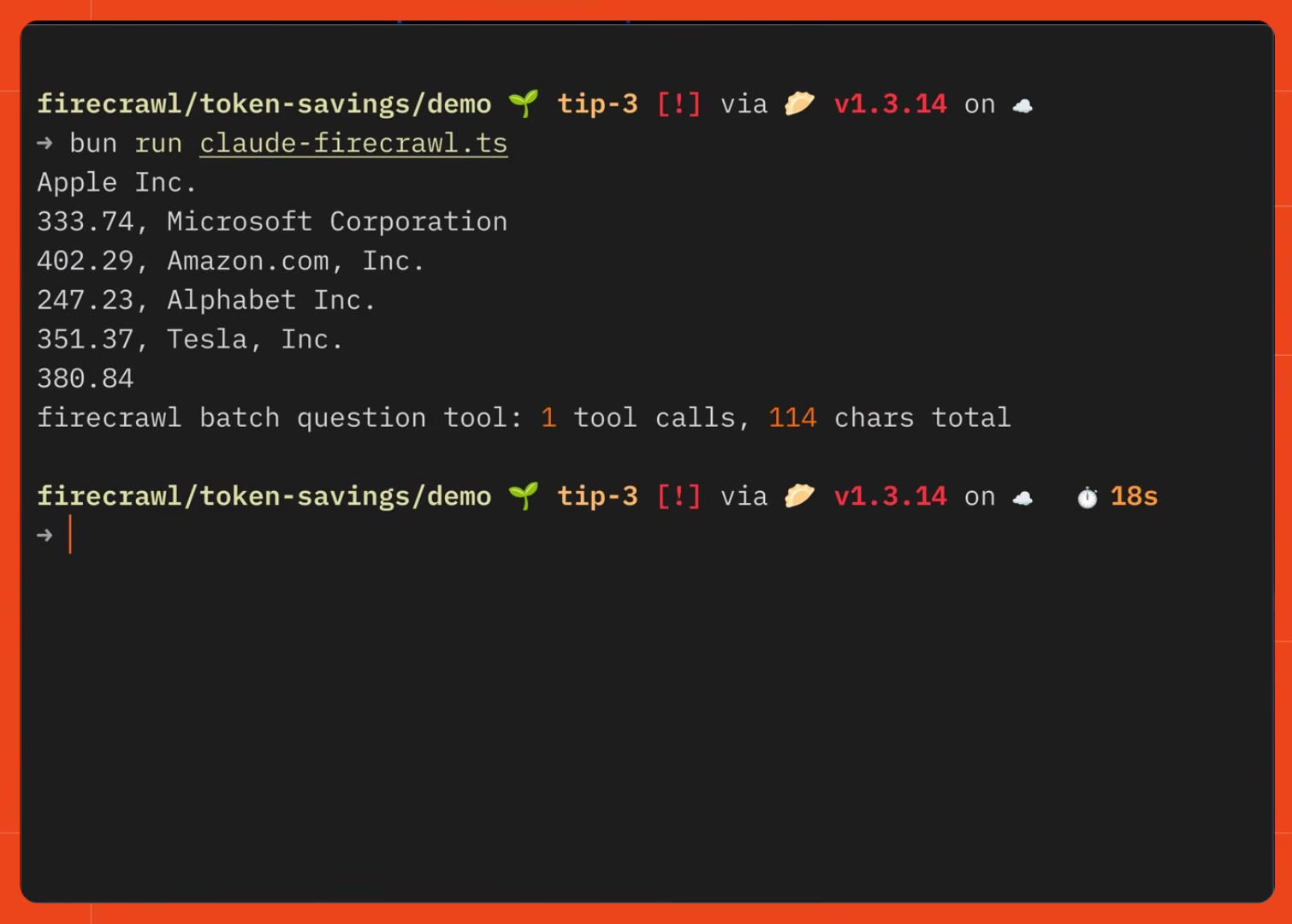
The saving here isn't just the shorter answers. It's that the per-call overhead, the framing and instructions that travel with every individual tool call, only gets paid once instead of five times.
Tip 4: ask every result, not just one page
The first three tips all assume you already have a URL, but as you can imagine research often starts with just a question.
Firecrawl's search endpoint handles that case, and it's where the question format pays off the most, because by default a search scrapes full markdown for every result it returns.
Searching for the latest stable version of Node.js with scrapeOptions: { formats: ["markdown"] } set on the search call, five results come back as five full scraped pages. Passing the question format into that same scrapeOptions field instead changes what each result contains:
// index.ts

import { Firecrawl } from "firecrawl";

const firecrawl = new Firecrawl({ apiKey: process.env.FIRECRAWL_API_KEY });

const query = "latest stable version of node.js";

const withQuestion = await firecrawl.search(query, {
  limit: 5,
  scrapeOptions: {
    formats: [{ type: "question", question: "what is the latest stable LTS version of node.js" }],
  },
});

const answers = withQuestion.web?.map((r) => r.answer ?? "") ?? [];
console.log("search + question:", withQuestion.web?.length, "results,", answers);
scrapeOptions is the same options object scrape() takes, just applied per result inside a search. With the question format set, all five results return 111 characters total, direct answers like "Node.js 24.11.0 (LTS)" instead of five full pages:
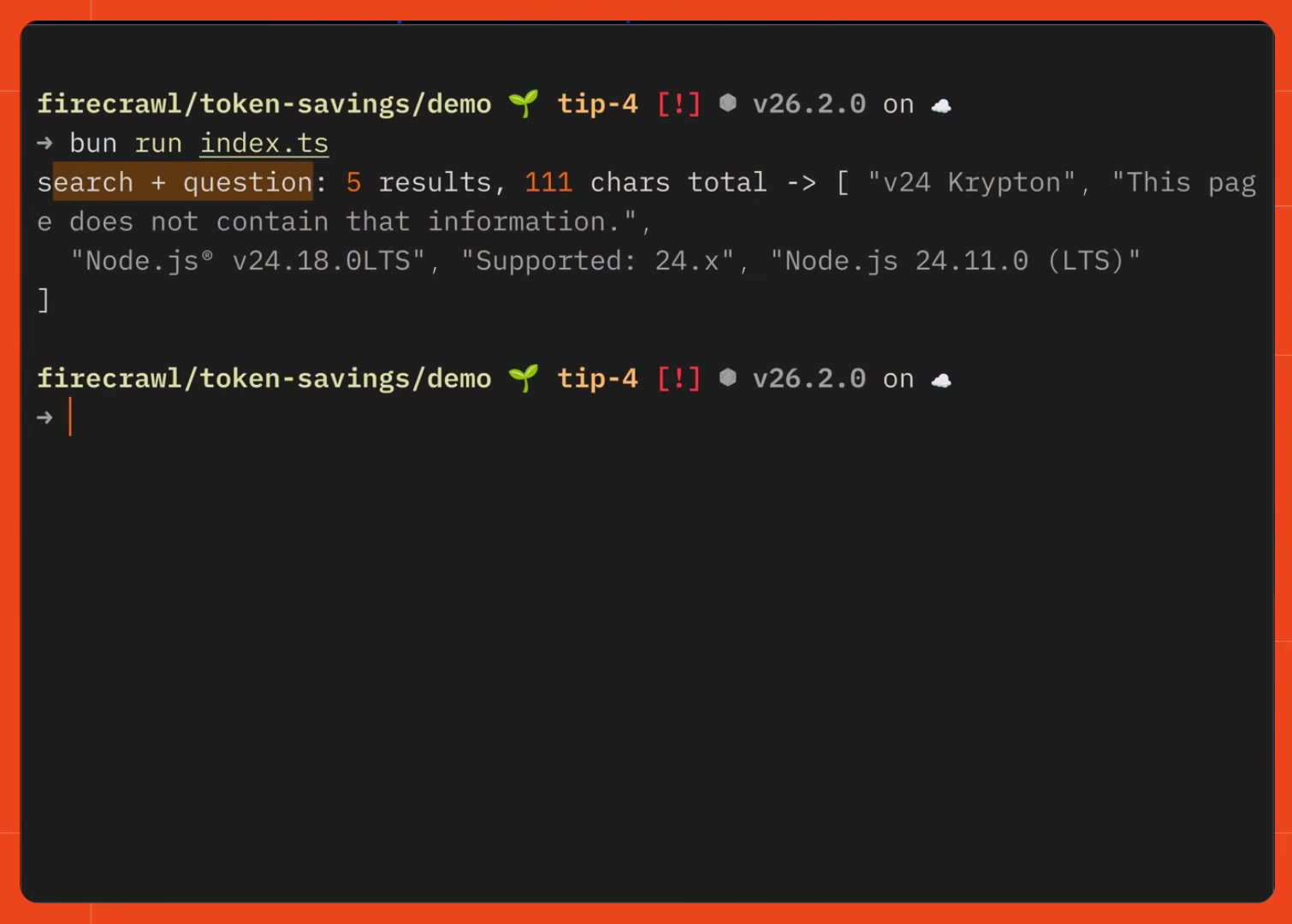
This is tip 1's trick again, just applied across an entire search instead of one page you already had the URL for. It matters most in exactly that situation: research and discovery, when you don't know which page has the answer yet and don't want to scrape blind.
Independent proof: Firecrawl returns the leanest context
This isn't only our own measurement. An independent benchmark reaches the same conclusion. On Openbenchmarks' web search for coding agents board, a fixed coding agent solves the same tasks through each search provider while the harness records the median LLM tokens each provider's results cost per task. Firecrawl returned the leanest context of any provider measured: a median of 7,456 tokens per task on the search-only board, against roughly 22,400 for Exa instant, 21,000 for Brave, and 24,000 for Linkup, while completing 70.3% of tasks at the lowest cost tier on the board. On the search-and-fetch board Firecrawl again used the fewest tokens of the general-web providers, a median of 17,379 per task at 76.0% completion.
For a coding agent that searches on nearly every turn, that per-search token gap is exactly the accumulation the four tips above attack: less lands in context per call, so less compounds across the session. To route Claude Code's searches through Firecrawl instead of the built-in WebSearch tool, see how to add web search to Claude Code with an MCP server.
Four different situations, one underlying move: decide what shape of answer you actually need before the page enters context, whether that's a single fact, a JSON object, a batch of pages, or a set of search results, so Claude reads only what it asked for.
Check out the Firecrawl docs to go deeper.
Frequently Asked Questions
Why does Claude Code use so many tokens when it researches something on the web?
Claude Code resends the entire session, including everything it has already scraped, on every new message, since the underlying API is stateless rather than a server-side memory. A page fetched early in a session stays in context for every later turn. Prompt caching, on by default, means that repeated content is usually billed at a fraction of the price on later turns rather than full price again, but it still occupies context space for the rest of the session, and a cache miss, like going idle past the cache TTL or switching models, bills it in full again.
Does Firecrawl's question format need an API key?
No. Scrape, search, interact, and parse all work keyless from Firecrawl's official SDK, CLI, or MCP server, rate-limited per IP. Signing up for a free API key raises those limits and adds credits.
What is Firecrawl's question format?
It's a scrape format, formats: [{ type: 'question', question: '...' }], that returns a direct answer instead of the page's full markdown. Firecrawl scrapes the page and extracts just the answer to your question, so an agent gets a handful of characters back instead of the whole page.
Do I need Zod to use Firecrawl's JSON extraction format?
No. Zod is optional. Firecrawl's JSON format accepts a Zod schema (converted to JSON Schema automatically by the SDK) or a plain JSON Schema object directly, so you can skip the extra dependency entirely if you already have a schema.
What's the difference between looping scrape calls and using batchScrape?
Looping means one tool call per URL, and each call re-injects its own tool-call framing and instructions into context on top of the page content. firecrawl.batchScrape(urls, { options }) sends the whole list as a single job and a single tool call, so the per-call overhead only happens once instead of once per URL.
Can Firecrawl's search endpoint return direct answers instead of full pages?
Yes. Passing scrapeOptions: { formats: [{ type: 'question', question: '...' }] } to firecrawl.search() applies the question format to every result, so a 5-result search returns 5 short answers instead of 5 full scraped pages.
Does using fewer tokens on web research hurt the quality of Claude's answers?
Not in this case. The question and JSON formats still run a real scrape behind the scenes, Firecrawl just extracts the specific answer or fields you asked for instead of handing back the whole page. The data is the same, there's just less of it for Claude to read.
What SDK does Firecrawl provide for JavaScript and TypeScript?
The firecrawl npm package, installed with npm install firecrawl. It exposes scrape, search, and batchScrape methods, all of which accept the same formats options shown here. A Python SDK and CLI are also available.