How to Scrape Job Boards: Structured Job Data with Firecrawl and Python
 Bex Tuychiev
TL;DR
- Every company career page is an index. The real job data lives on a third-party applicant tracking system (ATS) like Ashby, Greenhouse, or Lever that the page links out to.
- Because every ATS renders the same fields, one extraction schema reads roles from any of them with no per-site CSS selectors.
- We build a Python scraper that pulls a listing into structured JSON, then extracts full detail from every ATS with the same schema.
- It also ranks the scraped roles against a resume with an LLM.
- When you don't have the URL up front, run Firecrawl's search endpoint to find the careers page in seconds; reach for the agent endpoint when search comes back empty or roles are buried in site nav.
- The full script is on GitHub, and we run it live against real boards with the actual output at each step.
Say you want to track open roles across ten companies. You open each career page, the listings load with JavaScript, and clicking a role sends you to a different site with a different layout. Writing a scraper for each one means writing and maintaining ten parsers, and each breaks the next time a company ships a redesign.
There's a shortcut hiding in how these pages are built. Almost no company runs its own job database. They all route applications through a handful of applicant tracking systems, and those systems are the reason one piece of code can read every board.
This guide builds that one piece of code in Python. First we'll look at why the obvious approach falls apart. Then we write a scraper that reads any board, pulls full job detail, and ranks the roles against a resume.
What is job board scraping, and why is it harder than it looks?
Job board scraping is the act of pulling open roles from a company's career page into structured data you can filter, store, or feed to another tool. The hard part is that the page you start on is rarely the page the data lives on.
Career pages are just indexes
When you visit openai.com/careers or anthropic.com/jobs, you see a list of titles and locations. That list is an index. If you click a role, you land on a different domain that hosts the actual posting.
That second domain is an applicant tracking system, or ATS. It's the software a company uses to post openings, collect applications, and move candidates through hiring. Most companies don't build their own. Instead, they rent one from a few providers, and Ashby, Greenhouse, and Lever cover a large share of tech hiring.
So the career page is just the storefront. The ATS holds the real data, like the salary, the responsibilities, and the apply button.
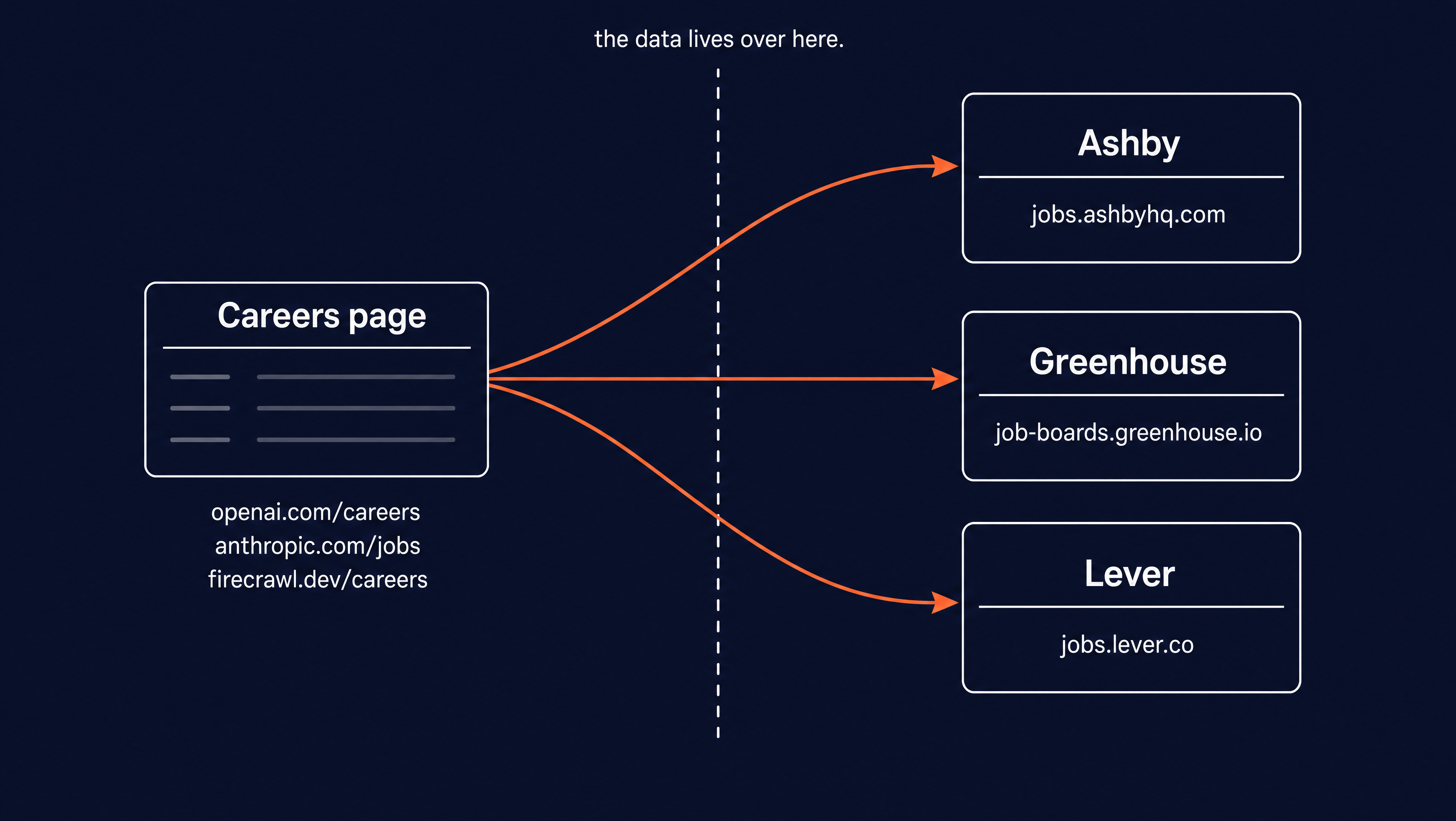
This split is good news. Each ATS provider renders the same fields in the same structure across every company that uses it. An Anthropic role on Greenhouse and a Stripe role on Greenhouse have the same page anatomy, so a scraper written for one reads all of them. No custom logic needed here!
The career page itself is the awkward part. It loads its role list with JavaScript and often adds more as you scroll, so a plain HTTP request gets you an empty shell. Here is OpenAI's careers search page in a browser, with roles that only appear once the page runs its scripts.
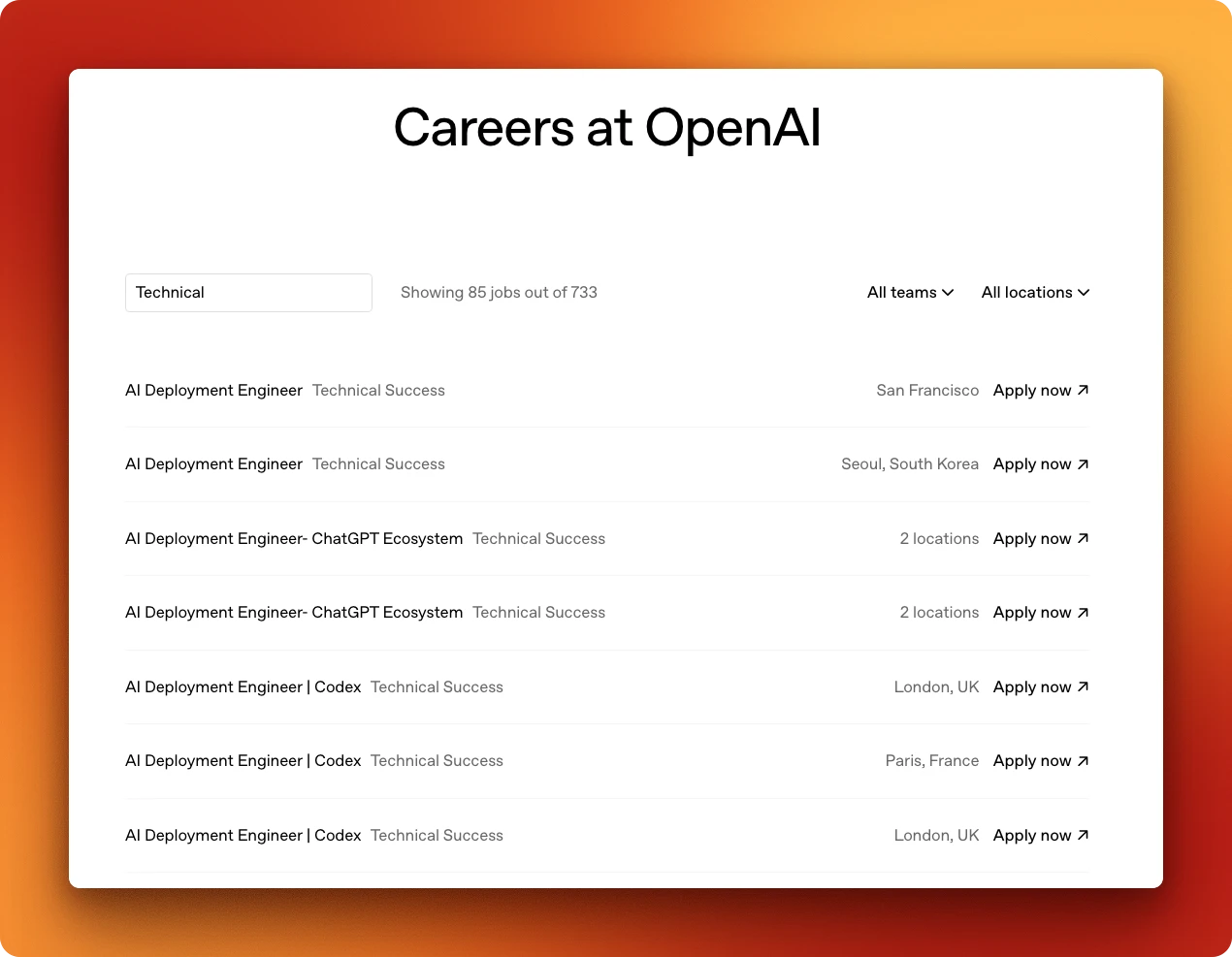
To read a page like this, a scraper has to run the page's JavaScript the way a real browser does, then extract from what renders. That rules out a plain HTTP request and points to a tool that can drive a full browser for you.
What breaks the traditional approach
The usual way to scrape a page is to find the CSS selectors for the data and parse them out. For one site on one day, that works. The problems start when you scale it.
Each site needs its own selectors. A redesign changes the markup and your parser returns empty strings. And since the roles only appear after the page runs its scripts, you also need a browser automation layer underneath just to see the content. Three sites mean three brittle parsers on top of a rendering setup to maintain.
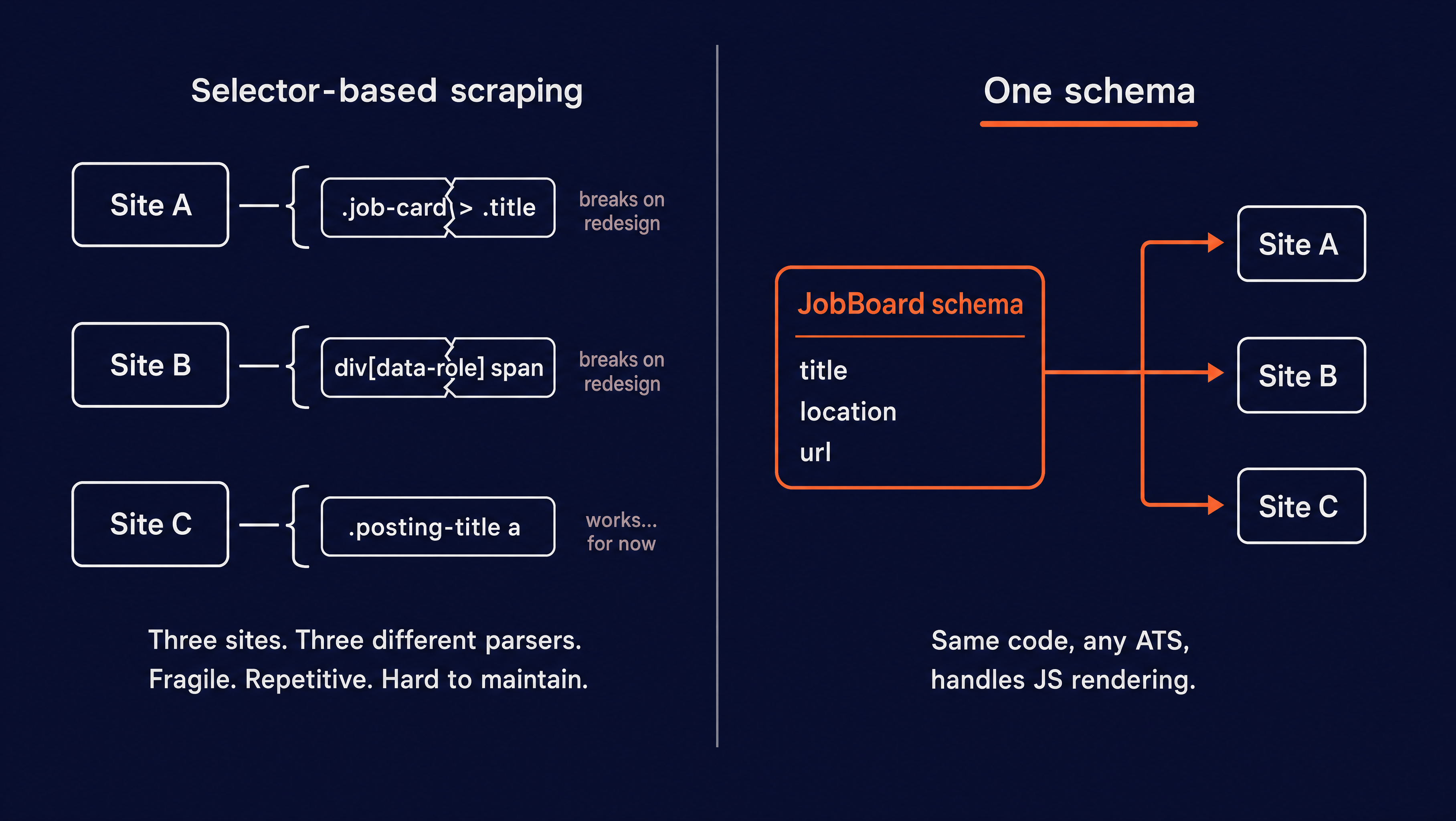
Both problems come from working at the level of the page's markup.
So you need to work one level up. Instead of writing selectors, you describe the data you want, which is the schema that names the fields. The scraper renders the page, hands the rendered content and your schema to an LLM, and the model reads the page and pulls out the fields you asked for. The selectors still get found, but the LLM finds them from your schema, not you.
Because a language model is doing the reading, it doesn't care where a field sits in the markup. Move the salary into a different div on a redesign and the model still finds it, because you asked for compensation, not .posting-salary > span. This is schema-based scraping, and it's what the rest of this guide is built on.
Prerequisites: setting up Firecrawl and your environment
Plenty of libraries scrape web pages. But schema-based scraping needs more than an HTTP client. It needs something that runs the page's JavaScript, gets past the complex rendering these career pages put up, and has an LLM wired in to read the rendered page against your schema.
Firecrawl does all three. It gives AI agents and apps fast, reliable web context with strong search, scraping, and interaction tools. Its scrape endpoint does exactly what the last section described: load the page like a browser, read it against a schema you define with an LLM, and hand back JSON. We'll use it for the whole pipeline.
You need Python 3.12 or newer and two API keys. Get a Firecrawl key from the dashboard, where the free plan covers everything in this guide, and an OpenAI key for the resume-matching step at the end. Firecrawl is now keyless if you'd rather skip the signup and hit the API directly. Every developer gets 1,000 free credits a month.
Install the clients:
pip install firecrawl-py openai pydanticSet both keys as environment variables so the script can read them:
export FIRECRAWL_API_KEY="fc-your-key"
export OPENAI_API_KEY="sk-your-key"
That's the whole setup. You don't need to install any browser drivers, set up a proxy config, or deal with any per-site login, because the rendering happens on Firecrawl's side.
How to scrape a job board listing into structured JSON
The whole scraper is about 100 lines and lives in one file on GitHub. We'll build it up piece by piece in each section below.
Define a schema for the jobs you want
A schema describes the data you want back. With the firecrawl-py client you write it as a Pydantic model, and the scrape endpoint fills it in from the page. A role on a listing has a title, a location, and a link to its detail page:
from typing import List, Optional
from pydantic import BaseModel


class Job(BaseModel):
    title: str
    location: Optional[str] = None
    url: Optional[str] = None


class JobBoard(BaseModel):
    jobs: List[Job]
Keep the secondary fields Optional. Some boards drop a location or skip the per-role link, and a strict schema would reject any row missing one. Marking them optional lets a role come back even with a field or two empty.
Extract the listing in a single scrape call
Now the scrape itself. You pass fc.scrape a URL and the json format with your schema, and Firecrawl renders the page, reads it against the schema, and gives you the data back on result.json. Here's the listing function:
import os, sys
from firecrawl import Firecrawl

fc = Firecrawl(api_key=os.environ["FIRECRAWL_API_KEY"])


def scrape_listing(board_url):
    try:
        result = fc.scrape(
            board_url,
            formats=[{"type": "json", "schema": JobBoard}],
        )
    except Exception as err:
        print(f"  scrape failed for {board_url}: {err}", file=sys.stderr)
        return []

    jobs = [Job(**j) for j in result.json["jobs"]]

    if len(jobs) >= 25:
        print(f"  note: got {len(jobs)} roles; this may be a sample on a large board")

    return jobs
The schema goes in as the Pydantic model itself, not a dict, so the client handles the JSON-schema conversion for you. You get a plain dict back on .json, and the comprehension turns each row into a typed Job.
A scrape can fail on a network blip or a page that won't render, so the call sits in a try/except. You get a readable line on stderr and an empty list instead of a traceback mid-run. No retries or backoff, since one clean failure is easier to read than a loop hiding three of them.
The >= 25 check: Large boards lazy-load their roles, so a single scrape can quietly return a sample, and the warning tells you when you might be looking at a partial list.
Point it at Firecrawl's own board, small and clean, and one call gets you every role:
listing: 19 roles in 22s

[
  {"title": "Design Engineer", "location": "San Francisco, CA (Hybrid) OR Remote", "url": "https://jobs.ashbyhq.com/firecrawl/..."},
  {"title": "Research Engineer – Evals", "location": "San Francisco, CA", "url": "https://jobs.ashbyhq.com/firecrawl/..."},
  {"title": "Research Engineer – Reinforcement Learning", "location": "San Francisco, CA", "url": "https://jobs.ashbyhq.com/firecrawl/..."},
  ...
]
Nineteen roles come back, each with a title, a location, and a link to its Ashby detail page.
What a scrape costs
The free plan you signed up for in the prerequisites covers a generous monthly batch of scrapes. So a board with 19 roles costs you nothing while you follow along. Past the free tier, a scrape in JSON mode runs about 5 credits per page, the same on every call.
Predictability here is useful. A board's listing plus one detail page per role is a fixed, countable number of credits you can budget ahead of time. The pricing page has the current per-credit rates.
How to extract full job details from any ATS page
The listing gives you titles and links. To get salary, responsibilities, and required skills, you scrape each role's detail page.
One schema, every ATS
A detail page carries more fields than a listing, but the schema works the same way. Name what you want, and mark anything that varies by company as optional:
class JobDetail(BaseModel):
    job_title: str
    team: Optional[str] = None
    location: Optional[str] = None
    employment_type: Optional[str] = None
    compensation: Optional[str] = None
    key_responsibilities: List[str] = []
    required_skills: List[str] = []
    apply_url: Optional[str] = None
This one model reads Ashby, Greenhouse, and Lever with no changes between them. Every ATS renders these same fields, so you write the schema once and point it at any provider.
Scaling across many job pages with batch scraping
A board has dozens of detail pages. Looping over them one scrape at a time is slow, and you'd be writing your own concurrency to speed it up. Firecrawl's batch scrape endpoint handles both. When you give it a list of URLs, it scrapes them in parallel on its side, and you get the results back together.
def extract_details(urls):
    job = fc.batch_scrape(
        urls,
        formats=[{"type": "json", "schema": JobDetail}],
        max_concurrency=5,
    )
    return [JobDetail(**doc.json) for doc in job.data if doc.json]
Same formats as a single scrape, just a list of URLs instead of one. max_concurrency=5 caps how many run at once, and the call blocks until the batch finishes.
Results come back on .data, one document per URL, each with its JSON on .json. The if doc.json skips any page that came back empty, so one dead URL doesn't take the rest down with it.
Run it across one Firecrawl role on Ashby and one Anthropic role on Greenhouse, two different applicant tracking systems, and the same JobDetail schema reads both:
# batch_scrape: 2 pages in 28s, credits_used=10

# Ashby (Firecrawl):
{
  "job_title": "Design Engineer",
  "team": "Engineering Team",
  "location": "San Francisco, CA (Hybrid) OR Remote (Americas, UTC-3 to UTC-10)",
  "employment_type": "Full time",
  "compensation": "$160K – $240K • 0.01% – 0.15%",
  "key_responsibilities": [
    "Build beautiful, fast UIs using Next.js, Tailwind, and Framer Motion",
    "Create and optimize product pages and interactive playgrounds",
    "Maintain and scale our internal design system across all surfaces"
  ],
  "required_skills": ["Next.js", "Tailwind", "Framer Motion"],
  "apply_url": "https://jobs.ashbyhq.com/firecrawl/.../application"
}

# Greenhouse (Anthropic):
{
  "job_title": "Full-Stack Software Engineer, Reinforcement Learning",
  "team": "Reinforcement Learning",
  "location": "San Francisco, CA | New York City, NY",
  "employment_type": "Full-time",
  "compensation": "$300,000 - $405,000 USD",
  "key_responsibilities": [
    "Build and extend web platforms for RL environment creation, management, and quality review",
    "Develop vendor-facing interfaces and tooling",
    "Design and implement platforms for human data collection at scale"
  ],
  "required_skills": ["strong software engineering fundamentals", "Python", "React", "TypeScript"],
  "apply_url": "https://job-boards.greenhouse.io/anthropic/jobs/5186067008"
}
Two companies, two ATS providers, identical code. That's why this approach scales to as many boards as you want.
Matching jobs to a resume with an LLM
Structured roles are useful on their own, but the obvious next step is ranking them against a candidate. Feed the scraped jobs and a resume to an LLM and ask which roles fit best.
The match step reads a plaintext resume from a file. For this guide we use a sample one for a senior Python and data engineer named Alex Rivera, with a background in web-scraping pipelines and LLM features. Swap in your own to get your own ranking.
# Alex Rivera

Senior Software Engineer

## Summary

Backend and data engineer with 8 years building Python services and large-scale
web data pipelines. Shipped several LLM-backed features in production.

## Skills

- Web data: requests, Playwright, Firecrawl, schema-driven extraction
- LLMs: OpenAI and Anthropic APIs, structured outputs, retrieval pipelines, evals

## Looking for

Senior or staff backend, data, or research-engineering roles. Strong interest in
search, retrieval, evals, and reinforcement learning infrastructure.
Ranking with structured outputs
The schema trick carries over to the LLM, through OpenAI's structured outputs feature. Hand its parse method a Pydantic model and you get a typed object back. Ranked matches come out as data, not a block of text you parse by hand.
import json
from openai import OpenAI

oai = OpenAI(api_key=os.environ["OPENAI_API_KEY"])


class Match(BaseModel):
    title: str
    url: Optional[str] = None
    why: str
    score: int


class Matches(BaseModel):
    top: List[Match]


def match_resume(resume, jobs):
    jobs_json = json.dumps([j.model_dump() for j in jobs])
    prompt = (
        f"Resume:\n{resume}\n\n"
        f"Jobs:\n{jobs_json}\n\n"
        "Return the top 3 fits, each with a one-line reason and a 0-100 score."
    )

    res = oai.chat.completions.parse(
        model="gpt-5-nano",
        messages=[{"role": "user", "content": prompt}],
        response_format=Matches,
    )

    parsed = res.choices[0].message.parsed
    if parsed is None:
        raise RuntimeError("model returned no parsed match (refusal or schema mismatch)")

    return parsed.top
The resume and the scraped jobs go into one prompt asking for the top 3 fits. The response_format=Matches argument does the real work here. It forces the model to answer in your Matches schema instead of free text.
So message.parsed comes back as a Matches object, and parsed.top is a list of Match objects you read straight off, no string parsing. The lone None check covers a refusal or a schema mismatch, which leave parsed empty. Raising there beats a later line crashing on a missing attribute.
Run the full pipeline against Firecrawl's board with Alex's resume and the top matches come back scored and explained:
top matches:
  [95] Research Engineer – Evals -> Direct alignment with evals and LLM-backed retrieval pipelines.
  [90] Research Engineer – Reinforcement Learning -> Strong match for RL infrastructure with LLMs and structured outputs.
  [88] Research Engineer – Search/IR -> Aligns with your search, retrieval, and schema-driven extraction experience.
The model picked the three research-engineering roles that line up with Alex's evals and retrieval background, each with a score and a one-line reason. Scores shift a few points run to run, which is normal for an LLM. The ranking stays stable.
When you don't know the URL, search first
Everything so far assumes you have the career page URL. When you only have a company name, start with Firecrawl's search endpoint. Run a query, take the careers listing URL from the results, then run the scrape and batch steps from earlier.
results = fc.search(query="Anthropic careers jobs", limit=5)
board_url = (results.web or [])[0].url  # pick the listing URL from the results
jobs = scrape_listing(board_url)
Agent: navigate and extract (and how it compares to scrape)
Reach for the agent endpoint when search doesn't give you a clean listing URL, when roles live on a non-obvious subdomain, or when you want Firecrawl to navigate the site and return structured jobs in one step without wiring search → scrape yourself.
You give it a starting URL, a prompt, and a schema, and it navigates the site on its own to find and extract what you asked for. While writing this guide we ran it against Firecrawl's board, where we already had the careers URL, to see how agent compares to a plain scrape:
res = fc.agent(
    urls=["https://www.firecrawl.dev/careers"],
    prompt="Find every open role with its title, location, and link.",
    schema=JobBoard,
    max_credits=500,
)
It found the same 19 roles, with the same JobBoard schema. The difference is the time:
status: completed | model: spark-2 | credits_used: 0
agent discovered 19 roles in 55s
This run took 55 seconds, against 16 to 22 for the plain scrape. An earlier research run hit 184 seconds on the same board, so the timing varies a lot. The agent navigates and decides where to look on each run, and since it doesn't follow a fixed route, each run takes a different amount of time.
One gotcha to keep an eye out for: the agent needs room to navigate. Set max_credits too low and the run fails with "Agent reached max credits" and returns nothing. A cap of 500 was plenty for a single board.
Which Firecrawl approach should you use?
The pipeline in this guide uses scrape and batch scrape. When you don't have a URL, search or agent can find the board first. The table below shows when each endpoint fits.
| Endpoint | Workload | Time | Cost | Reach for it when |
|---|---|---|---|---|
| Search | 1 query ("{company} careers jobs") | A few seconds | About 2 credits per 10 results | You have a company name but not its careers URL |
| Scrape (JSON mode) | 1 listing page (19 roles) | 16 to 22s | About 5 credits per page | You have the career or detail URL |
| Batch scrape | 2 ATS detail pages (example) | 28s, parallel | About 5 credits per page | You have role URLs from a listing scrape |
| Agent | Find + extract 19 roles | 55 to 184s | 5 free runs a day, then dynamic | Search missed the board or jobs are buried in site nav |
For tracking a known set of companies, scrape the listing and batch the detail pages. When you only have a company name, run search first to get the careers URL, then feed it into the same pipeline. Reach for agent when search misses the board or you want Firecrawl to navigate and extract in one step.
Conclusion
Every career page sends applications through a handful of applicant tracking systems. Because those systems all render the same fields, one schema reads every board, and you maintain a single scraper instead of one per site. The pipeline on top is short. Simply scrape the listing, batch-scrape the detail pages, rank against a resume.
The full script is on GitHub, about 100 lines covering those three steps end to end. Point it at any company's career page and it returns clean, typed data. With Firecrawl Keyless, you can run it without signing up. Every developer gets 1,000 free credits a month, plenty for tracking a handful of boards.
The scrape docs cover the rest of the JSON format options if you want to tune the extraction. And when you don't yet know which pages to scrape, Firecrawl's search endpoint finds the URLs first, then feeds them into this same pipeline. Sign up for a free account and run the script against a board you care about.
Frequently Asked Questions
What does it cost to scrape a job board with Firecrawl?
A scrape in JSON mode costs about 5 credits per page and the cost is predictable per call, so a 19-role board with detail pages runs to a few hundred credits. The agent endpoint gives you 5 free runs a day, then bills dynamically based on how much work it does.
Do I need different code for Greenhouse, Ashby, and Lever?
No. Every applicant tracking system renders the same fields (title, team, location, compensation, responsibilities), so one Firecrawl JSON schema extracts all of them. You point the same code at any ATS URL and it returns the same typed object.
Can I scrape LinkedIn or Indeed job listings this way?
The same schema approach works on any page Firecrawl can render, but large aggregators put listings behind logins, heavy rate limits, and terms that restrict automated access. This guide targets company career pages and the ATS they link to, which are public and built to be crawled.
How do I get every job from a large board that lazy-loads roles?
A single scrape returns what the page renders on first load, which on a big board is a sample. The script warns when it sees 25 or more roles. For full coverage on a large board, use the agent endpoint to discover the role URLs, or paginate the ATS API the board sits on.
Is scraping job postings legal?
Scraping public job postings for analysis is generally low risk, but it depends on the site's terms of service and your jurisdiction. Career pages and public ATS listings are built to be indexed. Avoid pages behind a login and respect rate limits. When in doubt, check the robots file and terms.
When should I use the agent endpoint instead of a plain scrape?
Use a scrape in JSON mode when you know the career page URL and want fast, repeatable data. Reach for the agent endpoint when you don't know which page holds the jobs and need Firecrawl to find them for you. The agent is slower and its timing varies run to run.